1. Export CSV file using Amazon s3 Adapter
In this tutorial, you will learn how to do Manual Process to export a CSV file via an AWS S3 adapter. This adapter supports four separators such as comma, semi-colon, Tab, and Bar of CSV format.
- #### Manual Process with CSV comma separator for outbound processing
Pre-requisite
- Create Integration and outbound interface with operation query
- Create a message type
- Link a message type for the inbound interface
- Mapping
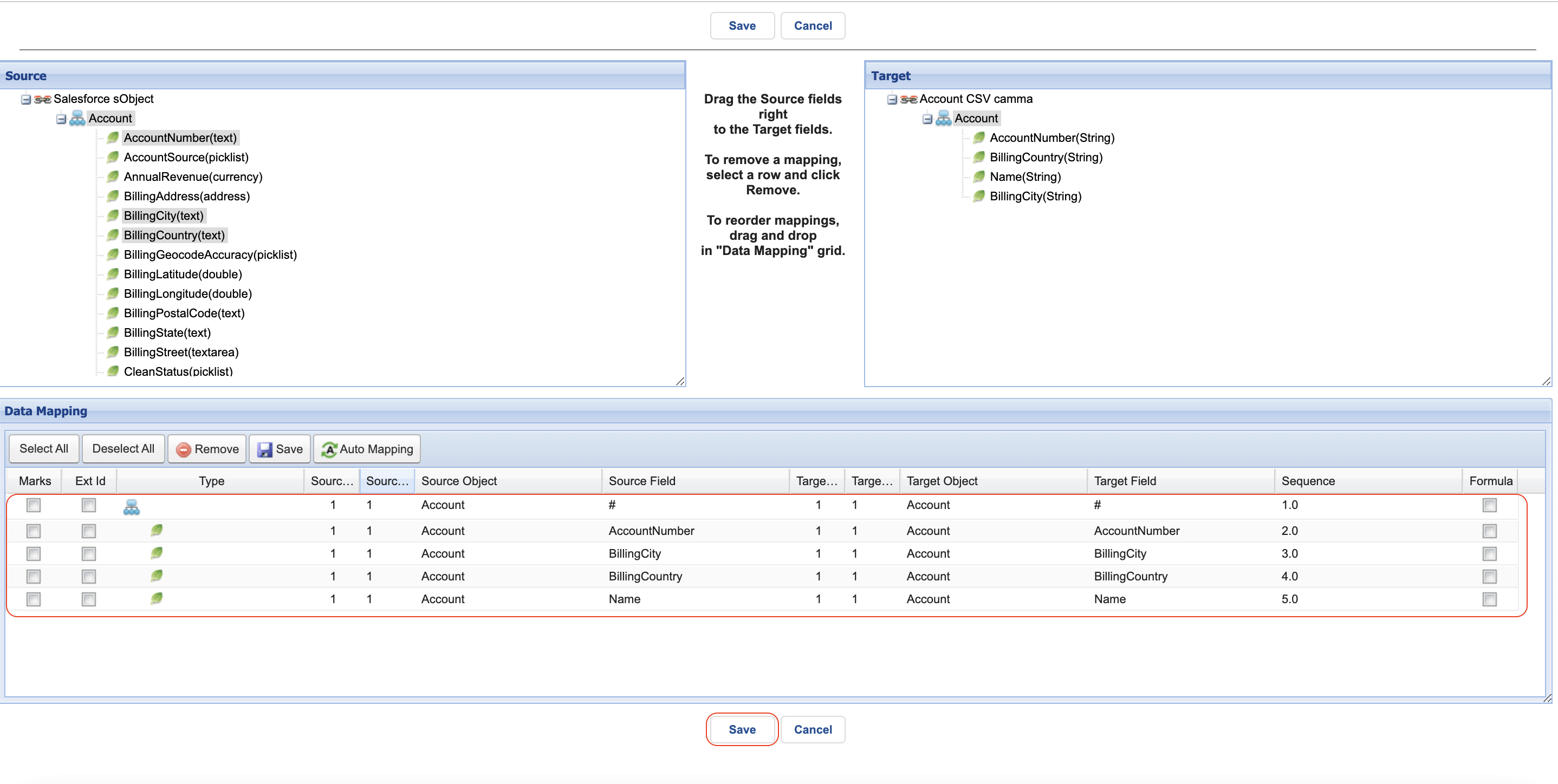
- Click save mapping
- Enter to integration detail page
- Click the link Amazon Control Board on the Custom Link section
- You will arrive at the Amazon Control Board
- Click Adapter tab
- Click the New button to create the adapter
Fill Name adapter
- Choose Amazon S3 on Type
- Choose Outbound as the direction
- Choose Status
- Choose Salesforce Type as a Salesforce Authentication Provider
- Fill Named_Credentials (Note: Please follow the link to create the Named_Credentials #article/2-named-credentials-to-access-the-aws-s3)
- Select CSV on File Type
- Select "," on Separator
- Checked Has File Header if you have a header on your CSV File.
- Fill Folder Path
- Fill File Name
- Choose File Handling Mode (It means that you want to create a new file on AWS s3 or you want to override the existing file)
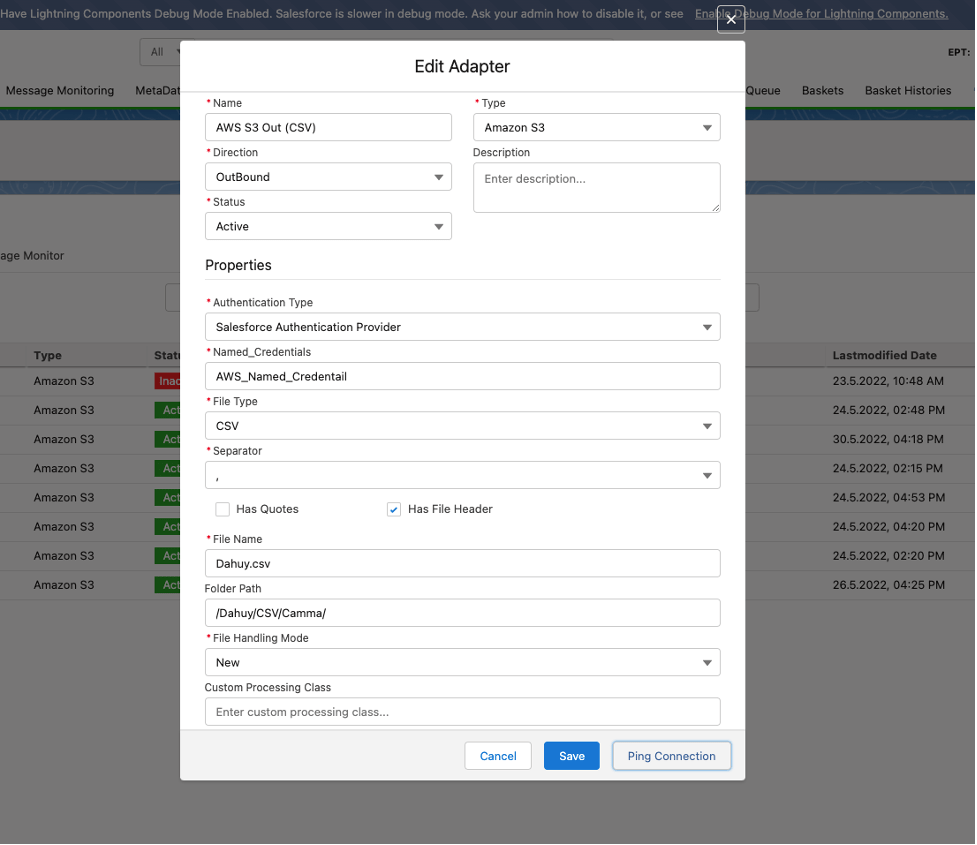
- Click Save Button
- Link this adapter to the interface
- Click the interface Tab on Amazon Control Board
- Select an interface
- Click the Manual Process Button
- It will display the Manual Execute Option pop-up screen
- Check Use the SOQL statement on the interface to select the sObject? (if you wish to select sObject based SOQL statement on the interface setting)
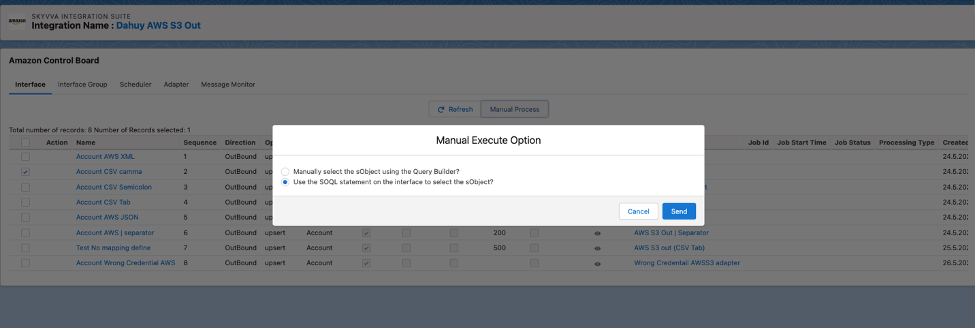
- Click Read button
It creates the completed message as screenshot below
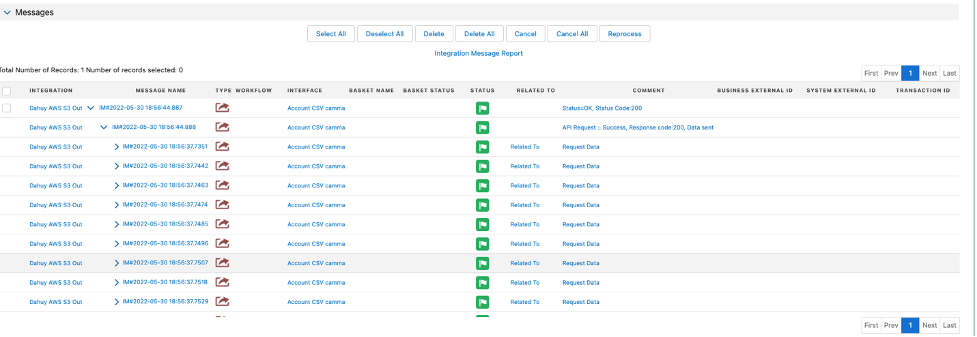
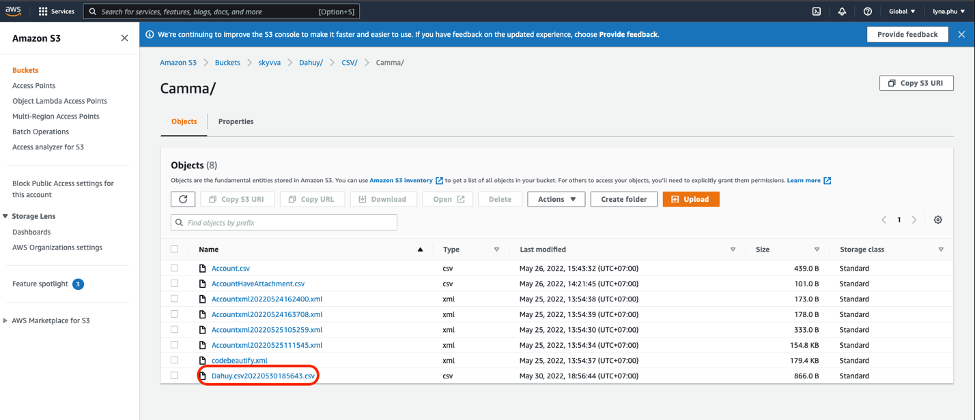
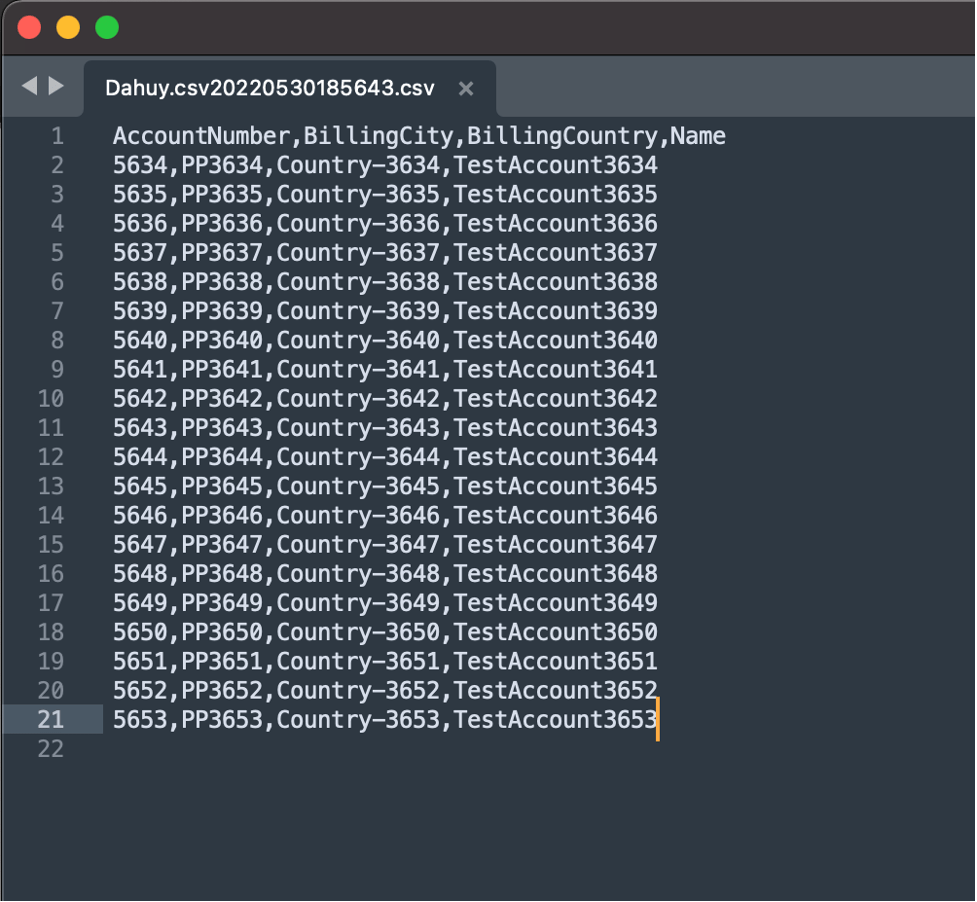
The records are saved into a CSV file and it will export to the AWS S3 service on the/Dahuy/CSV/Camma/ path folder. The file name will be File Name value + Date + Time + .csv
Here are the records that have been exported
2. Manual Process with CSV Tab separator for outbound processing
Pre-requisite
- Create Integration and outbound interface with operation query
- Create a message type
- Link a message type for the inbound interface
- Mapping
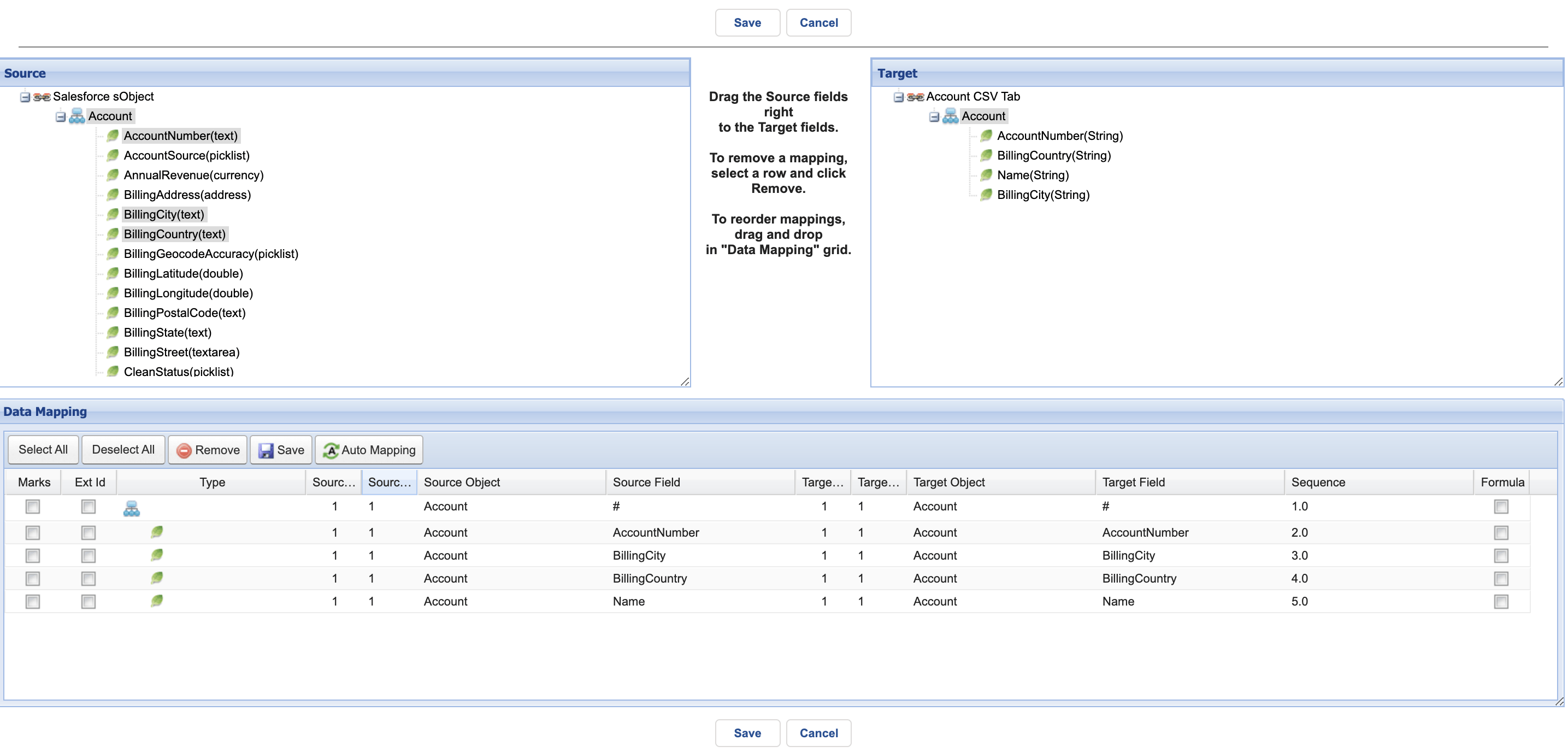
- Click save mapping
- Enter to integration detail page
- Click the link Amazon Control Board on the Custom Link section
- You will arrive at the Amazon Control Board
- Click Adapter tab
- Click the New button to create the adapter
Fill Name adapter
- Choose Amazon S3 on Type
- Choose Outbound as the direction
- Choose Status
- Choose Salesforce Type = Salesforce Authentication Provider
- Fill Named_Credentials (Note: Please follow the link to create the Named_Credentials #article/2-named-credentials-to-access-the-aws-s3)
- Select CSV on File Type
- Select the Tab on Separator
- Checked Has File Header if you have a header on your CSV File.
- Fill Folder Path
- Fill File Name
- Choose File Handling Mode (It means that you want to create a new file on AWS s3 or you want to override the existing file)
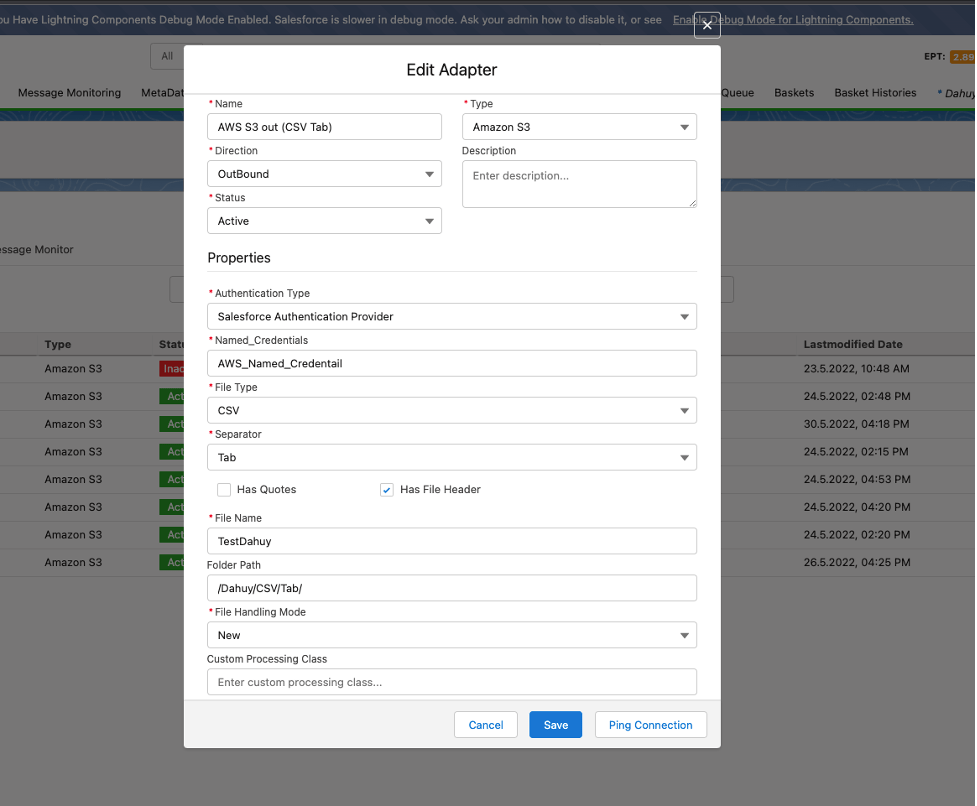
- Click Save Button
- Link this adapter to the interface
- Click the interface Tab on Amazon Control Board
- Select an interface
- Click the Manual Process Button
- It will display the Manual Execute Option pop-up screen
- Check Use the SOQL statement on the interface to select the sObject? (if you wish to select sObject based SOQL statement on the interface setting)

- Click Read button
It creates the completed message as screenshot below
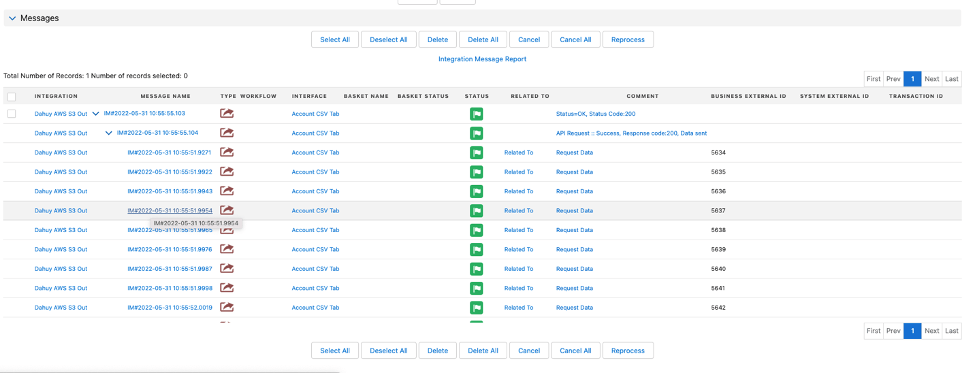
The records are saved into a CSV file and it will export to the AWS S3 service on the/Dahuy/CSV/Tab/ path folder. The file name will be File Name value + Date + Time + .csv
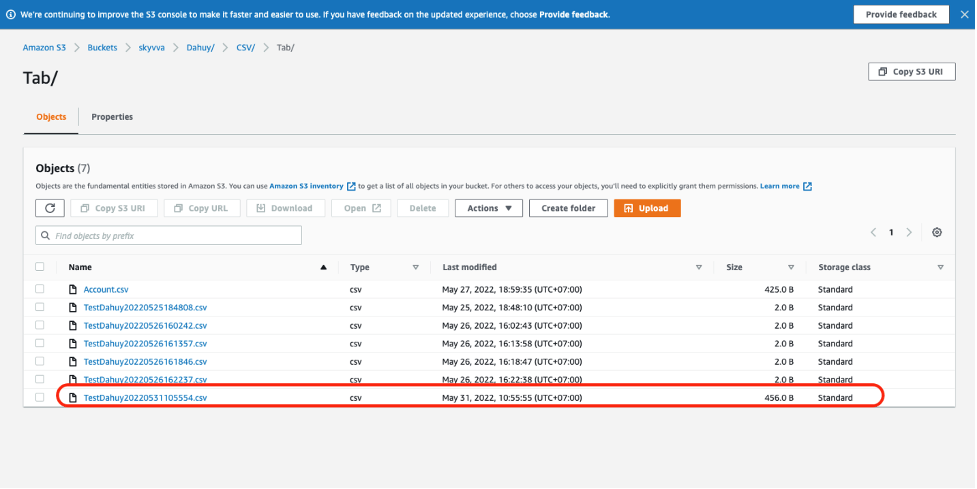
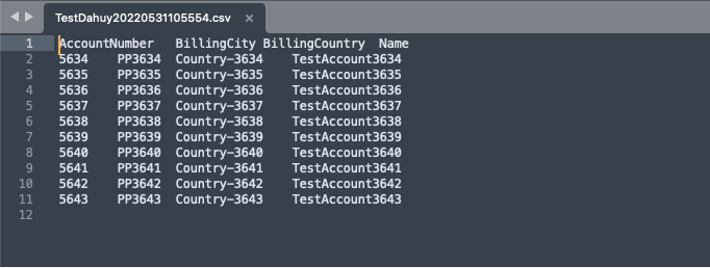
Here are the records that have been exported
3. Manual Process with CSV Semicolon separator for outbound processing
Pre-requisite
- Create Integration and outbound interface with operation query
- Create a message type
- Link a message type for the inbound interface
- Mapping
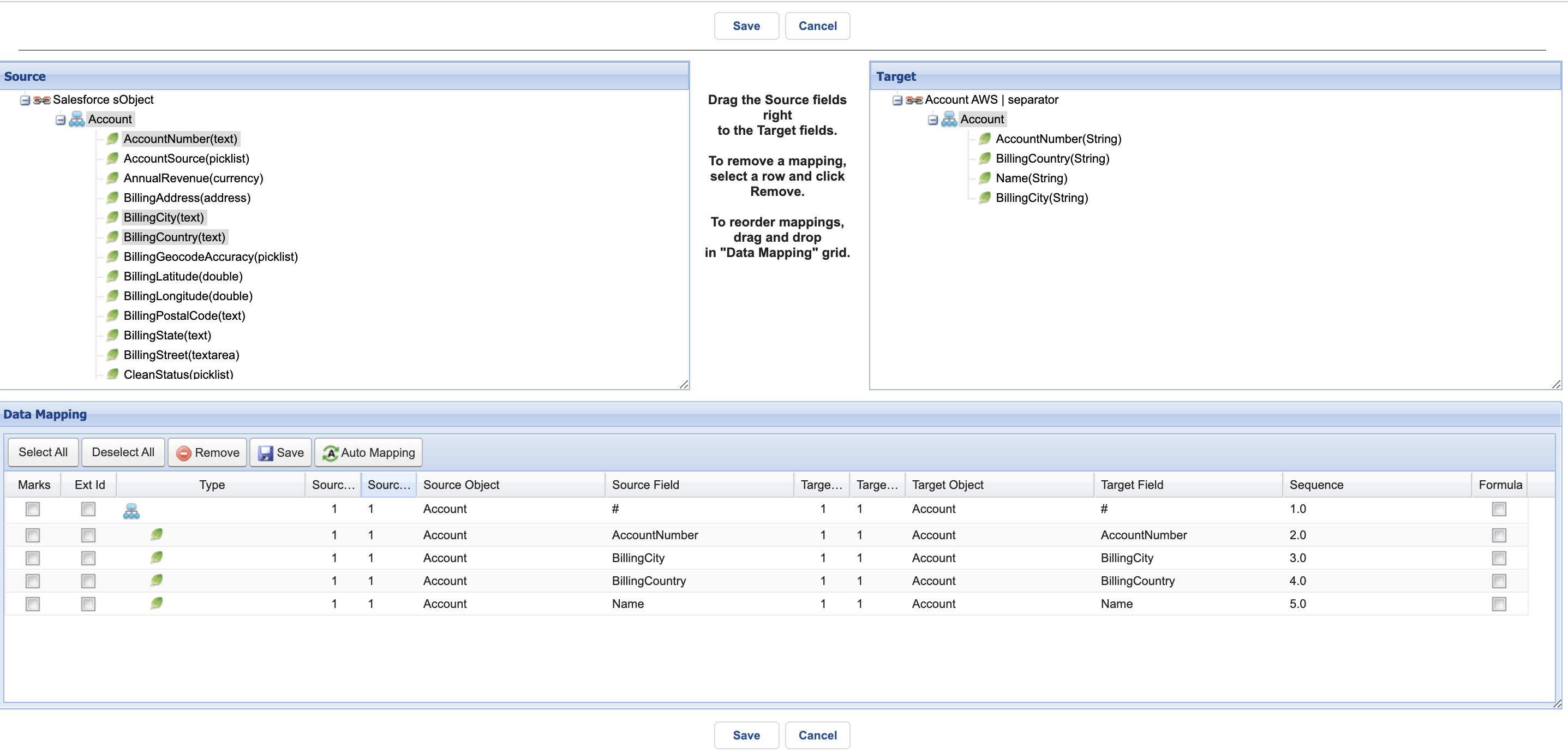
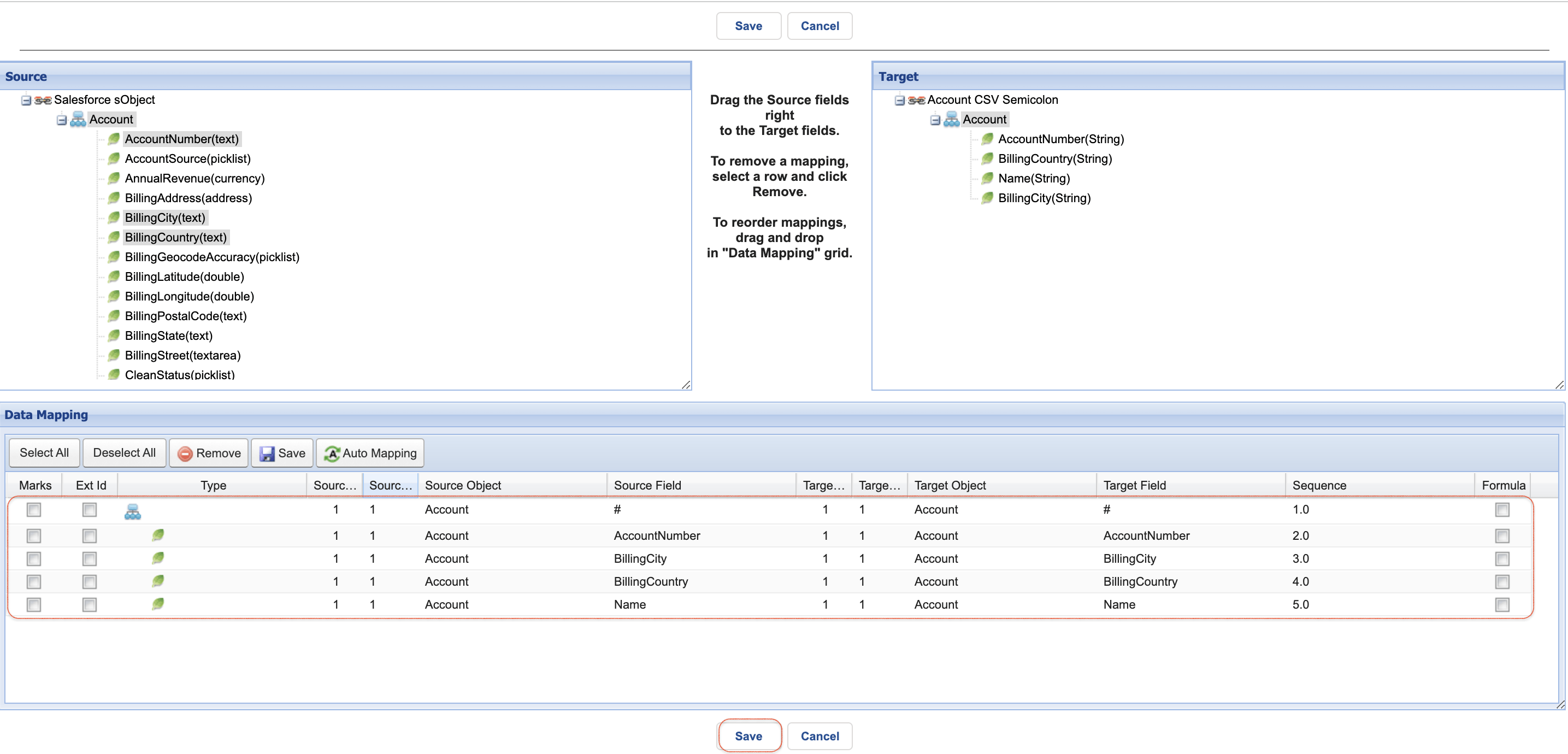
- Click save mapping
- Enter to integration detail page
- Click the link Amazon Control Board on the Custom Link section
- You will arrive at the Amazon Control Board
- Click Adapter tab
- Click the New button to create the adapter
Fill Name adapter
- Choose Amazon S3 on Type
- Choose Outbound as the direction
- Choose Status
- Choose Salesforce Type = Salesforce Authentication Provider
- Fill Named_Credentials (Note: Please follow the link to create the Named_Credentials #article/2-named-credentials-to-access-the-aws-s3)
- Select CSV on File Type
- Select the ";" on Separator
- Checked Has File Header if you have a header on your CSV File.
- Fill Folder Path
- Fill File Name
- Choose File Handling Mode (It means that you want to create a new file on AWS s3 or you want to override the existing file)

- Click Save Button
- Link this adapter to the interface
- Click the interface Tab on Amazon Control Board
- Select an interface
- Click the Manual Process Button
- It will display the Manual Execute Option pop-up screen
- Check Use the SOQL statement on the interface to select the sObject? (if you wish to select sObject based SOQL statement on the interface setting)
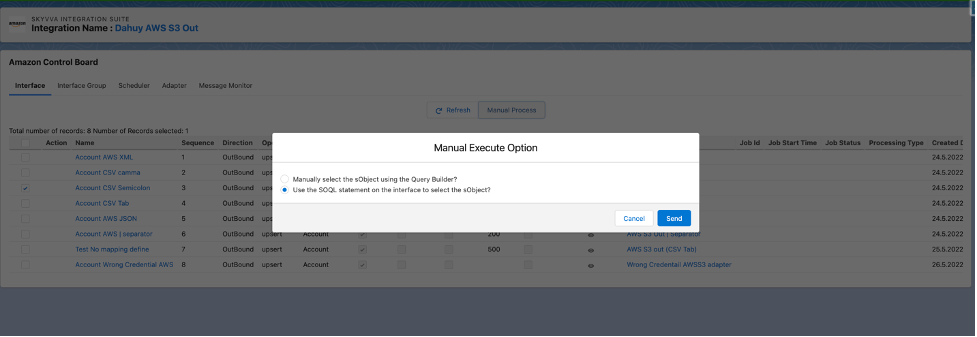
- Click Read button
It creates the completed message as screenshot below
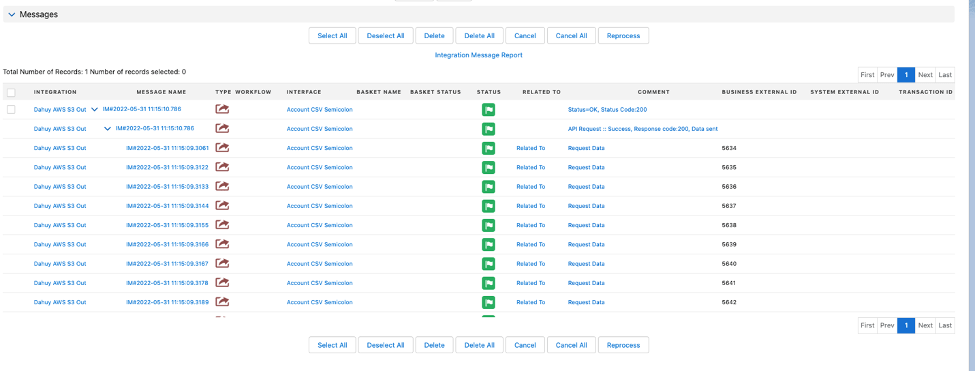
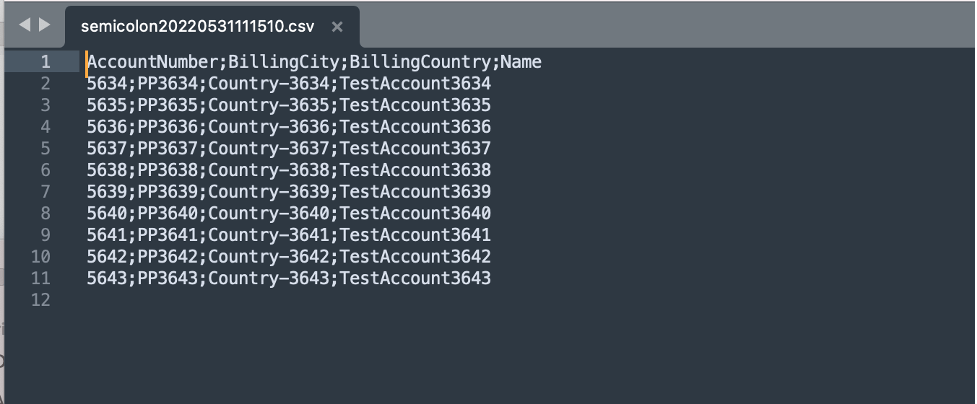
The records are saved into a CSV file and it will export to the AWS S3 service on the/Dahuy/CSV/Semicolon/ path folder. The file name will be File Name value + Date + Time + .csv
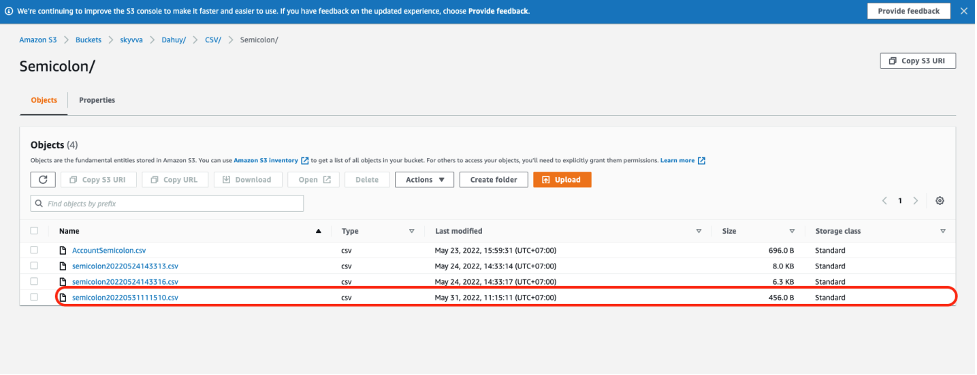
Here are the records that have been exported
4. Manual Process with CSV Bar separator for outbound processing
Pre-requisite
- Create Integration and outbound interface with operation query
- Create a message type
- Link a message type for the inbound interface
- Mapping
- Click save mapping
- Enter to integration detail page
- Click the link Amazon Control Board on the Custom Link section
- You will arrive at the Amazon Control Board
- Click Adapter tab
- Click the New button to create the adapter
Fill Name adapter
- Choose Amazon S3 on Type
- Choose Outbound as the direction
- Choose Status
- Choose Salesforce Type = Salesforce Authentication Provider
- Fill Named_Credentials (Note: Please follow the link to create the Named_Credentials #article/2-named-credentials-to-access-the-aws-s3)
- Select CSV on File Type
- Select the "|" on Separator
- Checked Has File Header if you have a header on your CSV File.
- Fill Folder Path
- Fill File Name
- Choose File Handling Mode (It means that you want to create a new file on AWS s3 or you want to override the existing file)
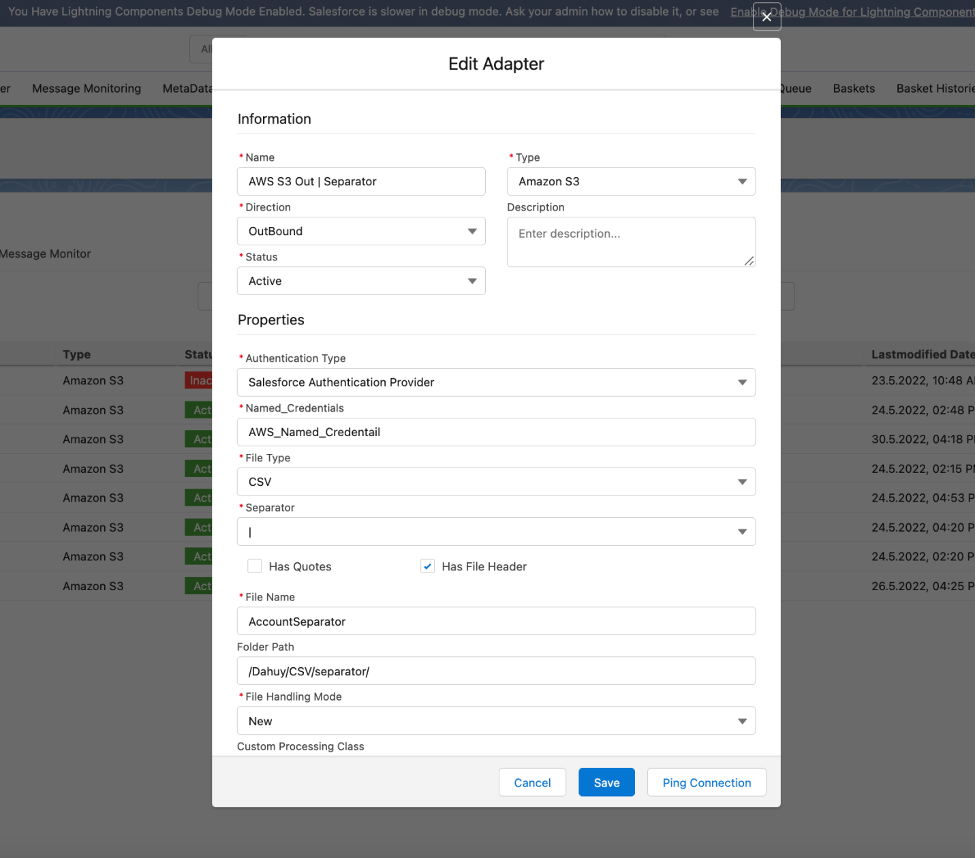
- Click Save Button
- Link this adapter to the interface
- Click the interface Tab on Amazon Control Board
- Select an interface
- Click the Manual Process Button
- It will display the Manual Execute Option pop-up screen
- Check Use the SOQL statement on the interface to select the sObject? (if you wish to select sObject based SOQL statement on the interface setting)

- Click Read button
It creates the completed message as screenshot below
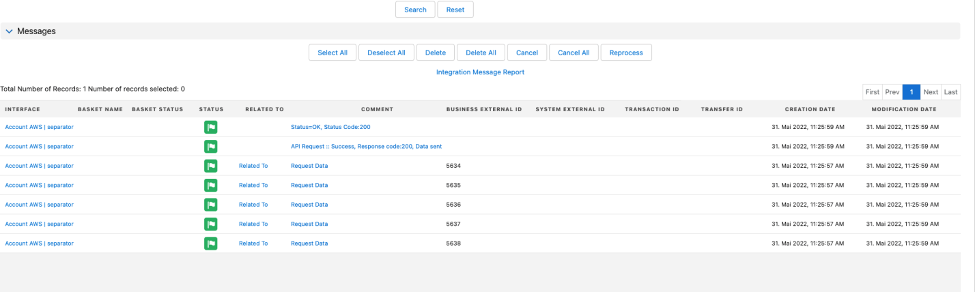
The records are saved into a CSV file and it will export to the AWS S3 service on the/Dahuy/CSV/separator/ path folder. The file name will be File Name value + Date + Time + .csv
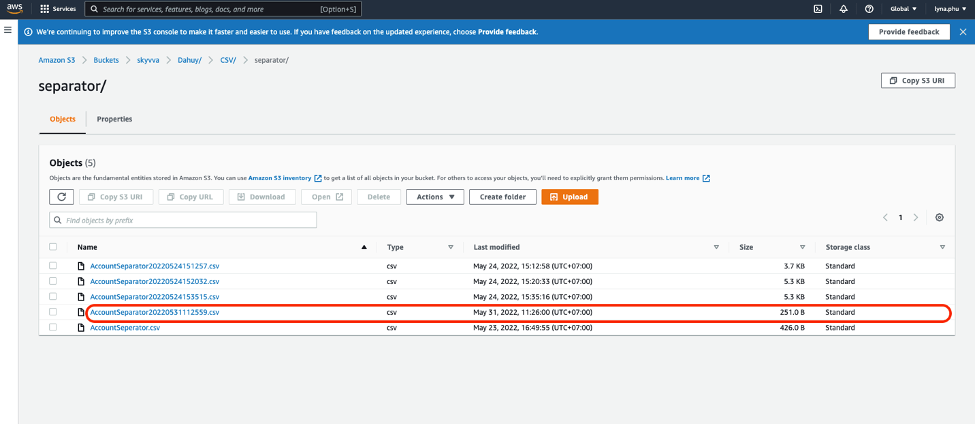
Here are the records that have been exported
