1. Formula reference guide?
Formula Operators and Functions
Summary
Working with formulas. Find out which operators can be used in which formulas and what each one does.
Math Operators
Operator
Description
+(Add) Calculates the sum of two values.
-(Subtract) Calculates the difference of two values.
*(Multiply) Multiplies its values.
/(Divide) Divides its values.
^(Exponentiation) Raises a number to a power of a specified number.
( ) (Open Parenthesis and Close Parenthesis) Specifies that the expressions within the open parenthesis and close parenthesis are evaluated first. All other expressions are evaluated using standard operator precedence.
Logical Operators
Operator
Description
= and == (Equal) Evaluates if two values are equivalent. The = and == operator are interchangeable.
< > and != (Not Equal) Evaluates if two values are not equivalent.
< (Less Than) Evaluates if a value is less than the value that follows this symbol.
(Greater Than) Evaluates if a value is greater than the value that follows this symbol.
<= (Less Than or Equal) Evaluates if a value is less than or equal to the value that follows this symbol.
= (Greater Than or Equal) Evaluates if a value is greater than or equal to the value that follows this symbol.
&& (AND) Evaluates if two values or expressions are both true. Use this operator as an alternative to the logical function AND.
|| (OR) Evaluates if at least one of multiple values or expressions is true. Use this operator as an alternative to the logical function OR.
Text Operators
Operator
Description
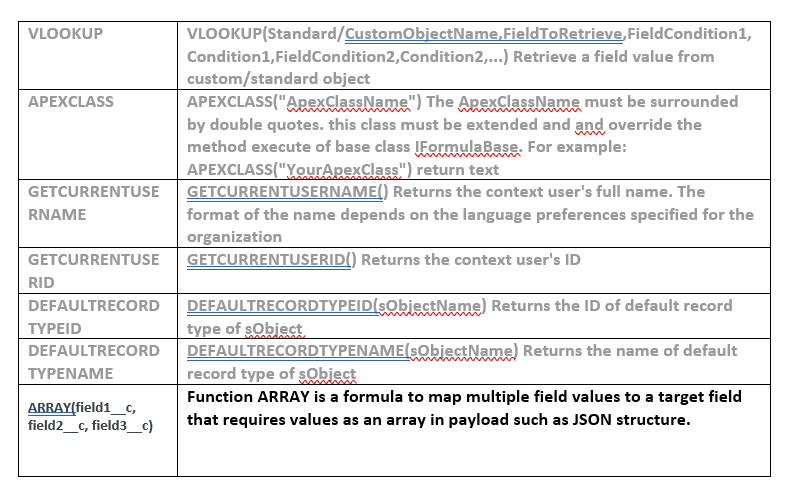
CONCAT CONCAT(text1,text2) Join text1 with text2
Date and Time Functions
Operator
Description
MONTH MONTH(date) Returns the month, a number between 1 (January) and 12 (December)
DATE DATE(Long timestamp, Boolean isGMT) converts timestamp(millisecond) to a Date, If isGMT=true returns a date in the GMT time zone. Else returns a date in the local time zone of the current user. If the time zone cannot be determined, GMT is used.
DATEADD DATEADD(date, nbOfDays) return a new date which the specified nb of days has been added/substracted to/from the date if the nb of days is positive/negative respectively. date must be in the format: "dd.mm.yyyy" | "dd-mm-yyyy" | "dd/mm/yyyy" | "yyyymmdd" and nbOfDays is numeric Eg: DATEADD("10.10.2010",30); DATEADD("10.10.2010", -30)
DATEDIFF DATEDIFF(date1Text, date2Text) return the number of days between two dates. If the date1 occurs after the date2, the return value is negative. date1 and date2 text must be in the format: "dd.mm.yyyy" | "dd-mm-yyyy" | "dd/mm/yyyy" | "yyyymmdd" Eg: DATEDIFF("10.10.2010",TODAY()); DATEDIFF("10.10.2011","31.10.2011")
DATETIME DATETIME(Long timestamp, Boolean isGMT) converts timestamp(millisecond) to a Datetime, If isGMT=true returns a datetime in the GMT time zone. Else returns a datetime in the local time zone of the current user. If the time zone cannot be determined, GMT is used.
DAY DAY("YYYYMMDD") Returns the day of the month, a number between 1 and 31
CDATE CDATE(dateText, dateFormat) Convert dateText to a Date based on a specified date format. dateFormat is ["x.y.z" | "x-y-z" | "x/y/z"] where [x,y,z] are: "d" for day; "m" for month; "y" for year. For example : CDATE("12/31/2010", "m/d/y")
CDATETIME CDATETIME(datetimeText, dateFormat, isGMT[true/false]) Convert datetimeText to a DateTime based on a specified dateFormat and in GMT time zone if isGMT true, else in local one. dateFormat is ["x.y.z" | "x-y-z" | "x/y/z"] where [x,y,z] are: "d" for day; "m" for month; "y" for year. Eg: CDATETIME("12/31/2010 12:00:00", "m/d/y", true)
TODAY TODAY([integer]) Returns the current date if integer is optional, else return current date +/- integer
YEAR YEAR(date) Returns the year of a date
Logical Functions
Operator
Description
CASE CASE(expression, value1, result1, value2, result2,...,else_result) Checks an expression against a series of values. If the expression compares equal to any value, the corresponding result is returned. If it is not equal to any of the values, the else-result is returned
IF IF(logical_test, value_if_true, value_if_false) Checks whether a condition is true , and returns one value if TRUE and another value if FALSE
ISNULL ISNULL(expression) Checks whether an expression is null (blank) and returns TRUE or FALSE
NOT NOT(boolean) Changes FALSE to TRUE or TRUE to FALSE
NOTHING NOTHING() Returns the nothing value
Text Functions
Operator
Description
BEGINS BEGINS(text,compare_text) Checks if text begins with specified characters and returns TRUE if it does. Otherwise returns FALSE
LEN LEN(text) Returns the number of characters in a text string
LOWER LOWER(text) Converts all letters in the value to lowercase
LPAD LPAD(text, padded_length [, pad_string]) Pad the left side of the value with spaces or the optional pad string so that the length is padded_length
MAX MAX(number,number,...) Returns the greatest of all the arguments
MID MID(text, start_num, num_chars) Returns character from the middle of a text string, given a starting position and length
MIN MIN(number,number,...) Returns the least of all the arguments
REPLACE REPLACE(text, old_text, new_text) Substitutes new_text for old_text in a text string. Use REPLACE when you want to replace specific text in a text string
RIGHT RIGHT(text, num_chars) Returns the specified number of characters from the end of a text string
RPAD Right side of the value with spaces or the optional pad string so that the length is padded_length
SUBSTITUTE SUBSTITUTE(text, old_text, new_text) Substitutes new_text for old_text in a text string. Use SUBSTITUTE when you want to replace specific text in a text string
SUBSTR SUBSTR(text,startIndex,endIndex) Get a substring from a string text from an index to an index
TRIM TRIM(text) Removes all spaces from a text string except for single spaces between words
UPPER UPPER(text) Converts all letters in the value to uppercase
LEFT LEFT(text, num_chars) Returns the specified number of characters from the start of a text string
LASTWORD LASTWORD(text) Returns the last word in the specified text. For example: LASTWORD("Toto Tata Titi") return Titi
LASTINDEXOF LASTINDEXOF(Text, compareText) Returns the last index of a specified text in a Text
CONTAINS CONTAINS(text, compare_text) Checks if text contains specified characters, and returns TRUE if it does. Otherwise, returns FALSE
FIND FIND(text, search_text [, start_num]) Returns the position of the search_text string in text
ENDS ENDS(text,compare_text) Checks if text ends with specified characters and returns TRUE if it does. Otherwise returns FALSE
REPLACELINEBREAK REPLACELINEBREAK(text, replacement) Replaces each line break in text with the specified literal replacement
Advanced Functions
Commonly used formula, with Examples
SourceField=Content
Formula
Description
Result in the target field
?Target? Always provides the word ?Example? in the target field Example
Field1 = ?A? Field1 & Field2 Unites the content of two fields AB
Field1 = ?A? Field2 = ?B? Field1 &?? ??& Field2 Unites the content of two fields with spaces A B
Active_Product = ?0?, ?1?, ?2? CASE (Active_Product, ??1??, true, NOTHING()) If Active_Product = 1, indicates the value ?true?; otherwise does not display any value 0 = ?? 1 = ?true? 2 = ??
DATE_Field = ?05.08.2018 09:51:40? IF(ISNULL(DATE) | LEN(DATE)<19,NOTHING(), SUBSTR(DATE,8,10) &"-"& SUBSTR(DATE,5,7) &"-"& SUBSTR(DATE,0,4)) Converts the data format 05-08-2018
DATE_Field= ?01/05/2018? Converts the data format 05.01.2018
VAT = ?19? TURNOVER = ?300? (VAT/100)*TURNOVER Calculates turnover tax (57?) on the basis of the turnover (300?) and the VAT rate (19%) 57
Pick list key = ?1?,?2?,?3? CASE(?A?, "1","B", "2","C", "3", other) Converts the Foreign Keys from external picklists into Text for picklists in Salesforce. 1 = ?A? 2 = ?B? 3 = ?C? else = ?other?
Pick list key = ?1?,?2?,?3? CASE(?A?, "1","B", "2","C", "3","D","4", NOTHING()) Converts the Foreign Keys from external picklists into Text for picklists in Salesforce. 1 = ?A? 2 = ?B? 3 = ?C? else = ??
1234567890 LEFT(TEXT,5) Reproduces only the left 5 characters 12345
1234567890 RIGHT(TEXT,5) Reproduces only the right 5 characters 67890
1.000.000,0 IF(CONTAINS(KLIMK,"."), SUBSTITUTE(SUBSTITUTE(KLIMK, ".", ""),",","."),KLIMK) Removes the separation character commas and replaces the decimal point separation char 1000000.00
Source_Nr = 512 VLOOKUP (Account, ID, Client_Nr__c, Source_Nr) Adds the Salesforce ID of the Account to the target field whose Client-Nr__c is consistent with the Source_Nr (512) Lookup Account ID = ?0012000000IL6xiAAD?
Source_Email = ?user@skyvva.com? VLOOKUP (User, ID, email, Source_Email) Adds the Salesforce ID of the user into the target field whose email address is consistent with with the Source_Email (user@skyvva.com) Lookup User ID = ?0012000000IL6xiAAD?
Examples: IF: IF(logical_test, value_if_true, value_if_false) Checks whether a condition is true , and returns one value if TRUE and another value if FALSE IF IF with String IF(language__c = "German", 'D', 'E') Logic IF(ISNULL(SALESFORCEID), VLOOKUP(Lead, Id, SAP_ID_REF__c, E101STRUC_IDENTIFICATIONKEY#IDENTIFICATIONCATEGORY:Z_SF#.IDENTIFICATIONNUMBER ) , SALESFORCEID)
SUBSTR: SUBSTR(text,startIndex,endIndex) Get a substring from a string text from an index to an index Example: SUBSTR("20120809",6,8)&SUBSTR("20120809",4,6)&SUBSTR("20120809",0,4) Output: 09082012
REPLACE: REPLACE(text, old_text, new_text) Substitutes new_text for old_text in a text string. Use REPLACE when you want to replace specific text in a text string Example: someone who wants to map the description field of an object. He gets a ";" as sign for a line break. Now he wants to replace the “;” with a break. What's the best way to do this? REPLACE(DESCRIPTION, ";", " ")
CDATE: CDATE(dateText, dateFormat) Convert dateText to a Date based on a specified date format. dateFormat is ["x.y.z" | "x-y-z" | "x/y/z"] where [x,y,z] are: "d" for day; "m" for month; "y" for year. For example : CDATE("12/31/2010", "m/d/y")
Example: Integration can support only authorized format date : dd.mm.yyyy or dd-mm-yyyy or yyyymmdd or dd/mm/yyyy if customer has data in format date like 2018-20-8, I suggest using function CDATE(XXXX, "y-d-m") i.e.: CDATE("2011-20-9", "y-d-m") Output: 20.08.2018
DATE: DATE(Long timestamp, Boolean isGMT) converts timestamp(millisecond) to a Date, If isGMT=true returns a date in the GMT time zone. Otherwise returns a date in the local time zone of the current user. If the time zone cannot be determined, GMT is used Example: DATE("1292948797", false) => result: 16.01.1970 in format (dd.MM.yyyy) in local time zone of current user. DATE("1292948797", true)=>15.01.1970 in GMT time zone.
CDATE: CDATE(dateText, dateFormat) Converts dateText to a Date based on a specified date format. dateFormat is ["x.y.z" | "x-y-z" | "x/y/z"] where [x,y,z] are: "d" for day; "m" for month; "y" for year. For example : CDATE("12/31/2010", "m/d/y") The following are the date formats which are supported by our tools: d/m/y or d-m-y or d.m.y If your date is in format 31/12/2012, the formula to convert date must be: target Source -> ClosedDate CDATE("31/12/2012", "d/m/y") or target Source -> ClosedDate CDATE("12/31/2012", "m/d/y") And if the date is in format 31-12-2012 : ClosedDate <--> CDATE("31-12-2012", "d-m-y")
More on VLOOKUP and Best Practices
Before you commence your first integration operation you should observe the following basis for file migration and integration:
- Parent / child objects must be created using a logical sequence
E.g.: A contact (child) should have access to an account (parent). In order to assign a contact to an account, the account must exist in the system prior to the contact.
- Parent / child objects must be connected with primary and foreign keys
E.g.: For each customer / account (child), there is a designated account owner / user (parent). To import a list of customers, a key which explicitly identifies the Account Owner is required. An example of the sequence during the creation of records and their relationship to each other:

One way to do mapping is to use the Mapping tool at the interface detail page to perform mapping for the interface integration. Drag and Drop from Source Definitions to sObject Field For Account mapping sheet, do mappings as shown in the figure:
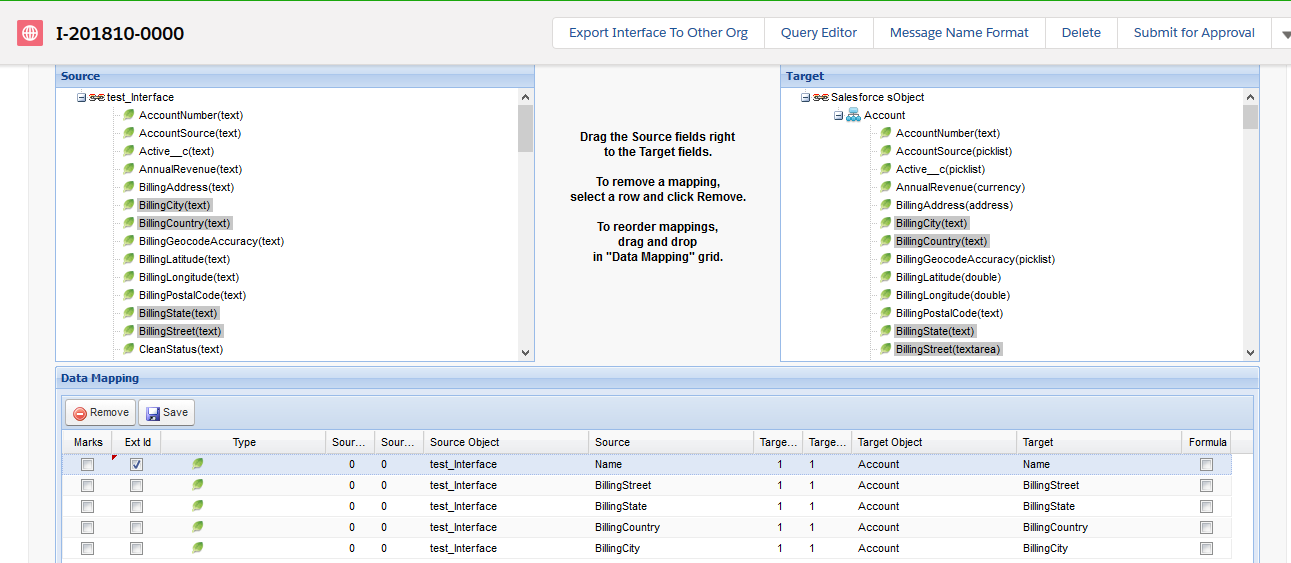
[su_box title="Note" box_color="#2a8af0" title_color="#000000"]For each object, it is required to have an External Id field which is to be used for synchronization with external system. This external id field must be unique in order to avoid duplicate records on each object.[/su_box] You can do formula mapping by (see the above figure)
- Ticking Formula at a mapping record in the Data Mapping table.
- Clicking the record row

Do as instructed in the above figure

How can I put some logic in the mapped fields?
- If you select the mapped field and tick “Formula” and click again in the selected row, the formula screen appears.
Below you will find a couple of examples of how VLOOKUP can be used with various objects in order to establish connections with other objects. Ensure that each object has a Primary Key (indicated with “*”), so that this object can be referenced. Examples: User Alias* <= Alias_Sourcefile Account Ext_ID_Account__c* <= Ext_ID_SourcefileA SourceField Target Owner ID: VLOOKUP(User,Id,Alias,Alias_Sourcefile) Contact Ext_ID_Contact__c* <= Ext_ID_SourcefileK (alternative email address) SourceField Target Owner ID VLOOKUP(Account,OwnerID,Ext_ID_Account__c,Ext_ID_SourcefileA) Account ID VLOOKUP(Account,ID,Ext_ID_Account__c, Ext_ID_SourcefileA)
Opportunity
Ext_ID_Opportunity__c* <= Ext_ID_SourcefileO SourceField Target OwnerID VLOOKUP(Account,OwnerID,Ext_ID_Account__c, Ext_ID_SourcefileA) Account Id VLOOKUP(Account, ID, Ext_ID_Account__c, Ext_ID_SourcefileA) Contact ID VLOOKUP(Contact,ContactID,Ext_ID_Contact__c,Ext_ID_SourcefileK)
Opportunity Line Item
In the Standard Price Book, the price for each product is listed as the Sales Price. The Quantity and Discount are then applied and define the Total Price.
- Formula which calculates the Total Price based on Sales Price, Quantity and Discount
Target: TotalPrice Source: QuantityVLOOKUP(PricebookEntry, UnitPrice, ProductCode, Product_Number)/100(100-Discount)
- Formula which retrieves the PricebookEntry from the Standard Price Book
Target: PricebookEntry Source: VLOOKUP(PricebookEntry, Id, ProductCode, Product_Number) StandardPricebookEntry Target: Pricebook2Id Source: IF(VLOOKUP(Pricebook2, Name, Name, PricebookName)="Standard Price Book", VLOOKUP(Pricebook2, Id, Name, PricebookName), VLOOKUP(Pricebook2, Id, Name, "Standard Price Book")) Contact Target: AccountId Source: VLOOKUP(Account,Id,Name,Customer_Name)
ADVANCE FEATURE
Add apex class to use as formula This feature enables user extends function of mapping formula to execute their apex class. Sometime, standard formula cannot handle the complex business logic. So user can write the apex script to execute the business logic. The apex class must be extends skyvva's based class <skyvvasolutions.IFormulaBase> and override some methods:
- public override String execute(Map
- public override void preExecute(List
Key of map (record):
- lower-case for InBound
- selected Field-Name (case-sensitive) for OutBound
Warning! : Does not execute query in method execute(…) because it is called when processing mapping every message record data, It can exceed the query limit in salesforce. Please override the method preExecute(…) then query and cached the result for using in execute(…). Invoke apex class with formula APEXCLASS("SkyvvaCustomFormula"): The apex class must be surrounded by double quotes. Mapping
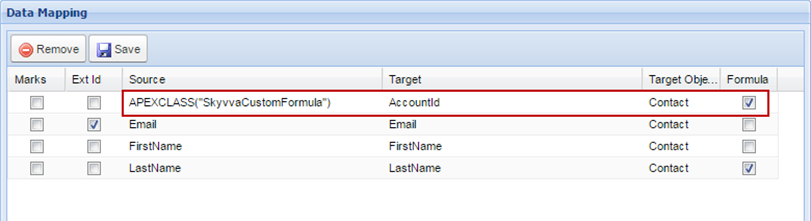
Sample Apex Class: This apex query all accounts based on ERP_DEBTOR_ID number to get each account id to map to target field AccountId for contact. public override void preExecute(List
globalwith sharing class SkyvvaCustomFormula extends skyvvasolutions.IFormulaBase{
//cache of account Id
Map erpIdAccountId=new Map();
/*
Query accounts based on ERP_DEBTOR_ID and ceche the result in map erpIdAccountId
@param records: Collection of map data of every messages
i.e: list of map record records
{email=test1@gmail.com, erp_debtor_id=RES001, firstname=test1, lastname=test1}
{email=test2@gmail.com, erp_debtor_id=RES002, firstname=test2, lastname=test2}
*/
public override void preExecute(List> records){
//System.debug('>SkyvvaCustomFormula.preExecute:message-records:'+records.size());
//add value of erp_debtor_id into set
Set erpIds=new Set();
for(Map m: records){
//key must be lower case
String erpId=m.get('erp_debtor_id');
if(String.isNotBlank(erpId))erpIds.add(erpId);
}
//System.debug('>SkyvvaCustomFormula.preExecute: Set erpIds:'+erpIds);
//>Set erpIds:{RES001, RES002}
//Query accounts based on set erpIds and put to cache
for(Account a: [select erp_debtor_id__c,id from Account where ERP_DEBTOR_ID__c
IN:erpIds]){
erpIdAccountId.put(a.erp_debtor_id__c, a.Id);
}
//System.debug('>SkyvvaCustomFormula.preExecute:cache erpIdAccountId:
'+erpIdAccountId);
//>erpIdAccountId:{RES001=001F000001hGGJhIAO, RES002=001F000001mv8F4IAI}
}
/*
Find account id based on ERP_DEBTOR_ID from cache
@param record: map contains key/value of each message-data. the key of must be lower case
i.e: record{email=test1@gmail.com, erp_debtor_id=RES001, firstname=test1, lastname=test1}
*/
public override String execute(Map record){
//System.debug('>SkyvvaCustomFormula.execute: '+record);
//key must be lower case
String erpIdVal=record.get('erp_debtor_id');
//return account-id
return erpIdAccountId.get(erpIdVal);
}
}
Formula ARRAY() to create the JSON array for the outbound processing:
We can create a new function called 'ARRAY'. The user will use the fx field and map to a target field Tx. When the formula editor opens we can select the source field into this formula as we can do with, for example, the CONCAT function. The user can select any source fields as needed and it will look like this: ARRAY.
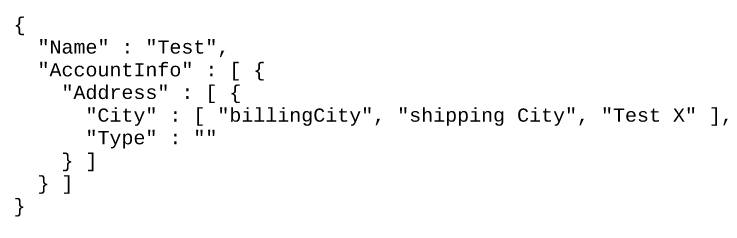
Our runtime has to execute this function by looping over the selected fields, reading the fields, and creating a special format using a special separator that cannot be inside the data. Such a separator can be for example '%3B'. We hope that this character combination is not found inside the data field. Our data would look like 'January%3BFebruary%3BMarch'. This is the mapping result of the target field Tx. Now we need to change the code of the generic JSON generation class on the adapter side to understand this format and generate an array of strings because the target field data type is a string. The result would look like "month":["January", "February", "March"]
Note: Function ARRAY is a formula to map multiple field values to a target field that requires values as an array in payload such as JSON structure. Mapping:

Generated payload:
[/aux_code] We listen. Over the last decade, we’ve built our business by meeting organizations where they are—we solve the problems that matter to you, regardless of how simple or complex they may be.

######
######