1. How to use Streaming API with PushTopic Event?
Introduction
The Streaming API in Salesforce provides a powerful mechanism for real-time data updates, enabling applications to subscribe to changes in Salesforce data.
- PushTopic events, on the other hand, allow users to define custom criteria for real-time notifications based on SOQL queries. When records meeting these criteria are created or updated, notifications are pushed to subscribers, providing a flexible way to respond to specific changes.
- Using the Streaming API with PushTopic events in the Agent SKYVVA integration application involves several steps. Here’s a comprehensive guide to help you get started:
- Understanding PushTopic Events, PushTopic events in Salesforce are a way to receive real-time notifications of changes in data. They are triggered by Salesforce Object Query Language (SOQL) queries that define the events you want to track. When records are created, updated, deleted, or undeleted that match the query criteria, a notification is sent.
SKYVVA Agent Control Board is a robust integration tool that facilitates the use of these streaming APIs. It enables users to configure PushTopic events seamlessly. By leveraging the SKYVVA platform, users can set up flows to handle real-time data updates and automate integration processes. The Agent Control Board simplifies the configuration of streaming events, ensuring that data integration is both efficient and effective.
The Role of Agent Skyvva Integration Application
Agent SKYVVA is an advanced integration platform designed to simplify and automate the process of data synchronization across multiple systems. With its robust capabilities, it provides a seamless interface to connect and manage various data sources, including those using PushTopic events and streaming APIs.
Prerequisites
- Salesforce Setup: Ensure that you have the necessary permissions to create and manage PushTopics in Salesforce.
- Agent Skyvva Integration Application: Configure the Agent ping connection SKYVVA integration application in your Salesforce environment.
Step-by-Step Guide.
- Configure Agent Skyvva:
Open the Agent SKYVVA application in Salesforce.
- Go to Integration Management.
- Select Streaming API under Interfaces.
- Check on Streaming CDC Platform Events, Event Type.
- Enter the details for your streaming API, ensuring you reference the PushTopic you created.
- Set Up the Integration Flow:
Define the integration flow by specifying the source (PushTopic) and the target (e.g., another Salesforce object, or external system).
- Use the mapping tool in Agent SKYVVA to map fields from the PushTopic event to the target fields.
- Monitor:
The integration to start receiving real-time updates.
- Monitor the integration using the Agent SKYVVA dashboard. You can view logs, track processed events, and handle any errors.
Best Practices
- Testing: Before deploying to production, test the PushTopic and integration flow in a sandbox environment.
- Filtering: Use specific SOQL queries to filter events and reduce the volume of data processed.
- Error Handling: Implement error handling mechanisms within Agent SKYVVA to manage and resolve issues.
By following these steps, you can effectively use the Streaming API with PushTopic events in the Agent SKYVVA integration application, enabling real-time data synchronization and updates.
Expectation:
The Streaming API (PushTopic Event) is an essential feature for Agents handling real-time data changes. When a new record is inserted or an existing record is updated in Salesforce, this feature ensures that the client-side data is automatically synchronized. By using the Streaming API, notifications are received for Salesforce data changes that align with a predefined SOQL query. This capability is harnessed through the Agent Skyvva integration application, allowing seamless and immediate data updates, thereby enhancing the efficiency and responsiveness of the system in real-time scenarios.
Step:
- Create an Integration
- Click on Agent Control Board
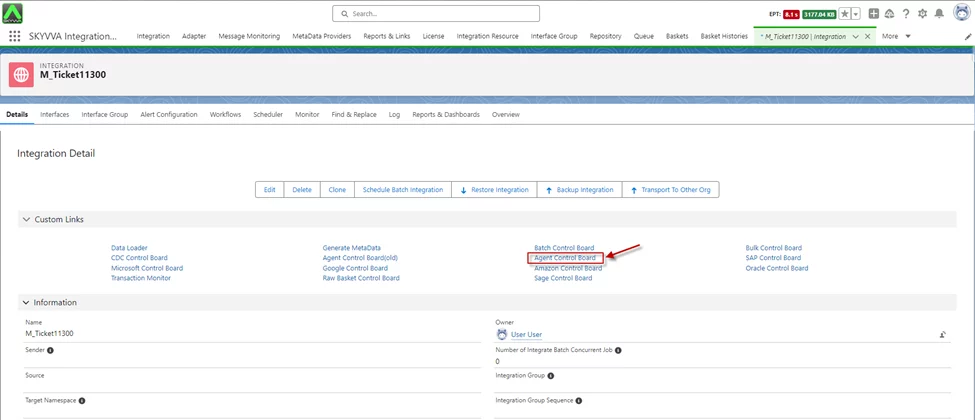
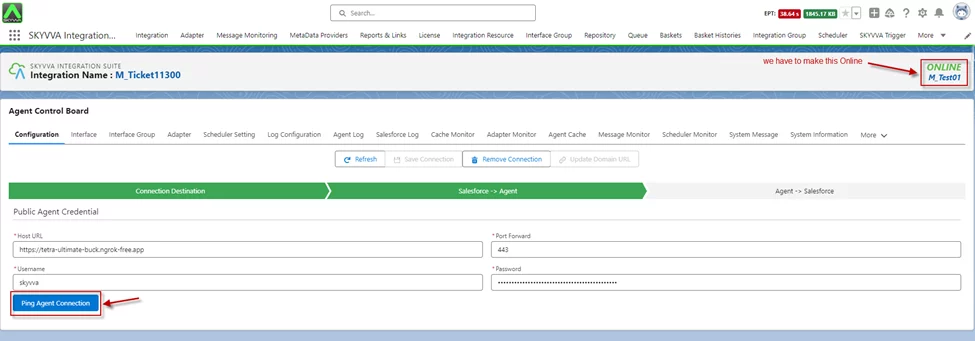
- Once the Agent Control Board is open.
- We have to configure the agent with config details.

- Click on the Agent Ping Connection button
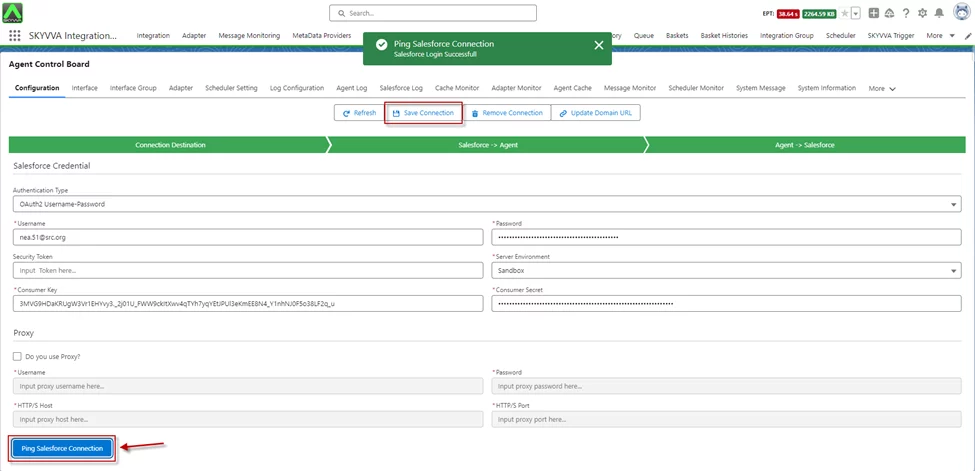
- Click On the Ping Salesforce Connection button
- Click Save Connection
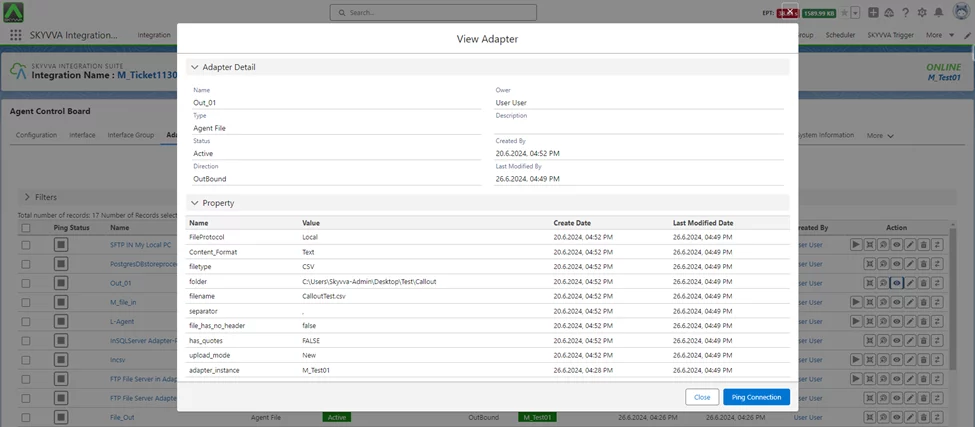
- Create an Adapter
- Here we are using Agent File
Outbound Interface
To create an outbound interface navigate to the Integration section, create the Interface, "New Interface" follow the "Event-Interface," and ensure that the source name includes "Object," to facilitate the creation of outbound interfaces for various objects, streamlining the integration process within the application.
- Go to Integration -> Interface tab -> Click on New Interface button -> We have to Create Outbound Interface
Interface type: “Event-Interface”
- Source name contains “Object” e.g. Account Object

- We have set on Event Configuration

- Do Mapping

- After Mapping, you get a PushTopic Event object with this interface

- Go to New Agent Control Board
- Interface tab -On the Interface tab, there is a streaming button on the interface list
- Click Start Streaming Api
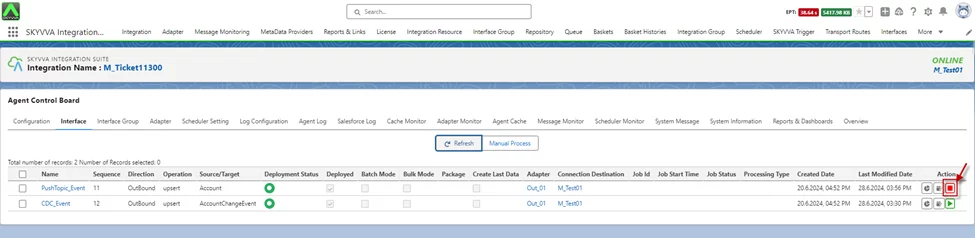
- Update Account Records in Salesforce

- Message Monitoring.

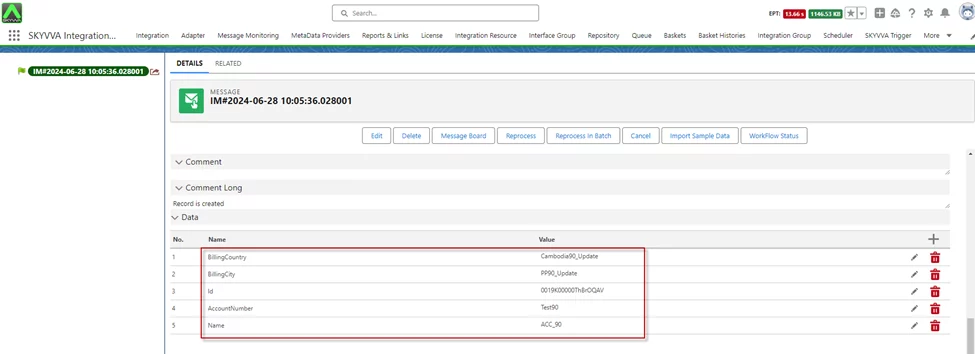
- Here is the CSV Payload.

[su_box title="Result:" box_color="#2a8af0" title_color="#000000"]Update a record in Salesforce using a PushTopic event via Agent Control Board SKYVVA integration application. This process guarantees real-time synchronization and precise data updates within Salesforce.[/su_box]
Summary
Now the user has learned to use the Streaming API with integrating PushTopic events in Salesforce using Agent Control Board SKYVVA. This involves creating and configuring PushTopics, setting up the integration flow, and activating it to enable real-time data updates and synchronization.