1. Interface Queue Execution Mode Configuration
Overview
This document describes the Interface Level Queue Processing Configuration used to control queue execution behavior during interface processing.
The configuration determines how the queue engine handles message failures and processing continuation.
Supported execution modes:
- Continue When an Error Occurs (EO)
- Stop When an Error Occurs (EOIO)
The document also explains:
- Queue lifecycle statuses
- Queue reprocessing behavior
- Hold and Stop by Admin restrictions
- Queue restart rules
- Developer and QA validation scenarios
- Customer usage recommendations
1. Execution Modes
Execution Mode is configured at the Interface Detail level.

Users can select the processing behavior directly from the Interface Detail configuration screen.
Supported execution modes:
- Continue When an Error Occurs (EO)
- Stop When an Error Occurs (EOIO)
The selected execution mode controls how the queue processing engine handles message failures during interface execution.
1.1 Continue When an Error Occurs (EO) (Default)
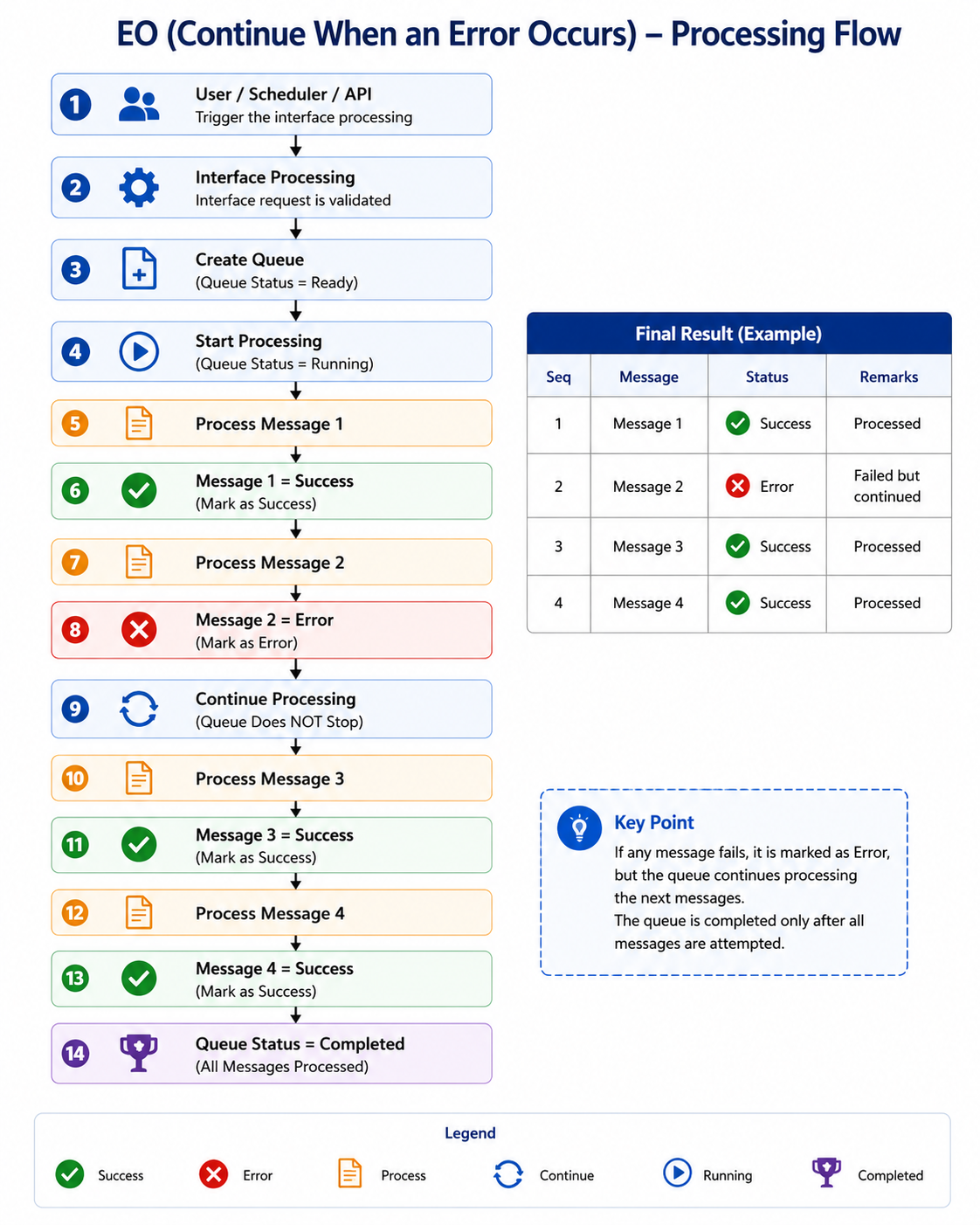
When this option is configured, the queue processing engine continues processing the remaining queue records even if an error occurs in one of the messages.
This behavior follows EO (Exactly Once) processing behavior.
Processing Behavior
- A queue is automatically created during interface execution.
- Each message is processed independently.
- If one message fails:
- The failed message is marked with an error status.
- Remaining queue records continue processing.
- Queue execution is not interrupted by individual message failures.
Processing Flow
Important Note
When using Continue When an Error Occurs (EO), the queue processing continues even if message errors occur.
After all queue records are processed, the queue status automatically returns to: Ready No manual restart or queue recovery action is required.
Example Scenario
Queue contains 5 messages:
| Message | Result |
|---|---|
| Message 1 | Success |
| Message 2 | Success |
| Message 3 | Failed |
| Message 4 | Success |
| Message 5 | Success |
Result
- Message 3 is marked as Failed.
- Messages 4 and 5 continue processing successfully.
- Queue processing remains active.
Recommended Usage
Use this mode when:
- Messages are independent.
- High processing availability is required.
- Failed messages should not affect other messages.
- Sequential processing is not required.
- Maximum throughput is preferred.
Advantages
- High availability
- Better processing throughput
- Individual message isolation
- Reduced queue interruption
Considerations
- Message order is not guaranteed after failures.
- Failed records require separate reprocessing.
- Dependent transactions may become inconsistent if ordering matters.
1.2 Stop When an Error Occurs (EOIO)
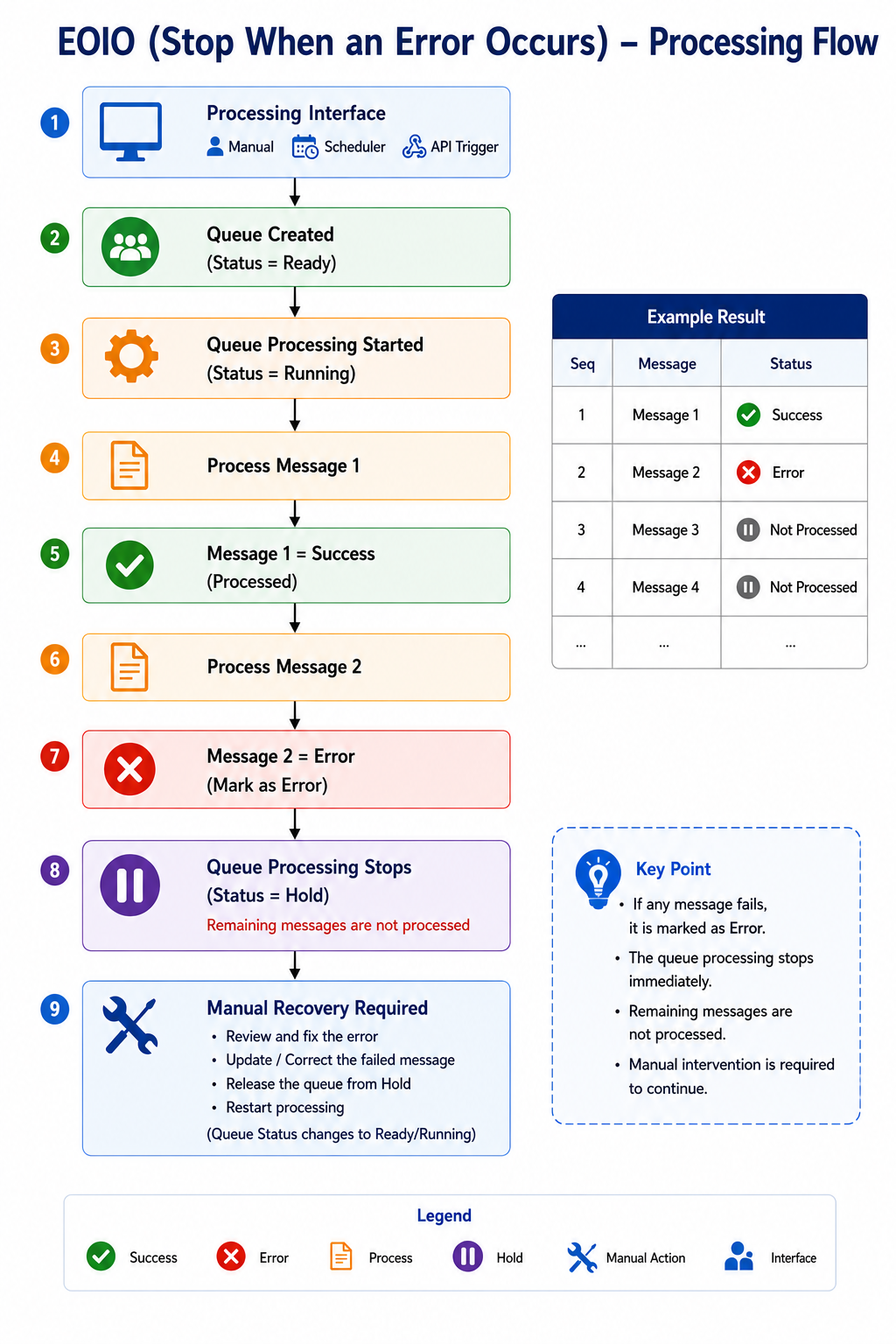
When this option is configured, the queue processing engine stops processing immediately after the first error occurs.
This behavior follows EOIO (Exactly Once In Order) processing behavior.
Processing Behavior
- A queue is automatically created during interface execution.
- Messages are processed sequentially.
- When a message fails:
- Queue execution stops immediately.
- Processing stops immediately after the failed message.
- Next message processing is not executed.
- Remaining queue records are not created because processing does not continue to the next messages.
- Queue status changes to Hold.
- Processing resumes only after:
- the issue is resolved, and
- the queue is manually restarted.
Processing Flow
Example Scenario
Queue contains 5 messages:
| Message | Result |
|---|---|
| Message 1 | Success |
| Message 2 | Success |
| Message 3 | Failed |
| Message 4 | Not Created |
| Message 5 | Not Created |
Result
- Processing stops at Message 3.
- Messages 4 and 5 are not created because processing does not continue to the next messages.
- Queue status becomes Hold.
Recommended Usage
Use this mode when:
- Message order is important.
- Data dependency exists between records.
- Strict sequential processing is required.
- Downstream systems require ordered delivery.
- Data consistency is critical.
Advantages
- Maintains message sequence integrity
- Prevents downstream inconsistency
- Supports dependent transactions
- Easier root cause analysis
Considerations
- Queue processing stops after the first error.
- Manual intervention may be required.
- Lower throughput compared to Continue mode.
- Pending records wait until recovery is completed.
2. Queue Monitoring
Users can view queue records in the Queue Monitoring tab.
Queue Creation Behavior
- A queue record is automatically created after the interface starts processing.
- Users can monitor the queue status from the Queue Monitoring tab.
- If the user executes the same interface again:
- A new queue is not created.
- The existing queue record is updated and reused for processing.
Queue Monitoring Visibility
Users can view:
- Queue status
- Processing progress
- Failed messages
- Queue execution results
- Queue recovery status
3. Queue Status Lifecycle
The queue status lifecycle controls processing state transitions during execution and recovery.
Queue Statuses
The following queue statuses are available during interface processing lifecycle:
| Status | Description |
|---|---|
| Ready | Queue is ready for processing |
| Worker | Queue worker is assigned and waiting to start processing |
| Running | Queue is actively processing messages |
| Failed | Queue processing failed due to message error |
| Hold | Queue processing is paused due to an error |
| Stop by Admin | Queue processing is manually stopped by an administrator |
| Completed | Queue processing completed successfully |
4. Queue Reprocessing Flow
When an interface is configured with Stop When an Error Occurs, queue processing stops immediately after an error is detected.
The queue remains in Hold status until the issue is resolved and the queue is manually restarted.

5. Queue Processing Restrictions
If the interface queue status is:
- Hold
- Stop by Admin
then the user cannot:
- Reprocess failed messages
- Execute the interface again
- Restart queue processing
Restriction Flow

6. Queue Restart Rules
Please note that before changing the queue status from Hold to Ready, the user must first resolve the failed message or processing error.
Processing is only allowed after the queue status is manually changed back to: Ready
Once the queue status becomes Ready, the user can:
- Reprocess failed messages
- Execute the interface again
- Restart queue processing
7. Functional Comparison
| Feature | Continue When an Error Occurs | Stop When an Error Occurs |
|---|---|---|
| Processing continues after error | Yes | No |
| Queue stops on failure | No | Yes |
| Failed message blocks others | No | Yes |
| Queue status changes to Hold | No | Yes |
| Manual restart required | No | Yes |
| Processing style | EO-like | EOIO-like |
| Message order guarantee | No | Yes |
| Throughput priority | High | Medium |
| Sequential integrity | Low | High |
8. User Notes
Continue When an Error Occurs
Users should use this mode when:
- Transactions are independent.
- Parallel or high-volume processing is required.
- Failed messages can be retried independently.
Important Notes:
- Failed messages should be monitored from Queue Monitoring tab.
- Users can reprocess failed messages after queue status returns to Ready.
- Queue processing continues even when message errors occur.
Stop When an Error Occurs
Users should use this mode when:
- Processing sequence is critical.
- Records depend on previous transactions.
- Ordered delivery must be preserved.
Important Notes:
- Users must resolve the error before restarting queue processing.
- Queue status changes to Hold when processing stops.
- Processing continues only after queue status is changed back to Ready.
9. User Scenarios
Continue When an Error Occurs
Expected Behavior
- Execute interface with multiple messages.
- Force one message to fail.
- Verify:
- Failed message receives error status.
- Remaining messages continue processing.
- Queue remains active.
Stop When an Error Occurs
Expected Behavior
- Execute interface with multiple messages.
- Force one message to fail.
- Verify:
- Queue processing stops immediately.
- Remaining messages are not created for processing.
- Queue status changes to Hold.
Reprocessing Validation
Expected Behavior
- Queue enters Hold status.
- Verify user cannot:
- Reprocess message
- Execute interface again
- Change queue status to Ready.
- Verify processing becomes available again.
10. User Guidance
When to Use Continue When an Error Occurs
Recommended for:
- Independent transactions
- High-volume integrations
- Non-sequential business processing
- Maximum operational continuity
Examples:
- Customer synchronization
- Product updates
- Independent API transactions
When to Use Stop When an Error Occurs
Recommended for:
- Sequential processing
- Financial transactions
- Ordered integrations
- Dependent business processes
Examples:
- Order processing
- Invoice sequencing
- Inventory synchronization with dependency rules
11. Summary
| Execution Mode | Queue Behavior |
|---|---|
| Continue When an Error Occurs (EO) | Queue continues processing after failed messages |
| Stop When an Error Occurs (EOIO) | Queue stops processing after the first failed message |
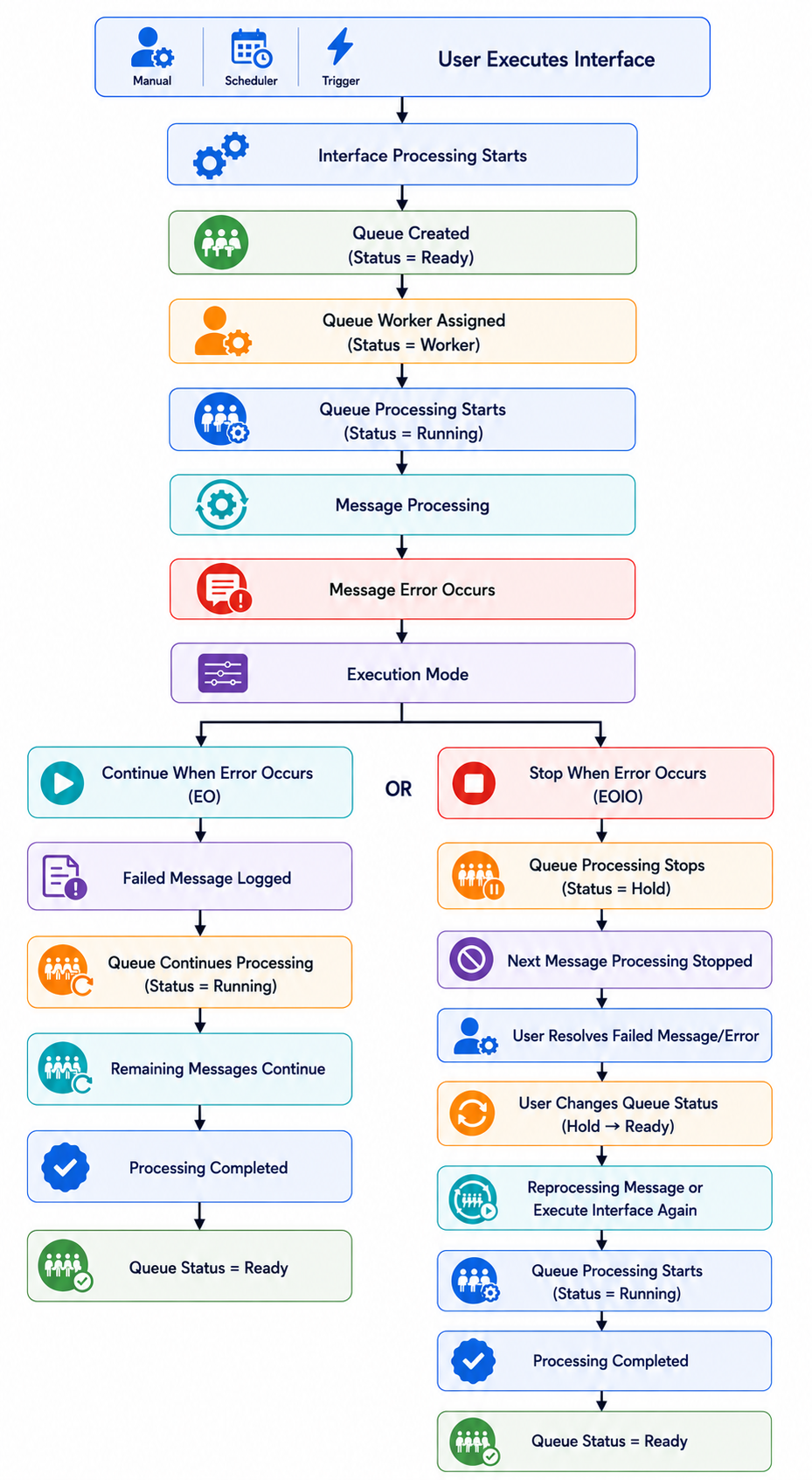
Full Processing between Continue When an Error Occurs (EO) and Stop When an Error Occurs (EOIO)
12. Key Functional Rules
Continue Mode
- Queue continues despite individual failures.
- Errors are isolated to failed messages.
- Processing availability is prioritized.
Stop Mode
- Queue stops immediately on failure.
- Queue enters Hold status.
- Manual intervention is required before continuation.
- Sequential integrity is prioritized.
Reprocessing Rule
Reprocessing or executing the interface again is only allowed when:
Queue Status = Ready
If queue status is:
- Hold
- Stop by Admin
then processing actions are blocked until the queue status is manually changed back to Ready.