1. Overview of the Any Connect
Introduction
- Any connect is an easy tool that helps users to get your data into Salesforce objects.
- Any Connect can also be used to extract data from database objects into any of the destinations as per business requirements.
- Similarly, Agent can use to perform bulk deletions by exporting the ID fields for the data we wish to delete and using that source to specify deletions through the Any Connect.
- Many networks and server monitoring solutions use what are called “Any Connect” to get values from the machines they are monitoring. It is programs that run on the remote machines and communicate with the main monitoring system. Some merchants try to hide the fact that they use Any Connect. They will try to deliver things like they “deploy” to remote systems or use other words, but it all compresses to installing custom software on the remote machines.
- We have available connectors like Pulsar, Kafka, Database, File, ftp, ftps, sftp, SOAP, REST, ActiveMQ, RabitMQ, JMS, Agent SAP ERP and Google Drive
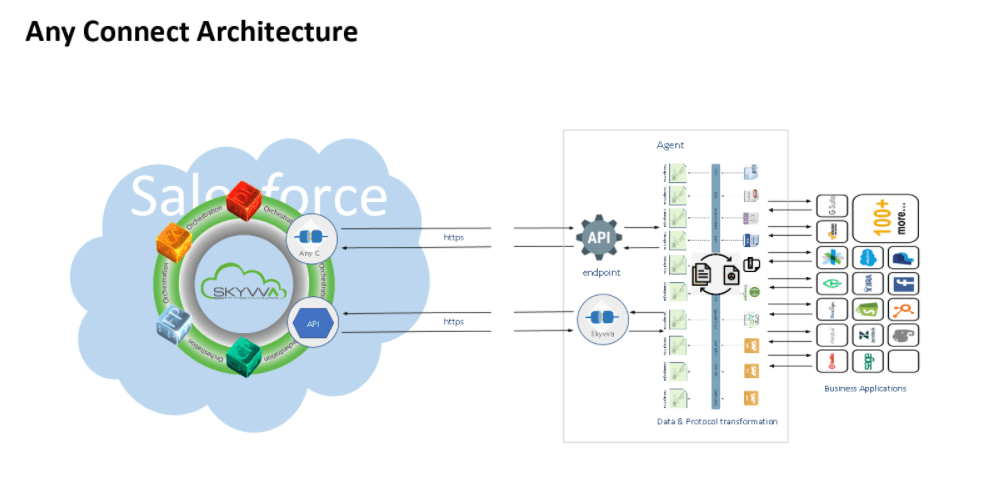
Any Connect?
This is the first kanban tab. In this tab we create a new entry e.g. a new connection for the direction Agent -> Salesforce or Salesforce -> Agent. We can choose from an existing entry or create a new one. For creating the new one we just enter here the name of the connection. Then the user clicks on the button 'Continue' and moves to the next tab which is Agent -> Salesforce. If we don't create a new entry we can choose from an existing one. Where are those entries come from? What are these entries? To make it clear user needs two sections e.g. one for the direction Agent -> Salesforce and Salesforce -> Agent. For the section 'Salesforce -> Agent' the entries in the dropdown list are coming from the table 'adapterInstance__c' where we have to store the connection record to use for the direction Salesforce -> Agent. In the section 'Agent -> Salesforce' we don't have the record in Salesforce but in the h2 database of the agent. Therefore user needs to read the entries from the section when the user wants to see the connection created for the direction Agent -> Salesforce. These entries are stored only in the h2 database and not in Salesforce. But why don't users keep the connection for this direction e.g. Agent -> Salesforce also in Salesforce in the table 'adapterInstance__c'? Users can store on both sides e.g. in Salesforce and also in Agent. Thus we can select from the table 'adapterInstance__c' only and don't need to make a call to the agent to get the connection entries for the direction Agent -> Salesforce. For the run-time, users don't need the connection for the direction Agent -> Salesforce. Users need to have on this screen only to chose the entry and then continue to the next tabs to ping the connection. For the direction Agent -> Salesforce the connection is only needed by the agent run-time. Salesforce side users don't need that. On the Salesforce side user need the connection for the direction Salesforce -> Agent. Therefore this connection is stored in the table 'adapterInstnace__c'.