1. SKYVVA CPI Salesforce Receiver Adapter in SAP Cloud Platform Integration
SKYVVA CPI Salesforce Receiver Adapter in SAP Cloud Platform Integration
Below figure is the sample integration flow using Skyvva Salesforce Adapter at receiver side. Figure: sample CPI integration flow using Skyvva Salesforce adapter
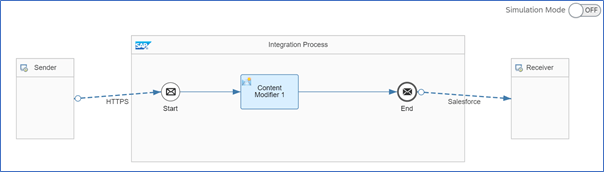
Skyvva Salesforce receiver adapter is used to communicate with Salesforce system using HTTPS transport protocol and Skyvva message protocol.
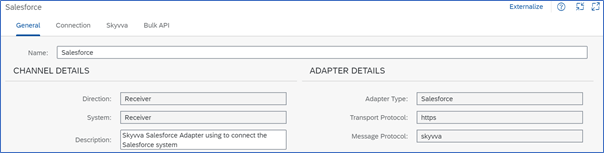
Figure: Skyvva Salesforce receiver adapter channel configurations Connection: LOGIN-CONFIG:
Parameter Description
Login Url Enter the URL of the Salesforce system to connect to. Use the following pattern: https://
User Credential Maintain Salesforce User Credential in CPI. Path: Monitoring > Manage Security > Security Material
Client Id Enter the Salesforce Client Id Note: Client Id will be provided by Salesforce.
Client Secret Enter the Client Secret. Note: Client Secret will be provided by Salesforce.
Skyvva: URI SETTING:
Parameter Description
REST Operation APEX_CALL: Only APEX operation is available in the current version Note: In current version only REST operation is supporting. Other operations will support in next release.
SALESFORCE ENDPOINT CONFIG:
Parameter Description
Apex Method Select the Method that you want to perform from the dropdown list. Available Methods: POST, PUT, DELETE, PATCH & GET
Logging Option Select the Logging option that you want to perform from the dropdown list. Default: Only Default is supporting in this version Below Logging Option will support in next release. Debug Level, Error Level, Info Level, Trace Level &Warning Level
Api Version (delete this content) Enter the API version from the Salesforce
Apex Url Only Integrate, integrateBatch, IntegrateSynchronous & SearchService supported in this version. createNewMessage & ProcessMessage will be support in next release.
Event Name Not supported at this moment.
Format Salesforce supports two formats for representations of resources: JSON and XML.
HTTP client timeout (sec) Enter the HTTP client timeout Example: 60 Secs
Integrate Max Size Provide the maximum size. Example: 5000
Integrate Batch Max Size Provide the maximum batch size. Example: 5000 Note: Choose this if the Apex Url is integrateBatch
Enable Autoswitch This will option support in next release.
S Object Id This will option support in next release.
S Object Fields This will option support in next release.
S Object Id Name This will option support in next release.
S Object Id Value This will option support in next release.
S Object Blob Field Name This will option support in next release.
S Object Class This will option support in next release.
S Object Query This will option support in next release.
S Object Search This will option support in next release.
Bulk API: Note: This will support in the next release version. BULK API:
Parameter Description
Environment
Skyvva Version
Bulk Operation
Bulk Package Size
Request Payload
Bulk Mode SFDC Bulk 1.0 SFDC Bulk 2.0
Switch to Batch Mode
Use Fast Batch Creation Mode