1. SkyvvaSalesforce Receiver Adapter in SAP Integration Suite
The SkyvvaSalesforce Receiver Adapter connects SAP Integration Suite to Salesforce. It sends data from your integration flow to Salesforce and returns a result when the selected action provides one.
You configure the adapter on the receiver connection of the integration flow. The settings let you choose how to sign in, what to do with the data, and which message format to use.
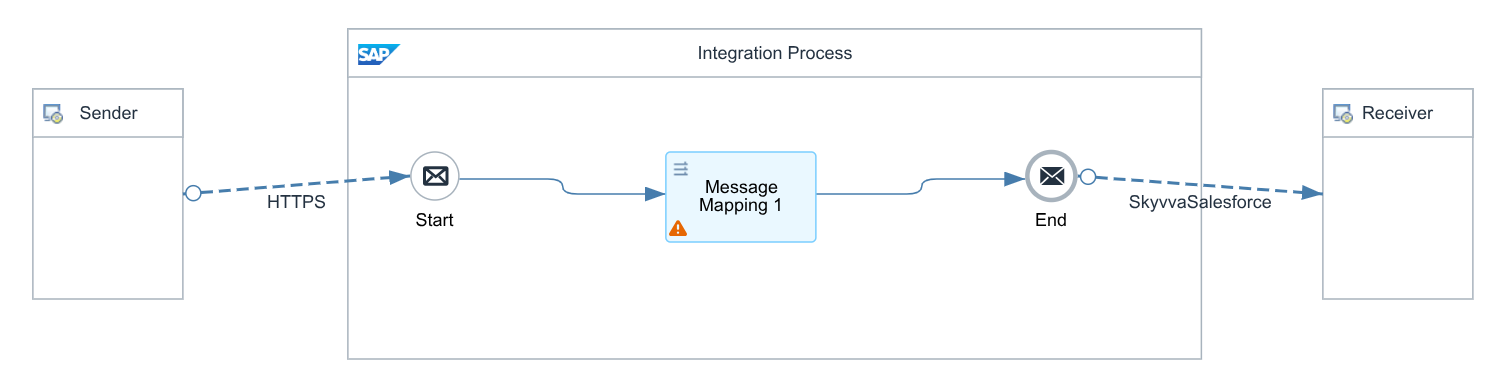
Figure 1. Example integration flow using the SkyvvaSalesforce receiver adapter.
Context Before You Start
Use this guide when SAP Integration Suite sends data to Salesforce. The adapter offers two ways to handle the data:
| Processing Type | When to use it |
|---|---|
| Skyvva | Use a SKYVVA Integration and Interface to process records, or send an event through a SKYVVA interface. |
| Salesforce | Work directly with Salesforce records, large groups of records, or events. |
The example in this guide uses Client Credential to sign in. Have your Salesforce My Domain address and application credentials ready. Your Salesforce administrator must enable Client Credential sign-in for the application and select the user it runs as. For Skyvva integration processing, also identify the SKYVVA Integration and Interface you want to use.
Why Use This Adapter?
The adapter brings the Salesforce connection and processing settings into one place. You can use the same adapter for sending individual records, processing groups of records, finding records, and working with events.
When to Use This Guide
Use this guide to understand the settings before configuring your receiver connection. For examples of sending records, receiving results, and batch processing, see the SKYVVA tutorials in section 11.
How This Guide Is Organized
Follow the tabs in order: General → Connection → Processing. Then read the section for your chosen processing type:
- Sections 5–7: Skyvva integration and event publishing.
- Section 8: Direct Salesforce operations.
- Section 9: Shared logging, retry, and waiting-time settings.
Only fill in the fields displayed for the action you select.
2. Receiver Adapter Configuration
In your integration flow, select SkyvvaSalesforce on the receiver connection.
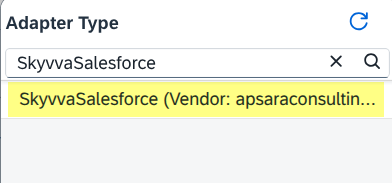
Figure 2. Selecting the SkyvvaSalesforce receiver adapter.
The adapter has three tabs:
| Tab | What to configure |
|---|---|
| General | Enter a name and an optional description. The other values are already set. |
| Connection | Choose how to sign in to Salesforce. |
| Processing | Choose what the adapter should do with the data. |
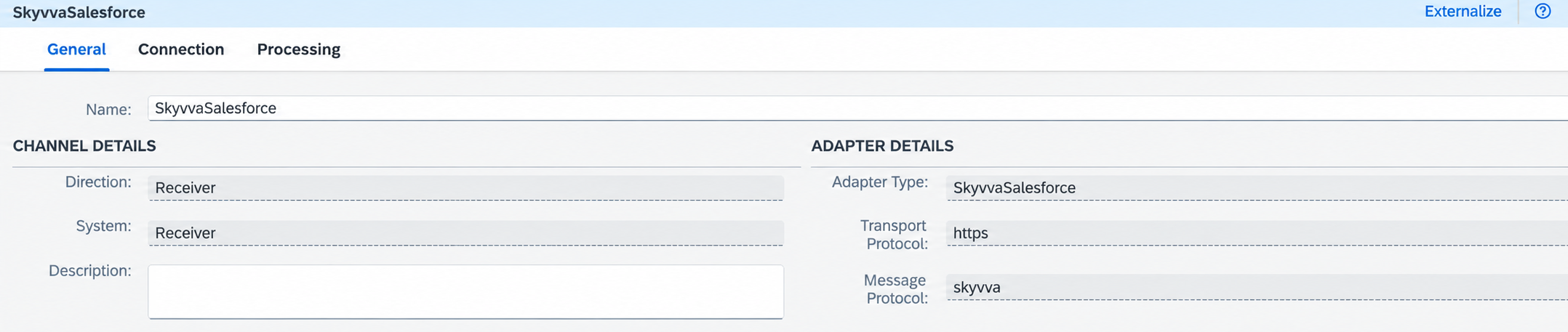
Figure 3. General tab.
3. Connection Tab
Use this tab to connect the adapter to your Salesforce organization. The example in this tutorial uses Client Credential.

Figure 4. Connection tab with Client Credential selected.
3.1 Authentication Type
This value is already set to OAuth2.
3.2 OAuth2 Flow
Select Client Credential for this tutorial. The User Credential field is hidden for this choice.
| Option | Credentials to enter |
|---|---|
| Client Credential — used in this tutorial | Client Credential only. |
| Username-Password Credential — alternative | User Credential and Client Credential. |
A new adapter starts with Username-Password Credential selected. Change it to Client Credential.
3.3 Login URL
For the Client Credential example, enter your Salesforce My Domain address:
| Environment | Example |
|---|---|
| Production | https://your-domain.my.salesforce.com |
| Sandbox | https://your-domain--sandbox-name.sandbox.my.salesforce.com |
Use your organization's actual address. Enter only the base address; the adapter adds the sign-in path automatically.
For the alternative Username-Password Credential option, the general login addresses are https://login.salesforce.com for production and https://test.salesforce.com for sandbox.
3.4 User Credential
This field is not shown when Client Credential is selected. You do not need a Salesforce username/password entry for this tutorial.
For the alternative Username-Password Credential option, enter the name of a User Credentials entry containing the Salesforce username and password. Add the security token to the end of the password if Salesforce requires it.
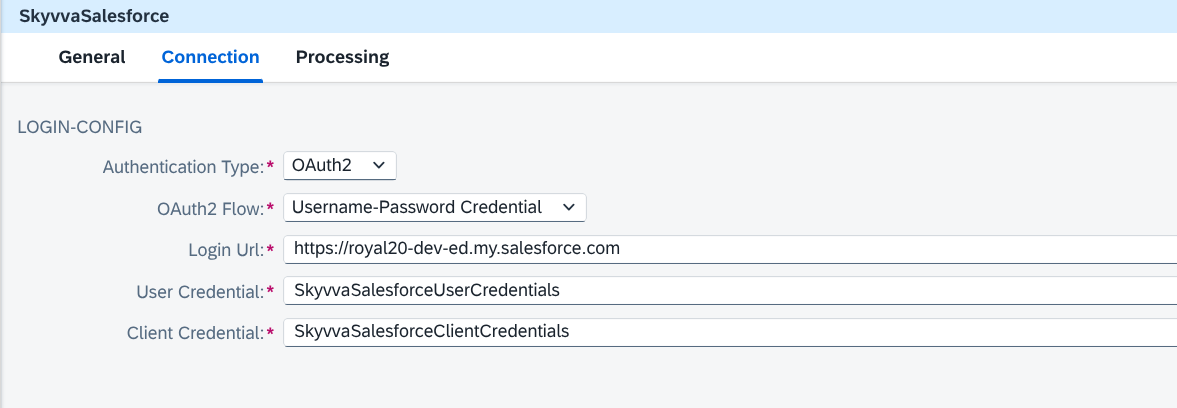
Figure 5. Alternative sign-in option: Username-Password Credential.
3.5 Client Credential
For this tutorial, enter the name of the entry containing your Salesforce application credentials.
Open Monitoring → Manage Security → Security Material and create a User Credentials entry, for example SKYVVA_Salesforce_Client:
| Entry field | Value |
|---|---|
| User | Consumer Key / Client ID |
| Password | Consumer Secret / Client Secret |
Enter SkyvvaSalesforceClientCredentials in Client Credential, or use the name you gave your entry. For this adapter, the entry type is User Credentials.
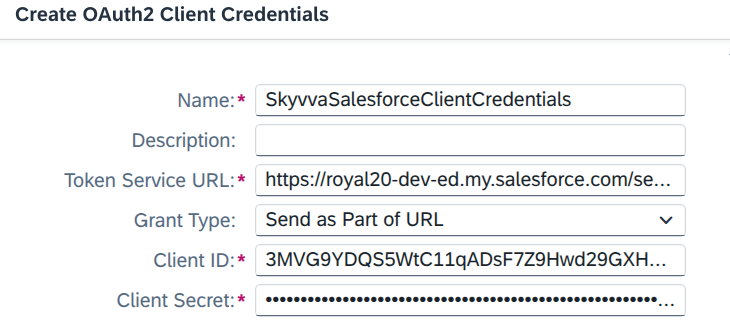
Figure 6. Client Credential entry in Security Material.
4. Processing Tab
Start by selecting Processing Type. The remaining settings change to match your choice.
| Processing Type | Use it for | Next choice |
|---|---|---|
| Skyvva — default | Processing data through SKYVVA or publishing an event through a SKYVVA interface. | Operation: Skyvva Integration or Platform Event - Publishing. |
| Salesforce | Working directly with Salesforce records and events. | Type: REST, REST Bulk, REST Bulk 2.0, REST Place Order, Event Processing, or Apex Call. |
Sections 5–7 explain Skyvva processing. Section 8 explains Salesforce processing. Section 9 covers the shared settings for logging, retry, and waiting time.
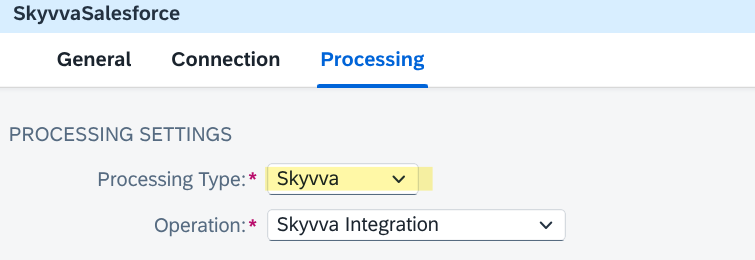
Figure 7. Processing Settings with Skyvva selected.
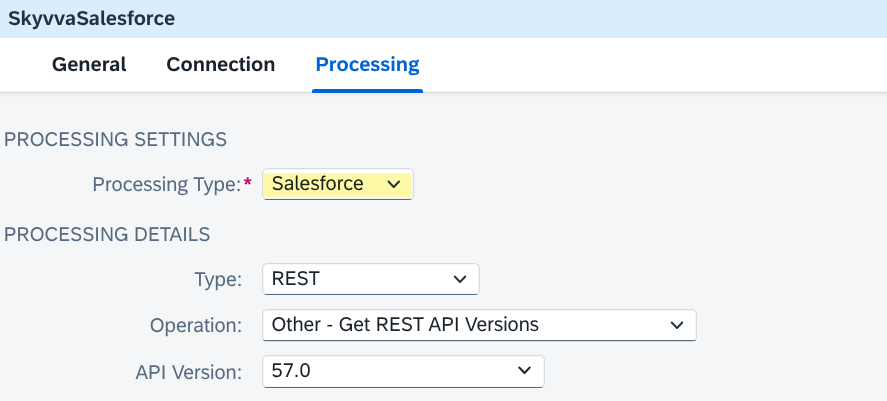
Figure 8. Processing Settings with Salesforce selected.
5. Skyvva Integration — Request Settings
Select Processing Type = Skyvva and Operation = Skyvva Integration.
5.1 Skyvva API Version
Choose the version used by your SKYVVA integration.
| Version | What you configure |
|---|---|
| V2 — default | Choose Skyvva API and Apex Method. Include the Integration and Interface in the message data. |
| V3 | Enter Integration and Interface in the adapter, then choose the processing mode and message formats. |
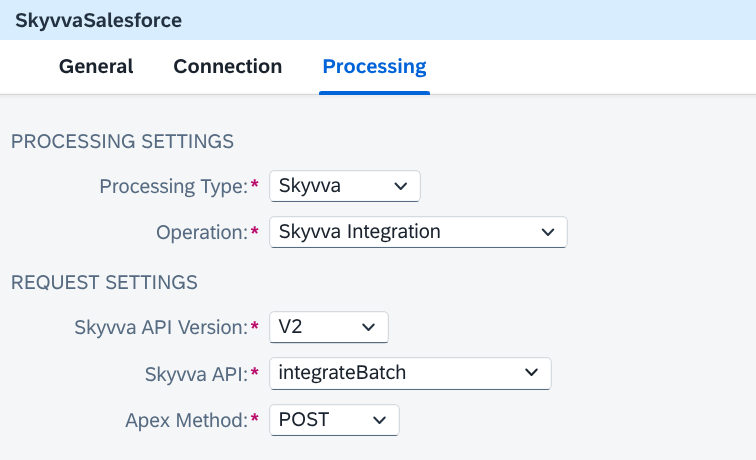
Figure 9. Skyvva V2 settings.
6. Skyvva Integration — Request Settings for V2
Select Skyvva API Version = V2.
6.1 Skyvva API
Choose the action required by your integration.
| Skyvva API | What it does |
|---|---|
| Integrate | Sends data for processing in the background. |
| IntegrateSynchronous | Processes data and returns the result in the same call. |
| integrateBatch | Sends a group of records for batch processing. |
| SearchService | Finds Salesforce records using search criteria. |
| V4/integrate | Sends XML data for background processing through the V4 service. |
| V4/integrateSynchronous | Sends XML data through the V4 service and returns the result in the same call. |
| V4/integrateBatch | Sends XML data for batch processing through the V4 service. |
For the integration actions, the message must identify the Integration and Interface:
| Selected action | Message fields |
|---|---|
| Integrate | integrationid and interfacename, or fromSystem and targetObject. |
| IntegrateSynchronous / integrateBatch | integrationid and interfacename. |
| V4 actions | XML input with fromSystem and targetObject. |
Include the records in the message format required by the selected action. V2 does not have separate Request Format or Response Format settings.
6.2 Apex Method
The choices are GET, POST, PUT, PATCH, and DELETE. Use POST for sending integration data unless the selected service requires another method.
For Integrate, changing Apex Method does not change how the adapter processes the data.
7. Skyvva — V3 Settings and Event Publishing
For Skyvva Integration, select Skyvva API Version = V3. Platform Event publishing is explained separately in section 7.9.
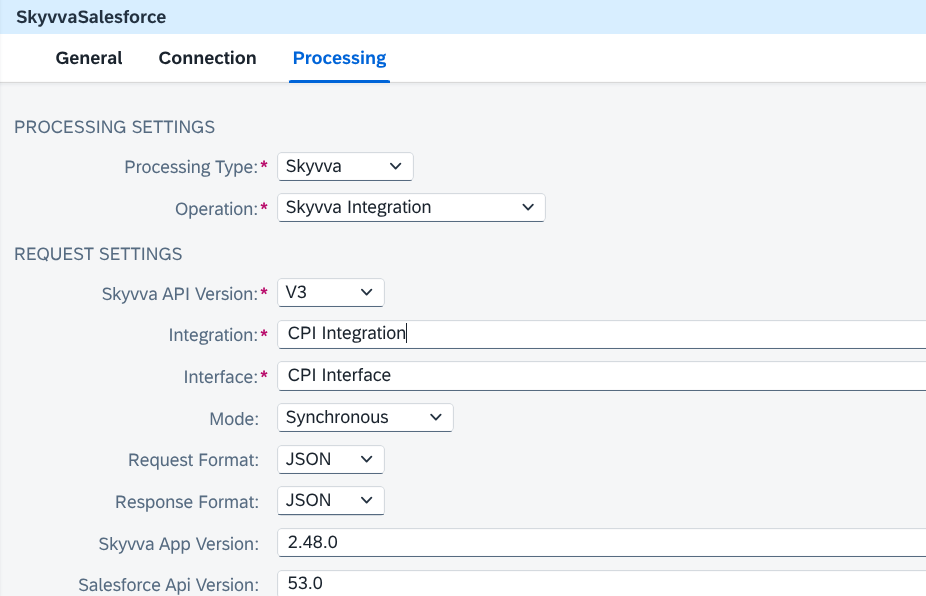
Figure 10. Skyvva Integration settings with Skyvva API Version = V3.
7.1 Integration
Enter the name of the SKYVVA Integration in Salesforce.
7.2 Interface
Enter the name of the SKYVVA Interface within that Integration.
7.3 Mode
Choose how to process the records.
| Mode | What it does |
|---|---|
| Synchronous — default | Processes the data and returns the result in the same call. |
| Asynchronous | Processes the data in the background. |
| Skyvva Batch | Processes records in groups using SKYVVA. |
| Skyvva Bulk | Uses SKYVVA to process large numbers of records. |
| Salesforce Bulk | Uses Salesforce to process large numbers of records. |
| Auto-Switch | Chooses a processing method using the configured record limits. |
7.4 Processing Behavior
Shown when Mode = Asynchronous. See Figure 11 for the screenshot showing this field.
| Option | What it does |
|---|---|
| None — default | Uses normal background processing. |
| Create Message Only | Saves a SKYVVA message for later processing. |
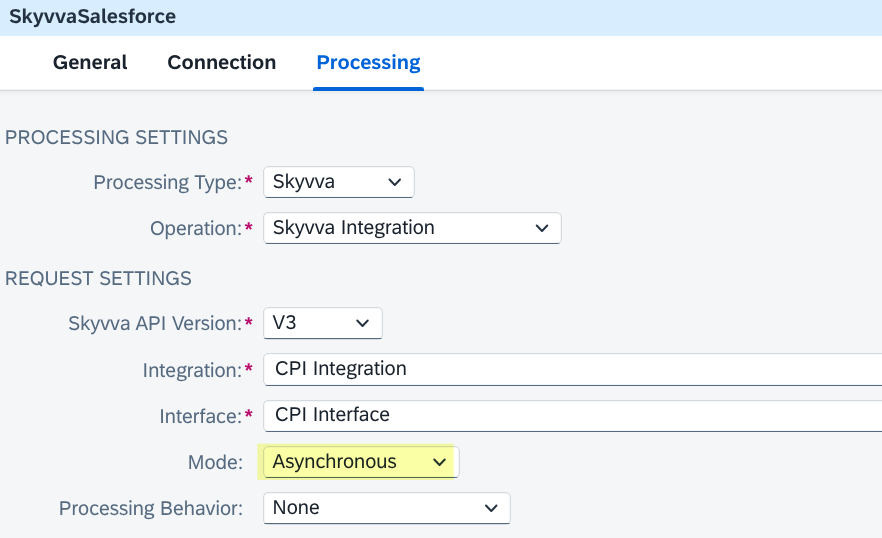
Figure 11a. Skyvva V3 Asynchronous mode with Processing Behavior = None.
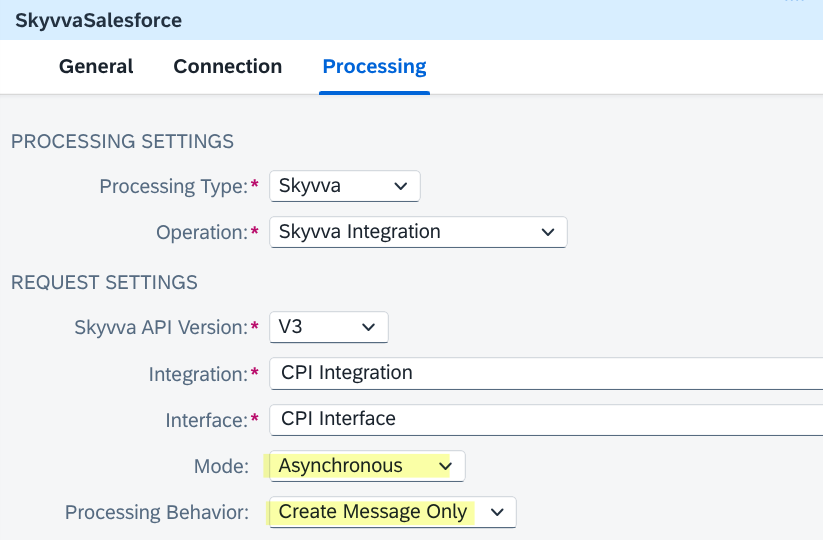
Figure 11b. Skyvva V3 Asynchronous mode with Processing Behavior = Create Message Only.
7.5 Request Format
Choose JSON or XML to match the data sent by your integration flow. The default is JSON.
7.6 Response Format
Choose JSON or XML for the returned result. The default is JSON.
7.7 Skyvva App Version
Enter the SKYVVA application version installed in Salesforce. The default is 2.48.0.
7.8 Salesforce API Version
Choose the Salesforce API version used by your integration. The default is 53.0.
7.9 Skyvva — Platform Event Publishing
To send an event instead of processing integration records, select Processing Type = Skyvva and Operation = Platform Event - Publishing.
For your SKYVVA V3 scenario, select Processing Type = Skyvva and Operation = Platform Event - Publishing. This sends an event message to Salesforce using the selected SKYVVA Interface.
| Field | Explanation |
|---|---|
| Integration | Enter the name of the SKYVVA Integration containing the Interface. |
| Interface | Enter the SKYVVA Interface name. Its Source Name must identify the Salesforce event, such as OrderEvent__e. |
| Request Format | Choose Application/JSON or Application/XML to match the event data you send. |
| Response Format | Choose Application/JSON or Application/XML for the confirmation returned after sending. |
Integration and Interface are required. Both formats default to Application/JSON.
This screen does not require Skyvva API Version or Mode selection. The adapter finds the event from the Interface and publishes the field values supplied in your message.
The response confirms that Salesforce accepted the event. It does not confirm that the processes receiving the event have finished.
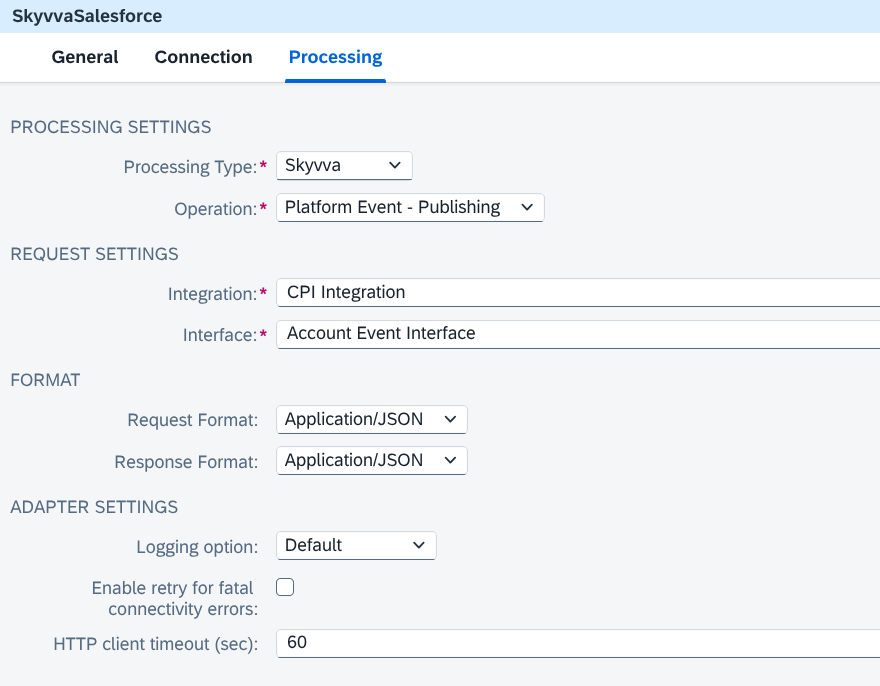
Figure 12. Skyvva Platform Event publishing settings, showing Integration, Interface, Request Format, Response Format, and Adapter Settings.
8. Salesforce Processing
Select Processing Type = Salesforce to work directly with Salesforce records or events. Then choose Type and the action you need. SKYVVA Integration and Interface are not required.
Choose Type according to what you want to do:
| Type | Use it for |
|---|---|
| REST | Read, add, change, or delete records; search for records; or combine several actions in one call. |
| REST Bulk | Send large groups of records using jobs and batches. |
| REST Bulk 2.0 | Load CSV data or retrieve large sets of records. |
| REST Place Order | Work with accounts, contracts, orders, and order products. |
| Event Processing | Read event messages or publish a Platform Event. |
| Apex Call | Call a custom service created in Salesforce. |
Some fields can use a value prepared earlier in the integration flow. For example, ${property.AccountId} uses the saved AccountId value for the current message.
8.1 REST
Select Type = REST for Salesforce records, searches, and queries. A query is a request to find records that match your conditions.
| Operation | What it does / what to enter |
|---|---|
| Other - Get REST API Versions | Lists the available Salesforce API versions. |
| Other - Get REST Resource Endpoints | Lists the Salesforce addresses available for the selected API Version. |
| Metadata - All | Lists the kinds of records available, such as Account and Contact. |
| Metadata - Basic | Shows basic information about the selected Salesforce Object. |
| Metadata - Comprehensive | Shows the fields and related records for the selected Salesforce Object. |
| Salesforce Object - Create | Creates one record from the message data. Select Salesforce Object or provide Custom Salesforce Object. |
| Salesforce Object - Get | Retrieves a record using Salesforce Object ID. |
| Salesforce Object - Get with External ID | Retrieves a record using External ID Name and External ID Value. |
| Salesforce Object - Update | Updates the record identified by Salesforce Object ID using the message data. |
| Salesforce Object - Upsert with External ID | Creates or updates a record using External ID Name, External ID Value, and the message data. |
| Salesforce Object - Delete | Deletes the record identified by Salesforce Object ID. |
| Salesforce Object - Delete with External ID | Deletes a record using External ID Name and External ID Value. |
| SOSL - Search Resource | Finds records using the search entered in SOSL Search. |
| SOQL - Execute Query | Runs SOQL Query. Include deleted records in query result adds deleted or merged records; Auto Pagination collects all result pages. |
| SOQL - Execute Query for More Results | Retrieves another query page using Next Records URL. |
| Salesforce Object - Get Blob | Downloads the file from an Attachment or Document record. |
| Salesforce Objects - Composite | Performs several actions in one call. See section 8.2. |
| Salesforce Objects - sObject Collections | Adds, changes, reads, or deletes a group of records. See section 8.3. |
| Salesforce Objects - Custom Request | Uses the Salesforce address and action you provide. See section 8.4. |
| Salesforce - List Organization Limits | Shows the usage limits for your Salesforce organization. |
API Version defaults to 57.0. Select the version used by your Salesforce connection.
For record operations, fill in the fields shown:
| Setting | What to enter |
|---|---|
| Salesforce Object | Choose the kind of record, such as Account. Select Custom for records defined by your organization. |
| Custom Salesforce Object | Enter the Salesforce name of the custom object, such as Invoice__c. |
| Salesforce Object ID | ID of the record to read, update, delete, or download. |
| External ID Name | Name of a Salesforce field set up as an External ID, used to match records from another system, such as ERP_DEBTOR_ID__c. |
| External ID Value | Value to match in that field. |
| Filter Fields | Choose which fields to include in the result. Add one field per row. |
For Get Blob, choose Attachment or Document as the Salesforce Object.
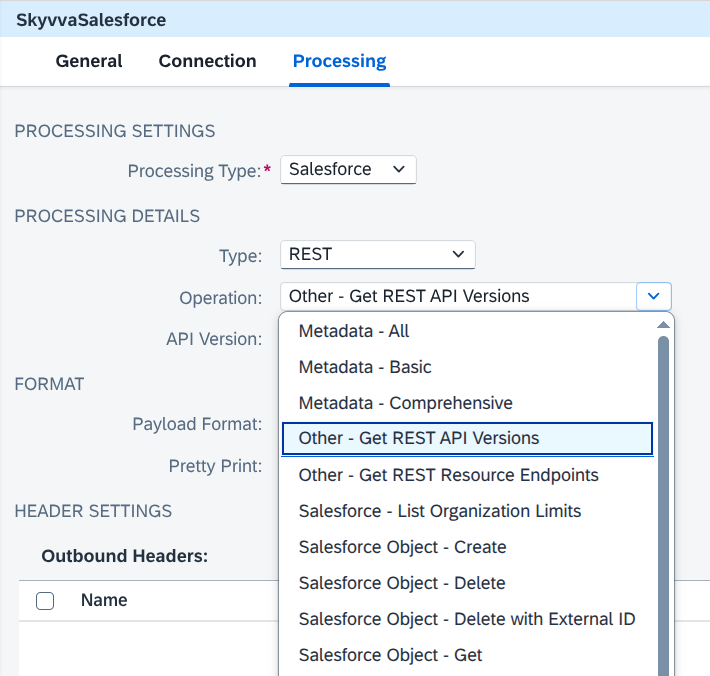
Figure 13. Salesforce REST operation choices.
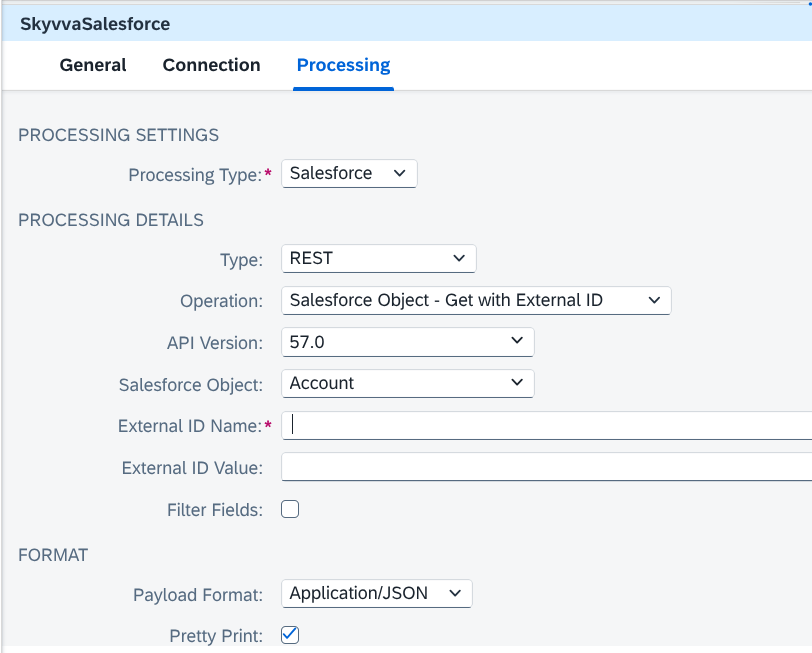
Figure 14. Salesforce REST record settings.
8.2 Salesforce Objects - Composite
Select Type = REST and Operation = Salesforce Objects - Composite to send several actions in one call.
| Setting | What to choose |
|---|---|
| API Version | Salesforce API version; default 57.0. |
| Payload Format | Application/JSON or Application/XML to match the message. Default XML. |
The message contains the actions to perform, their addresses, and their data. With JSON input, these actions are listed in compositeRequest.
The adapter builds the main address automatically:
https://<salesforce-instance>/services/data/v<API-version>/composite
Each action inside the message has its own address, starting with /services/data/v<version>/. Changing API Version in the adapter does not change the versions written inside the message.
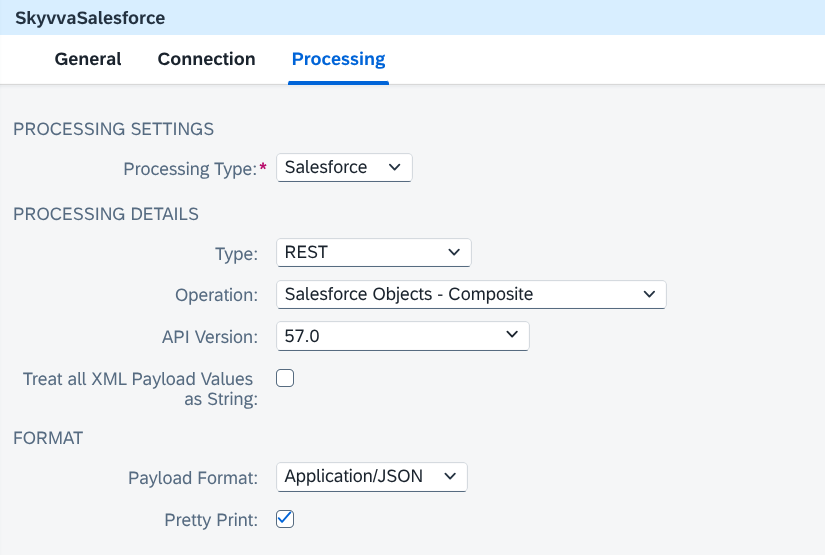
Figure 15. Salesforce Objects - Composite settings.
8.3 Salesforce Objects - sObject Collections
Select Type = REST and Operation = Salesforce Objects - sObject Collections. Choose what to do with the records in Method.
| Method | What it does / what to enter |
|---|---|
| Create | Creates records supplied in the message data. |
| Update | Updates records supplied in the message data. |
| Upsert | Creates new records or updates matching records using Salesforce Object and External ID Name. |
| Retrieve | Retrieves records for the selected Salesforce Object using IDs and requested fields supplied in the message data. |
| Delete | Deletes records supplied in List of Ids. Enable All or None to cancel all deletions if one fails. |
API Version defaults to 57.0. Choose Payload Format to match the message; the default is XML.
- Enable Multiple Batch Processing sends more than 200 records in separate groups. Keep
allOrNoneset to false when using this option. - Enable Lookup Query finds related Salesforce records from queries included in the message. This option requires XML input.
Both options are off by default.
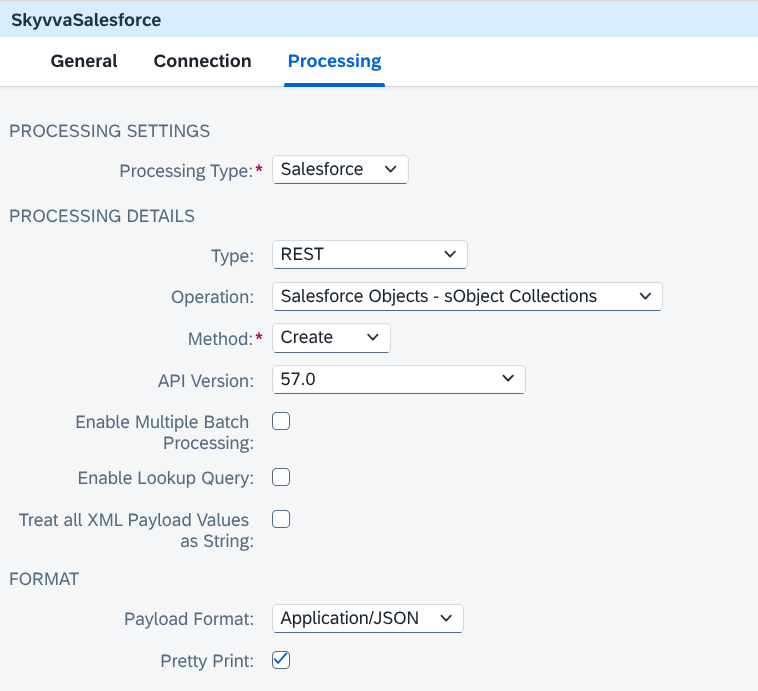
Figure 16. Salesforce Objects - sObject Collections settings.
8.4 Salesforce Objects - Custom Request
Select Type = REST and Operation = Salesforce Objects - Custom Request to call a Salesforce address that you provide.
| Parameter | Description |
|---|---|
| Resource Relative URL | The part of the address after your Salesforce domain name. Start with / and include the API version where needed. |
| Method Name | GET, POST, PATCH, PUT, or DELETE; default GET. |
| Request Payload Format | Format of the data to send: JSON, XML, or file content. Default XML. |
| Response Payload Format | Format to request for the result: JSON, XML, or file content. Default XML. |
| HTTP Protocol | Shown for PATCH. Keep Default. |
GET reads data, POST sends new data, PATCH updates selected fields, PUT replaces data, and DELETE removes data. Choose the method required by the Salesforce service.
For example, enter /services/data/v57.0/sobjects/Account/${property.AccountId}. The adapter returns the result in the format supplied by Salesforce.
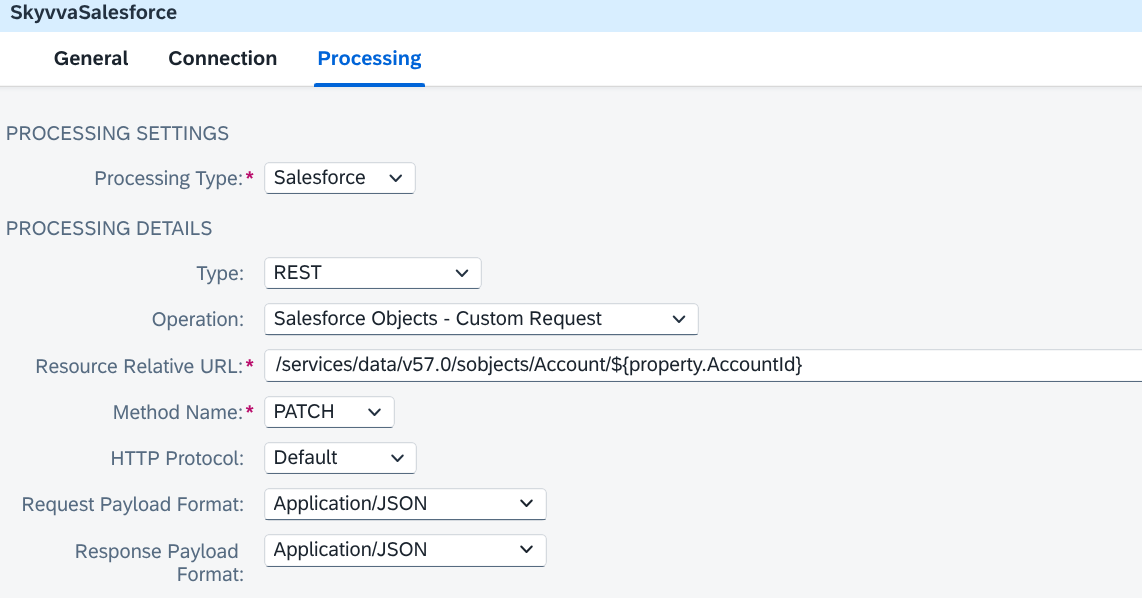
Figure 17. Salesforce Custom Request settings.
8.5 REST Bulk
Select Type = REST Bulk to send large numbers of records in groups. A job holds the work to be done; a batch is one group of records within that job.
| Actions | Available operations |
|---|---|
| Jobs | Job - Create, Job - Get, Job - Abort, Job - Close, Job - Get All Batches |
| Data batches | Batch - Create, Batch - Get, Batch - Get Request, Batch - Get Results |
| Query batches | Batch Query - Create, Batch Query - Get Result, Batch Query - Get Result IDs |
| Parameter | Description |
|---|---|
| API Version | Bulk API version; default 57.0. |
| Content Type | For Batch - Create: XML, CSV, JSON, ZIP XML, ZIP CSV, or ZIP JSON. For Batch Query - Create: XML, CSV, or JSON. Default XML. |
| SOQL Query | For Batch Query - Create, enter the query here. |
| Payload Format | JSON or XML for job messages and results. Default XML. Content Type controls the data sent in a batch. |
| Job ID | ID of the job to send data to, check, close, or stop. |
| Batch ID | ID of the batch to check or retrieve. |
| Result ID | ID of the query result to retrieve. |
| Data from Attachment / Attachment Name | Use an attached file as the batch data. Enter its attachment name. |
| Handle XML Null Values | Allows empty values marked as null to clear Salesforce fields in supported XML messages. |
Create a job, then send each batch using its Job ID. Save the Job ID and Batch ID for checking progress and reading results.
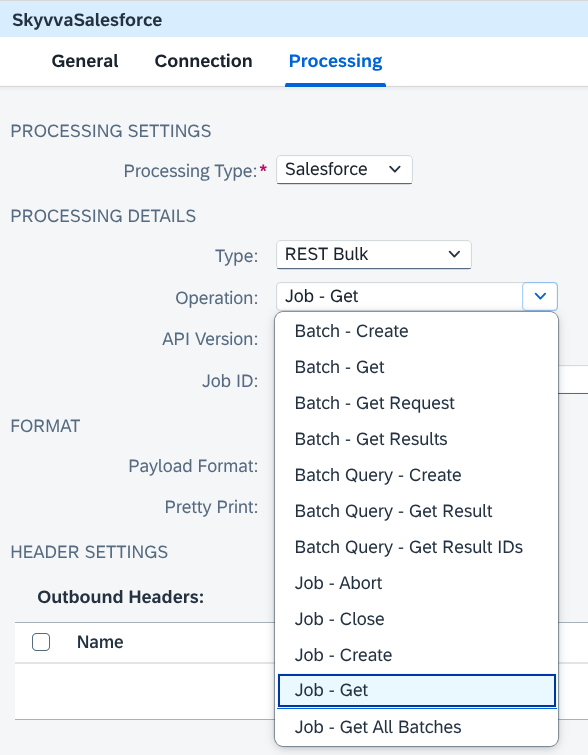
Figure 18. REST Bulk operation choices.
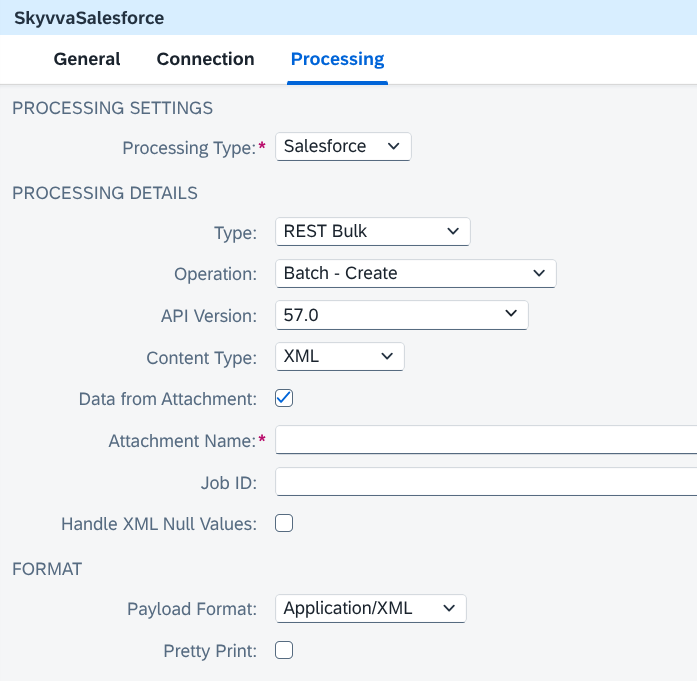
Figure 19. REST Bulk batch creation settings.
8.6 REST Bulk 2.0
Select Type = REST Bulk 2.0 to load records from a CSV file or retrieve large sets of records. CSV is a text file with data arranged in rows and columns.
| Actions | Available operations |
|---|---|
| Loading records | Job - Create, Job - Upload Data, Job - Get, Job - Get All Jobs, Job - Close, Job - Abort, Job - Delete |
| Query jobs | Job Query - Create, Job Query - Get Information, Job Query - Get Results, Job Query - Abort, Job Query - Delete, Job Query - Get All Query Jobs |
API Version defaults to 57.0.
For Job - Create, turn on Advanced Job Properties to enter the job settings in the adapter. Otherwise, supply them in the message.
| Parameter | Description |
|---|---|
| Salesforce Object | Kind of record, such as Account or CustomObject__c. |
| Operation Name | Insert adds records; Update changes records; Upsert adds or updates; Delete removes records; Hard Delete removes them permanently. Default Insert. |
| Content Type | CSV. |
| Column Delimiter for Job | Character separating the CSV columns. Default Comma; other choices are Backquote, Caret, Pipe, Semicolon, and Tab. |
| Line Ending | How each CSV row ends: LF or CRLF. Match the file. Default LF. |
| Assignment Rule ID | Optional assignment rule for Case or Lead. |
| External ID Field Name | Field used to match records for Upsert. Include this column in the CSV. |
| Upload Job Data from body | Creates the job and uploads its data together. Off by default. |
To upload to an existing job, choose Job - Upload Data, enter its Job ID, and supply CSV data. Then choose Job - Close to make the job ready for processing.
For Job - Get, Job Result Type chooses job information (None), Successful Results, Failed Results, or Unprocessed Records. Record results are downloaded as CSV.
For Job - Get All Jobs, Job Type and Enable PkChunking filter the job list. Query Locator identifies another page of that list. Leave these settings at their defaults unless you need a filtered list or another page.
For query jobs:
| Setting | What to enter |
|---|---|
| Operation Name | Query, or QueryAll to include deleted or merged records. Default Query. |
| SOQL Query | The query used to find records. |
| Query Job ID | ID of the query job to check or retrieve. |
| Max Records | Maximum records per result page; default 2000. |
| Auto Pagination | Turn on to collect all result pages automatically. |
| Sforce-Locator | Value identifying a particular result page, when you need to retrieve it separately. |
Advanced Job Properties also shows CSV column and line-ending settings for query creation. Query results are returned as CSV.
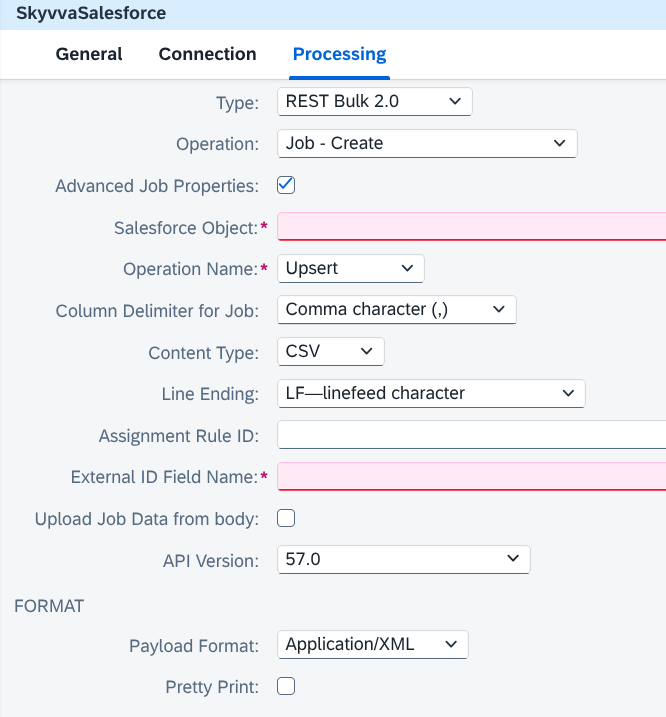
Figure 20. REST Bulk 2.0 record loading settings.
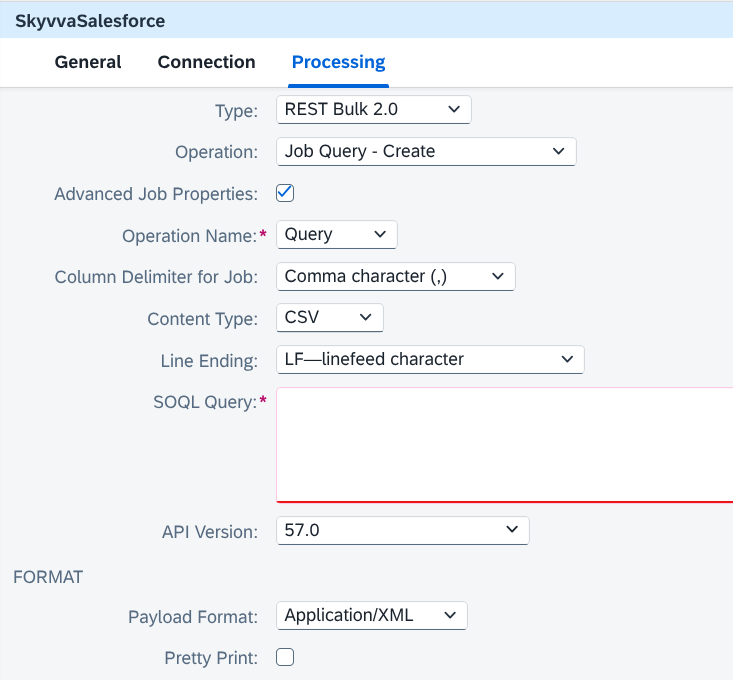
Figure 21. REST Bulk 2.0 query creation settings.
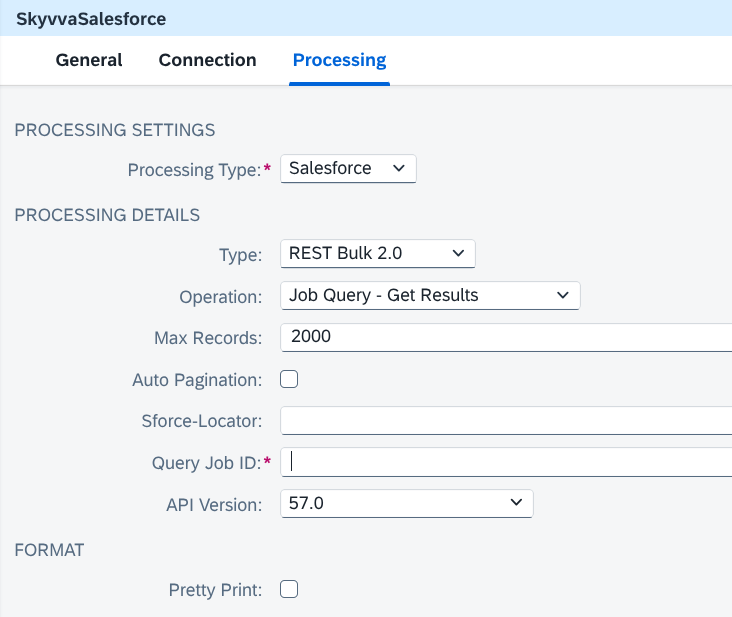
Figure 22. REST Bulk 2.0 query result settings.
8.7 REST Place Order
Select Type = REST Place Order to work with Salesforce contracts and orders. Choose the action you need.
| Operation | Purpose |
|---|---|
| Account - Add Contracts and Orders | Creates contracts and orders related to an account from the message data. |
| Account - Add Orders | Creates orders related to an account from the message data. |
| Contract - Add Orders | Adds orders to the contract identified by Contract ID. |
| Order - Add Products | Adds products to the order identified by Order ID. |
| Contract - Get | Retrieves a contract using Contract ID. |
| Order - Get | Retrieves an order using Order ID. |
| Contract - Filter Details | Retrieves filtered contract details using Contract ID, Filter Name, and Filter Value. |
| Order - Filter Details | Retrieves filtered order details using Order ID, Filter Name, and Filter Value. |
API Version defaults to 57.0. When sending data, choose Payload Format to match the message. Use Filter Fields to choose which details to return where available.
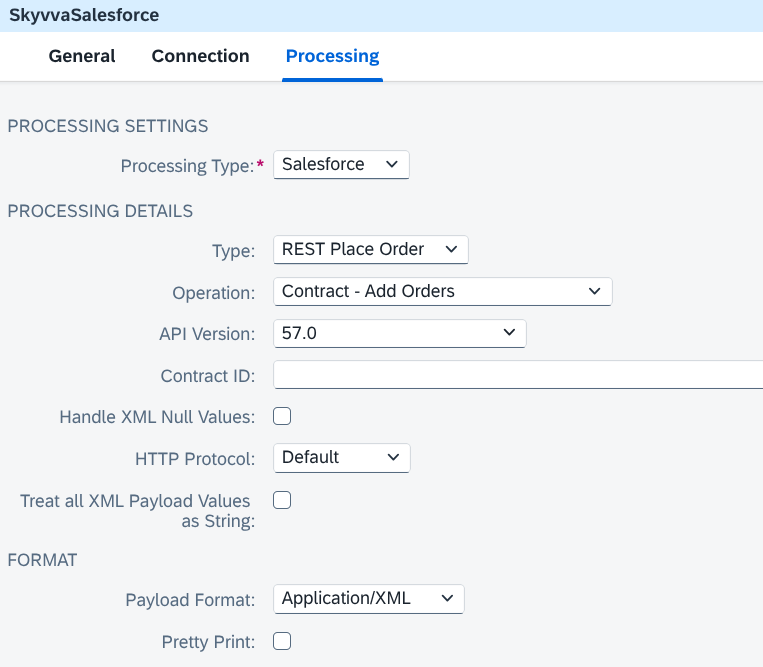
Figure 23. REST Place Order settings.
8.8 Event Processing
Select Type = Event Processing to read Salesforce event messages or send a Platform Event. Choose the Event Type first.
| Event Type | Supported actions | Channel example |
|---|---|---|
| PushTopic Events | Event - Polling | /topic/Account |
| Generic Events | Event - Polling | /u/notifications/ExampleUserChannel |
| Platform Events | Event - Polling, Event - Publishing | /event/OrderEvent__e |
| Change Data Capture Events | Event - Polling | /data/AccountChangeEvent |
Event - Polling waits for event messages and returns them to your integration flow.
| Parameter | Description |
|---|---|
| Channel Name | Event address to read. Use the exact spelling and letter case. |
| API Version | Streaming API version; default 57.0. |
| Replay Id | Where to start reading. -1 reads new events; -2 reads events still available in Salesforce. Enter a previous Replay Id to continue after that event. |
| Wait Time (in ms) | How long to wait for events. Default and minimum 30000 milliseconds (30 seconds). |
| Maximum Events Count | Maximum events to read; default 10. |
| Invalid Replay Id Approach | If the Replay Id is unavailable, read new events (-1), read available earlier events (-2), or stop with an error (None). |
| Max Buffer Size (in bytes) | Space reserved for received messages. Default 10485760 bytes (10 MB). |
| Max Network Delay (in ms) | How long to wait for a connection response. Default 120000 milliseconds (2 minutes). |
| Payload Format | Choose JSON or XML for the returned events. |
The default Event Type is PushTopic Events and the default operation is Event - Polling.
For Platform Events → Event - Publishing, enter the Channel Name, such as /event/OrderEvent__e, and supply the event field values in the message. Choose JSON or XML for Request Format and Response Format; both default to JSON. The adapter returns a confirmation after sending the event.
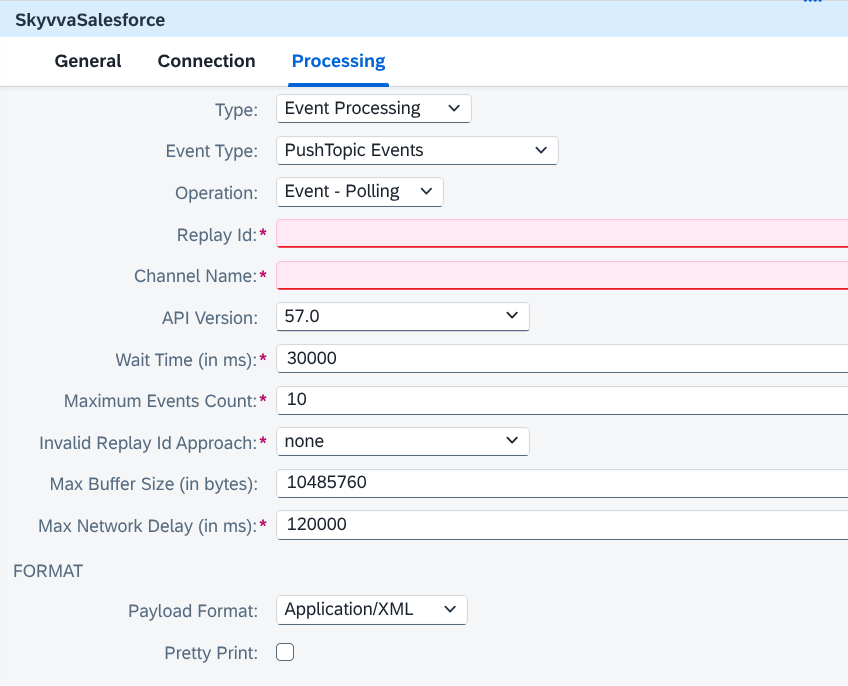
Figure 24. Salesforce event polling settings.
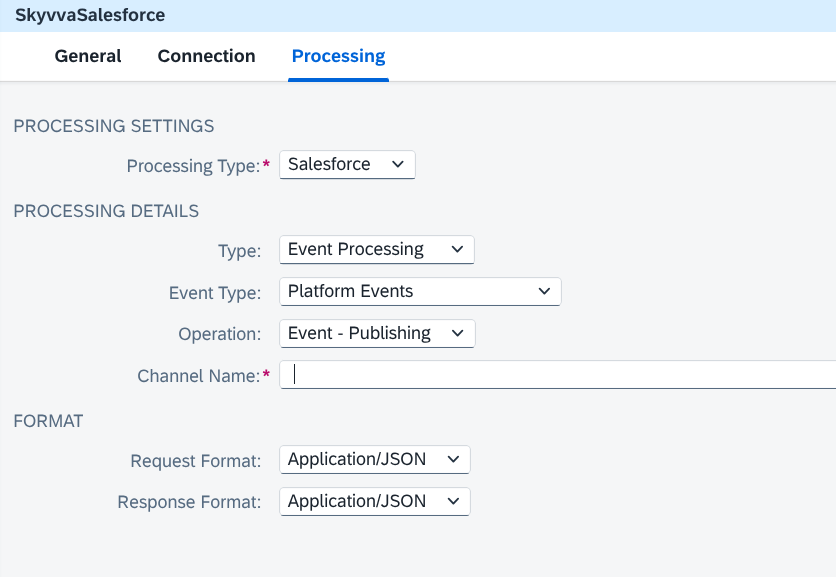
Figure 25. Salesforce Platform Event publishing settings.
8.9 Apex Call
Select Type = Apex Call to use a custom service created in Salesforce.
| Parameter | Description |
|---|---|
| Resource Relative URL | The part of the service address after your Salesforce domain name, starting with /. For example /services/apexrest/Account/${property.AccountId}. |
| Method Name | GET, POST, PATCH, PUT, or DELETE; default GET. |
| Payload Format | Application/JSON or Application/XML; default XML. The message and result are passed through as supplied. |
| HTTP Protocol | Shown for PATCH. Keep Default. |
| Query Parameters | Additional values required by the service, added to its address. |
| Customized Request Header | Additional request settings required by the service. |
Prepare the message in the format required by the custom service. For an XML service, set Content-Type and Accept to application/xml in Customized Request Header. Selecting XML in Payload Format alone does not set these values for Apex Call.
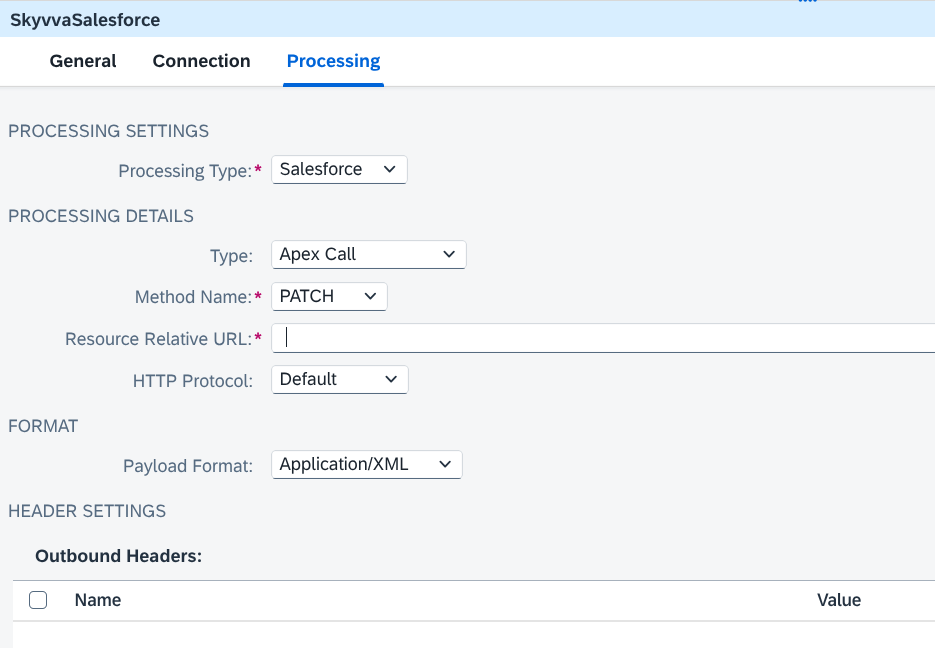
Figure 26. Salesforce Apex Call settings.
8.10 Format and Header Settings
Payload Format means the format of the message data: Application/JSON or Application/XML. For Salesforce processing, the default is XML. Choose JSON when sending JSON data.
| Setting | When to use it |
|---|---|
| Pretty Print | Makes supported JSON or XML results easier to read. |
| Handle XML Null Values | Allows values marked as null in supported XML messages to clear Salesforce fields. |
| Treat all XML Payload Values as String | Keeps XML values as text, for example numbers with leading zeros. |
| Customized Request Header | Adds settings required by a particular Salesforce service. |
The two XML options are off by default. They appear only for supported actions.
Custom Request has separate Request Payload Format and Response Payload Format fields. Event publishing has separate Request Format and Response Format fields. Get Blob returns file content.
If HTTP Protocol appears, keep Default.
8.11 Using SAP Salesforce Adapter Instructions
Many field names and choices match SAP's Salesforce adapter. For this adapter, use the labels and settings described above.
The main differences to remember are:
- SkyvvaSalesforce adds Skyvva processing and its Integration and Interface settings.
- It offers Platform Event publishing within this receiver adapter.
- Client Credential uses a User Credentials entry. See section 3.5.
9. Adapter Settings
These settings apply to both Skyvva and Salesforce processing.
9.1 Logging Option
Choose how much information to record while the adapter runs.
| Option | What it records |
|---|---|
| Default | Normal logging. |
| Trace level / Debug level | More detail for investigating a problem. |
| Info level | General activity. |
| Warning level | Warnings and errors. |
| Error level | Errors only. |
Keep Default for normal use.
9.2 Enable Retry for Fatal Connectivity Errors
Turn this on to retry when a connection problem interrupts a request. It is off by default.
Retry does not correct problems in the message data.
9.3 HTTP Client Timeout
Maximum time to wait for an HTTP response, in seconds. The default is 60 seconds.
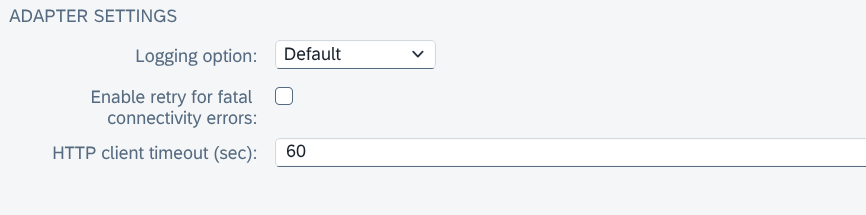
Figure 27. Shared Adapter Settings.
10. Summary
The SkyvvaSalesforce Receiver Adapter sends data from SAP Integration Suite to Salesforce. Choose Skyvva processing when using SKYVVA Integration and Interface settings, or Salesforce processing for direct record and event operations.
| Configuration area | What to set |
|---|---|
| General | A name and an optional description for the receiver connection. |
| Connection | Salesforce login address and Client Credential, as used in this guide. |
| Skyvva V2 | Skyvva API and Apex Method. Identify the Integration and Interface in the message data. |
| Skyvva V3 | Integration, Interface, processing Mode, and message formats. |
| Salesforce | Type, Operation, and the fields needed for that action. |
| Event publishing | The event details and formats; use the SKYVVA Interface or Salesforce Channel Name, depending on Processing Type. |
| Adapter Settings | Logging level, retry option, and maximum waiting time. |
The adapter supports immediate results, background processing, batch and bulk processing, searches, and event messages. Select the action that matches your integration and choose the message format to match the data you send.