1. What is Raw basket and how to use it?
Raw Basket Control Board to Process the Raw business data inside the file
The 'Raw Data Basket' is specifically designed to store raw business data in a file and is associated with a basket called the 'Raw Basket'. The raw basket contains unprocessed and pure business data in its original format. It serves as a solution for users who are uncertain about parsing the raw business data into the Skyvva message format. By utilizing the raw basket, users can avoid the complexities of parsing and transforming the data themselves. It enables users to store and work with their raw business data without the need for prior conversion or processing. However, it's important to note that hitting limits in Salesforce is a possibility when dealing with large raw data. Performing parsing and transformation logic within Apex can lead to CPU limitations, making it difficult to process big-size data. When working with the Raw Basket, it's essential to consider the nature of the request. For large-size requests, the Raw Basket may not be suitable. In such cases, it is recommended to utilize tools like Skyvva Batch, Bulk, Agent, and Bulk Data Loader.
Case1: How to Processing the Raw Basket Control Board using Scheduled Apex
Expectation:
A workflow for processing raw basket records using two methods: manual processing and a scheduler. Here's a breakdown of the steps involved in processing these raw baskets:
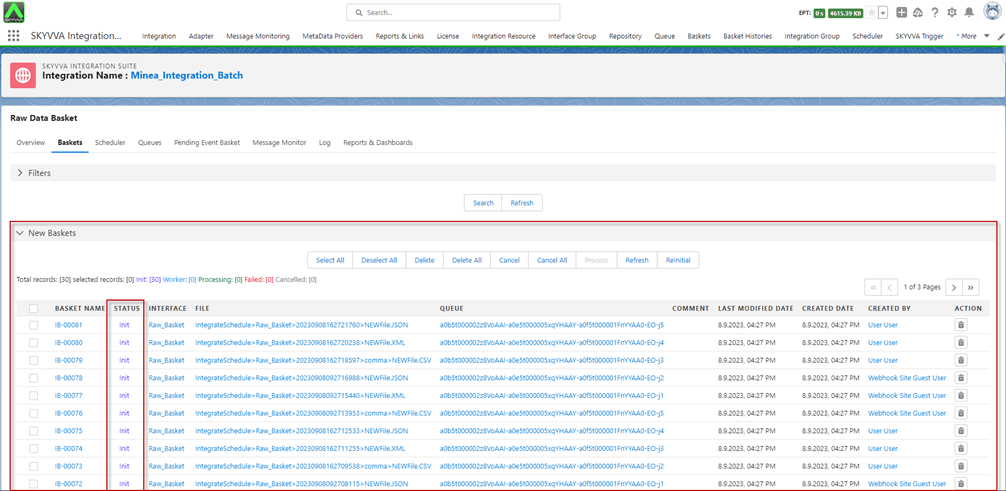
- Raw Basket Records Status: The raw basket records that have not been processed typically have a status of 'Init'. These records remain in the 'New Basket' section of the Raw Basket Control Board until they are processed.
- Processing Steps:
Manual Processing: Users can manually select the raw basket records they want to process.
- Scheduler: There is a scheduled process that is responsible for handling the processing of raw baskets with the 'Init' status.
- Manual Processing:
Users can manually select specific raw basket records they wish to process.
- This might involve a user interface where individuals can choose particular baskets for immediate processing.
- Scheduler Processing:
When the scheduled time arrives, the scheduler automatically processes all the raw baskets that have the 'Init' status.
- This automated process ensures that all eligible baskets are handled without manual intervention.
- Outcome:
Once processed, the status of these raw baskets likely changes from 'Init' to a different status, indicating completion or progression in the workflow.
- Processed baskets might move from the 'New Basket' section to a different section, indicating that they have been successfully handled.
- Control Board Monitoring:
The Raw Basket Control Board is the interface or platform where users can monitor the status of raw baskets.
- It likely displays information about the current status of baskets (e.g., 'New Basket' section) and possibly the history or logs of processed baskets.
Overall, this process offers both manual control (for specific selections) and automated handling (via the scheduler) to efficiently manage the processing of raw basket records.
Required step:
- Create an Integration
- Create an Inbound Interface
- Do Mapping
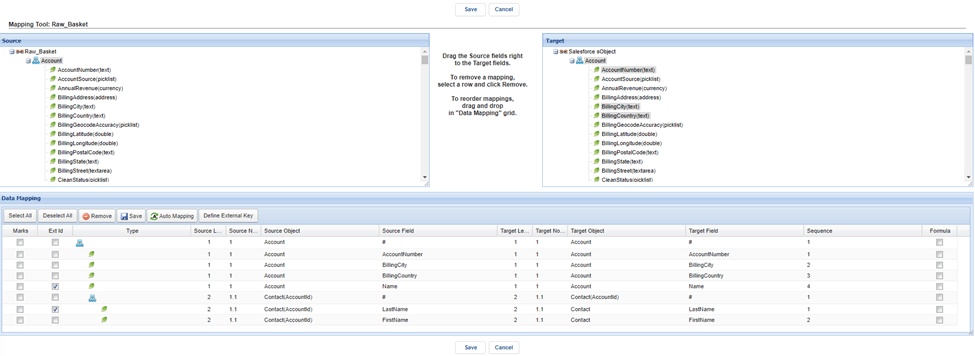
- Interface setting in the section “Runtime Configuration Inbound” set the field “Inbound Posting Behavior” = “Scheduled Apex”

- For Create Raw Basket, we have two options:
Use SKYVVA API V3/V4 Integrate
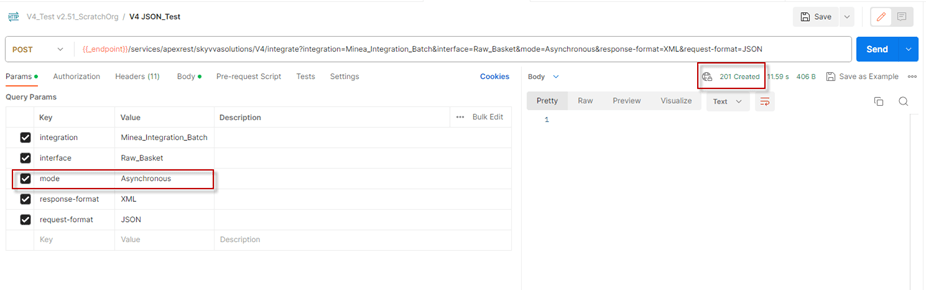
[su_box title="Result:" box_color="#2a8af0" title_color="#000000"]After clicking 'Send', there is no response body, and the Status Code is 201 Created.[/su_box]
[su_box title="Note" box_color="#2a8af0" title_color="#000000"]Mode is “Asynchronous”[/su_box]
- Use Webhook by Public Site and link Adapter on the Interface
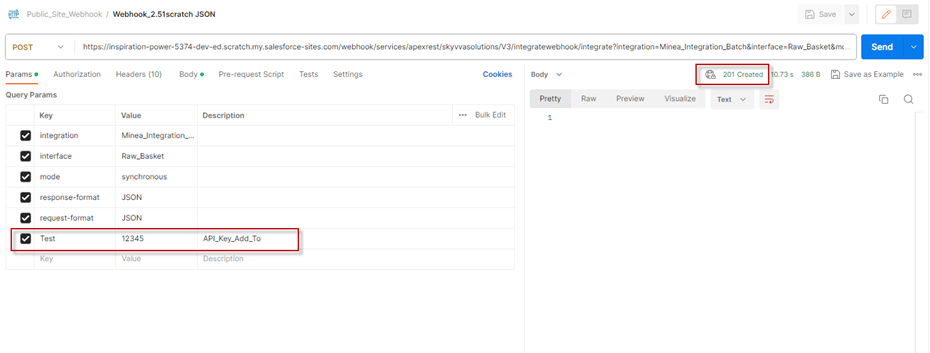
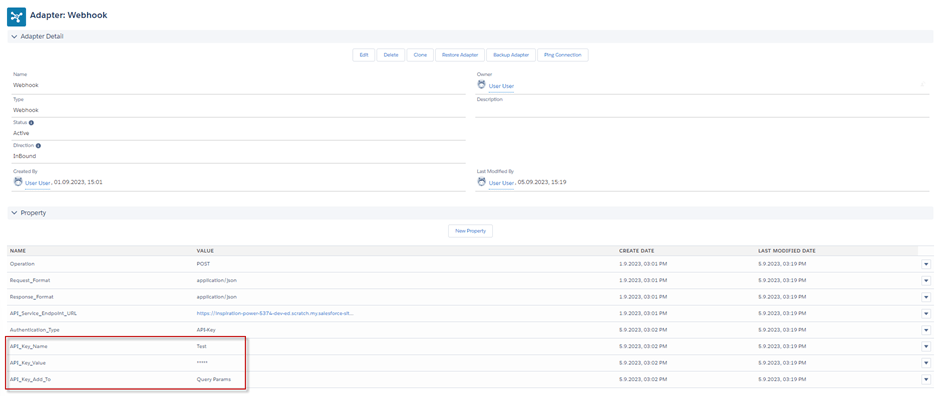
[su_box title="Result:" box_color="#2a8af0" title_color="#000000"]After clicking 'Send', there is no response body, and the Status Code is 201 Created.[/su_box]
[su_box title="Note" box_color="#2a8af0" title_color="#000000"]The API Key you have set on Postman is based on the Adapter Webhook.[/su_box]
- Go to Integration Details -> click Raw Basket Control Board -> you will see the New Basket with the status “Init”
- Processing those Raw Baskets, we have two ways to Process the Basket
Manually Processing
Select Baskets -> click Process button -> you can see pop-up screen Process Basket -> click Yes
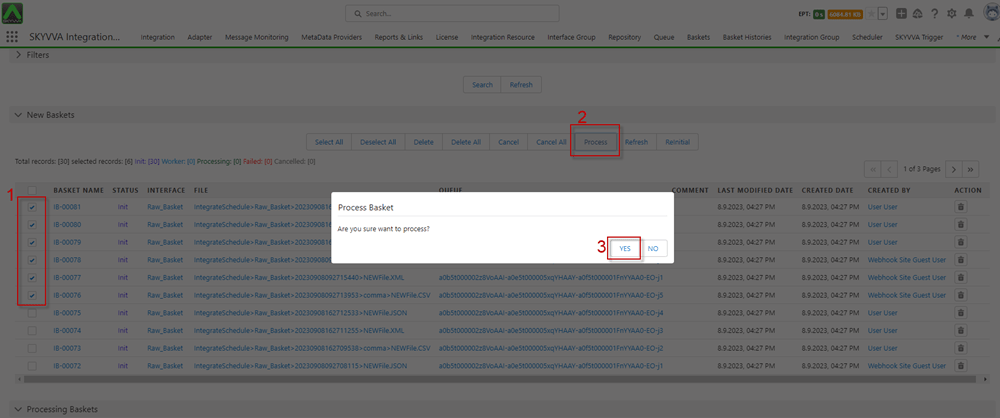
- After clicking Yes, the Baskets will be in the processing state, moving to the Processing Basket section, and their status will change to 'Processing'.

- After the job processing is completed, the Baskets also finish processing and move to the Basket Histories section, with their status changing to 'Completed'.

- Message Monitoring
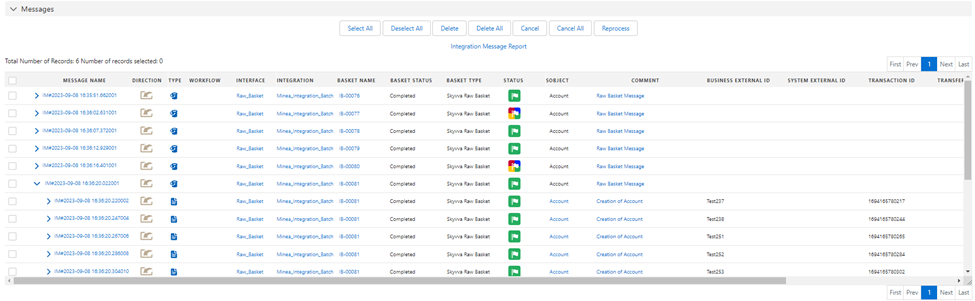
[su_box title="Result: " box_color="#2a8af0" title_color="#000000"]When you click the 'Process' button after selecting the raw baskets, they will be processed. Once the raw baskets are completed, they will be moved to the Basket Histories section.[/su_box]
- Scheduler Processing
User push 30 New Basket
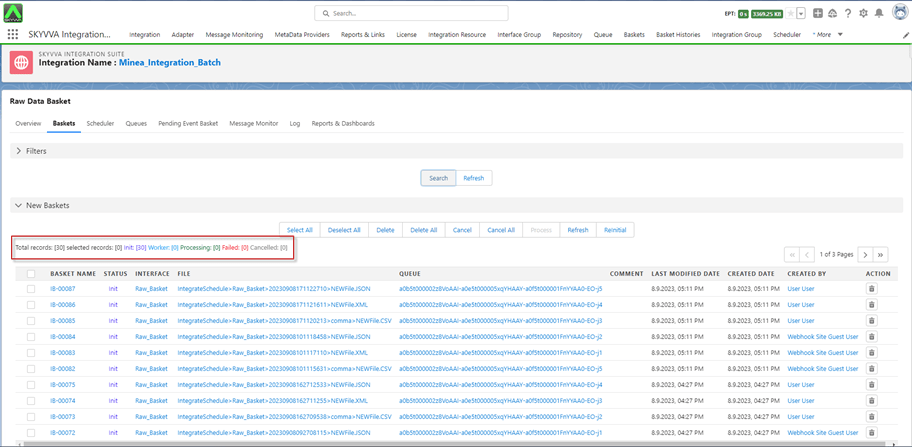
- Go to the Scheduler tab -> Start Run the Scheduler
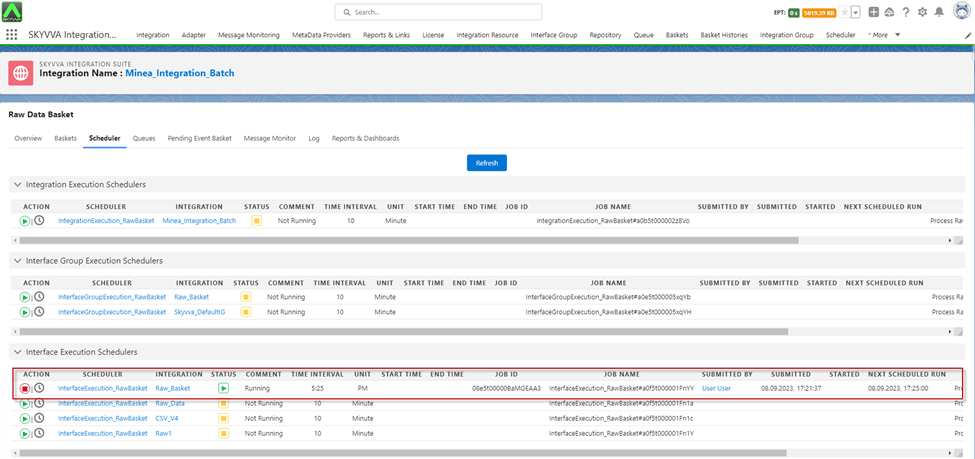
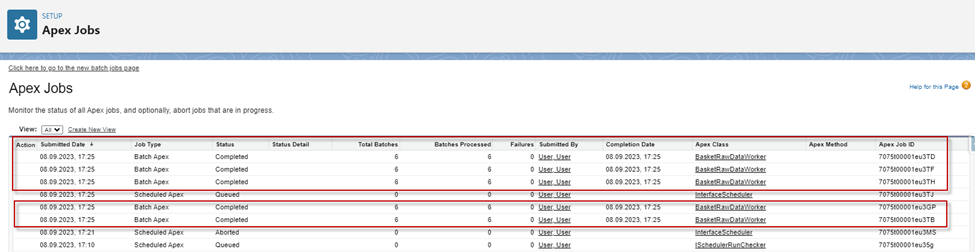
- After the scheduler runs, it will process all baskets in parallel if free jobs are available. Look at the screenshot below:
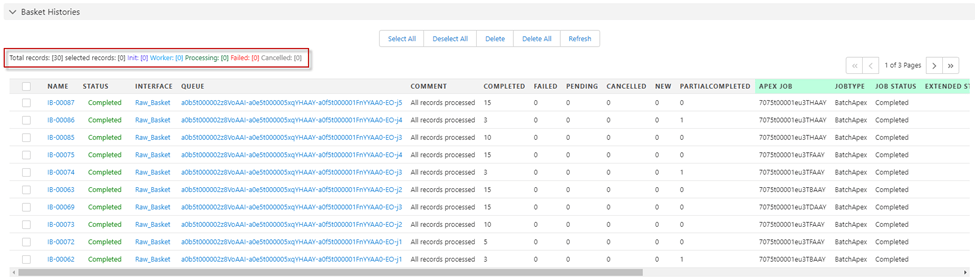
- After job processing is completed, the Basket is moved to the Basket Histories section and changed status to “Completed”
- Message Monitoring
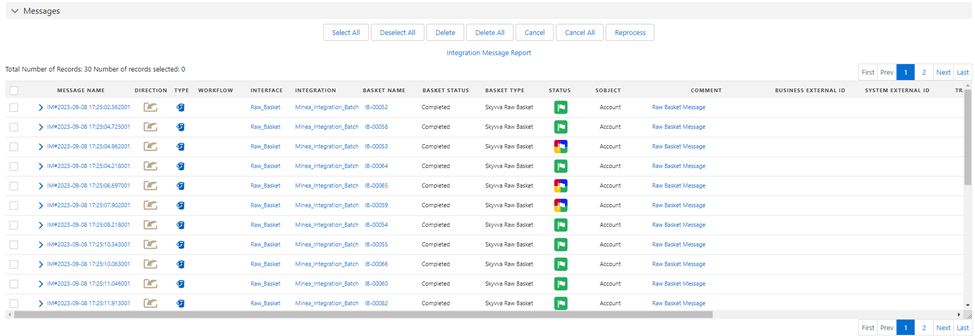
[su_box title="Result:" box_color="#2a8af0" title_color="#000000"]When the scheduler is ready to run at the set time, it will process all raw baskets with the status 'Init' in the New Baskets section. Once the raw baskets are completed, they will be moved to the Basket Histories section.[/su_box]
Scheduler Processing:
- Integration Execution Schedulers: The IntegrationExecution_RawBasket, schedulers will process all the Raw Baskets in the Integration.
- Interface Group Execution Schedulers: The InterfaceGroupExecution_RawBasket, schedulers will process all the Raw Baskets in the Interface Group.
- Interface Execution Schedulers: The InterfaceExecution_RawBasket, schedulers will process all the Raw Baskets in the interface.
[su_box title="Note:" box_color="#2a8af0" title_color="#000000"]We have the feature called 'Don't Process the Interface in Parallel' in the 'Batch Processing Runtime Behavior' field, located in the 'Batch Setting' section. This feature is used to process baskets per Job, and you can set the 'Query Limit for Batch & Bulk Processing' to control the number of baskets processed within the Interface Group. If you don't set a limit on the Interface Group, it will process all available baskets per job.[/su_box]
Case2: How to Processing the Raw Basket Control Board using Event Trigger Apex
Expectation
The sequence of events to follow these steps:
- Raw Basket Sent to SKYVVA: A raw basket is sent to SKYVVA, configured to process using the 'Event Trigger Apex'. When this happens, the basket is created with an initial status of 'Init'.
- Basket Published as an Event: Subsequently, the basket is published as an event. SKYVVA Trigger subscribes to these events.
- Trigger Execution: Upon subscription to the event, the SKYVVA Trigger executes the basket. This execution involves inbound processing.
- Processing Completion: After the execution, the basket completes its processing.
- Basket Moved to 'Basket Histories': Once the processing is complete, the basket is moved to the 'Basket Histories' section.
- Default User for Event Processing: The event processing, by default, is handled by the user 'Automated Process'. This user is assigned as the default user for event processing.
This flow outlines the lifecycle of a basket from its initial creation to its processing and eventual movement to the 'Basket Histories' section. The 'Event Trigger Apex' and the SKYVVA Trigger handle the execution and processing steps, and the default user 'Automated Process manages the event processing.
Required step:
- Create an Integration
- Create an Inbound Interface
- Do Mapping
- Interface setting in the section “Runtime Configuration Inbound” set the field “Inbound Posting Behavior” = “Event Trigger Apex”
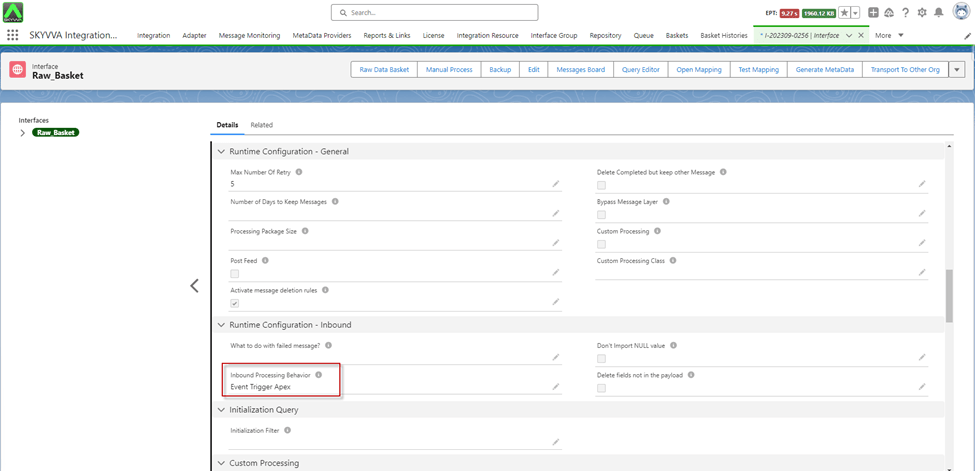
- For Create Raw Basket, we have two options:
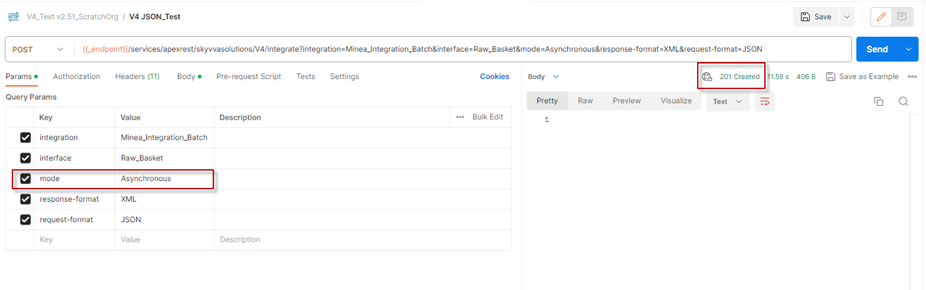
- Use SKYYVA API V3/V4 Integrate
Push Records from Postman using API V3/V4 Integrate with Mode Asynchronous
- Use Webhook by Public Site and link Adapter on the Interface
- Push Records from Postman using Webhook by Public Site
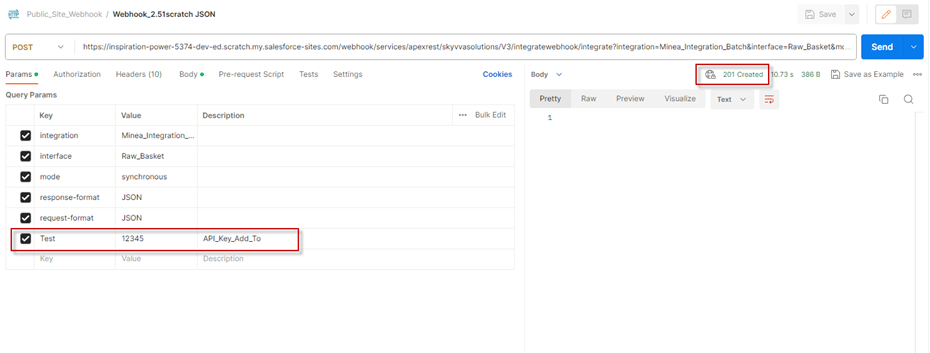
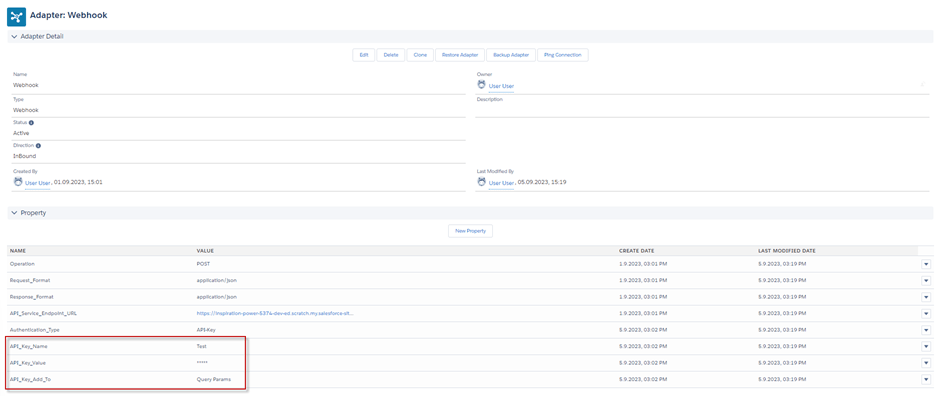
- After clicking Send -> when it responds with Status 201, it indicates that the Basket has been created. It also checks the 'Event Trigger Apex' on the Interface, causing its status is change to 'Worker'. The baskets are then displayed in the 'Pending Event Basket'

- After the basket processing is completed, those baskets are moved to Basket Histories
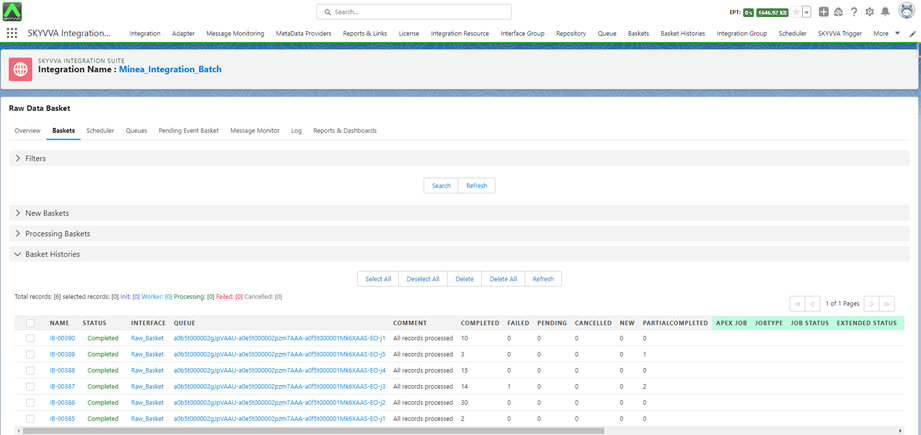
- Also, that you can see the basket has been processed by the “Automated Process” user by default.

- Message Monitoring

[su_box title="Note" box_color="#2a8af0" title_color="#000000"] (This configuration Batch Size for Platform Event Trigger)[/su_box]
Example of processing Event Basket:
- 10-20 basket processes in one trigger in the same transaction: A trigger initiates processing a set of 10-20 baskets (collections of items or data) within a single transaction in an SKYVVA application.
- The user processes each of them one by one in the same transaction: After the trigger initiates the processing, each basket within that set (10-20 baskets) is processed sequentially, one after the other, still within the same transaction context. This sequential handling ensures that each basket's processing occurs independently but within the same overarching transactional boundary.
- Basket1 > Posted spend 20 Queries, Basket2 > Posted spend 20 Queries... 100 queries hit limit: This means that each basket processing involves a certain number of queries (database requests, or operations). As each basket is processed one by one within the same transaction, a limit of 100 queries is imposed, potentially causing an issue when processing the subsequent baskets. Once the limit of 100 queries is reached cumulatively across all the baskets processed in the transaction, it can result in a limitation, potentially affecting further processing or triggering an SKYVVA app-defined limit.
- If there is any limit issue and not able to process e.g., Too many SOQL queried: 101.

We can set configure (PlatformEventSubscriberConfig) this setting is not mandatory because the batch size of the message could be set by the number of records and specify the ‘Automate Process’ user. By default, the trigger runs as the “Automated Process” system user with a batch size of 2,000 event messages.
- Setting Batch Size: Instead of processing all baskets at once in a single trigger transaction, the suggestion is to limit the batch size to, say, 5 baskets per transaction. By doing this, it might take a bit longer to process as each batch will have fewer baskets, but it helps avoid hitting limits imposed by Salesforce.
- Query Limits: With a smaller batch size (5 baskets in this case), each basket's processing involves, let's say, 20 queries. So, for those 5 baskets, the user is using up a total of 100 queries. To avoid exceeding the query limit, the transaction ends after these 100 queries (after processing these 5 baskets).
- Sequential Processing: The remaining baskets that haven't been processed (those beyond the first batch of 5 baskets) will be handled in subsequent trigger transactions. For example, another trigger transaction would process the next set of 5 baskets, ensuring that each batch stays within the query limit and avoids hitting Salesforce limits.
You can configure it anyway by following the salesforce document link: – Configure the User and Batch Size for Your Platform Event Trigger with PlatformEventSubscriberConfig
[su_box title="Example with Rest API using Postman:" box_color="#2a8af0" title_color="#000000"]URL: ‘URL_Salesforce_Classic’/services/data/v57.0/tooling/sobjects/PlatformEventSubscriberConfig
Method: POST
Body:
{
"BatchSize": "5",
"DeveloperName":"trgEventSubscriberConfig",
"MasterLabel":"trgEventSubscriberConfig",
"PlatformEventConsumerId":"01q5t0000002cIiAAI",
"UserId":"0055t000004C9jIAAS"
}[/su_box]
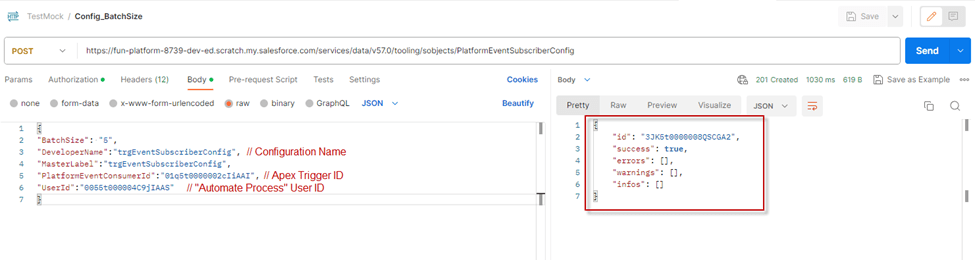
Apex Trigger ID:
*Select id, Name from Apextrigger*

Query the Configuration PlatformEventSubscriberConfig:
*Select id, DeveloperName, MasterLabel, PlatformEventConsumerId, PlatformEventConsumer.Name, UserId, User.Name, BatchSize from PlatformEventSubscriberConfig*

Summary
Now users understand the purpose of a raw basket and utilize SKYVVA tools to create, populate, process, and transmit data within it, users can facilitate seamless integration between disparate systems or applications, ensuring efficient data flow and manipulation.