10. Functional Category screen pop-up on multi-picklist
Description: We need to enhance the filter screen of the scheduler. Change Multi-Picklist on Functional Category that shows as a pop-up screen.
- Identify the Current Implementation:
The current implementation of the filter screen and the Multi-Picklist on the Functional Category.
- Identify the technology stack and framework used in the scheduler in the SKYVVA Integration application.
- Modify the Multi-Picklist:
Locate the flow responsible for rendering the Multi-Picklist on the Functional Category.
- Enhance the Multi-Picklist to suit business requirements better. This involves improving its appearance, adding new values, and modifying the behavior.
- Introduce Pop-up Screen:
Create a new pop-up screen that will display the Multi-Picklist.
- This pop-up is triggered from the scheduler's generic page, on the filter section.
- Connect Pop-up to Multi-Picklist:
Ensure that the pop-up screen is connected to the Multi-Picklist, and any changes made in the pop-up are reflected in the Multi-Picklist on the scheduler page.
Case: Multi-Picklist Functional Category is pop up on the generic page of the scheduler
Required step:
- Go to global Scheduler, and we can see the section Filters at function “Functional Category” It has been changed screen pop-up on multi-picklist.
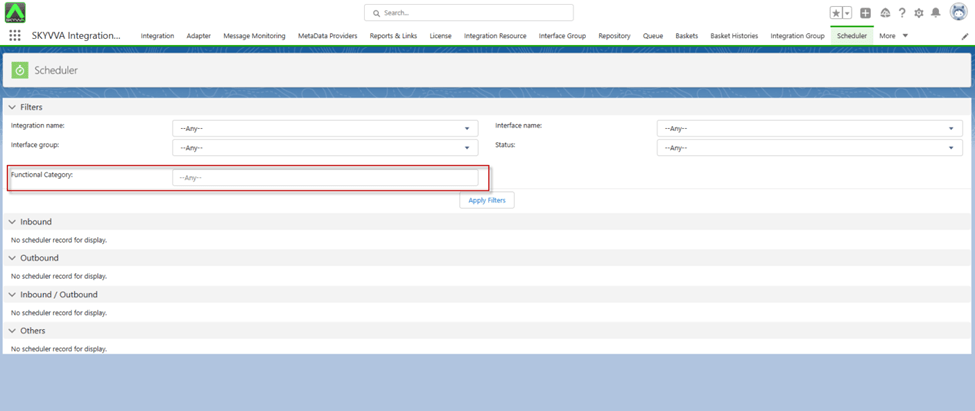
- Select Information filters if you want to Apply Filter Scheduler
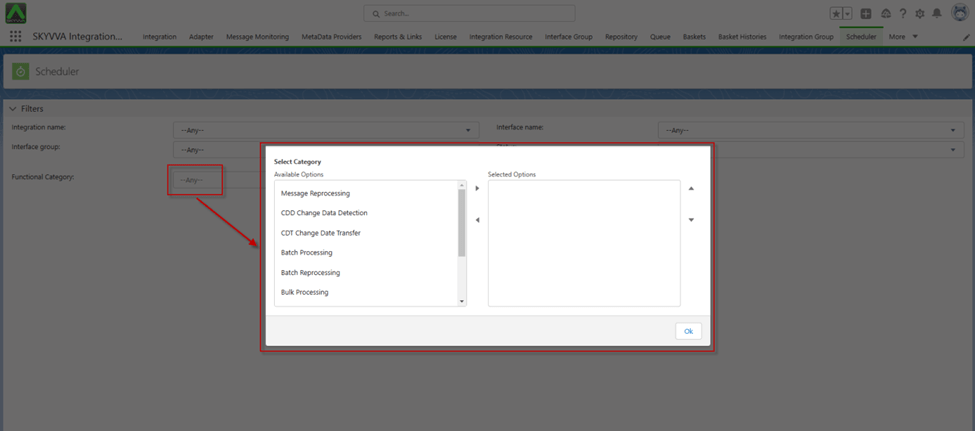
[su_box title="Result:" box_color="#2a8af0" title_color="#000000"]The user has successfully achieved the goal of changing the multi-picklist on the Functional Category to pop up on the generic page of the scheduler in the SKYVVA integration application. This is the expected result, that's great news![/su_box]