138.How to transfer Salesforce business data to store in OneDrive.
Learning Objectives :- This unit describes:-
- About Microsoft OneDrive.
- Microsoft Microsoft OneDrive.
Introduction
This tutorial is to show our new OneDrive connector to save data from Salesforce into a OneDrive file.With Microsoft OneDrive, you can easily and securely store and access your files from all your devices. You can work with others regardless of whether they're inside or outside your organization and terminate that sharing whenever you want. OneDrive helps protect your work through advanced encryption while the data is in transit and at rest in data centers.
Pre-required:
- Create Integration.
- Create Microsoft OneDrive connection by using Microsoft control board.
Introduction:- Microsoft OneDrive:
- Microsoft'scloud storage service, OneDrive, can back up your personal and work files online.
- With it you cansync files on your Windows 10 PC to the cloud and to your other Windows PCs, smartphone or tablet (with the OneDrive app for Android or iOS installed on either).
- We can easily transfer Salesforce Business data to store in Microsoft OneDrive.
How to configure Adapter in Microsoft Control Board: Step 1: Create Integration: To know detail about Integration, please follow this tutorial. What is Integration, and How to use it?
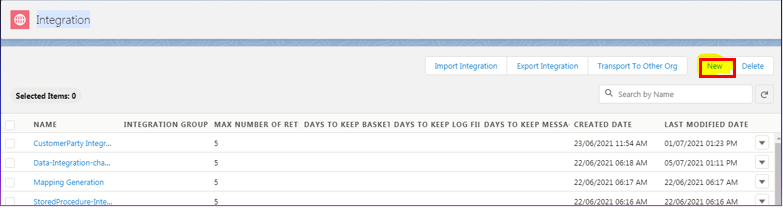
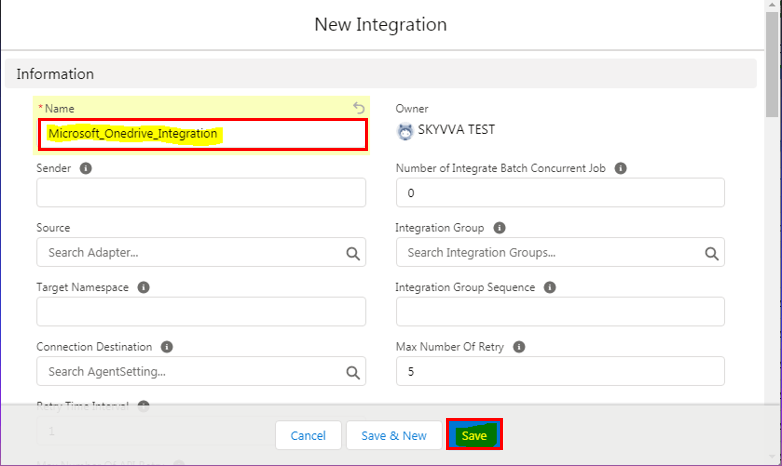
Save it. Step 2: Click on Microsoft Control Board link.

Step 3: Click on the adapter tab.

Step 4: Click on New button and select adapter type as a Microsoft OneDrive and fill all information base on your configuration and save.
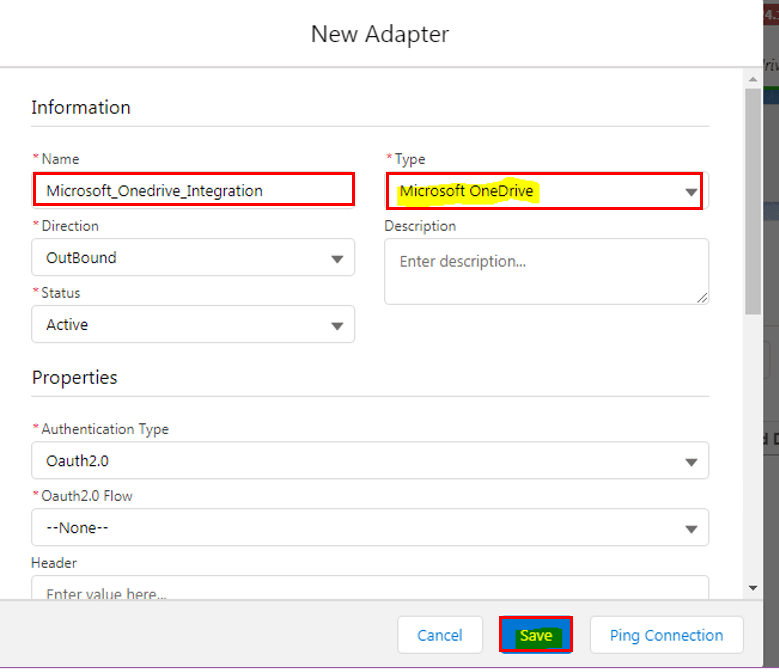
Save it. Microsoft One Drive CSV Outbound Adapter : 1) Create Metadata Provider, IStructure Repository and Create Flat Structure. 2) How to Create Microsoft One Drive CSV Outbound Adapter: Go to Integration (Example: Microsoft_OneDrive_Integration) Create Outbound Adapter : MODrive_CSV_Request_Adp(Please follow above steps for create adapter.
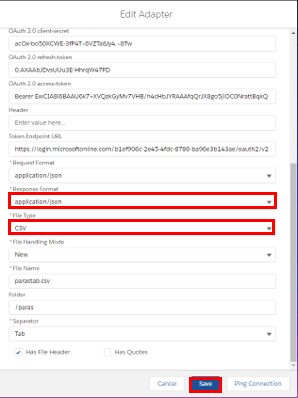
Save it. Create Integration and Outbound Interface: Integration: Microsoft_OneDrive_Integration Outbound Interface: MODrive_CSV_Request
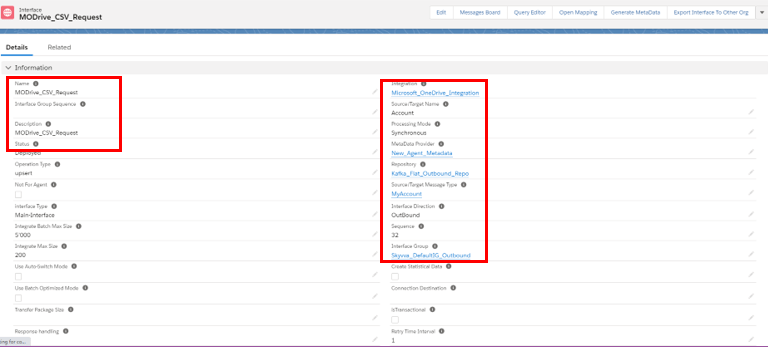
Link Outbound Adapter: MODrive_CSV_Request_Adp

Mapping:
What is SKYVVA Mapping Tool?
SKYVVA’s Mapping tool is a tool to map other system objects and fields with the SFDC object field. A mapping is a collection of key-value pairs where each unique key maps to a single value. Here we will map source fields with target object fields. Source fields are nothing but our Istructure. We can create Istructure as:
- Manually
- Uploading file in source definition.
- Using the Message type feature.
You can refer below link for more details about Mapping: #article/how-to-use-mapping
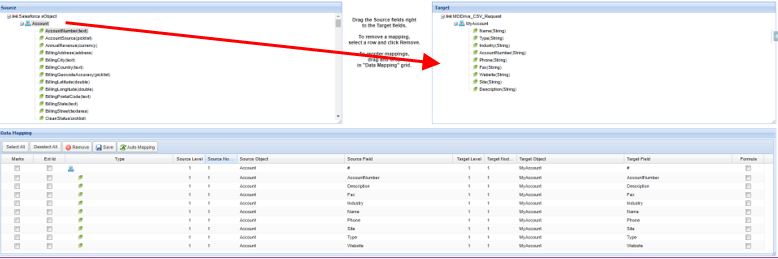
The above picture show the Source to Target: Callout: skyvvasolutions.CallOutControl c = new skyvvasolutions.CallOutControl(); c.returnJSONComplete=true; c.actionDoIntegrate=false; c.isCreateMessage=true; String[] ids= new String[]{'0011j000015ikjBAAQ','0011j000015ikjCAAQ'}; List

Check CSV Data on Microsoft One Drive Server:
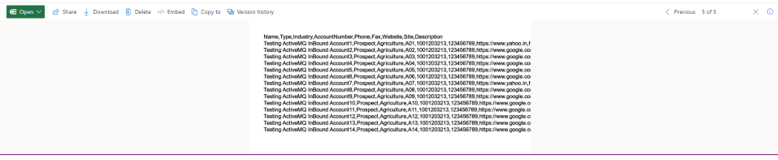
Note: when you are creating csv file then you can use , ; Tab And | operator with Microsoft one drive outbound adapter.