158. How to use Microsoft Dynamics 365 Adapter ?
Introduction
The 'Dynamics 365 Business Central' is based on 'Dynamics Nav' and is the cloud variant of Dynamics Nav. The 'Dynamics 365 for Finance and Operations' or now rebranded to 'Dynamics 365 for Operations' is the cloud variant of 'Dynamics AX'. Microsoft has rebranded the product to the 365 families as Dynamics 365 xx. The old name that doesn't have the 3 numbers 365 is the old name and mostly used for the on-premise offering.
Microsoft Dynamics 365 (Microsoft Dynamics 365 Adapter) enables integration with the Microsoft Dynamics 365 Cloud API.
This connector enables you to perform operations to:
- Authorize or unauthorize server access
- Create, update, and delete entities
- Retrieve a single entity or query multiple entities
- Associate and disassociate entities
- Execute actions
Prerequisites
- SKYVVA app have access to the Microsoft Dynamics 365 target resource . User also must understand how to create a SKYVVA app integration using Design Center.
- Obtain a client ID and secret for your app by logging in to the Microsoft Azure Active Directory portal at portal.azure.com.
- Before starting User need access to a Microsoft Dynamics 365 instance for which Azure Active Directory is the Identity Provider that provides access to SKYVVA.
How to configure Microsoft Dynamics 365 Adapter in Microsoft Control Board:
- Create Integration.
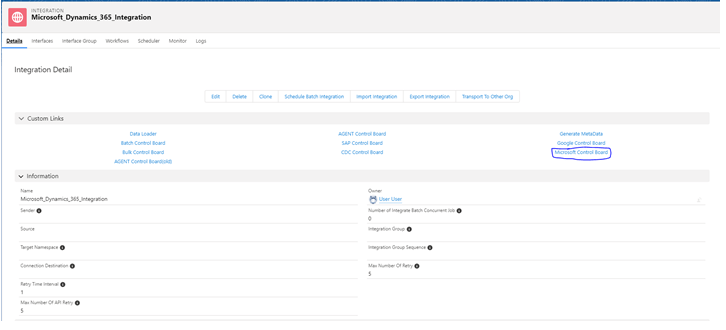
- Microsoft_Dynamics_365_Integration and click on Microsoft Control Board link.
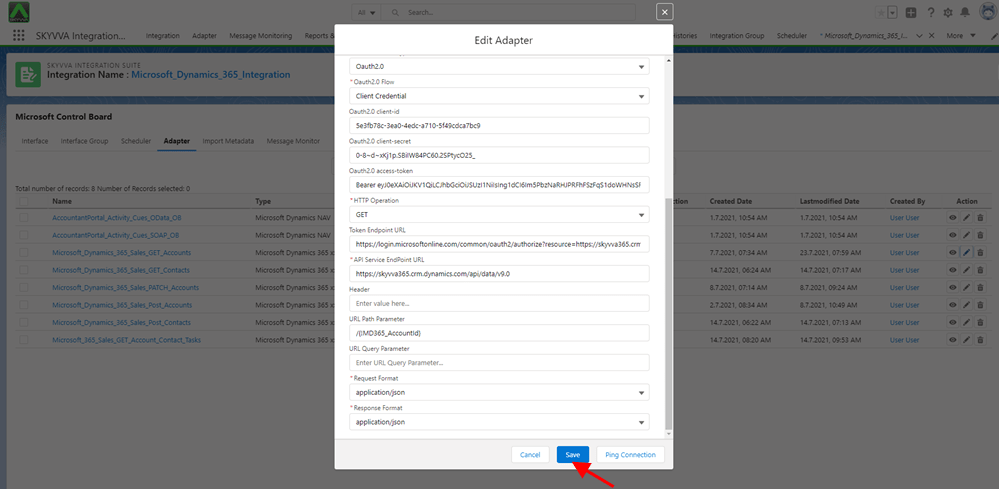
- Click on the adapter tab.

- Click on New button and select adapter type as a Microsoft OneDrive and fill all information base on your configuration.

Microsoft Dynamics 365 Outbound Adapter
- Create Rest Template (Metadata,Repository, MsgType) using Microsoft dynamics 365 service request payload.
[aux_code language="javascript" theme="tomorrow" title="" extra_classes=""]{ "Microsoft_Dynamics_365_Sales_Post_Accounts":{ "Request":{ "URL":{ "PATH Parameter":{ //flat Structure }, "QUERY Parameter":{ //flat Structure } }, "Header":{ //flat Structure }, "Body":{ //flat Structure //Custom Hierarchical Business Message type } }, "Response":{ "root":{ //json payload } } } } [/aux_code]
Test Case: 1
How to Create Account in Microsoft Dynamics 365 using Outbound Adapter:
- Go to Integration (Example: Microsoft_Dynamics_365_Integration)
- Create Outbound Adapter : Microsoft_Dynamics_365_Sales_Post_Accounts_OB
- (Please follow above steps for create adapter)

- Metadata: Microsoft_Metadata
- Repository: Microsoft_Dynamics_365_Repo

Create Integration and Outbound Interface:
- Integration: Microsoft_Dynamics_365_Integration
- Outbound Interface: Microsoft_Dynamics_365_Sales_Post_Accounts_OB
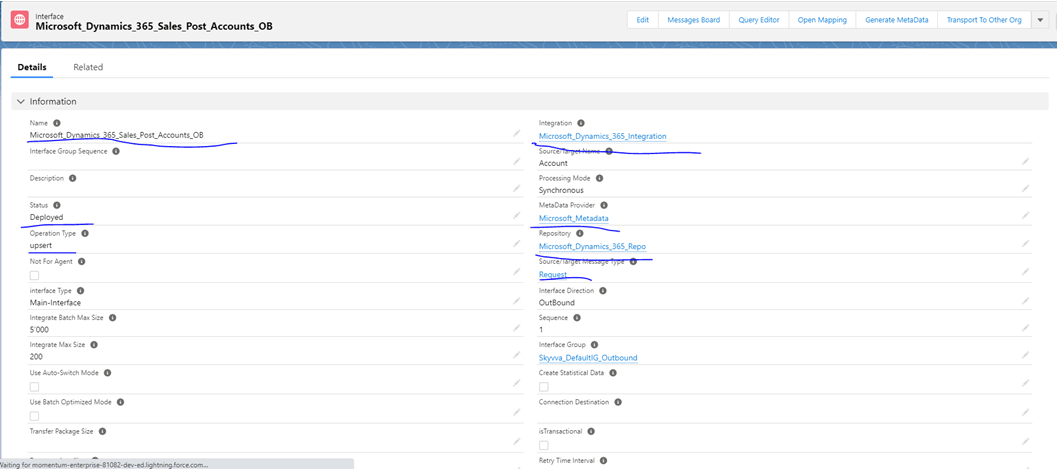
- Link Outbound Adapter: Microsoft_Dynamics_365_Sales_Post_Accounts

- Mapping

- Callout
[aux_code language="javascript" theme="tomorrow" title="" extra_classes=""]skyvvasolutions.CallOutControl c = new skyvvasolutions.CallOutControl(); c.returnJSONComplete=true; c.actionDoIntegrate=false; c.isCreateMessage=true; String[] ids= new String[]{'0013N00000iusLTQAY'}; Listresult=skyvvasolutions.Iservices.invokeCalloutV3('Microsoft_Dynamics_365_Integration','Microsoft_Dynamics_365_Sales_Post_Accounts_OB',ids,'SYNC',c); [/aux_code]
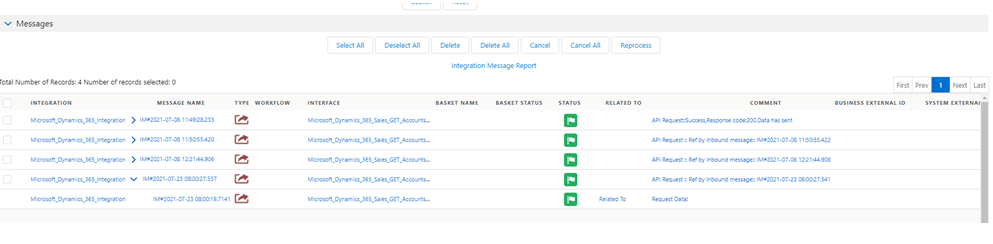
- Message Monitoring
Test Case: 2
How to Get Account in Microsoft Dynamics 365 using Outbound Adapter:
- Go to Integration (Example: Microsoft_Dynamics_365_Integration)
- Create Outbound Adapter: Microsoft_Dynamics_365_Sales_GET_Accounts_OB
- (Please follow above steps for create adapter)
Create Rest Template (Metadata,Repository, MsgType) using Microsoft dynamics 365 service request payload. [aux_code language="javascript" theme="tomorrow" title="" extra_classes=""]{ "Microsoft_Dynamics_365_Sales_GET_Accounts":{ "Request":{ "URL":{ "PATH Parameter":{ //flat Structure }, "QUERY Parameter":{ //flat Structure } }, "Header":{ //flat Structure }, "Body":{ //flat Structure //Custom Hierarchical Business Message type } }, "Response":{ "root":{ //json payload } } } } [/aux_code]
- Metadata: Microsoft_Metadata
- Repository: Microsoft_Dynamics_365_Repo
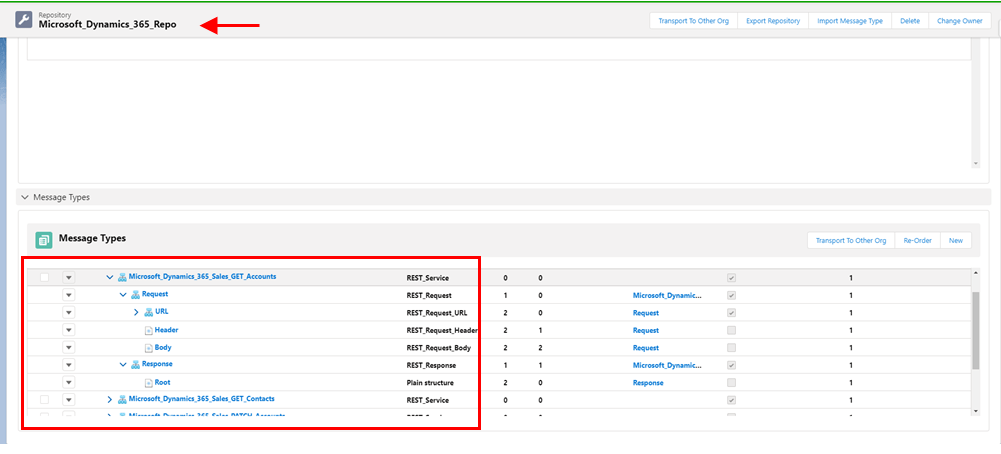
Create Integration and Outbound Interface:
- Integration: Microsoft_Dynamics_365_Integration
- Outbound Interface: Microsoft_Dynamics_365_Sales_GET_Accounts_OB

- Link Outbound Adapter: Microsoft_Dynamics_365_Sales_Post_Accounts

- Mapping: here I’m using dynamic path parameter and account id is coming from sObject custom field.

- Link Inbound Interface with Outbound Interface: Microsoft_Dynamics_365_Sales_GET_Accounts_IB

- Inbound Interface: Microsoft_Dynamics_365_Sales_GET_Accounts_IB

- Mapping

- Callout
[aux_code language="javascript" theme="tomorrow" title="" extra_classes=""]skyvvasolutions.CallOutControl c = new skyvvasolutions.CallOutControl(); c.returnJSONComplete=true; c.actionDoIntegrate=true; c.isCreateMessage=true; String[] ids= new String[]{'0013N00000iusLSQAY'}; Listresult=skyvvasolutions.Iservices.invokeCalloutV3('Microsoft_Dynamics_365_Integration','Microsoft_Dynamics_365_Sales_GET_Accounts_OB',ids,'SYNC',c); [/aux_code]
- Message Monitoring

Test Case: 3
How to Create Contact in Microsoft Dynamics 365 using Outbound Adapter:
- Go to Integration (Example: Microsoft_Dynamics_365_Integration)
- Create Outbound Adapter : Microsoft_Dynamics_365_Sales_Post_Contacts_OB
- (Please follow above steps for create adapter)

Create Rest Template (Metadata, Repository, MsgType) using Microsoft dynamics 365 service request payload. [aux_code language="javascript" theme="tomorrow" title="" extra_classes=""]{ "Microsoft_Dynamics_365_Sales_Post_Contacts":{ "Request":{ "URL":{ "PATH Parameter":{ //flat Structure }, "QUERY Parameter":{ //flat Structure } }, "Header":{ //flat Structure }, "Body":{ //flat Structure //Custom Hierarchical Business Message type } }, "Response":{ "root":{ //json payload } } } } [/aux_code]
- Metadata: Microsoft_Metadata
- Repository: Microsoft_Dynamics_365_Repo
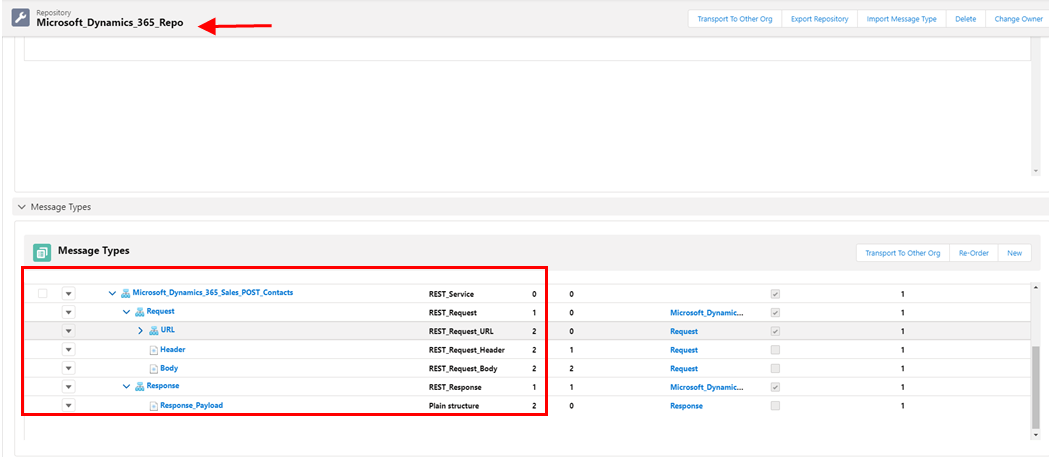
Create Integration and Outbound Interface:
- Integration: Microsoft_Dynamics_365_Integration
- Outbound Interface: Microsoft_Dynamics_365_Sales_Post_Contacts_OB
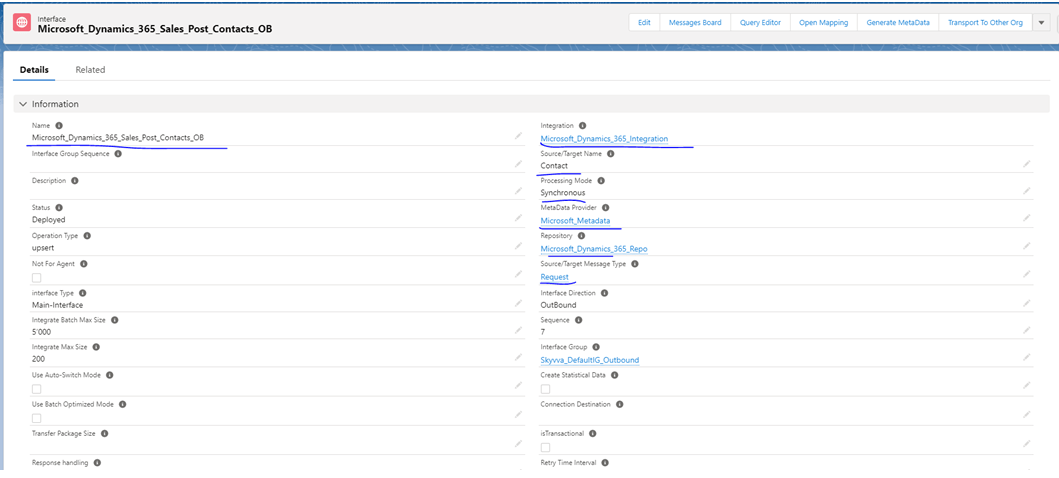
- Link Outbound Adapter: Microsoft_Dynamics_365_Sales_Post_Contacts

- Mapping
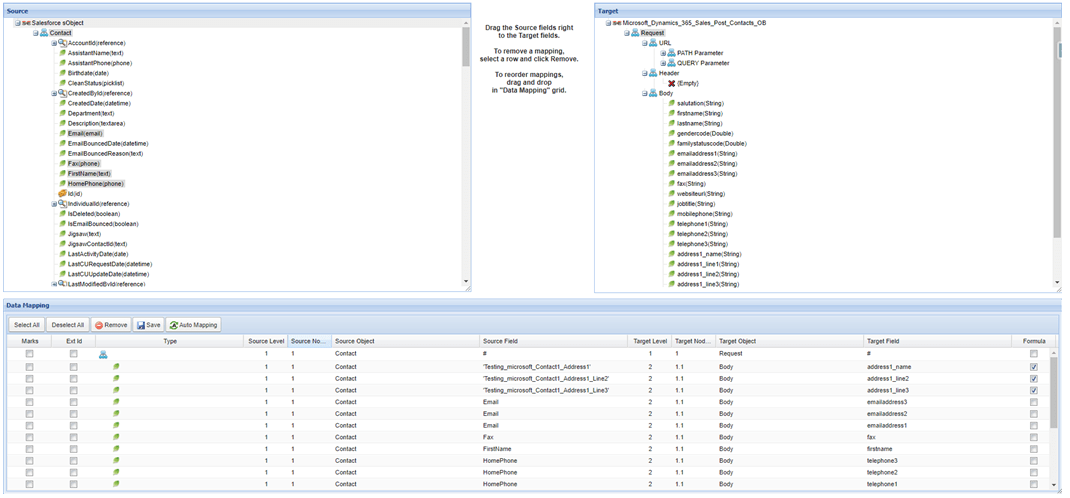
- Callout
[aux_code language="javascript" theme="tomorrow" title="" extra_classes=""]skyvvasolutions.CallOutControl c = new skyvvasolutions.CallOutControl(); c.returnJSONComplete=true; c.actionDoIntegrate=false; c.isCreateMessage=true; String[] ids= new String[]{'0033N00000axUXkQAM'}; Listresult=skyvvasolutions.Iservices.invokeCalloutV3('Microsoft_Dynamics_365_Integration','Microsoft_Dynamics_365_Sales_POST_Contacts_OB',ids,'SYNC',c); [/aux_code]
- Message Monitoring
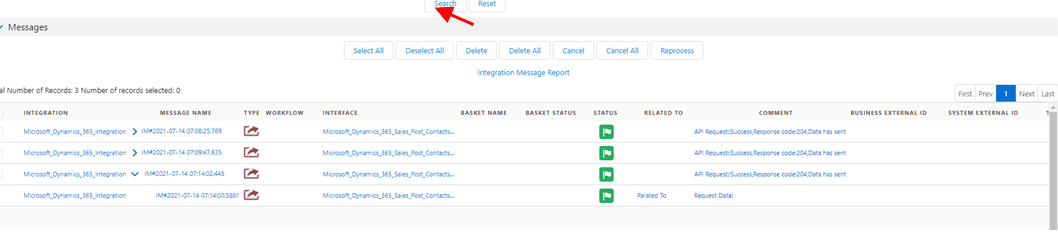
Test Case: 4
How to Get Contact in Microsoft Dynamics 365 using Outbound Adapter:
- Go to Integration (Example: Microsoft_Dynamics_365_Integration)
- Create Outbound Adapter: Microsoft_Dynamics_365_Sales_GET_Contacts_OB
- (Please follow above steps for create adapter)
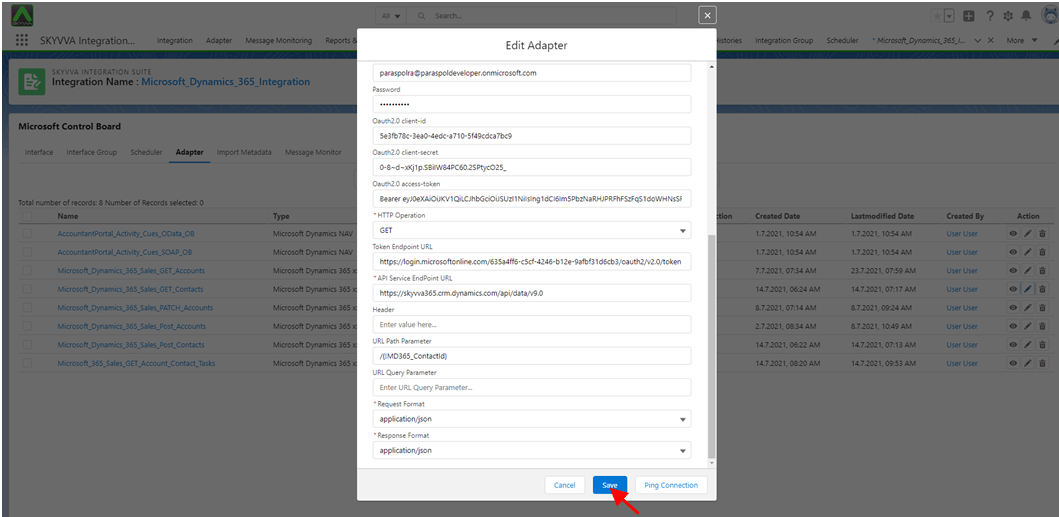
Create Rest Template (Metadata,Repository, MsgType) using Microsoft dynamics 365 service request payload. [aux_code language="javascript" theme="tomorrow" title="" extra_classes=""]{ "Microsoft_Dynamics_365_Sales_GET_Contacts":{ "Request":{ "URL":{ "PATH Parameter":{ //flat Structure }, "QUERY Parameter":{ //flat Structure } }, "Header":{ //flat Structure }, "Body":{ //flat Structure //Custom Hierarchical Business Message type } }, "Response":{ "root":{ //json payload } } } } [/aux_code]
- Metadata: Microsoft_Metadata
- Repository: Microsoft_Dynamics_365_Repo
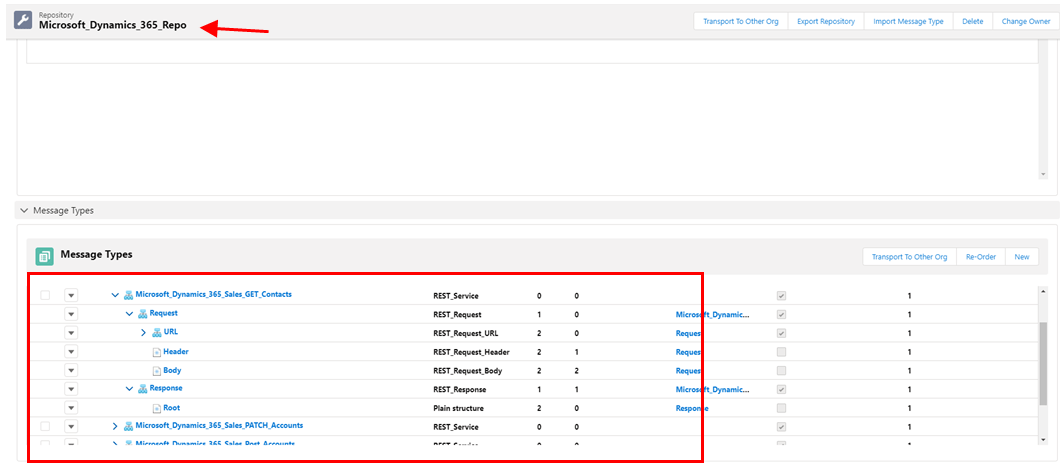
Create Integration and Outbound Interface:
- Integration: Microsoft_Dynamics_365_Integration
- Outbound Interface: Microsoft_Dynamics_365_Sales_GET_Contacts_OB

- Link Outbound Adapter: Microsoft_Dynamics_365_Sales_GET_Contacts

- Mapping: here I’m using dynamic path parameter and account id is coming from sObject custom field.
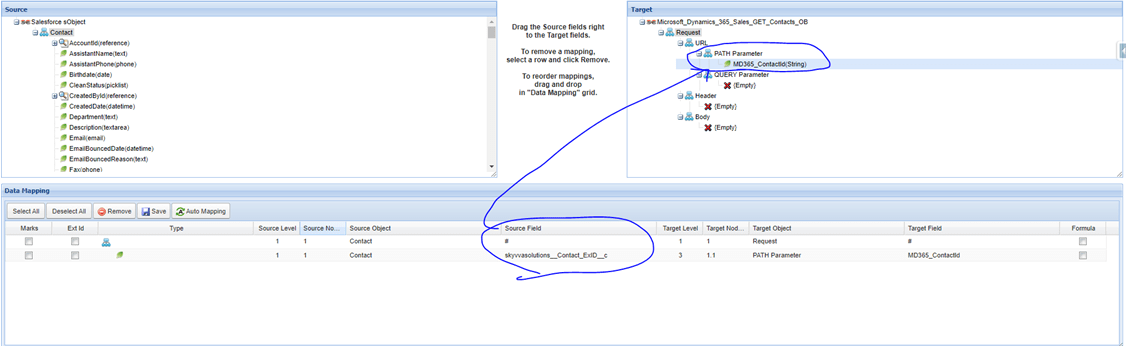
- Link Inbound Interface with Outbound Interface: Microsoft_Dynamics_365_Sales_GET_Contacts_IB

- Inbound Interface: Microsoft_Dynamics_365_Sales_GET_Contacts_IB
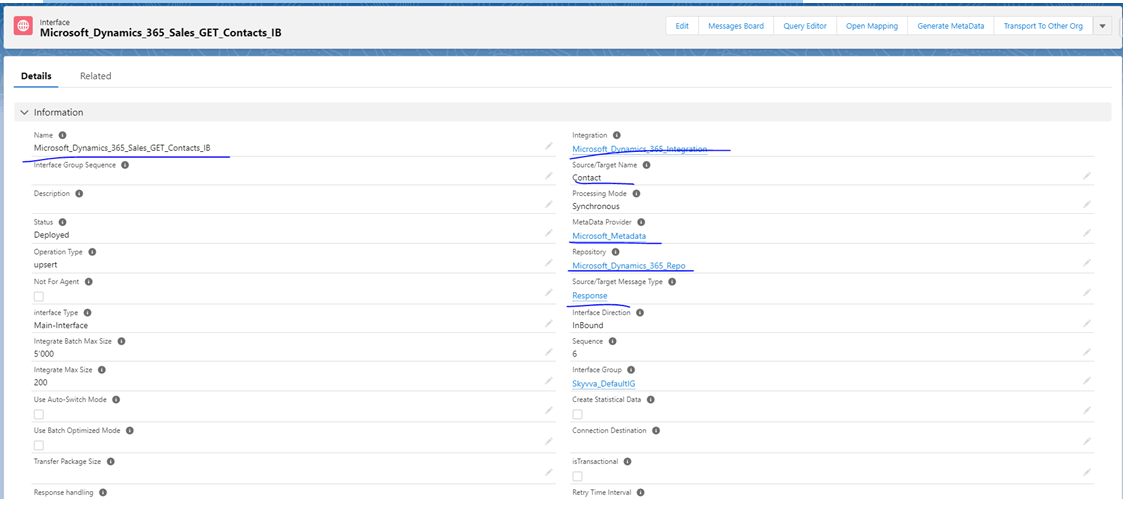
- Mapping

- Callout
[aux_code language="javascript" theme="tomorrow" title="" extra_classes=""]skyvvasolutions.CallOutControl c = new skyvvasolutions.CallOutControl(); c.returnJSONComplete=true; c.actionDoIntegrate=true; c.isCreateMessage=true; String[] ids= new String[]{'0033N00000axUXkQAM'}; Listresult=skyvvasolutions.Iservices.invokeCalloutV3('Microsoft_Dynamics_365_Integration','Microsoft_Dynamics_365_Sales_GET_Contacts_OB',ids,'SYNC',c); [/aux_code]
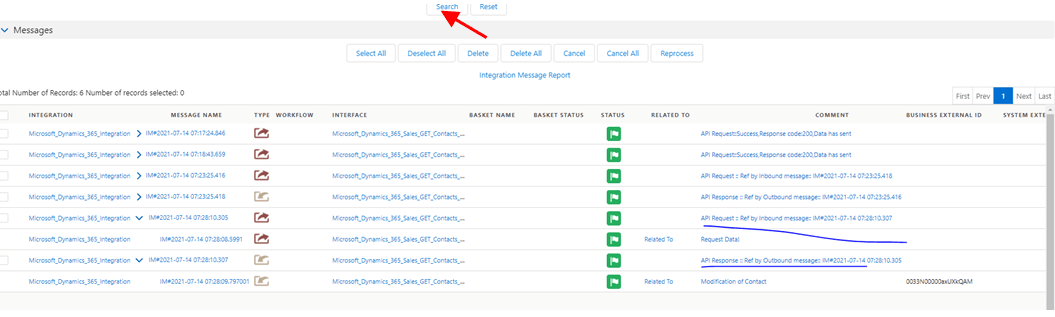
- Message Monitoring
Test Case: 5
How to Get Account, Contacts, Tasks in Microsoft Dynamics 365 using Outbound Adapter:
- Go to Integration (Example: Microsoft_Dynamics_365_Integration)
- Create Outbound Adapter: Microsoft_365_Sales_GET_Account_Contact_Tasks_OB
- (Please follow above steps for create adapter)
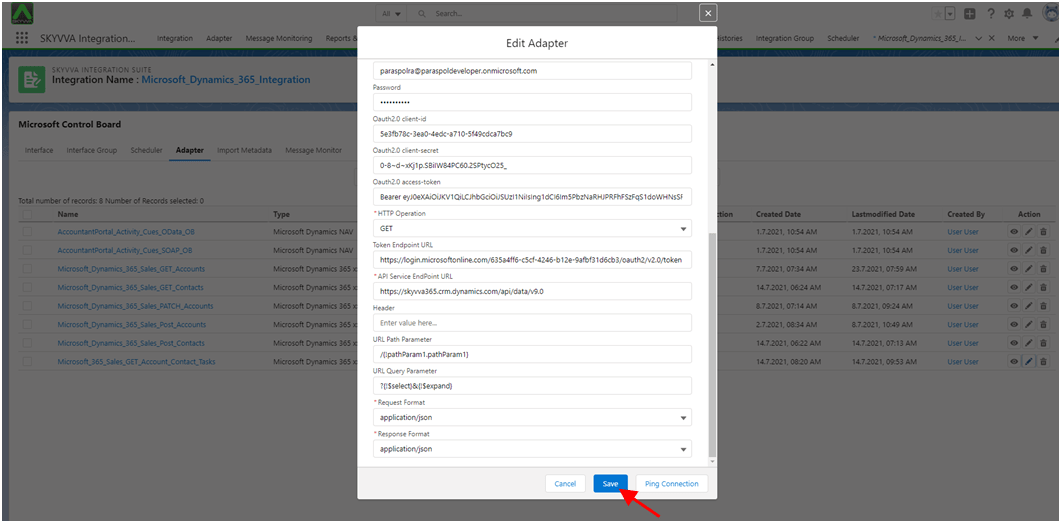
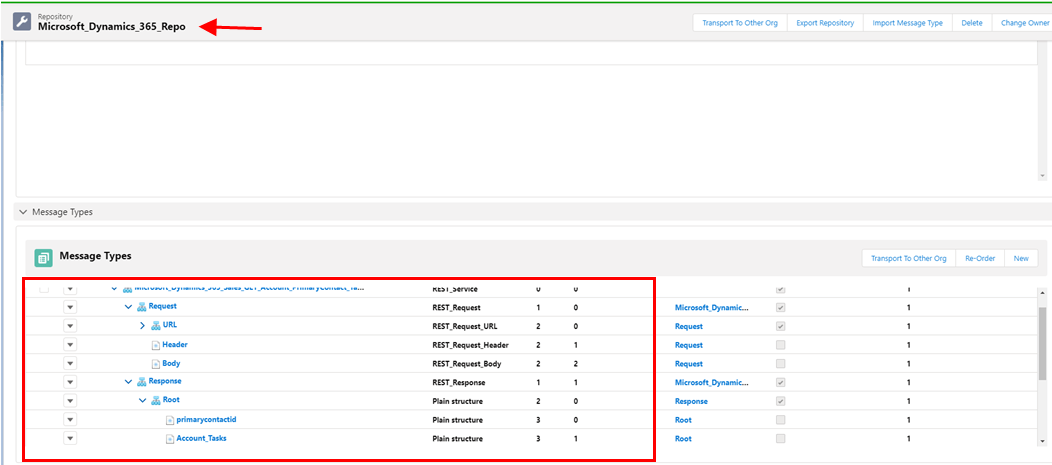
Create Rest Template (Metadata,Repository, MsgType) using Microsoft dynamics 365 service request payload. [aux_code language="javascript" theme="tomorrow" title="" extra_classes=""]{ "Microsoft_Dynamics_365_Sales_GET_Account_Contact_Tasks":{ "Request":{ "URL":{ "PATH Parameter":{ //flat Structure }, "QUERY Parameter":{ //flat Structure } }, "Header":{ //flat Structure }, "Body":{ //flat Structure //Custom Hierarchical Business Message type } }, "Response":{ "root":{ //json payload } } } } [/aux_code]
- Metadata: Microsoft_Metadata
- Repository: Microsoft_Dynamics_365_Repo
Create Integration and Outbound Interface:
- Integration: Microsoft_Dynamics_365_Integration
- Outbound Interface: Microsoft_365_Sales_GET_Account_Contact_Tasks_OB

- Link Outbound Adapter: Microsoft_365_Sales_GET_Account_Contact_Tasks

- Mapping: here I’m using dynamic path parameter and account id is coming from sObject custom field.
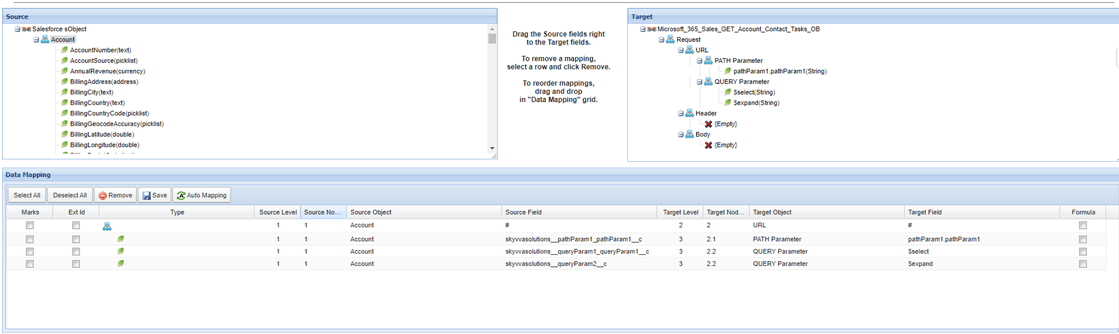
- Link Inbound Interface with Outbound Interface: Microsoft_365_Sales_GET_Account_Contact_Tasks_IB

- Inbound Interface: Microsoft_365_Sales_GET_Account_Contact_Tasks_IB
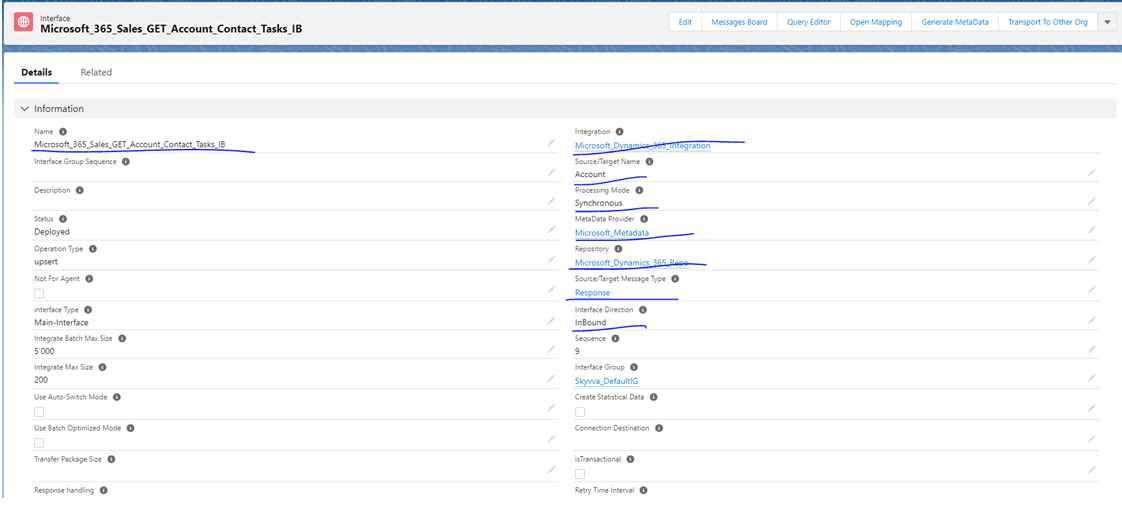
- Mapping

- Callout
[aux_code language="javascript" theme="tomorrow" title="" extra_classes=""]skyvvasolutions.CallOutControl c = new skyvvasolutions.CallOutControl(); c.returnJSONComplete=true; c.actionDoIntegrate=true; c.isCreateMessage=true; String[] ids= new String[]{'0013N00000jFRydQAG'}; Listresult = skyvvasolutions.Iservices.invokeCalloutV3('Microsoft_Dynamics_365_Integration','Microsoft_365_Sales_GET_Account_Contact_Tasks_OB',ids,'SYNC',c); [/aux_code]
- Message Monitoring
