14. Behavior of Sibling and Uncle node
The default behavior of the Sibling and Uncle node
When we use parent data to a child node, we copy data from parent to child. This means it repeats the data of the parent for all children.
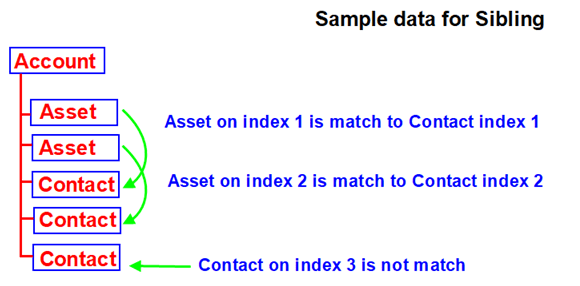
- In the case of a Sibling, we are making a pair of the couple and repeating the data from brother and sister with a couple. Ex: When the current node has 2 occurrences and the brother/sister has 3 occurrences then we are creating 2 couples and map the data accordingly. These mean 1 occurrence gets lost because we cannot build a pair/couple for them.
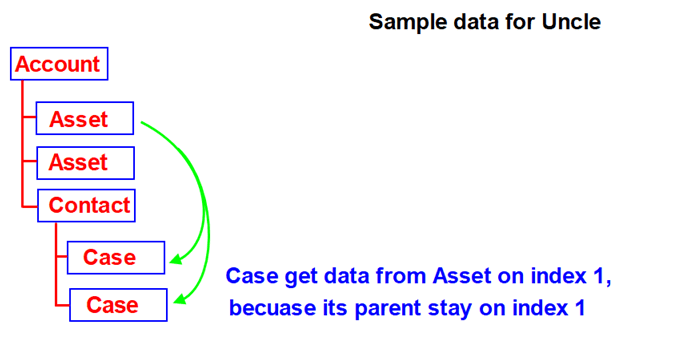
- In the case of the uncle, we are taking an occurrence of the parent node. EX: we have 2 uncles and 1parent then we take only 1occurrence and we are losing 1occurrence.
- ### Sibling node
- In the below data, we have 1 Account,1 Asset, and 2 Contact including its child.
- Asset and Contact are siblings because they stay on the same level and have the same parent
<Response> <AccountTestV3> <AccountNumber>20001</AccountNumber> <Name>TestAccount1-SB</Name> <BillingCountry>Cambodia1</BillingCountry> <BillingCity>PhnomPenh1</BillingCity> <Account_ID>101</Account_ID> <Description>Test description ACCOUNT object</Description> <AssetTestV3> <AssetName>Test-Asset_01</AssetName> <Asset_ID>10</Asset_ID> <Description>Test description ASSET object</Description> <Quantity>2.3412</Quantity> <SerialNumber>AS-000121</SerialNumber> </AssetTestV3> <ContactTestV3> <Cont_ID>201</Cont_ID> <LastName>TestContact_01</LastName> <FirstName>DContact2</FirstName> <Email>Dtest.2019_201@gmail.com</Email> <Phone>301</Phone> <Description>Test description CONTACT object</Description> <CaseTestV3> <Subject>TestCase Agent-01</Subject> <SuppliedPhone>401</SuppliedPhone> <status>Failed</status> <Case_Id>2001</Case_Id> <Description>Test description CASE object</Description> </CaseTestV3> </ContactTestV3> <ContactTestV3> <Cont_ID>401</Cont_ID> <LastName>TestContact_02</LastName> <FirstName>CContact2</FirstName> <Email>ctest.2019_102@gmail.com</Email> <Phone>102</Phone> <Description>Test description CONTACT object</Description> </ContactTestV3> </AccountTestV3> </Response>
Do Mapping
- In this case, we have mapped “ContactTestV3” to the target object node. Then we map the field from “AssetTestV3” to target. Because we want to retrieve data from “AssetTestV3”.

[su_box title="The result on Message Monitoring " box_color="#2a8af0" title_color="#000000"]The data is displayed correctly. Because “AssetTestV3” has only one occurrence but “ContactTestV3” has two occurrences. So the “ContactTestV3” on index 2 cannot get data from “AssetTestV3”.[/su_box]

UseCase with Uncle node
- In the below data, we have 1 Account,2 Asset, and 3 Contacts including its child as a Case.
- Asset and Contact are the siblings. Then Asset is the uncle of Case. It is the same thing as in real-life family relationships.
<Response> <AccountTestV3> <AccountNumber>20001</AccountNumber> <Name>TestAccount1-SB</Name> <BillingCountry>Cambodia1</BillingCountry> <BillingCity>PhnomPenh1</BillingCity> <Account_ID>101</Account_ID> <Description>Test description ACCOUNT object</Description> <AssetTestV3> <AssetName>Test-Asset_01</AssetName> <Asset_ID>10</Asset_ID> <Description>Test description ASSET object</Description> <Quantity>2.3412</Quantity> <SerialNumber>AS-000121</SerialNumber> </AssetTestV3> <AssetTestV3> <AssetName>Test-Asset_02</AssetName> <Asset_ID>20</Asset_ID> <Description>Test description ASSET object</Description> <Quantity>2.3412</Quantity> <SerialNumber>AS-000122</SerialNumber> </AssetTestV3> <ContactTestV3> <Cont_ID>201</Cont_ID> <LastName>TestContact_01</LastName> <FirstName>DContact2</FirstName> <Email>Dtest.2019_201@gmail.com</Email> <Phone>301</Phone> <Description>Test description CONTACT object</Description> <CaseTestV3> <Subject>TestCase Agent-01</Subject> <SuppliedPhone>401</SuppliedPhone> <status>Failed</status> <Case_Id>2001</Case_Id> <Description>Test description CASE object</Description> </CaseTestV3> <CaseTestV3> <Subject>TestCase Agent-02</Subject> <SuppliedPhone>501</SuppliedPhone> <status>Failed</status> <Case_Id>3001</Case_Id> <Description>Test description CASE object</Description> </CaseTestV3> </ContactTestV3> <ContactTestV3> <Cont_ID>401</Cont_ID> <LastName>TestContact_02</LastName> <FirstName>CContact2</FirstName> <Email>ctest.2019_102@gmail.com</Email> <Phone>102</Phone> <Description>Test description CONTACT object</Description> <CaseTestV3> <Subject>TestCase Agent-03</Subject> <SuppliedPhone>202</SuppliedPhone> <status>Failed</status> <Case_Id>4001</Case_Id> </CaseTestV3> </ContactTestV3> <ContactTestV3> <Cont_ID>801</Cont_ID> <LastName>TestContact_03</LastName> <FirstName>CContact3</FirstName> <Email>ctest.2019_103@gmail.com</Email> <Phone>103</Phone> <Description>Test description CASE object</Description> <CaseTestV3> <Subject>TestCase Agent-04</Subject> <SuppliedPhone>204</SuppliedPhone> <status>Failed</status> <Case_Id>4004</Case_Id> </CaseTestV3> </ContactTestV3> </AccountTestV3> </Response>
Do Mapping
- In this case, we have mapped “CaseTestV3” to the target object node. Then we map the field from “AssetTestV3” to target. Because we want to retrieve data from “AssetTestV3”.
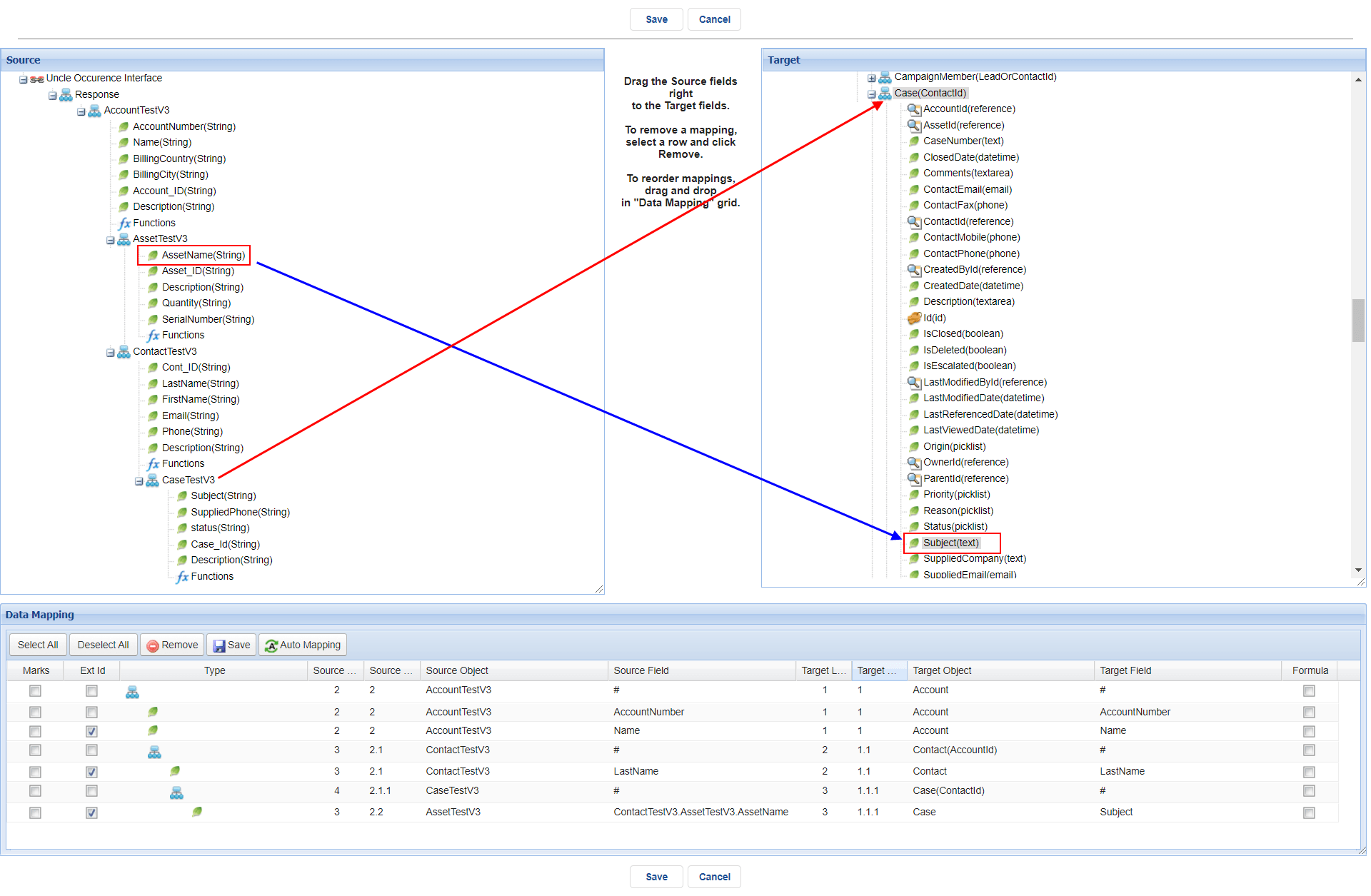
[su_box title="The result on Message Monitoring" box_color="#2a8af0" title_color="#000000"]The data is displayed correctly. Because “AssetTestV3” has only 2 occurrences but “ContactTestV3” has 3 occurrences. So the “CaseTestV3” of “ContactTestV3” on index 3 cannot get data from “AssetTestV3”.[/su_box]

Filter Condition of Sibling and Uncle node Filter Sibling
- In this data, I have 1 Account, 3 assets,s and 1 Contact including its child. Asset and Contact are siblings, if I want to take data from Asset to Contact by default it will take from the index 1. But at this time, we can set a condition to pick up data from any Asset that we need.
[su_box title="Note" box_color="#F91113" title_color="#000000"]The condition value must be unique. If the condition is not unique then run-time will display incorrect results.[/su_box]
<Response> <AccountTestV3> <AccountNumber>20001</AccountNumber> <Name>TestAccount1-SB</Name> <BillingCountry>Cambodia1</BillingCountry> <BillingCity>PhnomPenh1</BillingCity> <Account_ID>101</Account_ID> <Description>Test description ACCOUNT object</Description> <AssetTestV3> <AssetName>Test-Asset_01</AssetName> <Asset_ID>10</Asset_ID> <Description>Test description ASSET object</Description> <Quantity>2.3412</Quantity> <SerialNumber>AS-000121</SerialNumber> </AssetTestV3> <AssetTestV3> <AssetName>Test-Asset_02</AssetName> <Asset_ID>20</Asset_ID> <Description>Test description ASSET object</Description> <Quantity>2.3412</Quantity> <SerialNumber>AS-000122</SerialNumber> </AssetTestV3> <AssetTestV3> <AssetName>Test-Asset_03</AssetName> <Asset_ID>30</Asset_ID> <Description>Test description ASSET object</Description> <Quantity>2.3432</Quantity> <SerialNumber>AS-000123</SerialNumber> </AssetTestV3> <ContactTestV3> <Cont_ID>201</Cont_ID> <LastName>TestContact_01</LastName> <FirstName>DContact2</FirstName> <Email>Dtest.2019_201@gmail.com</Email> <Phone>301</Phone> <Description>Test description CONTACT object</Description> <CaseTestV3> <Subject>TestCase Agent-01</Subject> <SuppliedPhone>401</SuppliedPhone> <status>Failed</status> <Case_Id>2001</Case_Id> <Description>Test description CASE object</Description> </CaseTestV3> <CaseTestV3> <Subject>TestCase Agent-02</Subject> <SuppliedPhone>402</SuppliedPhone> <status>Failed</status> <Case_Id>2002</Case_Id> <Description>Test description CASE object</Description> </CaseTestV3> </ContactTestV3> </AccountTestV3> </Response>
Do Mapping
- In this example “AssetTestV3” and “ContactTestV3” are the sibling because they stay on the same level and have the same parent that is “AccountTestV3”
- We choose “ContactTestV3” as the master node to map to the Contact object then take data from the field “AssetName” of node“AssetTestV3”

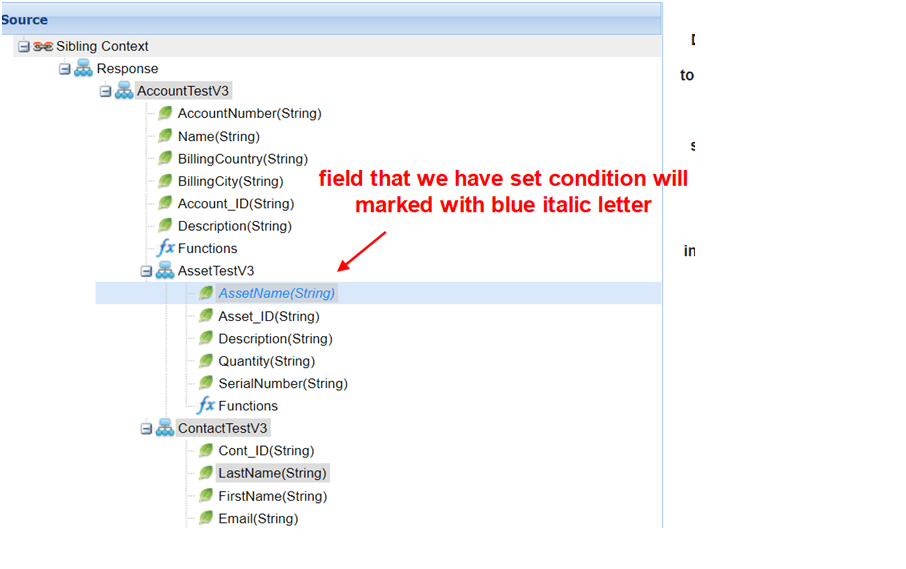
- Click “Set/Remove Filter”: this function allows the user to set the condition that they want. If we want to change or remove the condition, then we can go back to this function.
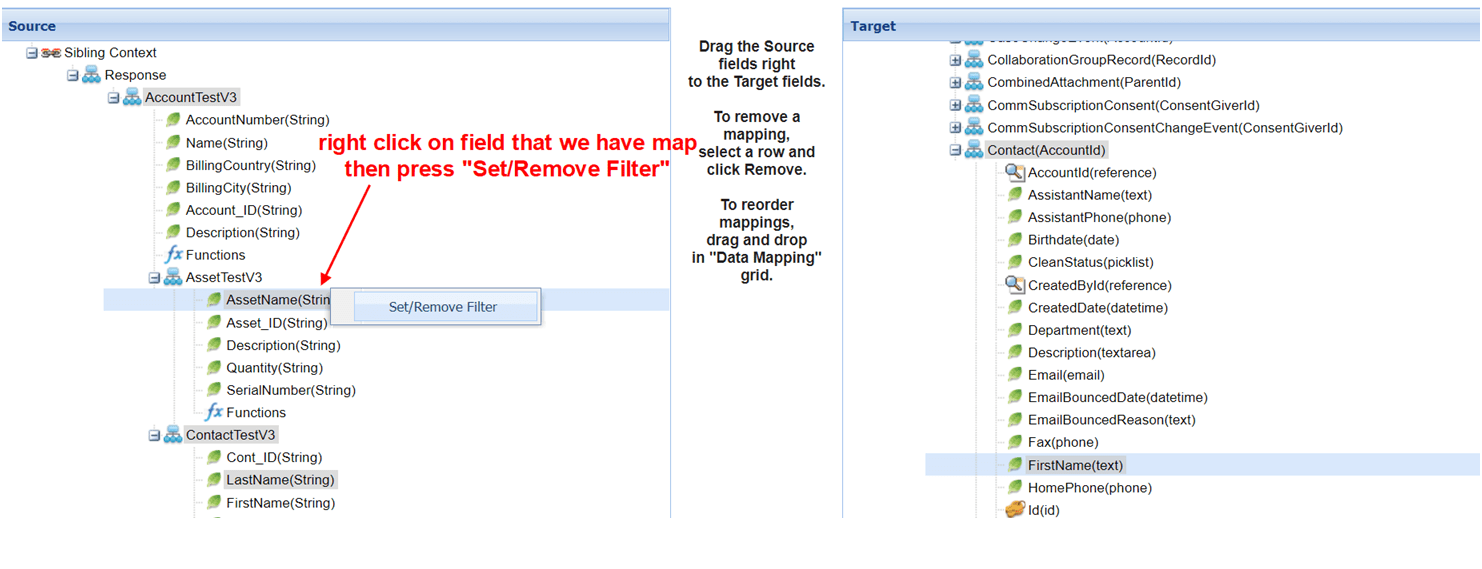
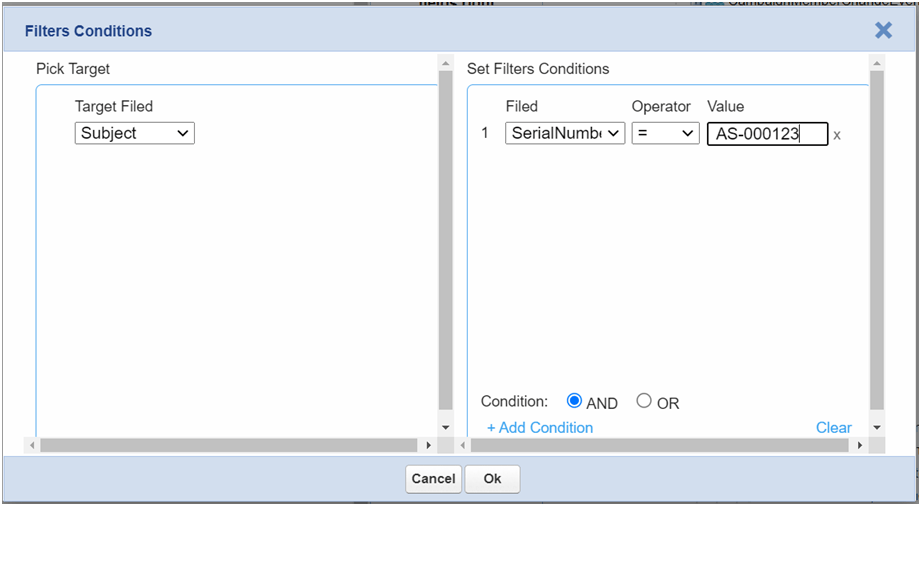
- A pop-up form will display to set the condition
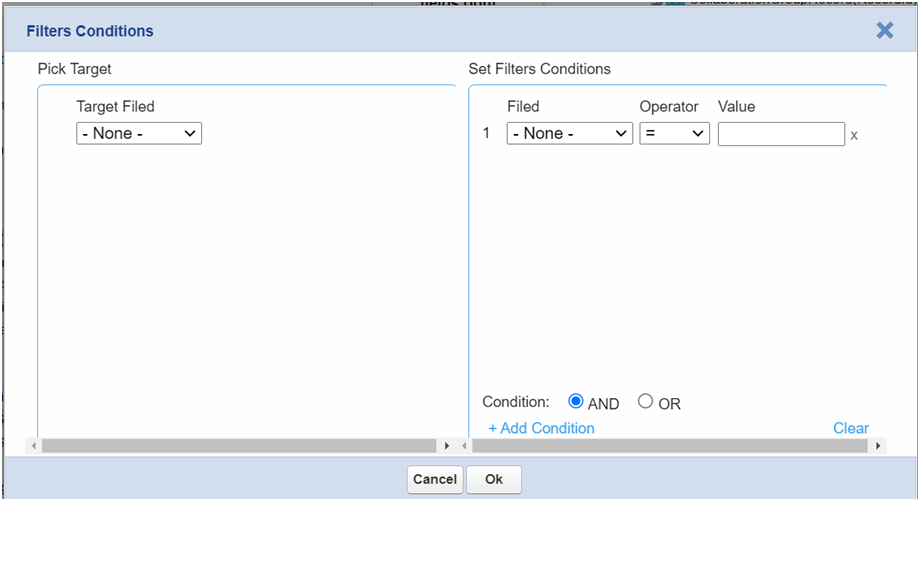
- Choose the target field

- Set the condition and click Ok to save

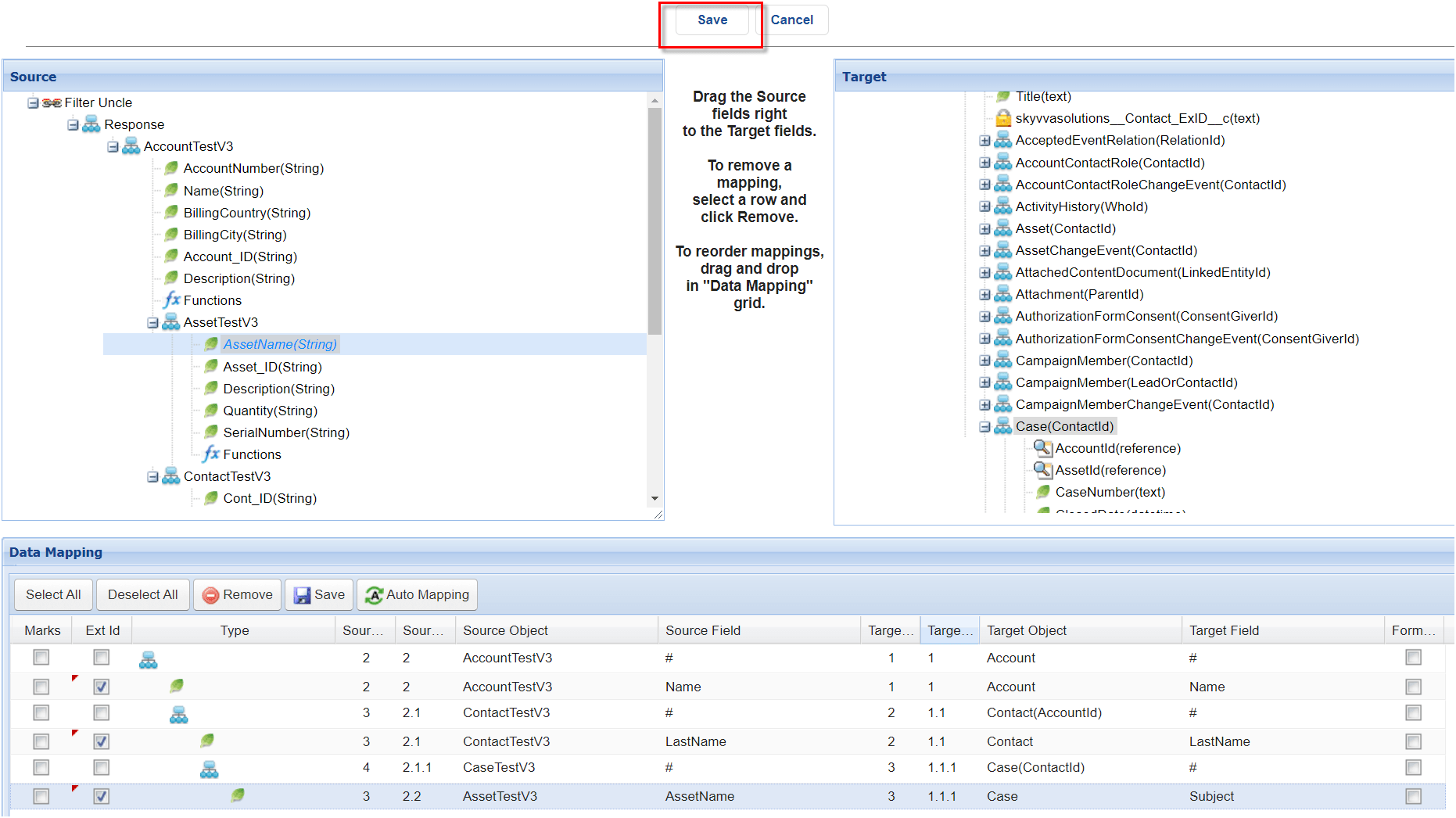
- After do mapping complete then Save

- Post data from Postman using SKYVVA V4 API
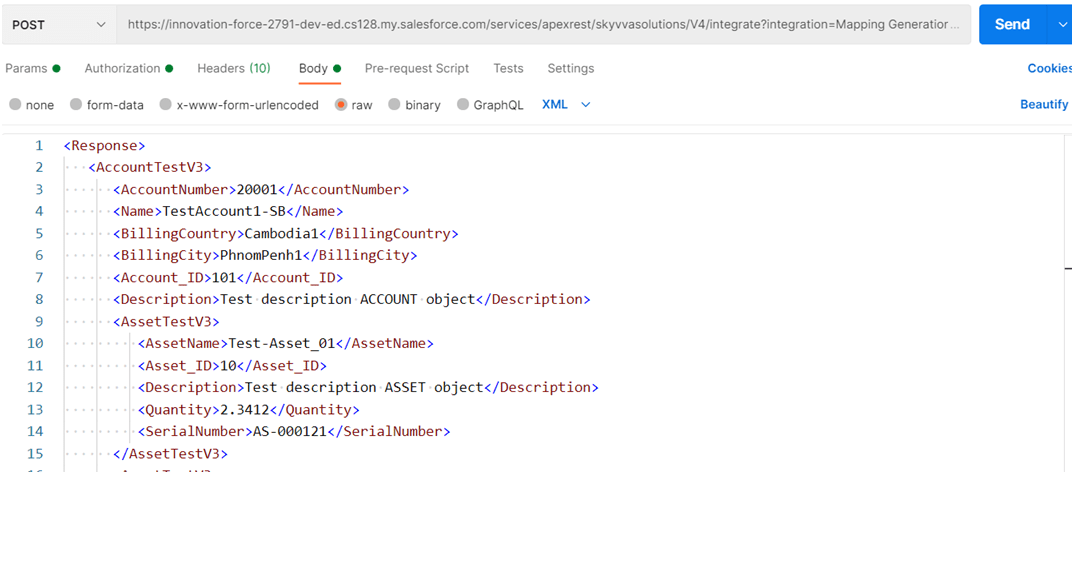
[su_box title="Result of Message Monitoring " box_color="#2a8af0" title_color="#000000"]The result is correct. We get data from the field “AssetName” if “SerialNumber” equal “AS-000122”[/su_box]

Filter uncle
- The data is the same as in Case 3. We have 1 Account, 3 Assets, and 1 Contact, including its child. Asset and Contact are siblings, and Asset is the uncle of Case. I want to take data from Asset to Case. By default, it will take from index 1 because the parent of Case, Contact, stayed on index 1. But at this time, we can set a condition to pick up data from any Asset that we need.
[su_box title="Note" box_color="#F91113" title_color="#000000"]The condition value must be unique. If the condition is not unique then run-time will display incorrect results. For the filter condition, we can not filter from the own node or from the parent node which does not make sense. [/su_box]
<Response> <AccountTestV3> <AccountNumber>20001</AccountNumber> <Name>TestAccount1-SB</Name> <BillingCountry>Cambodia1</BillingCountry> <BillingCity>PhnomPenh1</BillingCity> <Account_ID>101</Account_ID> <Description>Test description ACCOUNT object</Description> <AssetTestV3> <AssetName>Test-Asset_01</AssetName> <Asset_ID>10</Asset_ID> <Description>Test description ASSET object</Description> <Quantity>2.3412</Quantity> <SerialNumber>AS-000121</SerialNumber> </AssetTestV3> <AssetTestV3> <AssetName>Test-Asset_02</AssetName> <Asset_ID>20</Asset_ID> <Description>Test description ASSET object</Description> <Quantity>2.3412</Quantity> <SerialNumber>AS-000122</SerialNumber> </AssetTestV3> <AssetTestV3> <AssetName>Test-Asset_03</AssetName> <Asset_ID>30</Asset_ID> <Description>Test description ASSET object</Description> <Quantity>2.3432</Quantity> <SerialNumber>AS-000123</SerialNumber> </AssetTestV3> <ContactTestV3> <Cont_ID>201</Cont_ID> <LastName>TestContact_01</LastName> <FirstName>DContact2</FirstName> <Email>Dtest.2019_201@gmail.com</Email> <Phone>301</Phone> <Description>Test description CONTACT object</Description> <CaseTestV3> <Subject>TestCase Agent-01</Subject> <SuppliedPhone>401</SuppliedPhone> <status>Failed</status> <Case_Id>2001</Case_Id> <Description>Test description CASE object</Description> </CaseTestV3> <CaseTestV3> <Subject>TestCase Agent-02</Subject> <SuppliedPhone>402</SuppliedPhone> <status>Failed</status> <Case_Id>2002</Case_Id> <Description>Test description CASE object</Description> </CaseTestV3> </ContactTestV3> </AccountTestV3> </Response>
Do Mapping
- In this example “AssetTestV3” plays as uncle of “CaseTestV3”, because “AssetTestV3” and “ContactTestV3” are the sibling. The relationship of node is the same thing as real life family relationship
We choose “CaseTestV3” as the master node to map to the Case object then take data from the field “AssetName” of node“AssetTestV3”

- After, we map the field from “AssetTestV3” that we have called an uncle node then right-click on the field, and we have a map to set the condition.
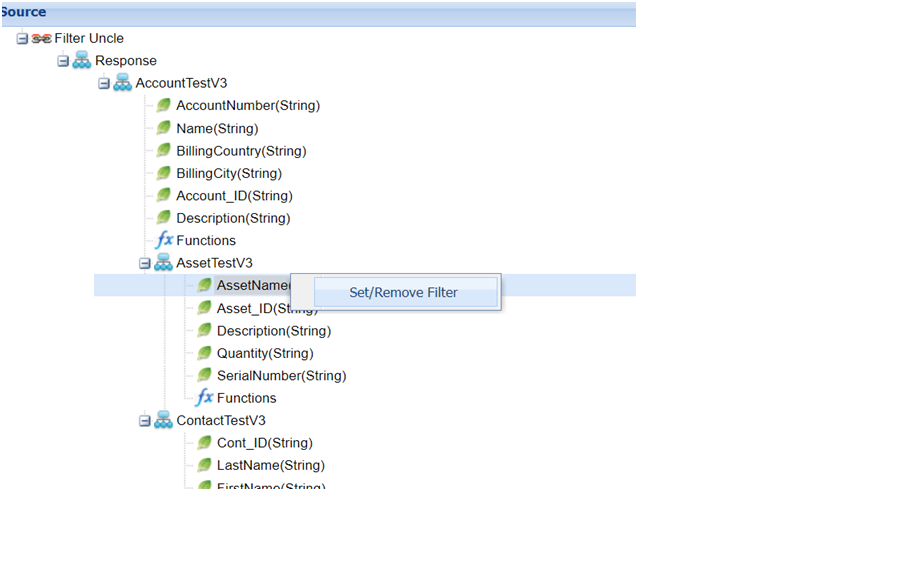
- After putting the condition then click Ok to save the condition record
- Do the mapping complete then Save it?
- Post data from Postman using SKYVVA V4 API

- The result is correct. We derive data from the field “AssetName” if “SerialNumber” equals “AS-000123”. Du to the data of “ContactTestV3” has two children occurrences all the child of “ContactTestV3” will get data from “AssetTestV3”

[su_box title="Note" box_color="#F91113" title_color="#000000"]To identify the node relationship, we start considering the first node map to the target object we can call this node the root node, and another node that maps to the target is called a master node.
- Sibling node: When the node has the same parent and stays on the same level within the same path by comparing with the root or master node.
- Uncle node: When the node stays on a different path by comparing with the root or master node.
[/su_box]
Filter Condition by Formula
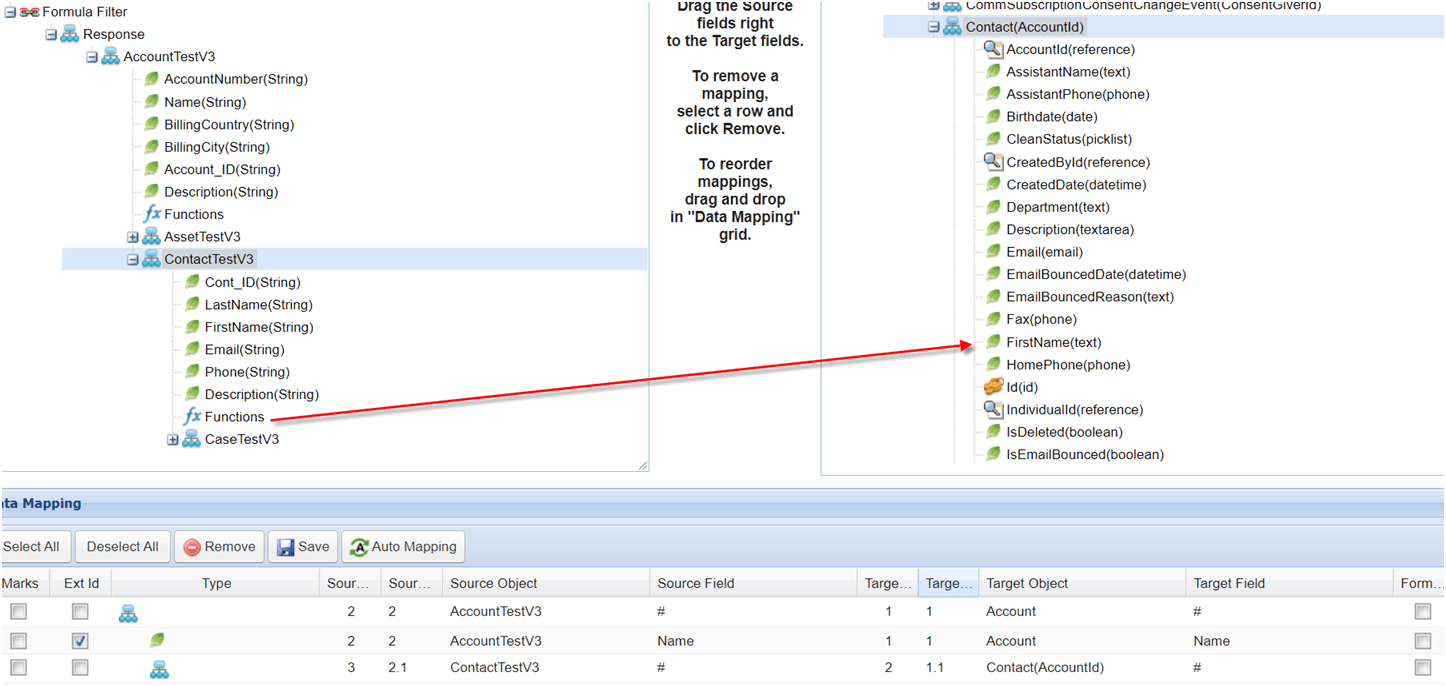
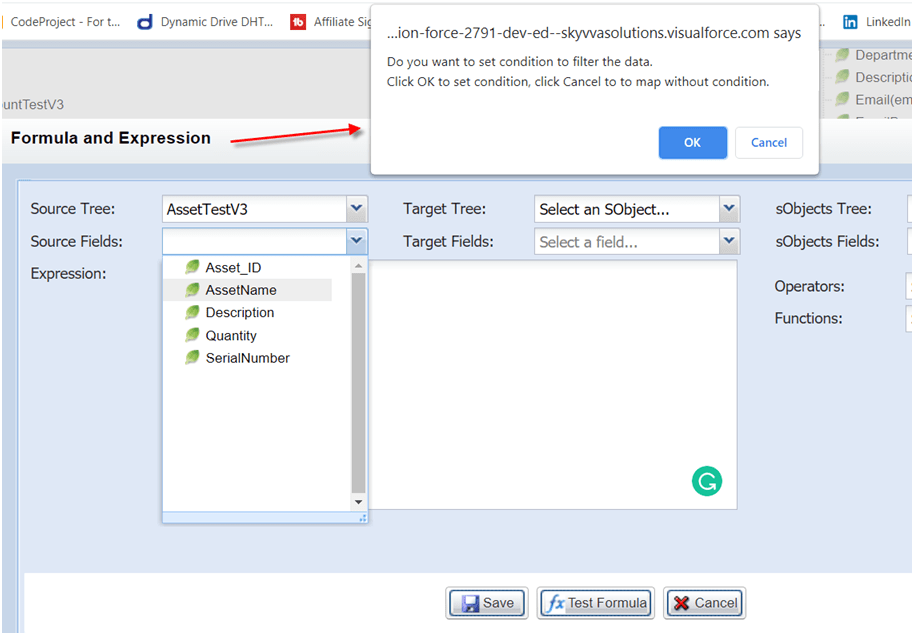
- After dragging Function to the target field, the formula screen will display and then browse the node that we need to retrieve data
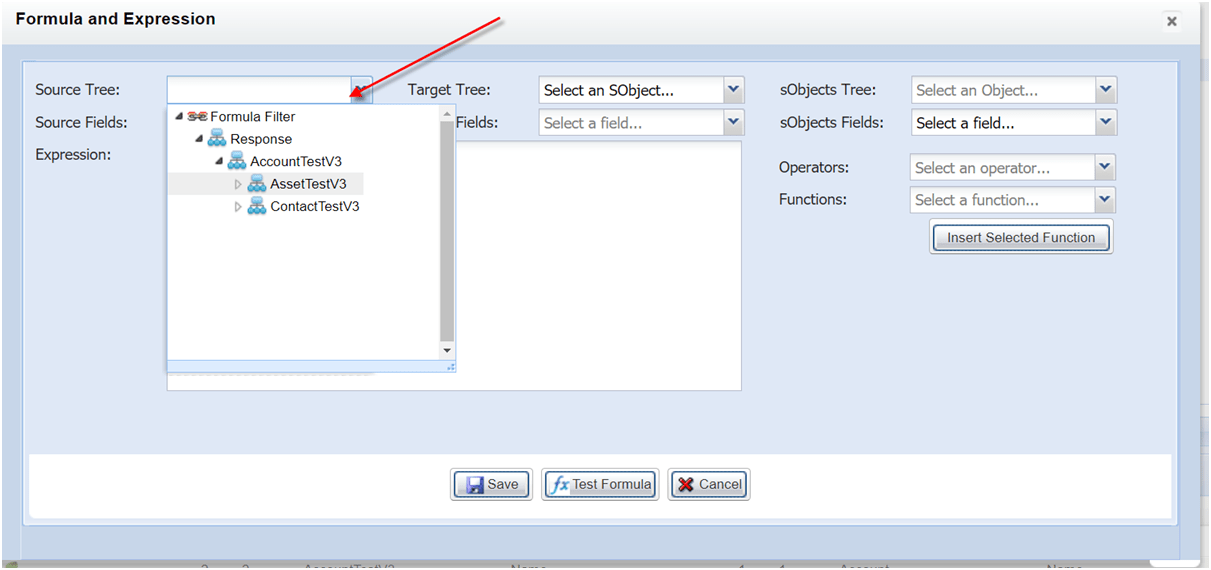
- Choose the field

- After choosing a field, the user will be asked whether to set a condition on it. If not, click Cancel. If we want to set the condition, click OK.
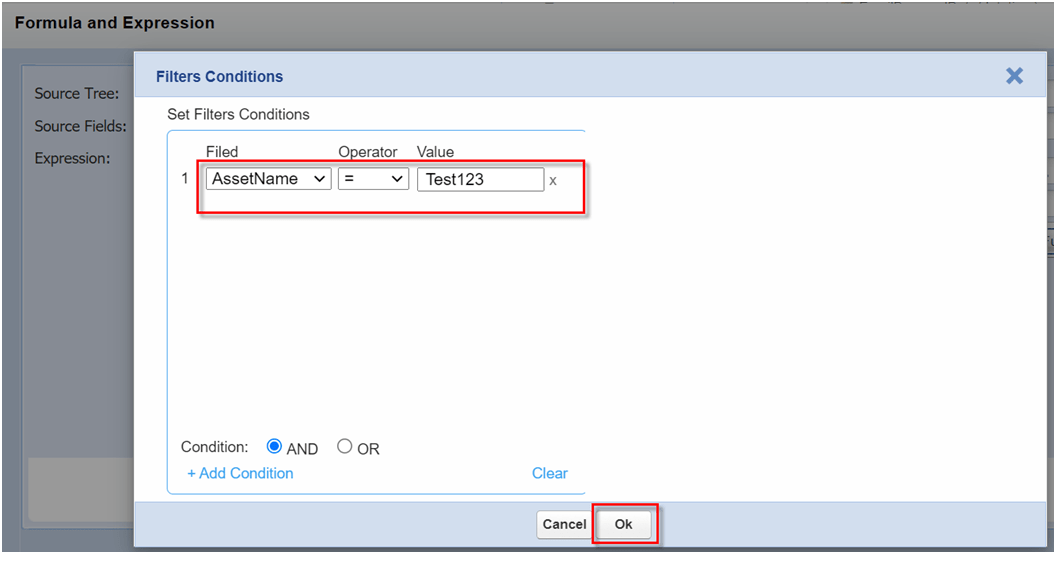
- If we click Ok from the above question then we can set conditions. After that click Ok to save the condition record
- Click Save for the saving formula
