161. How to use Microsoft One Drive Adapter
Introduction
SKYVVA Microsoft control board allows user to perform extract, transform, and load tasks in the cloud. With the Microsoft OneDrive, user get live access to Microsoft OneDrive data, directly within SKYVVA Microsoft control board . In this chapter, we talk connecting to Microsoft OneDrive through the SKYVVA and generating a mapping that can be used in any SKYVVA Microsoft control board process. This tutorial is to show our new OneDrive connector to save data from Salesforce into a OneDrive file. With Microsoft OneDrive, you can easily and securely store and access your files from all your devices. User can work with others regardless of whether they’re inside or outside your organization and terminate that sharing whenever you want. OneDrive helps protect your work through advanced encryption while the data is in transit and at rest in data centers.
- Create: Creates an object on a SKYVVA and is used as a target in an operation Microsoft control board server
- Update: Updates an object on a SKYVVA and is used as a target in an operation Microsoft control board server
- Upsert: Upserts an object on a SKYVVA and is used as a target in an operation Microsoft control board server
- Delete: Deletes an object from a SKYVVA and is used as a target in an operation Microsoft control board server
Pre-required:
- Create Integration.
- Create Metadata Provider, IStructure Repository and Create Flat Structure.
- CSV Outbound Adapter
- JSON Outbound Adapter/ Inbound Adapter
- XML Outbound Adapter/ Inbound Adapter
- JSON Outbound Adapter/ /Inbound Adapter
- Create Microsoft OneDrive connection by using Microsoft control board.
Microsoft OneDrive Integration
[su_box title="Note" box_color="#2a8af0" title_color="#000000"]New Microsoft One Drive Adapter is working with following 3 file structure.[/su_box]
- CSV File is working with flat structure.
- XML and JSON file is working with hierarchical structure.
How to configure Adapter in Microsoft Control Board:
- Create Integration. Ex: Microsoft_OneDrive_Integration
- Click on Microsoft Control Board link

- Click on the adapter tab
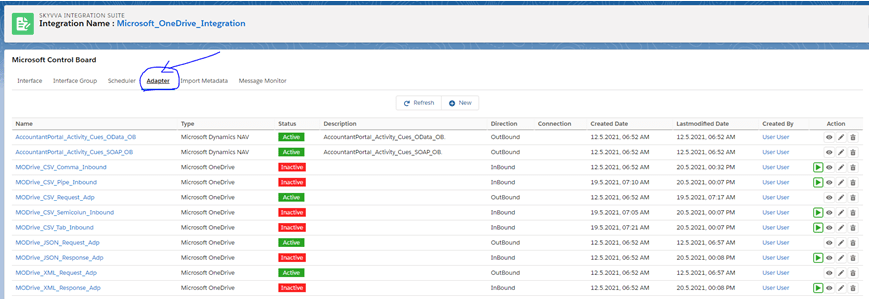
- Click on New button and select adapter type as a Microsoft OneDrive and fill all information base on your configuration.

Microsoft One Drive CSV Outbound Adapter
1) Create Metadata Provider, IStructure Repository and Create Flat Structure. 2) How to Create Microsoft One Drive CSV Outbound Adapter:
- Go to Integration (Example: Microsoft_OneDrive_Integration)
- Create Outbound Adapter : MODrive_CSV_Request_Adp (Please follow above steps for create adapter)
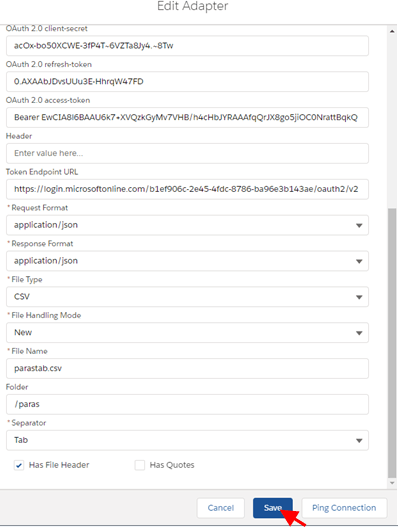
3) Create Integration and Outbound Interface:
- Integration: Microsoft_OneDrive_Integration
- Outbound Interface: MODrive_CSV_Request
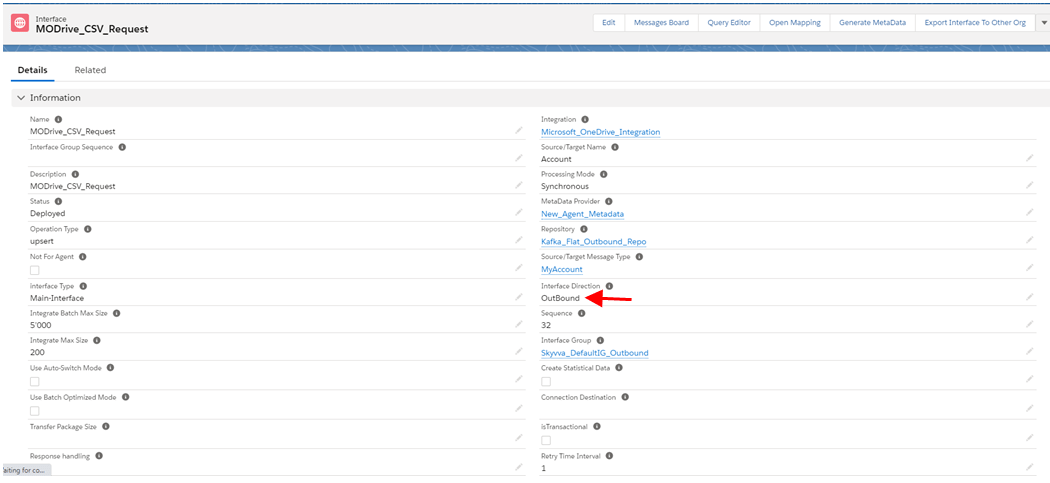
- Link Outbound Adapter: MODrive_CSV_Request_Adp

- Mapping
- Callout
[aux_code language="javascript" theme="tomorrow" title="" extra_classes=""]skyvvasolutions.CallOutControl c = new skyvvasolutions.CallOutControl(); c.returnJSONComplete=true; c.actionDoIntegrate=false; c.isCreateMessage=true; String[] ids= new String[]{'0011j000015ikjBAAQ','0011j000015ikjCAAQ'}; List result = skyvvasolutions.Iservices.invokeCalloutV3('Microsoft_OneDrive_Integration','MODrive_CSV_Request',ids,'SYNC',c); [/aux_code]
- Message Monitoring

- Check CSV Data on Microsoft One Drive Server
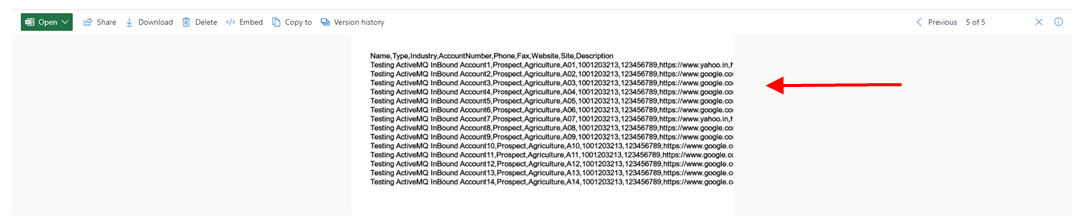
[su_box title="Note" box_color="#2a8af0" title_color="#000000"]When user creating csv file then use , ; Tab And | operator with Microsoft one drive outbound adapter.[/su_box]
Microsoft One Drive JSON Outbound
1) Create Metadata Provider, IStructure Repository and Create Hierarchical Structure. 2) How to Create Microsoft One Drive JSON Outbound Adapter:
- Go to Integration (Example: Microsoft_OneDrive_Integration)
- Create Outbound Adapter : MODrive_JSON_Request_Adp(Please follow above steps for create adapter)
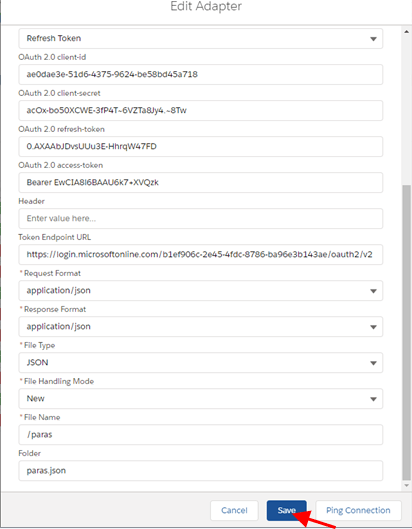
3) Create Integration and Outbound Interface:
- Integration: Microsoft_OneDrive_Integration
- Outbound Interface: MODrive_JSON_Request
- Link Outbound Adapter: MODrive_JSON_Request_Adp

- Mapping
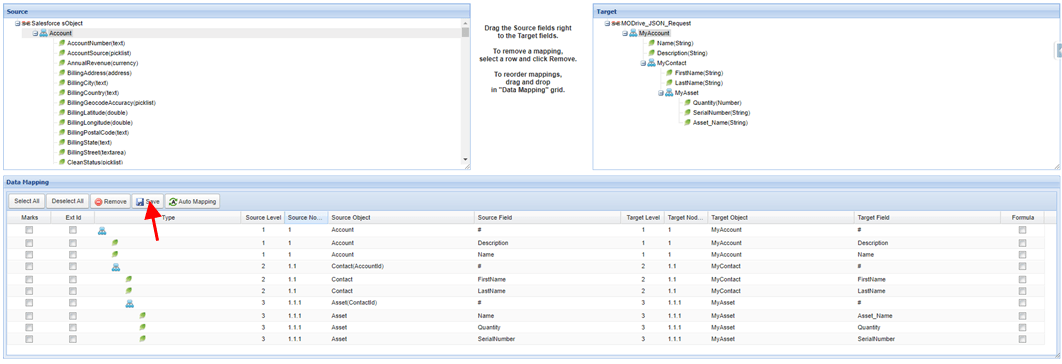
- Callout
[aux_code language="javascript" theme="tomorrow" title="" extra_classes=""]skyvvasolutions.CallOutControl c = new skyvvasolutions.CallOutControl(); c.returnJSONComplete=true; c.actionDoIntegrate=false; c.isCreateMessage=true; String[] ids= new String[]{'0011j000015ikjBAAQ','0011j000015ikjCAAQ'}; List result = skyvvasolutions.Iservices.invokeCalloutV3('Microsoft_OneDrive_Integration','MODrive_JSON_Request',ids,'SYNC',c); [/aux_code]
Microsoft One Drive XML Outbound Adapter
1) Create Metadata Provider, IStructure Repository and Create Hierarchical Structure. 2) How to Create Microsoft One Drive JSON Outbound Adapter:
- Go to Integration (Example: Microsoft_OneDrive_Integration)
- Create Outbound Adapter : MODrive_XML_Request_Adp (Please follow above steps for create adapter)
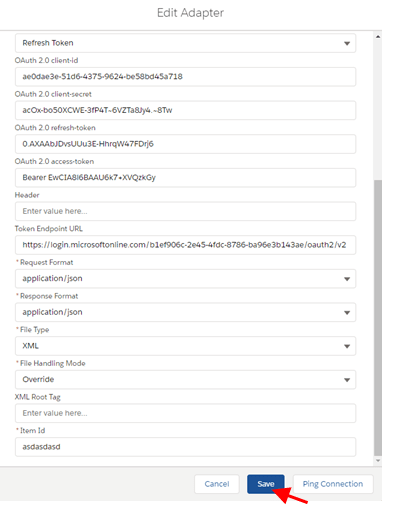
3) Create Integration and Outbound Interface:
- Integration: Microsoft_OneDrive_Integration
- Outbound Interface: MODrive_XML_Request
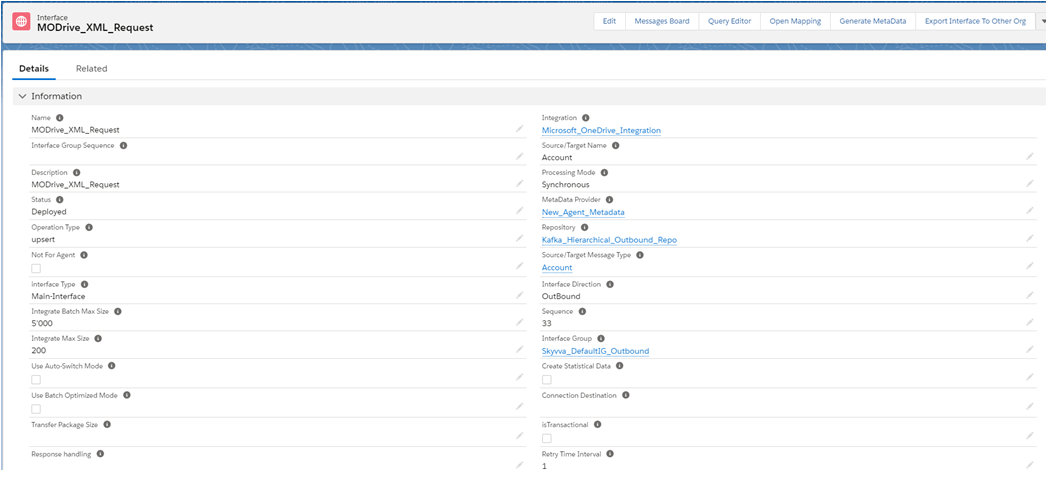
- Link Outbound Adapter: MODrive_XML_Request_Adp

- Mapping

- Callout
[aux_code language="javascript" theme="tomorrow" title="" extra_classes=""]skyvvasolutions.CallOutControl c = new skyvvasolutions.CallOutControl(); c.returnJSONComplete=true; c.actionDoIntegrate=false; c.isCreateMessage=true; String[] ids= new String[]{'0011j000015ikjBAAQ','0011j000015ikjCAAQ'}; List result = skyvvasolutions.Iservices.invokeCalloutV3('Microsoft_OneDrive_Integration','MODrive_XML_Request',ids,'SYNC',c); [/aux_code]
Microsoft One Drive CSV Inbound Adapter
1) Create Metadata Provider, IStructure Repository and Create Flat Structure. 2) How to Create Microsoft One Drive CSV Inbound Adapter:
- Go to Integration (Example: Microsoft_OneDrive_Integration)
- Create Inbound Adapter : MODrive_CSV_Comma_Inbound (Please follow above steps for create adapter)
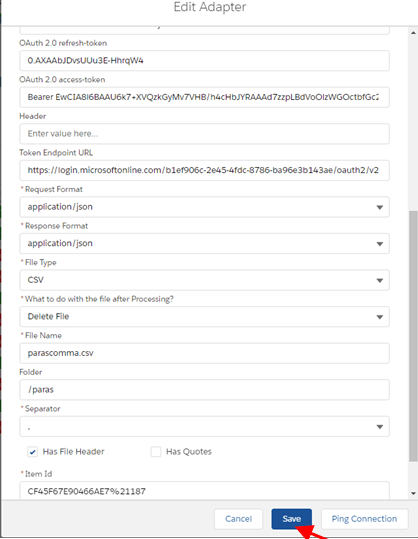
3) Create Integration and Inbound Interface:
- Integration: Microsoft_OneDrive_Integration
- Outbound Interface: MODrive_CSV_Comma_Inbound
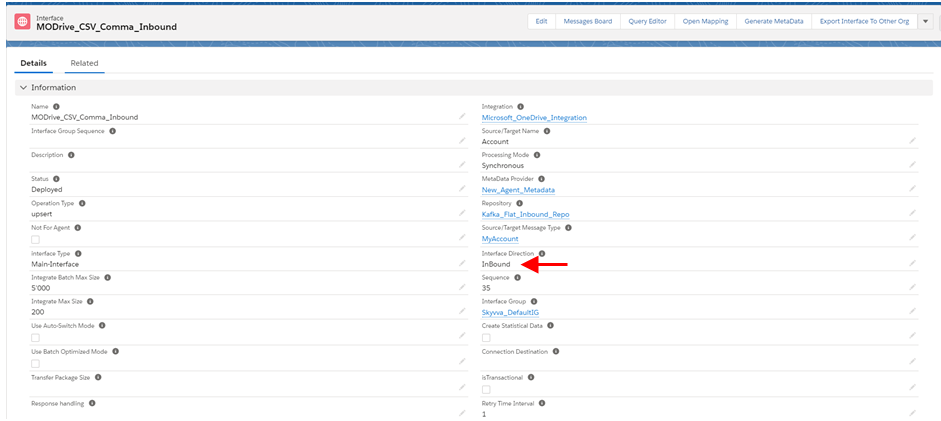
- Link Inbound Adapter: MODrive_CSV_Comma_Inbound

- Mapping
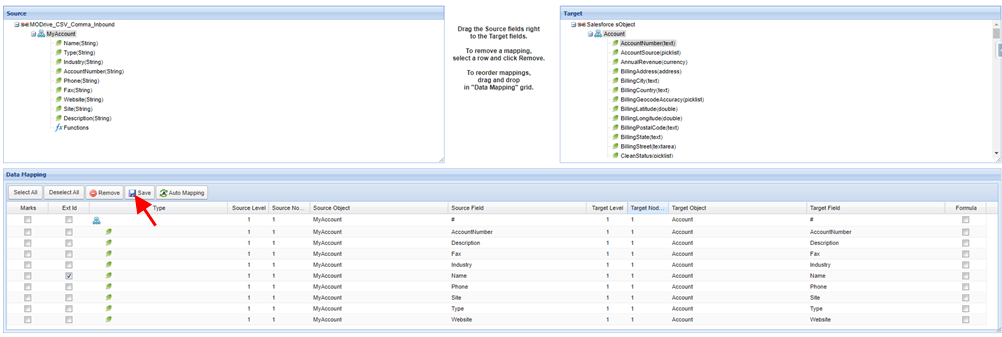
Callout:
- Start Schedule: Go to Microsoft control board -> Click on adapter tab -> click on start button with green color.
- Stop Schedule: Go to Microsoft control board -> Click on adapter tab -> click on stop button with red color.

- Message Monitoring: (Get records of .csv file from the Microsoft one drive)
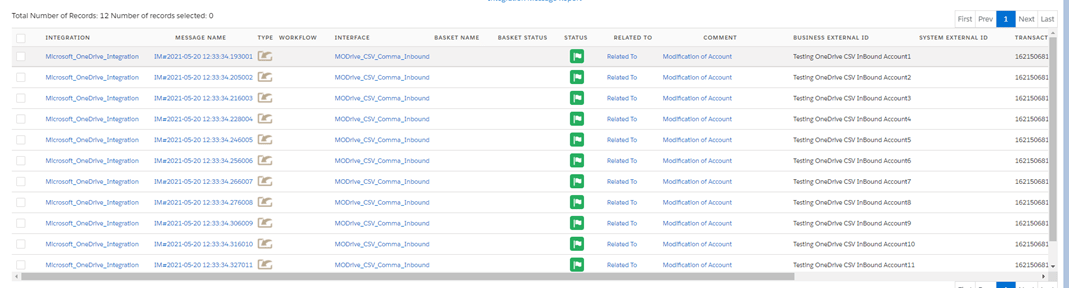
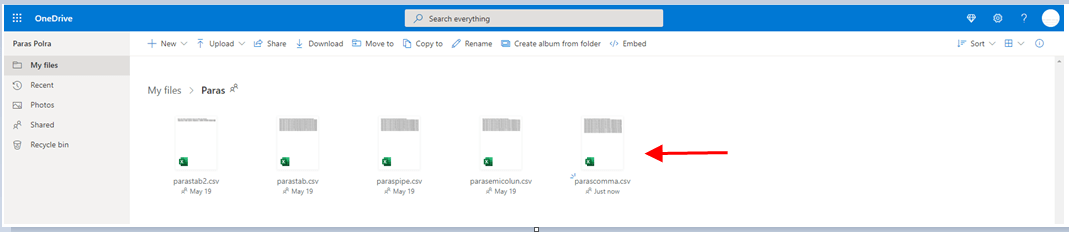
- Uploaded CSV file on Microsoft One Drive Server
[su_box title="Note" box_color="#2a8af0" title_color="#000000"]If adapter property What to do with the file after Processing? Is Delete File and Item Id means fileid of .csv file in Microsoft one drive example: CF45F67E90466AE7%21187 so after processing, it will be delete file from Microsoft one drive.[/su_box]
Microsoft One Drive JSON Inbound Adapter
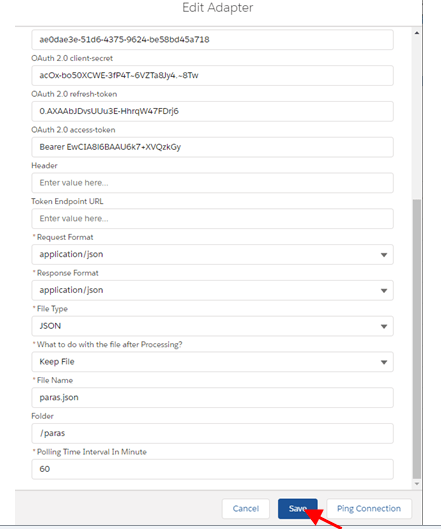
1) Create Metadata Provider, IStructure Repository and Create Hierarchical Structure. 2) How to Create Microsoft One Drive JSON Inbound Adapter:
- Go to Integration (Example: Microsoft_OneDrive_Integration)
- Create Inbound Adapter : MODrive_JSON_Response_Adp (Please follow above steps for create adapter)
3) Create Integration and Inbound Interface:
- Integration: Microsoft_OneDrive_Integration
- Inbound Interface: MODrive_JSON_Inbound
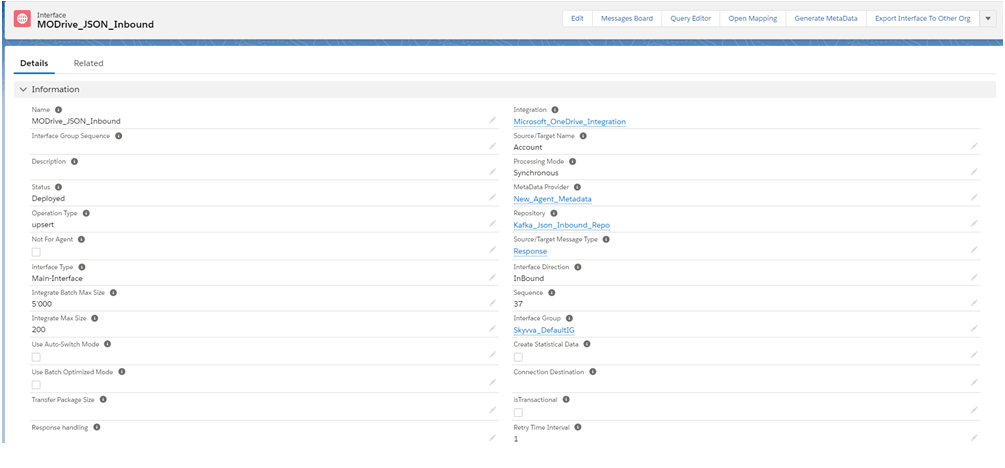
- Link Outbound Adapter: MODrive_JSON_Response_Adp

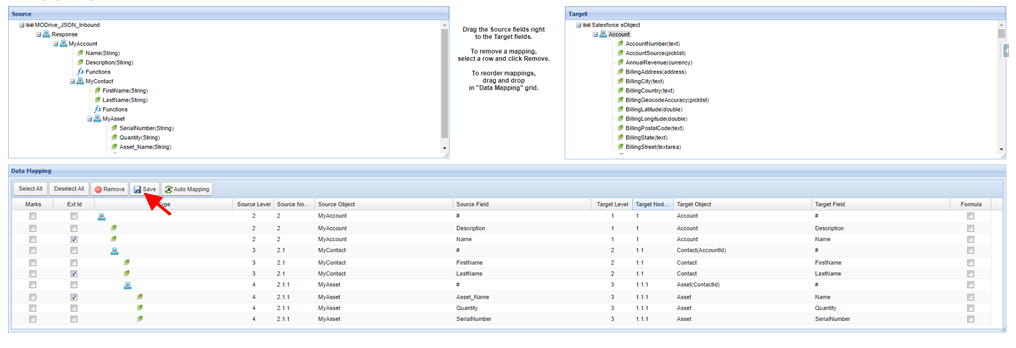
- Mapping
Callout:
- Start Schedule: Go to Microsoft control board -> Click on adapter tab -> click on start button with green color.
- Stop Schedule: Go to Microsoft control board -> Click on adapter tab -> click on stop button with red color.

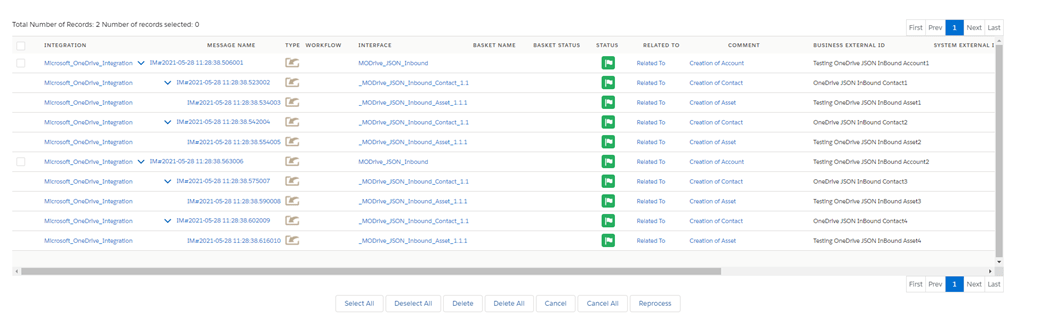
- Message Monitoring: (Get records of .json file from the Microsoft one drive)
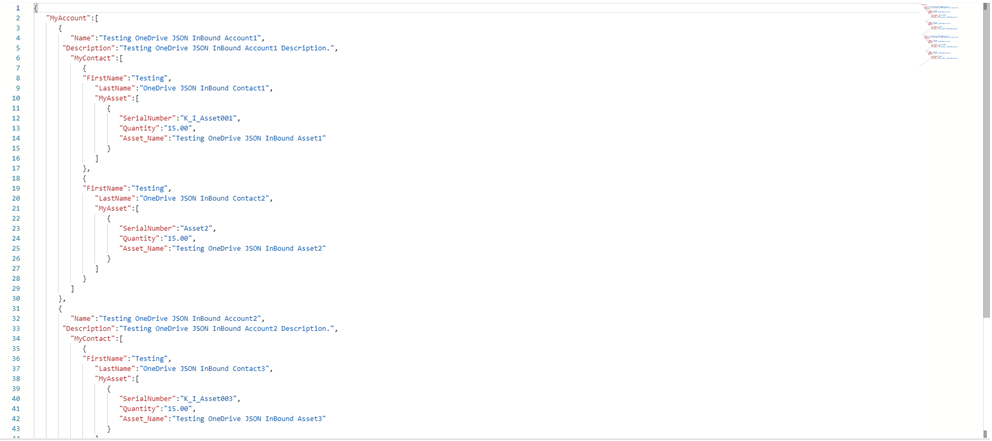
- .Json File is containing 2 account data with sub child object data like contact and asset.
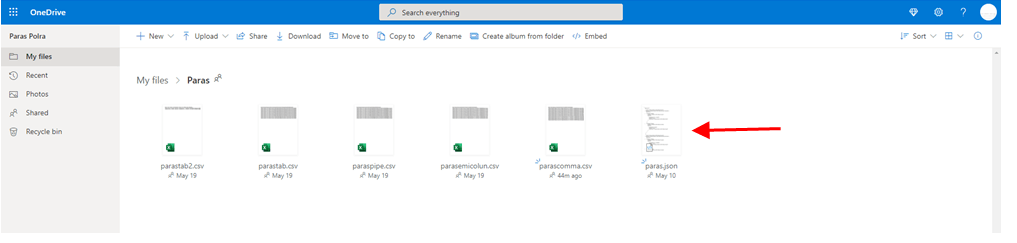
- Uploaded JSON file on Microsoft One Drive Server
[su_box title="Note" box_color="#2a8af0" title_color="#000000"]If adapter property What to do with the file after Processing? Is Delete File and Item Id means fileid of .json file in Microsoft one drive example: CF45F67E90466AE7%21187 so after processing, it will be delete file from Microsoft one drive.[/su_box]
Microsoft One Drive XML Inbound Adapter
1) Create Metadata Provider, IStructure Repository and Create Hierarchical Structure. 2) How to Create Microsoft One Drive XML Inbound Adapter:
- Go to Integration (Example: Microsoft_OneDrive_Integration)
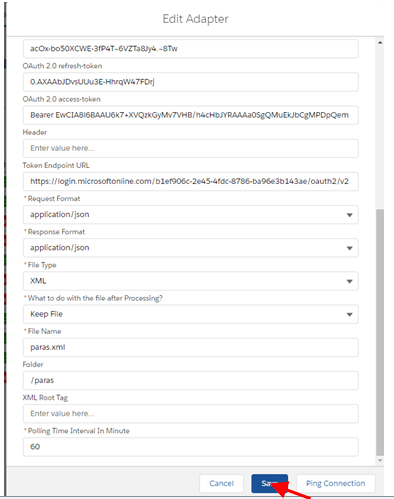
- Create Inbound Adapter : MODrive_XML_Response_Adp (Please follow above steps for create adapter)
3) Create Integration and Inbound Interface:
- Integration: Microsoft_OneDrive_Integration
- Inbound Interface: MODrive_XML_Inbound
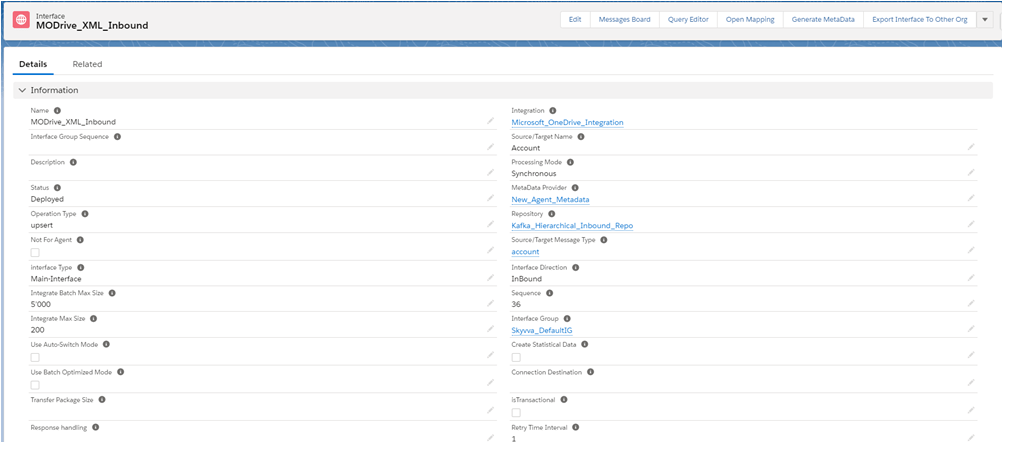
- Link Outbound Adapter: MODrive_XML_Response_Adp

- Mapping
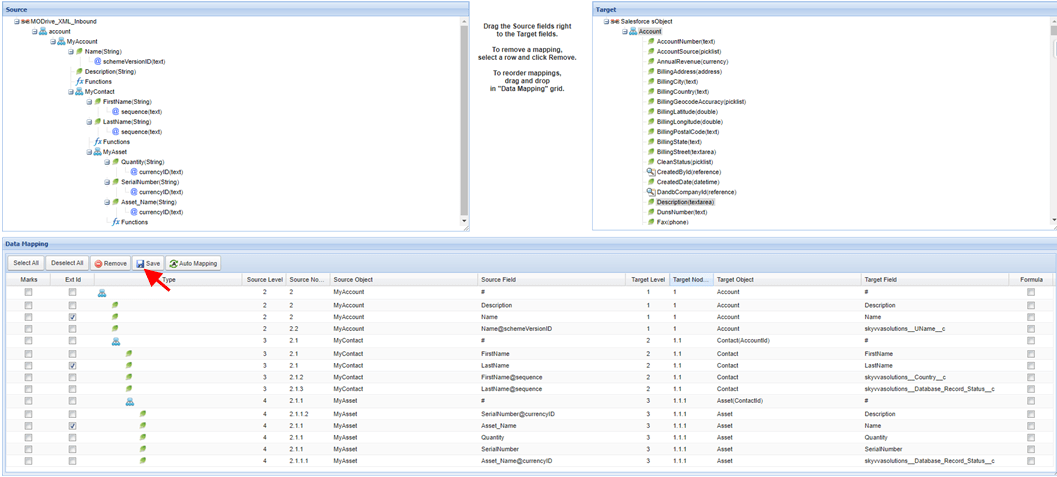
Callout:
- Start Schedule: Go to Microsoft control board -> Click on adapter tab -> click on start button with green color.
- Stop Schedule: Go to Microsoft control board -> Click on adapter tab -> click on stop button with red color.

- Message Monitoring: (Get records of .xml file from the Microsoft one drive)
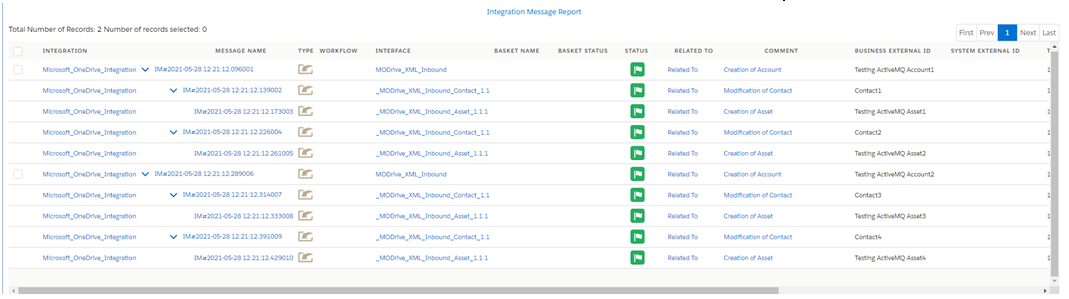
- .XML file is containing 2 account data with sub child object data like contact and asset.

- Uploaded .XML file on Microsoft One Drive Server
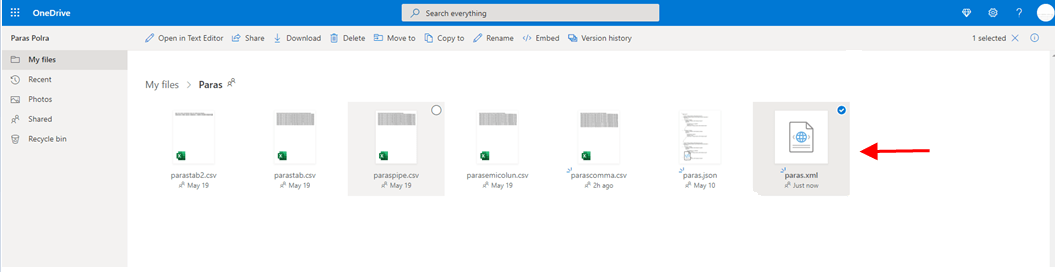
[su_box title="Note" box_color="#2a8af0" title_color="#000000"]If adapter property What to do with the file after Processing? Is Delete File and Item Id means fileid of .xml file in Microsoft one drive example: CF45F67E90466AE7%21187 so after processing, it will be delete file from Microsoft one drive.[/su_box]