2. All Warning
This blog provides a comprehensive list of all warning main and patch versions of 2.50, highlighting the potential issues and considerations associated with each version.
Adding Several picklist values while upgrading the new version
In general picklist values from the package will not be added automatically when you upgrade the package. Therefore you must add them manually after the upgrade. Note that for a new installation, this problem will not arise.
sObject Field API Name Picklist Value Version
skyvvasolutions__Interfaces__c skyvvasolutions__InboundPostingBehavior__c Scheduled Apex 2.50
skyvvasolutions__Interfaces__c skyvvasolutions__OperationType__c Subscribe Salesforce Event 2.50.1
skyvvasolutions__Interfaces__c skyvvasolutions__InbResponse_handling__c When empty response -> Status Completed (green) 2.50.24
skyvvasolutions__Interfaces__c skyvvasolutions__InbResponse_handling__c When empty response -> Status Failed (red) 2.50.24
skyvvasolutions__Interfaces__c skyvvasolutions__InbResponse_handling__c When empty response -> Status Pending (yellow) 2.50.24
skyvvasolutions__Interfaces__c skyvvasolutions__InbResponse_handling__c When empty response -> Status Cancelled (grey) 2.50.24
skyvvasolutions__IMessage__c skyvvasolutions__Message_Type__c DataLoader Message 2.50.1
skyvvasolutions__IMessage__c skyvvasolutions__Message_Type__c Custom Message 2.50.9
skyvvasolutions__IMessage__c skyvvasolutions__Message_Type__c Agent Message 2.50.10
skyvvasolutions__IMessage__c skyvvasolutions__Message_Type__c Mail Message 2.50.14
skyvvasolutions__InterfaceControlRuntime__c skyvvasolutions__RecordType__c External Key Expression Evaluator 2.50.2
skyvvasolutions__MessageType__c skyvvasolutions__Type__c Query sObject 2.50.13
skyvvasolutions__MessageType__c skyvvasolutions__Type__c Query Children 2.50.13
skyvvasolutions__IChained_Interfaces__c skyvvasolutions__Init_Operation__c Delete child not present in the payload [2.50.22]((link not available))
Another Warning Outside the Picklist
Disable Ext id Box in Mapping Tool (2.50.4)
In the previous version, to set an External Id for mapping, you needed to check the 'Ext Id' box. However, in outbound and V3 Inbound mapping, this box has been disabled. Instead, you should define the External Key using the 'Define External Key' button. This button is available in the Data Mapping section and also appears in the 'List' button on the Interface Detail Page.
Disabled the ‘Check Syntax’ Button on the Expression Formula of Inbound Interface (2.50.8)
The 'Check Syntax' button for formula and expression in the inbound interface IMapping has been disabled.
Disable Formula Box in Mapping Tool (2.50.24)
In the previous version, to do a formula for mapping, you needed to check the 'Formula' box. However, this box is no longer available. Instead, you should define the formula using the 'Open Formula' button, which is available in the Data Mapping section.
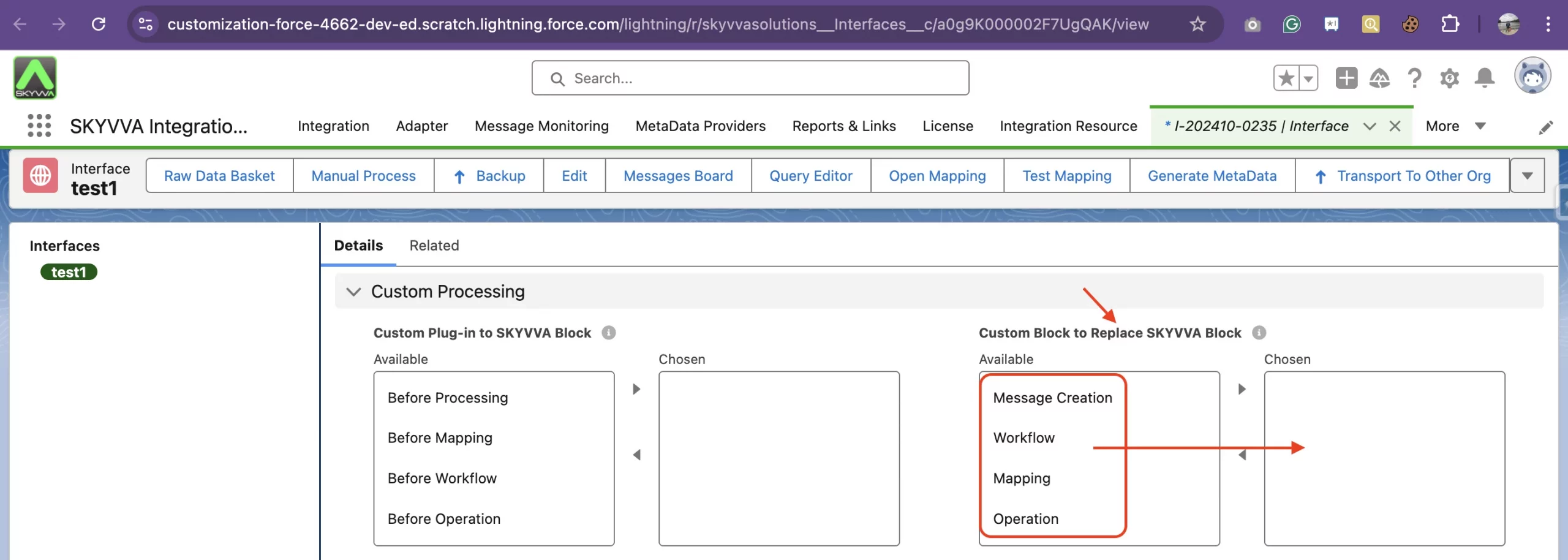
Ensuring Proper Configuration for Custom Processing Classe in SKYVVA (2.50.24)
In the previous version, you could use a 'Custom Processing Class' without specifying the location or processing unit. The processing block or unit can be set under the field 'Custom Block to Replace SKYVVA Block'. Now, if you do not set the processing block, your custom class will not get invoked by our processing runtime. Therefore you must select one of the 'Custom Block to Replace SKYVVA Block' that you need to override.