2. All Warning
This blog provides a comprehensive list of all warning, main, and patch versions of 2.51, highlighting the potential issues and considerations associated with each version.
Adding Require picklists values while upgrading the new version
In general picklist values from the package will not be added automatically when you upgrade the package. Therefore you must add them manually after the upgrade. Note that for a new installation, this problem will not arise.
| sObject | Field API Name | Picklist Value | Version |
|---|---|---|---|
| skyvvasolutions__Interfaces__c | skyvvasolutions__InboundPostingBehavior__c | Event Trigger Apex | 2.51 |
| skyvvasolutions__Interfaces__c | skyvvasolutions__InbResponse_handling__c | Subscribe Salesforce Event | 2.51 |
| skyvvasolutions__Interfaces__c | skyvvasolutions__InbResponse_handling__c | Create Platform Event | 2.51 |
| skyvvasolutions__Interfaces__c | skyvvasolutions__InbResponse_handling__c | When empty response -> Status Completed (green) | 2.51.2 |
| skyvvasolutions__Interfaces__c | skyvvasolutions__InbResponse_handling__c | When empty response -> Status Failed (red) | 2.51.2 |
| skyvvasolutions__Interfaces__c | skyvvasolutions__InbResponse_handling__c | When empty response -> Status Pending (yellow) | 2.51.2 |
| skyvvasolutions__Interfaces__c | skyvvasolutions__InbResponse_handling__c | When empty response -> Status Cancelled (grey) | 2.51.2 |
| skyvvasolutions__InterfaceControlRuntime__c | skyvvasolutions__RecordType__c | Agent V3 Scheduler not run since xxx | 2.51 |
| skyvvasolutions__InterfaceControlRuntime__c | skyvvasolutions__RecordType__c | Agent V3 Interface not runs since xxx | 2.51 |
| skyvvasolutions__InterfaceControlRuntime__c | skyvvasolutions__RecordType__c | Agent V3 Interface Group not runs since xxx | 2.51 |
| skyvvasolutions__InterfaceControlRuntime__c | skyvvasolutions__RecordType__c | Agent V3 Integration not runs since xxx | 2.51 |
| skyvvasolutions__InterfaceControlRuntime__c | skyvvasolutions__RecordType__c | Alert When Not Run | 2.51 |
| skyvvasolutions__InterfaceControlRuntime__c | skyvvasolutions__RecordType__c | SchedulerSubmittedTime | 2.51.7 |
| skyvvasolutions__InterfaceControlRuntime__c | skyvvasolutions__RecordType__c | Child Relationship Name | 2.51.7 |
| skyvvasolutions__IChained_Interfaces__c | skyvvasolutions__Init_Operation__c | Delete child not present in the payload | 2.51.1 |
| skyvvasolutions__IMessage__c | skyvvasolutions__Message_Type__c | Routing Message | 2.51.1 |
Enable Lightning Web Security to Use the Beautify Editor 2.51
In this version, we have introduced a Beautify Editor in various areas, including Test Connection, Raw Logging Payload, Adapter Detail, Test Mapping, Import Message Editor, and View Basket. However, if you attempt to view it without enabling the 'Use Lightning Web Security for Lightning Web Components and Aura Components' option, an error will occur, causing a nonstop spinner. To resolve this, please make sure to check this flag.
Ensuring Proper Configuration for Custom Processing Class in SKYVVA (2.51)
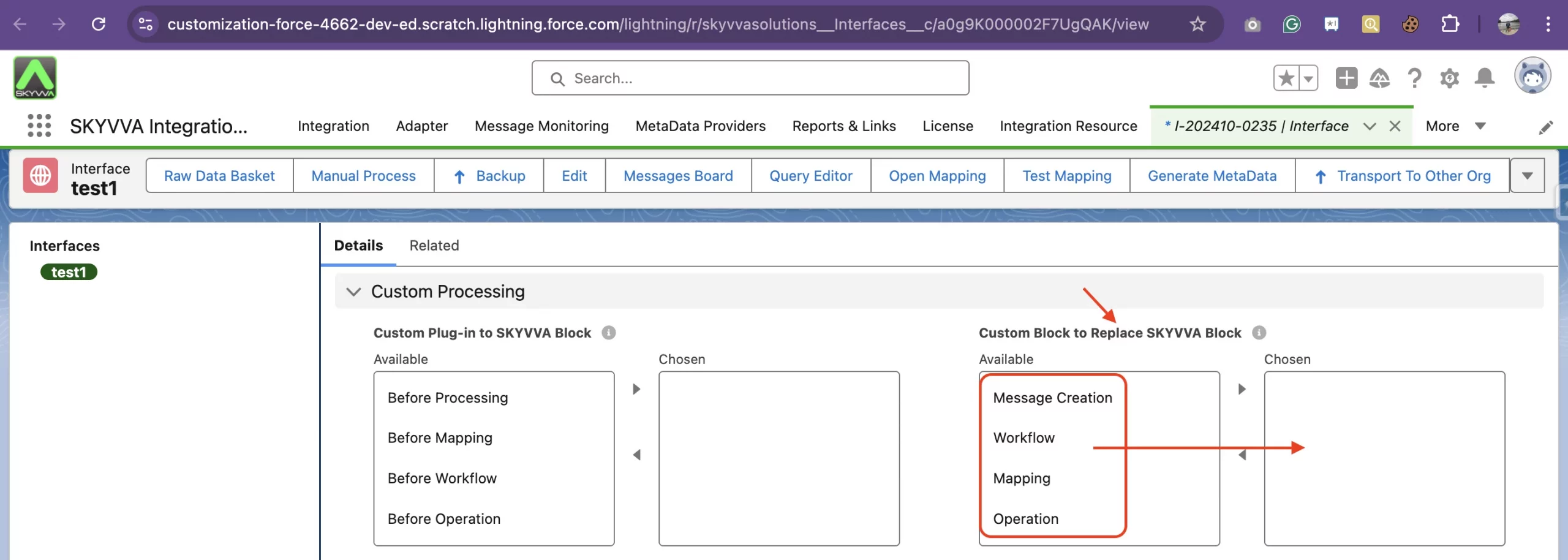
In the previous version, you could use a 'Custom Processing Class' without specifying the location or processing unit. The processing block or unit can be set under the field 'Custom Block to Replace SKYVVA Block'. Now, if you do not set the processing block, your custom class will not get invoked by our processing runtime. Therefore, you must select one of the 'Custom Block to Replace SKYVVA Block' that you need to override.
Ensure Halting of All Outbound Schedulers Before Upgrading to New Agent Version 3.06.03 and Skyvva Version 2.51.8 for Non-Open Firewall Mode (2.51.8)
In light of our enhancements in outbound processing on the Agent side aimed at minimizing event usage, it is crucial to halt all outbound schedulers before upgrading Skyvva (from version 2.51.7 or earlier to 2.51.8 or later) and the Agent Version (from 3.05.7 or earlier to 3.06.03 or later) in non-open firewall mode exclusively.
Note: Skyvva Version 2.51.8 or earlier must be used with Agent Version 3.06.03 or later in non-open firewall mode with outbound processing. For Open Firewall Mode, no action is required; simply upgrade it.
Follow the Instructions below to halt all Outbound Agent Schedulers, Reconfigure the Outbound Agent Scheduler settings, and then start them again
- Navigate to the Scheduler Setting in the Agent Control Board and click on 'Stop All Outbound Agent Scheduler

- After completing the upgrade, you must reset the Agent Scheduler settings before starting the scheduler. If you start it without resetting the Agent scheduler, you will encounter the error shown in the screenshot below.

- Please adjust your Agent Scheduler settings and then click the save button.

- Click the start scheduler icon, then press the 'Yes' button to confirm to start this scheduler.
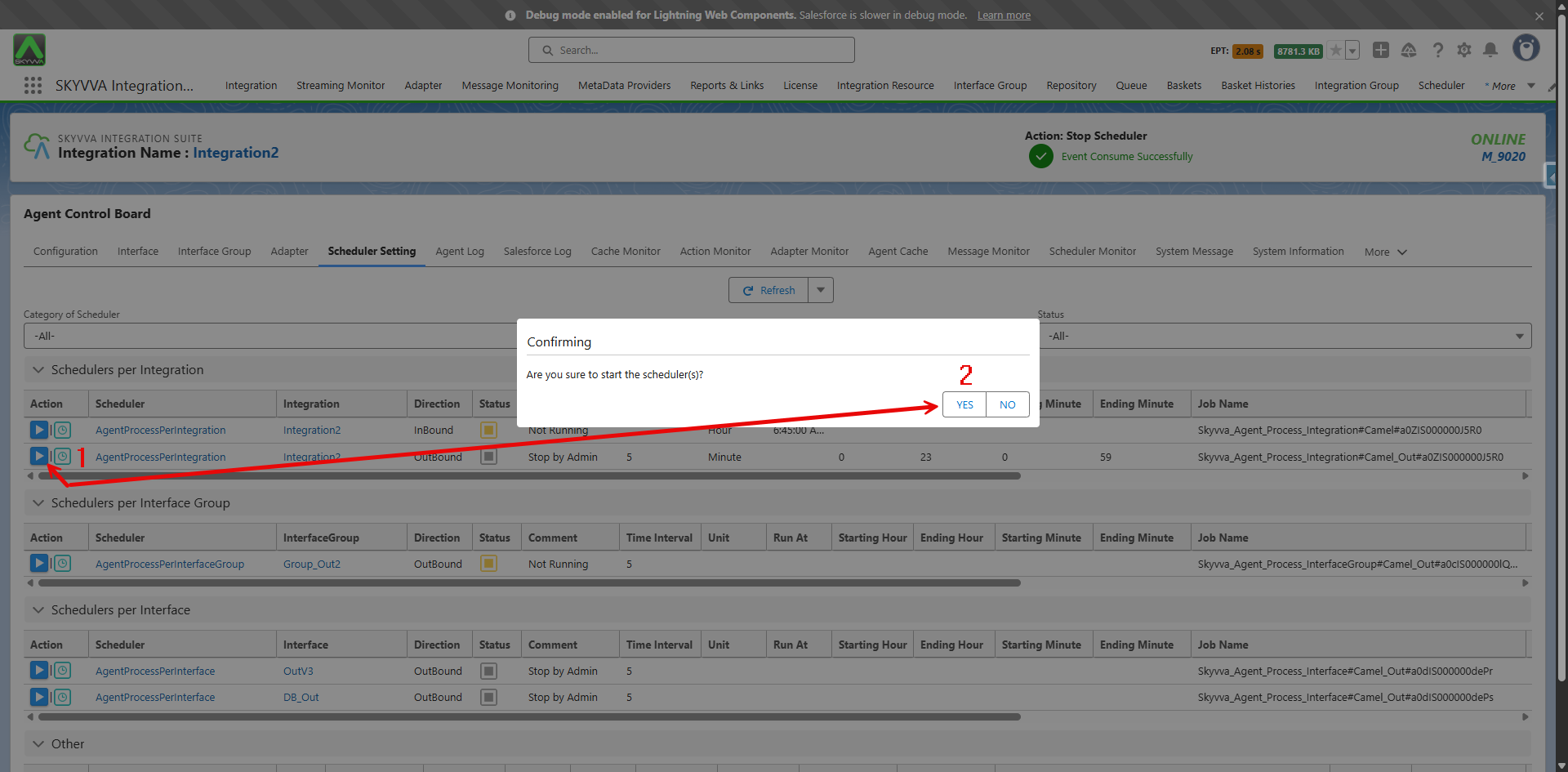
- Finally, the AgentProcessPerIntegration scheduler is now running. Please make sure to reconfigure all the outbound schedulers that you intend to run after the upgrade.
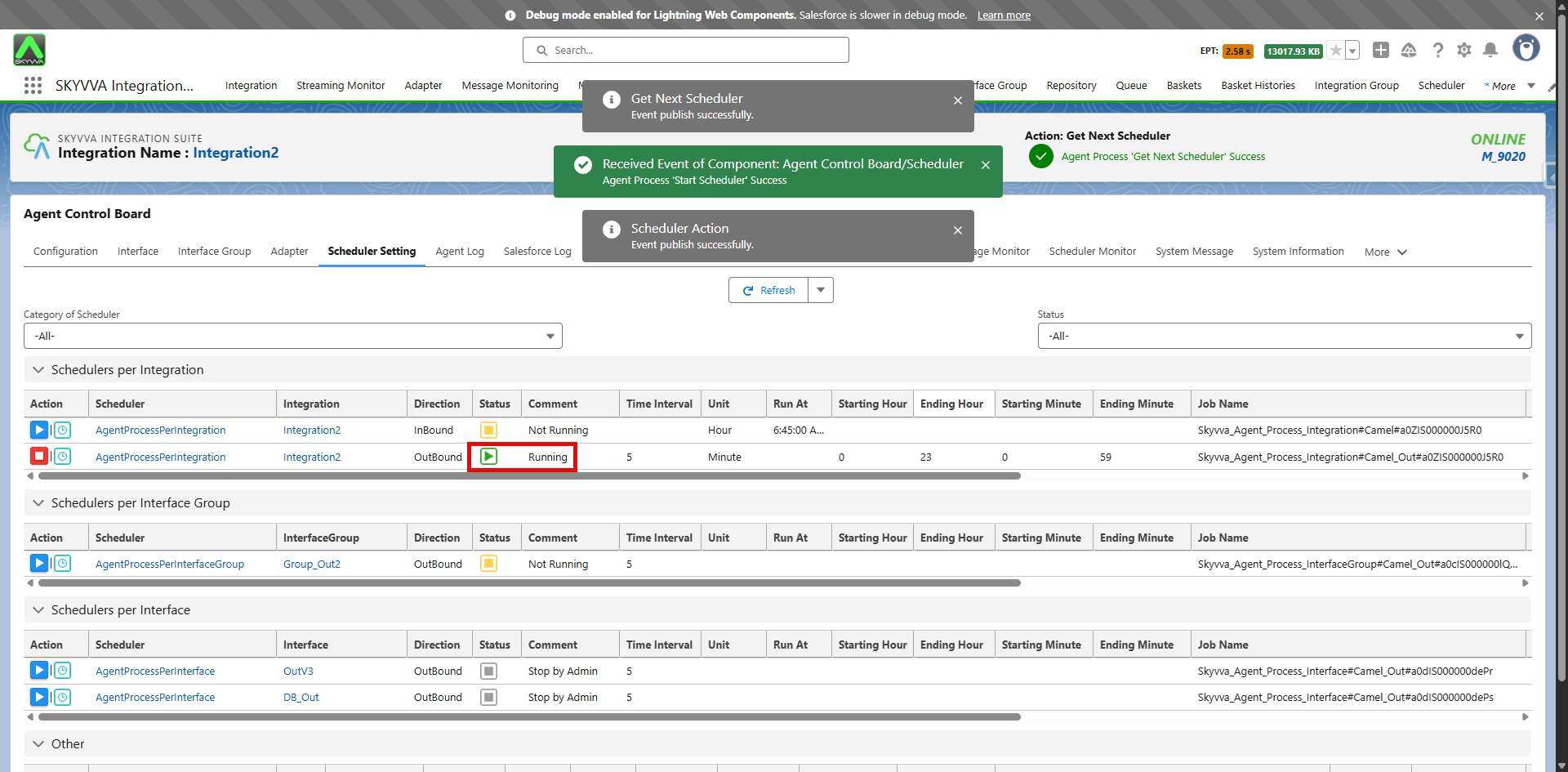
In case you did not stop the Agent Outbound Scheduler before the Upgrade
If you did not stop the outbound scheduler processing before the upgrade, the Outbound Processing is still using the old method that consumes significant event resources. Errors like 'Agent Response: The Scheduler with id: xxxxxxxxxxxxxxx is not running.' are appearing in the comments of the Outbound Scheduler, but the processing remains functional on the Salesforce side. This indicates that the processing is not running for the Agent side.
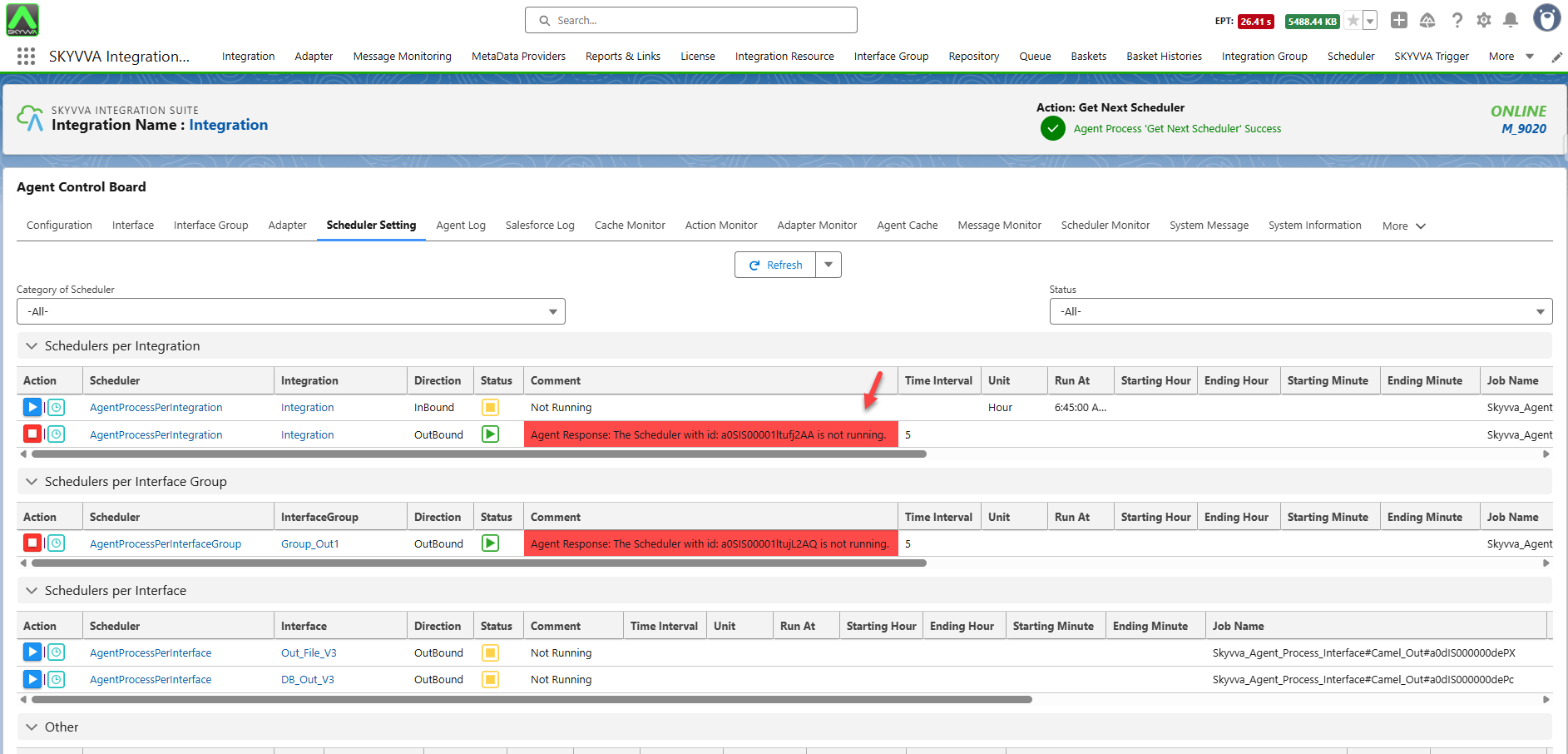
Please stop the scheduler that you intend to run processing on the agent side to reduce event consumption. Although you encountered an error, the scheduler will be stopped as shown in the screenshot below:
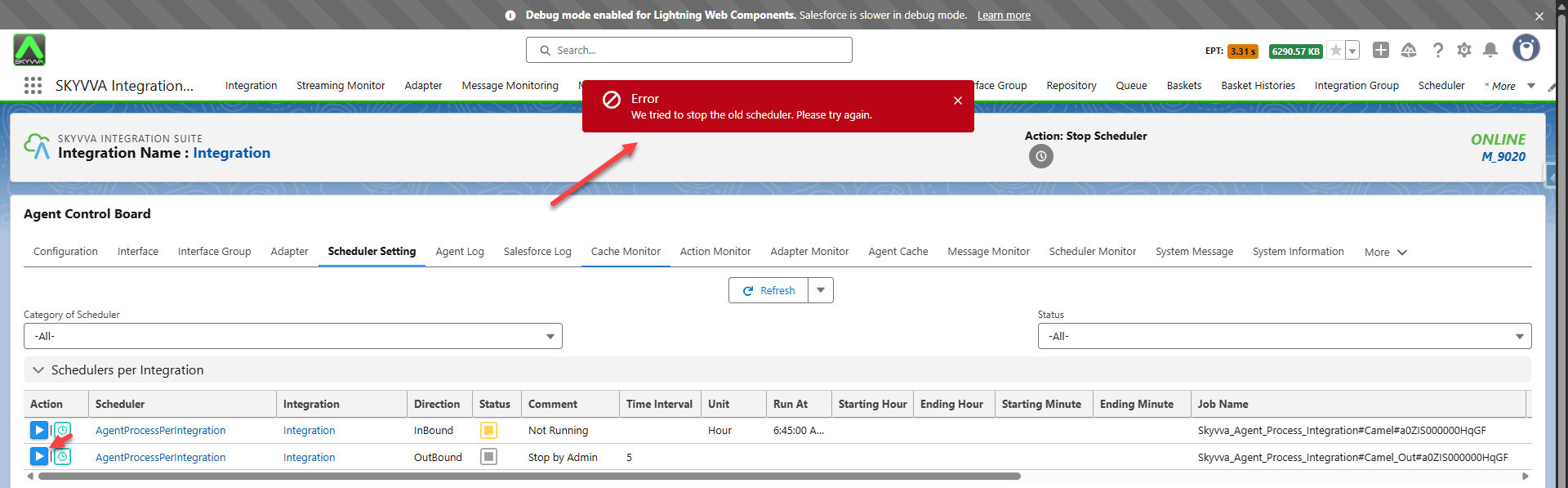
After stopping the Agent scheduler, please reconfigure the scheduler settings and start it again. Follow these steps #article/2-all-warning-main-and-patch-2-51 to reconfigure the scheduler setting.
Ensure Cleanup is Executed Using the Outbound Scheduler Within the Scheduler Settings of the Agent Control Board After Upgrading (2.51.9)
You will get the following error message, as shown in the screenshot below, in the scheduler settings tag on the Agent Control Board if you have upgraded to version 2.51.9 or later. In this version, we have modified the outbound scheduler naming schema, so your old schedulers will no longer work. The error will be displayed as shown in the screenshot below:

We offer you the function to clean up and restore the old schedulers. To execute this conversion, please click on the button ‘Run Cleanup’.
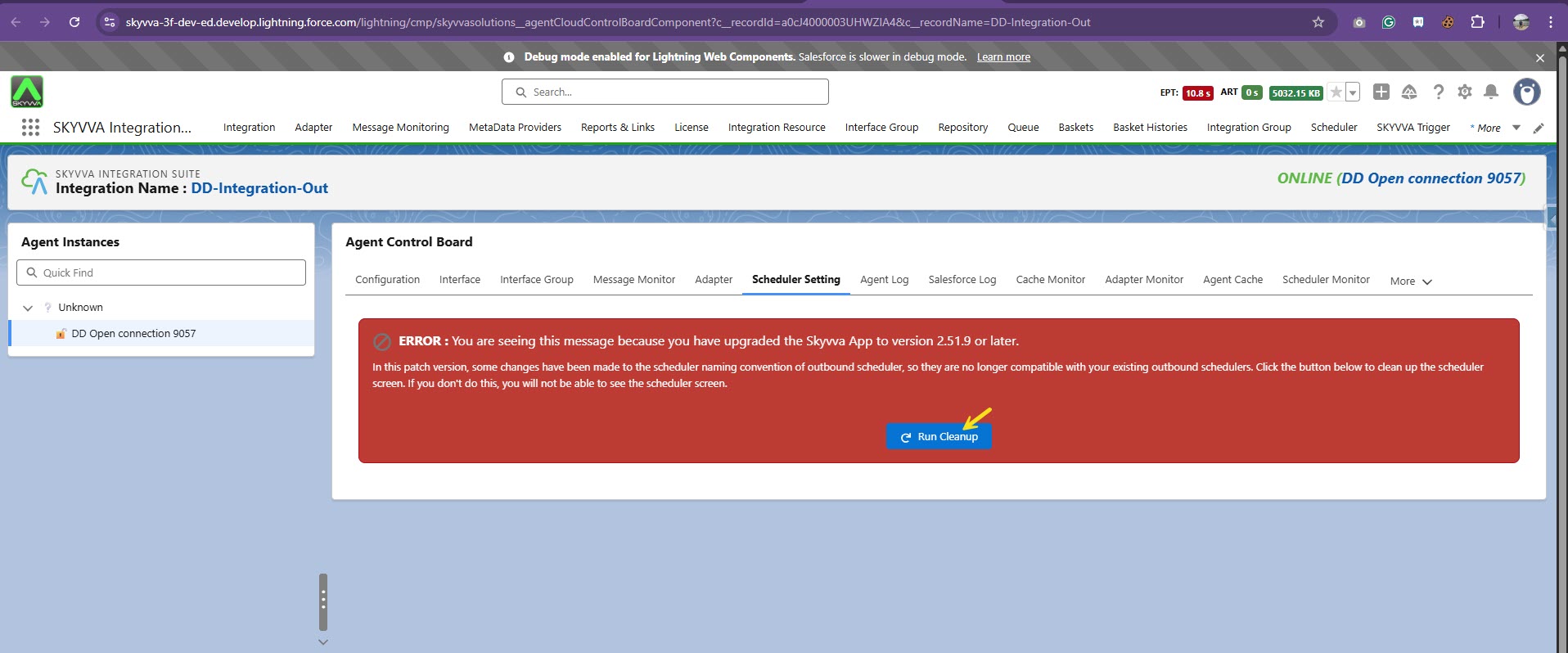
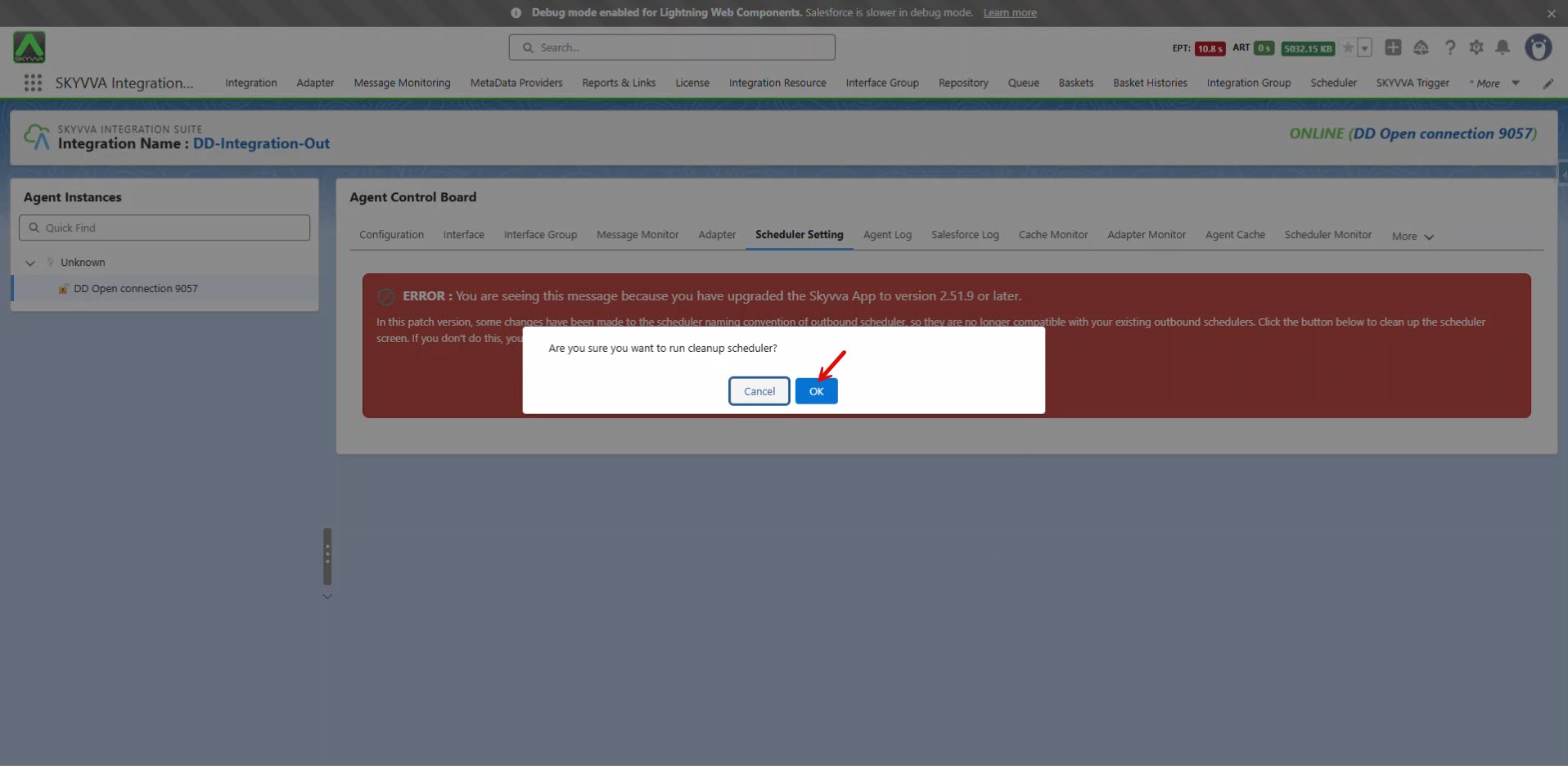
You will encounter a pop-up confirming the cleanup of the outbound scheduler. Please click 'OK' to proceed with the cleanup.
The cleanup of the outbound scheduler has now been completed.
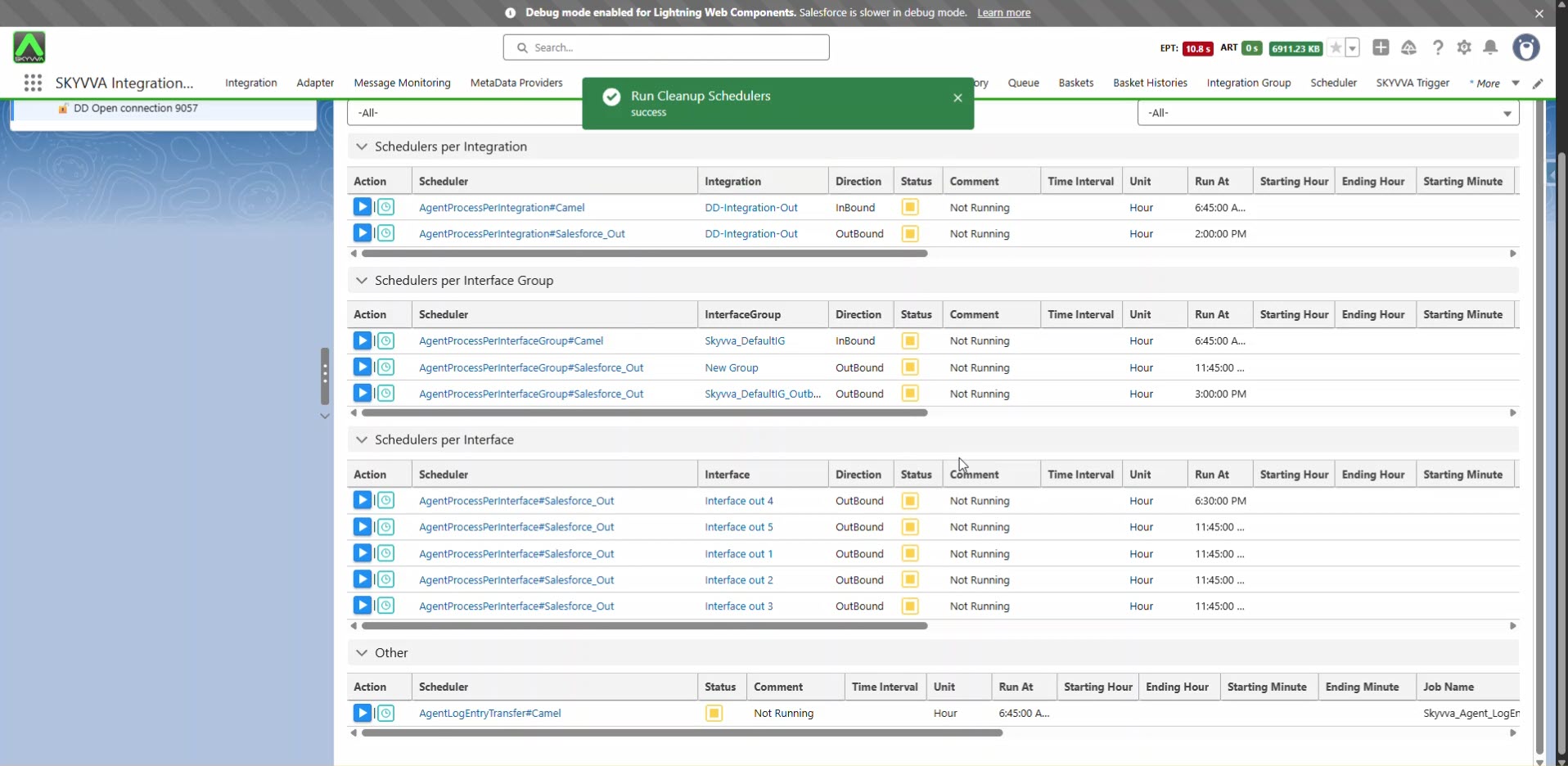
Note: The scheduler is running before the upgrade.

After the upgrade and cleanup, you must start the outbound scheduler manually; it will not run automatically afterward. Please note that this change only affects the outbound scheduler. For the inbound scheduler, there is no change, and thus you don’t need to take any action after the upgrade.
