2. How to Create Adapter Webhook and Push Records to Raw Basket Control Board ?
The expectation appears to be that users can send raw data into the raw basket within Salesforce by leveraging the Public Site in conjunction with Skyvva's 'V3/integratewebhook' API. This process allows users to bypass authentication by providing their API key in the adapter settings for seamless access to the API. Here's a breakdown of the expected workflow:
- Public Site Configuration:
Set up a Public Site in Salesforce to create an external-facing URL that acts as an entry point for external systems or applications.
- Skyvva 'V3/integratewebhook' API Integration:
Configure an adapter or integration within Salesforce, utilizing the Public Site URL as the endpoint for the 'V3/integratewebhook' API provided by Skyvva.
For more details on how to create the public site using our 'V3/integratewebhook' API, click link below – HOW TO CONFIGURE THE PUBLIC SITE?
- Adapter Settings:
Within the adapter configuration, input the API key provided by Skyvva into the settings. This key enables access to the 'V3/integratewebhook' API without requiring separate authentication steps.
- Sending Raw Data:
Users can then send raw data into Salesforce by making API requests to the Public Site URL integrated with the 'V3/integratewebhook' endpoint. The provided API key in the adapter settings grants access to deposit this data directly into the designated raw basket within Salesforce.
This process facilitates the seamless transmission of raw data from external sources into Salesforce, leveraging the 'V3/integratewebhook' API and the Public Site while utilizing the provided API key for authentication, thus eliminating additional authentication steps for users.
Required step:
- Create an Integration
- Create an Inbound Interface
- Do Mapping

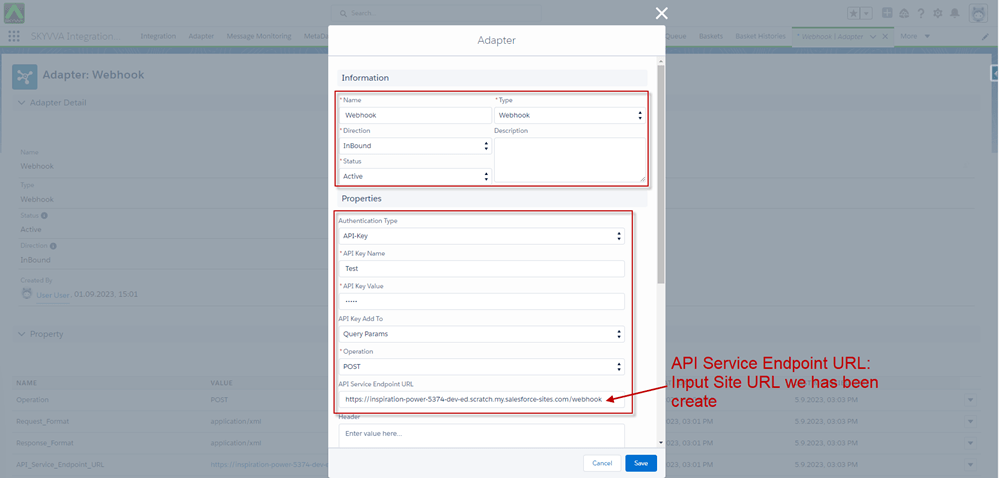
- Create an Adapter Webhook
Authentication Type: API-Key.
- API Key Name / API Key Value: You can provide the API Key by your own.
- Add the API Key To: You can provide that API Key with the Params you have set (Query Param or Header).
- API_Service_Endpoint_URL: Public Site URL.
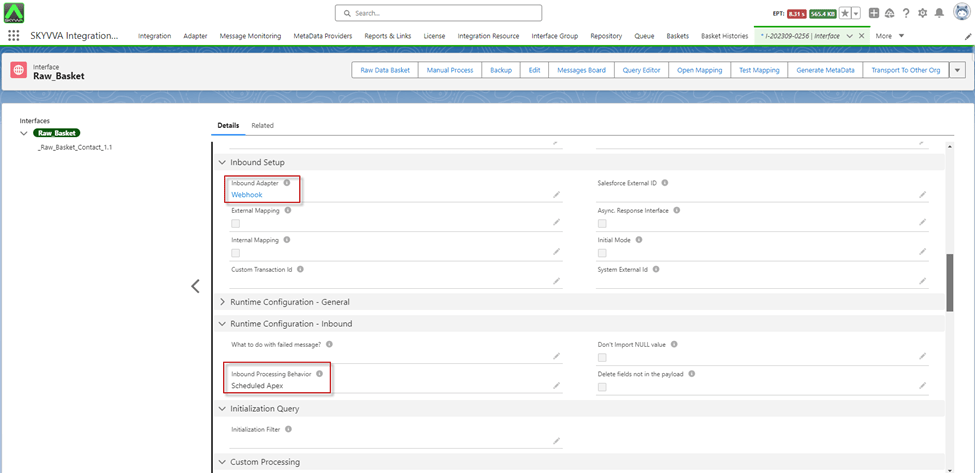
- After created an Adapter already, go to the Interface Detail -> link Adapter and set Scheduler Apex on the Interface
[su_box title="Note" box_color="#2a8af0" title_color="#000000"]Raw Basket will be created when the API uses a Public Site from the adapter Webhook to push data.
[/su_box]
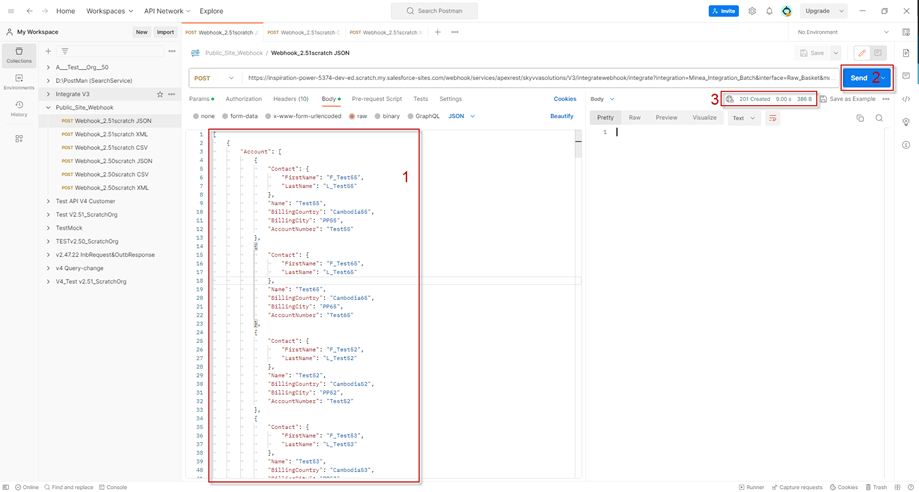
- Configuration from Postman to push records with Real data to Raw Basket Control Boad
- e.g.: Public URL Site + /services/apexrest/skyvvasolutions/V3/integratewebhook/integrate

- After configuring the Query Params on Postman, you can input data into the Body section -> click Send -> when it responds with Statue 201, it means the Basket has been successfully created.
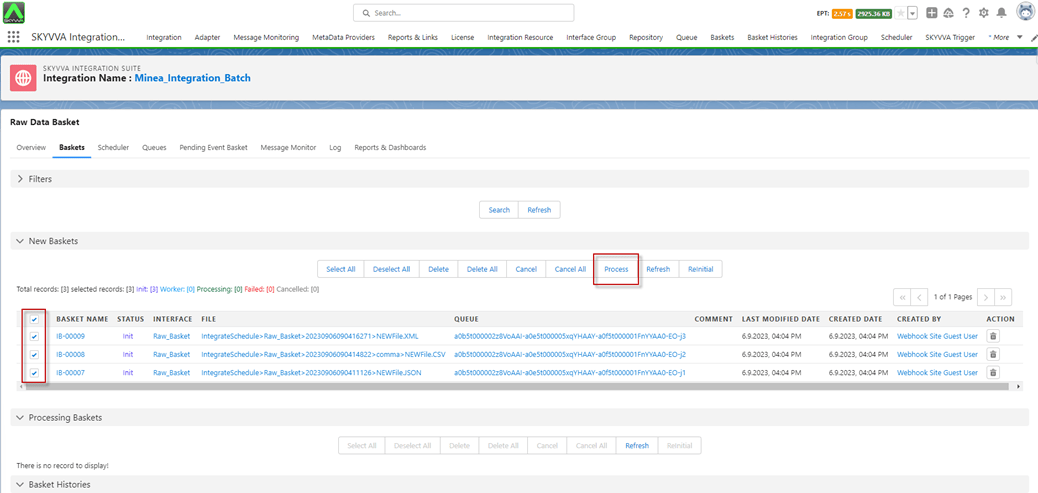
- Go to Integration Detail -> Raw Basket Control Board -> click on the Basket tab -> you will be able to see the Baskets that are created from the Webhook Site Guest User. Now, the raw basket is created in the 'New Baskets' section of the Raw Data Basket Control Board.

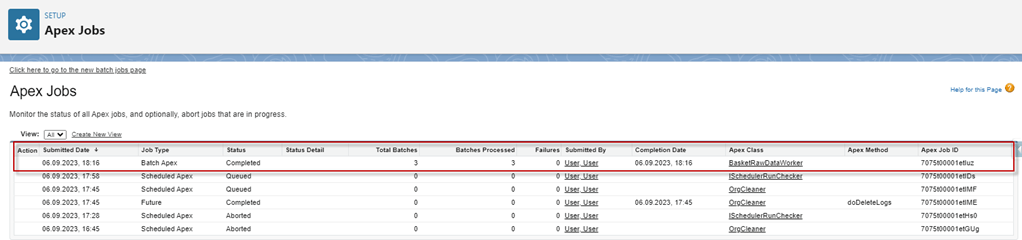
- Processing the Baskets
- Apex Job
- After Processed, The Message Monitoring
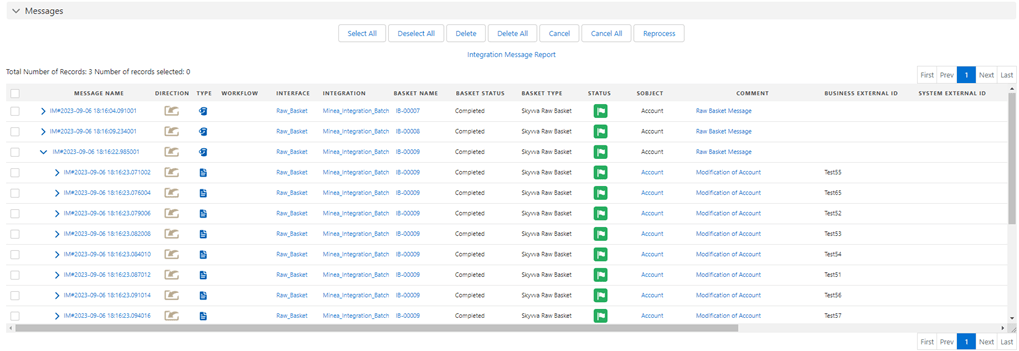
[su_box title="Result: " box_color="#00d9a6;" title_color="#000000"]After doing a manual process of the Raw Basket, the records have been upserted into salesforce.
[/su_box]
[su_box title="Note" box_color="#2a8af0" title_color="#000000"]
On the Adapter Webhook, we provide two Options:
- Default API Key, we use this API Key to obey the API Rule: method POST + API Path + some Query Parameter
- Custom Class, the user can put the apex class and verify yourself.
Sample custom validator class for V3/integratewebhook:
Extends global class in package: skyvvasolutions.IntegrateWebhookValidator
- Setting class name in adapter property (Custom Class) e.g., CustomValidator
[/su_box]
Example: global with sharing class CustomValidator extends skyvvasolutions.IntegrateWebhookValidator{ global override Boolean isValid(){ / Custom logic here * * */ return true; } }