2. How to generate an access token ?
Intoduction
- Generating an access token in Salesforce using the Client Credentials Flow is ideal for server‑to‑server integrations like the SKYVVA iPaaS. Unlike user‑context authentication, this method enables your application to authenticate using only its credentials—no interactive login required. It involves two main configuration steps in Salesforce:
Pre-require
Before attempting to generate an access token, ensure your Salesforce org is configured correctly:
- Configure the Connected AppNavigate to Setup → App Manager, locate your existing Connected App, and click Edit. Scroll to API (Enable OAuth Settings) and check “Enable Client Credentials Flow.” Define the necessary OAuth scopes (e.g., “API”), then save your changes. This enables Salesforce to issue tokens for your app.
- Connected App Creation
Navigate to Setup → App Manager, edit an existing one.
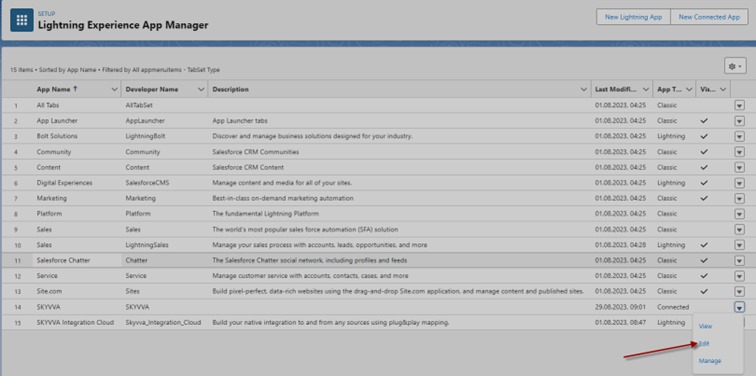
- Configure the Connected AppNavigate to Setup → App Manager, locate your existing Connected App, and click Edit. Scroll to API (Enable OAuth Settings) and check “Enable Client Credentials Flow.” Define the necessary OAuth scopes (e.g., “API”), then save your changes. This enables Salesforce to issue tokens for your app.
- Tick on Enable Client Credentials Flow

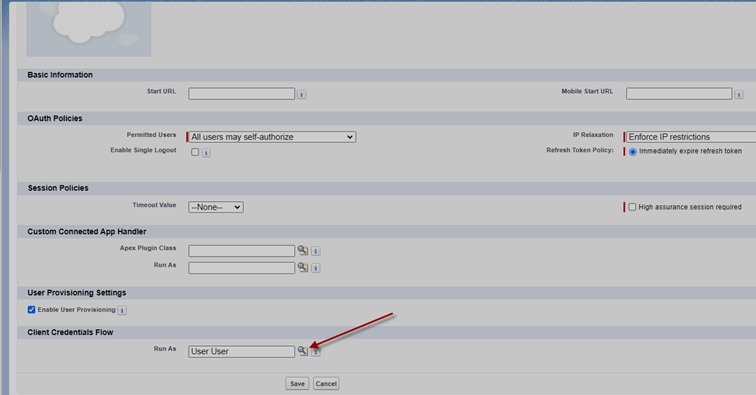
Step 2: Go to Manage Connected Apps and then edit Connected Apps

Select any User to enable access token in the section Client Credentials Flow
Postman screen side.
URL: https://enterprise-ruby-3909-dev-ed.scratch.my.salesforce.com/services/oauth2/token
KeyWord
- grant_type = client_credentials
- client_id = …?
- client_secret= …?

Summary
Now, users learn how to obtain an access token with the SKYVVA Integration App, following the OAuth 2.0 Client Credentials flow. Start by registering your integration and obtaining a client ID and client secret within SKYVVA. Then send a POST request to the OAuth endpoint/V4/integrate, including these credentials along with requested permission scopes. SKYVVA validates the credentials and issues an access token in the response. Store this token securely, as it authorizes your API calls. Tokens may expire, so implement logic to refresh or request a new token as needed. This method ensures secure, automated access from user integration without using user credentials.