2. How to use Custom Payload Class for Callout Row CSV?
Introduction
- In this tutorial, we will guide you through the process of exporting Row CSV using an Agent File Adapter with a Custom Payload Class, utilizing the SKYVVA Integration App's Agent Control Board. The Custom Payload Class is a tailored solution designed to generate payloads that meet your specific business needs. By customizing this class, you can ensure that the data exported aligns perfectly with your organizational requirements.
- The SKYVVA Integration App is a powerful tool for managing and streamlining data integration processes within Salesforce. The Agent Control Board component allows for efficient configuration and management of data agents, ensuring smooth and accurate data handling.
- Through this tutorial, you will learn how to set up the Agent File Adapter, create and implement the Custom Payload Class, and configure the necessary settings within the Agent Control Board. Whether you need to export customer data, sales reports, or any other vital information, this tutorial will provide you with the knowledge and skills to perform these tasks efficiently.
By the end of this tutorial, you will be equipped to customize your payloads and export data seamlessly, leveraging the robust capabilities of the SKYVVA Integration App. Let's dive in and start optimizing your data export processes!
Prerequisites
- Salesforce Environment Setup: Ensure you have a Salesforce org with administrative access to create and configure custom objects, classes, and interfaces. You should also have the SKYVVA integration app installed and properly licensed.
- Basic Knowledge of Salesforce: Familiarity with Salesforce concepts like custom objects, fields, Apex classes, and triggers is essential. Understanding the basics of the SKYVVA integration app and its components, such as the Agent Control Board and Adapters, is also crucial.
- Agent Control Board Configuration: Ensure that the Agent Control Board within the SKYVVA app is properly configured. This involves setting up connections to external systems, defining integration endpoints, and configuring security settings.
- Creating a Custom Payload Class: You need to create a custom Apex class to define the structure and format of the payload for data integration. This class will handle the mapping and transformation of data between Salesforce and external systems.
- Adapter Creation: Create and configure an Adapter in the Agent Control Board to facilitate communication between Salesforce and the external system. This involves setting up connection details, authentication, and data mapping rules.
- Outbound Interface Setup: Define an Outbound Interface within the SKYVVA app to manage the data flow from Salesforce to the external system. This includes specifying the data source, mapping fields, and configuring triggers or events to initiate data transfer.
- Custom Payload Class for Callout Row Configuration: For the callout row configuration, customize the payload class to handle specific requirements of the external system's API. This may involve additional field mappings, data transformations, and error-handling mechanisms.
- Testing and Validation: Before going live, thoroughly test the integration setup to ensure data flows correctly between Salesforce and the external system. Validate that the custom payload class and outbound interface work as expected.
By meeting these prerequisites, you'll be well-prepared to set up and manage integrations using the SKYVVA integration app and the Agent Control Board.
Custom Payload Class for Callout Row CSV(Outbound)
- Using the Outbound Custom Payload Class involves creating a specific class in Salesforce that formats the data into a CSV structure suitable for the external system’s API. This class can be tailored to include only the necessary fields and handle any required data transformations.
- With the SKYVVA Agent Control Board, you can configure this class and map it to the appropriate callout row, ensuring seamless data integration. This process enhances data accuracy, reduces integration errors, and supports efficient data management across platforms. In this guide, we'll walk you through the steps to set up and use the Outbound Custom Payload Class effectively for your callout row CSV needs.
Steps:
- Create an Integration
Create new Integration by following the guide, a link is given below: – What is an integration and how to create it?
- Create a Custom Payload Class
Go to Setup
- Search for Apex Class
- Create a New Apex class
- Save
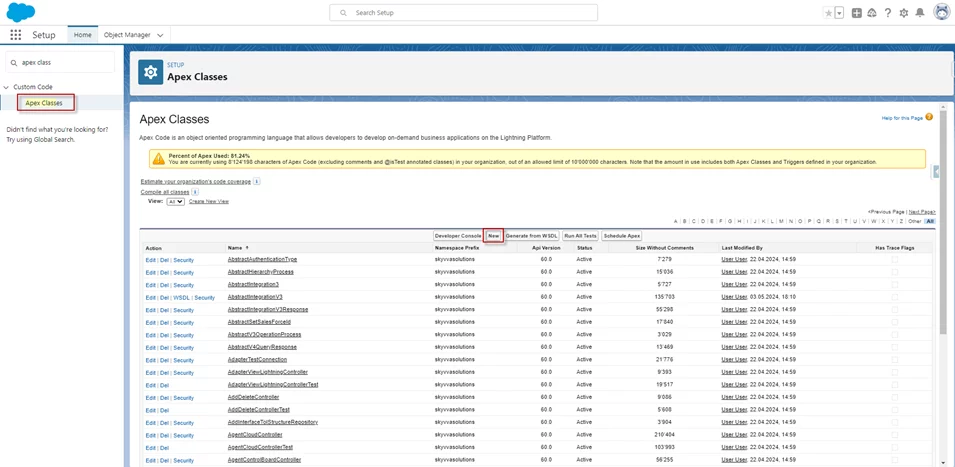
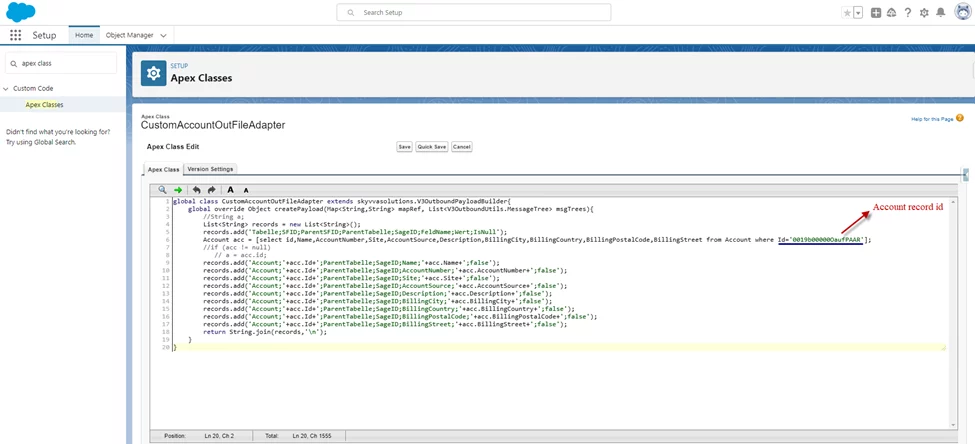
- The Sample Code: This Custom Class is an example of creating a custom row CSV payload for the callout record with the Agent File Adapter.
global class CustomAccountOutFileAdapter extends skyvvasolutions.V3OutboundPayloadBuilder{ global override Object createPayload(Map<String,String> mapRef, List<V3OutboundUtils.MessageTree> msgTrees){ //String a; List<String> records = new List<String>(); records.add('Tabelle;SFID;ParentSFID;ParentTabelle;SageID;FeldName;Wert;IsNull'); Account acc = [select id,Name,AccountNumber,Site,AccountSource,Description,BillingCity,BillingCountry,BillingPostalCode,BillingStreet from Account where Id='0019b00000OaufPAAR']; //if (acc != null) // a = acc.id; records.add('Account;'+acc.Id+';ParentTabelle;SageID;Name;'+acc.Name+';false'); records.add('Account;'+acc.Id+';ParentTabelle;SageID;AccountNumber;'+acc.AccountNumber+';false'); records.add('Account;'+acc.Id+';ParentTabelle;SageID;Site;'+acc.Site+';false'); records.add('Account;'+acc.Id+';ParentTabelle;SageID;AccountSource;'+acc.AccountSource+';false'); records.add('Account;'+acc.Id+';ParentTabelle;SageID;Description;'+acc.Description+';false'); records.add('Account;'+acc.Id+';ParentTabelle;SageID;BillingCity;'+acc.BillingCity+';false'); records.add('Account;'+acc.Id+';ParentTabelle;SageID;BillingCountry;'+acc.BillingCountry+';false'); records.add('Account;'+acc.Id+';ParentTabelle;SageID;BillingPostalCode;'+acc.BillingPostalCode+';false'); records.add('Account;'+acc.Id+';ParentTabelle;SageID;BillingStreet;'+acc.BillingStreet+';false'); return String.join(records,'\n'); } }
- Configuration on the Agent Control Board and create an Adapter
- Create a Connection Destination
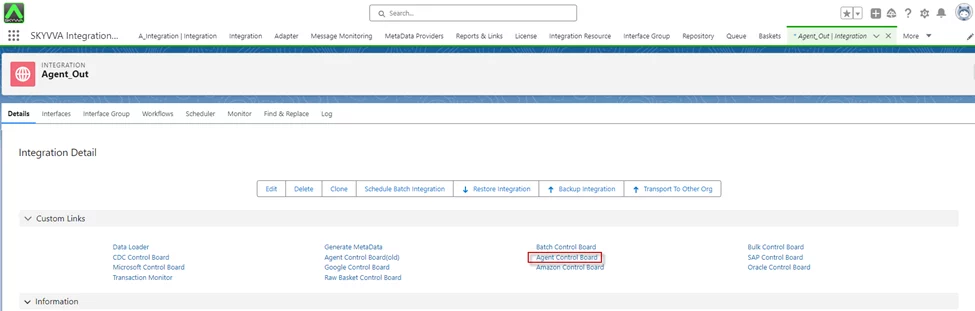
Navigate to AGENT Control
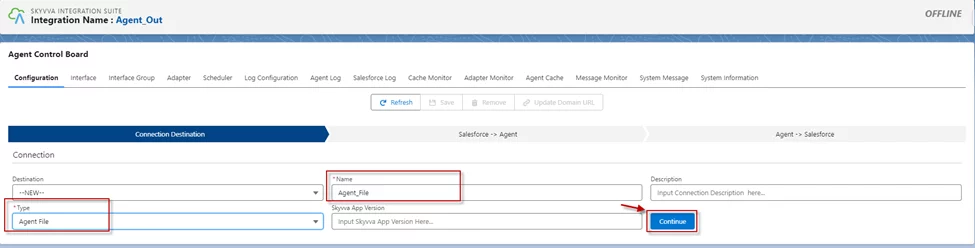
- In the Configuration tab enter the connection destination name and click on the button “Continue”
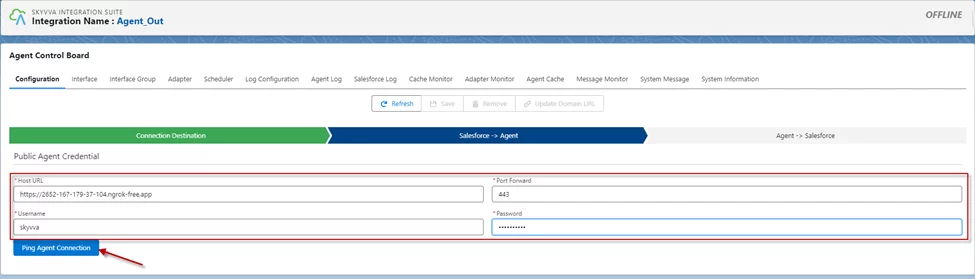
- Fill in all the required details
- Click the button Ping Agent Connection
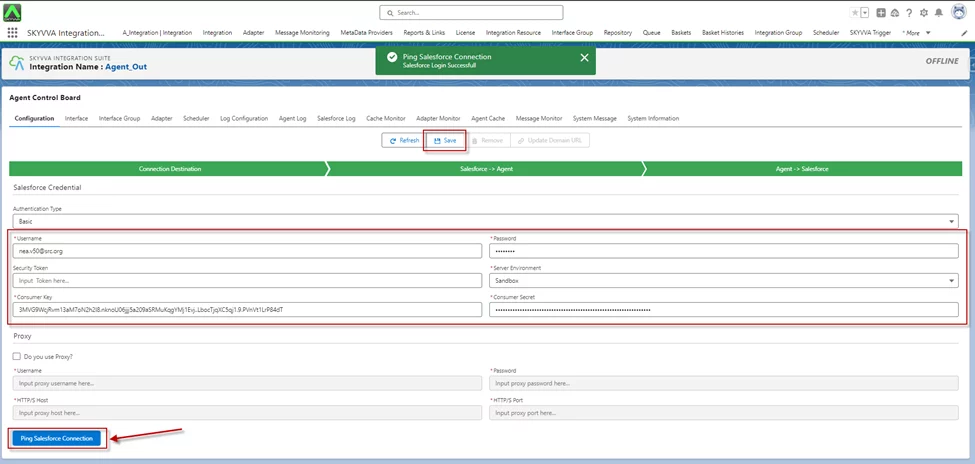
- Fill in all the required details
- Click the button Ping Salesforce Connection
- Click Save
- Create an Outbound Adapter
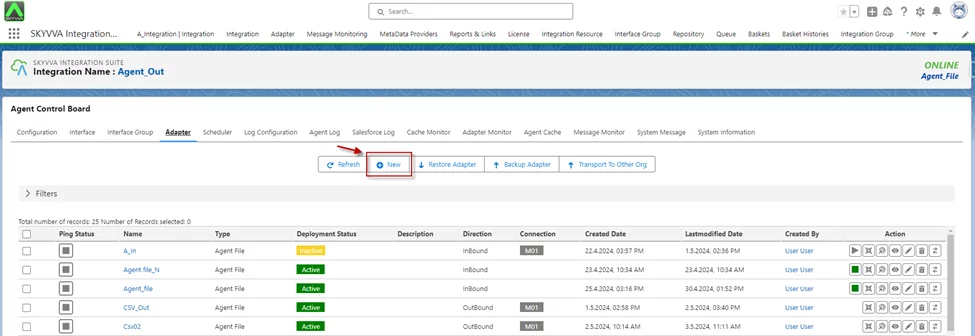
- Navigate to the Adapter tab after that click the button New
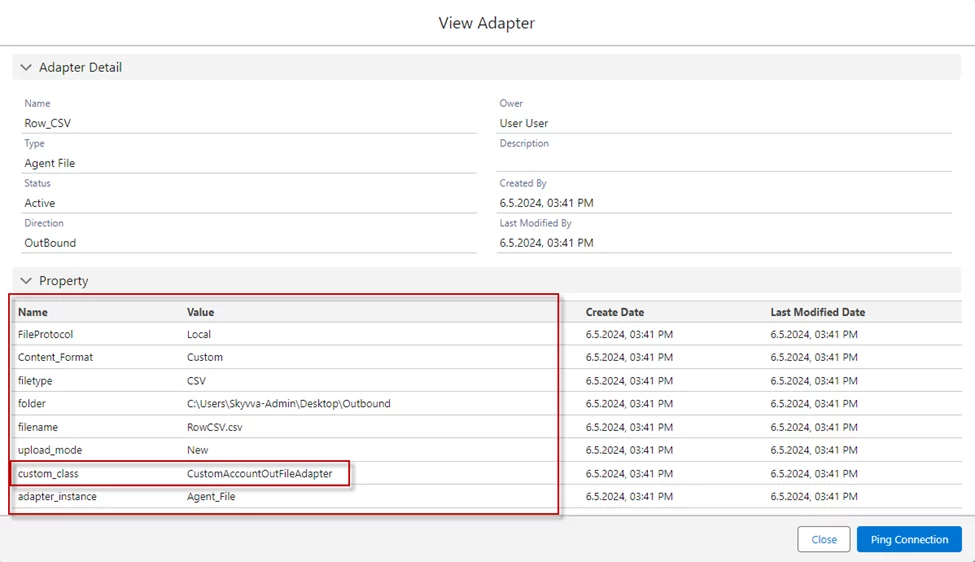
- Name: any Name
- Type: Agent File
- Direction: Outbound
- Protocol: Local
- Content Format: Custom
- File Type: CSV
- Folder: (your folder location)
- File Name: (your file name)
- File Handling Mode: (choose file mode)
- Custom Processing Class: (Input your custom class name)
- Connection Destination: (your destination name)
Create an Interface
- To create the interface need to follow this guide
- Create an Outbound Interface
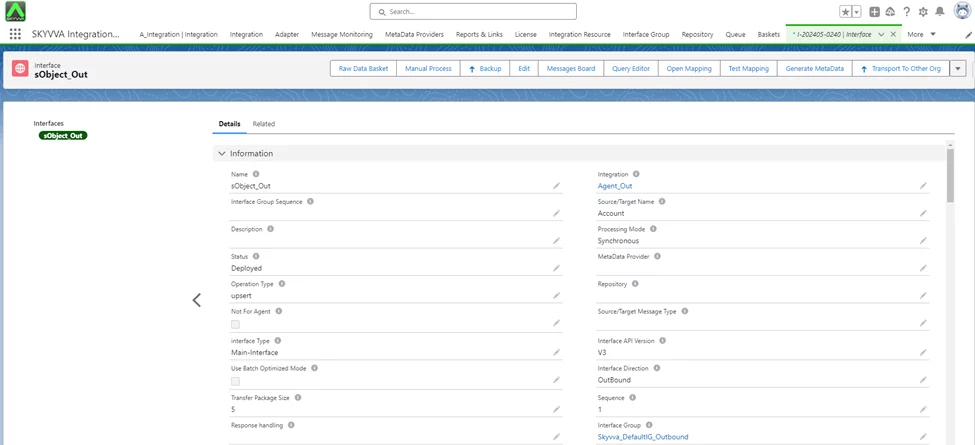
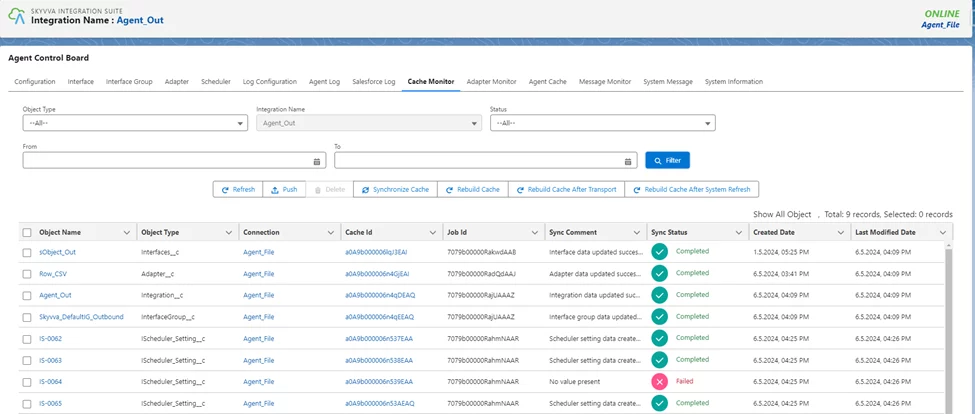
- Check cache status
- Go to Agent Control Board
- Click Cache Monitor
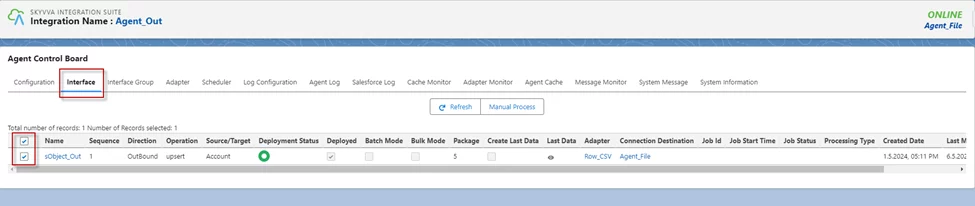
- Manual process
Navigate to the Interface tab and select the interface
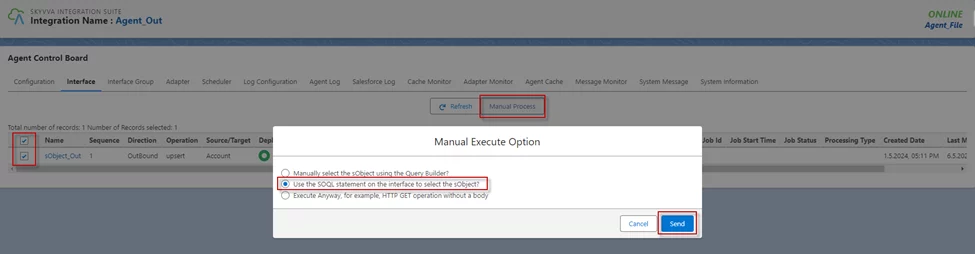
- Click on the Manual Process button and choose the second radio
- Click Send
- As a result of Message Monitoring, the record has been sent from Salesforce to file

- CSV File
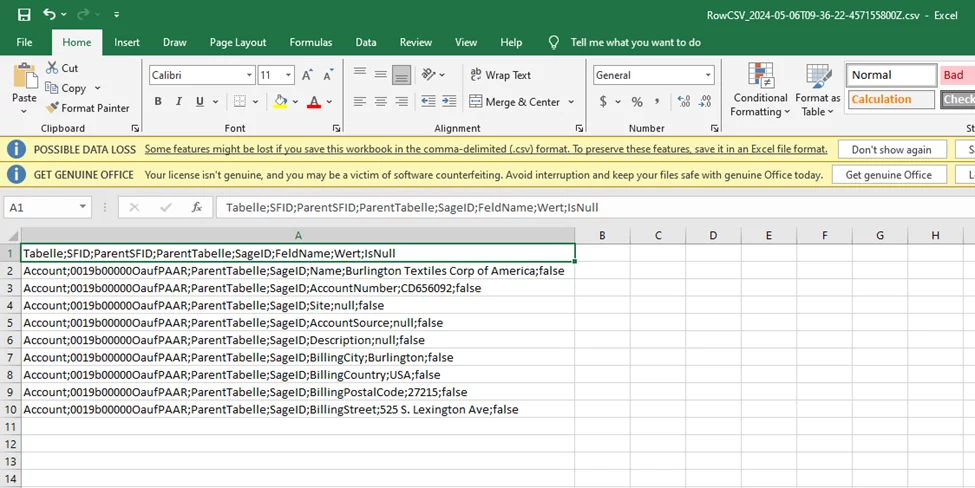
[su_box title="Result:" box_color="#2a8af0" title_color="#000000"]After clicking Manual Process for the callout record, you get the payload Row CSV file, based on the Custom Class you have created. [/su_box]
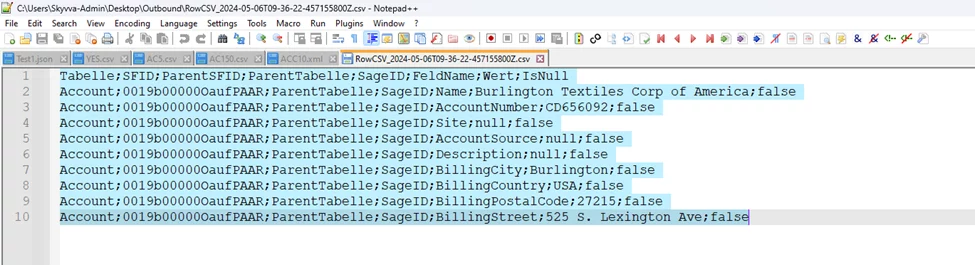
- Payload open with NotePad++
[su_box title="Note" box_color="#E4080A" title_color="#000000"]This Custom Class is an example only used for a callout record, as we have defined a Record or Field in the Custom Class so there is no need for Mapping.[/su_box]
Summary
Now users understand this tutorial explains how to export Row CSV using an Agent File Adapter with a Custom Payload Class in the SKYVVA integration app, guiding you through setup and configuration to meet specific business data handling needs.