2. How to use Merge or Override option for uploading an IStructure on the Interface ?
Learning Objectives
After completing this unit, you’ll be able to:
- Describe what the Interface is.
- Comfortably use the Interface.
- Merge or Override option for uploading an IStructure on the Interface
Introduction
The SKYVVA Integration App provides powerful tools to simplify and automate data integration within Salesforce. One of its key features is the ability to manage complex data structures (IStructures) that facilitate smooth data exchange between Salesforce and external systems. When working with IStructures in an interface, the "Override" option plays a crucial role in ensuring data integrity and accuracy during the uploading process.
- The "Override" option allows you to upload an updated or modified IStructure while retaining the existing interface configuration. This is especially useful when you need to make changes to the data structure—such as adding new fields, updating data formats, or adjusting mappings—without disrupting the current interface logic. Instead of manually reconfiguring the interface, the Override option streamlines the process by automatically replacing the old IStructure with the new one while preserving the overall structure and settings.
- Using this option helps prevent data inconsistencies, reduces the risk of integration errors, and ensures that updates are applied quickly and efficiently. This guide will walk you through the steps to effectively use the Override option for uploading an IStructure, enabling smooth, error-free integration in your Salesforce environment with SKYVVA.
What is Interface?
The interface is the second main object in SKYVVA after the integration. The interface describes the IStructure of data to exchange between Salesforce and other applications.
- Inbound Interface
The next property of the interface defines the processing mode. e.g. Synchronous and real-time (synchronous) Batch (asynchronous) and Bulk (asynchronous).
Prerequisites
- You have your salesforce organization
- You have installed SKYVVA in your salesforce organization.
- You have created integration.
How to create an inbound Interface?
- Click on the interface tab
- Fill in the following field:
– Name
– Source name
– Status
– operation Type
– Type
- Click on the Save button
- Scroll down to the Source Definition Section

- Choose and upload the XML/CSV File
- The message pops up on the dialogue box "Do you want to merge the new fields with the oldones? Click okay to confirm, or Cancel to overwrite old fields."
The SKYVVA Integration application offers a user-friendly interface for managing data fields during integrations. When working with existing data, a user may need to merge new fields with old ones to ensure that their datasets are up-to-date without losing valuable information. The application provides an option where, upon detecting new fields, you can choose to merge them with the old ones by clicking "OK" to confirm. Alternatively, selecting "Cancel" will overwrite the old fields with the new data. This functionality ensures flexibility and control in handling your integration updates efficiently.
- Click on Save

- ISructures saved successfully
- click on the OK button
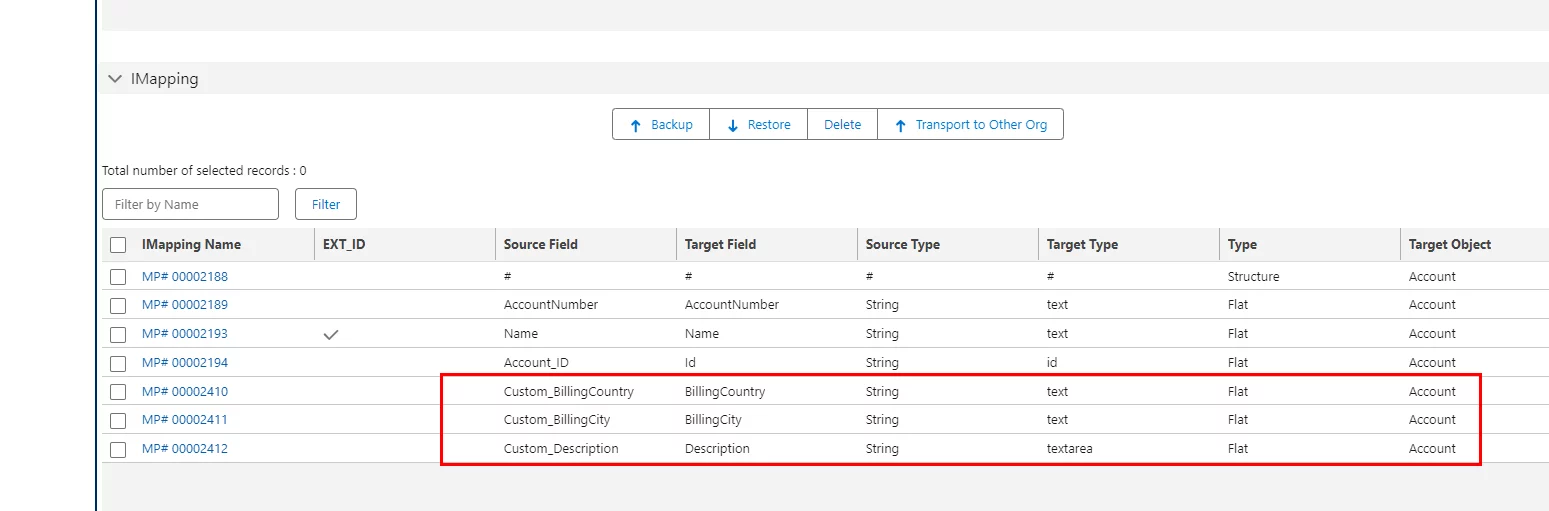
- Go to the IMapping section
- See the Source fields Merge or Override successfully

- Now Check on the Mapping
- Source fields Merge or Override successfully
- Save the mapping
Summary
Now the user understands, How SKYVVA Integration App's "Override" option simplifies updating IStructures in interfaces without disrupting existing configurations. It allows seamless uploads of modified data structures, ensuring smooth data integration and reducing errors. This feature enables efficient updates while maintaining interface logic, and streamlining Salesforce integration processes.