2. How to use Streaming API with CDC Event?
Introduction
The Streaming API in Salesforce provides a powerful mechanism for real-time data updates, enabling applications to subscribe to changes in Salesforce data. This API includes two key event types:
- Change Data Capture (CDC) events, CDC events are designed to deliver notifications about changes to Salesforce records, including inserts, updates, and deletes. They are particularly useful for tracking data changes in near real-time and integrating them with external systems.
- Understanding Streaming API and CDC Events: Streaming APIs are crucial for enabling real-time data flow between systems. They allow applications to subscribe to data streams and receive updates instantly as changes occur. Change Data Capture (CDC) is a method used to track and capture changes in a database, ensuring that any modifications, such as inserts, updates, and deletes, are recorded and made available for further processing.
SKYVVA Agent Control Board is a robust integration tool that facilitates the use of these streaming APIs. It enables users to configure and manage CDC events seamlessly. By leveraging the SKYVVA platform, users can set up flows to handle real-time data updates and automate integration processes. The Agent Control Board simplifies the configuration of streaming events, ensuring that data integration is both efficient and effective.
Integrating a streaming API with Change Data Capture (CDC) events using the Agent SKYVVA integration application can significantly enhance real-time data processing and synchronization across various systems. This guide aims to provide a comprehensive introduction to this process, facilitating a seamless integration experience.
The Role of Agent Skyvva Integration Application
Agent SKYVVA is an advanced integration platform designed to simplify and automate the process of data synchronization across multiple systems. With its robust capabilities, it provides a seamless interface to connect and manage various data sources, including those using CDC events and streaming APIs.
Prerequisites
- Setup Agent Skyvva Integration Application
- Installation: Ensure the Agent SKYVVA package is installed in your Salesforce environment. This package facilitates the integration process by providing necessary tools and connectors.
- Configuration: Configure the Agent SKYVVA app by setting up the necessary credentials and endpoints to communicate with your external system.
- Enable Change Data Capture in Salesforce
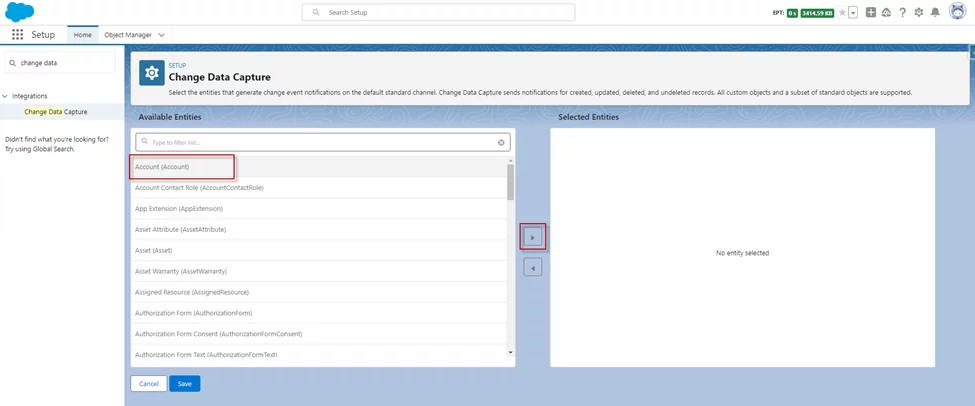
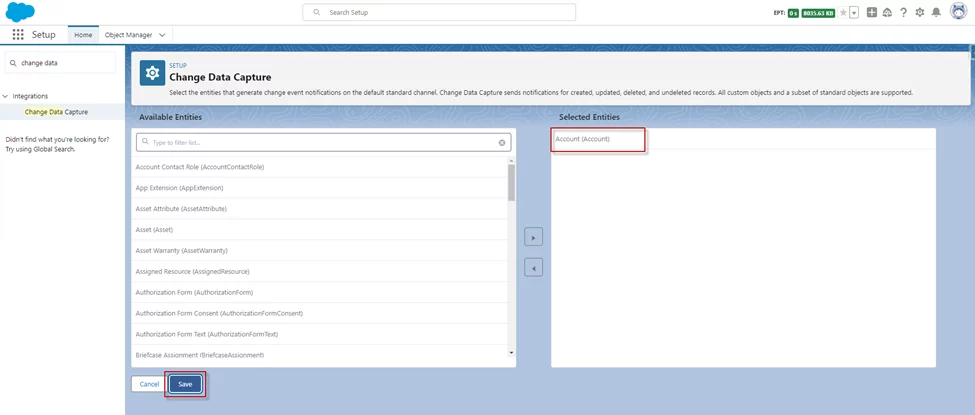
- CDC Configuration: Go to Salesforce Setup and search for "Change Data Capture." Select the objects you want to track for changes. This could be standard or custom objects.
- Event Subscription: Once CDC is enabled for the required objects, Salesforce will start generating CDC events whenever changes occur.
- Integrate with Agent Skyvva
- Outbound Interface: In the Agent SKYVVA application, create an outbound interface to process incoming CDC events. This interface will define how the data is mapped and transformed before being sent to the external system.
- Mapping: Define the data mapping rules within Agent SKYVVA. This ensures that the data captured from Salesforce CDC events is correctly formatted and ready for the external system.
- Monitoring
- Monitoring: Use the Agent SKYVVA message to monitor the flow of data. Look out for any errors or issues in the integration process and address them promptly.
By following these steps, you can effectively use the Streaming API with CDC events in conjunction with the Agent SKYVVA integration application, ensuring real-time data synchronization between Salesforce and your external systems.
Expectation:
In this scenario, CDC (Change Data Capture) events are used to send all changed data as events to the Agent automatically. To configure CDC events, set the flag and select the corresponding xxxChangeEvent object in the interface's 'Source/Target' field—such as AccountChangeEvent, LeadChangeEvent, OpportunityChangeEvent, and so on. In the message type, specify the external message type. Then, map the sObject fields to the external message type. Whenever a user changes, inserts, deletes, or undeletes data, an event is created and sent to the Agent, containing all the changed fields. The Agent checks the mapping, transforms the event data into the external structure, and raises an error if no mapping is available, logging it using the Agent Skyvva integration application.
Step:
- Go to Setup
- Find Change Data Capture in the Quick Find box
- Select Object
- Save
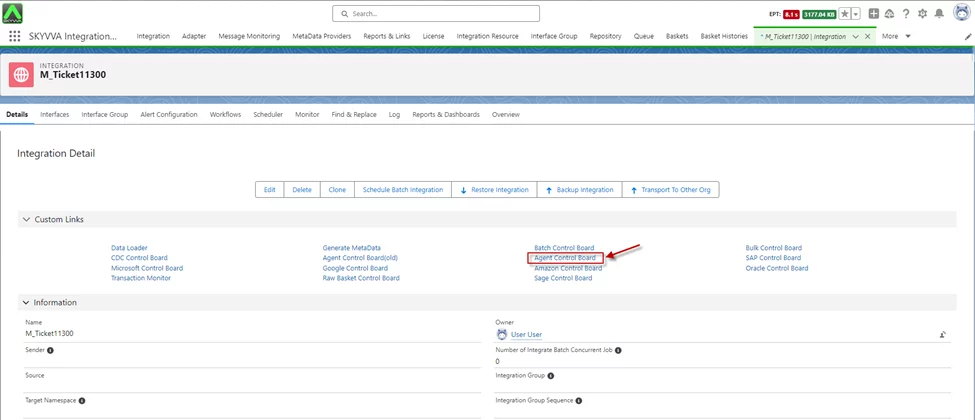
- Create an Integration
- Click on Agent Control Board
- Once the Agent Control Board is open.
- We have to configure the agent with config details.
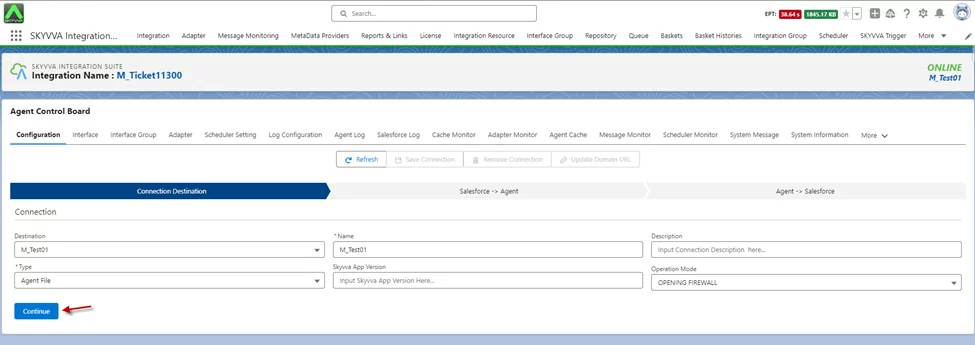
- Click on the Ping Agent Connection button
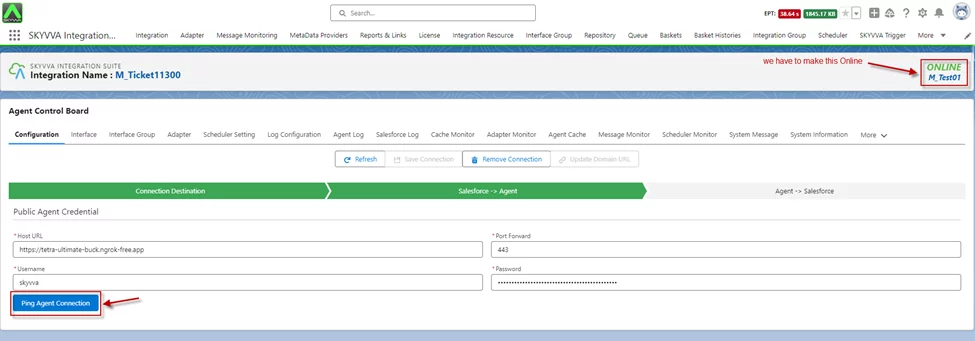
- Click Ping Salesforce Connection
- Click Save Connection.

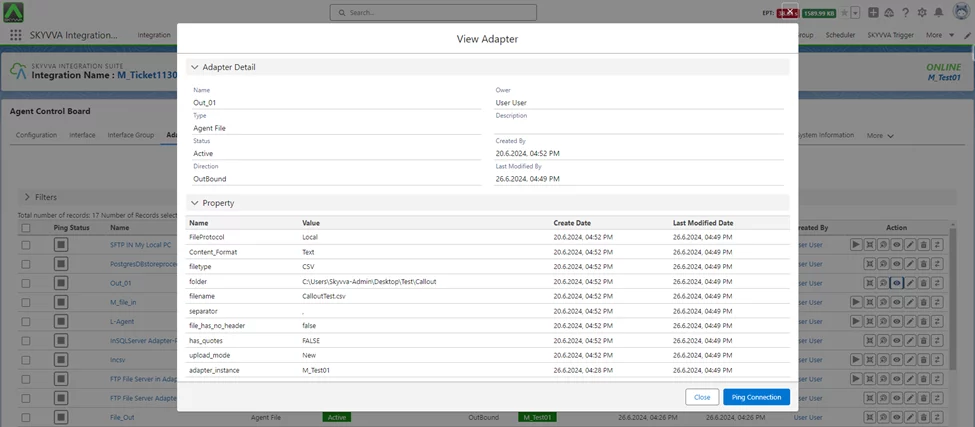
- Create an Adapter.
- Here we are using Agent File-Type
Outbound Interface
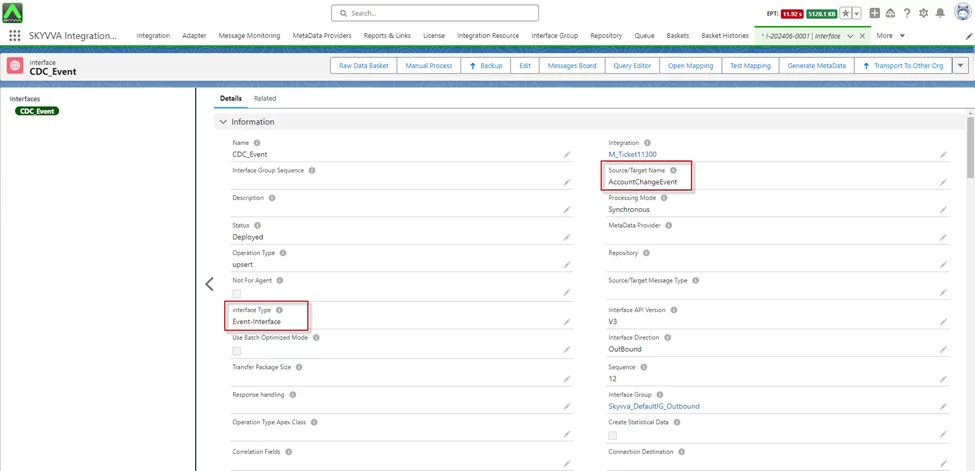
To create an outbound interface in the SKYVVA integration application, navigate to the Integration tab, then click on the Interface tab and select the New Interface button. Set the interface type to "Event-Interface" and ensure that the source name contains "ChangeEvent," such as "AccountChangeEvent." Complete the configuration according to your specific integration requirements. This setup will enable the outbound interface to handle change events using the Skyvva integration application.
- Go to Integration -> Interface tab -> Click on New Interface button -> We have to Create Outbound Interface
Interface type: “Event-Interface”
- Source name contains “ChangeEvent” e.g. AccountChangeEvent
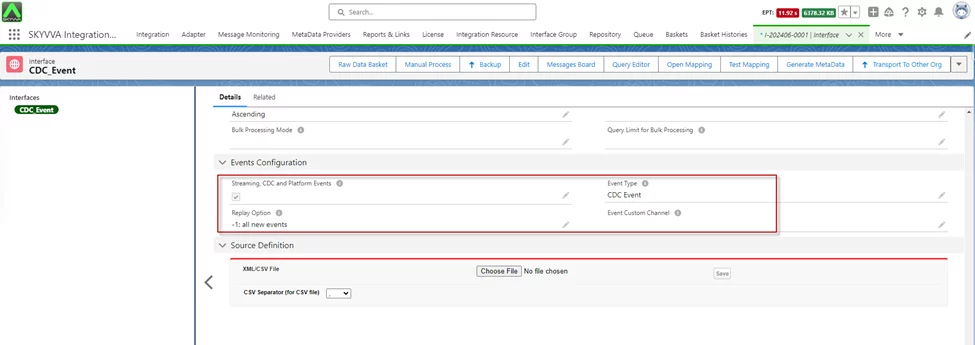
- We have set on Event Configuration
- Enable- Streaming CDC and Platform Event
- Event Type- CDC Event
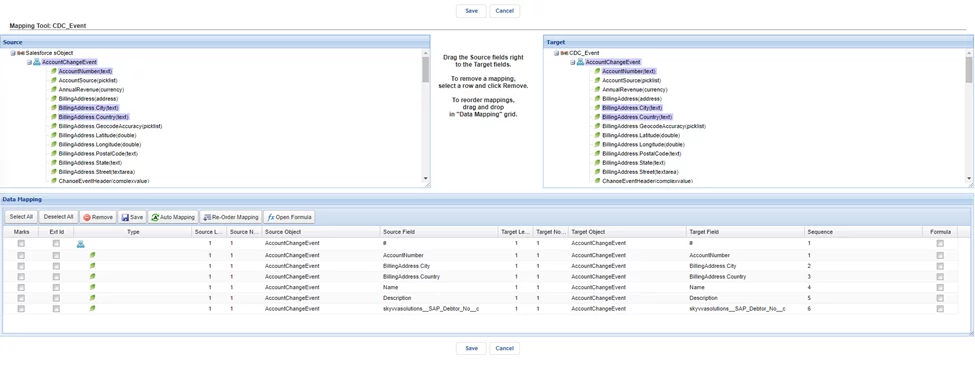
- Do Mapping
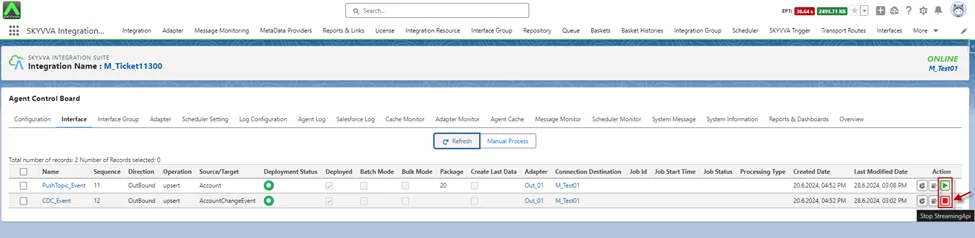
Go to New Agent Control Board
- Interface tab
- On the Interface tab, there is a streaming button on the interface list
- Click Start Streaming Api
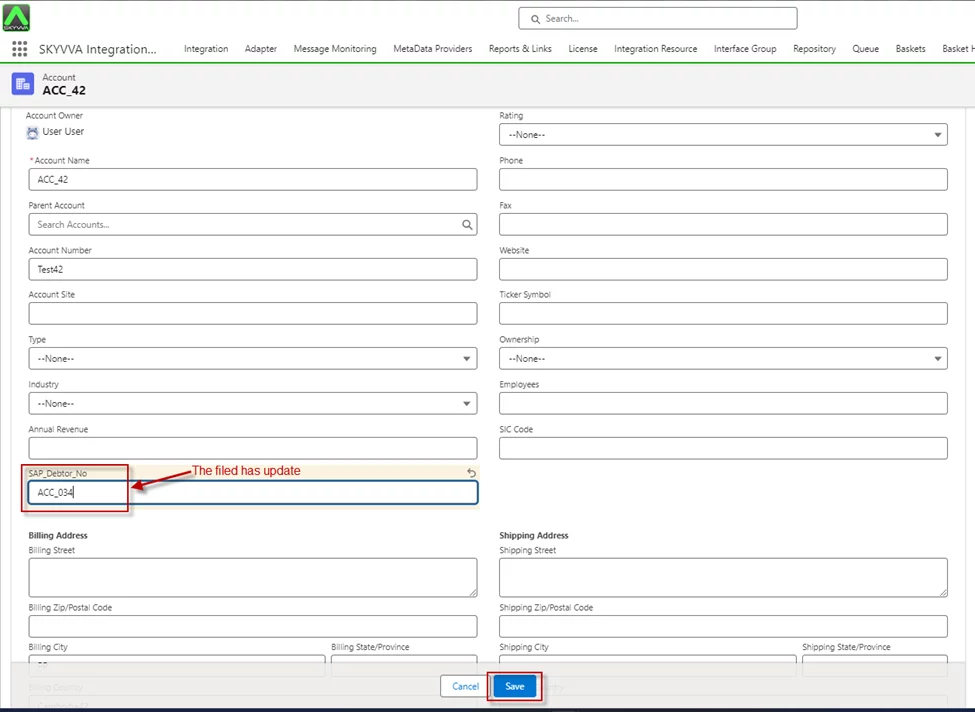
- Change an Account Salesforce
- After changing the record in Salesforce, you will see the record is pushed to your external system.

- Message Monitoring

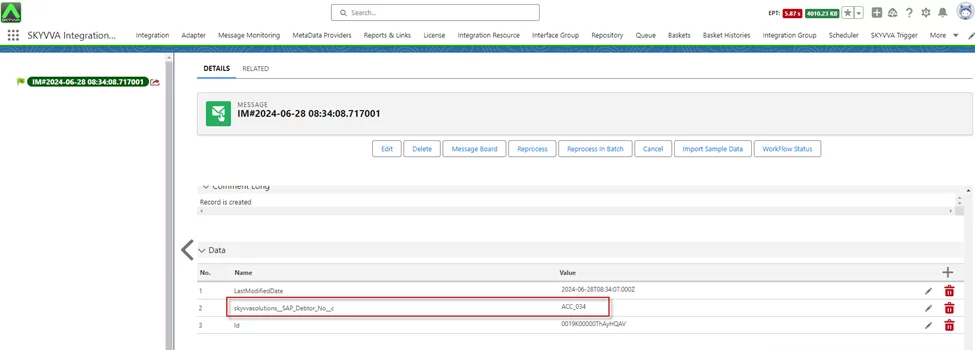
[su_box title="Result:" box_color="#2a8af0" title_color="#000000"]After updating a record in Salesforce, the change will be reflected in your external system via CDC (Change Data Capture) Events. This process guarantees real-time synchronization and precise data updates within Salesforce.[/su_box]
Summary
Now the user has learned to use the Streaming API with CDC Events in Salesforce using Agent Control Board SKYVVA. This involves creating and configuring CDC Events, setting up the integration flow, and activating it to enable real-time data updates and synchronization.