2. Integration Queue Processing Behavior
1. Introduction
The Skyvva Integration Queue framework controls how Integrations, Interface Queues, and Messages are processed during runtime execution.
The framework is responsible for:
- Integration orchestration
- Queue creation
- Sequential and parallel execution
- Message processing
- Queue monitoring
- Error handling
- Queue recovery and reprocessing
The Integration Queue is created only after the Integration execution is triggered.
Integration execution can be triggered by:
- Manual processing
- Scheduler processing
2. High-Level Processing Architecture
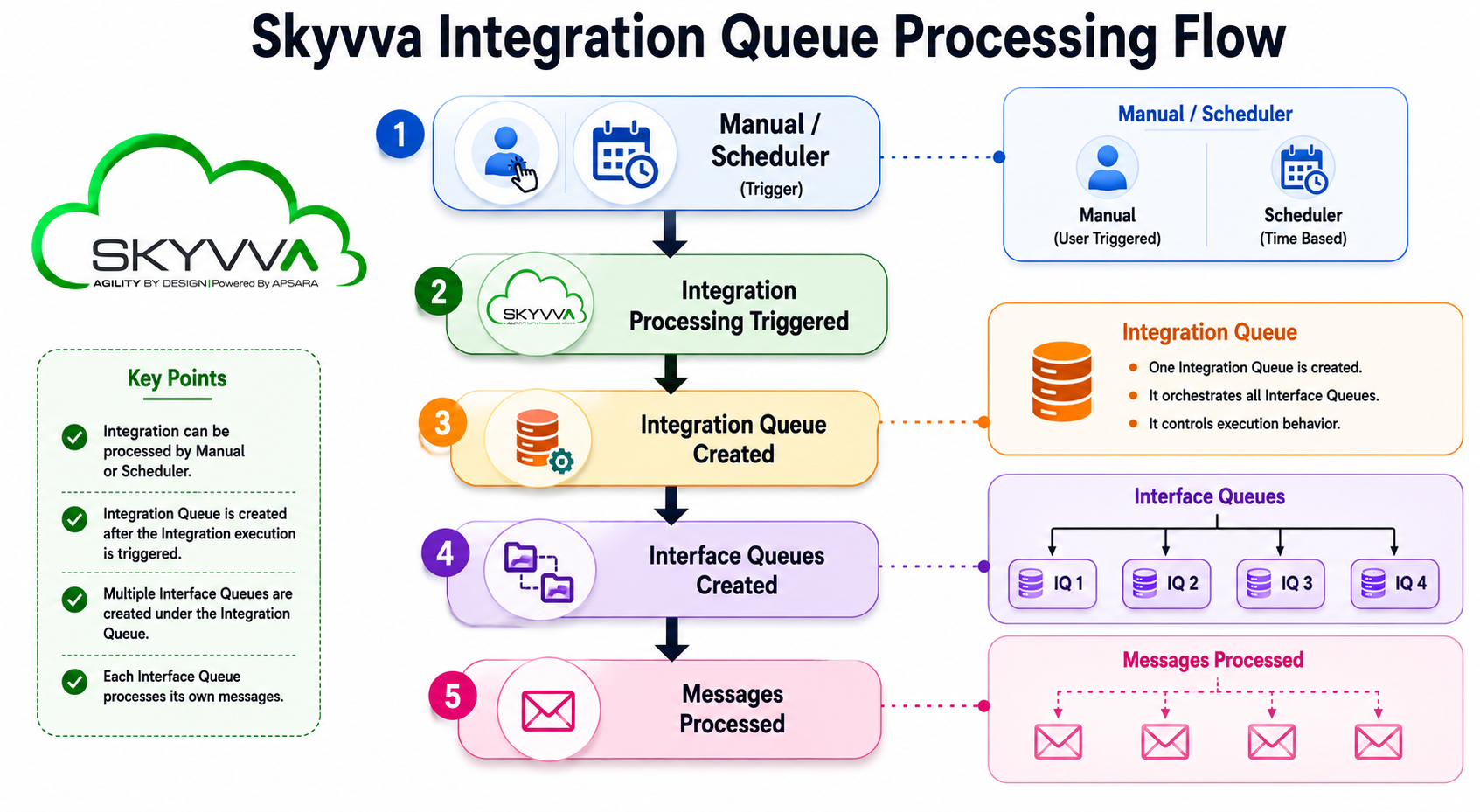
The overall processing structure is:
3. Integration Processing Trigger
An Integration can be executed using two trigger mechanisms.
3.1 Manual Processing
The user manually executes the Integration.
Example:
- User clicks Execute
- User starts Integration from UI
- User manually starts reprocessing
3.2 Scheduler Processing
The system automatically executes the Integration based on configured schedules.
Example:
- Time-based execution
- Scheduled batch processing
- Automatic background processing
4. Integration Queue Creation
After the Integration execution is triggered:
- The system creates the Integration Queue
- The Integration Queue becomes the main runtime controller
The Integration Queue is responsible for:
- Orchestrating Interface Queue execution
- Applying execution rules
- Managing processing behavior
- Managing runtime status
- Handling Hold and recovery processing
5. Processing Architecture
The runtime processing hierarchy contains four processing layers.

6. Queue Monitoring Structure
When Integration execution starts:
- One Integration Queue is created
- Multiple Interface Queues are created under the Integration Queue
- Each Interface Queue processes its own messages
Example:
Integration Queue

7. Integration Queue Configuration
The Integration Queue contains three major processing configurations.

7.1 Execution Mode
Execution Mode controls how Interface Queues are executed.
Available options:
- Sequential Processing (Default)
- Parallel Processing
Sequential Processing
Processes Interface Queues one by one according to sequence order.
Processing Flow

Characteristics:
- Ordered processing
- Dependency-based execution
- Controlled transaction flow
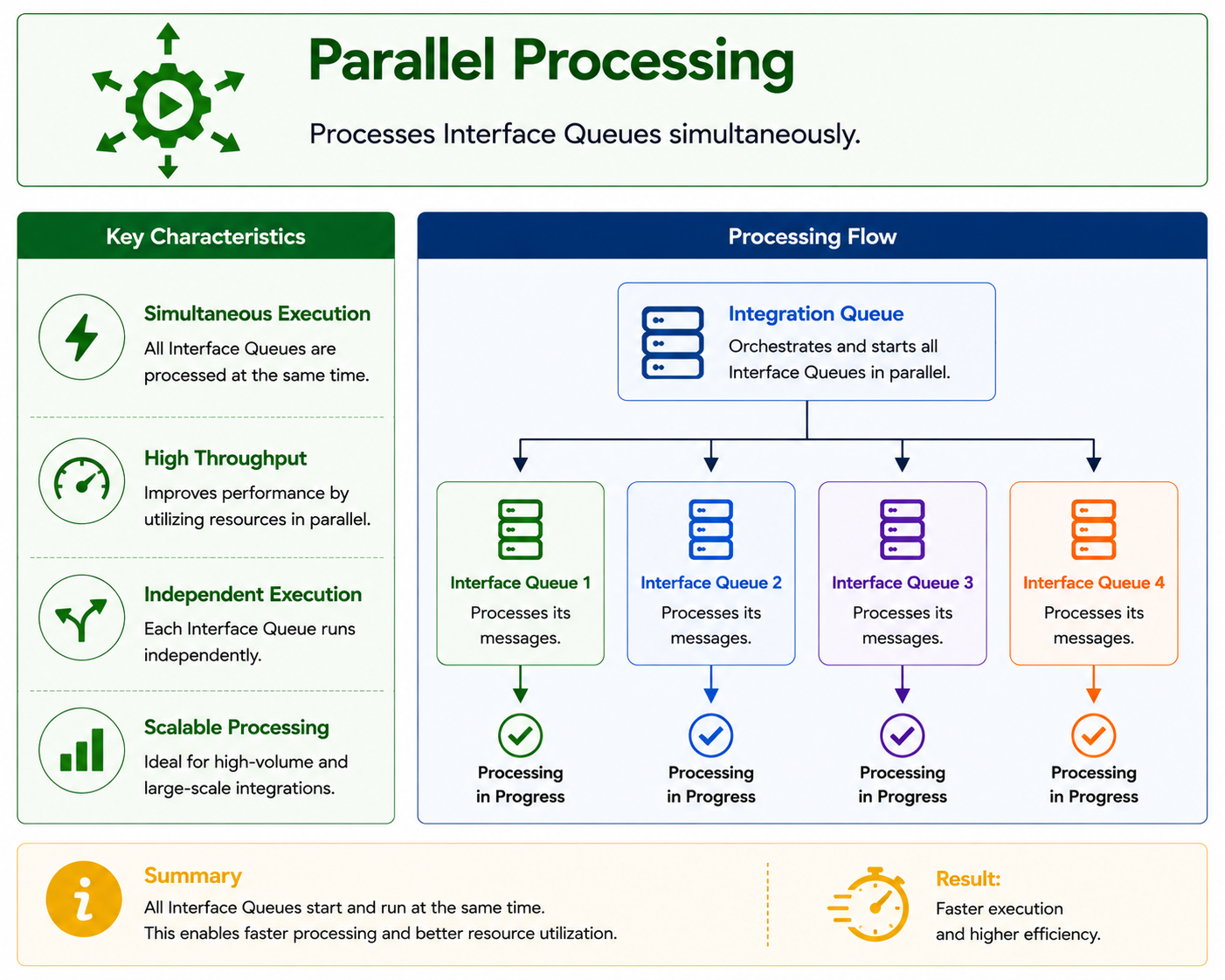
Parallel Processing
Processes Interface Queues simultaneously.
Processing Flow
Characteristics:
- Faster throughput
- Independent execution
- High-performance processing
7.2 Processing Behavior
Processing Behavior controls how the Integration Queue reacts when an Interface Queue fails.
Available options:
- Continue Next Interface When an Error occurs (EO)
- Stop Next Interface When an Error occurs (EOIO)
7.3 Restart Processing Strategy
Restart Processing Strategy controls where queue reprocessing resumes after recovery.
Available options:
- Continue from the beginning (Default)
- Continue from the failed interface
8. Interface Execution Mode
Each Interface contains its own message processing behavior.
Available options:
- Continue when an error occurs (Default)
- Stop when an error occurs
This setting controls message-level processing inside the Interface Queue.
Important:
- This setting controls message processing only
- This setting does not directly control Integration Queue orchestration
9. Direct Interface Execution
When a user executes an Interface directly:
- Only an Interface Queue is created
- The Interface Queue follows its configured Execution Mode
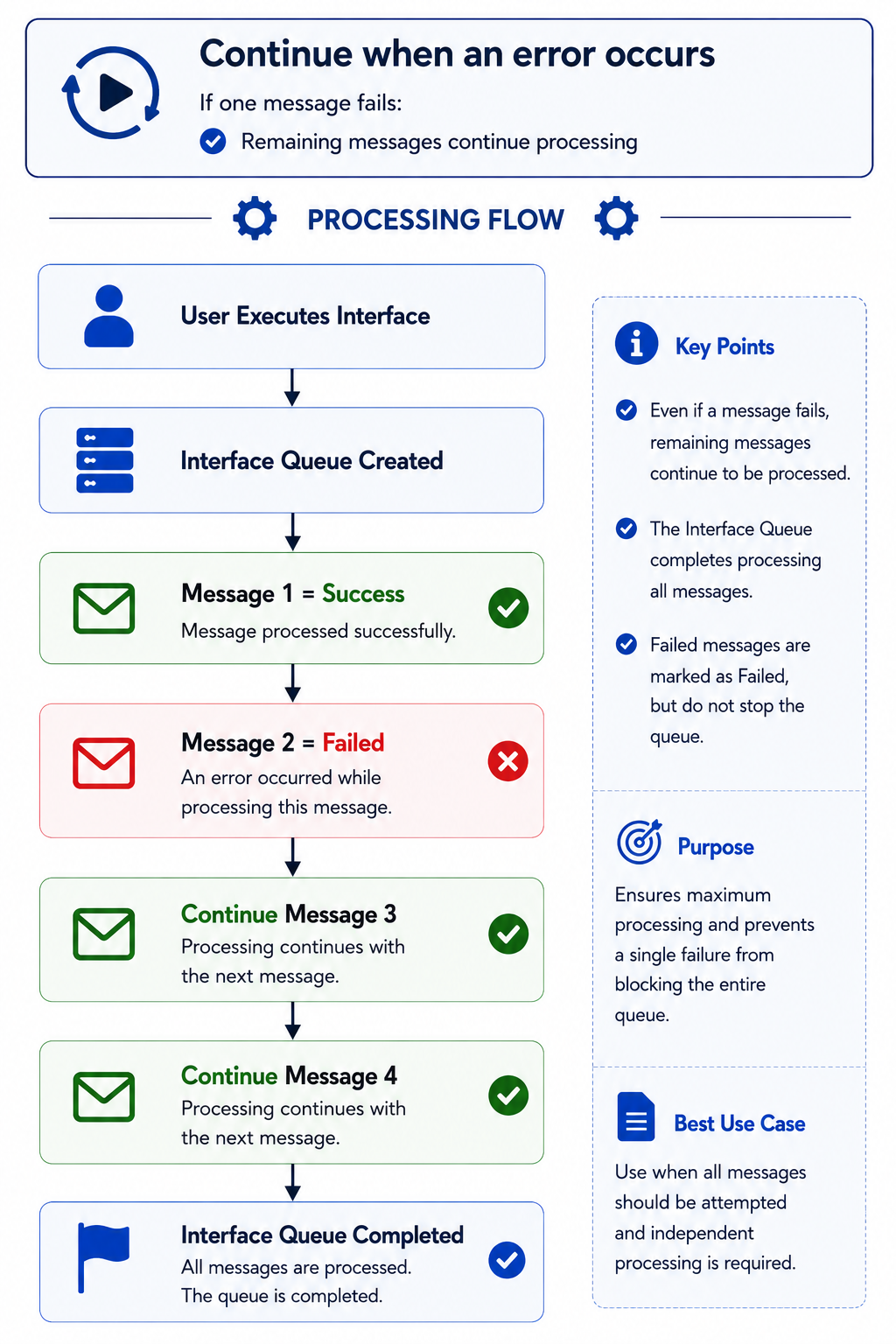
9.1 Continue when an error occurs
If one message fails:
- Remaining messages continue processing
Processing Flow
9.2 Stop when an error occurs
If one message fails:
- Remaining messages stop processing immediately
Processing Flow

10. Integration Execution
When a user or scheduler executes an Integration:
- Integration Queue is created
- Multiple Interface Queues are created
- Integration Queue controls runtime orchestration
The runtime behavior depends on the configured Processing Behavior.
11. Integration Processing Behavior \= EO
Continue Next Interface When an Error occurs
Configuration:
Processing Behavior:
Continue Next Interface When an Error occurs (EO)
11.1 Important Runtime Rule
When Processing Behavior is EO:
- The Integration Queue overrides Interface Execution Mode
- All Interface Queues internally process messages using:
Continue when an error occurs
This applies even if the Interface itself is configured with:
Stop when an error occurs
11.2 EO + Interface Execution Mode \= Continue when an error occurs
Processing Flow
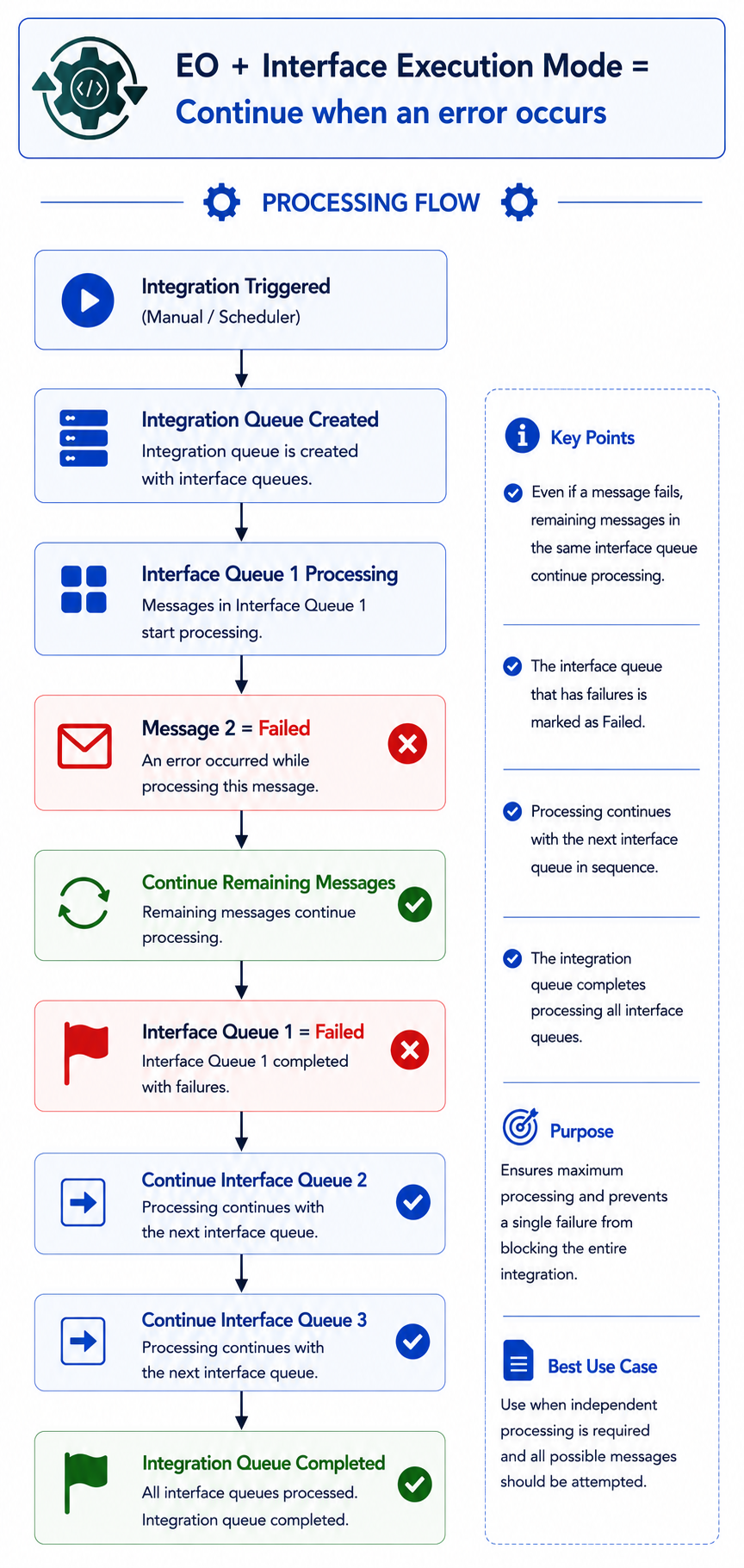
Result:
- Failed Interface Queue does not stop Integration processing
- Remaining Interface Queues continue processing
11.3 EO + Interface Execution Mode \= Stop when an error occurs
Even if the Interface configuration is:
Stop when an error occurs
actual runtime behavior becomes:
Continue when an error occurs
because Integration Queue orchestration overrides Interface behavior.
Processing Flow

Result:
- Remaining messages continue processing
- Remaining Interface Queues continue processing
- Integration Queue does not enter Hold status
12. Integration Processing Behavior \= EOIO
Stop Next Interface When an Error occurs
Configuration:
Processing Behavior:
Stop Next Interface When an Error occurs (EOIO)
12.1 Important Runtime Rule
When Processing Behavior is EOIO:
- Integration Queue respects Interface Execution Mode
- Interface Queue processing follows its configured Execution Mode
- Failed Interface Queue stops Integration processing
12.2 EOIO + Interface Execution Mode \= Continue when an error occurs
In this scenario:
- Failed messages do not stop remaining message processing immediately
- Remaining messages continue processing
- Interface Queue may still complete with Failed status
Once Interface Queue becomes Failed:
- Integration Queue changes to Hold
- Remaining Interface Queues stop processing
Processing Flow

12.3 EOIO + Interface Execution Mode \= Stop when an error occurs
In this scenario:
- Failed messages immediately stop message processing and remaining messages are not processed the interface Queue immediately becomes Failed.
Once Interface Queue becomes Failed:
- Integration Queue changes to Hold
- Remaining Interface Queues stop processing
Processing Flow

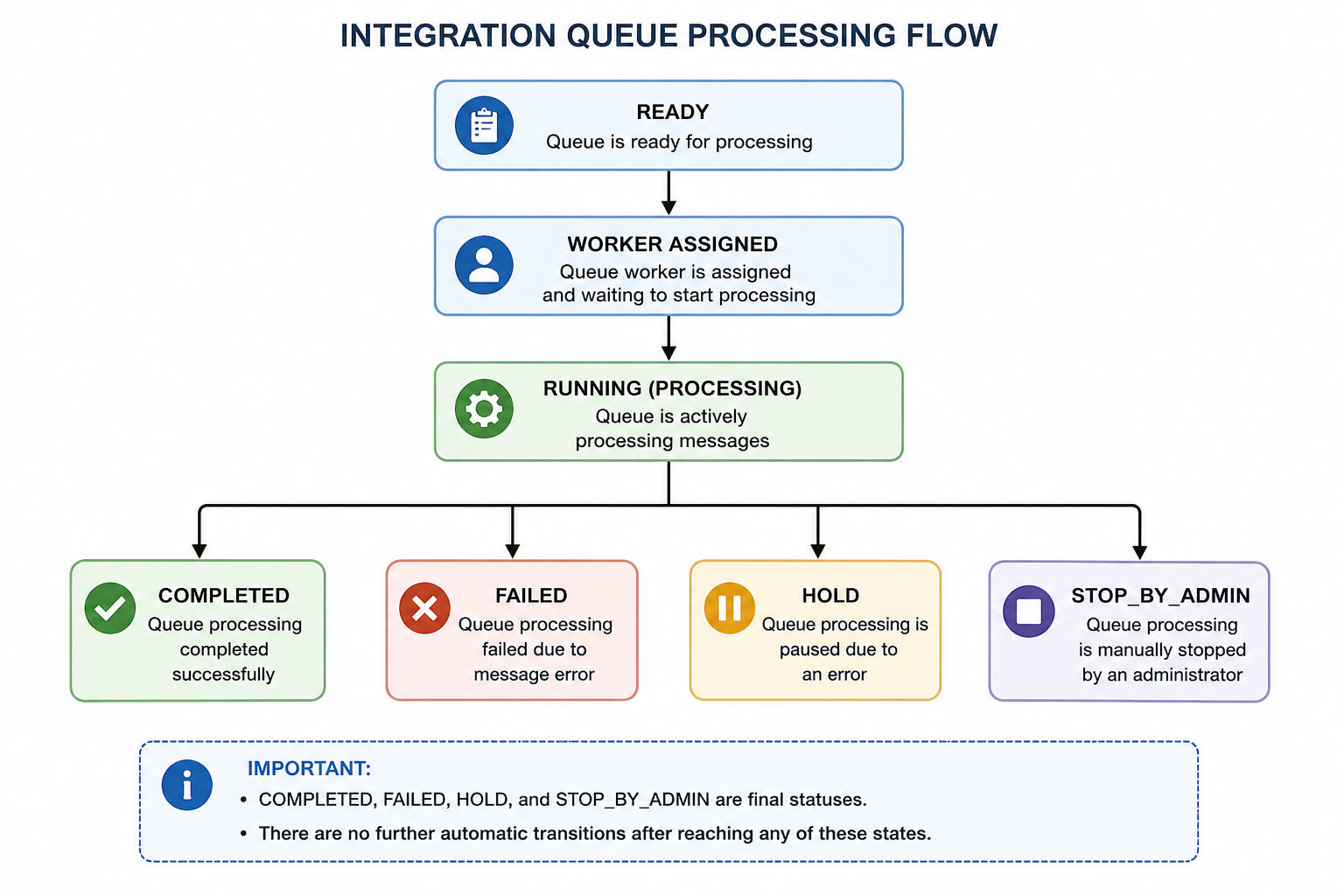
**13. Integration Queue Processing Flow
The queue processing flow follows a linear start with branching outcomes:
Flow:
- READY → queue is waiting
- WORKER → worker is assigned
- RUNNING → processing is in progress
From RUNNING, the process ends in one of four final states:
- COMPLETED → successful execution
- FAILED → error occurred during processing
- HOLD → processing paused due to recoverable issue
- STOP_BY_ADMIN → manually stopped by administrator
High-Level Flow
The queue processing lifecycle follows this pipeline:
14. Queue Hold and Recovery
When Integration Queue status becomes:
On Hold
processing stops.
Before reprocessing:
- User must resolve the failed issue
- User manually changes queue status:
Hold → Ready
Examples:
- Fix invalid data
- Correct mapping configuration
- Resolve external system errors
- Restore authentication/connectivity
15. Restart Processing Strategy
15.1 Continue from the beginning
Reprocessing starts from the first Interface Queue.
Processing Flow

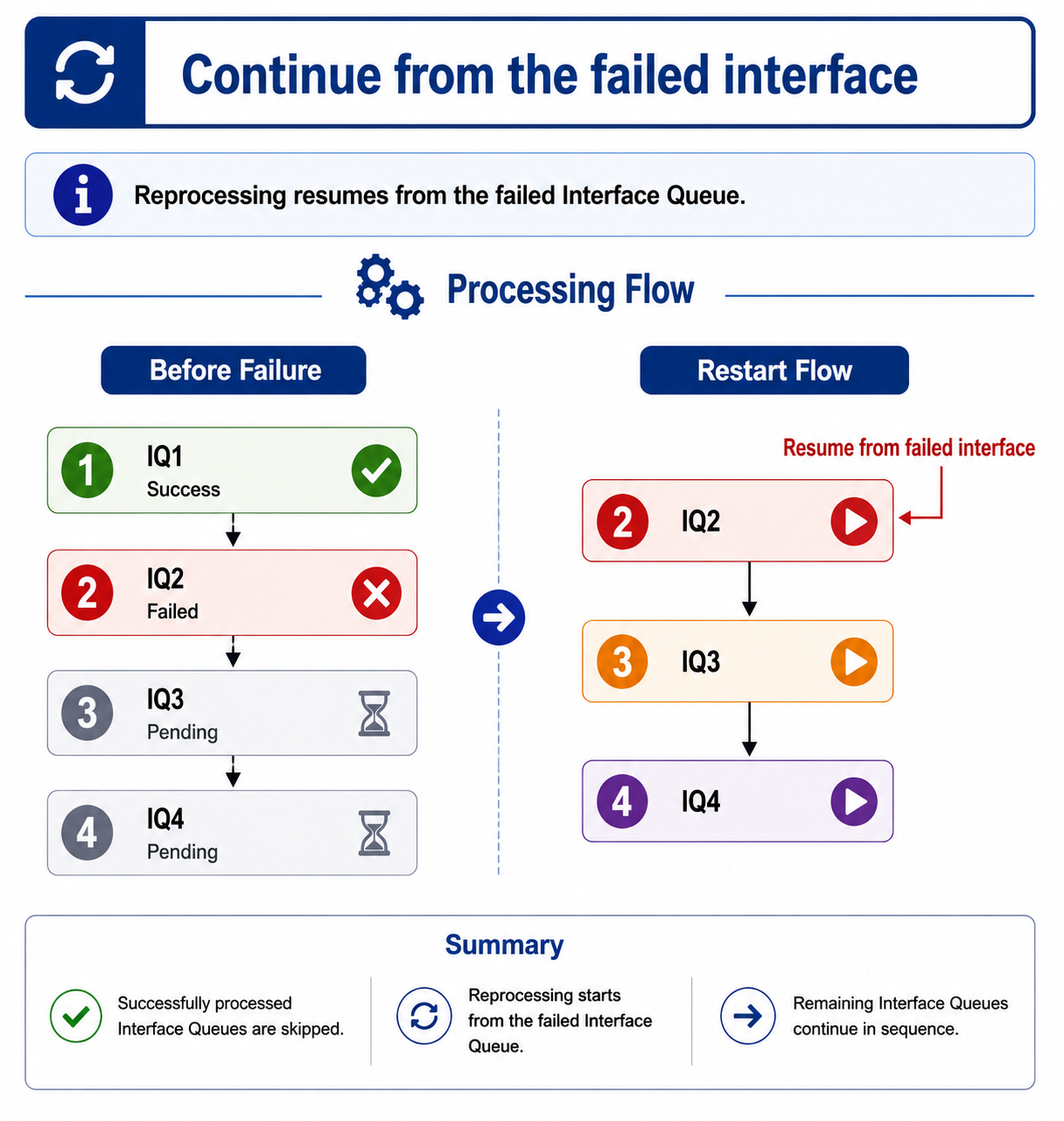
15.2 Continue from the failed interface
Reprocessing resumes from the failed Interface Queue.
Processing Flow
16. Runtime Behavior Summary Matrix
| Scenario | Interface Execution Mode Applied? | Integration Queue Behavior |
|---|---|---|
| Direct Interface Execution | Yes | Interface controls message behavior |
| Integration Execution + EO | No | Integration Queue overrides Interface behavior |
| Integration Execution + EOIO | Yes | Integration Queue respects Interface behavior |
17. Functional Summary
The Skyvva Integration Queue framework provides:
- Integration orchestration
- Queue management
- Sequential and parallel execution
- Message processing control
- Queue monitoring
- Queue recovery
- Hold and reprocessing management
- Controlled restart strategies
- STOP_BY_ADMIN handling and controlled restart recovery
Framework Capabilities
The framework supports enterprise-level:
- Integration processing governance
- Error handling and recovery management
- Queue lifecycle monitoring
- Administrative stop and restart control
- Reliable reprocessing execution