2. What is new in workflow with the Spring '19 release?
Learning Objectives:- This unit describes:- What is new in workflow with the Spring '19 release?
Introduction:-
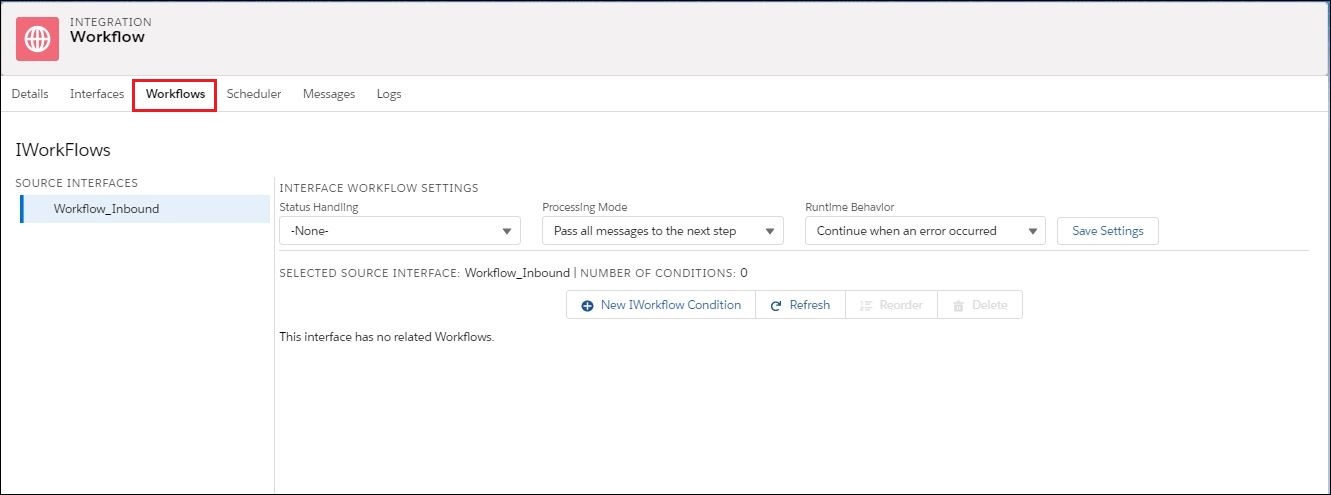
In this tutorial, we will come to know about new updates in Workflow with the Spring '19 release. Mainly we have 3 more new features like "Status Handling.", "Processing Mode", "Runtime Behavior". All three features are described in this tutorial.
Following new Workflow settings/features are added:-
We can find this page on the integration page with the tab name "Workflows". And then selecting interface from the left side as shown in the picture below:-
- Status Handling.
- Processing Mode.
- Runtime Behavior.
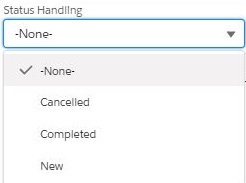
Status to set to when a condition is not met:-
- None: By default, "None" is selected. No status of the message will be set if None is selected
- Cancelled: In runtime, if conditions do not meet workflow step condition then the status is set to Cancelled.
- Completed: For all successful workflows step conditions status is set to complete.
- New:
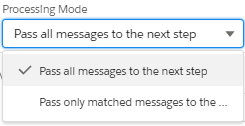
Workflow Processing Mode:-
To use this feature, you need to configure some step:
- Set up Workflow Mode on Integration page, by clicking on the new tab "Workflows".
- Click on the Processing Mode picklist then choose any of the one options.
We use this feature to pass the match condition message to the next step and remove the message which not match any condition. We provide one more value option for the user to desire their own needs business. For a release ’19 we offer new picklist in the interface:
- Pass all messages to the next step:- This is the current behavior and it is as the default value.
- Pass only matched messages to the next step:- Message that matches workflow condition will pass to the next step/ New processing mode behavior.
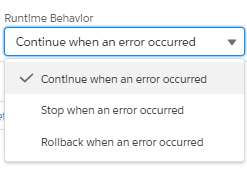
Runtime Behaviour:-
We can see 3 options in Runtime behavior and we can select any one of them according to our requirement:-
- Continue when an error occurred:-
It is a default option if we process messages and suppose we met with error on 2nd or 3rd message. The other message will continue to process.
- Stop when an error occurred:-
If we process messages and suppose we met with error on the 2nd or 3rd message. We should stop there", for that processing the code will automatically stop the process, we don't have to manually stop pushing the message.
- Rollback when an error occurred:-
If we got some error while processing a message like perform DML operation based on mapping and we get some error like missing required field value, missing ExtId value that we need to considered as error. When workflow message met an error it will immediately stop processing and rollback.