22. SkyvvaSalesforce Sender - Account Change Data Capture to Customer Master
1. Overview
This tutorial shows how to send manually saved Salesforce Account changes to an external customer-master API through SAP Cloud Integration. Salesforce publishes a Change Data Capture (CDC) event, the SkyvvaSalesforce sender adapter receives it, and a Groovy script in CPI converts the changed Account fields into a JSON request for that API.
You will update an Account's Phone, verify the same Account Id and new value in Salesforce, CPI and the receiving API, then clear Phone to check that the request sends an explicit JSON null. The script processes Name, Phone and Website.
A Postman mock server represents the external API for this exercise. It logs the delivered request and returns a saved response, allowing you to verify the change flow without setting up a customer database. It does not store customer updates or validate the outgoing field values.
Prepare Salesforce and Postman in section 3, build and deploy the iFlow in sections 4–6, then perform the manual changes in section 7.0.
2. Context Before You Start
A sales representative corrects one Account's Phone and clicks Save. Match that Account Id and new Phone value across Salesforce, the incoming CDC event and the outgoing Postman request. The main exercise changes only Phone; Name and Website should be omitted unless automation also changes them.
Salesforce Account → Save → Account CDC → SKYVVA sender
    → Build Customer Changes → Postman mock → Check Mock Response
Use a sandbox with fictional customer data and a Postman workspace permitting public collection-based mocks. Control other Account activity: the subscriber receives org-wide changes. Prepare a compatible sender, API/CDC access, Account/field edit permissions, and CPI connectivity to api.pubsub.salesforce.com:7443 and the mock HTTPS URL. Confirm sender licensing separately.
Use one consumer per managed subscription and configure the sender with Event Processing → Change Data Capture Events. No SKYVVA inbound interface or generated Apex trigger is required.
Monitor CPI and Postman's call log; this subscription does not create SKYVVA managed-package message records.
3. Enable Account changes and prepare the subscription
Enable Account Change Data Capture to publish Account changes. A Salesforce-managed subscription selects the events and remembers the committed position for reconnects. Create it before CPI connects, using Salesforce's API-defined JSON format below.
- Open Salesforce Setup → Change Data Capture, move Account to Selected Entities and save.
- Confirm the OAuth run-as user has API Enabled, Account Read / View All Records, and read access to Name, Phone, Website. Query a test Account as that user. CDC ignores record sharing; authorize org-wide Account access.
- Confirm the sender supports section 4's managed settings. Prepare the section 3.2 Account before deployment; test edits only after connection.
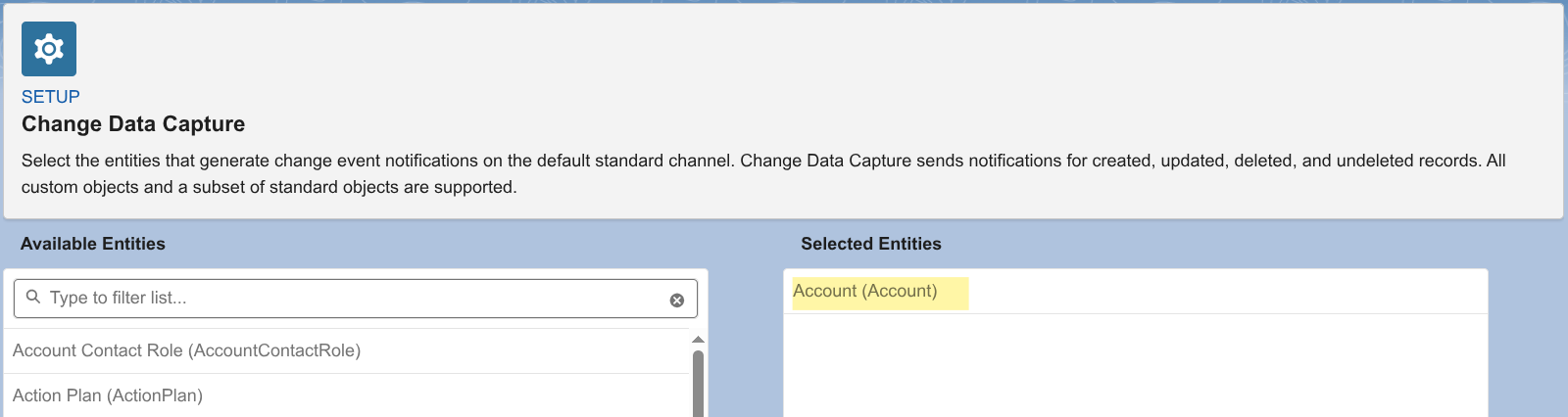
Figure 1. Account enabled as a CDC source.
Subscription configuration:
{
  "FullName": "AccountChangesToCustomerMaster",
  "Metadata": {
    "label": "Account Changes to Customer Master",
    "topicName": "/data/AccountChangeEvent",
    "defaultReplay": "LATEST",
    "state": "RUN",
    "errorRecoveryReplay": "EARLIEST"
  }
}
| Field | Description |
|---|---|
| FullName | Subscription developer name; must match CPI's Managed Subscription Name. |
| Metadata | Groups the subscription settings below. |
| label | Readable display name; choose a meaningful label. |
| topicName | Account CDC topic; use /data/AccountChangeEvent for this exercise. |
| defaultReplay | LATEST starts with new events when no committed position exists. |
| state | RUN enables the subscription so CPI can connect. |
| errorRecoveryReplay | EARLIEST resumes from the earliest retained events if the committed position is invalid; events can repeat. |
Verify the saved name, topic and RUN state. Confirm org availability of managed subscriptions (Beta). Subscription STOP clears the committed position; stopping the iFlow does not.
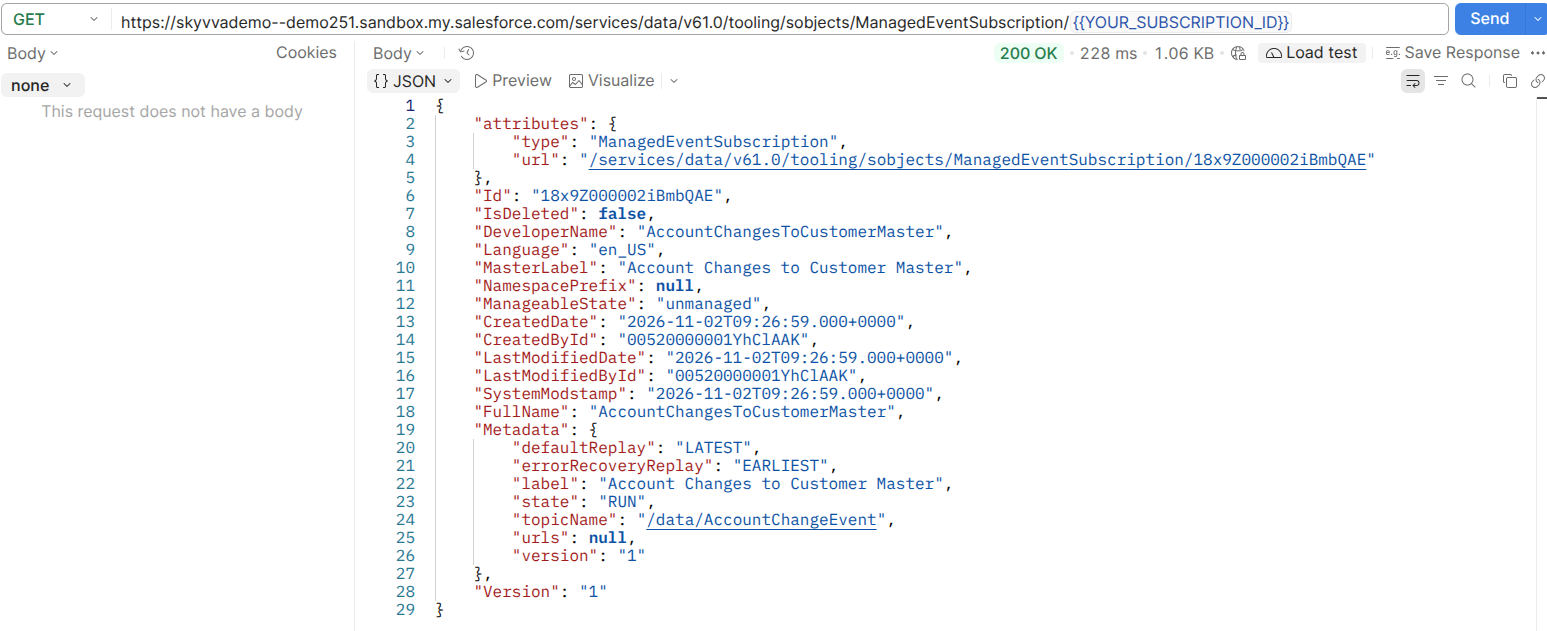
Figure 2. Saved Account change topic, RUN state and replay settings.
3.1 Prepare the external customer-master mock
Use Postman as the external customer-master mock to inspect CPI requests and return a predictable response:
- Create collection Customer Master Mock and request Receive Account Changes: POST
https://example.com/api/account-changes, Authorization = No Auth. Save without sending to this placeholder URL. - Choose Add example and name it Account change received. Keep POST
/api/account-changes; set response 200 OK, header Content-Type: application/json, and the response JSON below. Save. - Create Mock Server → Existing collection → Customer Master Mock. Name it Customer Master Mock and deploy as public, with body/header matching disabled.
- Replace
https://example.comin the request with the generated HTTPS base URL. Use that base URL in section 6's receiver. - Send Body → raw → JSON =
{"items":[]}. Expect HTTP 200 and the saved response. This checks connectivity; section 7.0 tests actual Account changes.
Saved response:
{
  "status": "RECEIVED",
  "mock": true
}
The public mock needs No Authentication; anyone with its URL can call it. Use fictional data. The fixed response confirms a mock exchange, not a customer update.
3.2 Prepare the test Account
Use one known Account to match each manual edit with its request. Before deployment, select or create Elbtal Baustoffhandel in Salesforce → Accounts. Set Phone to +49-30-555-0100 and Website to https://example.com, save, and copy its Id.
Initial LATEST excludes earlier saves. Make the test edits after the sender connects.
4. Build the iFlow and configure the sender
The iFlow receives Account events, uses Groovy Script (Build Customer Changes) to create the customer-change JSON, and delivers requests to Postman. Create it in SAP Integration Suite → Design, then select the SkyvvaSalesforce sender connection.
Use Integration Process (Account Changes to Customer Master). Labels use Component (Name); enter only the parenthesized name in General → Name.
Sender (Salesforce)
  → SkyvvaSalesforce
  → Message Start (Receive Account Change)
  → Groovy Script (Build Customer Changes)
  → Request Reply (Deliver Customer Changes)
      ↔ HTTP connection (DeliverCustomerChanges) ↔ Receiver (Customer Master Mock)
  → Groovy Script (Check Mock Response)
  → Message End (Complete Customer Change)
Groovy Script (Build Customer Changes) creates the customer-change JSON. Request Reply (Deliver Customer Changes) sends it to the Postman receiver through HTTP, then passes the response to Groovy Script (Check Mock Response).
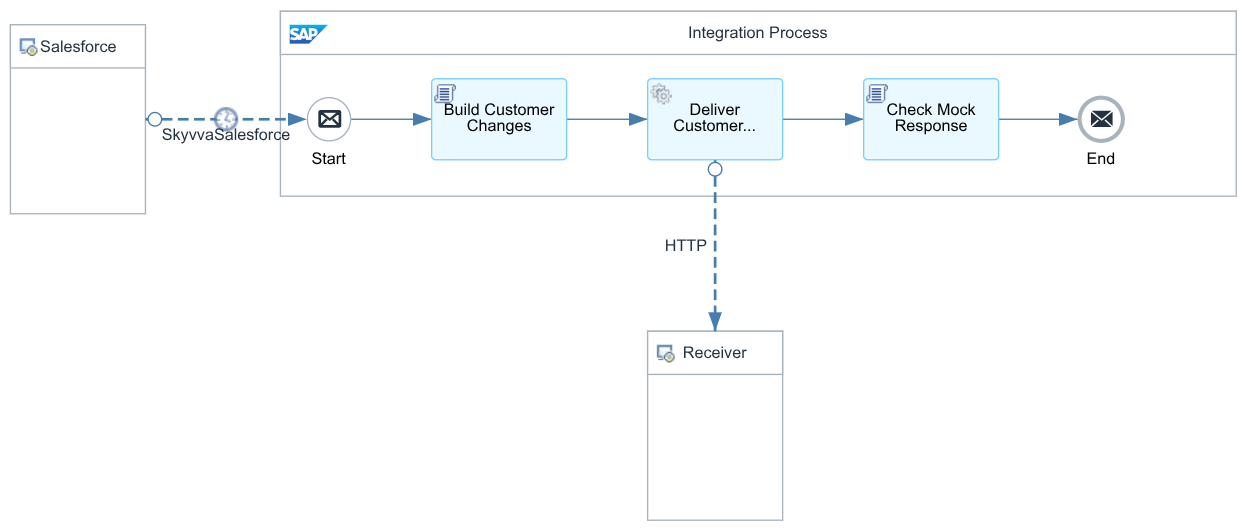
Figure 3. Full iFlow: receive Account changes, transform the JSON and deliver it to Postman.
| Connection field | Value |
|---|---|
| Authentication Type | OAuth2 |
| OAuth2 Flow | Client Credential |
| Login Url | Your Salesforce My Domain base URL |
| Client Credential | skyvva-client-credentials |
Use User Credentials alias skyvva-client-credentials: User = Client ID, Password = Client Secret. Enable Client Credentials and set its run-as user in Salesforce. Login Url is My Domain without /services/oauth2/token. General: Direction = Sender, Adapter Type = SkyvvaSalesforce.
| Processing field | Value | Description |
|---|---|---|
| Sender channel Name | ReceiveAccountChanges | Identifies the Salesforce sender connection in this iFlow. |
| Processing Mode | Event Processing | Starts processing from Salesforce events. |
| Event Type | Change Data Capture Events | Receives changes to the enabled Account records. |
| Operation | Topic - Subscribe | Keeps listening for new Account changes while the iFlow runs. |
| Subscription Model | Salesforce-managed (Managed Event Subscription) | Uses Salesforce to store the committed replay position. |
| Managed Subscription Name | AccountChangesToCustomerMaster | Selects the subscription created in section 3 and its Account change topic. |
| Commit Strategy | After each event | Requests a replay-position commit after successful processing; this mock exercise treats the expected HTTP response as success. |
| Request Batch Size | 1 | Requests one event at a time to make the first test easier to follow. |
| Subscription Mechanism | Subscribe on one runtime node | Uses one subscription owner across the tenant's runtime nodes. |
| Message Expiration (in ms) | 300000 | Keeps the adapter's duplicate-event entries for five minutes; this is not Salesforce event retention. |
| Process Errors as an Event | Enabled | Routes subscription diagnostics into the iFlow, where the builder rejects them for monitoring. |
| Payload Format | Application/JSON | Matches the input expected by Groovy Script (Build Customer Changes). |
| Pretty Print | Disabled | Keeps JSON compact; indentation is unnecessary for the Groovy script. |
| Logging option | Default | Uses the adapter's default logging for this exercise. |
| Salesforce Api Version | 61.0 | Matches the API version used in this guide's Salesforce setup requests. |
| Scheduler | Leave unchanged | Topic - Subscribe listens continuously and ignores Scheduler settings. |
Managed mode uses the named subscription's topic and replay position; client channel/replay controls are hidden. The adapter handles Pub/Sub while the iFlow runs.
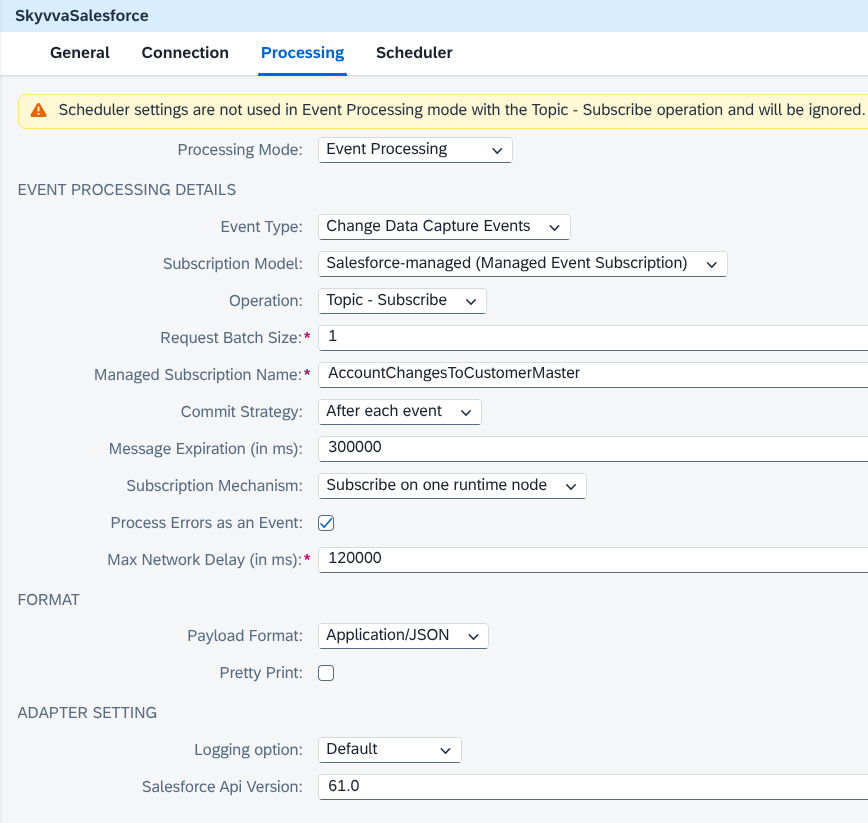
Figure 4. Sender configured for managed Account changes.
5. Transform the Account change with a Groovy script
Groovy Script (Build Customer Changes) prepares one item per Account, including changed Name, Phone and Website, explicit JSON nulls for clears, and no unchanged fields.
| Source | Outgoing request |
|---|---|
| ChangeEventHeader.recordIds | One item per Account Id as reference |
| changedFields | Include changed Name, Phone or Website |
| nulledFields | Send Name, Phone or Website as JSON null when cleared |
| Unchanged Name, Phone and Website | Omit them |
| changeType | Carry the operation, such as UPDATE |
| transactionKey | Retain the Salesforce transaction identifier for correlation |
| commitNumber / sequenceNumber | Combine as sourceVersion, for example 90001:1 |
The script rejects diagnostics, gap/overflow events, diff fields affecting Name, Phone or Website, and unnormalized field lists. Investigate failures; the mock does not validate the script's output.
Example input (fictional single-Account Phone clear):
{
  "channel": "AccountChangesToCustomerMaster",
  "data": {
    "schema": "illustrative-schema",
    "payload": {
      "ChangeEventHeader": {
        "entityName": "Account",
        "recordIds": [
          "001000000000001AAA"
        ],
        "changeType": "UPDATE",
        "transactionKey": "example-transaction-1042",
        "commitNumber": 90001,
        "sequenceNumber": 1,
        "changedFields": [
          "Phone"
        ],
        "nulledFields": [
          "Phone"
        ],
        "diffFields": []
      },
      "Phone": null
    },
    "event": {
      "replayId": "illustrative-replay-id"
    }
  }
}
Request produced by the Groovy script:
{
  "items": [
    {
      "reference": "001000000000001AAA",
      "sourceVersion": "90001:1",
      "operation": "UPDATE",
      "fields": {
        "Phone": null
      },
      "transactionKey": "example-transaction-1042",
      "commitNumber": "90001",
      "sequenceNumber": 1
    }
  ]
}
6. Deliver to the Postman mock
The HTTP receiver connection sends the JSON produced by Groovy Script (Build Customer Changes) from Request Reply to Customer Master Mock:
| HTTP receiver field | Value |
|---|---|
| General: Name | DeliverCustomerChanges |
| Address | Your mock HTTPS base URL followed by /api/account-changes |
| Proxy Type / Method | Internet / POST |
| Authentication | None |
| Timeout (in ms) | 60000 |
| Request Headers | Accept |
| Throw Exception on Failure | Enabled |
| Retry on Exception / Retry on Error Response | Disabled for this exercise |
Content-Type and Accept are application/json. The public mock requires no destination credential.
Groovy Script (Check Mock Response) requires HTTP 200, status=RECEIVED and mock=true; otherwise the flow fails. This verifies the mock response, not storage.
Save, validate and deploy. Before editing, confirm connection to the correct org/subscription in runtime logs; deployment status alone is insufficient. Reuse the existing subscription.
7. Test and monitor
7.0 Perform the manual business exercise
Follow one Phone update from Salesforce through CPI to Postman, then repeat the checks for a Phone clear. Start after connection, use the section 3.2 Account and same subscription, and check each result before the next edit. Enable temporary Trace logging on the iFlow before saving a test change so its payload is available for inspection. Re-enable Trace before the next save if it has expired or you disabled it after verification.
| Step | Salesforce action | Expected fields in the Postman request |
|---|---|---|
| 1 — update Phone | Change Phone from +49-30-555-0100 to +49-30-555-0900, then Save | "Phone": "+49-30-555-0900"; Name and Website are omitted |
| 2 — clear Phone | After verifying step 1, remove Phone completely and Save | "Phone": null; Name and Website are omitted |
Use the Phone update for Figures 5–7 below. For the second save, expect a new transactionKey/sourceVersion and Phone in nulledFields; the Account Id remains the same. Section 5's illustrative JSON shows this clear operation.
Automation may change additional fields; compare the saved record and actual event.
For each save:
- After Save completes, confirm Phone in the Account record and copy its Account Id from the record URL. Use this Id to find the corresponding CDC event and Postman request.
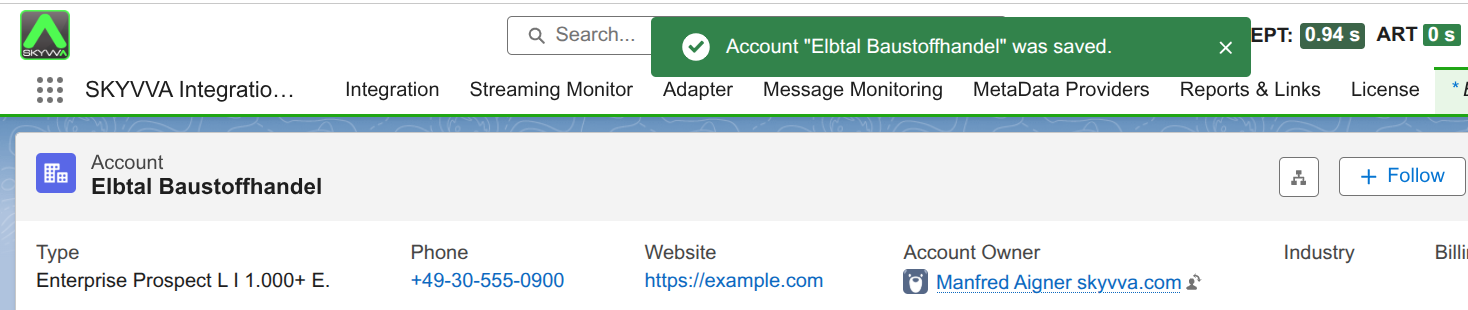
Figure 5. Saved Account Phone +49-30-555-0900 in Salesforce.
- In CPI → Monitor → Monitor Message Processing, open the matching traced run. Select Build Customer Changes → Message before Step → Payload to inspect the incoming CDC event. Select Deliver Customer Changes → Message before Step → Payload to inspect the JSON produced by the Groovy script. Confirm the Account Id in
recordIds, the changed Phone value andtransactionKey; the outgoingreferenceandtransactionKeymust match. OutgoingsourceVersionis incomingcommitNumber:sequenceNumber.
Salesforce updates LastModifiedDate when the Account is saved, so the CDC event can show both Phone and LastModifiedDate in changedFields even when you edit only Phone. This system field records the update time (Z means UTC). The Groovy script includes only Name, Phone and Website as customer fields, so LastModifiedDate is omitted from the outgoing fields.
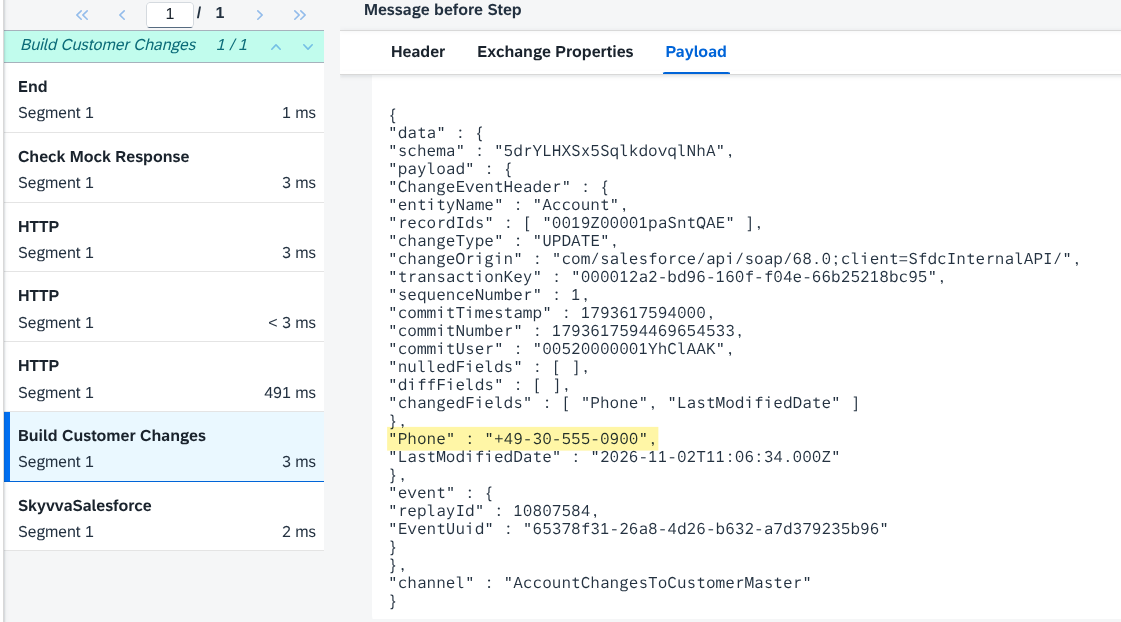
Figure 6. Incoming Account CDC event containing the saved Phone update.
- In Postman → Mock Servers → Customer Master Mock → call log, open POST
/api/account-changes. Matchreference,transactionKeyandsourceVersionto the CPI run. Confirmfields.Phonecontains the new value, or JSON null for the clear test, and unchanged Name/Website are absent.
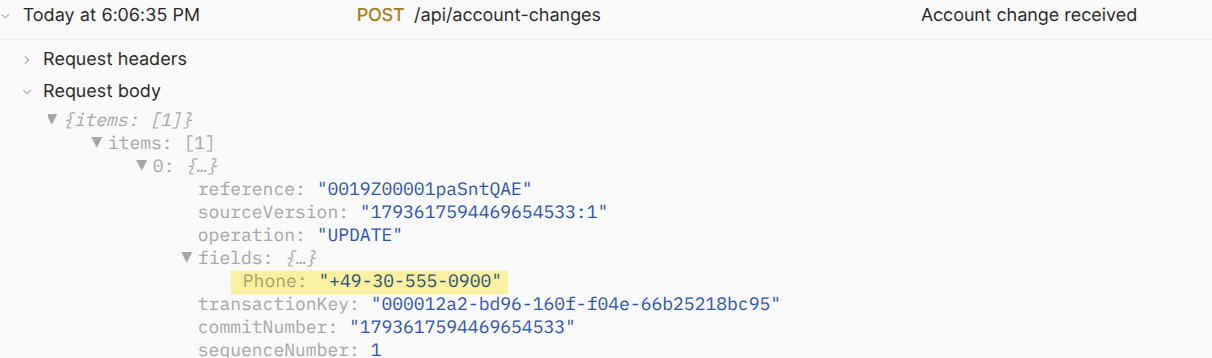
Figure 7. Account Phone update received by the Postman mock server.
- In the same CPI run, select Check Mock Response → Message before Step. Confirm Header → CamelHttpResponseCode = 200, the saved response
{"status":"RECEIVED","mock":true}under Payload, and final message status Completed. The fixed response confirms the mock exchange; the matching request values verify the Groovy transformation. Save masked evidence and disable tracing.
Earlier calls remain in the logs. Match reference, transactionKey and sourceVersion to distinguish new changes from repeated delivery; the total entry count alone is insufficient.
Optional checks after the Phone exercise:
| Salesforce action | Expected fields in the Postman request |
|---|---|
| Change Account Name to Elbtal Baustoffhandel GmbH and Save | Name has the new value; Phone and Website are omitted |
Change Website to https://example.org and Save | Website has the new value; Name and Phone are omitted |
| If editable, change Description and Save | fields: {} because the Groovy script excludes Description |
Check each request before the next save. Automation can also change Name, Phone or Website.
7.1 If a message is missing or fails
Use the source event, CPI run and Postman call to locate the failure. Check Salesforce org, CDC, permissions and subscription name/state; then the mock URL, POST path, public access, saved example and disabled body/header matching.
Keep failures visible and retain the subscription when retrying. Some adapter decoding/formatting errors can be skipped and committed before the iFlow; inspect diagnostics for missing requests. This exercise does not verify replay or recovery guarantees.
8. Summary
A saved Account change is received through CDC, transformed by a Groovy script and delivered to Postman. Matching the Account Id, transaction and Phone value verifies the change flow; clearing Phone sends JSON null. The mock verifies HTTP delivery. Customer storage and recovery testing are outside this walkthrough.