24. SkyvvaSalesforce Sender — Send Opportunity Changes to Reporting Using Salesforce PushTopic Events
1. Overview
Use the SkyvvaSalesforce sender adapter to receive Salesforce Opportunity changes through a continuous PushTopic subscription, transform them with a Groovy script in CPI, and send the result to a Postman reporting mock. An Opportunity represents a potential sale. A real reporting application would maintain a row for its stage, amount and expected close date; this exercise simulates the receiving API instead of supplying that application.
The source is a saved Salesforce Opportunity change, not an event published from Postman. Postman is the destination mock. Its saved response acknowledges the HTTP call but does not store Opportunity rows, compare versions, prevent duplicates or prove reporting acceptance.
This guide supports maintenance of an existing PushTopic integration. Salesforce classifies PushTopic Events as legacy; use CDC or explicit Platform Events when designing a new event integration. PushTopic uses CometD, whose underlying HTTP long-polling differs from the adapter's scheduled Topic - Polling operation. Here Topic - Subscribe stays subscribed, and the CPI Scheduler is unused.
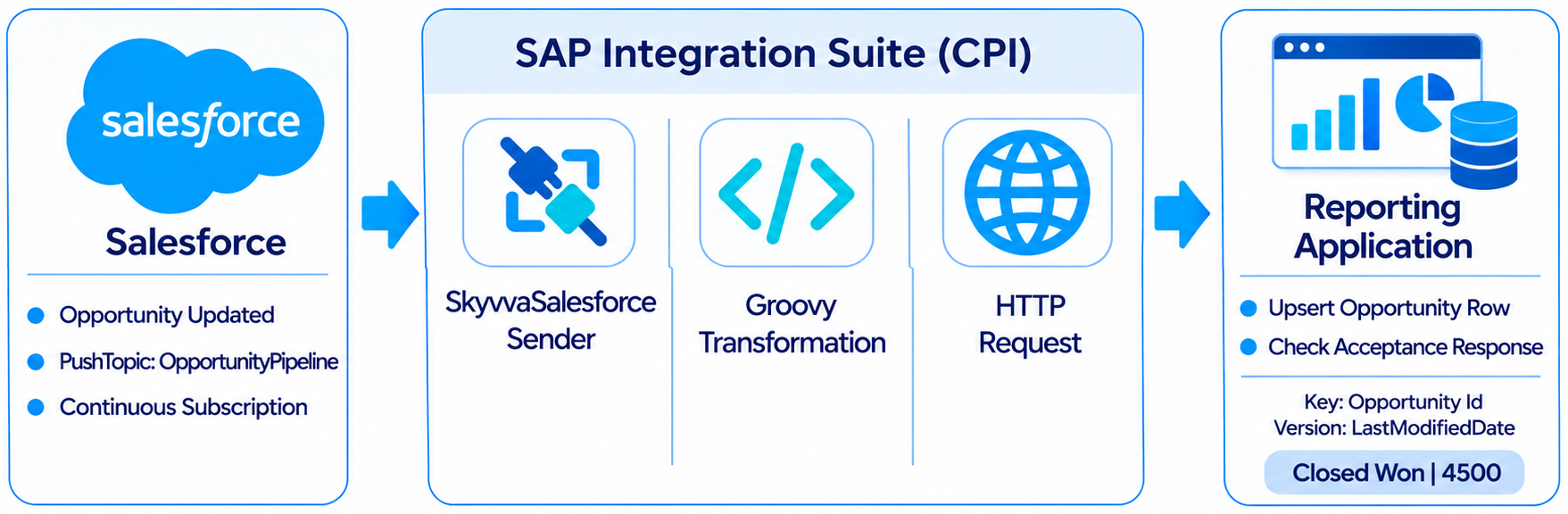
Figure 1. Conceptual Salesforce-to-reporting integration, with the reporting API simulated by a Postman mock server.
The diagram shows the intended reporting application. In this tutorial, Postman simulates its API and returns a fixed acknowledgement without storing Opportunity rows.
2. Context Before You Start
Business example
A distributor tracks Elbtal Baustoffbestellung, an Opportunity for building materials. Its initial stage is an open stage allowed by the org's sales process, with Amount 4000. A sales user later changes the stage to Closed Won, keeping Amount at 4000. CPI receives the change and sends the selected Opportunity state to the mock. Use a valid Close Date, such as 2026-12-31.
The request uses the real Salesforce Opportunity Id as its reference and normalized LastModifiedDate as its source version. The illustrative Id/timestamp in the examples are fixtures; do not enter them as a real source record or expect them in every live call. The mock's acknowledgement has no record Id or version, so its saved response does not need to be rewritten after each save.
The query has no open-stage filter, so Closed Won does not exclude the Opportunity from notifications. It also selects LastModifiedDate; changes to that field can cause notifications even when the selected business values are unchanged. Amount must be a number or explicit null. A missing Amount field is rejected and does not mean clear the value. The example assumes one agreed currency.
Prerequisites
- A Salesforce sandbox with Streaming API access, a supported PushTopic setup, and an authorized integration user with Opportunity object/field access and visibility to the dedicated test record. Topic administration and source editing may use separate authorized users.
- An OAuth application configured for Client Credentials, its intended run-as user, and a compatible deployed SkyvvaSalesforce sender build. Verify the actual build, not only its version label.
- A Postman workspace that can create a mock server from saved collection examples. Use fictional sandbox data for the public mock; a private mock needs an authorized Postman API key.
- CPI network/trust access to the Salesforce Streaming API and generated mock endpoint over HTTPS. Complete both Groovy steps and mock setup before the controlled Opportunity save.
No real reporting API, ReportingApiUser credential, database or target persistence is required for this exercise. The receiving mock must be provisioned before deployment; importing a collection alone does not create a hosted server.
Initial Latest receives new events, not an existing Opportunity baseline. Create the dedicated test record after the subscriber connects. PushTopic retention is 24 hours; expired events cannot be recovered by replay. The adapter's client-managed replay position advances before later CPI steps finish, so reconnect alone does not guarantee retry of a failed mock call. Keep failed-run evidence and plan durable recovery/reconciliation for production. No SKYVVA Integration/Interface or generated outbound trigger is used here.
3. Inspect the PushTopic contract
Have the Salesforce administrator check whether OpportunityPipeline exists before connecting CPI. If it does not exist, create the PushTopic in Salesforce using the settings below, then verify the saved record. If it already exists, verify and reuse it instead of creating another topic. Its channel is /topic/OpportunityPipeline and its selected fields define the data.sobject body delivered to the sender.
| Setting | Value | Description |
|---|---|---|
| Name / channel | OpportunityPipeline / /topic/OpportunityPipeline | Dedicated topic used by this exercise |
| Query | SELECT Id, Name, StageName, Amount, CloseDate, LastModifiedDate FROM Opportunity | Full selected state; no IsClosed filter |
| ApiVersion | 61.0, or a supported version | Confirm with the intended org and deployed adapter |
| IsActive | true | Confirm that notifications are enabled |
| NotifyForFields | Select | Evaluate changes to selected fields, including LastModifiedDate |
| Create / Update / Undelete | true | Supported event types for the transformation |
| Delete | false | Deletions require separate reconciliation |
In Developer Console → Query Editor, run this query first:
SELECT Id, Name, Query, ApiVersion, IsActive, NotifyForFields,
       NotifyForOperationCreate, NotifyForOperationUpdate,
       NotifyForOperationDelete, NotifyForOperationUndelete
FROM PushTopic WHERE Name = 'OpportunityPipeline'
If it returns a record, compare its settings with the table above and reuse it. If it returns no records, create the topic with the Apex below. Run SOQL in Query Editor and Apex in Execute Anonymous.
Create the topic only if it does not exist. As an authorized Salesforce administrator, open Developer Console → Debug → Open Execute Anonymous Window, paste the following Apex and click Execute. Run it once; if the topic already exists, skip this code and verify its settings instead.
PushTopic topic = new PushTopic();
topic.Name = 'OpportunityPipeline';
topic.Query = 'SELECT Id, Name, StageName, Amount, CloseDate, LastModifiedDate FROM Opportunity';
topic.ApiVersion = 61.0;
topic.NotifyForFields = 'Select';
topic.NotifyForOperationCreate = true;
topic.NotifyForOperationUpdate = true;
topic.NotifyForOperationDelete = false;
topic.NotifyForOperationUndelete = true;
insert topic;
Query the saved PushTopic again and confirm the settings above, including IsActive = true, before deploying the iFlow. This code creates the topic definition. Saving an Opportunity later triggers the change notification.

Figure 2. Saved Opportunity pipeline PushTopic contract.
For an existing topic, deliberately review any query/flag change with its owner. Do not overwrite another feed or insert a duplicate. The adapter receives from this pre-created channel; this guide does not depend on its hidden/commented-out topic auto-creation fields. No custom Platform Event definition or ManagedEventSubscription is required.
Deletion notifications are deliberately excluded. A later reporting reconciliation must remove or deactivate deleted records according to agreed retention rules. Changing the query can also exclude records without sending a deletion; absence of an event is not proof of deletion.
4. Configure the continuous sender
The verified topic identifies the changes to receive. Build Opportunity Pipeline to Reporting in your CPI test package. The process transforms each event, sends it to a Postman reporting mock and checks its fixed acknowledgement before ending.
Sender (Salesforce) -- SkyvvaSalesforce --> Start (Receive Opportunity Change)
  → Groovy Script (Build Pipeline Record)
  → Request Reply (Deliver Pipeline Record)
  → Groovy Script (Check Mock Response)
  → End (Complete Pipeline Update)

HTTP receiver branch:
Request Reply (Deliver Pipeline Record) -- HTTP --> Receiver (Reporting Mock)
Only the text in parentheses is entered in General → Name; the preceding text identifies the component to add. The response returns to Request Reply, and the main process continues to Check Mock Response.
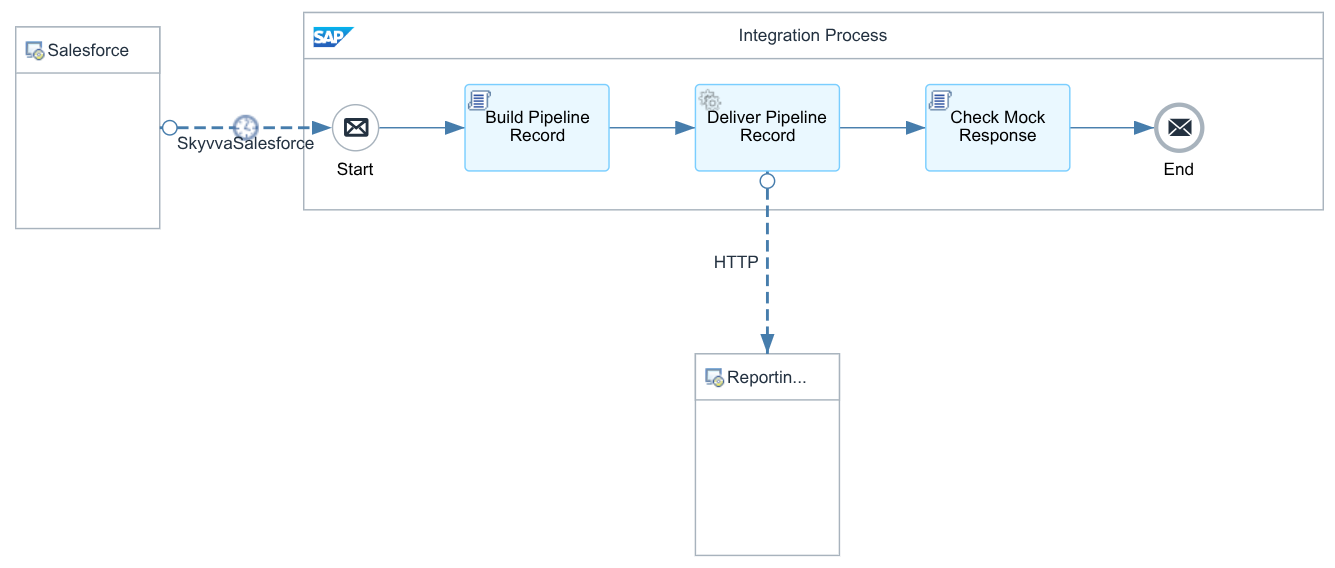
Figure 3a. Continuous Opportunity pipeline flow.
| Connection field | Value |
|---|---|
| General: Name / Direction | ReceiveOpportunityPipeline / Sender |
| Authentication Type | OAuth2 |
| OAuth2 Flow | Client Credential |
| Login Url | Actual Salesforce My Domain base URL |
| Client Credential | skyvva-client-credentials |
This custom adapter reads skyvva-client-credentials from CPI User Credentials, using User for Client ID and Password for Client Secret. Do not append /services/oauth2/token to Login Url. Use the intended run-as user's permissions and keep credential values out of screenshots.
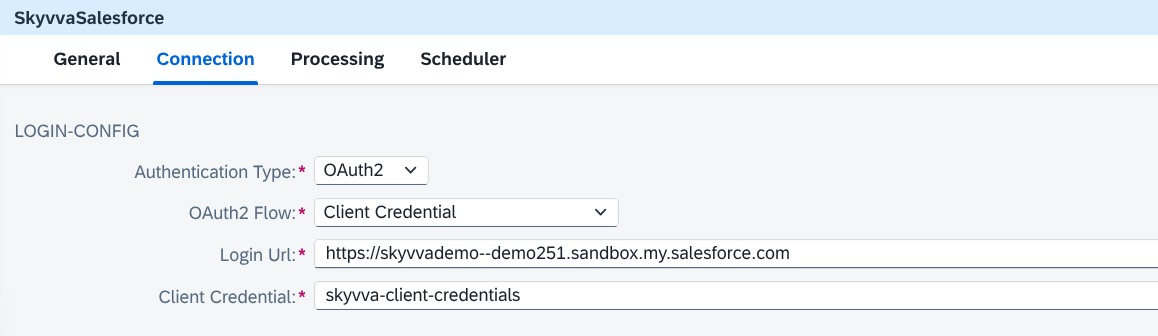
Figure 3b. Salesforce sender connection.
| Processing field | Value |
|---|---|
| Processing Mode / Event Type | Event Processing / PushTopic Events |
| Operation | Topic - Subscribe |
| Channel Name | /topic/OpportunityPipeline |
| Replay Id Approach | Events from latest position (Latest), for controlled initial setup |
| Subscription Behaviour On Reset | Replay from last processed message |
| Replay Preset for Invalid Replay ID | Earliest |
| Subscription Mechanism | Subscribe on one runtime node |
| Message Expiration (in ms) | 300000; adapter duplicate-memory period, not event retention |
| Max Buffer Size (in bytes) | 10485760 |
| Process Errors as an Event | Enabled; builder rejects diagnostic events |
| Payload Format / Pretty Print | Application/JSON / enabled |
| Logging option / Salesforce Api Version | Default / 61.0 or a supported deployed-adapter version |
| Scheduler | Leave unchanged; unused for Topic - Subscribe |
Platform Event/CDC managed-subscription and request-batch controls do not apply. Custom Replay Id is unused with Latest. Leave Max Network Delay at the displayed default; the current code does not use that field to control the live subscription wait. Other unrelated settings remain at their applicable defaults.
Replay from last processed message is a UI label, not a target-success checkpoint. With saved-position reset behavior, an existing stored position can take precedence over initial Latest. Do not clear that position merely to run a test. Earliest recovery can repeat retained events but cannot recover expired events. One-runtime-node selection does not establish exactly-once delivery or guaranteed automatic standby takeover.
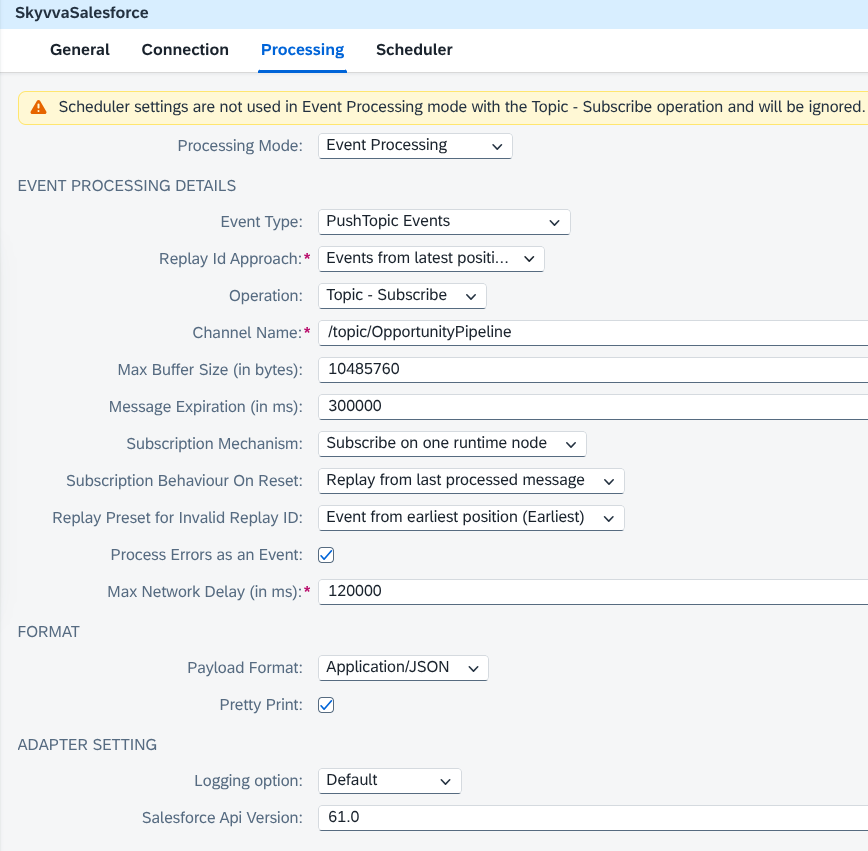
Figure 4. Continuous client-managed PushTopic subscription.
5. Transform Opportunity state
The received PushTopic envelope contains the selected Opportunity fields under data.sobject, rather than the Platform Event data.payload structure used in Tutorial 26. The Groovy Script (Build Pipeline Record) validates that envelope and produces one reporting item for the Opportunity.
At Build Pipeline Record → Message before Step → Payload, inspect the incoming Opportunity fields before transformation.
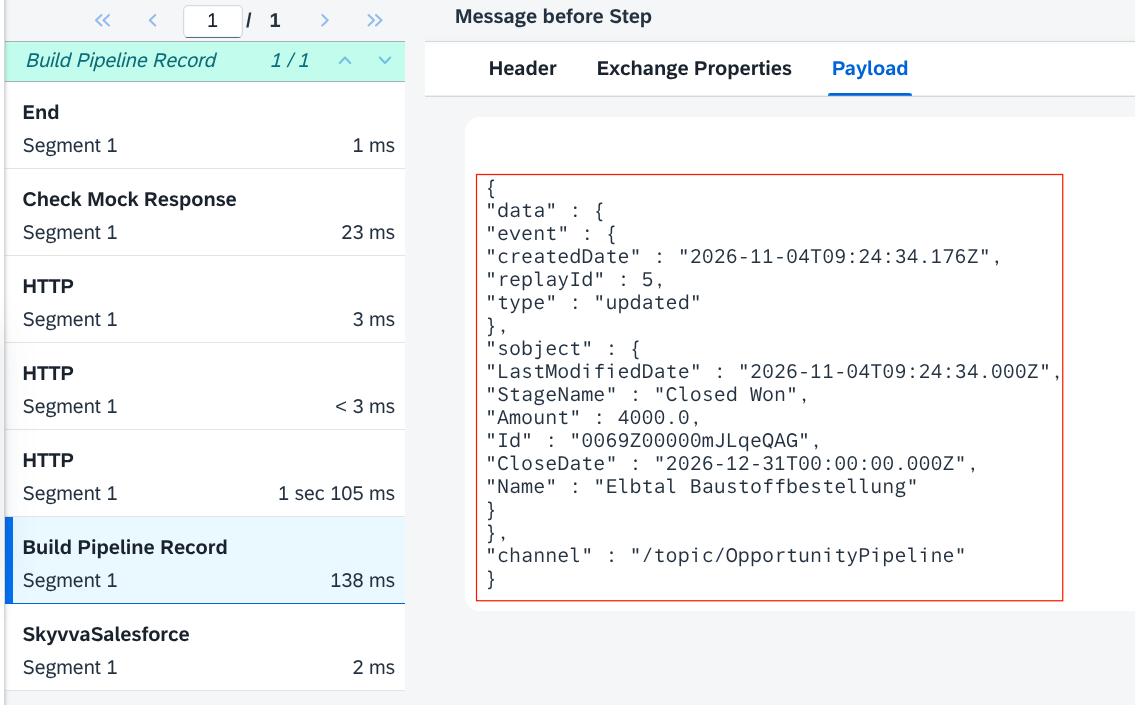
Figure 5a. Received Opportunity change.
| Source value | Target value | Description |
|---|---|---|
| data.sobject.Id | items[0].reference | Stable Opportunity key |
| data.sobject.LastModifiedDate | items[0].sourceVersion | Normalized UTC timestamp |
| data.sobject.Name | items[0].fields.name | Opportunity name |
| data.sobject.StageName | items[0].fields.stage | Current stage, including Closed Won |
| data.sobject.Amount | items[0].fields.amount | Number or explicit null; never formatted currency text |
| data.sobject.CloseDate | items[0].fields.closeDate | Date or offset timestamp normalized to YYYY-MM-DD without timezone shifting |
| created / updated / undeleted | items[0].operation = UPSERT | Intended real-service action; the mock does not store a row |
The builder rejects unsupported channels/event types and malformed roots. It normalizes timestamps such as +0000 or Z to UTC ISO text. A real reporting service would compare parsed timestamps; the mock does not compare versions. UPSERT means creating a missing row or updating an existing row by its key; here it is only a field in the request, not a storage operation performed by Postman. The script also sets Content-Type, Accept and an Idempotency-Key derived from the prepared request. A header does not implement target-side deduplication.
Pretty Print formats the incoming Salesforce event. The Groovy builder produces compact JSON for the reporting request, so its output may still appear on one line.
Close Date accepts an ISO date such as 2026-12-31 or an offset timestamp such as 2026-11-04T00:00:00.000Z. The builder sends date-only text (2026-11-04 in that example), preserving the calendar date represented in the source value. This works for any valid calendar date, including leap days; blank values, impossible dates and formats such as 31/12/2026 are rejected. Compare the actual saved Close Date after changing the Opportunity stage; closing an Opportunity as Won can replace a future Close Date with the current date.
Request produced by the Groovy script for the illustrative Closed Won event:
{
  "items": [
    {
      "reference": "006000000000001AAA",
      "sourceVersion": "2026-10-10T01:10:00Z",
      "operation": "UPSERT",
      "fields": {
        "name": "Elbtal Baustoffbestellung",
        "stage": "Closed Won",
        "amount": 4000,
        "closeDate": "2026-12-31"
      }
    }
  ]
}
No graphical Message Mapping or XSD is required. The identifier and timestamps in these examples are fixtures; the live test must use the real Opportunity Id and actual source version received from Salesforce.
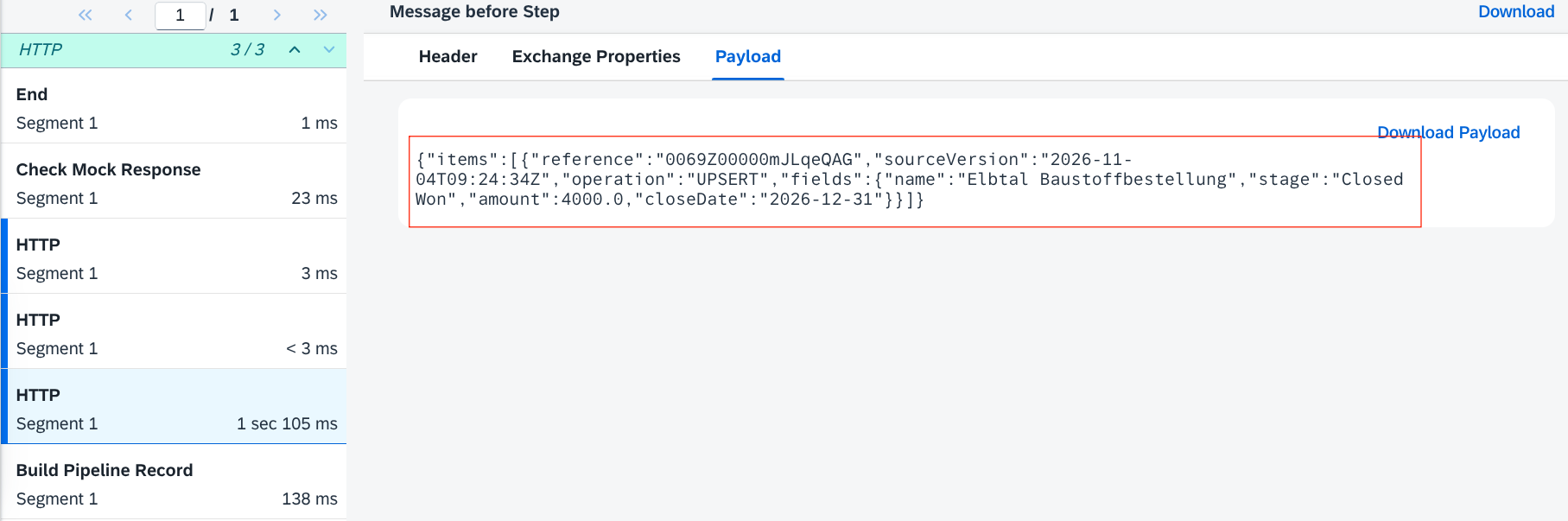
Figure 5b. Reporting request produced by the Groovy script.
6. Deliver the request to the Postman mock
The HTTP receiver connection sends the prepared JSON to the Postman mock's POST /api/opportunity-upserts endpoint. Configure the mock to select its one saved response by method/path, with body and header matching disabled, so real Opportunity identifiers, timestamps and Idempotency-Key values may vary.
The fixed acknowledgement is:
{
  "status": "RECEIVED",
  "mock": true
}
The Groovy Script (Check Mock Response) requires HTTP 200, status: RECEIVED and mock: true. It does not claim a saved reporting row or compare returned record versions. The full request must therefore be checked separately in the mock server call log against the actual source event and CPI transformation.
Select Check Mock Response → Message before Step → Payload to see the acknowledgement returned by Postman.
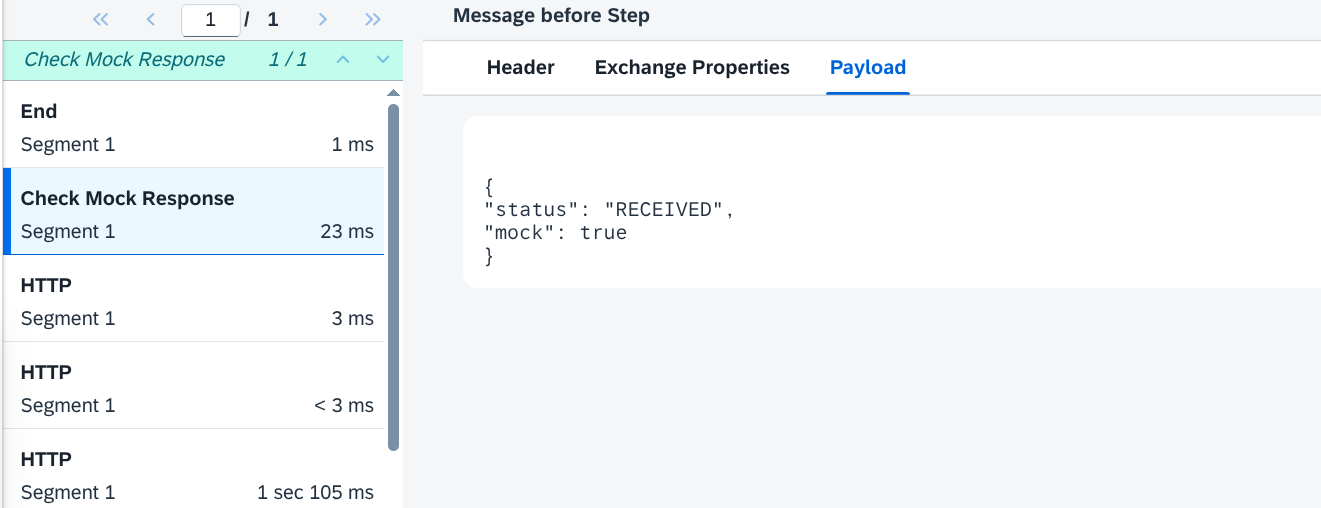
Figure 6a. Postman mock acknowledgement received in CPI.
| HTTP receiver field | Value |
|---|---|
| General: Name | DeliverPipelineRecord |
| Connection: Address | https://<your-mock-id>.mock.pstmn.io/api/opportunity-upserts; paste the generated URL |
| Proxy Type | Internet |
| Method / Query | POST / blank |
| Authentication | None for the public Postman mock |
| Credential Name | Not used with None |
| Timeout (in ms) | 60000 |
| Request Headers | traceparent|Accept|Idempotency-Key |
| Response Headers | Leave default |
| Throw Exception on Failure | Enabled |
| Attach Error Details on Failure | Enabled |
| Retry on Exception / Retry on Error Response | Disabled for the first test |
Enter traceparent|Accept|Idempotency-Key as one value in Request Headers, using literal pipes between the header names. traceparent is forwarded when present; this setting does not create it. The builder sets Content-Type and Accept to application/json; verify them and the actual body in the mock log. The Idempotency-Key remains part of the request, but the mock does not use it for deduplication. No ReportingApiUser Basic-auth credentials are needed. A private mock instead requires an x-api-key header supplied securely and included in forwarded Request Headers.
A fixed HTTP 200 can be returned even for incorrect business values when body matching is disabled. A completed flow alone is insufficient evidence of a correct transformation; compare the actual Id, version, name, stage, amount and close date across the source, request and mock log. This mock does not establish reporting persistence, duplicate prevention, stale-version rejection or recovery guarantees.
7. Test an Opportunity change through the mock
Prepare the topic, builder, mock checker and Postman mock before deploying. Confirm that Topic - Subscribe is connected before creating or editing the dedicated test Opportunity. Leave the Scheduler unchanged.
- In Salesforce → Opportunities → New, create Elbtal Baustoffbestellung with an allowed open stage, Amount 4000 and a valid Close Date such as 2026-12-31. Supply the Account and any other org-required fields, then save. Record its actual Id. The create event may produce an initial mock call; distinguish that from the later update. If reusing an existing record, subscription startup alone does not send its state.
- Enable temporary CPI Trace. Open the same saved Opportunity → Edit, change Stage to Closed Won (or the agreed equivalent permitted by the sales process) and keep Amount at 4000, then save once. Reopen the saved record and use its actual Close Date in the comparison; Salesforce may change a future date when closing as Won. That save produces the PushTopic notification. If the record is already Closed Won with Amount 4000, make another allowed field change for a repeat test and compare the actual new values; saving unchanged values is not a reliable way to demonstrate a new notification. Do not POST a Platform Event or the sender-envelope fixture from Postman.
- In CPI → Monitor → Monitor Message Processing, locate the corresponding execution. At Build Pipeline Record input, verify the actual Id, data.event.type updated and selected values. Select Deliver Pipeline Record → Message before Step → Payload to verify the prepared items entry and normalized sourceVersion. Select Check Mock Response → Message before Step → Payload to inspect the fixed acknowledgement, and check the HTTP response-code header is 200.
- In the Postman mock call log, find the matching CPI request by path, time, real Id and version. Compare all transformed business fields and Idempotency-Key. Capture the evidence, then restore normal logging. No saved reporting row is expected.
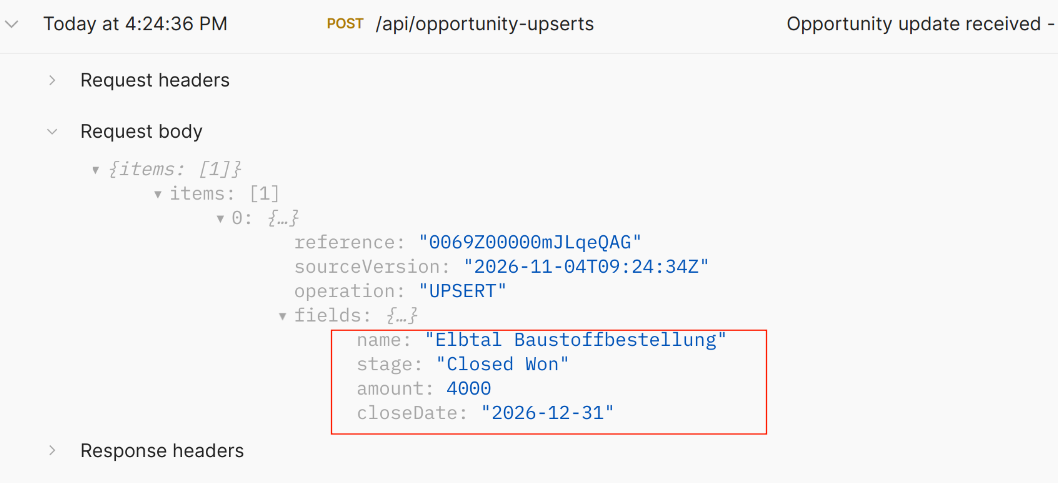
Figure 6b. Reporting mock call log with the transformed Opportunity request.
The fixed response does not change between Opportunity versions. Its absence of Id/version is intentional: it tests transport and the acknowledgement contract. Correct mapping is established by the actual source/request/log comparison, not by receiving HTTP 200 alone.
If Salesforce omits Amount rather than returning explicit null, stop and inspect the actual payload; the builder rejects a missing Amount instead of converting it to null. Do not call a successful mock response proof that a reporting amount was cleared.
A failed HTTP call can occur after the adapter has saved the client-managed replay position. Keep failed-run evidence; reconnecting alone does not guarantee the same event will be retried. For production, provision durable error handling/resend and reconcile actual reporting state. A current-state source read cannot reconstruct every historical stage transition.
8. Summary
The exercise continuously receives a Salesforce Opportunity change, transforms its selected state in CPI and sends it to a Postman reporting mock. The mock returns a fixed acknowledgement checked by a dedicated Groovy script. This demonstrates event delivery, transformation and HTTP response handling; a reporting database, durable acceptance, duplicate prevention and version ordering are separate production capabilities.
Configuration Summary
| Component | Configuration |
|---|---|
| Sender | PushTopic Events → Topic - Subscribe; Scheduler unused |
| Channel / transport | /topic/OpportunityPipeline / CometD |
| Request identity | Real Opportunity Id / normalized LastModifiedDate |
| Transformation | Groovy script in CPI; data.sobject to one items entry |
| Delivery | Postman mock POST /api/opportunity-upserts; Authentication None for public access |
| Response check | HTTP 200, status RECEIVED, mock true |
| Not established | Reporting persistence, duplicate prevention, stale-version rejection and durable recovery |
| Replay boundary | 24-hour PushTopic retention; client checkpoint precedes later step success |