23. Processing in transactional mode
Introduction
The functionality in the context of a system that integrates with the SKYVVA application and Salesforce, using different versions (V3 and V4) of an API or integration method. Let's break down your description:
- interface.isTransactional__c=true: This appears to be a condition indicating that a transactional mode is enabled for the interface. When this is set to true, it means that if a node in the integration process fails, the entire tree of nodes will be rolled back, ensuring that no partial data is saved.
- Multiple Trees: If a request is posted to SKYVVA with more than one tree, and a node within one of those trees fails, no message will be saved. This implies that the entire integration process is atomic, and it either succeeds entirely or fails.
- V3 and V4: SKYVVA has two different versions of integration methods (V3 and V4) that are used for calling data from Postman to SKYVVA/Salesforce. These versions might have different ways of making the integration work.
Step 1: Create Message Type.
- Create Metadata
- Create Istructure Repository
- Create Message type

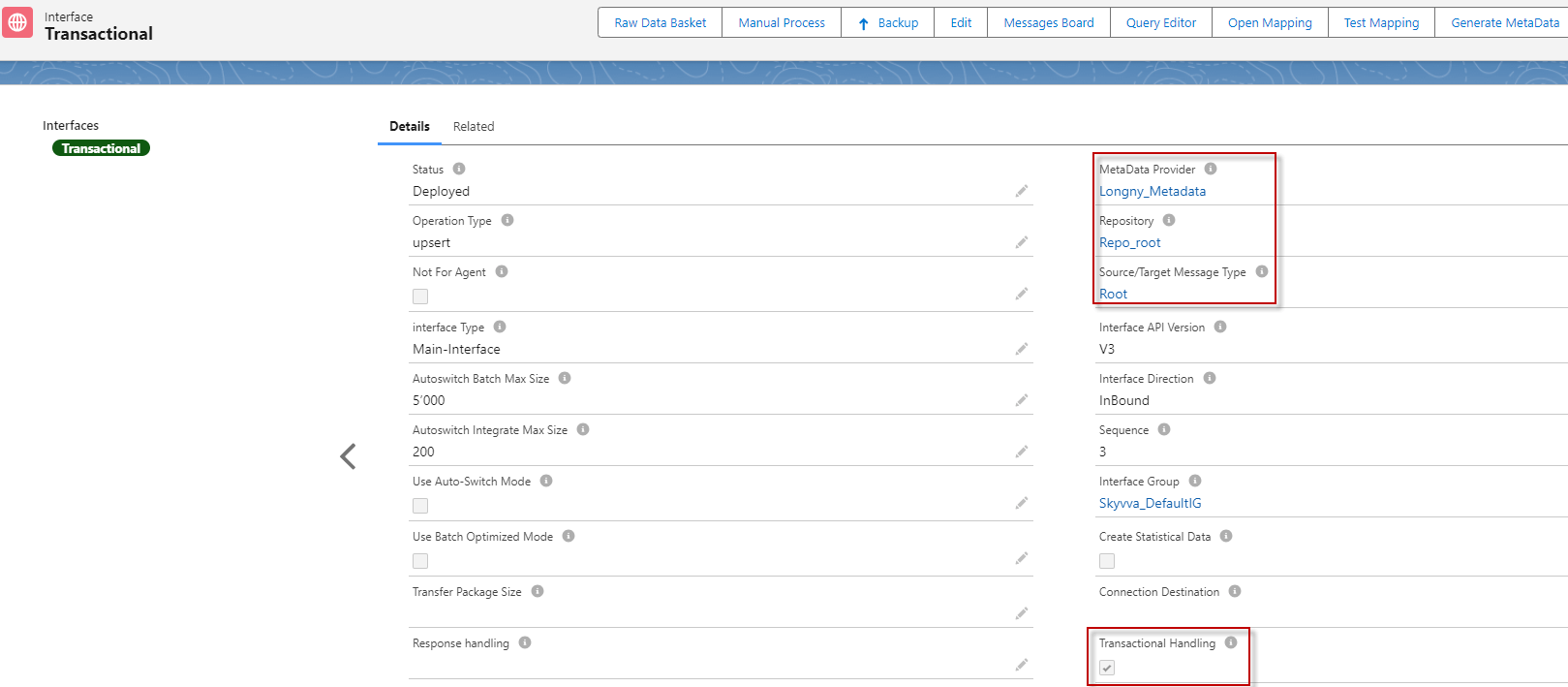
Step 2: Create the Integration. Step 3: Create the Inbound Interface link with the message type, then check the 'Transactional Handling' mode.
Step 4: Do mapping.
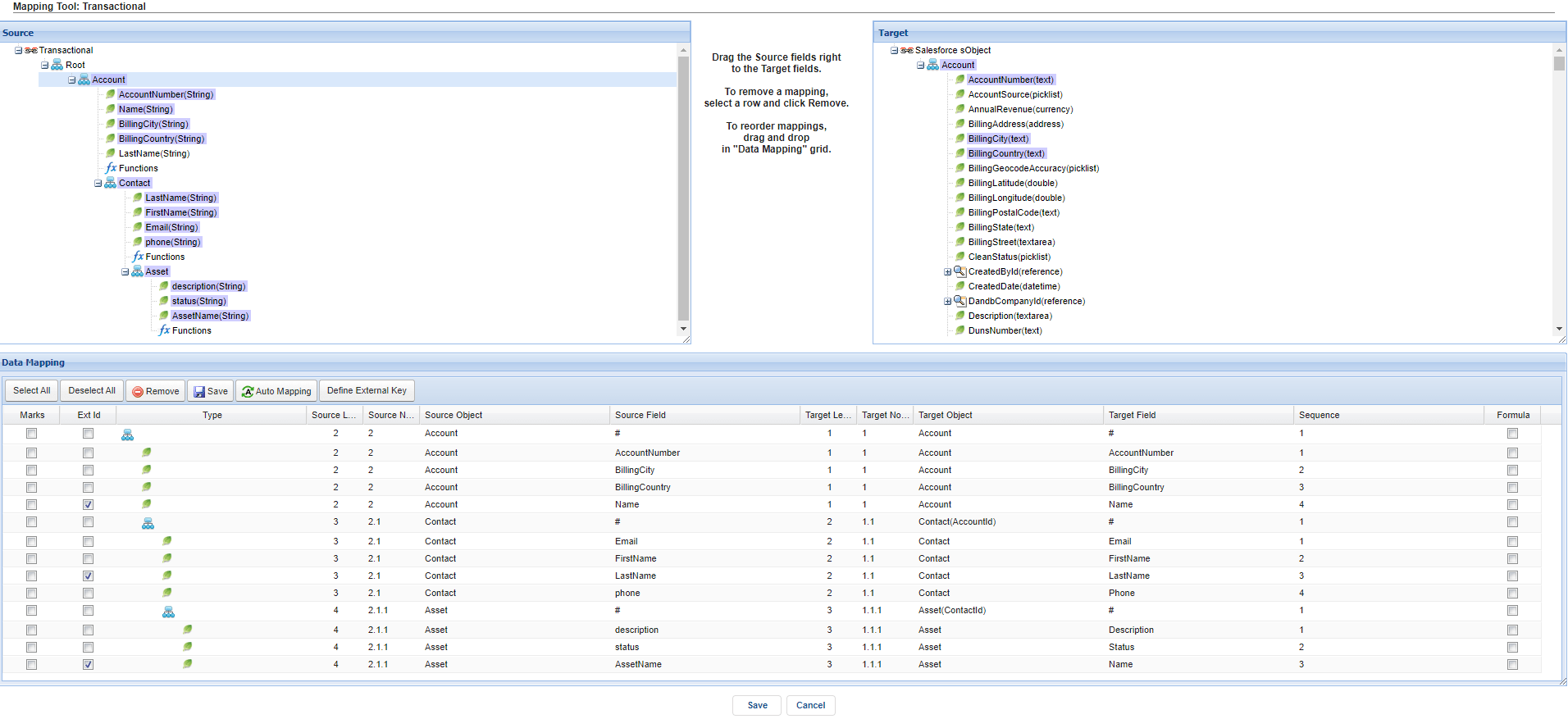
The transactional mode is a flag that we can set as true or false. "IsTransactional__c=true" Means that when a node has failed it will roll back the whole tree. There are two modes:
1. Transactional Mode
2. Non-Transactional Mode
Case1: Transactional Mode
- Transactional Mode is used in the SKYVVA application. In a transactional mode, a series of operations are grouped into a single transaction. The SKYVVA application ensures that either all these operations are completed successfully, or none of them are, to maintain data consistency and integrity. If a failure occurs at any point during the transaction, the system can "roll back" the entire transaction to its original state, effectively undoing all the changes made during that transaction.
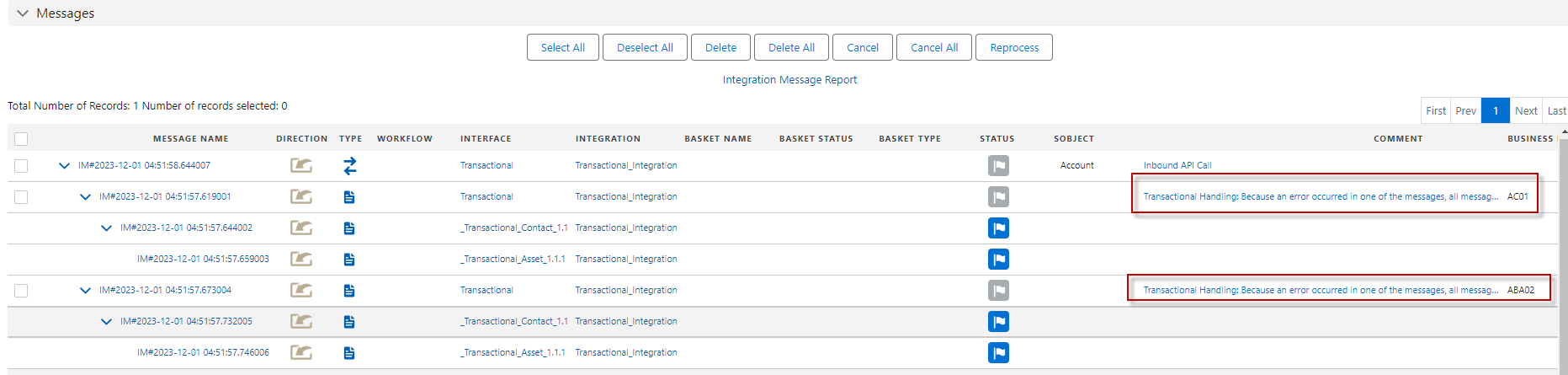
- We have three levels of messages account, contact, and asset. If the Transactional Mode flag is ON, and a failure occurs at the "asset" level, it will trigger a rollback of the entire transaction. This means that any changes made to the "account" and "contact" messages during the same transaction will be undone, and the data will return to its original state.
- When a record fails, all messages within the entire tree will be rolled back, and the message status will be set to 'Cancelled' for any message indicating a failed transaction. This visual representation signifies that the data is in an inconsistent state due to the failed transaction, with the specific implications varying depending on the SKYVVA application.
When the Transactional Mode flag is ON, if a record fails in one of the messages, all messages within the entire tree will be rolled back. Let's take an example: we have three levels of messages - account, contact, and asset. When an Account fails, it will be canceled throughout the entire tree, and its child nodes will show as 'New' as follow:
Case2: Non-Transactional Mode
- In a non-transactional mode, each message is processed independently without any inherent guarantee of consistency. This means that if one message fails, it doesn't trigger an automatic rollback or transaction reversal.
- Three levels of messages - "account," "contact," and "asset." These messages likely represent data operations within a SKYVVA application.
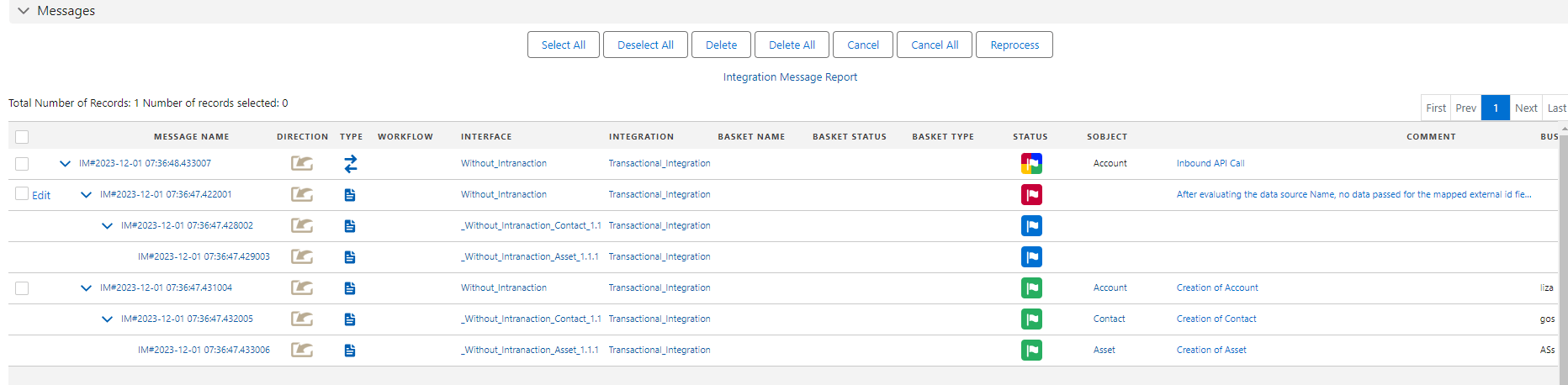
- When the 'Account' record fails in one of the messages, it does not check the child messages, resulting in a cascading effect on the 'Contact' and 'Asset' messages. Consequently, these messages are set to a 'new' status.
This is normal case, if a record fails in one of the messages, the API message's status is set to Partial Completed. Let's take an example: we have three levels of messages - account, contact, and asset. When an Account fails, the root message will be set to Partial Completed.
Summary
- If interface.isTransactional__c is set to true, the integration is in a transactional mode where failures in any part of the process will trigger a rollback of the entire integration.
- The integration involves posting requests from Postman/FileZila to SKYVVA/Salesforce, and the data payloads and formats used can vary between V3 and V4. V4 uses Query Parameters with JSON data payload, while V3 uses Request Body with data formats like JSON and XML.