3.3. FTP, SFTP & FTPS
FTP Adapter
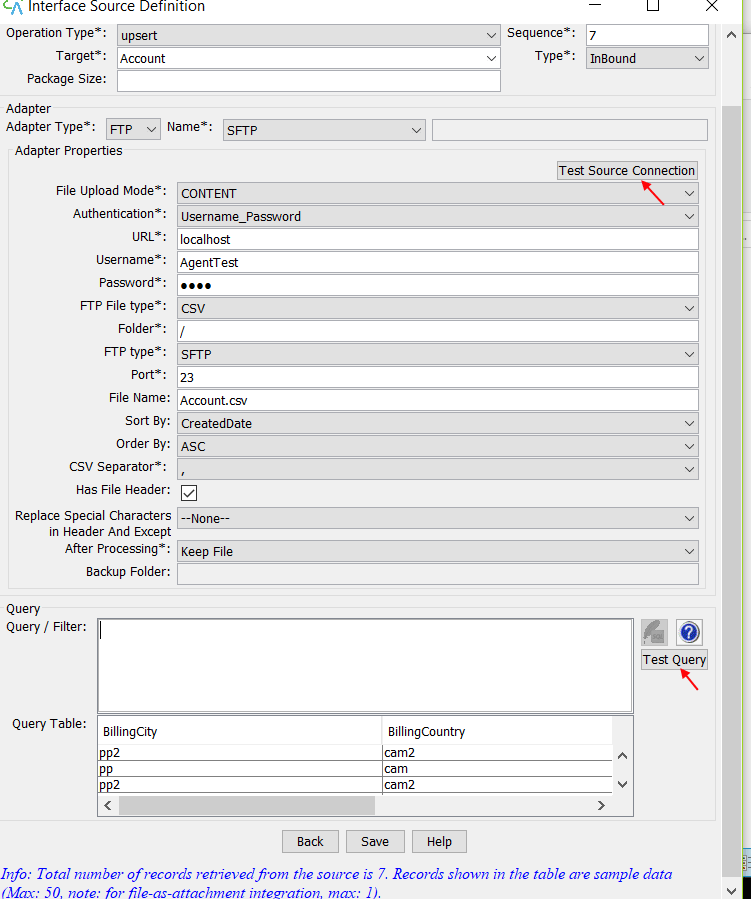
FTP Adapter is used as a connector to transfer data from the FTP server to Salesforce and from Salesforce to the FTP server. The File Transfer Protocol (FTP) is a standard network protocol used for the transfer of computer files between a client and server on a computer network. To create an FTP Adapter, there are some steps that must be followed: Run Agent UI → Integration Wizard → Choose Integration → Choose existing interface.
- Adapter Section: Choose Adapter Type (FTP)
- Adapter Properties:
- Authentication → Username_Password
- URL → localhost
- Username → akash (Username to log in to FTP server)
- Password →* (The default password to use when making the connection to the FTP Server)
- FTP File Type → Choose CSV/XML or other
- Folder → /
- FTP Type→ Choose FTP/FTPS/SFTP
- Port → 21(Default)
- File Name → (Optional) a file name for the agent to query data from
- After Processing → Choose what you want to do with your file
- Keep File → The file will keep in the folder.
- Lock File → The file will lock.
- Delete File → The file will delete.
- Backup File → The file will back up in the other folder.
- Backup Folder → The folder to keep the processed file. If you choose to backup your file, you have to input your folder name here.
- Click “Test Source Connection” to test the connection to the specified folder and file.
- Click Save.
 –How to use FTP Adapter (FileZilla Client & Server) with Agent Control Board (old)?
Since the user now completely understand; How to use FTP Adapter (FileZilla Client & Server), Agent Control Board, by hitting the upper link, now we understand the Architect of the Agent Control Board. [su_box title="Note" box_color="#2a8af0" title_color="#000000"]For Excel and CSV File, user can just do the same as XML File. But user only needs to change the file types, adapter, and its properties accordingly.
- Select File upload Mode "File"
- File Extension*: insert your extension file
- Max. in each file size around 3MB
- For on extensions use (.CSV)
- For few extensions use (.CSV, .pdf, .xls)
- For many extension use (.*)[/su_box]
FTP Type (SFTP)
- SFTP (SSH File Transfer Protocol) is a secure file transfer protocol. It runs over the SSH protocol. It supports the full security and authentication functionality of SSH.
- SFTP has pretty much-replaced legacy FTP as a file transfer protocol and is quickly replacing FTP/S. It provides all the functionality offered by these protocols, but more securely and more reliably, with easier configuration. There is basically no reason to use legacy protocols anymore.
- SFTP also protects against password sniffing and man-in-the-middle attacks. It protects the integrity of the data using encryption and cryptographic hash functions and authenticates both the server and the user.