3. How to Connection Agent to Salesforce Using OAuth2 Client-Credential Authentication Type with API User ?
Introduction
Connecting an agent to Salesforce using OAuth2 Client-Credential Authentication with an API user through the SKYVVA Integration application involves several essential steps.
- First, OAuth2 Client-Credential Authentication, a widely used method, provides a secure and efficient way to authenticate applications. This process begins with setting up the necessary credentials in Salesforce, including creating a connected app that specifies the API user's client ID and client secret.
- Next, these credentials are configured within the SKYVVA Integration application to enable secure communication between the agent and Salesforce. The application leverages the OAuth2 protocol to obtain an access token, which is then used for authenticated API requests. This ensures the agent can interact with Salesforce data securely, adhering to predefined permissions and scopes.
- Additionally, the SKYVVA Integration application simplifies the connection setup by providing a user-friendly interface for managing these credentials and configuring the authentication process. Users can easily input the required information, test the connection, and ensure that the integration is functioning correctly.
By utilizing OAuth2 Client-Credential Authentication, the SKYVVA Integration application ensures robust security while facilitating seamless data exchange between the agent and Salesforce. This method is particularly advantageous for scenarios where machine-to-machine communication is required, offering a scalable and secure solution for integrating various applications with Salesforce.
Pre-required
- Salesforce Environment Setup:
Create a Salesforce Connected App:
Navigate to Setup in Salesforce.
- Search for App Manager and click on New Connected App.
- Fill in the necessary details such as Connected App Name, API Name, and Contact Email.
- Under API (Enable OAuth Settings), select Enable OAuth Settings.
- Specify a Callback URL (though not required for Client-Credential Flow, a placeholder URL can be used).
- Select OAuth Scopes that define the data access permissions for the API user.
- Generate Client ID and Client Secret:
Once the connected app is created, Salesforce will generate a Client ID and Client Secret.
- Note these credentials as they will be required for configuring the Skyvva Integration application.
- Skyvva Integration Application Configuration:
Login to Skyvva Integration Application:
Ensure you have access to the Skyvva Integration application.
- Configure OAuth2 Settings:
Navigate to the OAuth2 settings within the Skyvva application.
- Input the Client ID and Client Secret obtained from Salesforce.
- Specify the Token URL provided by Salesforce for obtaining access tokens.
- API User Setup in Salesforce:
Create an API User:
Ensure there is an API user in Salesforce with the necessary permissions to access the required data.
- Assign the appropriate profiles and permission sets to the API user to control data access and operations.
- Grant API Access:
Ensure that the connected app permissions and security settings in Salesforce allow access to the API user
By following these pre-required steps, you will establish a secure and functional connection between the agent and Salesforce using OAuth2 Client-Credential Authentication within the Skyvva Integration application.
How to use agent connection with API User?
- Create API User
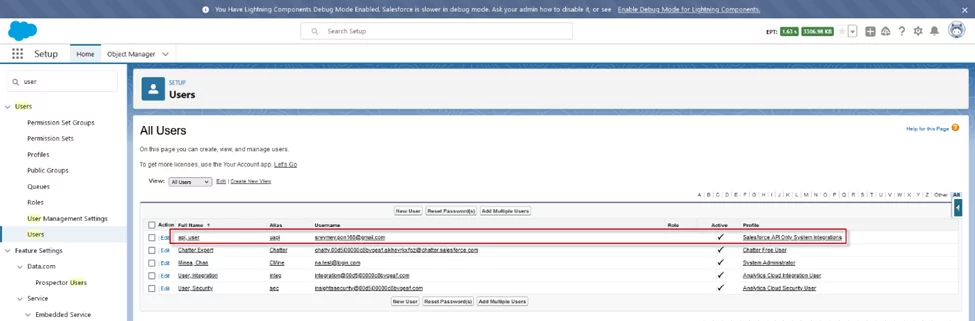
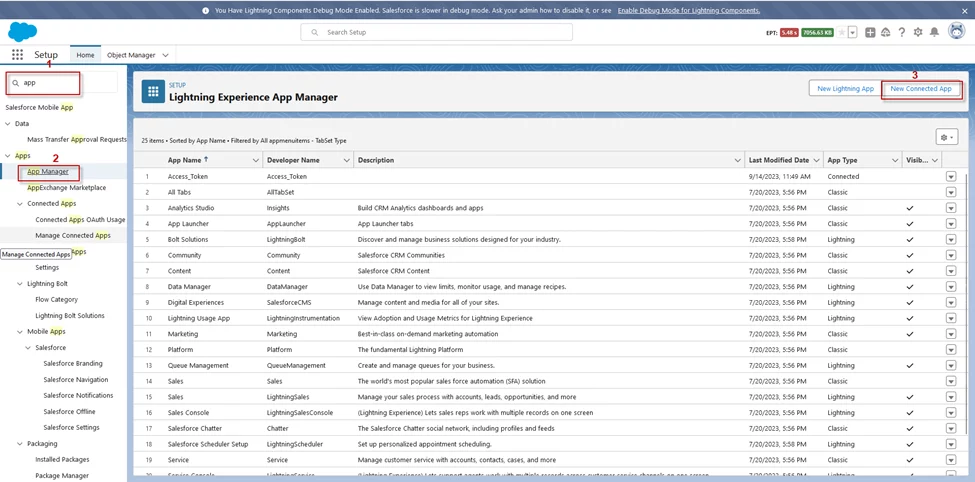
- Create a connection app on Salesforce
- Navigate to the search box and type “app…” to find the App Manager menu then click New Connected App to create a new connection on Salesforce
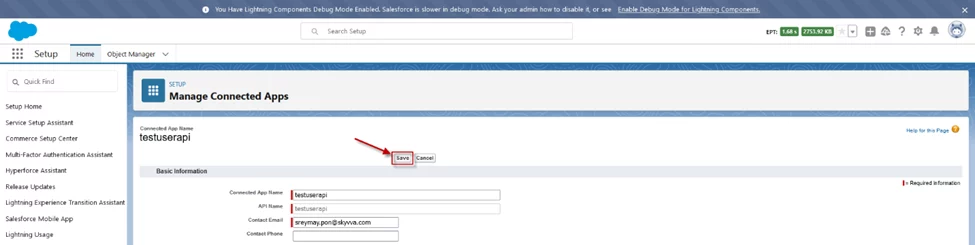
- Fill required information


- After that click button Save
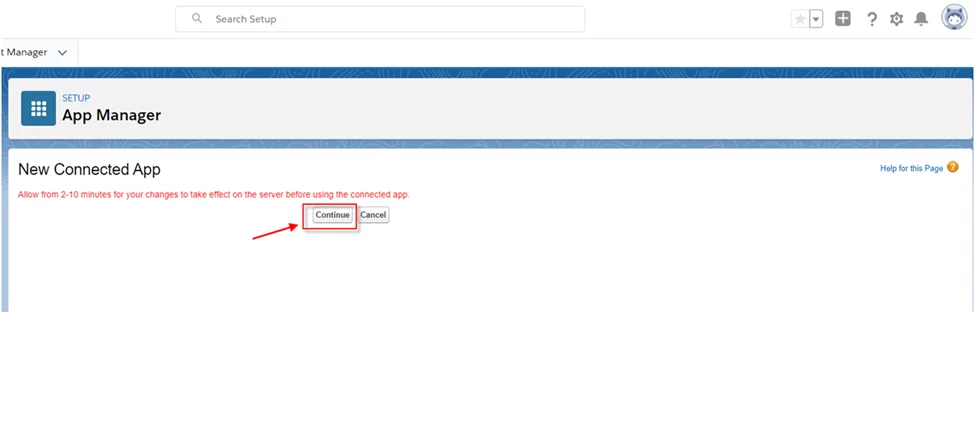
- Click Continue
- Here is the client-id (Consumer Key) and Client-Secret (Consumer Secret). But we cannot use those keys immediately as Salesforce has a display of a warning in the red line above.
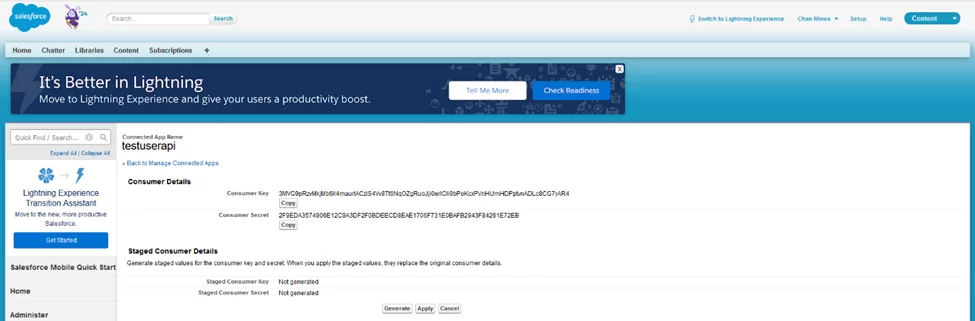
- we have a tick on the Enable Client Credentials Flow

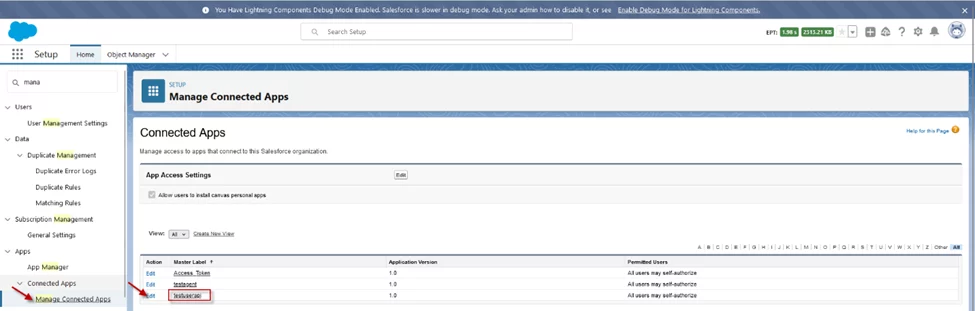
- Go to Manage Connected App and then edit Connection app
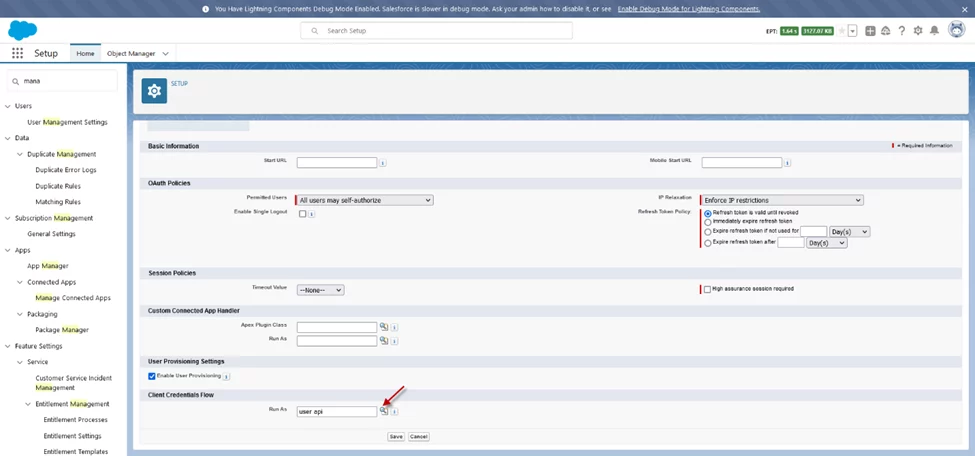
- Select api user to enable access token in the section Client Credentials Flow
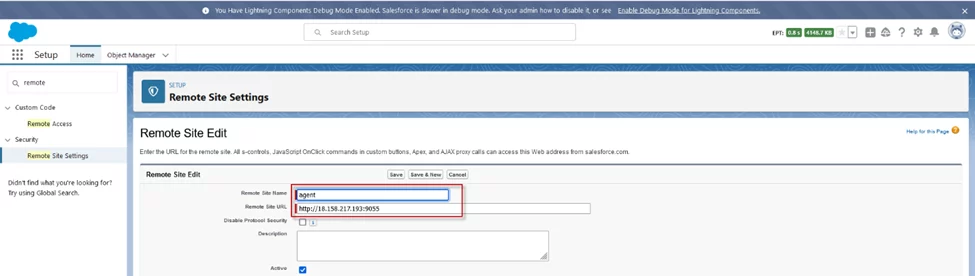
- Create Remote Site
- We need to create a Remote Site to allow Salesforce access to your external system. Put the host URL and Agent port number.
- Example: http://18.158.217.193:9055
- Create a new connection name
- Provide the credential to Connection Destination
Destination -> New
- Name-> any name
- Description -> optional
- Type -> any adapter type, for example, Agent Database. If we work with a Database, so type is “Agent Database”. We need to create a connection type depending on the working target

Then click on the Continue button
- Second, provide the credential of Agent for ping connection from Salesforce to Agent
Host URL -> Server address that installs agent
- Port Forward -> 9055(default)
- Username -> skyvva (default)
- Password -> skyvva@12! (default)

Then click on the Ping Agent Connection button
- Third, provide the credential of Salesforce for ping connection from Agent to Salesforce
OAuth 2 Grant Type: client_credentials
- Server Environment: Sandbox/Production
- Consumer Key and Consumer Secret users get from the connection app from the Salesforce side
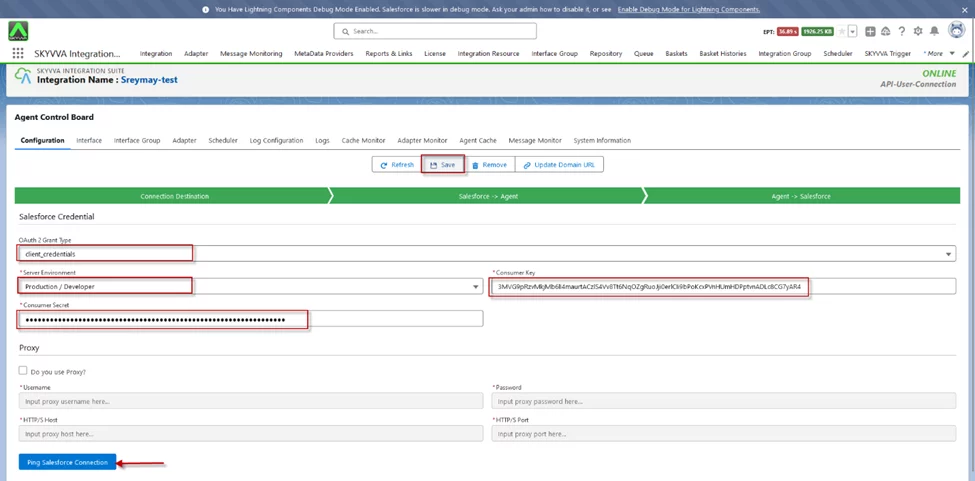
Then click on the Ping Salesforce Connection button, after we ping successfully we can save the connection name.
- Allow Api users to access the skyvva class
- Go to setup -> Profile -> click “Salesforce API Only System Integration” profile

- Click on Enabled Apex Class Access
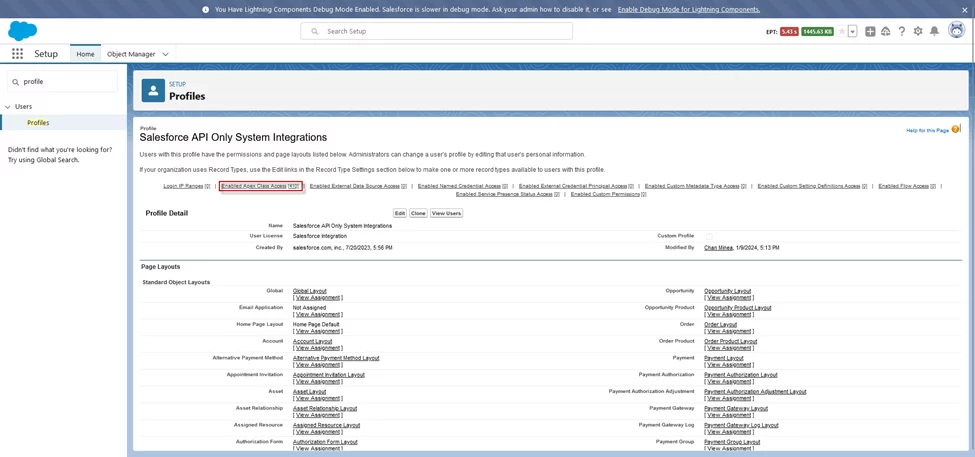
- Click edit button

- Add Apex Class Access

Then click the Save button
- Create a new permission set license “Salesforce API Integration”.
- Go to the permission set -> click the New button

- Assign object permission: Read, Create, Delete, …
- Example: assign permission to sObject Account, click Object Setting -> Accounts
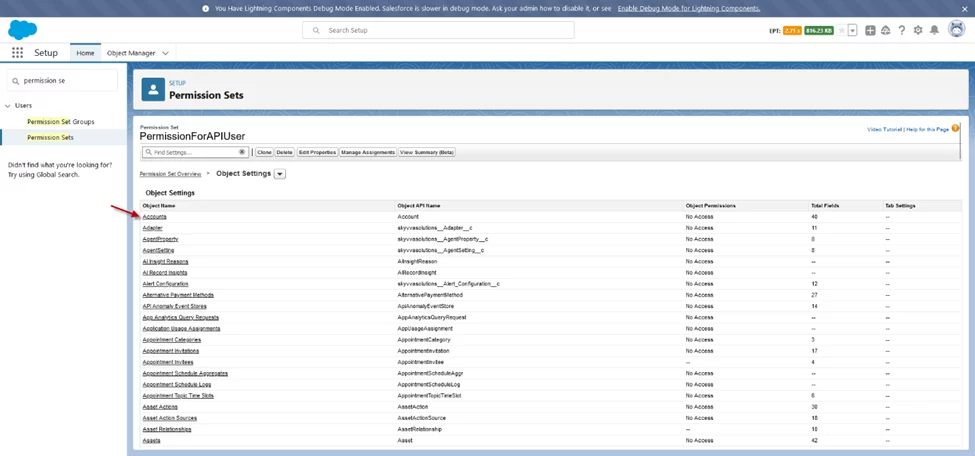
- Click Edit button
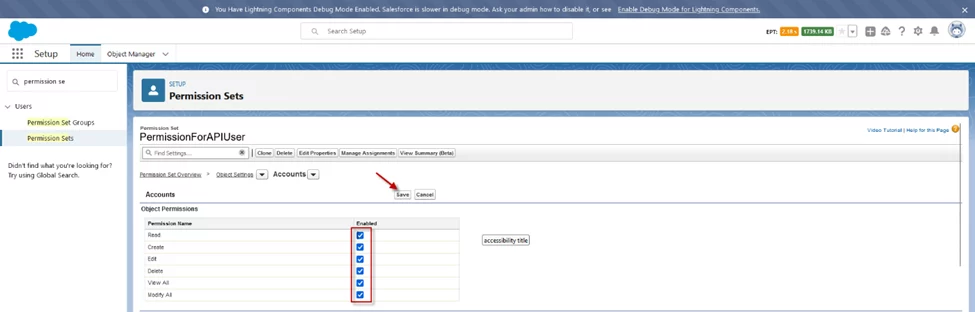
Then click the Save button
- Assign this permission set to the API User
- Click the Manage Assignments button

- Click Add Assignment
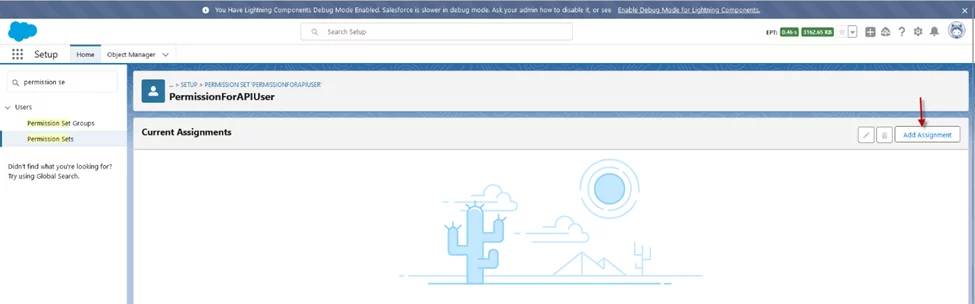
- Click tick “user api” then click the Next button

- Click assign button

- Now we successfully assign permission to api user

- Push data from Agent via API User
- Go to agent control board -> click on Interface tab -> Tick Interface -> click Manual Process button
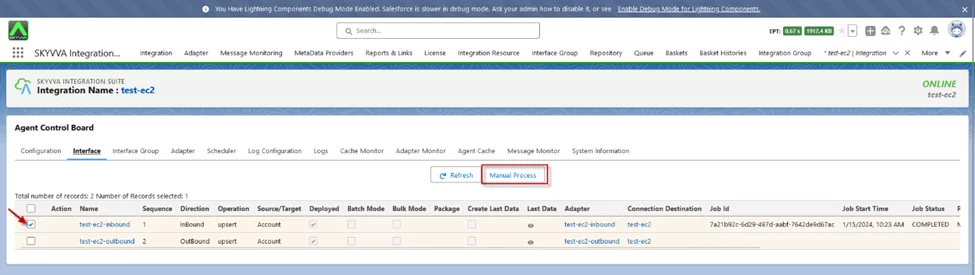
Here is the result on Message Monitor

Summary
Now user learned by following these steps, the user can successfully connect an agent to Salesforce using OAuth2 Client-Credential Authentication with an API user. This involves creating a connected app to obtain a client ID and client secret, configuring OAuth2 credentials, and using this token for authenticated API requests.