3. How to use 'Don't process the interface in parallel' picklist (Multi-Select) ?
Introduction
- Introducing a 'Batch Processing Runtime Behavior' Picklist (Multi-Select) field on the interface interface is a strategic enhancement facilitated by the SKYVVA integration application. This feature enables users to adapt the processing behavior of the Interface Scheduler to their specific requirements, particularly in business scenarios where parallel processing is undesired. By selecting the 'BatchProcessPerInterface' option from the picklist, users can ensure that the Interface Scheduler refrains from executing tasks jointly, avoiding potential conflicts.
- This customization empowers users with greater control over their integration processes, allowing them to fine-tune performance parameters to align with their business needs. Whether it's optimizing resource utilization or the risk of data fluctuation, introducing this picklist field enhances the adaptability and efficiency of the SKYVVA integration application.

- To enhance the functionality and flexibility of the SKYVVA integration application, a 'Batch Processing Runtime Behavior' picklist (Multi-Select) field can be introduced on the interface. This feature empowers users with greater control over batch processing operations, particularly in scenarios where parallel processing by the Interface (BatchProcessPerInterface) Scheduler may lead to issues.
- By selecting appropriate options from the picklist, users can dictate how batches are handled, including the ability to opt out of parallel processing. This ensures that batches containing the same business data are not concurrently processed by the scheduler, mitigating the risk of conflicts arising from simultaneous access to shared resources.
- The significance of this functionality lies in its capacity to prevent exclusive access issues, which can disrupt operations and compromise data integrity. By enforcing sequential processing of batches when necessary, the application safeguards against potential conflicts and ensures smooth execution of integration tasks.
- Implementing this feature underscores SKYVVA's commitment to providing users with robust tools for managing data integration processes effectively. With the ability to tailor batch processing behavior to specific requirements, users can optimize performance, minimize risks, and maintain the integrity of their Salesforce environment with confidence.
Case: Do not Process the Interface in Parallel of Batch EO Type
- We see the example 'Batch Processing Runtime Behavior' multi-picklist field on our interface to block the parallel processing of baskets. Opting for 'Don't process the interface in parallel' in this field activates this feature.
- Therefore, the scheduler will only handle a set number of baskets at a time within a job. Should another job become available, the scheduler refrain from picking up any additional baskets. This functionality, integrated within the SKYVVA application, ensures orderly processing and prevents overload, enhancing system stability.
[su_box title="Note" box_color="#2a8af0" title_color="#000000"] If the scheduler runs multiple jobs during the Apex job worker to process the basket, the next scheduler will be aborted. It will wait until the current basket is completed process before moving on to the next one.[/su_box]
Required step:
- Create an Integration
- Create an Inbound interface with batch mode and Batch Processing Runtime Behavior
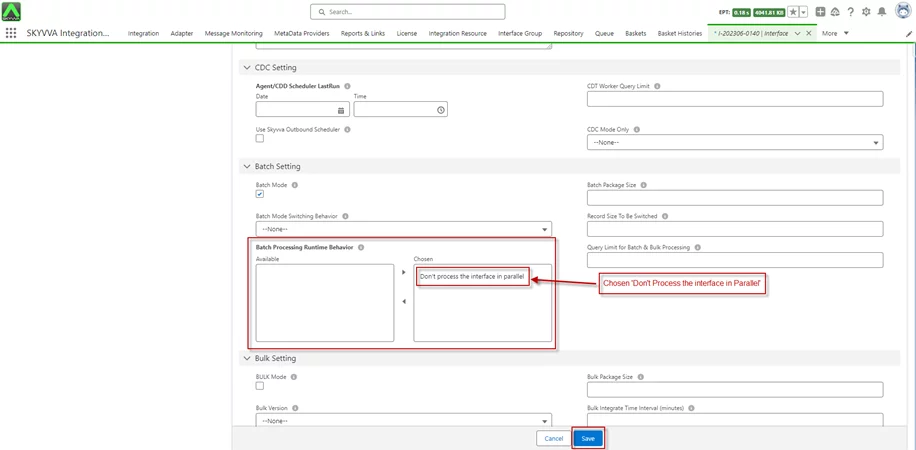
- Go to Interface Group Default -> Set Basket Record Collection Size: 1000

- Push 2 baskets and each basket with 500 records
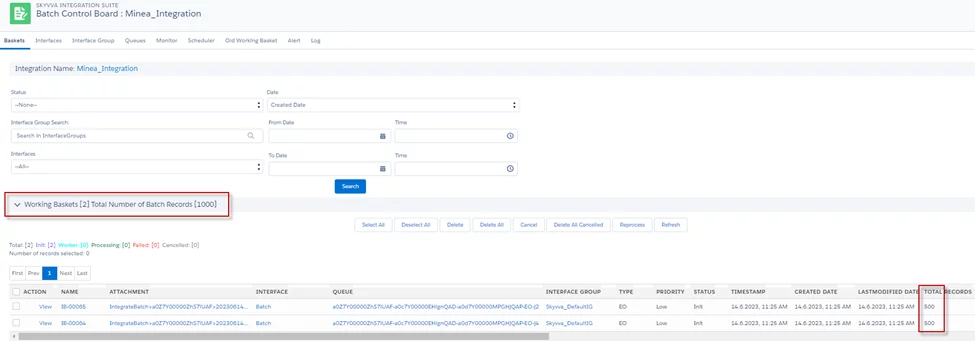
- Go to Scheduler -> Start Run Interface Scheduler

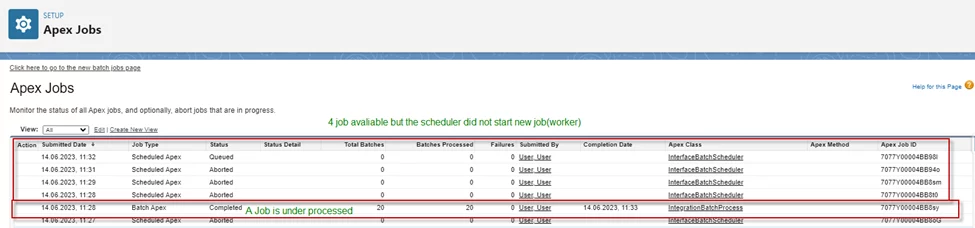
- After the scheduler runs, it will process baskets containing 1000 records per job. Look at the screenshot below, If an Apex job is under processing baskets.
- The next scheduler job will not pick up those baskets for processing even if the free jobs are available.
[su_box title="Note" box_color="#2a8af0" title_color="#000000"]
- Basket Record Collection Size = Record per job
- Processing Package Size = Record per batch (Default Processing Package Size 50 Records per Batch)
[/su_box]
- Go to Message Monitoring

[su_box title="Result:" box_color="#00d9a6;" title_color="#000000"]After the scheduler runs, The Message Monitoring creates 20 API Basket Messages from each basket message that has 50 Business Message records.[/su_box]
Summary
Now users understand how to use, The 'Batch Processing Runtime Behavior' feature in the SKYVVA integration application prevents parallel processing of baskets by allowing users to select 'Don't process the interface in parallel.' This ensures orderly processing by the scheduler, which handles a set number of baskets within a job at a time.