3. Interface Group Queue Processing Behavior
1. Overview
The Interface Group Queue framework provides centralised runtime orchestration for processing multiple Interfaces within an Interface Group. The framework controls how Interfaces are executed, monitored, recovered, and managed during runtime processing.
An Interface Group represents a collection of Interfaces that are executed together as part of a business integration process. During execution, the system creates runtime queues that coordinate Interface execution and monitor processing status across all Interfaces and Messages.
The Interface Group Queue framework is designed to support enterprise-level integration processing with:
- Runtime queue orchestration
- Sequential and parallel processing
- Message-level processing control
- Failure handling
- Queue recovery management
- Restart processing strategies
- Runtime monitoring and governance
The framework allows administrators and integration users to control how processing behaves when errors occur and how processing resumes after recovery.
2. Runtime Processing Architecture
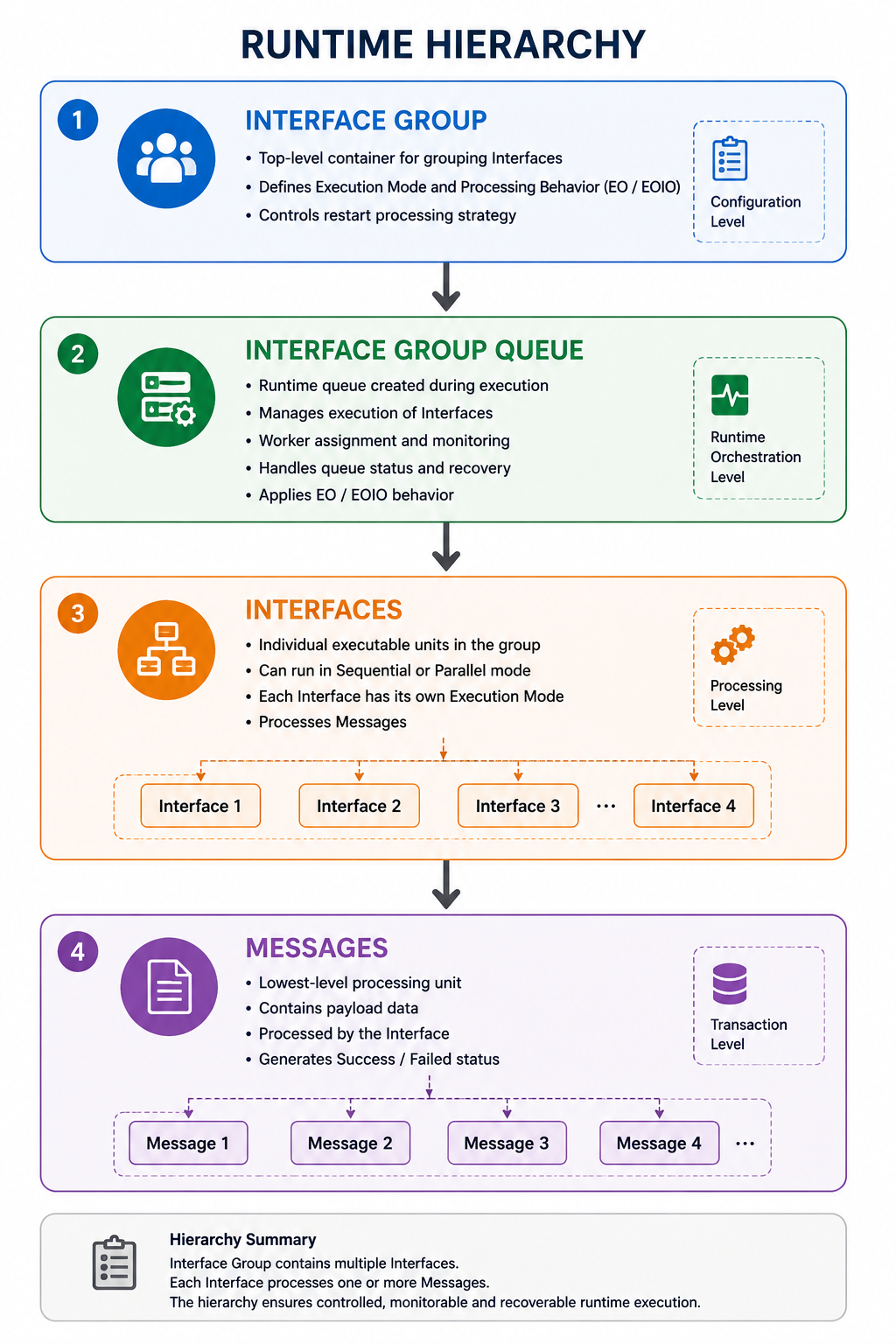
When an Interface Group is executed, the system creates a runtime processing hierarchy. Each layer in the hierarchy has a different responsibility during execution.
2.1 Runtime Hierarchy
2.2 Runtime Layer Description
Interface Group
The Interface Group is the top-level configuration object that contains multiple Interfaces.
Responsibilities:
- Defines Interface execution order
- Controls processing behavior
- Controls restart processing strategy
- Defines runtime orchestration rules
Interface Group Queue
The Interface Group Queue is the runtime execution container created during processing.
Responsibilities:
- Controls Interface execution
- Monitors processing status
- Handles runtime orchestration
- Controls queue lifecycle
- Applies EO or EOIO processing behavior
- Coordinates queue recovery and restart processing
Interface
An Interface is an executable processing unit inside the Interface Group.
Responsibilities:
- Processes Messages
- Executes mappings and transformations
- Handles adapter communication
- Applies Interface Execution Mode
- Controls message-level processing behavior
Message
A Message is the lowest processing unit.
Responsibilities:
- Contains runtime payload data
- Executes individual processing transactions
- Generates processing status
- Produces success or failure results
3. Queue Creation Process
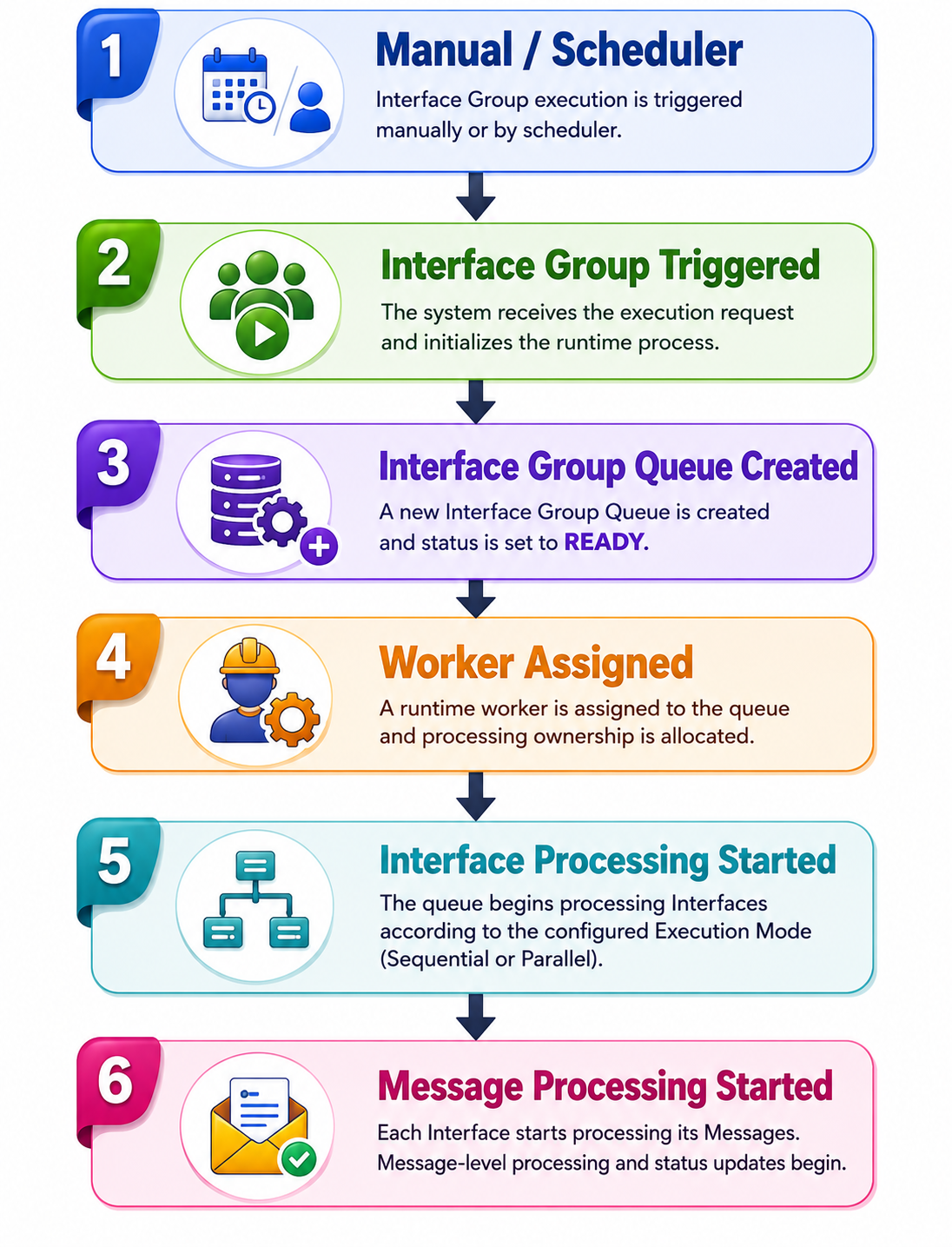
The Interface Group Queue is automatically created when Interface Group execution starts.
Execution can be triggered by:
- Manual execution
- Scheduler execution
3.1 Queue Creation Flow
3.2 Runtime Initialization
During queue creation:
- The system generates a new Interface Group Queue record
- Runtime worker resources are allocated
- Queue status changes to READY
- Worker assignment begins
- Interface processing starts according to configured Execution Mode
The queue remains active until:
- Processing completes successfully
- Processing fails
- Queue enters HOLD status
- Queue is manually stopped
4. Queue Runtime Lifecycle
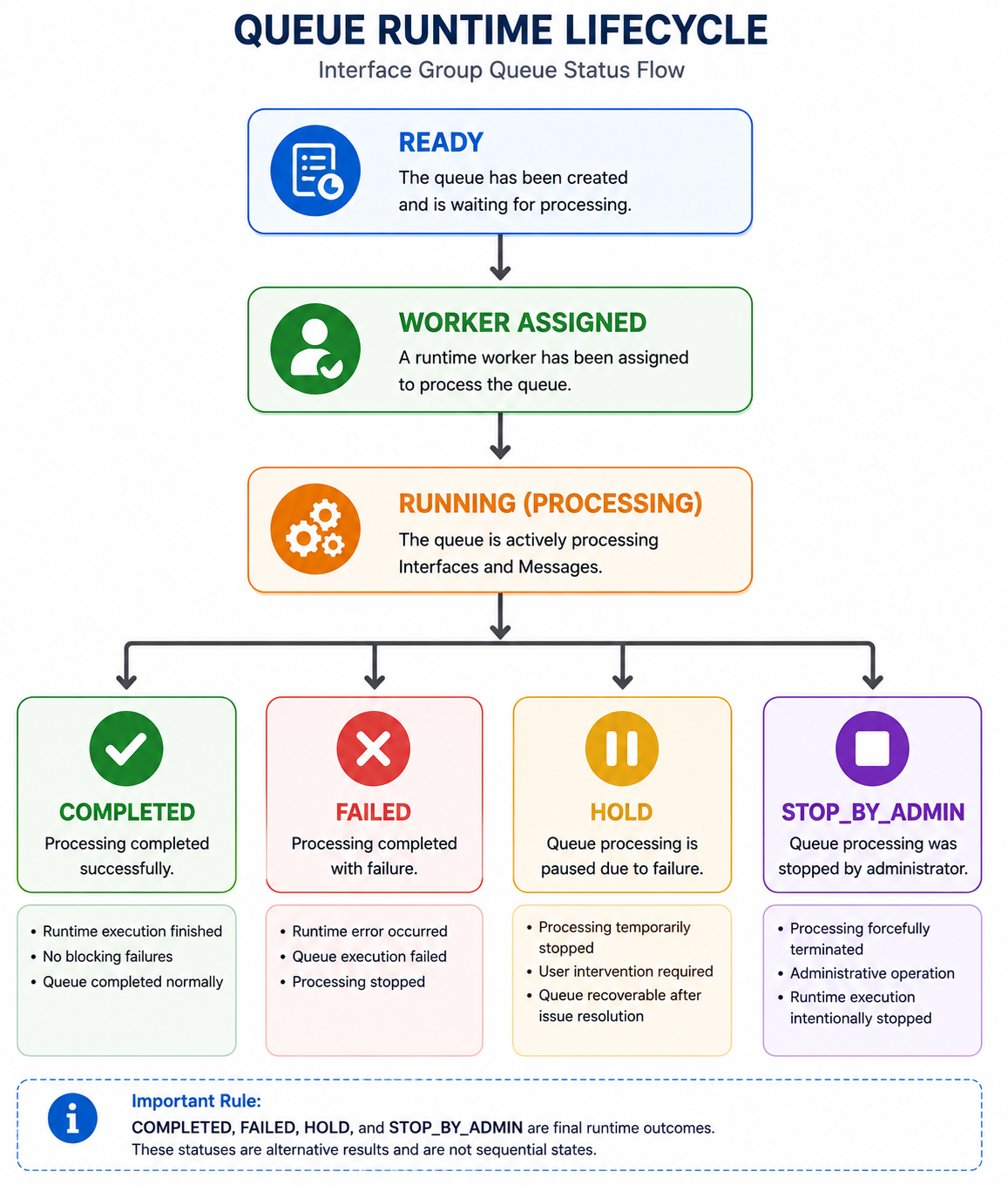
The queue lifecycle defines how queue statuses change during runtime execution.
4.1 Queue Status Flow
4.2 Important Runtime Rule
The following statuses are final runtime outcomes:
- COMPLETED
- FAILED
- HOLD
- STOP_BY_ADMIN
These statuses are alternative runtime results and are not sequential processing states.
Example:
RUNNING
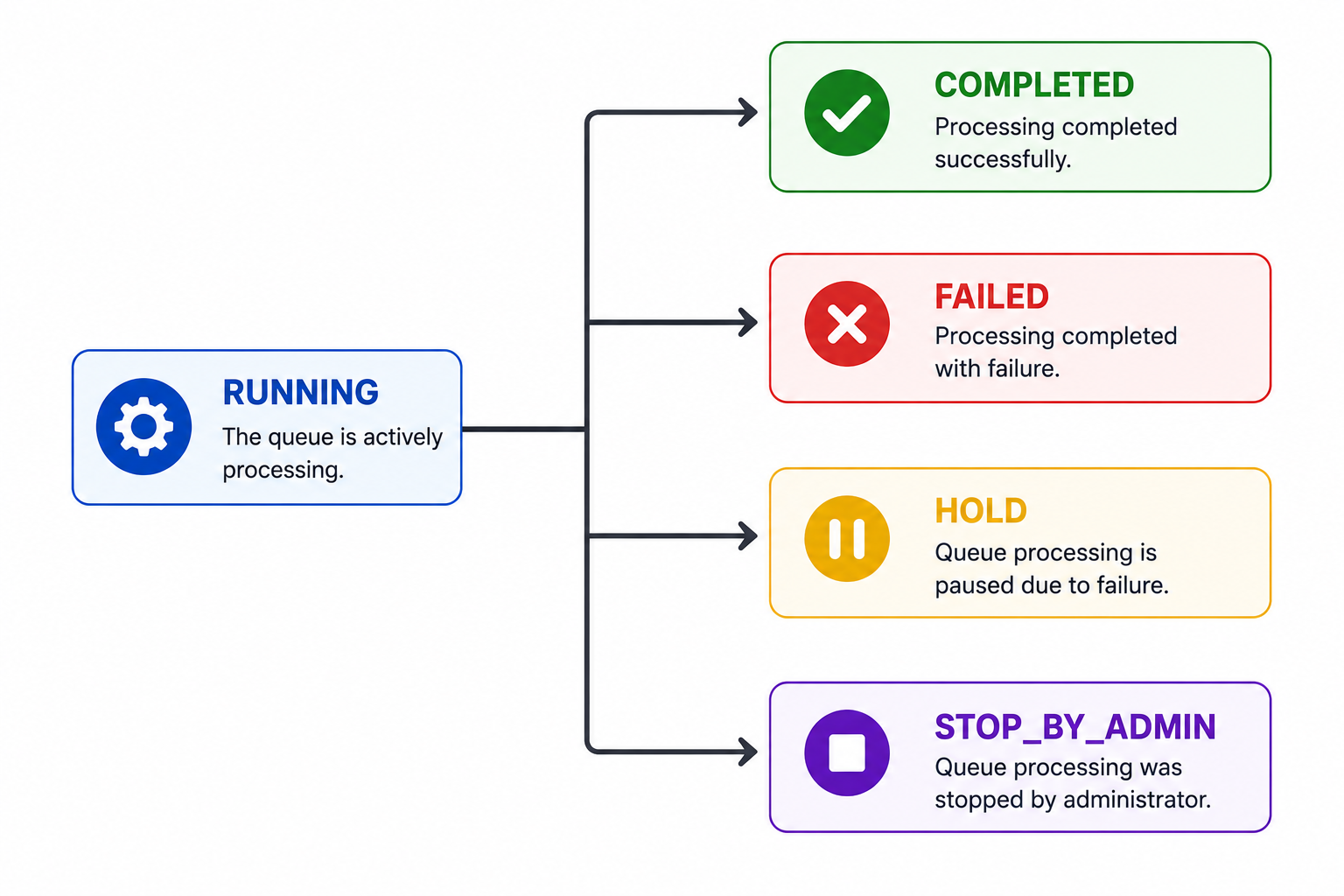
A queue cannot move from COMPLETED to FAILED because both are final runtime states.
5. Queue Status Definitions
5.1 READY
The queue has been created but processing has not yet started.
Runtime Characteristics
- Queue initialized
- Waiting for worker assignment
- Processing not yet active
READY is typically a temporary initialization state.
5.2 WORKER ASSIGNED
A runtime worker has been assigned to the queue.
Runtime Characteristics
- Worker allocated
- Runtime resources prepared
- Queue initialization completed
- Processing about to start
5.3 RUNNING (PROCESSING)
The queue is actively processing Interfaces and Messages.
Runtime Characteristics
- Interface execution active
- Message processing active
- Queue orchestration active
- Runtime monitoring enabled
During RUNNING status:
- Interfaces may succeed or fail
- Messages may continue or stop depending on configuration
- Queue orchestration logic is continuously evaluated
5.4 COMPLETED
The queue finished processing successfully.
Runtime Characteristics
- Runtime execution completed
- No blocking failures occurred
- Queue processing finalized successfully
COMPLETED does not necessarily mean all Messages succeeded. Under EO processing, failed Messages or Interfaces may still exist while overall queue processing completes.
5.5 FAILED
The queue finished with runtime failure.
Runtime Characteristics
- Runtime processing terminated
- Failure condition encountered
- Queue processing unsuccessful
FAILED usually occurs when processing cannot continue due to runtime exceptions or unrecoverable failures.
5.6 HOLD
The queue is paused due to processing failure and requires user intervention.
Runtime Characteristics
- Processing stopped
- Queue recoverable
- Manual recovery required
- Runtime execution paused
Common Causes
- EOIO processing failure
- Interface failure
- Validation exceptions
- External system errors
- Authentication issues
- Connectivity failures
Queues in HOLD status remain recoverable after the underlying issue is resolved.
5.7 STOP_BY_ADMIN
Queue processing was manually stopped by an administrator.
Runtime Characteristics
- Administrative stop operation
- Processing forcefully terminated
- Runtime execution intentionally stopped
This status is typically used for operational control or emergency processing stop scenarios.
6. Execution Mode
Execution Mode controls how Interfaces are processed inside the Interface Group Queue.
6.1 Available Execution Modes
| Execution Mode | Description |
|---|---|
| Sequential Processing (Default) | Interfaces execute one by one according to configured order |
| Parallel Processing | Interfaces execute simultaneously |
7. Sequential Processing
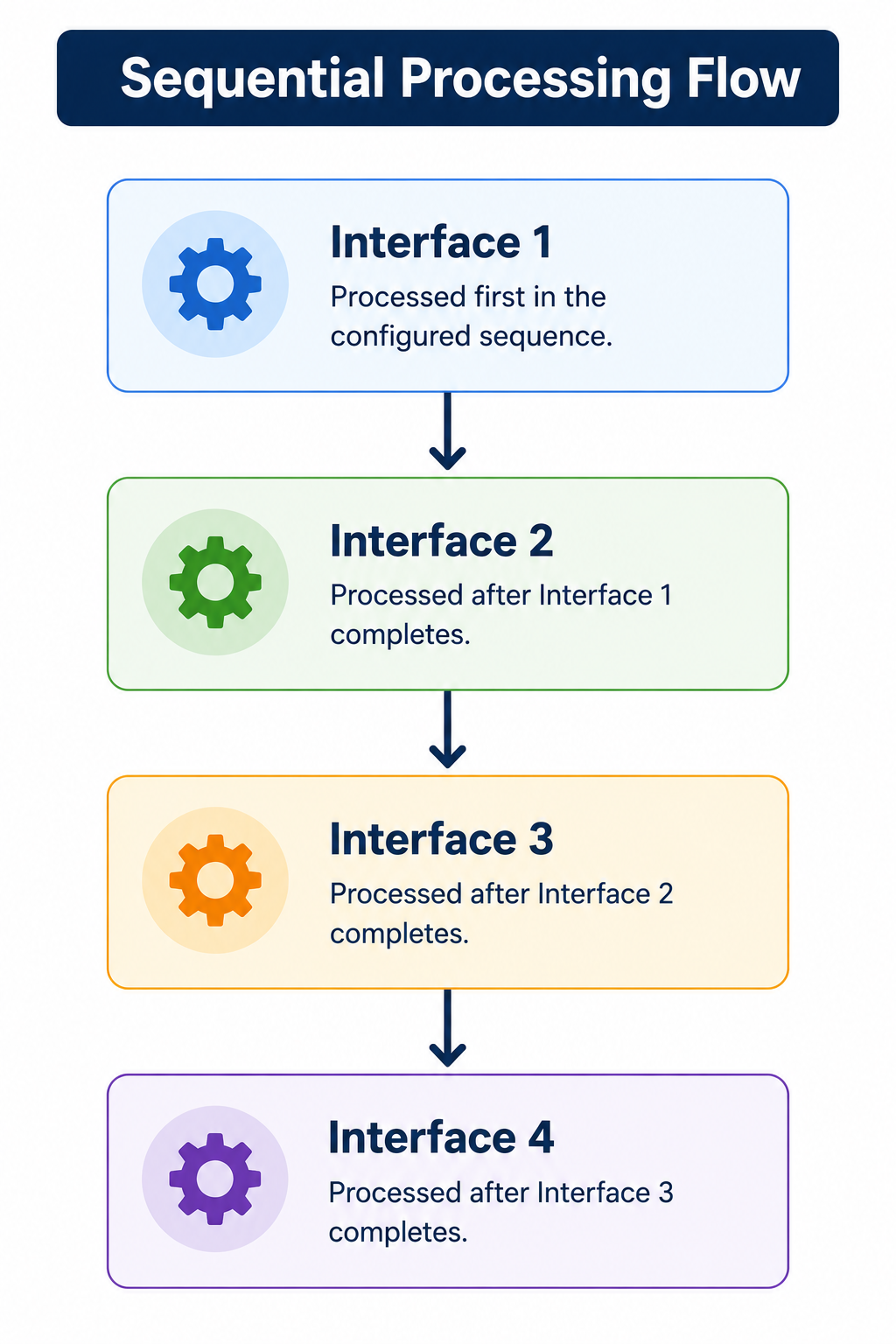
Sequential Processing executes Interfaces one after another according to the configured sequence order.
7.1 Sequential Processing Flow
7.2 Runtime Behavior
During Sequential Processing:
- Only one Interface executes at a time
- Next Interface starts only after previous Interface finishes
- Interface order is strictly maintained
- Runtime dependency control is preserved
7.3 Typical Use Cases
Sequential Processing is recommended when:
- Interfaces depend on previous processing results
- Transaction order must be preserved
- Business process sequencing is required
- Controlled execution flow is necessary
8. Parallel Processing
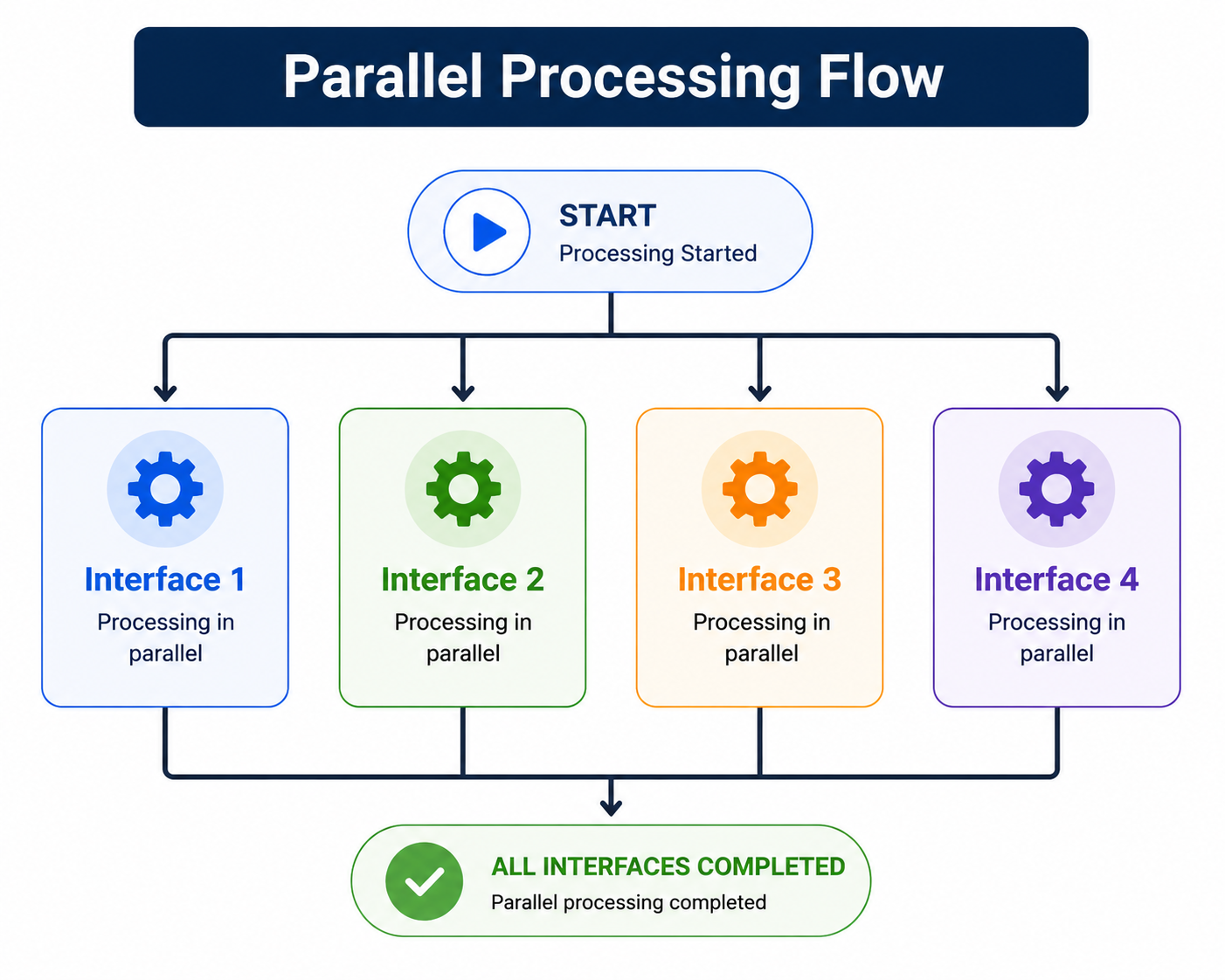
Parallel Processing executes multiple Interfaces simultaneously.
8.1 Parallel Processing Flow
8.2 Runtime Behavior
During Parallel Processing:
- Multiple Interfaces execute concurrently
- Runtime throughput increases
- Independent processing is optimized
- Overall processing time may be reduced
8.3 Typical Use Cases
Parallel Processing is recommended when:
- Interfaces are independent
- No execution dependency exists
- High-volume processing is required
- Runtime performance optimization is necessary
9. Processing Behavior
Processing Behavior controls how the Interface Group Queue reacts when Interface failures occur.
9.1 Available Processing Behaviors
| Processing Behavior | Description |
|---|---|
| Continue Next Interface When an Error occurs (EO) | The queue continues processing the remaining Interfaces |
| Stop Next Interface When an Error occurs (EOIO) | Queue stops remaining Interface processing |
Processing Behavior operates at the Interface Group Queue orchestration level.
10. Interface Execution Mode
Each Interface independently controls its own message-level processing behavior.
10.1 Available Interface Execution Modes
| Interface Execution Mode | Description |
|---|---|
| Continue when an error occurs (Default) | Remaining messages continue processing after failure |
| Stop when an error occurs | Remaining messages stop immediately after failure |
Interface Execution Mode applies only inside the Interface Queue and controls message processing behavior.
11. Direct Interface Execution
When an Interface is executed directly outside an Interface Group:
- One Interface Queue is created
- Interface Execution Mode fully controls message processing behavior
The Interface behaves independently without Interface Group orchestration rules.
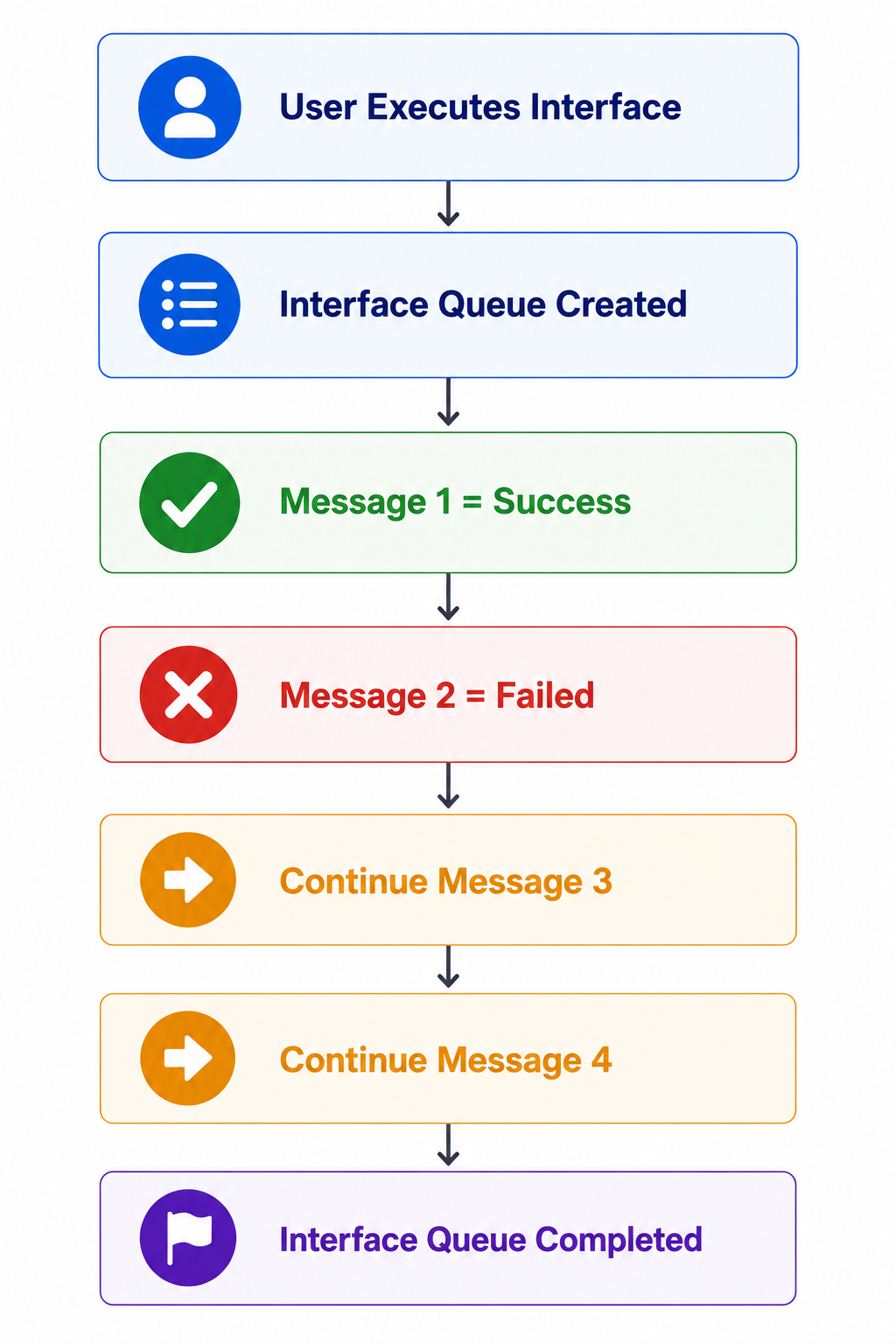
12. Continue when an error occurs
Under this mode, failed Messages do not stop remaining Message processing.
12.1 Runtime Behavior
If a Message fails:
- Remaining Messages continue processing
- Interface processing continues
- Queue processing completes
12.2 Processing Flow
12.3 Processing Result
- Failed Messages are logged
- Remaining Messages continue processing
- Interface Queue completes runtime execution
This mode is useful for high-volume processing where partial failures should not stop processing.
13. Stop when an error occurs
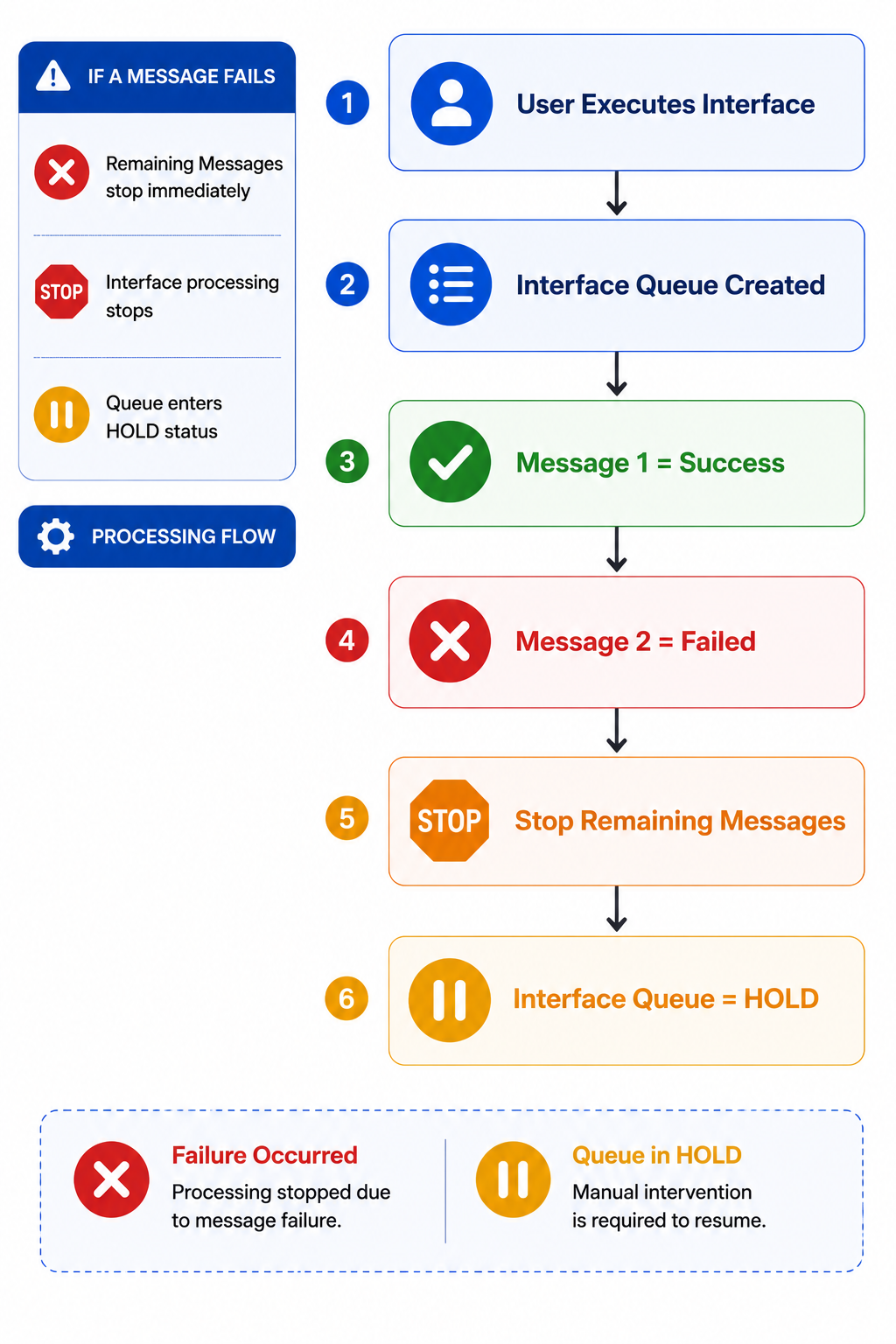
Under this mode, failed Messages immediately stop remaining Message processing.
13.1 Runtime Behavior
If a Message fails:
- Remaining Messages stop immediately
- Interface processing stops
- Queue enters HOLD status
13.2 Processing Flow
13.3 Processing Result
- Processing immediately stops
- Queue becomes recoverable
- User intervention required before restart
This mode is useful for critical transactional processing where failures must stop further execution.
14. EO Processing Behavior
EO means:
Continue Next Interface When an Error occurs.
Under EO processing:
- Interface failures do not stop remaining Interface execution
- Queue orchestration continues processing remaining Interfaces
14.1 Important EO Rule
When Processing Behavior \= EO:
- Interface Execution Mode is internally overridden
- All Interfaces behave as:
Continue when an error occurs
This applies even if the Interface configuration is:
- Stop when an error occurs
EO processing prioritizes continuous queue orchestration.
15. EO + Continue when an error occurs
15.1 Runtime Behavior
During processing:
- Failed Messages do not stop remaining Messages
- Failed Interfaces do not stop remaining Interfaces
- Queue processing continues until all Interfaces finish
15.2 Processing Flow
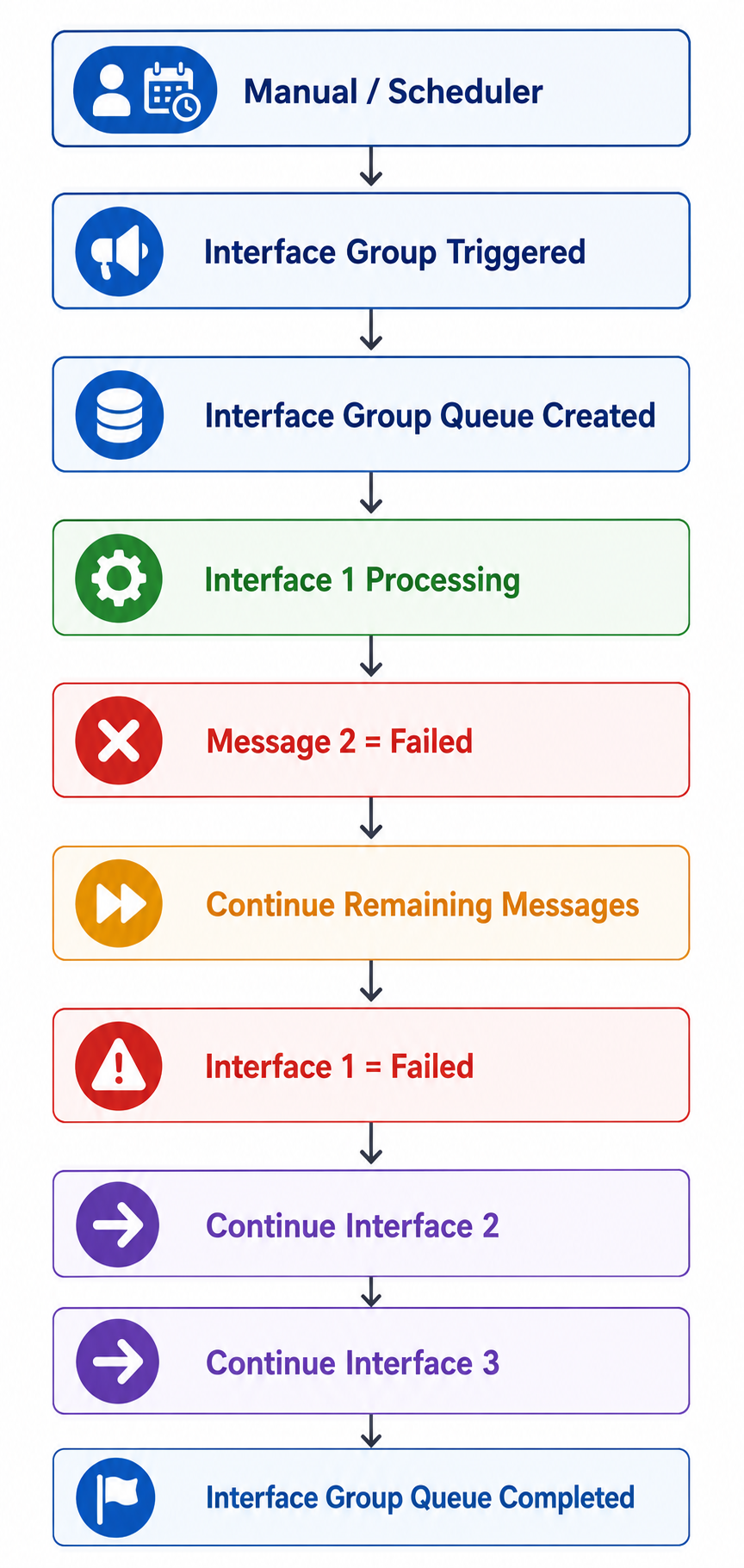
15.3 Processing Result
- Remaining processing continues
- Queue orchestration never stops
- Queue completes successfully
16. EO + Stop when an error occurs
Even if the Interface configuration is:
- Stop when an error occurs
runtime behavior changes to:
- Continue when an error occurs
because EO processing overrides Interface Execution Mode.
16.1 Runtime Behavior
Under EO:
- Remaining Messages continue
- Remaining Interfaces continue
- Queue processing completes
16.2 Processi
Processing Flow
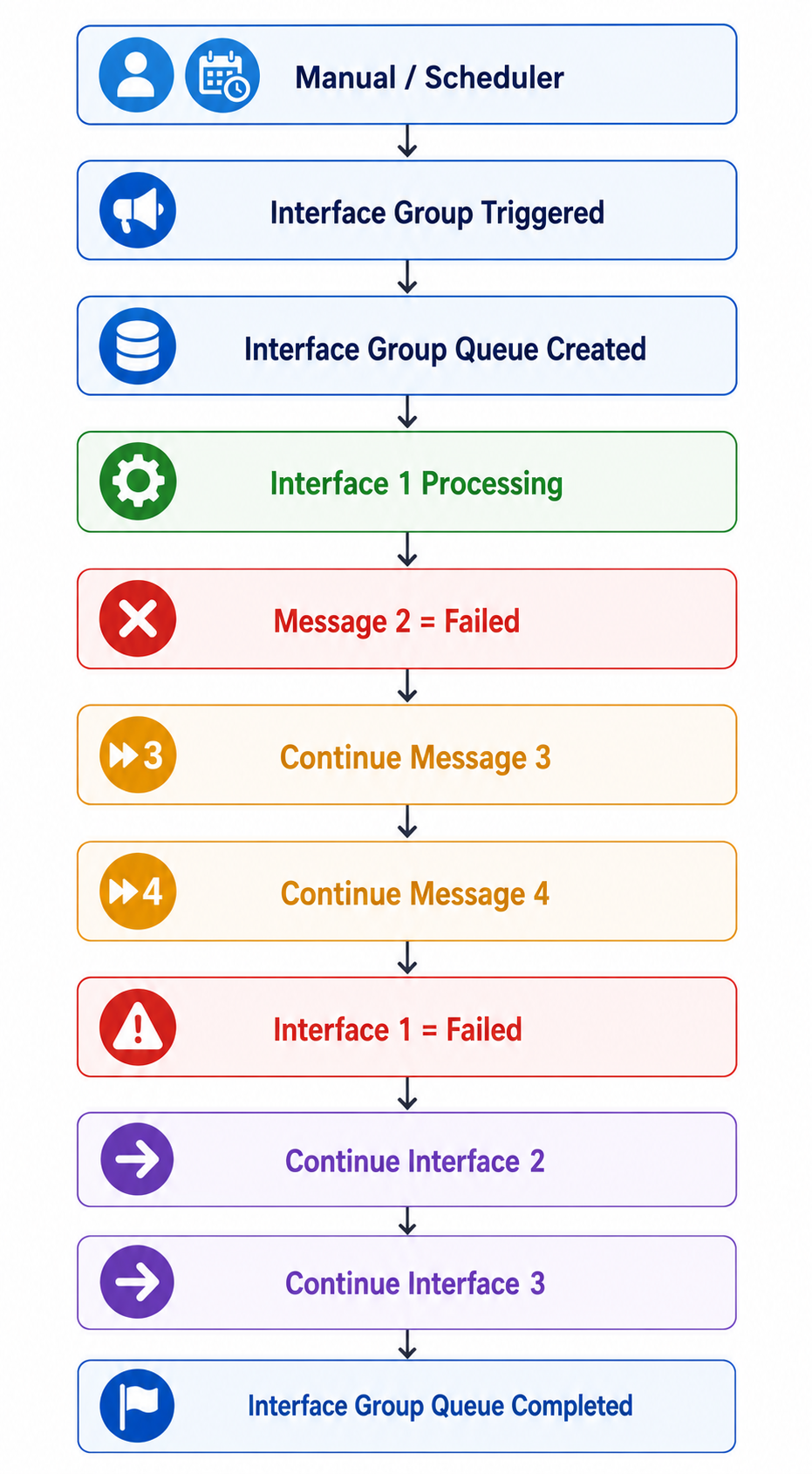
17. EOIO Processing Behavior
EOIO means:
Stop Next Interface When an Error occurs.
Under EOIO processing:
- Queue orchestration respects Interface Execution Mode
- Failed Interfaces stop remaining Interface execution
EOIO processing provides strict runtime control.
18. EOIO + Continue when an error occurs
18.1 Runtime Behavior
If one Message fails:
- Remaining Messages continue processing
- Interface eventually becomes Failed
Once the Interface becomes Failed:
- Queue changes to HOLD
- Remaining Interfaces stop processing
18.2 Processing Flow
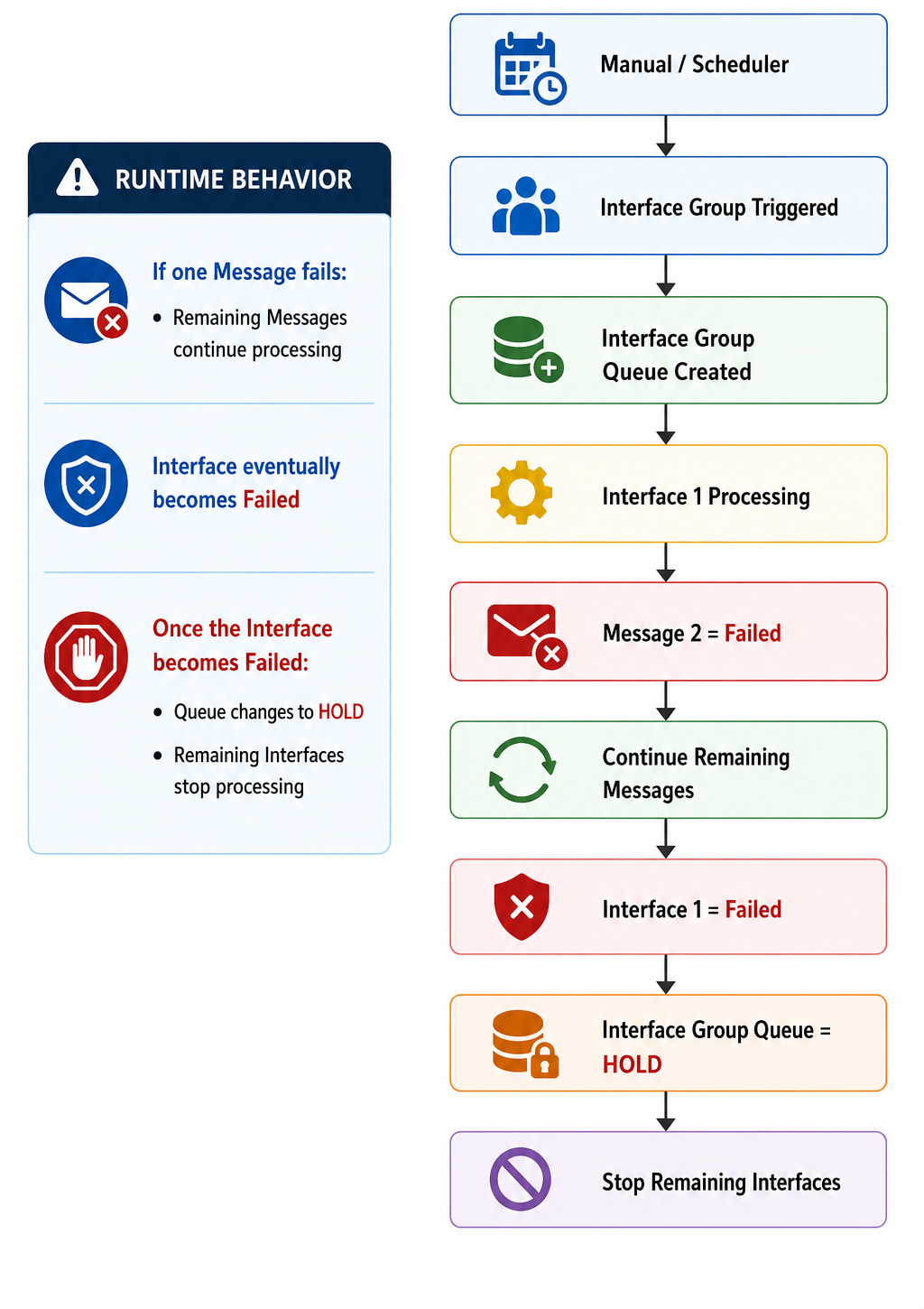
18.3 Processing Result
- Current Interface finishes processing
- Queue orchestration stops afterward
- User recovery required
19. EOIO + Stop when an error occurs
19.1 Runtime Behavior
If one Message fails:
- Remaining Messages stop immediately
- Interface immediately becomes Failed
Once the Interface fails:
- Queue changes to HOLD
- Remaining Interfaces stop processing
19.2 Processing Flow
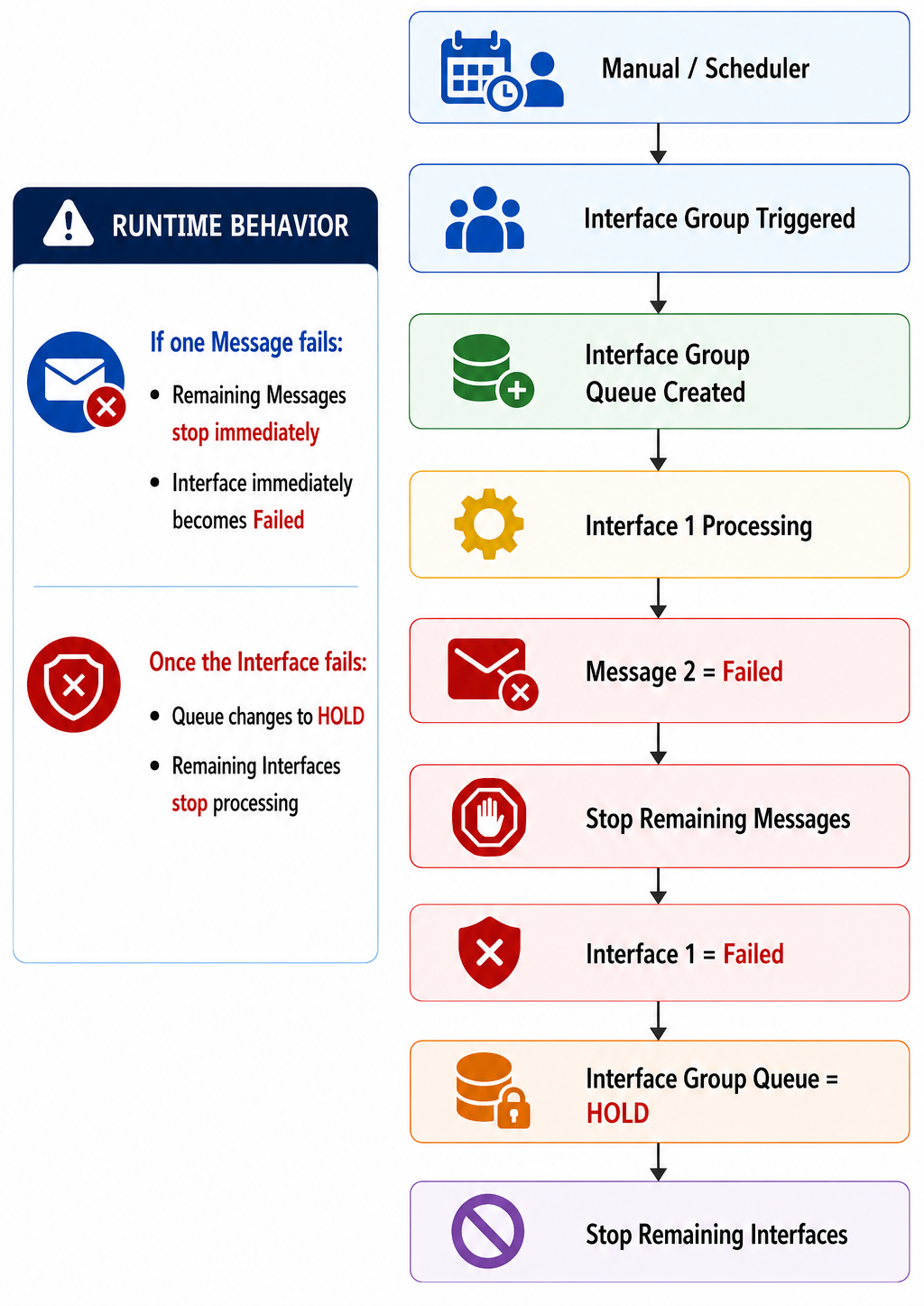
19.3 Processing Result
- Processing stops immediately
- Queue enters HOLD status
- Remaining Interfaces are not executed
This mode provides the strictest runtime control.
20. Restart Processing Strategy
Restart Processing Strategy controls where queue reprocessing resumes after recovery.
20.1 Available Restart Strategies
| Restart Strategy | Description |
|---|---|
| Continue from the beginning (Default) | Queue restarts from first Interface |
| Continue from the failed interface | Queue resumes from failed Interface |
21. Continue from the beginning
Under this strategy:
- Queue reprocessing starts from the first Interface
21.1 Processing Flow
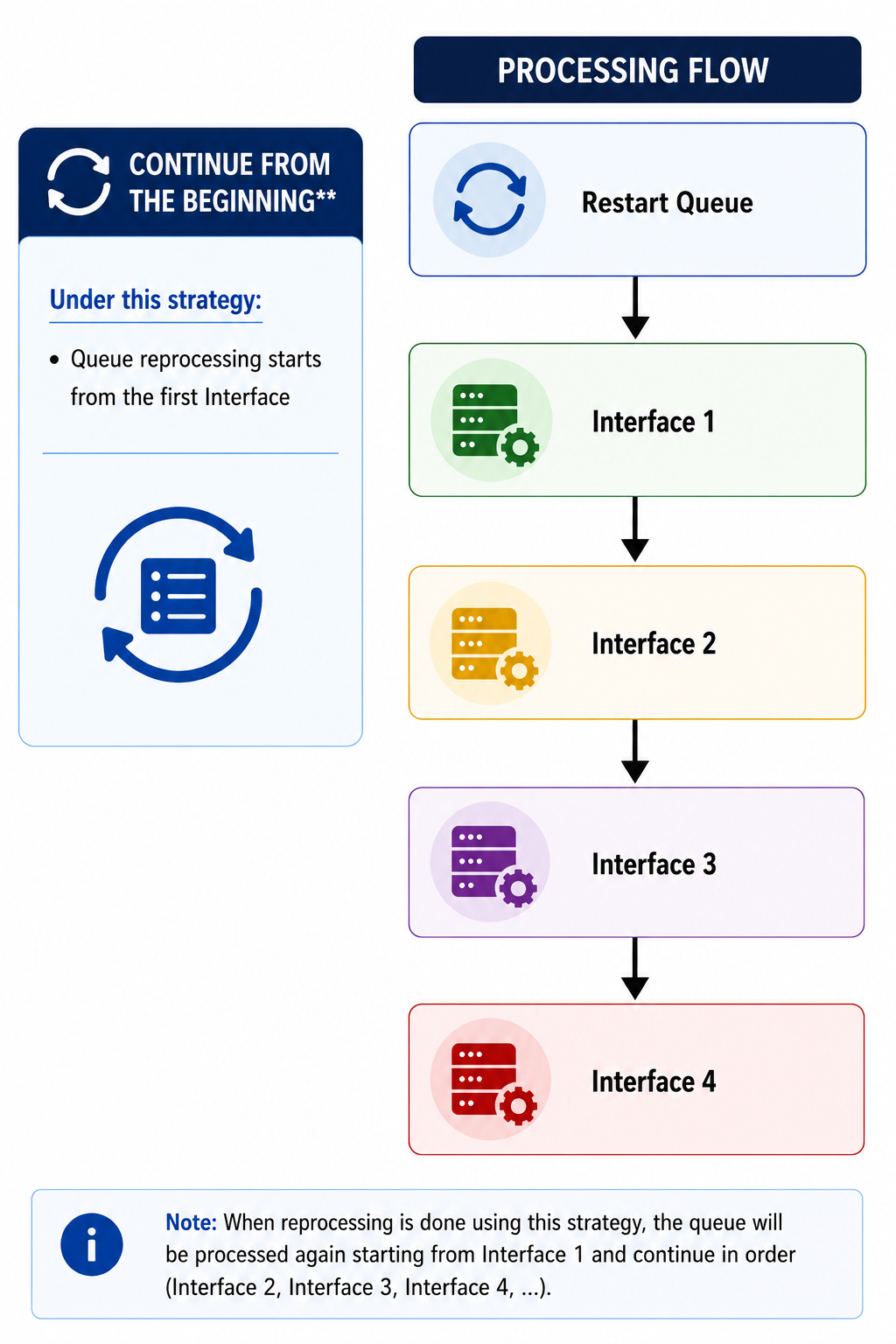
This strategy ensures full processing consistency.
22. Continue from the failed interface
Under this strategy:
- Queue resumes processing from the failed Interface
22.1 Processing Flow
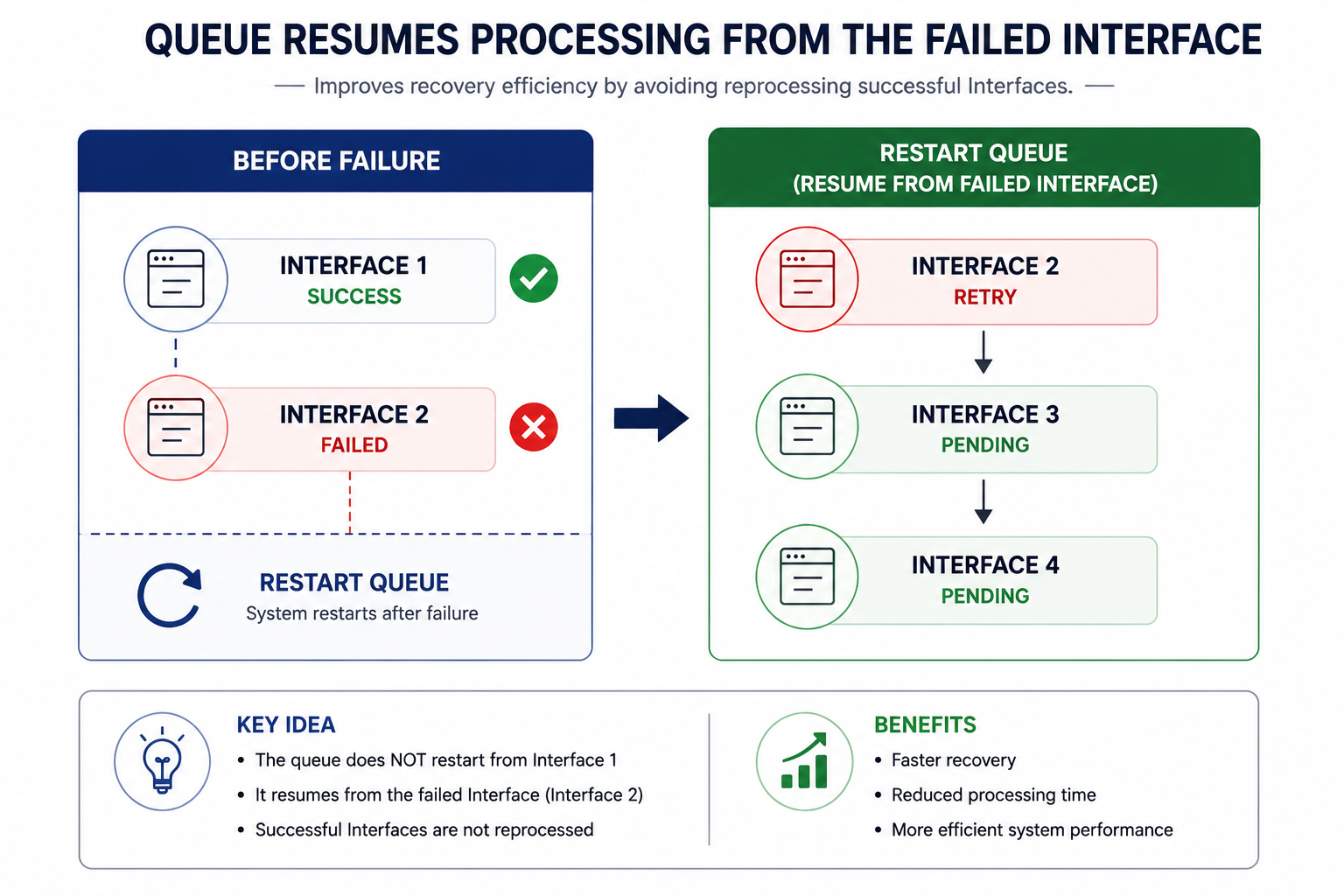
This strategy improves recovery efficiency by avoiding reprocessing successful Interfaces.
23. Queue Recovery
Queues in HOLD status require manual recovery.
23.1 Recovery Steps
- Resolve the failed issue
- Change queue status:
HOLD → READY - Restart queue processing
23.2 Recovery Flow
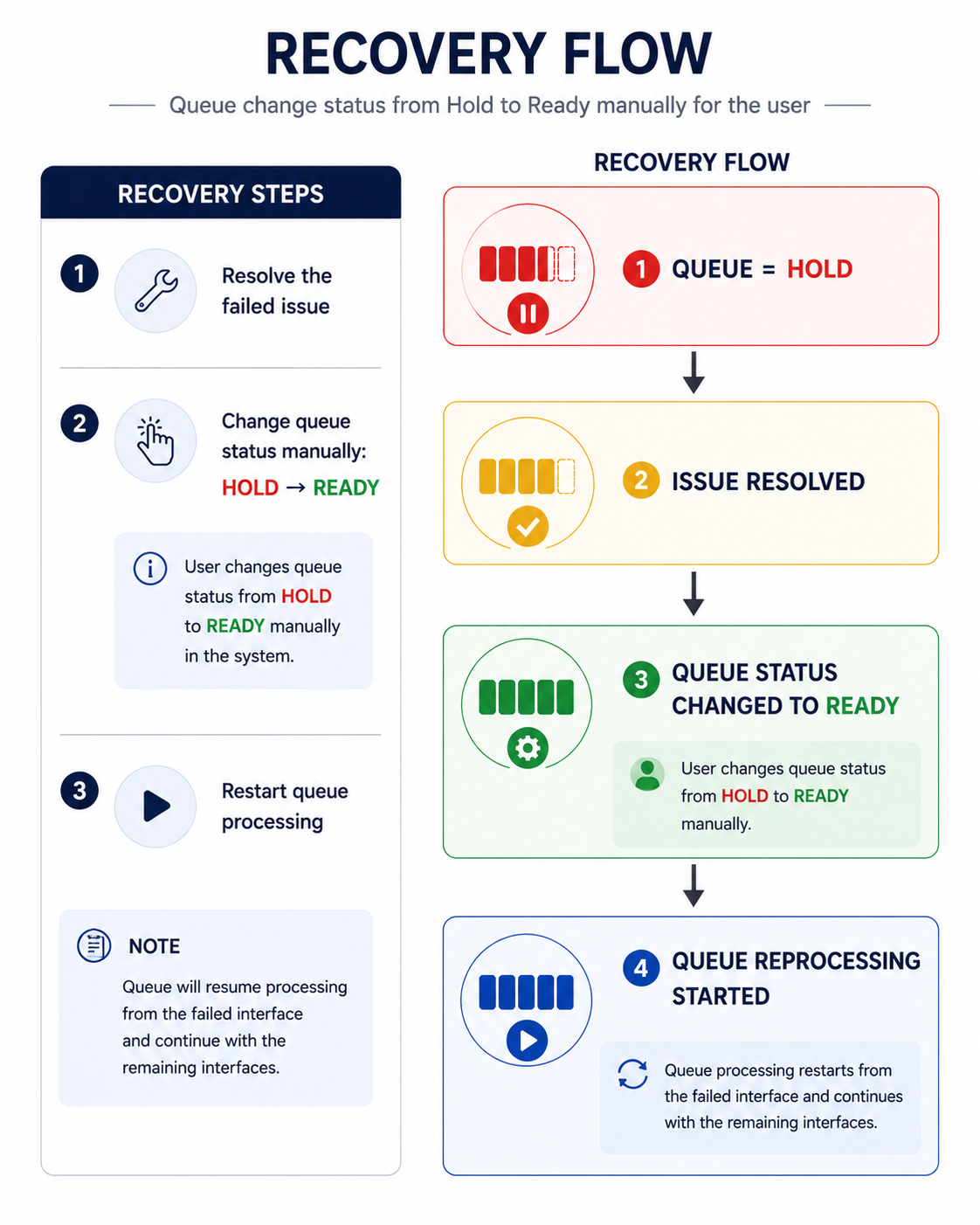
23.3 Typical Recovery Actions
- Correct invalid payload data
- Fix mapping configurations
- Restore authentication credentials
- Resolve connectivity issues
- Fix external system failures
24. Functional Summary
The Interface Group Queue framework provides:
- Enterprise-level runtime orchestration
- Sequential and parallel execution
- Message-level processing control
- Runtime monitoring
- HOLD and recovery management
- Restart processing strategies
- Operational governance and scalability
The framework enables controlled, recoverable, and scalable Interface Group processing across enterprise integration environments.