4. How to use DateTime Mapping?
Introduction
Using a DateTime mapping involves transforming DateTime values from one format to another. Here's a generalized approach to using a DateTime mapping :
- Identify Input Format: Understand the format of the DateTime values you're receiving. In your case, it's in the format YYYY-MM-DDThh:mm:ss.xxx±hh:mm.
- Extract Components: Break down the DateTime string into its components:
Year (YYYY)
- Month (MM)
- Day (DD)
- Hour (hh)
- Minute (mm)
- Second (ss)
- Milliseconds/Microseconds (xxx)
- Timezone Offset (±hh:mm)
- Transform the DateTime:
Decide on the target format or timezone you want the DateTime to be converted to.
- Use programming or scripting languages to transform the DateTime string accordingly. Functions or methods for date manipulation can be employed here.
- Utilize Libraries or Functions:
Leverage language-specific libraries or functions designed to handle DateTime objects or strings.
- Functions for parsing, formatting, and manipulating DateTime values are often available in most programming languages.
Using a DateTime mapping requires transforming incoming DateTime values from one format to another. In your case, the format received from the target system is in the following six forms:
- YYYY-MM-DDThh:mm:ss.xxx+hh:mm (e.g., 2023-03-24T08:57:07.733+02:00)
- YYYY-MM-DDThh:mm:ss.xxx-hh:mm (e.g., 2023-03-24T08:57:07.733-02:00)
- YYYY-MM-DDThh:mm:ss+hh:mm (e.g., 2023-04-04T16:30:07+02:00)
- YYYY-MM-DDThh:mm:ss-hh:mm (e.g., 2023-04-04T16:30:07+02:00)
- YYYY-MM-DDThh:mm:ssZ (e.g., 2023-03-28T14:16:04Z)**
**
- YYYY-MM-DDThh:mm:ss.xxxZ (e.g., 2023-03-29T16:16:04.073Z)
Here's a guideline on how to handle these DateTime formats:
- Understanding the Components:
YYYY: Year (four digits)
- MM: Month (two digits)
- DD: Day (two digits)
- hh: Hour (two digits)
- mm: Minute (two digits)
- ss: Second (two digits)
- xxx: Fractional seconds (milliseconds or microseconds)
- ±hh:mm: Timezone offset (positive or negative hours and minutes)
- Processing the DateTime Values:
Users must parse these incoming DateTime strings to extract the individual components (year, month, day, hour, minute, second, milliseconds/microseconds, timezone offset).
- Transformation and Formatting:
Once the user has extracted these components, you can use programming or scripting languages (like Python, JavaScript, etc.) to transform the DateTime into the desired format.
- For example, users can convert these DateTime strings into a standardized format, such as UTC or a specific timezone, or reformat them as required by your system.
- Consider Using Libraries or Functions:
Utilize programming language libraries or built-in functions designed to handle DateTime objects or strings. These often provide methods to efficiently parse, manipulate, and format DateTime values.
Use Case 1: Support format: YYYY-MM-DDThh:mm:ss.xxx+hh:mm (Ex: 2023-03-24T08:57:07.733+02:00)
Expectation:
SKYVVA application stores DateTime values in a standard manner (UTC), disregarding the timezone component. To match the original DateTime from your system (which includes the timezone offset like +02:00), adjustments are required to align it with the SKYVVA application handling of DateTime.
- To convert the received DateTime with a specified timezone offset to SKYVVA application default UTC format:
- Given an example DateTime: 2023-03-27T01:55:07.733+02:00
- To convert it to UTC (remove the timezone offset of +02:00):
- Subtract the timezone offset from the original DateTime.
- The result will be a DateTime in UTC (+00:00).
Following your example:
- Original DateTime: 2023-03-27T01:55:07.733+02:00
- Subtracting the +02:00 timezone offset: 2023-03-27T01:55:07.733 - 2 hours = 2023-03-27T11:55:07.733+00:00 (UTC)
This adjusted DateTime (2023-03-27T11:55:07.733+00:00) aligns with the SKYVVA application storage convention (UTC without a specified timezone).
Pre-requisite:
- Click set up to Create field Account (CreateDate) in Salesforce sObject.

- Click Object Manager
- Select an Account
- Select Fields & Relationships
- Click New button

- Select Fields & Relationships
- Click the New button
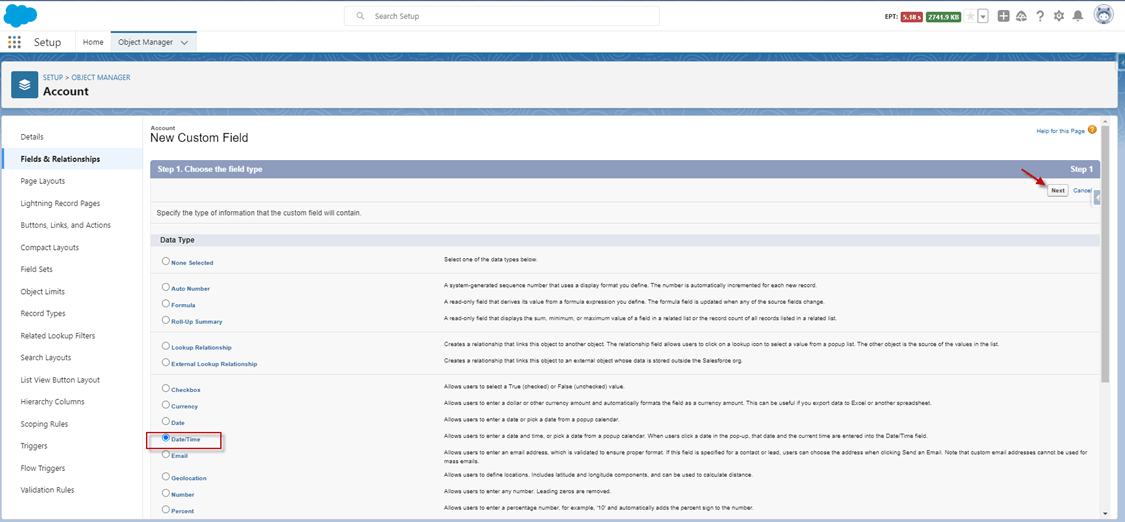
- Choose the field type as Date/Time and click the button.
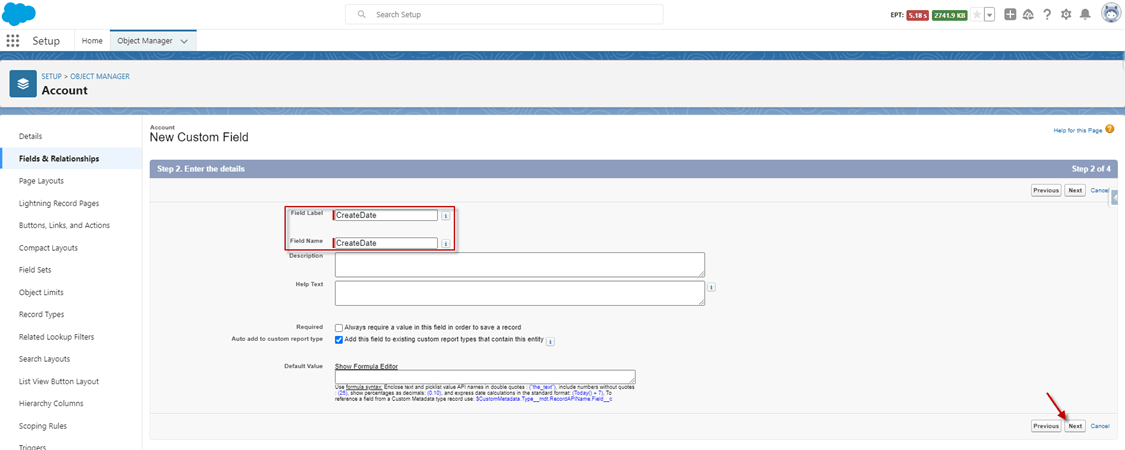
- Enter the Field Name and click the next button.
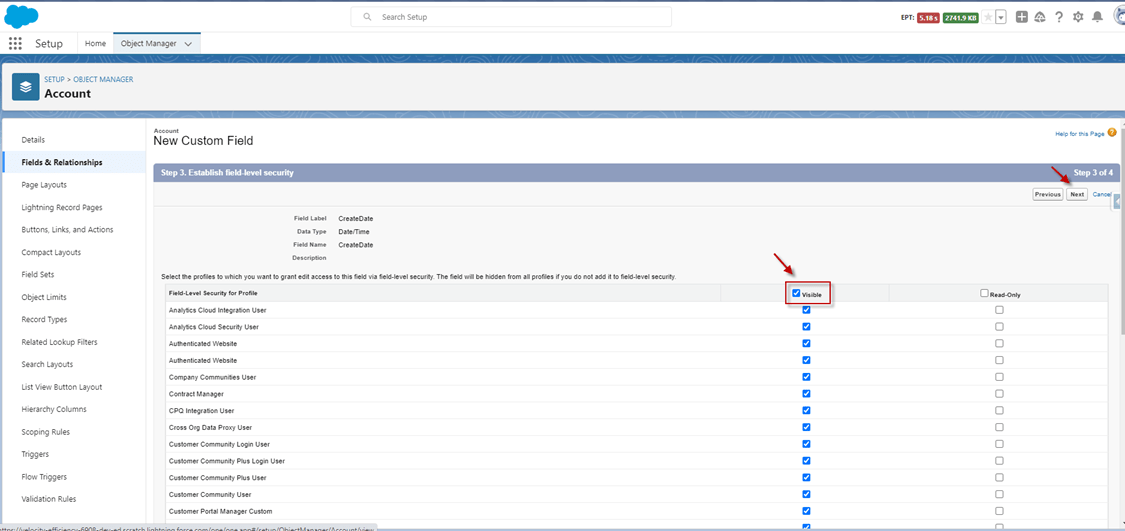
- Tick on Visible and click the next button.
- Click the Save button.

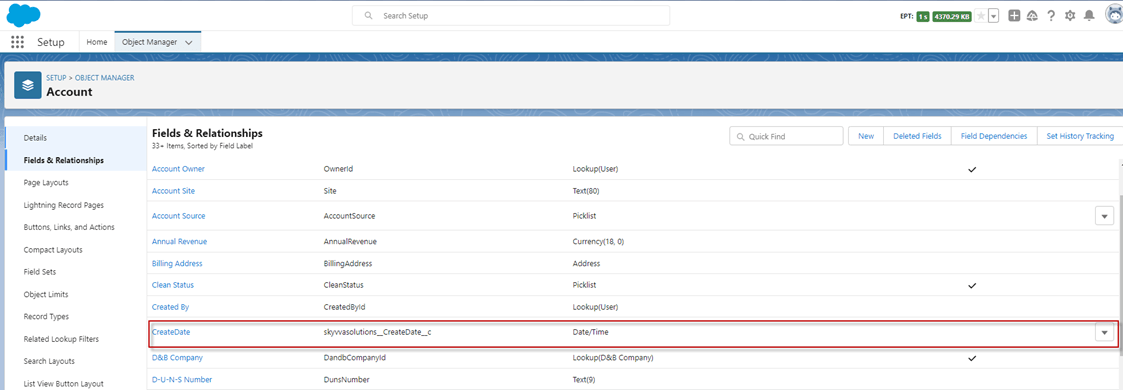
- Here’s the field, after creation.
- Create the Integration.
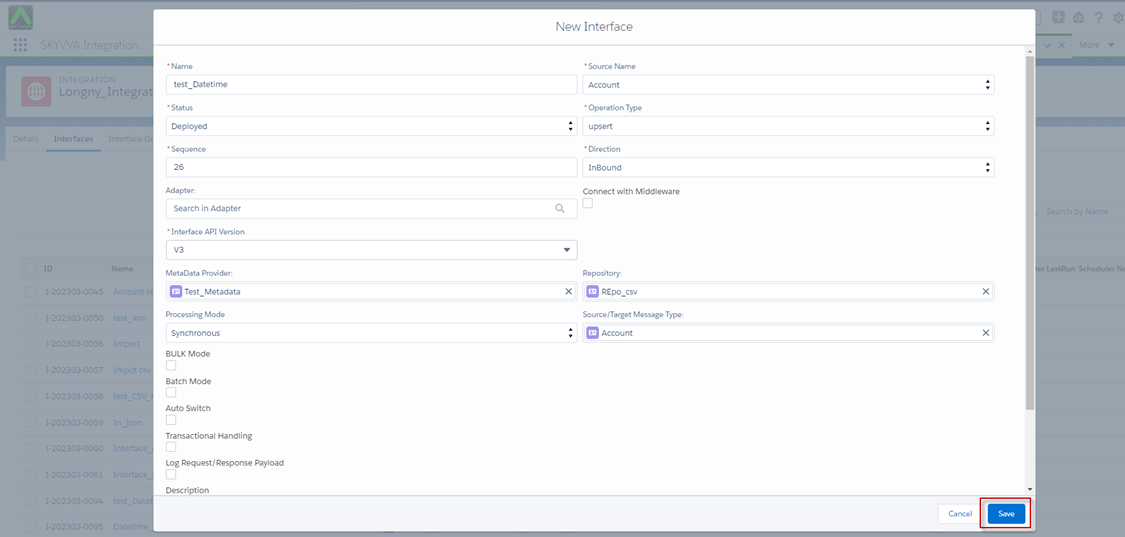
- Create an Inbound interface link with message type.
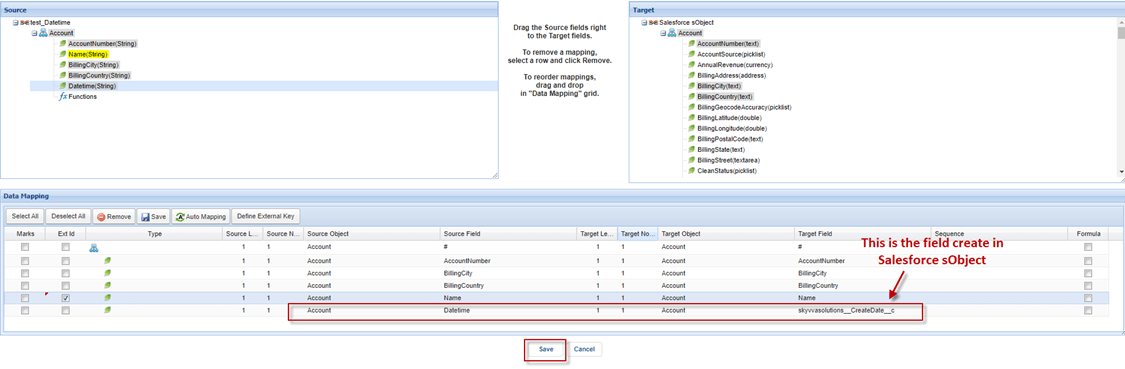
- Do Mapping, we need to map the 'Datetime' field to the field that was created in the object.
- Push data using data loader go to Integration click details page and click on Data Loader.
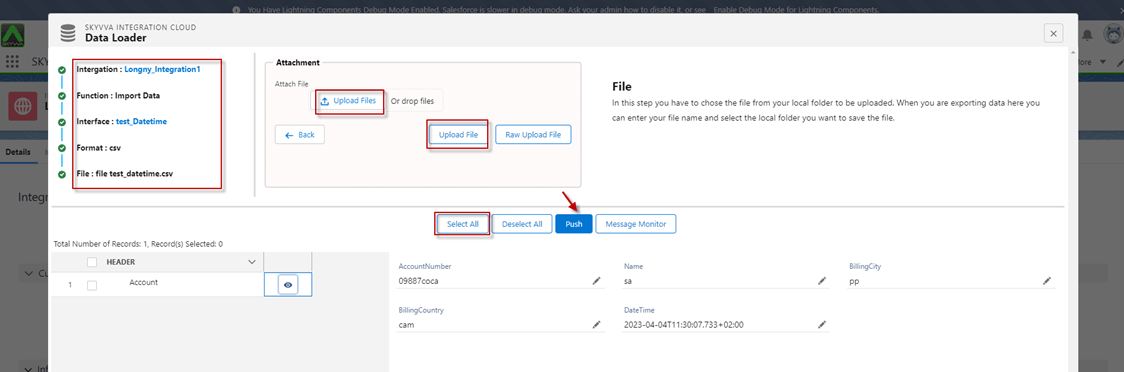
- Here’s the message monitor.

- Here’s the record.
Format: YYYY-MM-DDThh:mm:ss.xxx+hh:mm, Ex:(2023-04-04T11:30:07.733+02:00)

- Here’s the Result.
[su_box title="Note" box_color="#2a8af0" title_color="#000000"]The current user login now GMT +7 time zone
- Here is the datetime not yet covert to time zone (0) 2023-04-04T11:30:07.733+02:00.
- Here is the time zone after covert to time zone (0) 2023-04-04T09:30:07.733+00:00
- Current display login user time zone GMT + 7 => 4/4/2023, 4:30 PM
[/su_box]

Use Case 2: Support format: YYYY-MM-DDThh:mm:ss.xxx-hh:mm (ex: 2023-03-24T08:57:07.733-02:00)
Expectation:
SKYVVA application stores datetime without time zone information (as UTC). To reconcile this difference and make it consistent with the zero time zone, you're subtracting 2 hours from the original time.
- For instance, if the exported datetime is 2023-04-27T01:30:07.733+02:00, you'd subtract 2 hours to convert it to a zero time zone (UTC), resulting in 2023-04-26T23:30:07.733+00:00.
- When displaying this datetime in the SKYVVA application for a specific user's timezone, the user will need to factor in the user's time zone offset to ensure accurate representation.
- SKYVVA application typically handles this by adjusting the UTC datetime to the user's configured time zone for display purposes.
Pre-requisite:
- Do Mapping.

- Go to Integration click Details Page and click on Data Loader.
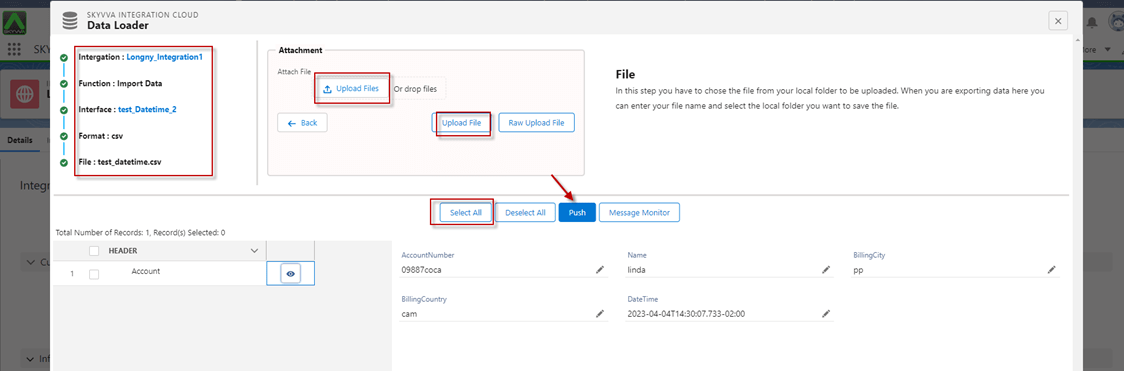
- Here’s the Message Monitor.

- Here’s the record.
Format: YYYY-MM-DDThh:mm:ss.xxx-hh:mm, (Ex: 2023-04-04T14:30:07.733-02:00)
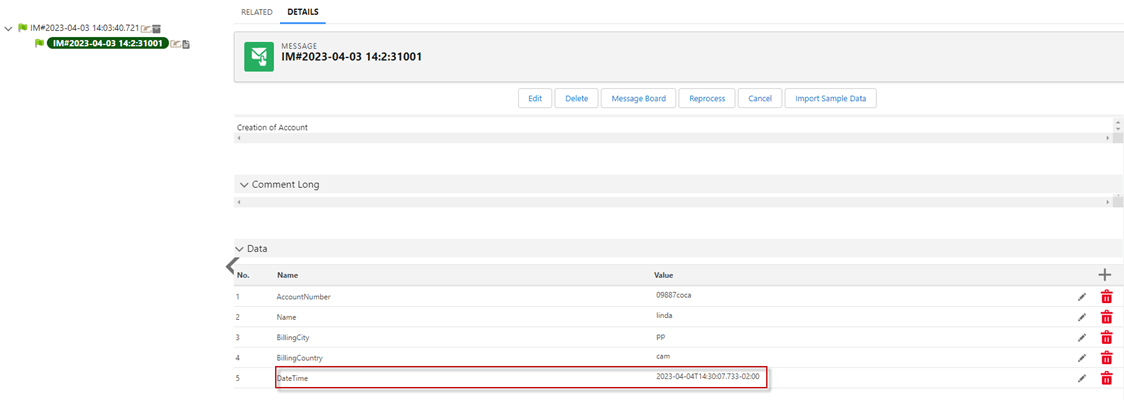
- Here’s the Result.
[su_box title="Note" box_color="#2a8af0" title_color="#000000"]The current user login now GMT +7 time zone
- Here is the datetime not yet covert to time zone (0) 2023-04-04T14:30:07.733-02:00
- Here is the time zone after covert to time zone (0) 2023-04-04T04:30:07.733-00:00
- Current display login user time zone GMT + 7 => 4/4/2023, 11:30 PM
[/su_box]
Use Case 3: Support format: YYYY-MM-DDThh:mm:ss+hh:mm, (Ex: 2023-04-04T16:30:07+02:00)
Expectation:
SKYVVA application stores these datetime values without any time zone information (assumed to be in UTC). To align these exported date times with a zero time zone (UTC), you're subtracting 2 hours from the original datetime.
- For instance, if the user has a datetime value such as 2023-03-27T01:55:07+02:00, subtracting 2 hours from the given time in +02:00 would result in 2023-03-26T23:55:07+00:00, reflecting the same moment in time but in UTC (zero time zone).
- When the SKYVVA application displays these date times to a user, it typically considers the user's specified time zone to adjust the UTC datetime to the user's local time for presentation purposes. SKYVVA application has features that allow for dynamic conversions to ensure accurate representation based on the user's settings or context within the platform.
This process helps ensure that when the datetime is displayed to a user in the SKYVVA application, it reflects their local time zone rather than UTC, providing a more meaningful representation of the time.
Pre-requisite:
- Push data using data loader go to Integration click details page and click on Data Loader.

- Here’s the Message Monitor.

- Here’s the record.
Format: YYYY-MM-DDThh:mm:ss+hh:mm, (Ex: 2023-04-04T16:30:07+02:00)

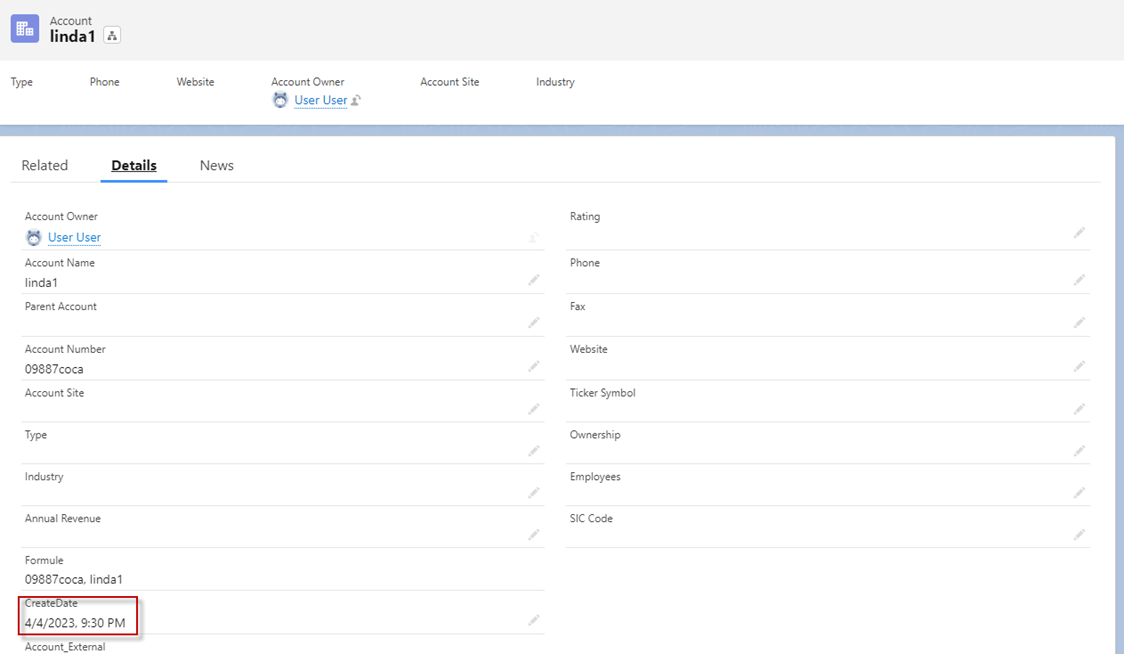
- Here’s the Result.
[su_box title="Note" box_color="#2a8af0" title_color="#000000"]The current user login now GMT +7 time zone
- Here is the datetime not yet covert to time zone (0) 2023-04-04T16:30:07+02:00
- Here is the time zone after covert to time zone (0) 2023-04-04T02:30:07-00:00
- Current display login user timezone GMT + 7 => 4/4/2023, 09:30 PM
[/su_box]
Use Case 4: Support format: YYYY-MM-DDThh:mm:ss-hh:mm, (Ex: 2023-04-04T15:30:07-02:00)
Expectation:
SKYVVA application stores these date times without any timezone information (considered as UTC). To reconcile these differences and ensure the date time aligns with a zero time zone (UTC), you're subtracting 2 hours from the original datetime.
- The user has a datetime value like 2023-03-27T01:55:07+02:00, subtracting 2 hours from the time in the +02:00 time zone would result in 2023-03-26T23:55:07+00:00. This conversion reflects the same moment in time but adjusted to UTC (zero time zone).
- When the SKYVVA application displays these date times to a user, it considers the user's specified time zone settings to adjust the UTC datetime accordingly. SKYVVA application is equipped with functionalities to dynamically convert UTC times to the user's local time zone for accurate presentation and to ensure that the displayed datetime reflects the user's local time rather than just UTC.
- Push data using data loader go to Integration click details page and click on Data Loader.
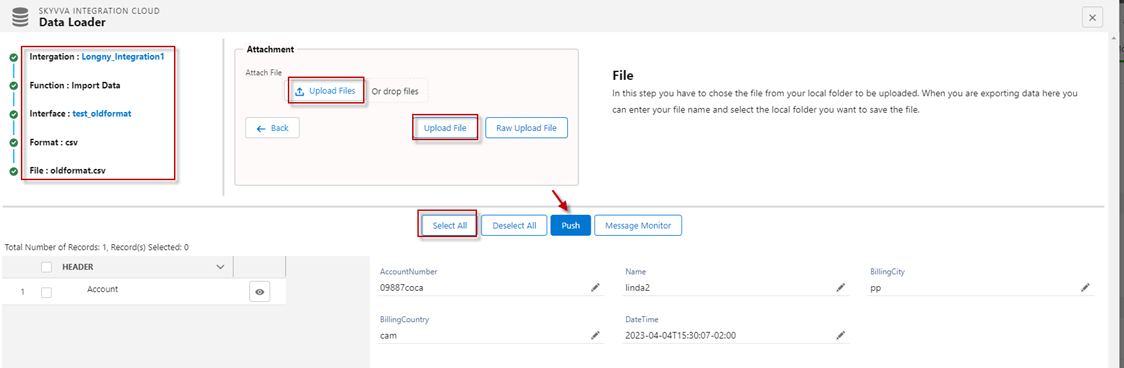
- Here’s the Message Monitor

- Here’s the record.
Format: YYYY-MM-DDThh:mm:ss-hh:mm, (Ex: 2023-04-04T15:30:07-02:00)

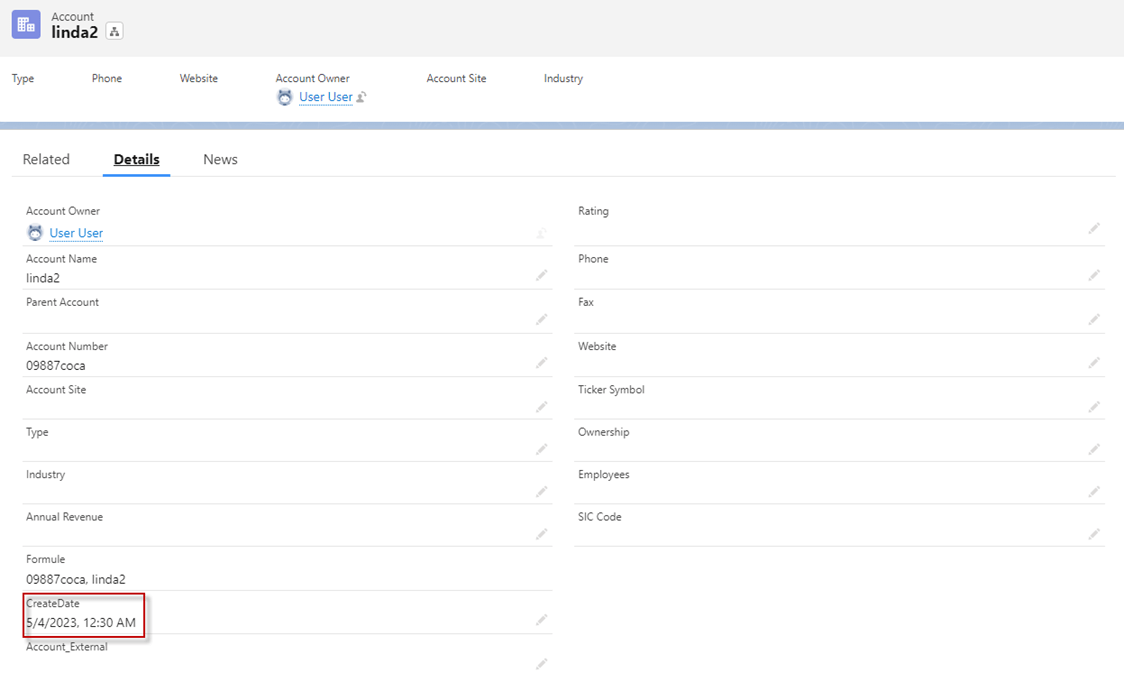
- Here’s the Result.
[su_box title="Note" box_color="#2a8af0" title_color="#000000"]The current user login now GMT +7 time zone
- Here is the datetime not yet covert to time zone (0) 2023-04-04T15:30:07-02:00
- Here is the time zone after covert to time zone (0) 2023-04-04T05:30:07-00:00
- Current display login user timezone GMT + 7 => 5/4/2023, 12:30 PM
[/su_box]
Use Case 5: Support format: YYYY-MM-DDThh:mm:ssZ, (Ex: 2023-03-28T14:16:04Z)
Expectation:
- When importing datetime data into a system like SKYVVA, especially when dealing with users across various time zones, the application would be designed to handle these conversions.
- It would interpret the incoming datetime values and adjust them according to the relevant user's time zone to ensure accurate representation within the application.
- This process ensures that when users interact with datetime data within SKYVVA, they see it displayed in their preferred or configured time zone, providing a more intuitive and contextually relevant experience.
- Push data using data loader go to Integration click details page and click on Data Loader.
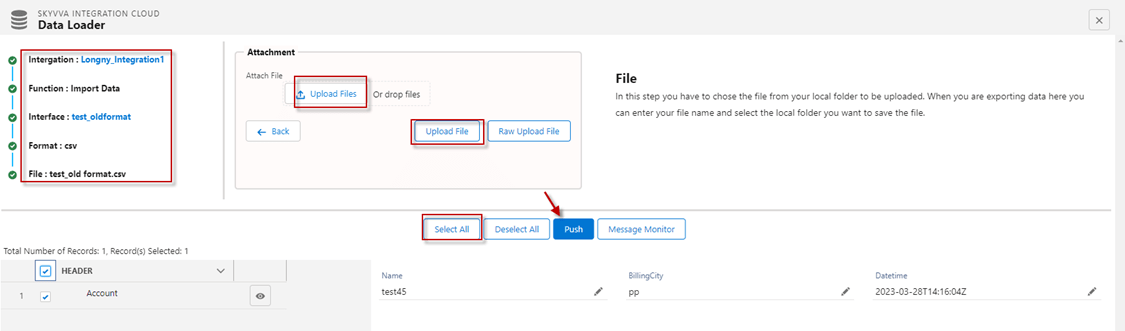
- Here’s the message monitor.

- Here’s the record.
Format: YYYY-MM-DDThh:mm:ssZ, (Ex: 2023-03-28T14:16:04Z)
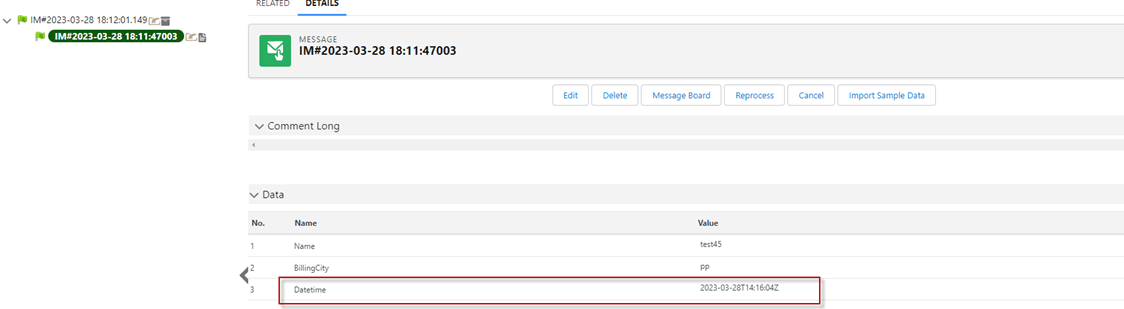
[su_box title="Result:" box_color="#2a8af0" title_color="#000000"]It will convert DateTime based on the user's time zone.[/su_box]

Use Case 6: Support format: YYYY-MM-DDThh:mm:ss.xxxZ, (Ex: 2023-03-29T16:16:04.073Z)
Expectation:
When importing data into the SKYVVA application, the platform handles datetime conversion based on various factors, including the user's specified time zone. SKYVVA application is designed to manage datetime fields in a way that accounts for different time zones, ensuring that users see the timestamps adjusted to their local time settings.
Here's how it typically works:
- Storing Datetime: The SKYVVA application stores datetime values in Coordinated Universal Time (UTC) by default. This means that when you import data if it includes datetime fields, they are stored in UTC.
- User Time Zone Settings: The SKYVVA application allows each user to set their preferred time zone in their user profile settings. When a user interacts with datetime fields, the SKYVVA application dynamically converts the stored UTC datetime values to the user's specified time zone for display purposes.
- Displaying Datetime: Any datetime values displayed in the SKYVVA application, whether in records, reports, or interfaces, are adjusted to the user's time zone setting. This way, users see datetime values in their local time zone, providing a more personalized and meaningful experience.
- Imported Data Considerations: When importing data into the SKYVVA application, especially if it includes datetime fields, the system retains the UTC format for storage. However, when users view or interact with this data, the SKYVVA application converts it to the appropriate time zone based on the user's settings.
- Push data using data loader go to Integration click details page and click on Data Loader.

- Here’s the Message Monitor.

- Here’s the record.
Format: YYYY-MM-DDThh:mm:ss.xxxZ, (Ex: 2023-03-29T16:16:04.073Z)

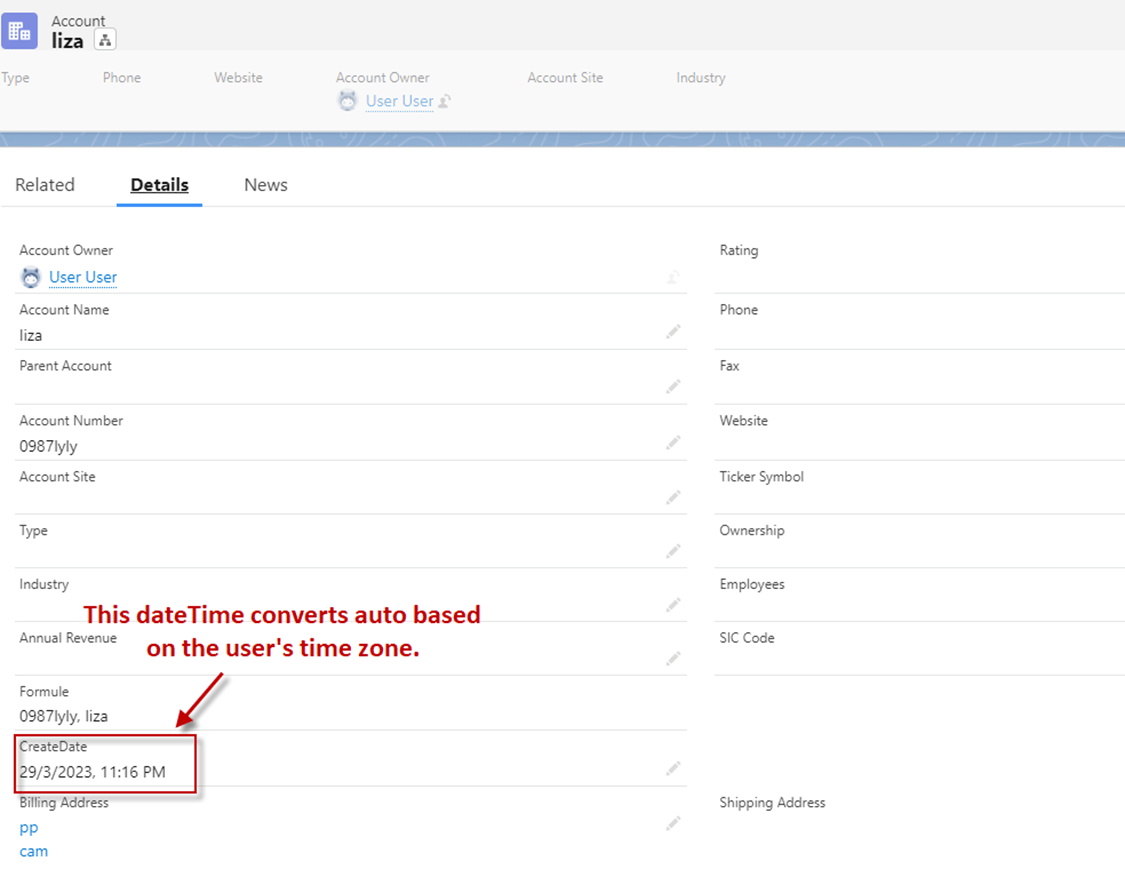
[su_box title="Result:" box_color="#2a8af0" title_color="#000000"]It will convert DateTime based on the user's time zone.[/su_box]
Summary
Now users understand the SKYVVA application and utilize the DateTime Mapping to dynamically transform datetime values during data imports or integrations. Configure this feature by defining DateTime Mapping that adjusts timestamps based on specific conditions or calculations, enabling seamless conversion of datetime data to match target formats, time zones, or custom requirements within SKYVVA's mapping interface.