5.3 Using SKYVVA CDC
Learning Objectives
CDC can be used with SAP SFDC2SAPPI Adapter. But we need this functionality also for the Agent. What we can do with the agent is using streaming API to capture changes record by record e.g. real-time data changes. This is based on a single record only e.g. if the user changes an account X this account will be transferred to the client. With CDC we support not real-time and not single record scenarios. What we support is an asynchronous scenario with collecting many records and sent as a single message to the external system. This feature is good for big size data and for a scenario where mass changes are to be managed.
Introduction
SAP SFDC2SAPPI Adapter
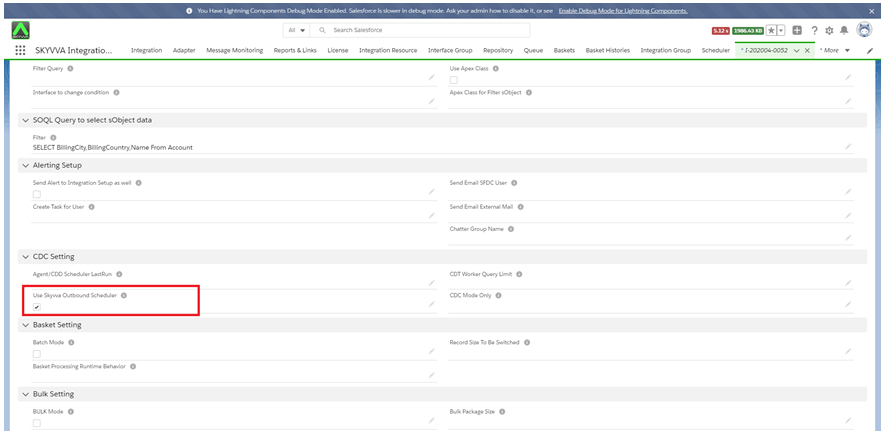
- Use SKYVVA Outbound Scheduler: This flag use for CDC Processing. When you check this flag, it’s mean that you activate the CDC. It activates both CDD and CDT.
- CDC Mode Only: This field is used for separating the process of CDD and CDT follow flag Use SKYVVA Outbound Scheduler. Select CDD to run only CDD for interface or select CDT to run only CDT. Select None to run both CDD and CDT at the same time.
- Interface Control Runtimes: Interface Control Runtime could be used for another purpose. for CDD, it is used where the user can set LastRun DateTime that CDD finds the record change which is record’s LastModifiedDate>that date.
Now we can send data from Salesforce to Agent using CDC with Agent listener http/https.
How to use SKYVVA CDC with Agent?
Configuration Agent Service SSL A Simple Step-By-Step Guide To Apache Tomcat SSL Configuration. Secure Socket Layer (SSL) is a protocol that provides security for communications between client and server by implementing encrypted data and certificate-based authentication.

An outbound interface can be processed with the different adapters to configure CDC. For example, we use SFDC2SAPPI adapter, Rest Adapter, Soap adapter. Follow the given step to process the outbound interface using the adapter. We are using SFDC2SAPPI adapter as an example, you can follow the given steps: Follow the given step to process outbound interface using adapter: Step1: Create Adapter We are using SFDC2SAPPI adapter. To create SFDC2SAPPI adapter follow the given steps: Click on Agent Control Board (old) Tab - How to use the Agent Control Board (old) ?
Since the user now completely understand; How to use the Agent Control Board, by hitting the upper link, now we understand the Architect of the Agent Control Board now follows below on Salesforce org. Now go to Salesforce Click on Adapter Tab
- Create Adapter Type JDBC
- Click on Ping Connection
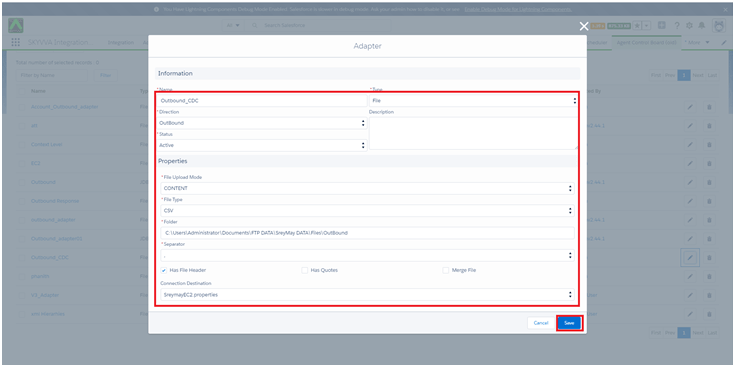
Step2:
- Create Integration
- Create Interface
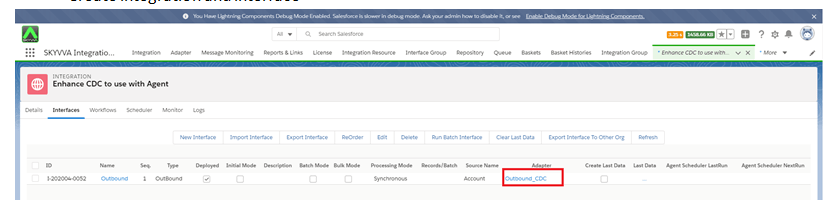
We have to configure CDC For an Interface.
- In order to configure the CDC for an Interface, We have to open and edit Interface.
- Check “Use Skyvva Outbound Scheduler” checkbox.
Go to Interface and Click on Related tab -> scroll down the page to Interface Control Runtimes Specify the parameters:
Step3: Enter Integration Details Tab CDC Control board Tab and apply a filter on:
- Integration name
- Interface Name
- Status
- Search

Step3: Schedule CDT
- Go Integration Details Tab
- Go to Scheduler Tab
- Start the Schedule and set the minute as user want to set

- Scroll Down to Messages section
- Click on the search button
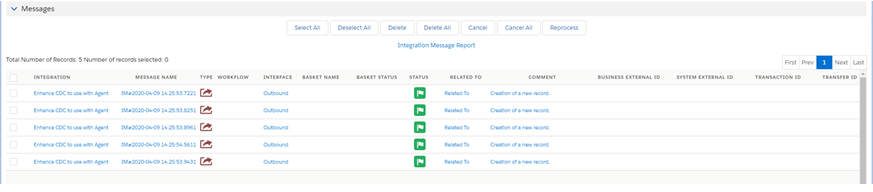
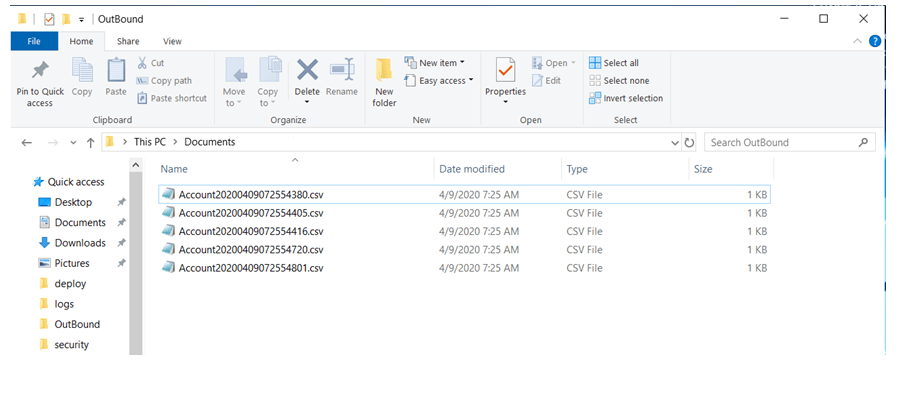
- Records exported successfully
[su_box title="Note" box_color="#2a8af0" title_color="#000000"]CDC Control Board is a dashboard where we can monitor Change Pointer, Interfaces and Scheduler. Each tab holds different functionality. Change Pointer is a table that stores change pointer records. So we can facilely monitor them on Change Pointer table in CDC Control Board rather than on the Integration Admin tab. This withal applies for Interfaces and Schedulers tab What is CDC and how to configure it...[/su_box]