5. How to Use Platform Events to Publish Salesforce Events via Skyvva V4/Integrate?
Introduction
- To subscribe to a platform event in Salesforce, the user can use an Apex trigger. This allows users to handle both inbound and outbound events through a generic method that executes the necessary interface. The execution of these interfaces using Apex triggers is a robust Salesforce solution for managing event-driven processes.
- However, when using SKYVVA, the approach is further enhanced. SKYVVA allows users to enrich event data through mapping, which adds a layer of data processing. After mapping the event or message, the user can process the data using the SKYVVA comprehensive processing pipeline. This pipeline includes various stages such as workflow, mapping, and processing, providing a structured way to handle incoming messages.
- The SKYVVA integration application offers a sophisticated method to manage and process platform events. By leveraging its capabilities, you can map the incoming data to the appropriate fields and process it through predefined workflows. This ensures that the data is not only captured but also transformed and utilized effectively according to your business requirements.
- While Apex triggers provide a powerful tool for subscribing to and managing platform events in Salesforce, SKYVVA enhances this process by enabling enriched data mapping and structured processing, thereby optimizing the overall event handling and integration workflow.
Prerequisite
To effectively create Platform Events, Custom Objects, and Triggers using the SKYVVA integration application, several prerequisites and steps must be followed.
- Firstly, ensure you have the necessary permissions and licenses in Salesforce. You will need to input the license value specific to your organization's SKYVVA integration app. This is essential for accessing the required features and functionalities.
- Next, create the Platform Events. These are used to define the event schema and facilitate communication between Salesforce and external systems. Platform Events are pivotal for real-time data integration and event-driven architecture.
- Following this, create the Custom Objects. These objects will hold the data structures specific to your integration needs. Custom Objects allows you to extend the standard Salesforce data model to accommodate your unique business requirements.
- Once the Custom Objects are in place, develop the Triggers. Triggers are essential for automating processes and responding to specific events in Salesforce. They will ensure that your integration processes are executed automatically based on defined criteria.
- After setting up the Platform Events, Custom Objects, and Triggers, proceed to create the integration itself. This involves defining the Interface using the Skyvva integration application. Specify the Source/Target Name to indicate the origin and destination of the data.
- Define the Operation Type, such as create, update, or delete, based on the required data manipulation. Lastly, determine the Interface Type, which could be inbound, outbound, or bidirectional, depending on your integration needs.
By following these steps and prerequisites, the user can successfully create a robust integration using the SKYVVA integration application.
Platform Events
Integration
- Create Custom
- Create an Interface
- CreateTriggers
- Source/target Name
- Custom Settings
- Operation Type
- Input license value
- Interface Type
Steps:
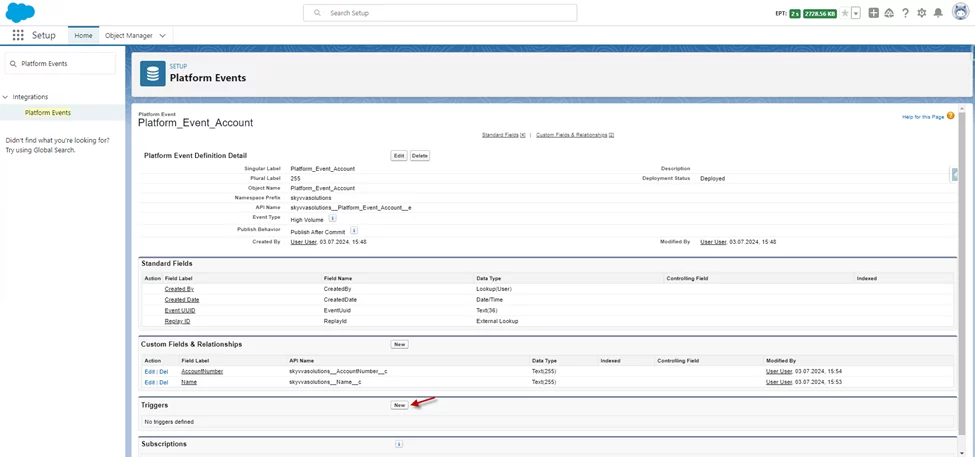
- Go to Setup -> quickly find Platform Events box -> click New

- Then Create Custom

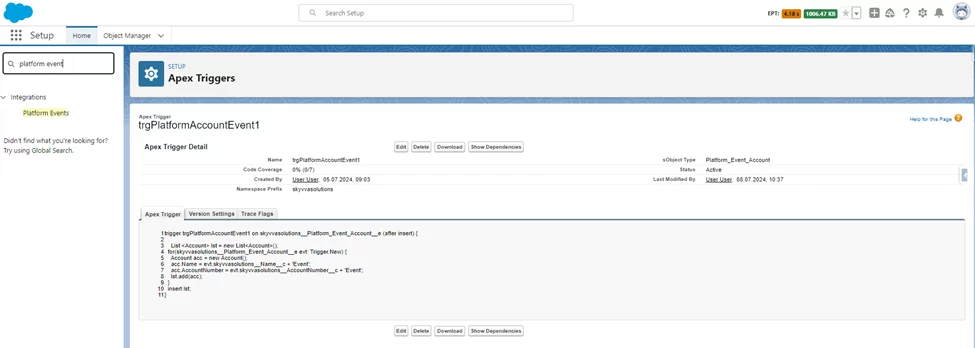
- Create the Triggers -> Check Save button
Users can copy Trigger
trigger trgPlatformAccountEvent1 on skyvvasolutions__Platform_Event_Account__e (after insert) { List <Account> lst = new List<Account>(); for(skyvvasolutions__Platform_Event_Account__e evt: Trigger.New){ Account acc = new Account(); acc.Name = evt.skyvvasolutions__Name__c + 'Event'; acc.AccountNumber = evt.skyvvasolutions__AccountNumber__c + 'Event'; lst.add(acc); } insert lst; }
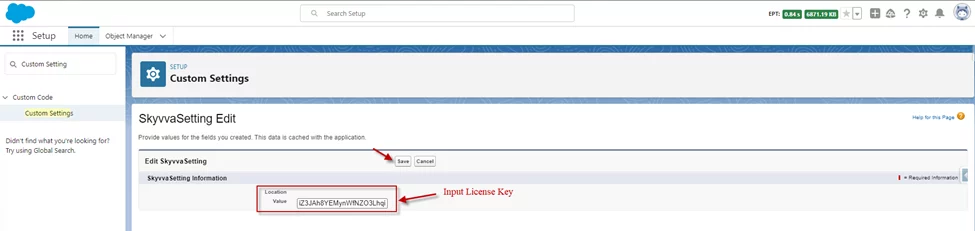
- Allow License for user Automated Process
Go to Setup -> Find Custom Settings

- New

- Input license value
- Save
Platform event Inbound
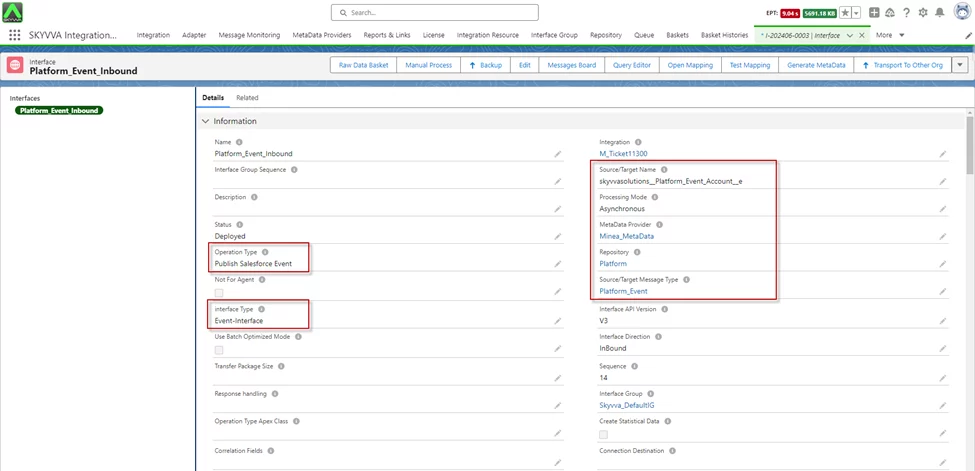
In this scenario, we create an inbound integration/interface for a Salesforce platform event named Platform_Event_Account_e. This platform event is used to facilitate real-time data communication within and between Salesforce applications and external systems using the SKYVVA integration application. The integration is designed to operate as a public Salesforce event and follows an event-driven architecture to ensure timely and efficient data processing.
- Create an Integration -> Create an Interface ->
Source/target Name: select Platform Event Here platform event name is Platform_Event_Account_e
- Operation Type: It should be a Public Salesforce Event
- Interface Type: Event Interface
- Do Mapping
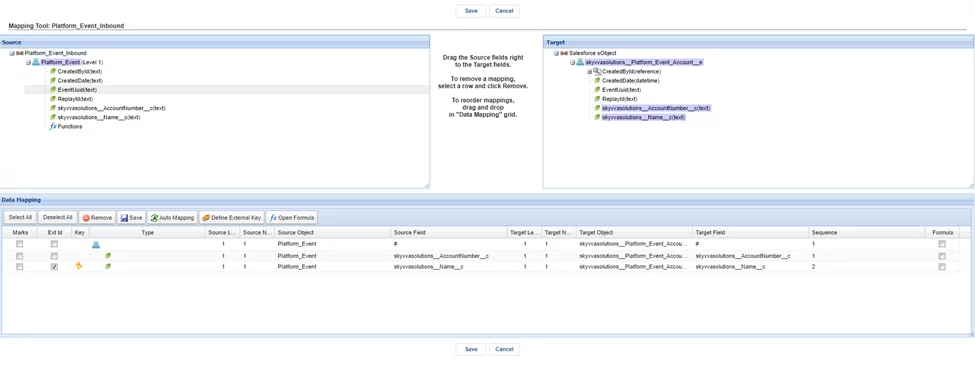
- Push Records from Postman Using API V4/integrate

- The Message Monitoring

- Record Account in Salesforce
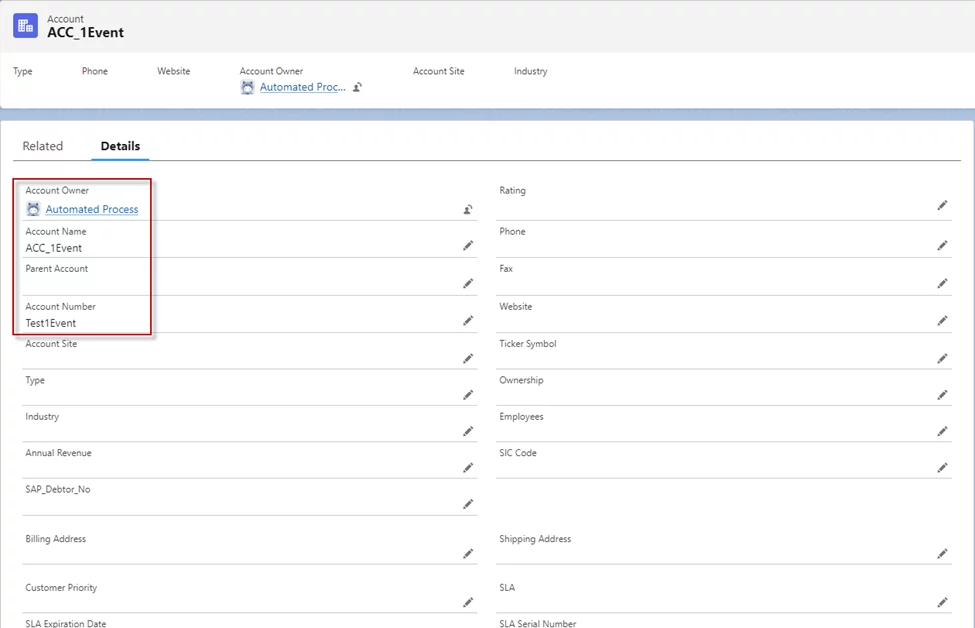
[su_box title="Result:" box_color="#2a8af0" title_color="#000000"]Update a record in Salesforce using a platform event via the SKYVVA integration application. This process guarantees real-time synchronization and precise data updates within Salesforce.[/su_box]
Summary
Now user learned that How To use the streaming API with platform events in the SKYVVA integration application V4, configure the integration service, subscribe to platform events, and handle event messages via the streaming API for real-time updates.