5. What is SAP BTP Integration Suite Adapter in Salesforce?
Overview
The SAP BTP Integration Suite Adapter is the piece of configuration, stored in Salesforce, that tells a SKYVVA outbound interface how to call an SAP Cloud Integration (SAP CPI) integration flow: which URL to hit, which authentication to use, which HTTP method, and what shape (JSON/XML) to send.
It is not a piece of middleware and it does not run inside SAP CPI. It's an Adapter record you create in Salesforce, of type "SAP BTP Integration Suite" — the label you'll actually see and pick in the New/Edit Adapter form (stored internally as Adapter__c with Type__c = 'SAP CPI'; see the naming note in §3.1 for why the on-screen label and the stored value don't match). Think of it as the Salesforce-side "connection + envelope" settings for one outbound call target, the same role a Destination/Communication Arrangement plays on the SAP side.
Do not confuse this with the SkyvvaSalesforce Receiver Adapter. That is a completely different artifact — a Camel/OSGi adapter that runs inside SAP CPI as a sender or receiver channel in an iFlow, used for the opposite direction (SAP CPI → Salesforce). This document is exclusively about the Salesforce-side Adapter__c record used for Salesforce → SAP CPI.
The end-to-end flow for an outbound call is:
Salesforce (SKYVVA Outbound Interface)
    ↓  uses connection/format settings from
SAP BTP Integration Suite (an Adapter record)
    ↓  HTTP(S)/SOAP callout
SAP Cloud Integration — standard HTTPS Sender Adapter
    ↓
Your deployed iFlow
The standard HTTPS Sender Adapter on the SAP CPI side is the entry point into the iFlow — it isn't a separate downstream step, it's simply how CPI accepts the inbound call from Salesforce.
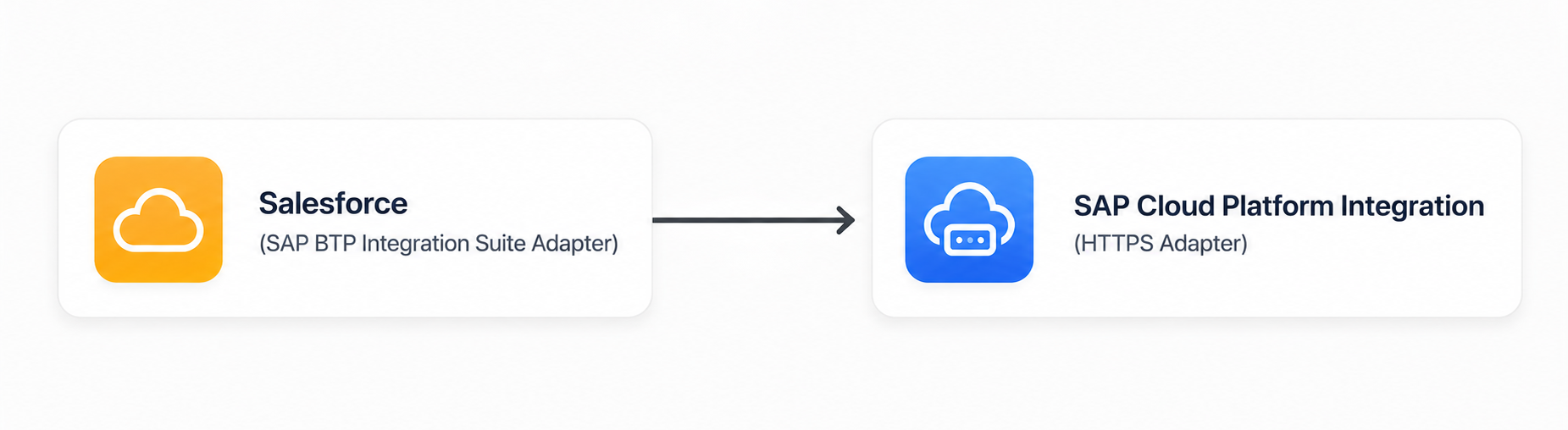
Figure 1. Outbound integration flow from Salesforce to SAP Cloud Integration using the SAP BTP Integration Suite.
Motivation
Use this adapter whenever a Salesforce-originated event or record needs to reach an SAP system, and SAP Cloud Integration is the integration layer that receives it. Concretely, it exists to solve three problems:
- Connection reuse. Authentication, endpoint URL, and headers are configured once on the adapter record and reused by every outbound interface that points at it, instead of being hard-coded per interface.
- Protocol/format flexibility on one adapter type. The same SAP BTP Integration Suite adapter can speak plain HTTP/REST (JSON or XML) or SOAP, and can authenticate with Basic Auth, OAuth 2.0 (three flows), or a Salesforce Named Credential — covering nearly every way an SAP CPI iFlow's sender channel can be secured.
- Migration path from SAP PI/PO. If you are moving an existing SAP PI/PO point-to-point integration onto SAP CPI, the Payload Format property (§9) can reshape the outbound body to match the old PI/PO or
SFDC2SAPPIwire format, so the receiving iFlow's mapping doesn't have to change on day one of the migration.
Good Fit For
- You are building a SKYVVA outbound interface (Salesforce → external system) and the target system is SAP Cloud Integration.
- You already have (or will deploy) an SAP CPI iFlow whose entry point is the standard HTTPS Sender Adapter.
- You are migrating an old SAP PI/PO integration to SAP CPI and want to preserve the legacy payload shape during the transition (§9).
- SAP CPI needs to push data into Salesforce — use the SkyvvaSalesforce Receiver Adapter inside the iFlow instead.
- The Salesforce side needs a custom inbound HTTPS endpoint of its own — CPI's HTTPS Sender Adapter is the entry point in this pattern; Salesforce is always the initiator here.
1. About the SAP BTP Integration Suite Adapter
1.1 Skyvva API Version affects which adapter settings apply
This is worth understanding before configuring one of these adapters, because it explains a few field behaviors later in this document that otherwise look like bugs.
The outbound Interface's Skyvva API Version field (V2 or V3) determines which of the adapter's properties actually get used at runtime — this is decided on the Interface, not on the Adapter record itself:
| Skyvva API Version on the Interface | Effect on the SAP BTP Integration Suite adapter |
|---|---|
V3 (the current, standard choice for new interfaces) | Uses the adapter's connection/endpoint/format settings normally. Does not apply the legacy Payload Format or Timeout properties (see §9, §10). |
V2, or left blank/--None-- | Both route through the same legacy engine. This is the only case that honors Payload Format and Timeout, and the SAP PI/PO migration behavior described in §9. An interface with a blank Skyvva API Version is not "unset" in the sense of falling back to modern behavior — it's treated identically to an explicit V2. |
SAP-PO Payload Format, but if the Interface using it is V3, the setting is silently ignored — no error, no warning, normal payload sent regardless. See §9.
Connection basics — authentication, endpoint, headers, CSRF — behave the same regardless of the Interface's API Version. It's specifically payload shape, Timeout, and a couple of other properties in §10 that differ.
1.2 Choosing Skyvva API Version: V2 or V3?
Skyvva API Version isn't a technical detail buried on the Interface — it's a decision that should be driven by what the integration actually needs to do. Use this table to decide, then configure the Interface accordingly before touching the adapter's Payload Format/Timeout settings.
| Scenario | Choose | Rationale |
|---|---|---|
| Building a brand-new SAP CPI integration | V3 | Current, actively developed path — full Integration/Interface/Message-Type model, richer processing modes, transaction grouping. Default here unless a reason below applies. |
| Migrating an existing SAP PI/PO integration, mapping can't change yet | V2 | Only V2 honors Payload Format (§9), letting you move the transport to SAP CPI while keeping the old payload shape. Move to V3 once the receiving mapping is updated. |
| Simple, single-purpose outbound call | V2 | Only needs a Skyvva API + HTTP method — no Message Type/Integration/Interface Mode setup. |
| Target iFlow is slow, default timeout too short | V2 | Timeout (§10) only takes effect under V2. |
| Existing, working V2 interface | Keep V2 | Migrate opportunistically when a V3-only capability is actually needed, not as a standalone project. |
1.3 Contents of the Adapter Record
The adapter configuration includes:
- Authentication settings
- SAP CPI endpoint configuration
- Protocol and operation settings
- Request and response formats
- HTTP headers
- URL parameters
- Payload format options (applies only with Skyvva API Version = V2, §9)
2. Create the SAP BTP Integration Suite Adapter
To create a SAP BTP Integration Suite Adapter, open the relevant Integration record in Salesforce.
From the Integration record, click SAP Control Board.
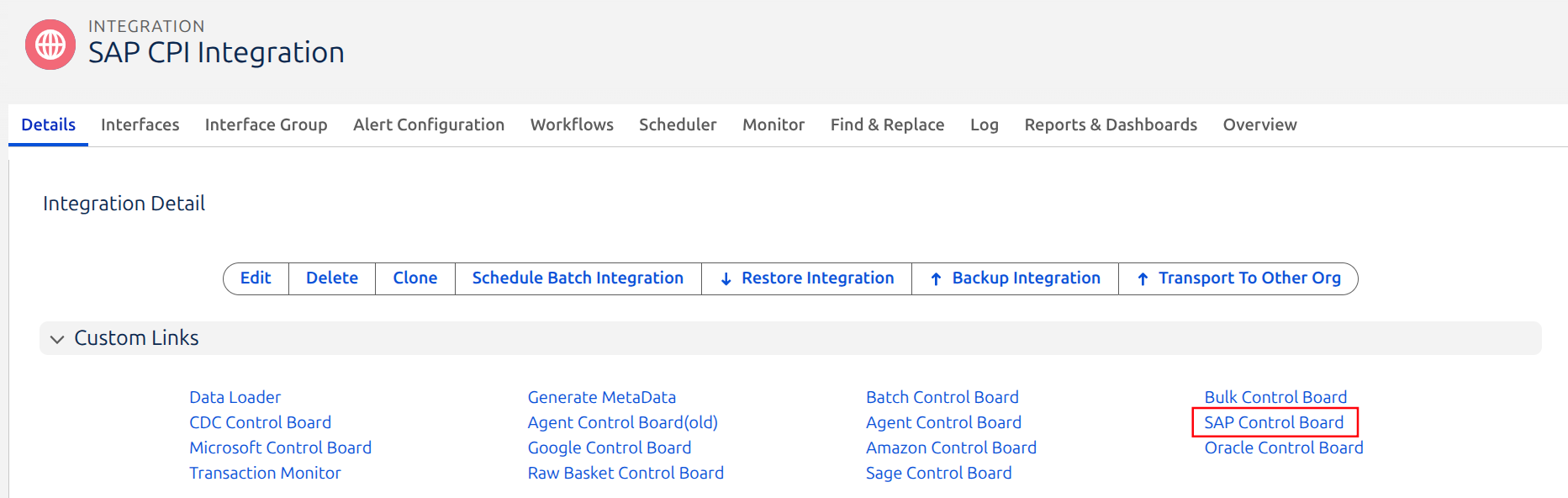
Figure 2. Integration Detail page — Custom Links section with the SAP Control Board link.
In the SAP Control Board, open the Adapter tab and click New.
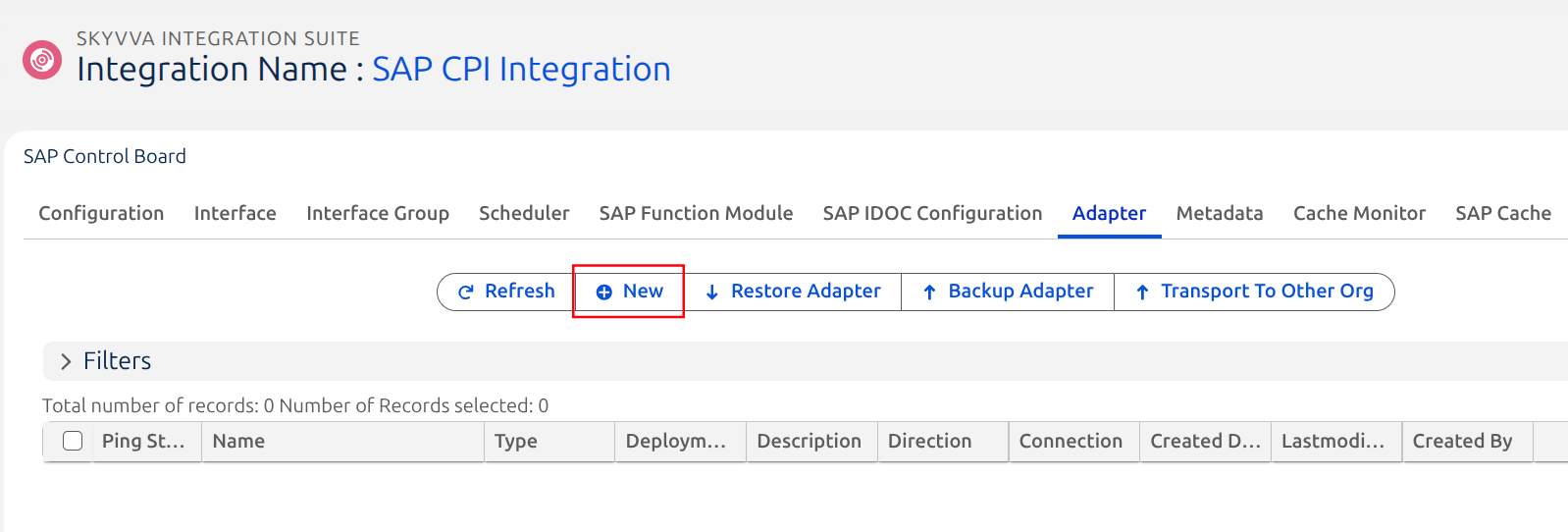
Figure 3. SAP Control Board — Adapter tab.
Configure the adapter parameters as described in the following sections.
3. SAP BTP Integration Suite Adapter Parameters
The SAP BTP Integration Suite Adapter configuration is divided into the following sections:
- Information
- Properties
3.1 Information
Configure the general information for the adapter.
| Parameter | In Short | Matters Because | Steps |
|---|---|---|---|
| Name | The record's identifying label. | Interfaces reference the adapter by this record — a clear name (target system + purpose) keeps large orgs navigable. | Free text. Example: SAP_CPI_Adapter_Account. |
| Type | Selects the adapter family and which properties render below. | Drives every downstream decision: which properties appear, how the connection is tested, and how the outbound call is built. | Select the option that saves as SAP CPI. The New/Edit Adapter form displays this option as "SAP BTP Integration Suite" — see the naming note below before you assume you've picked the wrong thing. |
| Direction | Whether the adapter sends or receives. | An outbound SAP CPI call is always Outbound from Salesforce's point of view. | Select Outbound when the adapter is used to send data from Salesforce to SAP CPI. |
| Description | Free-text notes. | Documents intent for other admins. | Optional. |
| Status | Active / Inactive gate. | An Inactive adapter blocks outbound processing outright. | Set to Active to enable outbound processing. |
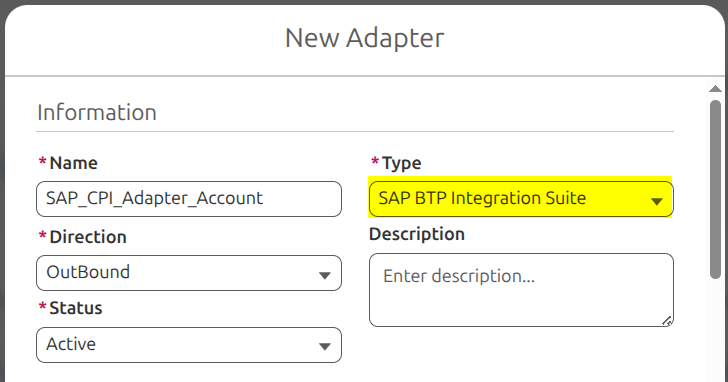
Figure 4. New/Edit Adapter dialog — Information section.
Naming note — "SAP BTP Integration Suite" label
Important: the dropdown labels this option "SAP BTP Integration Suite", but it's stored asType__c='SAP CPI'— that's expected, pick it with confidence.
A separate, brokenType__c='SAP BTP Integration Suite'value also exists at the data level (not reachable through this form) — if you ever see that literal text on a record's Type outside the dropdown, treat it as misconfigured and recreate it through the form.
3.2 Properties
The Properties section contains the connection and message configuration used to communicate with SAP CPI. Each is detailed in its own section below; this table is the map.
| Parameter | Section |
|---|---|
| Authentication Type | §4 |
| Generate CSRF Token | §8.2 |
| Protocol | §6.1 |
| HTTP Header | §8.1 |
| API Service Endpoint URL | §5 |
| URL Query Parameter / URL Path Parameter | §5 |
| Operation | §6.2 |
| Request Format / Response Format | §7 |
| Username / Password | §4.1 |
| Payload Format | §9 |
| Salesforce Id Handling, Processing Mode, Custom Processing Class, Timeout, Connection Destination | §10 |
4. Authentication Type
In short: the method SAP CPI's HTTPS Sender Adapter uses to verify the incoming call. This must match how the receiving iFlow's sender channel is secured — SKYVVA is the client here, so this setting has to mirror whatever the iFlow admin configured on the CPI side.
The SAP BTP Integration Suite adapter supports:
- Basic Authentication
- OAuth 2.0
- Certificate
- Salesforce Authentication Provider
4.1 Basic Authentication
Steps: select Basic Authentication, then fill in:
- Username
- Password
Authorization: Basic header on every call.
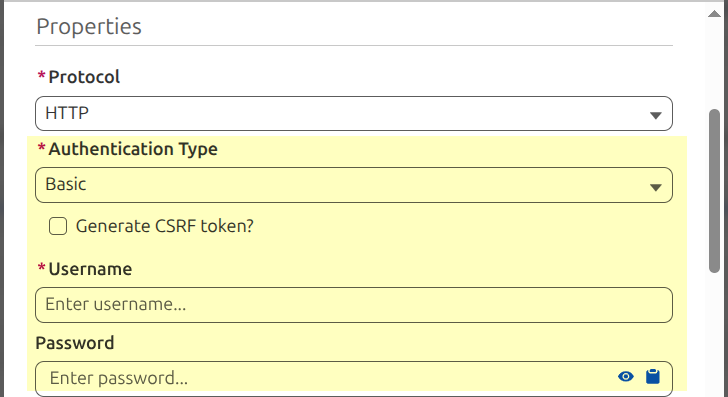
Figure 5. Properties section — Basic Authentication.
4.2 OAuth 2.0
Steps: pick the flow matching how the iFlow's OAuth client was registered, then fill in the fields it requires:
| Flow | Required fields |
|---|---|
| Username-Password Credential | Username, Password, Client Id, Client Secret |
| Client Credential | Client Id, Client Secret |
| Authorization Code | Client Id, Client Secret, Code, Redirect URI |
Note: if Client Id, Client Secret, and a refresh token are all already present on the adapter, the adapter uses that refresh token directly and skips the configured Flow entirely — worth knowing if changing the Flow dropdown doesn't seem to take effect.
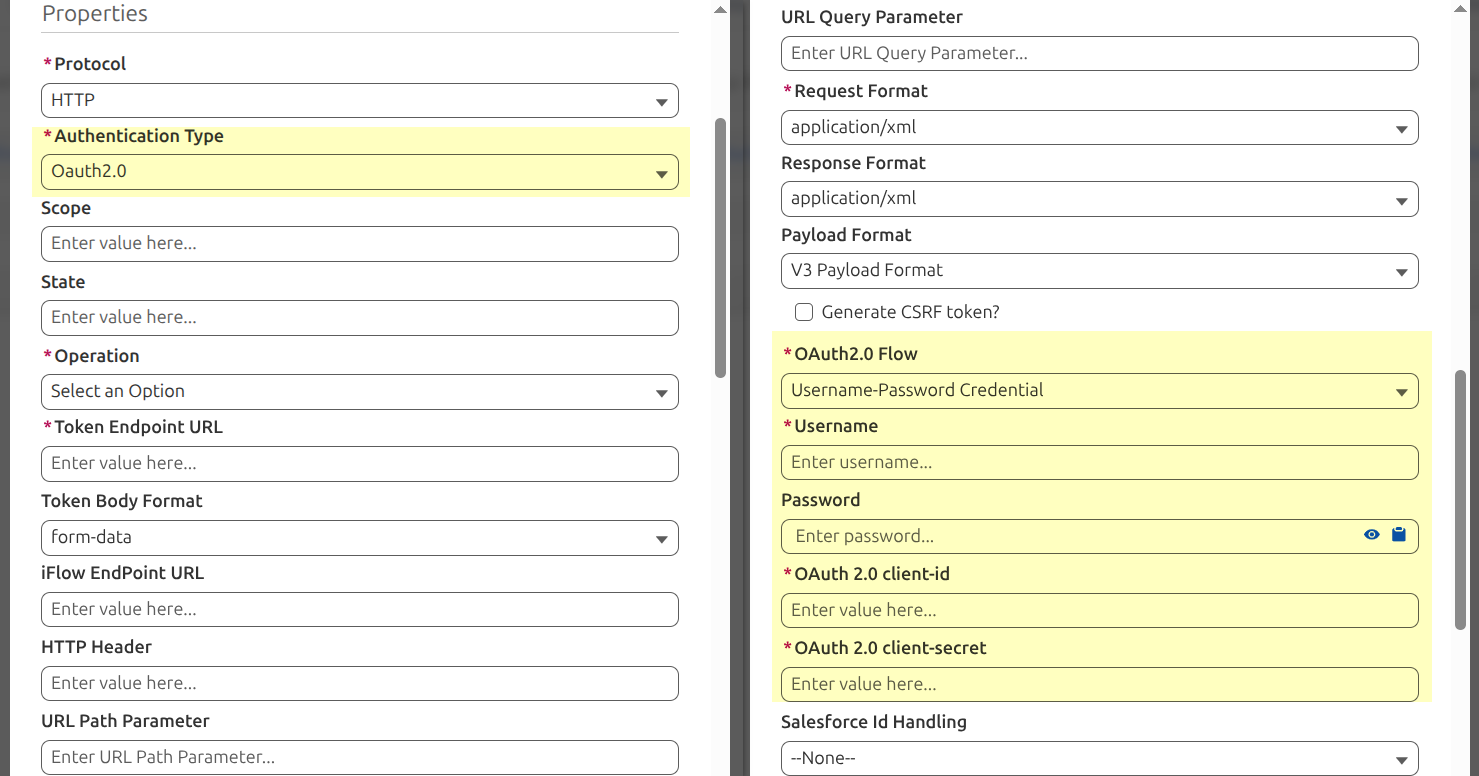
Figure 6. Properties section — OAuth 2.0.
4.3 Certificate
Steps: select Certificate, then provide:
- Certificate Name — a certificate already uploaded in Salesforce Setup → Certificate and Key Management, not deployed on the CPI side. It has to exist in your org before you can reference it here.
- Certificate Password — optional; only needed if the certificate itself requires one.
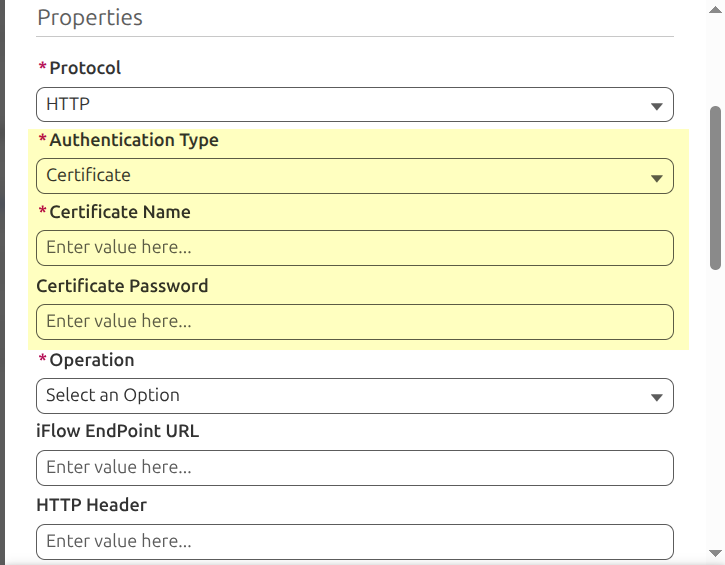
Figure 7. Properties section — Certificate.
4.4 Salesforce Authentication Provider
Steps: select this option and provide Named Credentials — the developer name of an already-configured Salesforce Named Credential. It fully owns both the endpoint and the authentication (no Basic Auth header is added on top, so Username/Password elsewhere on the adapter go unused). Leaving it blank fails the request immediately.
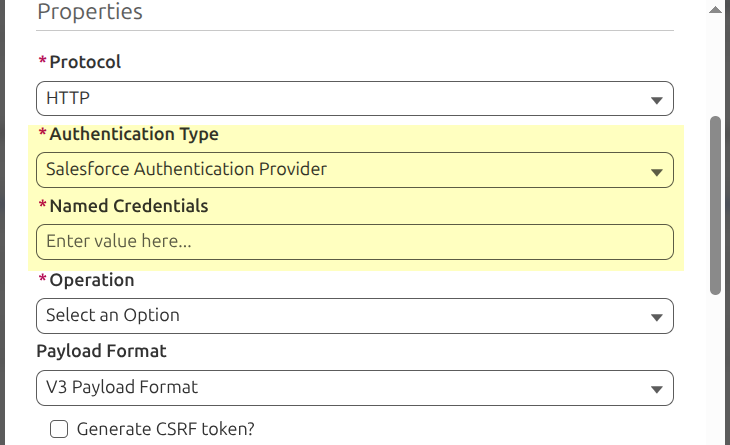
Figure 8. Properties section — Salesforce Authentication Provider.
5. SAP CPI Endpoint Configuration
In short: the target URL of the SAP CPI iFlow's HTTPS Sender Adapter, plus any extra path/query values the iFlow requires.
Field label on screen: "iFlow EndPoint URL". This is not a distinct field — it's a runtime relabel applied on top of one of two different underlying properties, chosen by whether a Connection Destination is selected on the adapter:
| Connection Destination selected? | Field API name actually saved | Default label if unrelabeled |
|---|---|---|
No (--None--) | API_Service_Endpoint_URL | "API Service EndPoint URL" |
| Yes | api_path_url | "API Path Url" |
require: false client-side by that same relabel — validation instead happens Apex-side at request-build time (see the error string below).
iFlow EndPoint URL example:
https://<tenant>/http/<endpoint-path>
The shape matters because: SAP CPI requires a sender-channel path prefix — /http for HTTP/REST, /cxf for SOAP. The adapter injects this automatically if your path doesn't already start with it, so a URL that looks "off by a segment" still works at runtime.
URL Query Parameter / URL Path Parameter: for extra values the iFlow needs beyond the base endpoint (e.g. ?sysid=100, or an extra /orders segment) — merged onto the final endpoint automatically.
If the endpoint is already a complete URL (http(s)://, callout:, or similar), the adapter uses it directly rather than composing one from separate parts — useful when pasting a URL a CPI admin gave you verbatim.
If no endpoint can be resolved at all, the callout fails with: "SAP CPI endpoint is missing. Configure API_Service_Endpoint_URL, or configure domain_url and api_path_url on the selected Connection Destination." — note this error message still refers to the underlying API names, not the "iFlow EndPoint URL" label shown on screen.
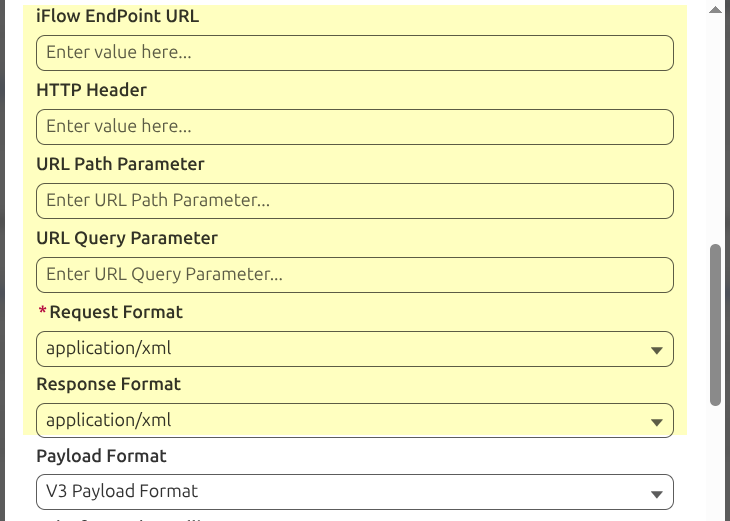
Figure 9. Properties section — Endpoint Configuration.
6. Protocol and Operation
6.1 Protocol
In short: the wire protocol used to call the iFlow.
HTTP— plain REST-style call, body is JSON or XML per Request Format.SOAP— the request is wrapped in a SOAP envelope; internally the adapter always forces the transportRequest Formatto XML for SOAP, so you don't (and can't) separately choose JSON with SOAP.
Steps: select the protocol matching the SAP CPI integration flow. If left blank with no Connection Destination selected, the adapter throws "SAP CPI Protocol is required when no Connection Destination is selected." — an old adapter record left blank may need this filled in explicitly now.
6.2 Operation
In short: the HTTP method (for HTTP) or the equivalent operation the SOAP service expects (for SOAP).
For HTTP-based integrations, select:
GETPOSTPUTPATCHDELETE
GET and DELETE calls are sent without a request body, even if a payload would otherwise have been built — so if your iFlow expects data in the body of a DELETE, this adapter won't send it that way; use path/query parameters instead for those two methods.
Note: switching Operation between POST/GET/PUT/PATCH/DELETE does not change which other Properties fields are shown on the form — the field set is identical for all five values. What does change the visible field count is whether a Connection Destination is selected and, if not, which Authentication Type/OAuth2.0 Flow is picked (ranges from 12 to 26 fields across those combinations).
For SOAP integrations, configure the operation required by the SOAP service (this typically maps to the SOAPAction header expected by the receiving service).
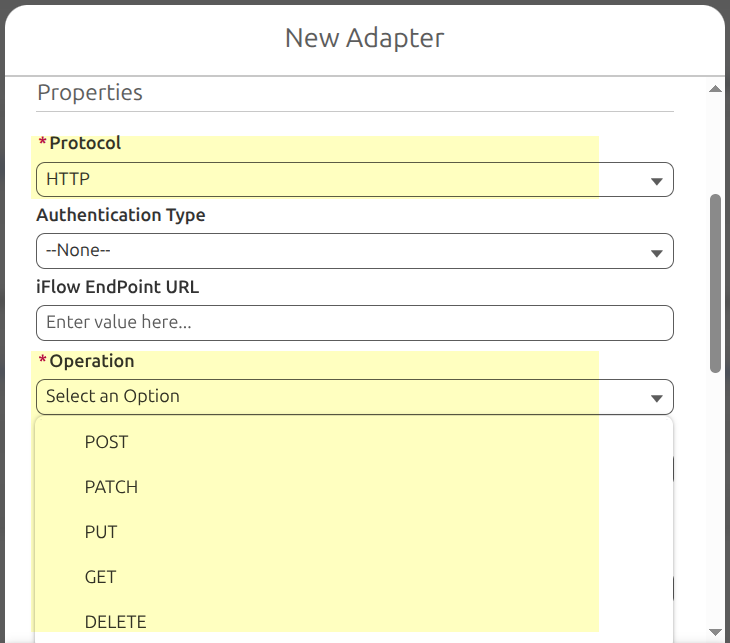
Figure 10. Properties section — Protocol and Operation.
7. Request and Response Format
In short: the serialization of the outbound call body (Request Format) and the expected shape of what SAP CPI sends back (Response Format).
Supported values: JSON, XML.
Rationale for only two options: narrowed from four (dropped text/plain/application/octet-stream) alongside stricter Apex validation — a blank or unrecognized Request Format under HTTP now throws rather than silently defaulting. An older adapter still configured with either dropped value will now fail at runtime — reconfigure it to JSON or XML.
Steps: set Request Format to match the payload shape Salesforce should send; set Response Format to match what the iFlow returns. When Protocol = SOAP, these two fields aren't shown at all — SOAP's request format is fixed internally to XML, and the response is parsed as a SOAP envelope regardless.
Note: CSV, plain text, and binary formats are not supported by this adapter type at all.
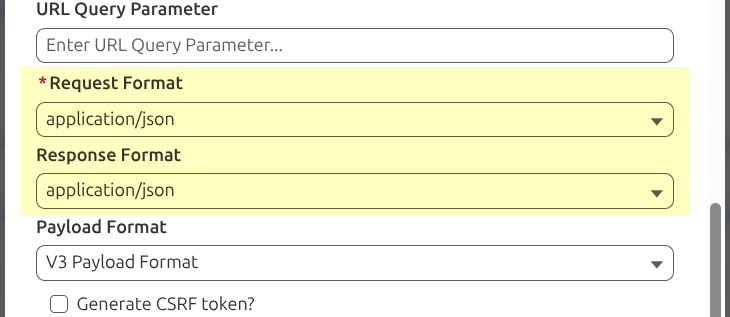
Figure 11. Properties section — Request and Response Format.
8. HTTP Headers and CSRF Token
8.1 HTTP Header
In short: free-form extra HTTP headers sent with every request.
Rationale: many SAP CPI sender channels expect specific headers beyond the basics the adapter sets automatically (e.g. a custom correlation header, an API key header some iFlows layer on top of OAuth, or an explicit Content-Type override).
Steps: enter headers in the format:
Content-Type: application/json
Configure whatever headers the target iFlow's sender channel requires.
8.2 Generate CSRF Token
In short: a toggle that makes the adapter perform SAP's CSRF-token handshake (a preliminary GET with X-CSRF-Token: Fetch, then reusing the returned token on the real request) before the actual call.
Rationale: some SAP-side endpoints (particularly OData-style or classic SAP services fronted by CPI) reject state-changing requests (POST/PUT/PATCH/DELETE) without a valid CSRF token, as a cross-site-request-forgery protection.
Steps: enable it only when the target endpoint actually requires CSRF handling — for a typical stateless SAP CPI HTTPS Sender Adapter secured by OAuth or Basic Auth, this is usually not required and can be left off; turning it on unnecessarily just adds a wasted round-trip per call.
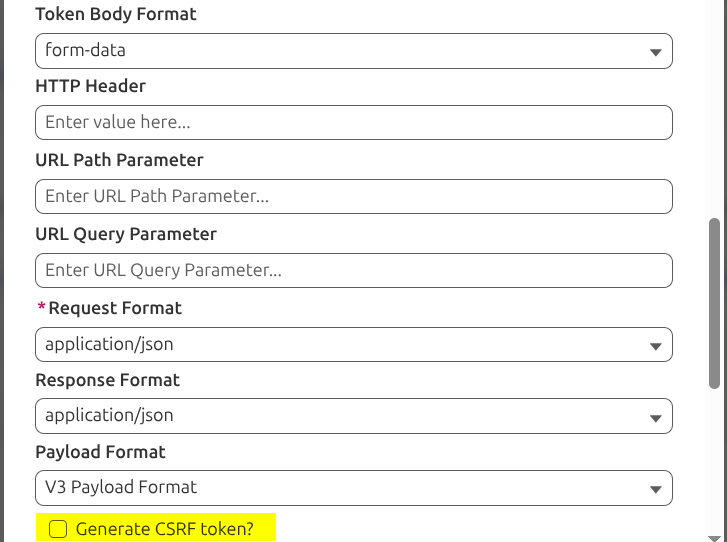
Figure 12. Properties section — HTTP Headers and CSRF Token.
9. Payload Format — Rationale, Trigger, and Usage
This is the property that only makes sense once you understand §1.1 (Skyvva API Version gates which settings apply), so this section walks through the full rationale, trigger, and usage for it, using the scenario of a user choosing a payload format value.
9.1 In Short
Payload Format controls the shape of the outbound request body.
| Payload Format | Output Shape |
|---|---|
V3 Payload Format (default) | The current, standard SKYVVA payload — no special reshaping. Use this for any new SAP CPI integration. |
SAP-PO Payload Format | Approximates the legacy SAP PI/PO wire shape, for migrating an old PI/PO integration onto this adapter. |
SFDC2SAPI Payload Format | Reproduces the structure of SKYVVA's older, historical direct-to-PI SOAP integration format. Requires Protocol = SOAP — selecting this with Protocol = HTTP is rejected. |
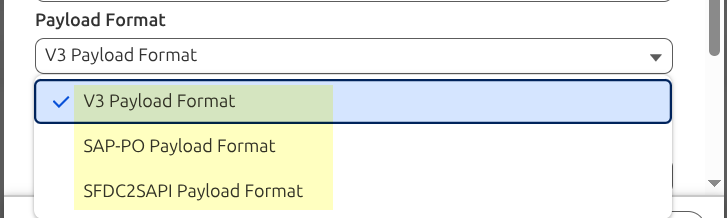
Figure 13. Properties section — Payload Format.
9.2 Rationale
Exists purely for migration: lets a customer move an existing SAP PI/PO integration's transport onto SAP CPI while keeping the receiving iFlow's mapping unchanged. Not meant for greenfield SAP CPI integrations — those stay on V3 Payload Format.
9.3 Trigger Condition — the Skyvva API Version Gate
This is the field that most often confuses people, so here is the concrete walkthrough:
- You set the adapter's Payload Format to
SAP-PO Payload Formatbecause you're migrating an old PI/PO interface. - You link this adapter to an outbound Interface.
- Check that Interface's Skyvva API Version:
V2, or left blank → Payload Format is honored; SKYVVA attempts to build the PI/PO-shaped body.V3→ Payload Format is ignored, with no error or warning. You get the normal, standard payload regardless of what's configured here.
- Need
SAP-PO/SFDC2SAPIto take effect? Set the Interface's Skyvva API Version = V2 (or leave blank) — check the Interface record, not just the Adapter's Payload Format. - Interface is
V3and you need a non-standard shape? This property can't help — talk to your SKYVVA implementation contact instead.
9.4 A caveat worth knowing before relying on SAP-PO Payload Format
SAP-PO Payload Format output can be very close to V3 Payload Format for some payload shapes.
If your migration specifically depends on the SAP-PO shape being different from the modern payload, verify the actual outbound body at runtime rather than assuming the label guarantees a distinct shape.
9.5 Using SFDC2SAPI Payload Format Correctly
- Set Protocol = SOAP first — the setting is rejected otherwise.
- Set Payload Format = SFDC2SAPI Payload Format.
- Make sure the Interface is set to Skyvva API Version = V2 (or left blank) — same rule as above.
- For interfaces with parent/child (chained) data, verify the resulting SOAP structure against your receiving iFlow's mapping before going live — this legacy-shape reproduction is closest to the original for flat, non-chained interfaces, and is an approximation for hierarchical ones.
10. Additional Properties
These five fields render on every SAP BTP Integration Suite adapter but are easy to overlook because they aren't part of the "headline" property table — some also depend on the Interface's Skyvva API Version, the same way Payload Format does.
| Field | In Short | Rationale / Usage | Know Before Relying On It |
|---|---|---|---|
| Salesforce Id Handling | --None-- (default) / Return Salesforce Id into the response | Echoes the Salesforce record Id back into the response for correlation. | No effect on Asynchronous interfaces — Synchronous-mode only. |
| Processing Mode | Pushing (default) / Polling | Leave at Pushing unless you need a simplified generic-call path. | Polling skips your configured Operation, Header, and URL parameters entirely, sending generic headers straight to the endpoint. If your settings don't seem to be going out, check this field first. |
| Custom Processing Class | Free text — an Apex class name | A hook for custom logic. | Despite the label, this is a custom authentication hook, not a payload/processing hook — use Payload Format (§9) for payload reshaping instead. |
| Timeout | Number, 1–120000 (ms) | For a known-slow target iFlow. | Only takes effect on V2 interfaces (§9.3) — no effect on V3. |
| Connection Destination | Picklist, default --None-- | Manage endpoint/protocol/auth centrally instead of per-adapter. | Selecting one moves Protocol and Authentication Type off the adapter onto the Connection Destination. |
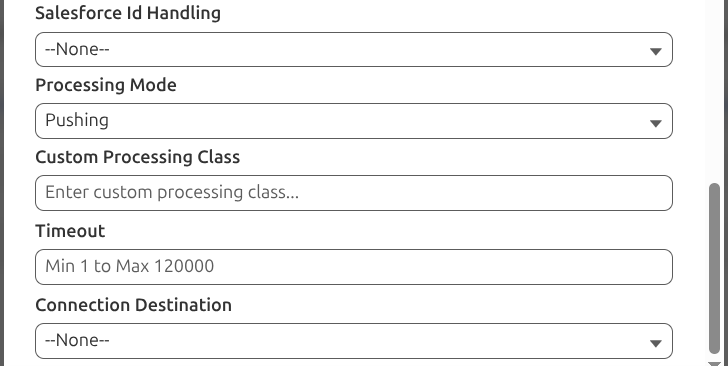
Figure 14. Properties section — Additional Properties. (screenshot to be added)
11. SAP BTP Integration Suite Adapter Limitations
Supported Message Formats
Only JSON and XML. Not supported: CSV, plain text, binary data.
Supported Authentication Methods
- Basic Authentication
- OAuth 2.0 (Username-Password Credential, Client Credential, Authorization Code)
- Certificate
- Salesforce Authentication Provider
Supported Protocols
HTTP and SOAP.
12. Summary
The SAP BTP Integration Suite Adapter is an Adapter record configured in Salesforce, used by SKYVVA outbound interfaces to send data to an SAP Cloud Integration iFlow via its standard HTTPS Sender Adapter:
Salesforce (Outbound Interface)
    ↓
SAP BTP Integration Suite Adapter
    ↓
SAP Cloud Integration (HTTPS Sender Adapter → your iFlow)
Key things to remember when configuring one:
- The dropdown label is "SAP BTP Integration Suite", but it saves as
Type__c='SAP CPI'— that's expected, pick it with confidence (§3.1). - The Interface's Skyvva API Version (V2 vs V3) — not anything on the Adapter — governs whether Payload Format and Timeout have any effect at all (§9, §10).
- Endpoint, headers, CSRF, and authentication behave the same regardless of API Version.
- The adapter supports
JSON/XMLandHTTP/SOAP, with Basic, OAuth 2.0, Certificate, and Salesforce Authentication Provider authentication. SAP-PO Payload FormatandSFDC2SAPI Payload Formatare migration tools for legacy SAP PI/PO integrations, not defaults for new SAP CPI work — leave new interfaces onV3 Payload Format, and useSkyvva API Version = V2only when you specifically need the legacy payload behavior.