8. Generic Use of Multit-Tab
This unit describes:- How to use Skyvva MultiItab-Function module( /SKYVVA/MULTI_ITAB_ADAPTER_V3 ) in SAP Z Program/FM Introduction:- This document describes how data can be transferred to SFDC within your own Programs. The MultiItabAdapter allows you to transfer data of different RFC/BAPI or Structures(DDIC), which you have filled before in your own FM/Report, within one SKYVVA FM Call. The routing to the different Salesforce Objects is implemented with workflow in Skyvva-IntegrationSuite on SFDC. 1. SAP Implementation Part 1.1 Prerequisites Please use repository based typing instead of program-internal types for the RFC/BAPI definition and Structure definition (DDIC). Otherwise the Adapter will have problems at runtime. 1.2 Implement a sender module for the transfer of Internal Tables (ITAB) In this example a Sender Module : ZV3_BINARY_FILE_TRANSFER has been implemented . This Module is also used in salesforce for metadata provider in salesforce to create message type in salesforce on the Interface-definition of this module. Note : We are supporting a single importing/exporting parameter only in RFC/BAPI to send data from sap to salesforce. The parameter must be table type only which can be hierarchical tables or flat table. Follow the below steps to Create the function module and interface.
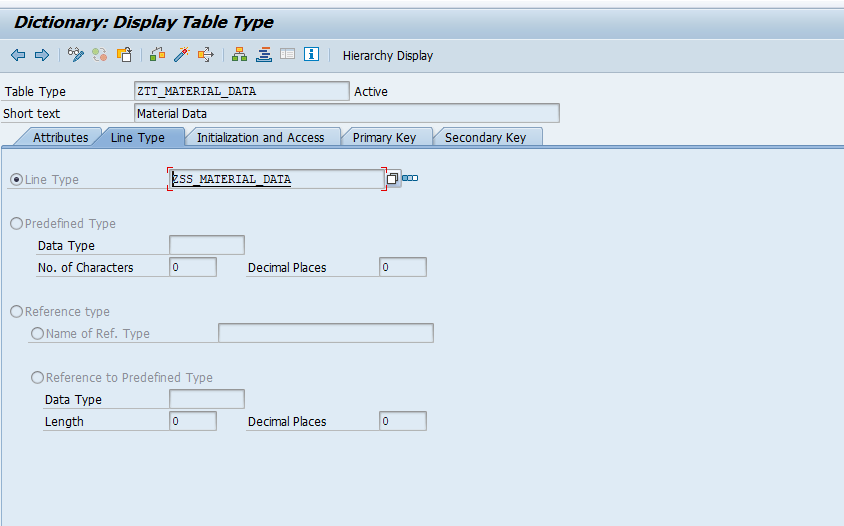
- Create table type structure in SE11.
- Create function module in SE37
- Create importing parameter for sending data from sap to salesforce.
- Create exporting parameter for receiving data from salesforce to sap.
- Call the Multi-tab function module /SKYVVA/MULTI_ITAB_ADAPTER_V3 in side function module.
- Pass the all required parameter in multi-tab function module base on required scenario.
- save and activate the function module which is created by you.
- Create message type using your function module.
- Create the interface and do the mapping.
- In case if you change the function module importing/exporting parameter field(add/remove),override the message type and delete the field from message type in related tab which is remove and check if add field is there
- Do the mapping again.
- Configure the Function module in SAP/AGENT Control Board.
- Finally call the function module from any report/program and send the data from sap to salesforce
1.Create table stature
- Create Function Module with parameter
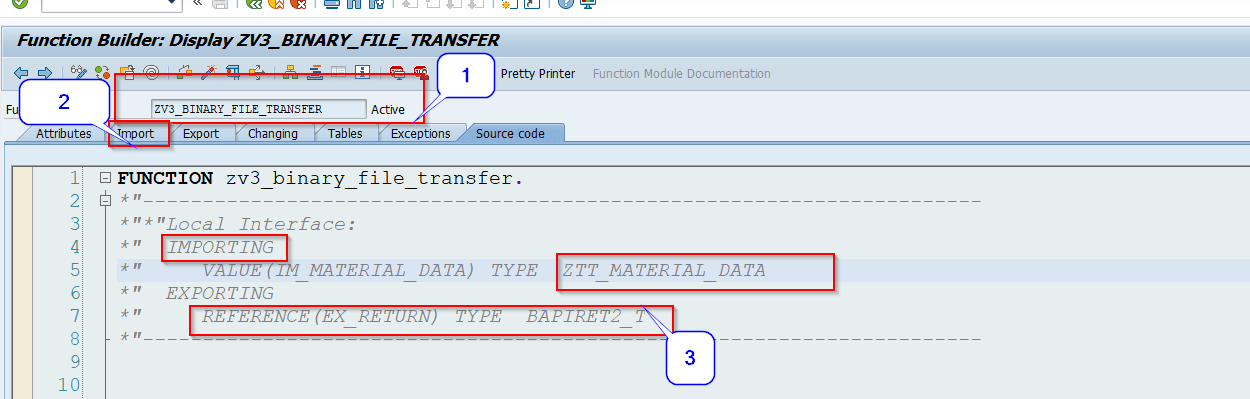
in the importing Parameter “IM_MATERIAL_DATA” has data need to send salesforce and the exporting parameter “EX_RETURN” has field or structure coming data back from salesforce in that format.
3. Calling function module /SKYVVA/MULTI_ITAB_ADAPTER_V3 in side Z function module
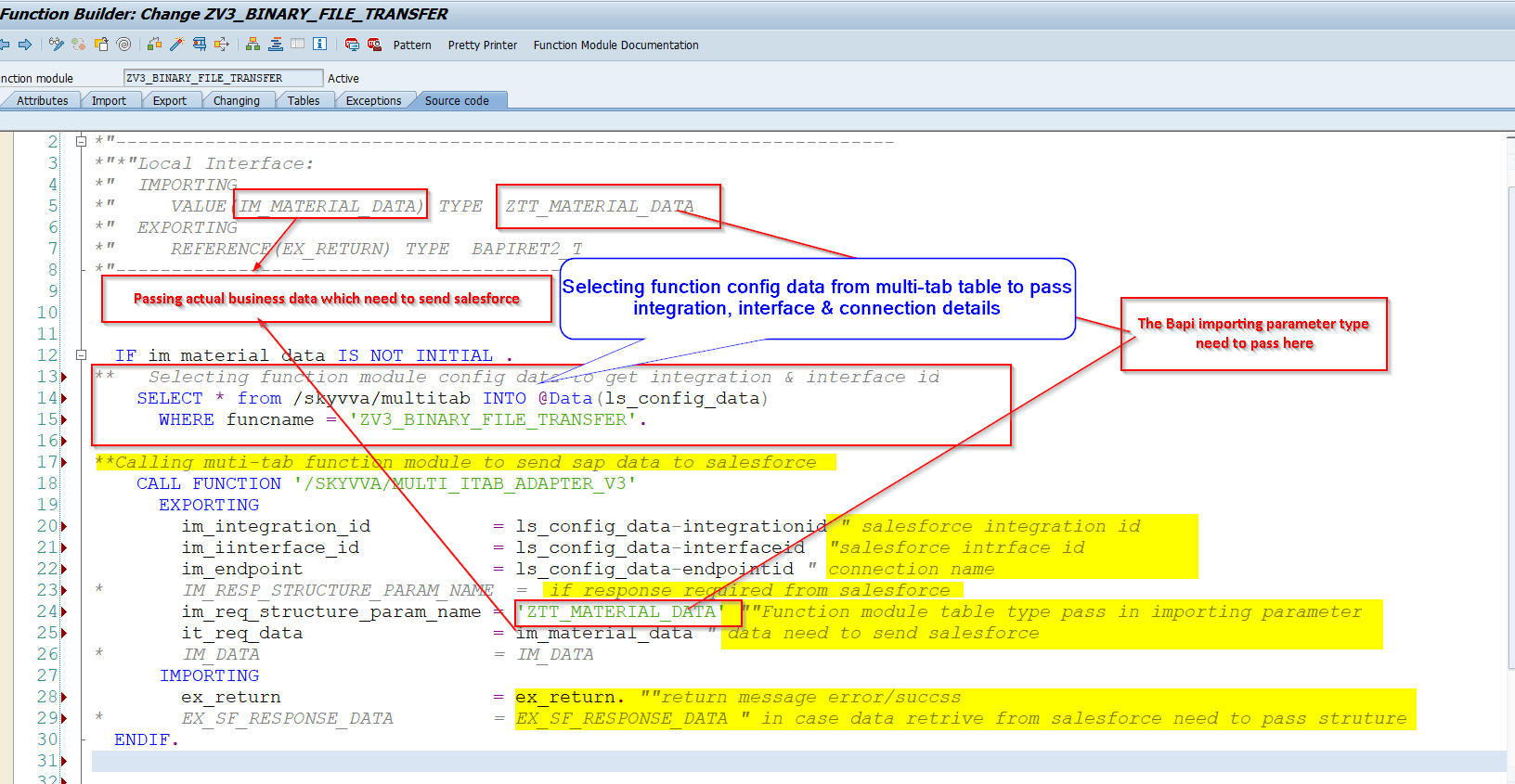
The importing Parameters
IM_INTEGRATION: Passing Salesforce Integration ID(Mandatory)
IM_INTERFACE: Passing Salesforce Interface ID(Mandatory)
IM_ENDPOINT: Passing Salesforce Endpoint name is nothing but salesforce login details (Mandatory)
IM_RESP_PARAM_NAME: Passing Response Param Name is nothing but data type (Optional)
IM_REQ_PARAM_NAME: Passing Request Param Name is nothing but data type (Mandatory)
IM_REQ_DATA: Passing Request Data in the internal table format (Mandatory)
The Exporting Parameter
- EX_RETURN is the parameter which return error/success message .
- IM_SF_RESPONSE is the parameter which return the response from salesforce which is the exporting parameter of calling skyvva FM.
The content of this Itabs is send via v3 adapter . The following lines are necessary for passing the data to the MultiItabAdapter . Example code : IF im_material_data IS NOT INITIAL . ** Selecting function module config data to get integration & interface id SELECT * from /skyvva/multitab INTO @Data(ls_config_data) WHERE funcname = 'ZV3_BINARY_FILE_TRANSFER'. **Calling muti-tab function module to send sap data to salesforce CALL FUNCTION '/SKYVVA/MULTI_ITAB_ADAPTER_V3' EXPORTING im_integration_id = ls_config_data-integrationid " salesforce integration id im_iinterface_id = ls_config_data-interfaceid "salesforce intrface id im_endpoint = ls_config_data-endpointid " connection name * IM_RESP_STRUCTURE_PARAM_NAME = if response required from salesforce im_req_structure_param_name = 'ZTT_MATERIAL_DATA' ""Function module table type pass in importing parameter it_req_data = im_material_data " data need to send salesforce * IM_DATA = IM_DATA IMPORTING ex_return = ex_return. ""return message error/succss * EX_SF_RESPONSE_DATA = EX_SF_RESPONSE_DATA " in case data retrive from salesforce need to pass struture ENDIF.
- Prepare data and call z function module in report/program.
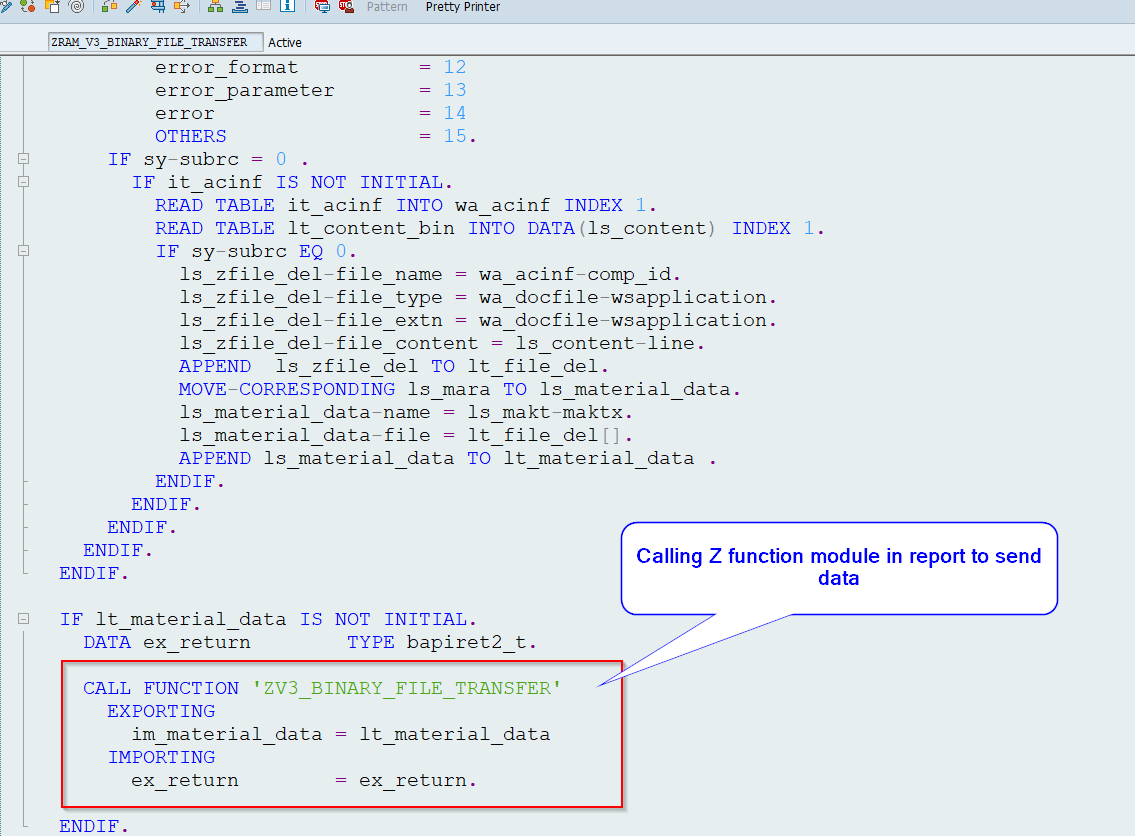
Remark: the importing/exporting structure must be used in salesforce as message type. For call skyvva interface in a Asynchronous mode do not pass the response parameter “im_req_param_name” and exporting response parameter “IM_SF_RESPONSE” in skyvva Multi-tab FM.