68.2 How to pass raw data to custom class for processing with custom code?
Learning Objective:- This unit describes:-
- How to pass raw data to a custom class (message creation) for processing?
1. How to pass raw data to a custom class (Message Creation) for processing?
Our Skyvva Tool supports XML, CSV, and JSON file formats by default. However, if you have complex XML, JSON, or other raw data structures that our tool cannot read in your payload, you will need to use a custom class to build your logic and read your raw data structure to create the SKYVVA Message yourself.
Here is a sample payload in a data format that our standard cannot read:
status: success code: '200' message: completed data:
- Id: ba228042-793a-4289-b0cb-57a661c11ff5
Name: Jamie Conn
Fax: "(646) 029 4240"
BillingCity: Saint Helier
BillingCountry: Jersey
Type: Direct Solutions Supervisor
Website: https://frieda.com
Description: Mozilla/5.0 (compatible; MSIE 7.0; Windows NT 6.0; Trident/3.0)
Contact:
- Id: f062cfad-a38c-4a4c-b8b0-788a8ae5910e
FirstName: Jamie
LastName: Conn
Email: Jamie97@yahoo.com
Title: Regional Security Technician
Description: Mozilla/5.0 (compatible; MSIE 8.0; Windows NT 6.0; Trident/3.0; .NET CLR 4.6.90034.5)
Asset:
- Id: 250c739a-4ab8-4ba8-997b-a184bec568d7
Name: Intelligent Frozen Sausages
Quantity: 954
City: Nā‘ūr
Country: Jordan
Description: Mozilla/5.0 (Windows NT 6.1; WOW64; rv:8.9) Gecko/20100101 Firefox/8.9.0
Case:
- Id: 91282b68-0894-4439-bb56-c27df3cf8cf1 Status: ATS Subject: BMW Description: Mozilla/5.0 (compatible; MSIE 9.0; Windows NT 5.3; Trident/7.1)
- Id: 250c739a-4ab8-4ba8-997b-a184bec568d7
Name: Intelligent Frozen Sausages
Quantity: 954
City: Nā‘ūr
Country: Jordan
Description: Mozilla/5.0 (Windows NT 6.1; WOW64; rv:8.9) Gecko/20100101 Firefox/8.9.0
Case:
- Id: f062cfad-a38c-4a4c-b8b0-788a8ae5910e
FirstName: Jamie
LastName: Conn
Email: Jamie97@yahoo.com
Title: Regional Security Technician
Description: Mozilla/5.0 (compatible; MSIE 8.0; Windows NT 6.0; Trident/3.0; .NET CLR 4.6.90034.5)
Asset:
- Id: e03fxb30-c925-4c63-9e6c-e2b974c3fe39 Name: Ouu MeyNeang Fax: "(431) 476 31545" BillingCity: Mao Sen Tong BillingCountry: China Type: Lead SKYVVA Consultant Website: https://apsara-consulting.com Description: testing record
- Id: e03fcc30-c925-4c63-9e3c-e2b974c3fe38
Name: Cesar Murazik
Fax: "(431) 476 3151"
BillingCity: Mao
BillingCountry: Chad
Type: Lead Tactics Consultant
Website: https://alene.org
Description: Mozilla/5.0 (Windows NT 6.3; Trident/7.0; rv:11.0) like Gecko
Contact:
- Id: 30e65a2e-2a0e-4a53-893e-01d30b725204
FirstName: Cesar
LastName: Murazik
Email: Cesar41@hotmail.com
Title: National Marketing Orchestrator
Description: Mozilla/5.0 (Windows; U; Windows NT 6.3) AppleWebKit/535.1.2 (KHTML, like Gecko) Chrome/14.0.886.0 Safari/535.1.2
Asset:
- Id: 5a948bfb-7441-4d63-9d47-a38ab611d2fa
Name: Incredible Plastic Pizza
Quantity: 4534
City: La Estrella
Country: Panama
Description: Mozilla/5.0 (compatible; MSIE 7.0; Windows NT 6.1; Trident/5.1)
Case:
- Id: 93e3b363-0e08-425d-b659-7122ef3c9e34 Status: Wrangler Subject: Jaguar Description: Mozilla/5.0 (Windows NT 6.2; Trident/7.0; rv:11.0) like Gecko
- Id: 5a948bfb-7441-4d63-9d47-a38ab611d2fa
Name: Incredible Plastic Pizza
Quantity: 4534
City: La Estrella
Country: Panama
Description: Mozilla/5.0 (compatible; MSIE 7.0; Windows NT 6.1; Trident/5.1)
Case:
- Id: 30e65a2e-2a0e-4a53-893e-01d30b725204
FirstName: Cesar
LastName: Murazik
Email: Cesar41@hotmail.com
Title: National Marketing Orchestrator
Description: Mozilla/5.0 (Windows; U; Windows NT 6.3) AppleWebKit/535.1.2 (KHTML, like Gecko) Chrome/14.0.886.0 Safari/535.1.2
Asset:
2. The procedure to pass raw data to a custom class (Message Creation) for processing with custom code:-
The procedure is given below with an example:-
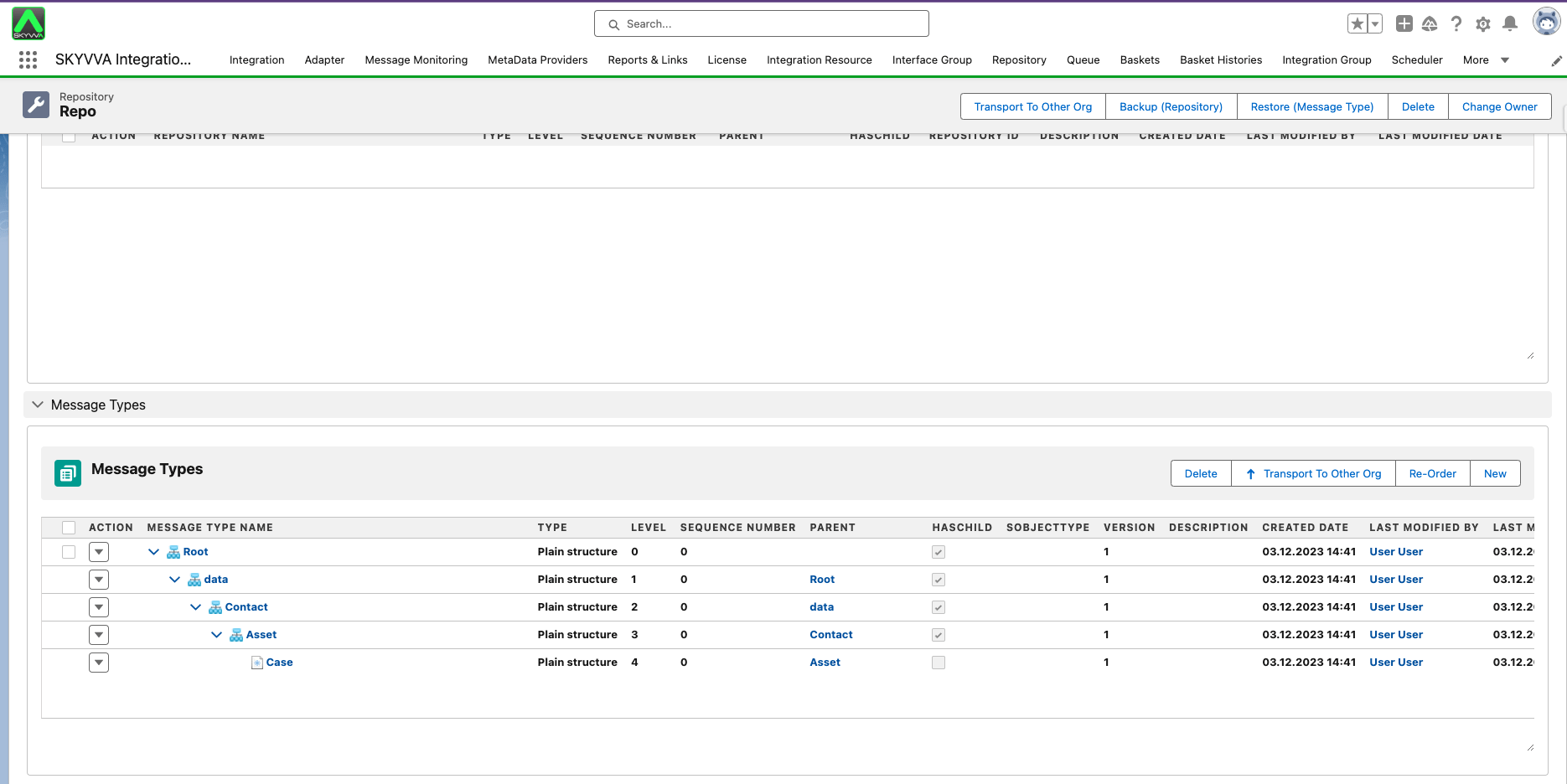
2.1. Create MetaData, Repository and Message Type:-
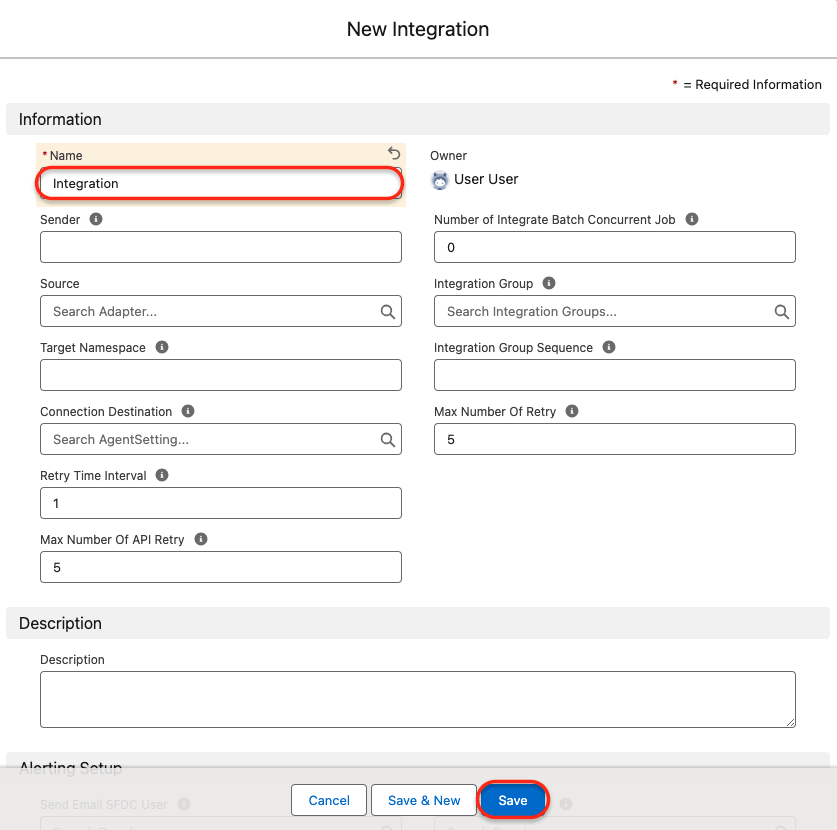
2.2. Create Integration:-
2.3. Create custom class :
- The custom code is given below to pass raw data (create the message):-
public with sharing class RawDataCustomProcessing extends AbstractIntegrationV3 {
List
Map
public override IServicesUtil.IMessageResult createMessage(AbstractIntegrationV3.DtoRequestBody dtoRequestBody,
AbstractIntegrationV3.DtoStructure dtoStr){
AbstractIntegrationV3.DtoInterface dtoIntfStructure = getInterfaceStructure();
// custom transaction
if(String.isBlank(dtoRequestBody.transactionId))dtoRequestBody.transactionId='YAML-Data-'+System.now().getTime();
// parse yaml payload to map// here using your own logic
Map
System.debug('>>dataAsMap: '+dataAsMap);
// i know exactly my data contain data node as array //{"NodeX":[{},{}]} List
// create mesage from root createMsg((Map
// overide create message logic public override IMessage__c invokeNewMessage( String rootId, String parentId, String transId, Boolean hasChild, Integer lv, String hPath, Boolean isRoot, Interfaces__c mInft, Map
// just using skyvva default message setting IMessage__c msg=super.invokeNewMessage(rootId,parentId,transId,hasChild,lv,hPath,isRoot,mInft,idata); msg.Name='IM#YAML-Data-'+System.now().getTime()+'---'+indexMsg; return msg; }
// hierarchy message creation void createMsg(Map
// ignore array or object, ingore childen datas if(valueX instanceof List
// System.debug('>>createMsg>idata: '+JSON.serializePretty(idata));
// get parent message if current creation is child IMessage__c parentMsg=mapParentIntfMsg.get(dtoIntfStructure.parentIntfId);
// current message, invoke create message setting IMessage__c msg = invokeNewMessage(rootMsg?.External_Id2__c,parentMsg?.External_Id2__c,transactionId,false,level,null,isRoot,super.mIntf.get(dtoIntfStructure.intfId),idata);
// save parent interface to message mapParentIntfMsg.put(dtoIntfStructure.intfId,msg);
// if current is root levelt then set it to children if(isRoot)rootMsg=msg; else {
// mark parent and grand parent as has child rootMsg.HasChild__c=true; parentMsg.HasChild__c=true; }
// create children message for(AbstractIntegrationV3.DtoInterface tmp : dtoIntfStructure.child){
// System.debug('>>createMsg>tmp.sourceObject: '+tmp.sourceObject); Object obj = objectX.get(tmp.sourceObject); if(obj==null){ // ingore case for (String field : objectX.keySet()) {
// find child node if(tmp.sourceObject.equalsIgnoreCase(field)){ obj = objectX.get(field); } } }
// System.debug('>>createMsg>obj: '+obj); // child message if(obj instanceof Map
// child message array else if(obj instanceof List
// logic parsing raw data --------------satrt
Map
void readByLine(String line,Map
// read children Integer nextLvl=indexOfNextLevel; while(!lines.isEmpty() && getIndexOfElement(lines.get(0))==nextLvl){ if(isElement(lines.get(0))){ child=new Map
- Copy and paste this code into the custom class. This example code will enable the reading of the data structure.

2.4. Create Interface:
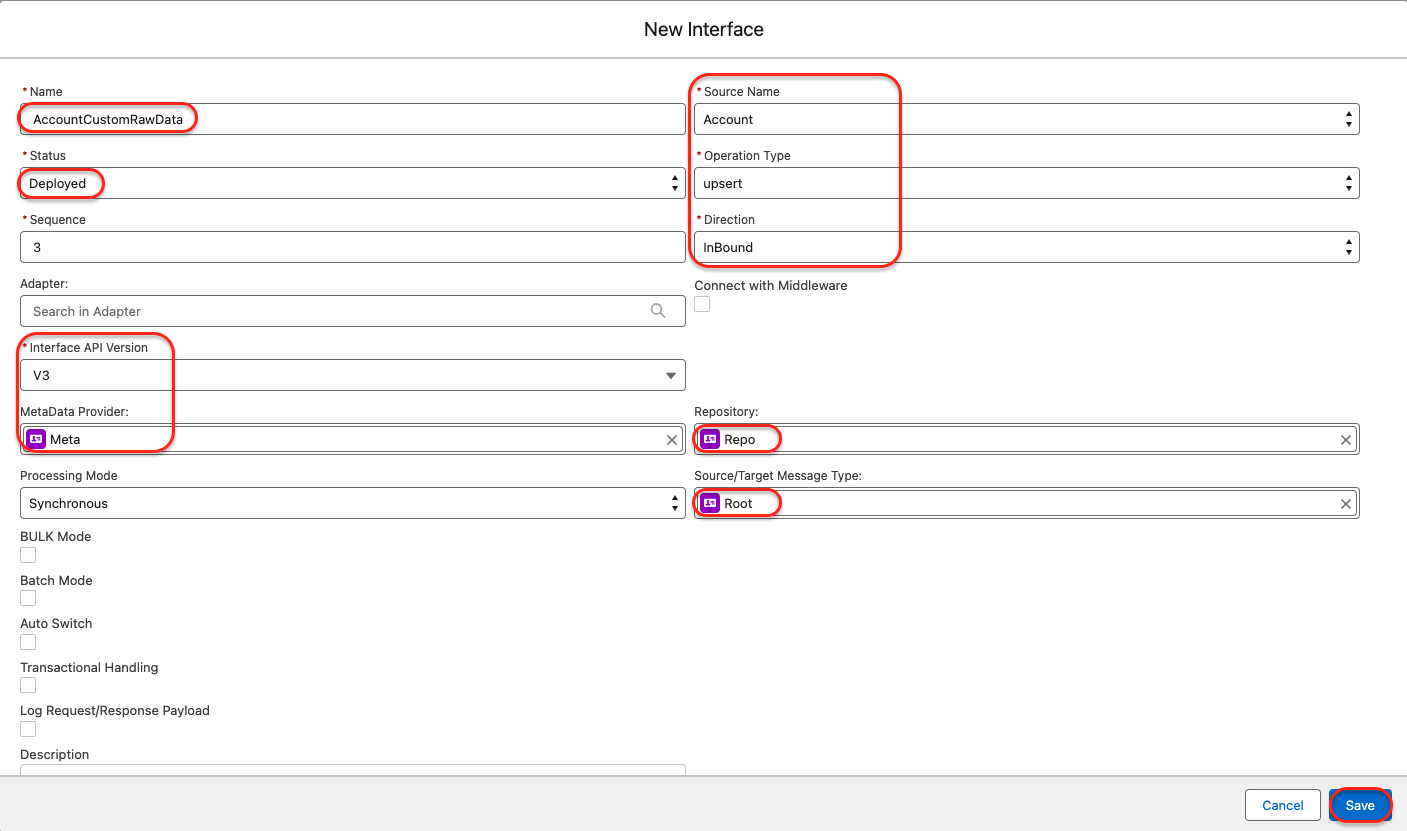
- In the Runtime Configuration Section of the Interface page we need to select two things which are shown in the picture given below:-
- To enable custom processing, check the 'Custom Processing' option. Once you have checked this option, you will be able to use a custom class for this interface. A custom Apex class is required to handle the specific processing for this interface.
- You also need to enter the custom processing class that you have created with the logic mentioned above.
- In the Custom Processing section, you need to select the block that you want to custom
- Select 'Message Creation' on "Custom Block to replace the SKYVVA Block". This is the block that you need to customize.

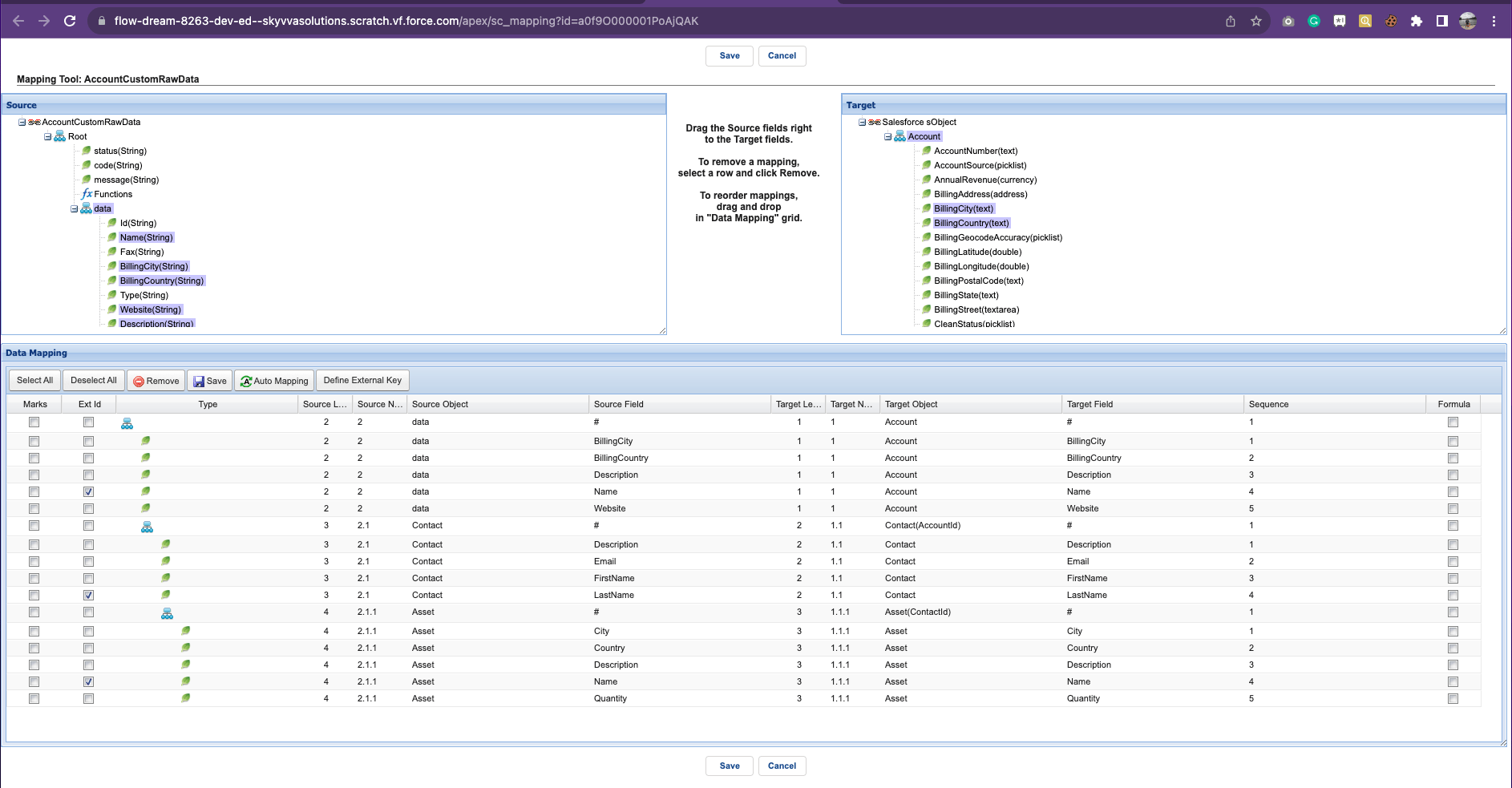
2.5. Do Mapping:
2.6. Call via V4/integrate

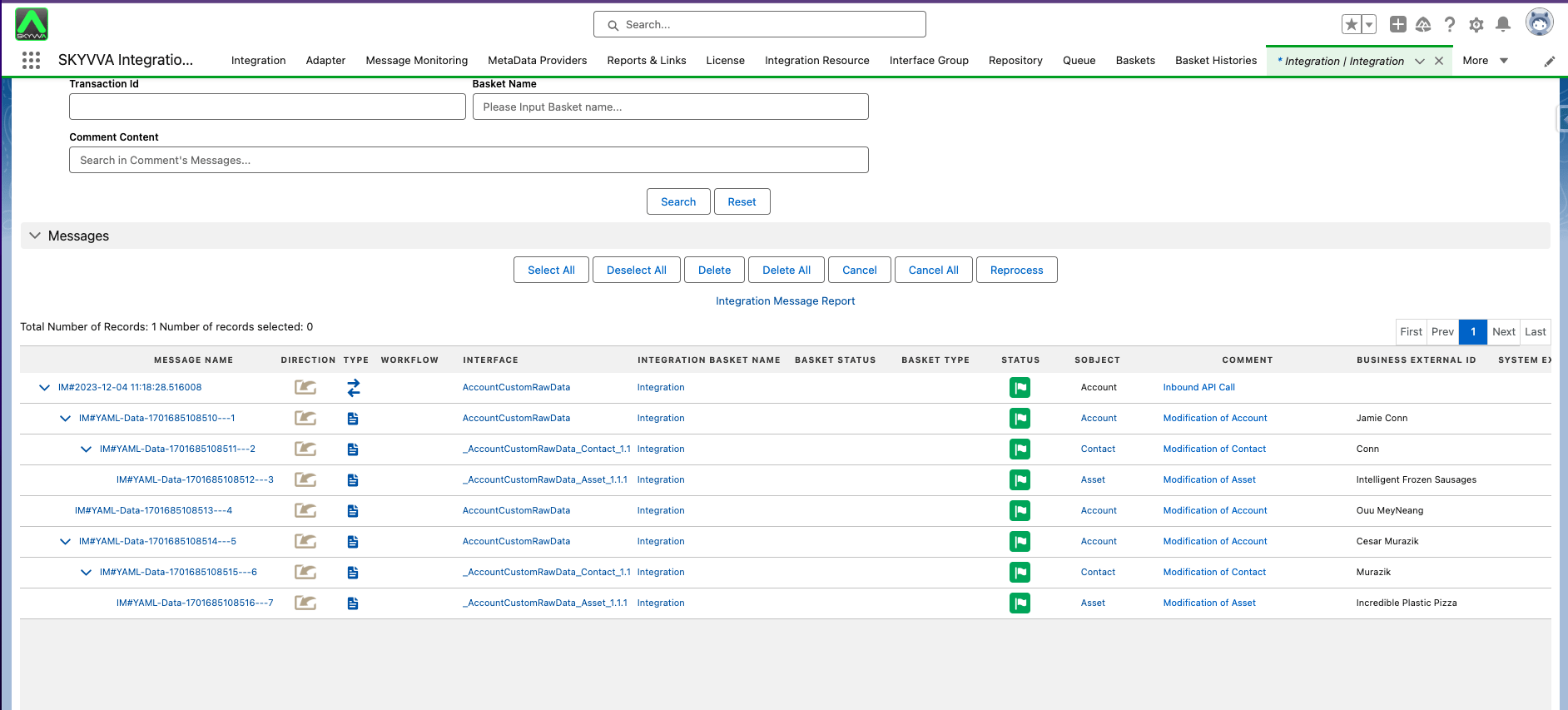
- After calling V4/integrate, it will read raw data and create the message.