11. New plug-in custom logic of the out bound processing
SKYVVA provide completely powerful processing way with new Version3 and allow for significant flexibility. New plug-in custom logic is normally refers to the processing which will give the ability for the solution to adapt to possible changes in your requirements. If user doesn't want to use our existing class and want to create his own class then he can add custom block. User can extend our existing class.

The picture shows the different location where the user can add their own logic. The green flow represents the standard processing flow without any custom enhancement.
- The process is started normally by a custom apex which invokes the method 'invokeCallout2()'. The method invokeCallout2() initiate the outbound processing flow with the four steps shown with the green block and flow.
- The second step is the mapping block. Mapping processing by default, mapping result of each message that is specified message-field
as key. - The third step is the new step 'Workflow'. The new steps in the processing flow where we add the step/block 'Workflow' to do the receiver routing before we send the data.
- The fourth step is the final step in the processing flow and contain the operation, for example, to send the data to a receiver.
Custom Processing Class: V3OutboundCustomStepProcessing Plug-in custom block before or after Skyvva step (Selection base on your requirement) Define the time and location where wecan chose to add our custom logic. Our custom logic can be apex class,flow or process. Your customer logic will be executed at the chosen time additinally ti the skyvvva processing Unit. In contrast to the custom block where the customer completely replaces the whole skyvva step by their own block here there is no need to replace but to plug-in custom logic before or after the skyvva standard block. We have the following plug-in block which could make sense:
- Before Mapping
- Before Workflow
- Before Operation
- After Processing
Replacement Skyvva step by custom block Name of the SKYVVA standard processing block which is used in the Inbound andoutbound message processing. The blue color flow and block show the position where the customer can replace their own logic of the skyvva standard step. Each of the four steps can be replaced by a corresponding custom block which can be an apex class. We have different configuration combining through the skyvva standard and custom replacement block. for examples, customer adds their processing by replacing the skyvva standard step. In the Case 1e customer have the own block for the first step e.g. how to query additional data for the sObject Id passed through the method invokeCallout2(). The other 3 blocks are the skyvva standard block. In case2 customer replace step 3 by their custom block and do the workflow processing in apex code based on the special requirement. In case3 customer replace two steps e.g. step 2 and 4 to build their own logic for the mapping and operation step. These are just three examples and another combination is possible based on the customer requirement.) Mixed case with custom replacement + plug-in block
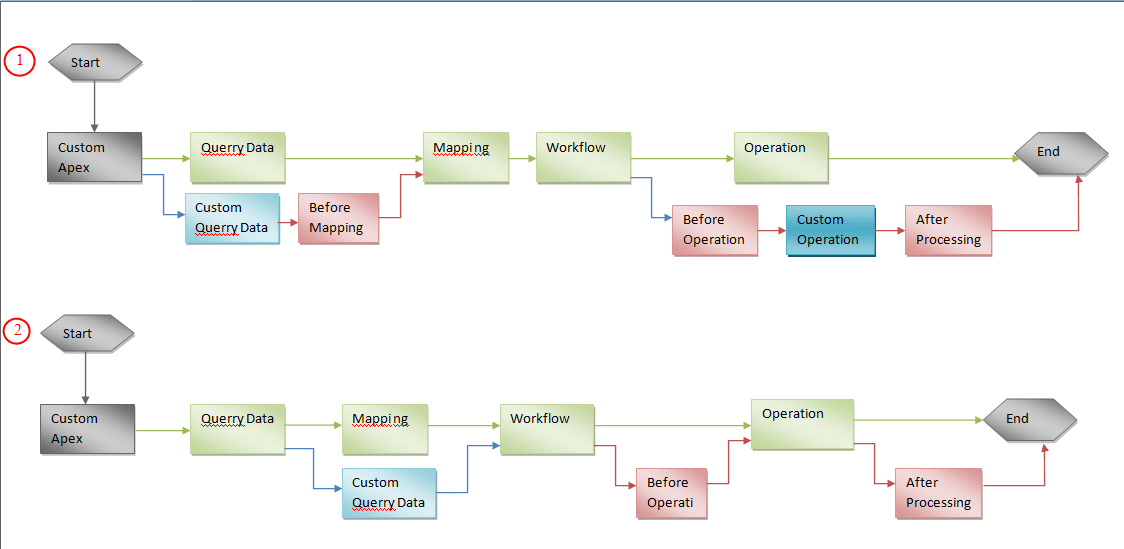
The above examples show the different type of custom logic enhancement to the skyvva standard step. The first possibility is to replace the whole skyvva step e.g. processing block. The second possibility is to add plug-in logic to the skyvva step/block. Combining these two type we have the mixture use case. Here we can define plug-in logic not only for the skyvva standard but also for the custom block. The Case1, shows that we have the custom block 'Custom Query Data' and the plug-in block 'Before Mapping'. Furthermore, we don't use the standard skyvva block 'Operation' but replace it by the custom block 'Custom Operation' and have the before and after plug-in logic, e.g. 'Before Operation' and 'After Processing'. In Case2 we replace the skyvva block 'Mapping' by the custom block 'Custom Mapping' and have plug-in block before and after the skyvva step 'Operation'.
How to create Custom class?
A Custom Class is a developer defined class. If user doesn't want to use our existing class and want to create his own class then he can add custom block. User can extend our existing class. Go to set up -> Search for Apex class -> Create new apex class.

[su_box title="Note" box_color="#2a8af0" title_color="#000000"] Accessing any class and sObject in SKYVVA’s package must be prefixed by namespace skyvvasolutions.[/su_box]
Use the following Custom Processing Class: V3OutboundCustomStepProcessing; [aux_code language="javascript" theme="tomorrow" title="" extra_classes=""] global class V3OutboundCustomStepProcessing extends skyvvasolutions.V3OutboundStepProcessing{ /* //Custom Query Operation global override List
//Before Mapping global override IServicesUtil.IMessageResult beforeMapping(IServicesUtil.IMessageResult mr){ //Custom Logic System.debug('V3OutboundCustomStepProcessing beforeMapping method invoked'); return mr; }
/* //Custom Mapping Operation global override Map
//Before WorkFlow global override IServicesUtil.IMessageResult beforeWorkFlow(IServicesUtil.IMessageResult mr, Map
/* //workflow step global override IServicesUtil.IMessageResult executeWorkFlow(IWorkFlow__c wf, IServicesUtil.IMessageResult mr, Map
//Before Operation global override void beforeOperation(List
/* //Custom Operation global override V3OutboundUtils.Response executeOperation(Adapter__c adapter, List
//After Operation global override void afterOperation(V3OutboundUtils.Response response){ //Custom Logic System.debug('V3OutboundCustomStepProcessing afterOperation method invoked'); } } [/aux_code]
When the process start user can change anything or want to add/ remove anything from records then he can add his logic in before class. Every process is executed step by step where we can add our plug in.
V3OutboundStepProcessing methods Description
query(String soql, List
beforeMapping(IServicesUtil.IMessageResult mr) It will be executed if interface is setting <Custom Plug-in to SKYVVA Block: Before Mapping>, return skyvvasolution. IServicesUtil.IMessageResult which contains list message and map of source data the in the ordered index. Those objectes should be cloned to bypass the reference of
executeMapping(IServicesUtil.IMessageResult mr, List
beforeWorkFlow(IServicesUtil.IMessageResult mr, Map
executeWorkFlow(IWorkFlow c wf, IServicesUtil.IMessageResult mr, Map
beforeOperation(List
exe cuteOperation(Adapter c adapter, List
afterOperation(V3OutboundUtils.Response response) It is execute after operation and return nothing. <Custom Plug-in to SKYVVA Block: After Processing>
[su_box title="Note" box_color="#2a8af0" title_color="#000000"] Due to DML does not allow to execute before invoke callout from salesforce. So the DML cannot be executed in those steps before the step operation (executeOperation), yet if interface has defined some workflows routes the message to different target outbound interfaces, the DML can’t execute in all steps because the API will execute other target interface in the next workflow.[/su_box]
Adapter:
Outbound adapter is needed to push data from salesforce to the external system. We need create an adapter before Interface then we can set adapter to use with interface. There are different adapter available with skyvva.
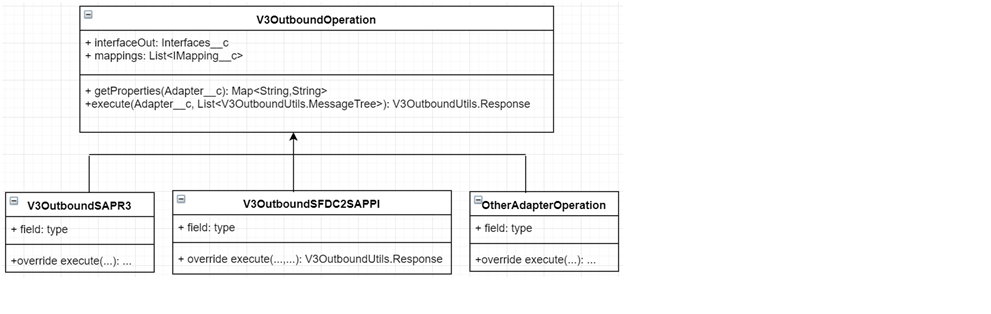
V3OutboundStepProcessing methods/attributes Description
execute(Adapter c adapter, List
getProperties(Adapter c adapter) Return map as pairs of key-value of adapter’s property such as username, password, endpoint, …
executeInbound(V3OutboundUtils.Response response) It should be overridden if doing inbound processing or execute and DML after callout.
interfaceOut skyvvasolutions Interfaces c
mappings List
inputParam skyvvasolutions.CallOutControl, the parameters are passing from the caller
outResponse skyvvasolutions.CalloutResponse, the data that response to the caller (i.e http-response such as JSON, XML)
Pre-requisite:
- Create custom class.
- Create Rest/Soap Adapter.
- Create message type as per template.
- Create Integration.

- Create outbound Interface
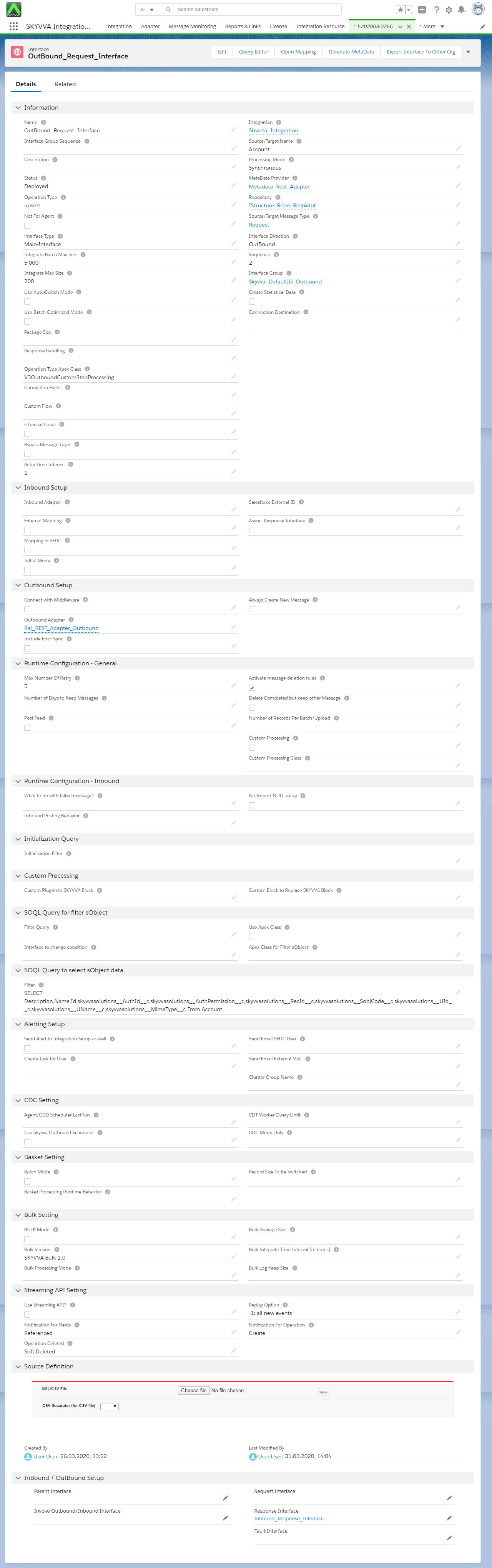
How to use Custom Step Processing class (Outbound Custom Plugin Enhancement)?
You need to set properties on Inbound Interface Record:
- Select Custom Processing checkbox.
- Custom Processing Class: V3OutboundCustomStepProcessing
- You need to set two properties on Interface Object:Operation Type: Apex ClassAnd
4. Select Any Step: [aux_code language="javascript" theme="tomorrow" title="" extra_classes=""] Custom Plug-in to SKYVVA Block Help: (Selection base on your need) OR Custom Block to Replace SKYVVA Block Help: (Selection base on your need) [/aux_code]

- Go to mapping page. And Do mapping.


Execute the following code: [aux_code language="javascript" theme="tomorrow" title="" extra_classes=""] skyvvasolutions.CallOutControl c = new skyvvasolutions.CallOutControl(); c.returnJSONComplete=true; c.actionDoIntegrate=true; c.isCreateMessage=true; String[] ids= new String[]{'0011X00000U5rygQAB','0011X00000U5ryhQAB'}; skyvvasolutions.Iservices.invokeCalloutV3('Your Integration Name','Your Interface Name',ids,'SYNC',c); [/aux_code]
- You can check the result on message monitoring.
