5. Batch reprocessing
A job runs to process batches that use API Dynamic Switch where incoming data goes automatically to be processed as synchronous, batch, or bulk. And when messages get failed or are pending then it gets reprocessed.
What is batch reprocessing?
- In batch processing, we are storing data into an attachment or file.
- In the batch control board, we can see data into a basket and basket is linked to the attachment(File where we can see JSON record).
- we have a scheduler for processing and reprocessing of the basket. It processes the basket and then we can see messages in the message monitoring. We can also do it manually we can select baskets as per our choice and can process it manually. We can do it using the scheduler too. Processing the basket and then basket gets failed due to the error then the reprocessing can pick up the basket again and reprocess it again then its a reprocessing of the basket.
- There is a difference between reprocessing of basket and reprocessing of the message. To understand the reprocessing of messages check the example which will give a clear view, for example, If we have 5 messages in the basket and 4 of them show a green flag and 1 shows the red flag in message monitoring then it means we need to do message reprocessing not basket reprocessing because the message got failed not basket.
- Batch Reprocessing is used for running a batch job for a pending or failed message. It has more capability than synchronous and we can check job monitoring. The job must contain more than 200 and less than 5000 records, o we can utilize it with batch reprocessing. When Batch reprocessing job ran all the basket stay in this Integration will be reprocessed.
IntegrateMaxSize: A maximum number of records that the Skyvva integration agent can integrate utilizing methods integrate () is the default value of 200. If the number of records to be integrated is more immensely colossal than the value, the agent will switch the API mode automatically. IntegrateBatchMaxSize: A maximum number of the record that Skyvva integration agent can integrate utilizing method integrateBatch() is the default value of 5000. If a number of records to be integrated is more astronomically immense than this value, the agent will switch to the bulk API method automatically.
Pre-requisite
- Create Integration.
- Create the Interface. (Inbound Interface)
How to create batch using “Use Auto-Switch Mode”?
Auto-switch mode is a data processing mode. To check this mode, Follow steps given below:
- Open Interface
- Click on the Edit button.
- Check the "Use Auto-Switch Mode" field.
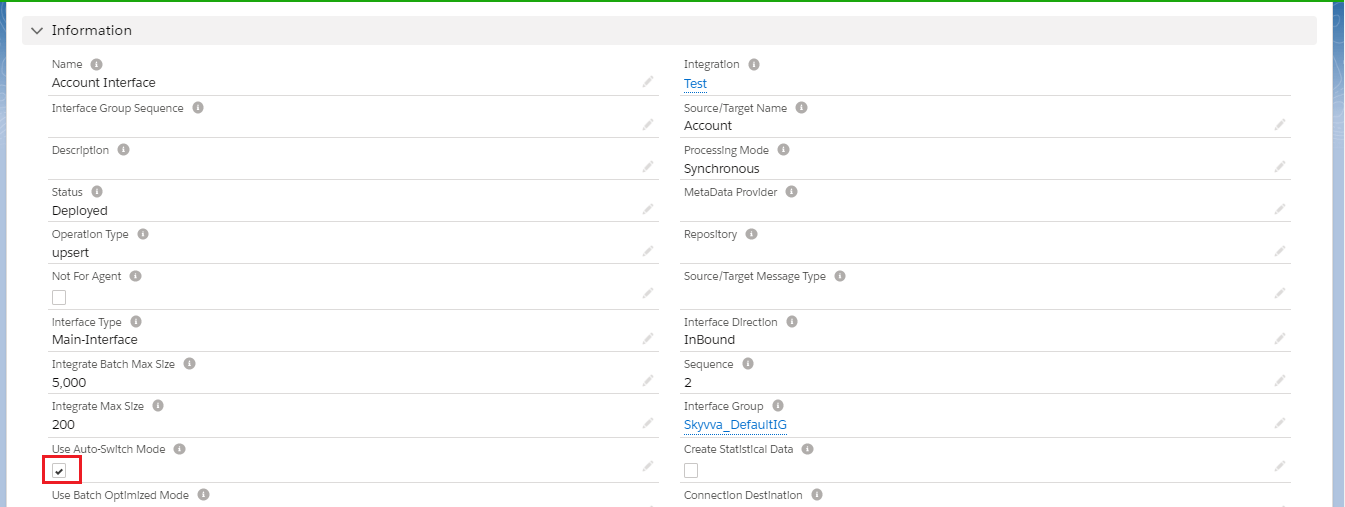
- Upload data using an agent. Now you can check results on the batch control board of your salesforce org.

- As we can see in the picture there are 2 baskets. We can reprocess the basket if the basket failed.
- So we have two ways for basket reprocessing.
- We can do it manually by selecting a basket and then click on the reprocess button as shown below. So all baskets stay in this Integration will be reprocessed.
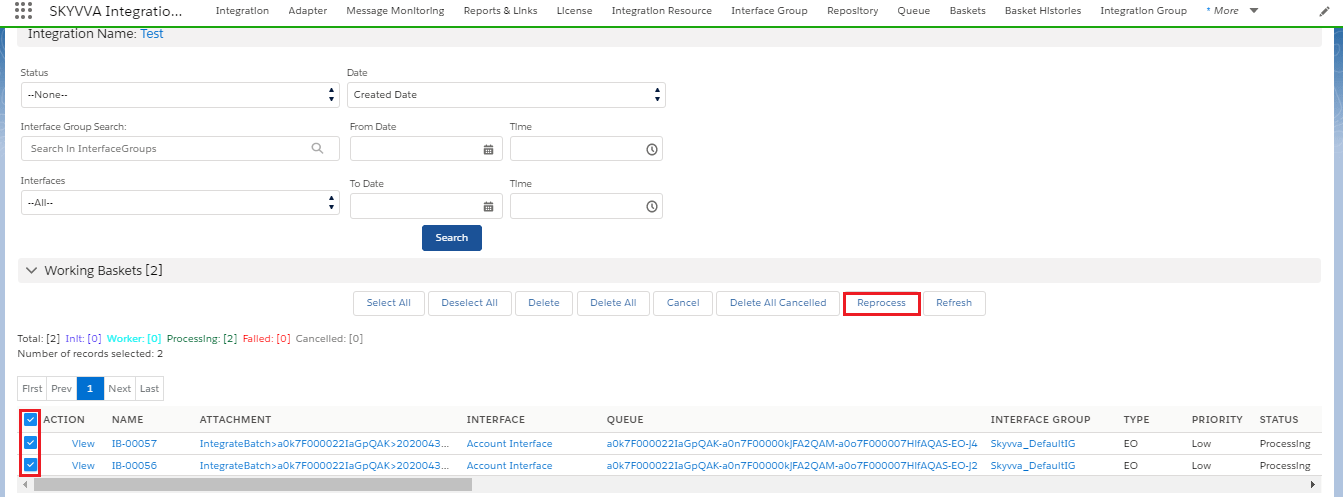
- We can see a reprocessed basket as shown below in History basket.

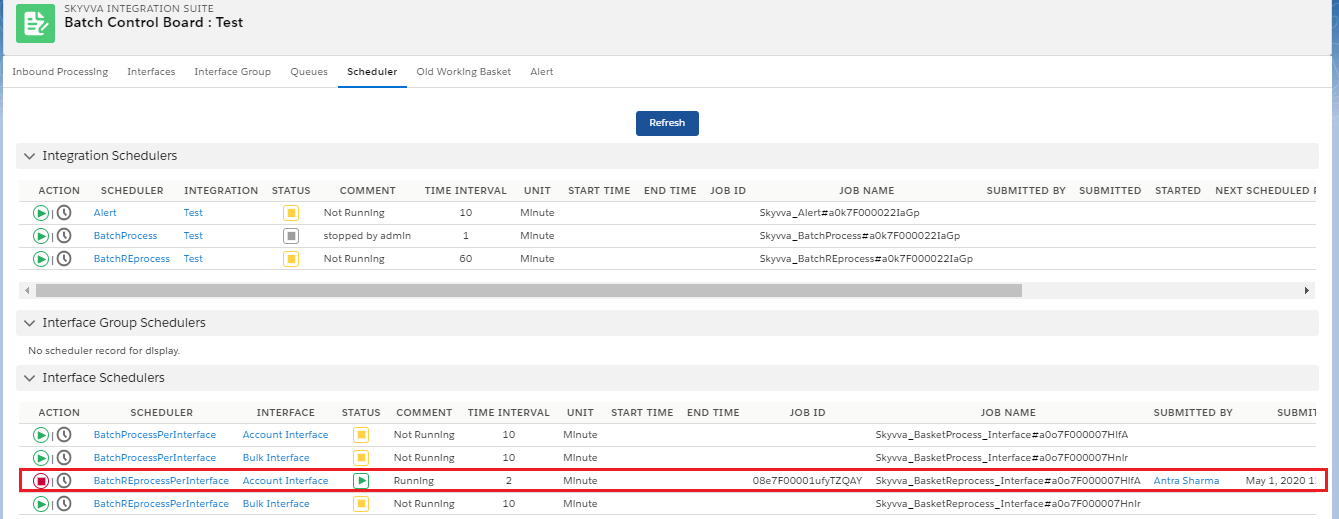
- Another way where we can reprocess by using the scheduler. As shown below.
How to create batch by Configuring Basket settings?
- We just need to configure the Basket setting section as shown below. All other procedure is the same as we have seen in this section "How to create batch using “Use Auto-Switch Mode”?

- Batch mode:- Check this field if we want to process as batch mode.
- Basket Processing Runtime behavior:- Set to "Dynamic switch based on record size" if you want to switch based on the record number inside the message to use synchronous or batch posting.
- Record Size To Be Switched:- This field is used only in the combination of the field "Runtime behavior" with the value "Dynamic switch based on record size". Set here a number from which to switch to use batch processing e.g. create basket instead of posting immediately and synchronously.