4. Sending data in real-time
This concept is about outbound interface processing. The real-time outbound interface can be done in different ways i.e Using a button, Using trigger, Using the process builder.
What is real-time outbound processing?
For outbound processing, we have two categories:-
- Synchronous:- Apex code wait for the response of the HTTP callout.
- Asynchronous:- Apex code doesn't wait for the response of the HTTP callout. It can have a response which is an asynchronous response. This response can come at any time.
Synchronous interface mostly has a response which means that we will create a response interface to handle the response. An asynchronous interface mostly doesn't have a response. But this is not true for all cases. We could have an asynchronous interface which has a response interface. In this case, the apex code doesn't wait and get blocked. The response will come back at a later time. In this case, we have an asynchronous scenario with an asynchronous response. But for the synchronous interface, we should always expect to have a response and the apex code is waiting as long as it will take time until the response is coming back. If the response doesn't come back at the allowed time e.g. 120 sec. then we will get a governor limit exception time out.
- The steps in the asynchronous processing are as follows:-
- Execute the SOQL statement from the interface to read the business data.
- Create the message (outbound message) with status "Pending".
- Do request mapping.
- Convert to XML, JSON and send it out h an adapter.
- Check the result of the HTTP callout and update the status of the outbound message.
- For synchronous processing, the steps are as follows:-
- Execute the SOQL statement from the interface to read the business data
- Create the request message (outbound message) with status "Pending"
- Do request mapping
- Convert to XML, JSON and send it out through an adapter e.g. make an HTTP callout.
- Wait for the response. When the response comes then parse the response and call the inbound processing to execute the response interface
For the asynchronous scenario, we need the outbound message to reprocess it again. For synchronous scenario, we normally and mostly do not need the outbound message to reprocess. If the call for example to Google web service fails the user will issue the call again. This is true when the end-user carries the action. But what is when the action is not carried by the user but for example from a trigger or process builder process? In this case, a background process is the trigger of the action and if something going failed there is no user to repeat the action again. Therefore, in this case, we need an outbound message so that the reprocessing job or the user can reprocess the call again. Technically we can handover the interface processing to the future, queueable or batch apex.
How to build a real-time outbound interface?
The realtime outbound interface we can do in a different way:-
- Using a button on, for example, a sObject Account and put the code to do the callout with invokeCallout2().
- Using a trigger. In this case, it fires when a record is changed.
- Using the process builder. This is quite the same as the trigger. The difference here is that you have a graphical design tool to define the condition when a record should be sent.
How to create real-time outbound Interface using Button:-
This feature uses our invokeCallout2() method. This method support SAP, SAP-PI, SAP-R/3, SFDC2SAPPI, SOAP, REST adapter types. The response could be a text of JSON, XML, List
We get a real-time response in SYNC mode only. Input Parameters: -Integration name: Integration Name
-Interface name: Interface name
-ids: Collection of sObject id
-Mode: SYNC, FUTURE, BATCH, AUTO
CallOutControl Flag CalloutResponse (Attributes) SAP SAP-PI SAP-R/3 SFDC2SAPPI SOAP REST
returnJSONComplete true String payloadJSON no no no no yes yes
returnXml true String payloadXML no no no yes yes yes
returnListRecord true List
returnIMessages true
no no no no no no
actionDoIntegrate false Does not process interface invoke call In/Out
actionDoMapping true Does nothing with this flag
isCreateMessage false Does not upsert message only in mode SYNC, Otherwise message will upsert.
isBypassDML true Does not upsert messages, interface, log file
Pre-Requisite:-
- Create Integration.
- Create Adapter.
Steps to create USecase: Step 1:- Outbound Interface:
- Create Interface ->direction:Outbound
- Select Outbound adapter as shown in the picture below:-
- Add SOQL statement.
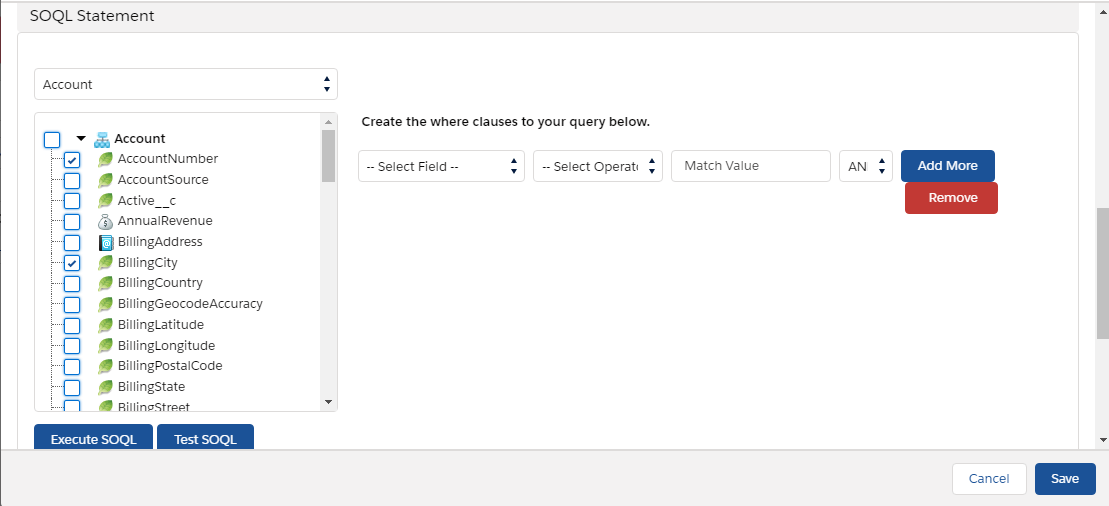
We have to select fields on which we have to build the query. For example, here we have selected three fields AccountNumber, BillingCity, and Name. And mapping data. Click on the outbound interface to show detail and do mapping data as shown below:

Step 2:- Execute Apex code in the developer console:-
- Navigate to the developer console.
- Click on debug.
- Open Anonymous window.
- Enter Code.
"The code and the picture is shown below"
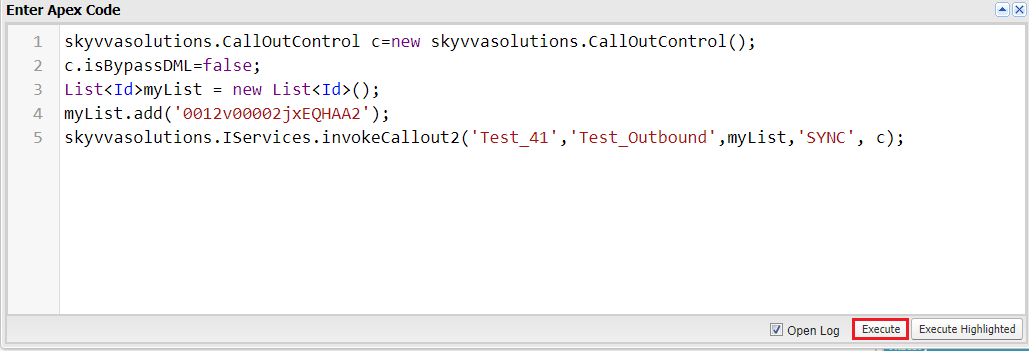
[aux_code language="javascript" theme="tomorrow" title="" extra_classes=""]skyvvasolutions.CallOutControl c=new skyvvasolutions.CallOutControl(); c.isBypassDML=false; List
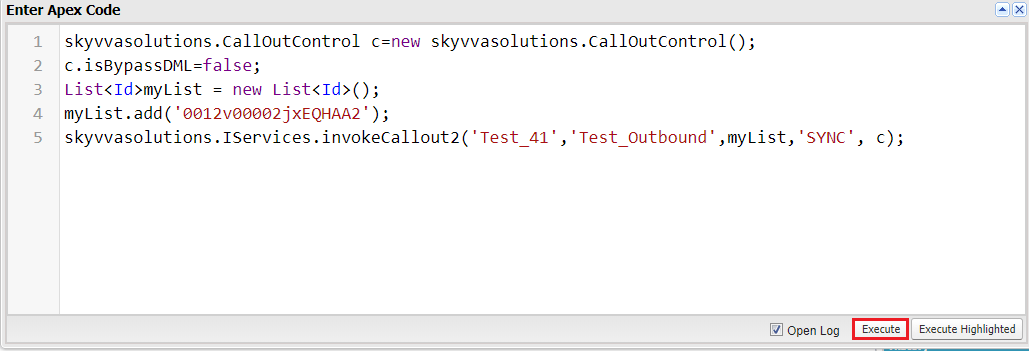
Check it on message monitoring:-
How to create real-time outbound Interface using Trigger
In integration admin, there is a new tab called "SKYVVA Trigger" which allows the user to configure in a graphical user interface the following settings:
- Select box "Triggering Method": Button, APEX Trigger
- Select box "Mode": Immediate, Batch
- SFDC object: List of all Objects in the Org
- Interface to trigger: List of all Interfaces in the Org
SKYVVA Trigger tab uses to generate script trigger automatic for Button and Apex Trigger. Go to “Integration Admin” tab > click on the tab “SKYVVA Trigger”
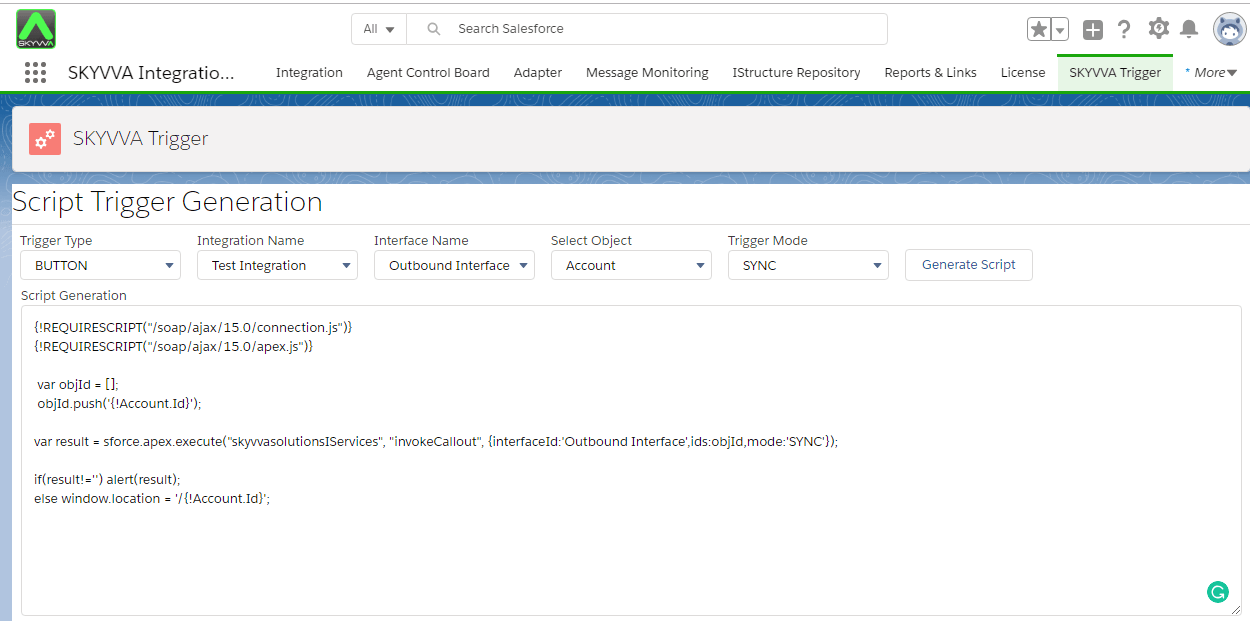
It can generate two kinds of the script:-
- Generate Script Trigger Button
- Generate Script Trigger Apex
1. Generate Script Trigger Button
- Select the Trigger Type “BUTTON”
- Select your Integration Name
- Select your Interface Name (show only outbound interface)
- Select SObject Name
- Select Trigger Mode: Sync,Future,Batch
- Click button “Generate Script”
- Now you will see the script trigger button in the box and can copy to use it
2. Generate Script Trigger Apex
- Select Trigger Type “APEX TRIGGER”
- Tick Trigger Event (can tick more than one)
- Select your Integration Name
- Select your Interface Name (show only outbound interface)
- Select SObject Name
- Select Trigger Mode : None,Auto,Future,Batch
- Click button “Generate Script”
- Now you will see the script apex trigger in the box and can copy to use it
- In the script, change to your own name
to your own name

At the last select with Trigger Mode, button “Generate Script” will visible.
How to create real-time outbound Interface using Process builder
Process Builder is a Salesforce’s point-and-click tool that lets you easily automate if/then business processes and see a graphical representation of your process as you build. Every process consists of a trigger, at least one criteria node, and at least one action. You can configure immediate actions or schedule actions to be executed at a specific time. To keep things simple, this unit focuses on the most common process type: Record Change, which means the process, will start when the records are created or edited.
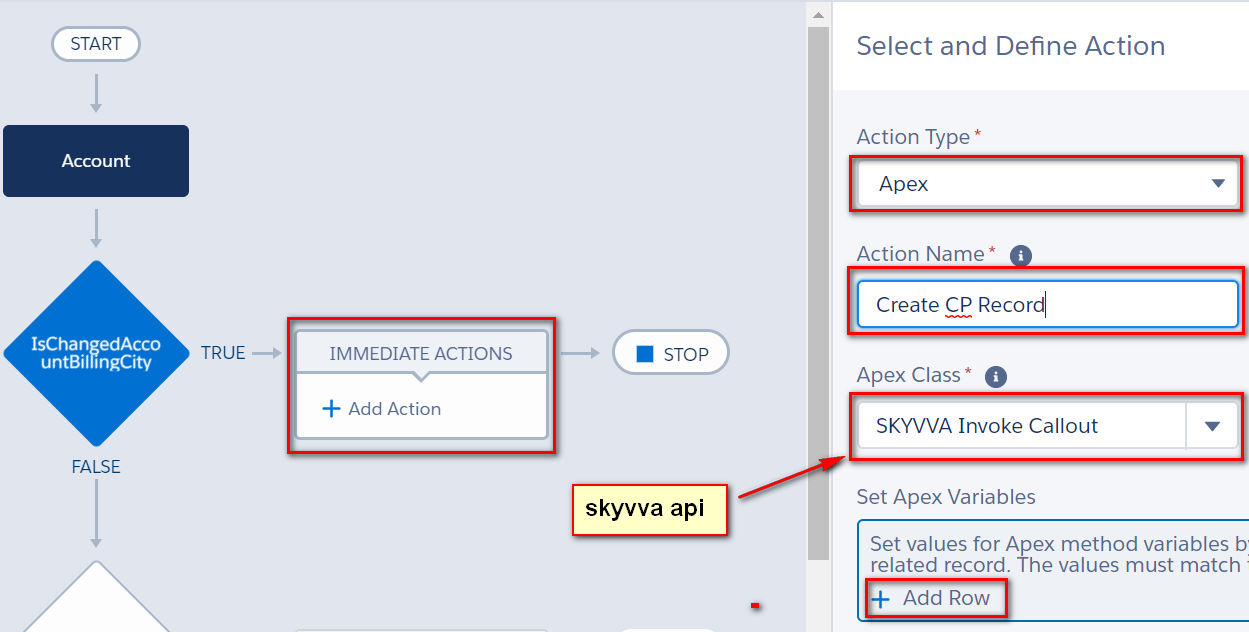
- Create a process builder to create CP Record


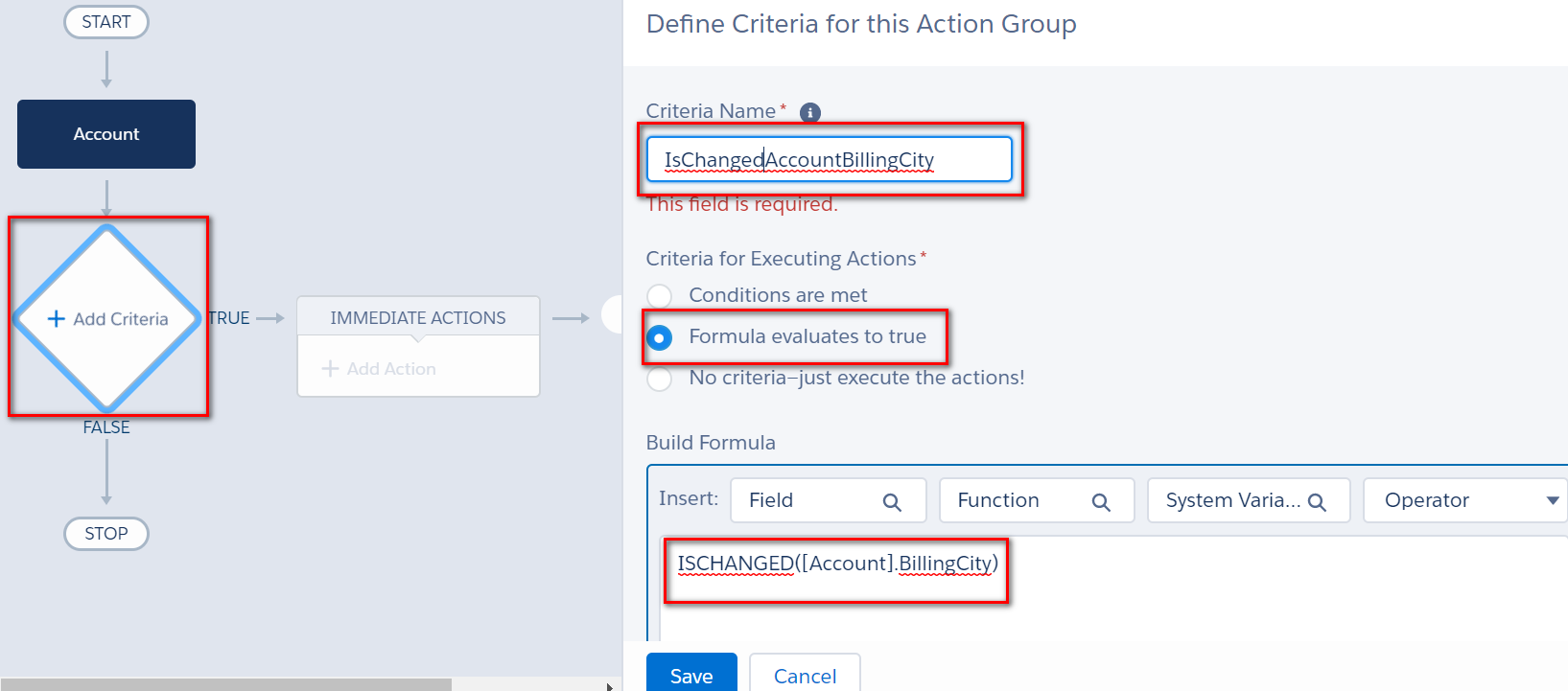
Select SKYVVA apex API
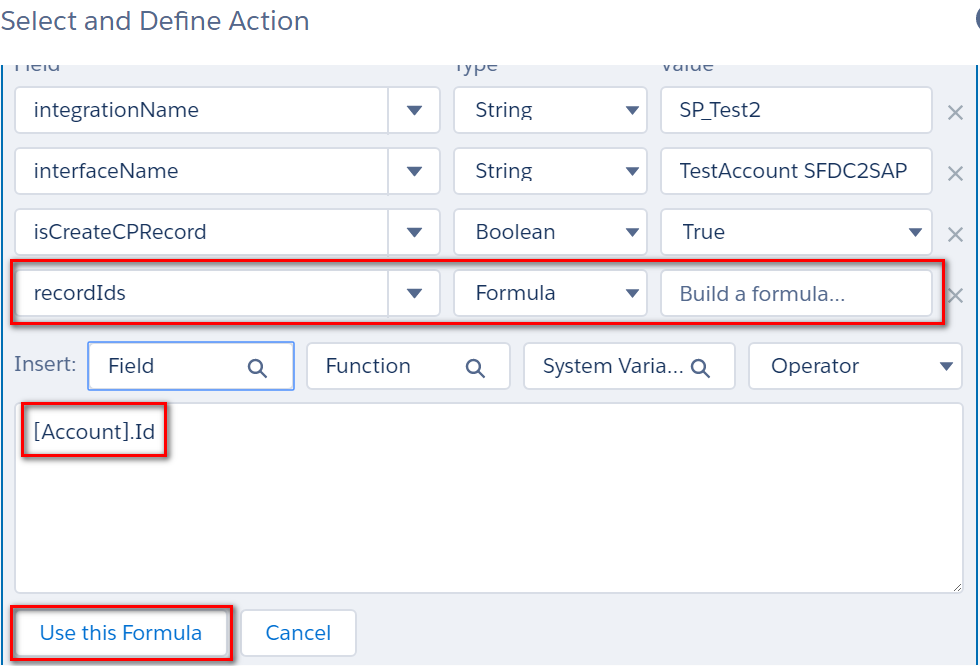
Add input definition Setting apex variable values: integrationName: integration name Interface name: interface name: isCreateCPRecord: True (False, if the value is not specified) recordIds: salesforce sObject.Id (i.e Account.Id)

You can test modification account from the screen and Save. I have executed mass update 10 account in developer console then got 10 CP records

- Process Builder executes callout.
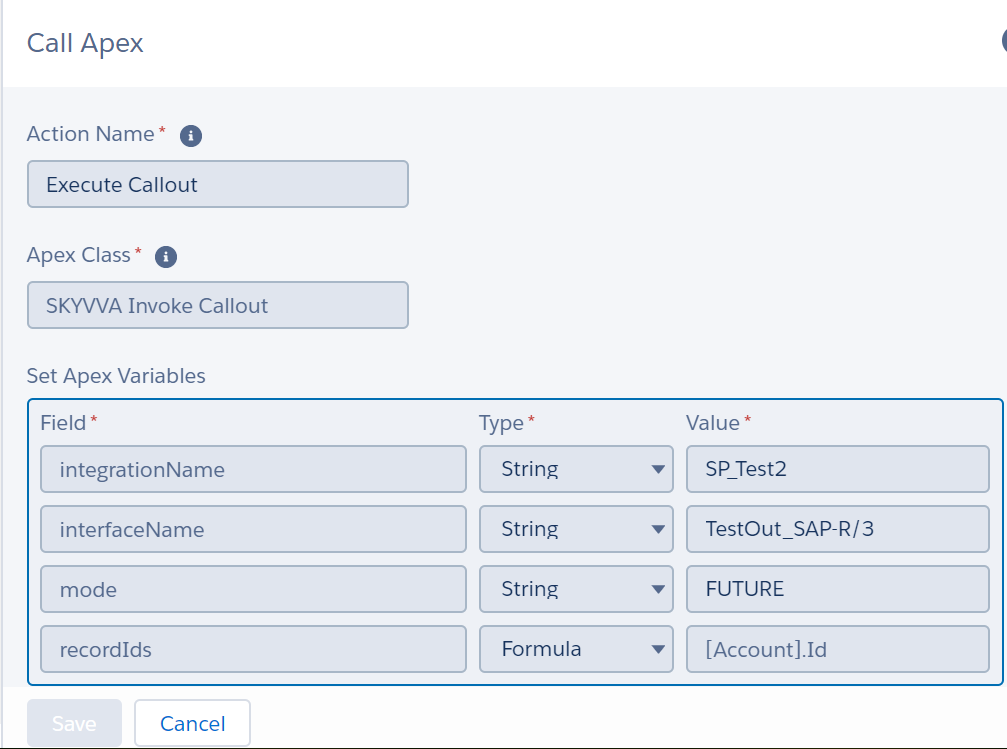
You can edit the account on screen the save, then check the message on message-monitoring.