75. How to use LAST_INTERFACE_DATETIME() function?
Introduction
Date Formats and Date Literals
In a SOQL query, you can specify either a particular date or a date literal. A date literal is a fixed expression that represents a relative range of time, such as last month, this week, year.
DateTime field values are stored as Coordinated Universal Time (UTC). When a DateTime value is returned in Salesforce, it’s adjusted for the time zone specified in your org preferences. SOQL queries, however, return DateTime field values as UTC values. If you want to process these values in different time zones, your application might need to handle the conversion.
Date Formats
A fieldExpression uses different date formats for date and DateTime fields. If you specify a DateTime format in a query, you can filter only on DateTime fields. Similarly, if you specify a date format value, you can filter only on date fields.:
Format
#### Format Syntax
Example
Date only YYYY-MM-DD 2010-01-01
Date, time, and time zone offset
- YYYY-MM-DDThh:mm:ss+hh:mm
- YYYY-MM-DDThh:mm:ss-hh:mm
- YYYY-MM-DDThh:mm:ssZ
- 2010-01-01T23:01:01+01:00
- 2010-01-01T23:01:01-08:00
- 2010-01-01T23:01:01Z
[su_box title="Note" box_color="#2a8af0" title_color="#000000"]The zone offset is always from UTC. For more information, see links: D ISO 8601 Date and Time Formats
[/su_box]
LAST_INTERFACE_DATE() for outbound direction
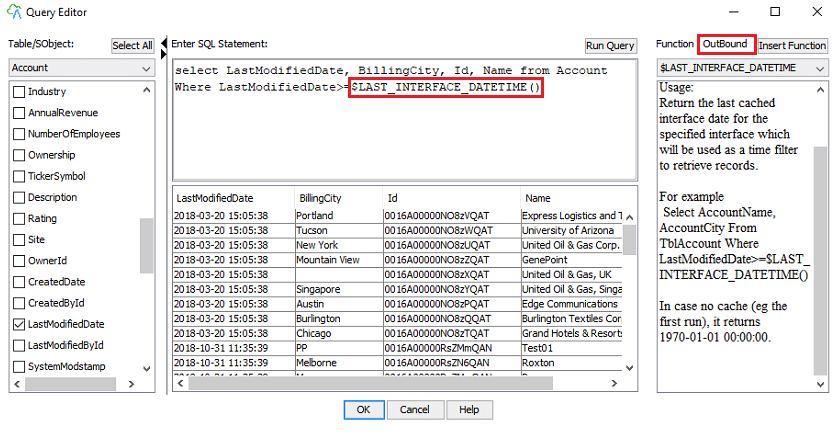
The “LAST_INTEGRATION_DATE” function is created to specific for SKYVVA inbound direction. Additionally, the outbound direction is required to add in order to complete the lack of functionally. This function allows the user to retrieve or query the new records which have been modified after the last run date with Agent. You can export data from Salesforce to SQL Server with the syntax: $LAST_INTERFACE_DATETIME(). To configure the function, there are some steps should be followed:
- Enter Query section on Interface Source Definition. Use $LAST_INTERFACE _DATETIME() to query data from SQL Server that focus on column Lastdate
2. Set scheduler to process on Agent
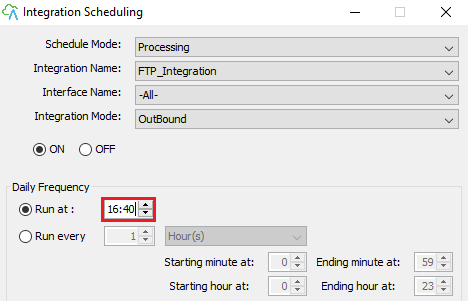
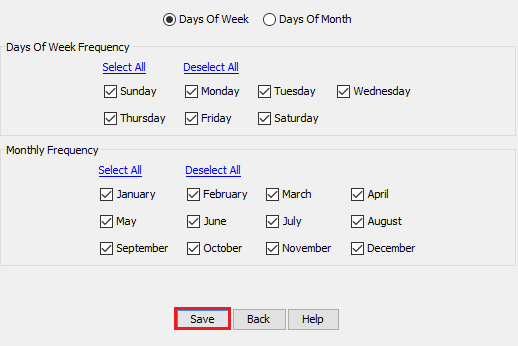
You can monitor this function by:
- Enter Salesforce and go to the Integration page. Click on Interface tab and check the result of data that you had the process.

- After the schedule done process it creates file automatically in Agent file location.

User can see that screenshot above show File cache DateTime after scheduler completed [su_box title="Note" box_color="#2a8af0" title_color="#000000"]This function you will get only new creation or update records after a successful outbound transfer.[/su_box]