1. REST API
REST API
REST is an architectural style of web services that work as a channel of communication between different computers or systems on the internet. The term REST API is something else. Those application programming interfaces that are backed by the architectural style of the REST architectural system are called REST APIs. REST API compliant web services, database systems, and computer systems permit requesting systems to get robust access and redefine representations of web-based resources by deploying a predefined set of stateless protocols and standard operations. By these protocols and operations and redeploying the manageable and updatable components without causing the effect on the system, REST API systems deliver fast performance, reliability, and more progression.

Explaining a Simple REST Example IntegrateBatch
The examples in this section use REST API resources to create, retrieve, update, and delete records, along with other record-related operations.
- Open SoapUI
- Click on REST

Login to your Salesforce org
- Go to setup
- Copy your URL

- Paste URL here to create new REST project
- Click ok
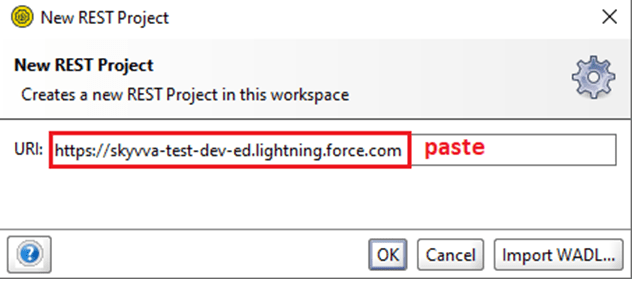
- Rest project created.

- Expand URL
- Right-click on Request
- Click on Clone Request


- Specify the name of cloned Request
- Eg. Authorization
- Click ok
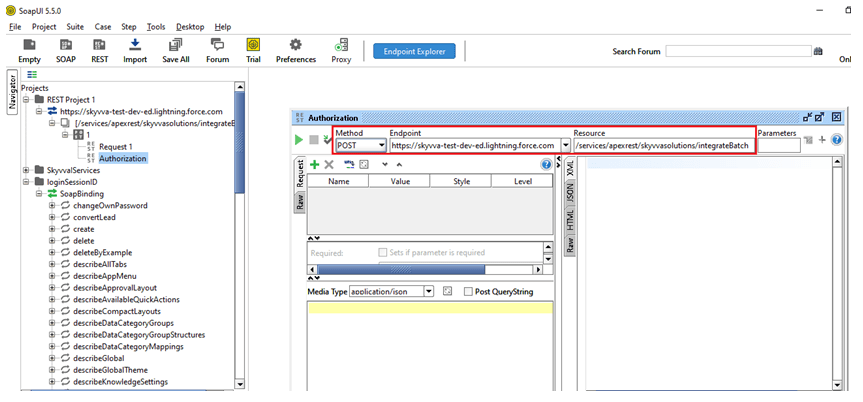
Now here something is very important Method POST Endpoint URL: https://skyvva-test-dev-ed.lightning.force.com/ RESOURCE : /services/apexrest/skyvvasolutions/integrateBatch
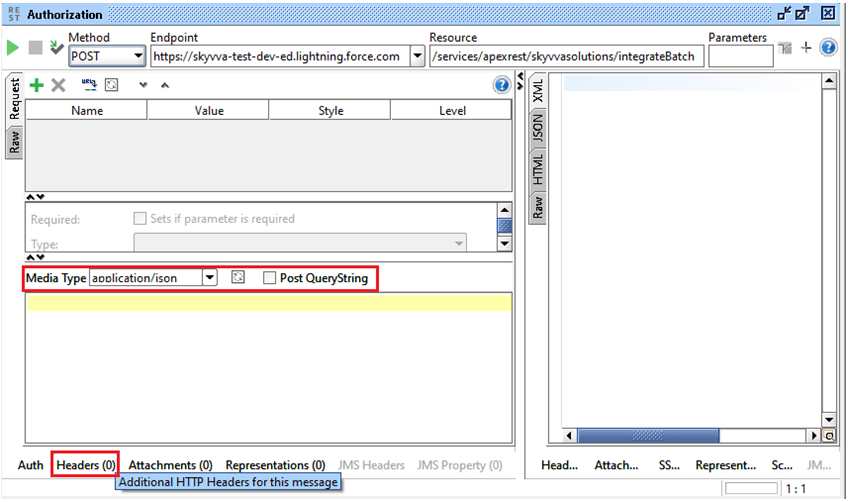
- Media type by default application/json where we post. (json is the format)
- Header its some tricky although it is easy
- Click on Header
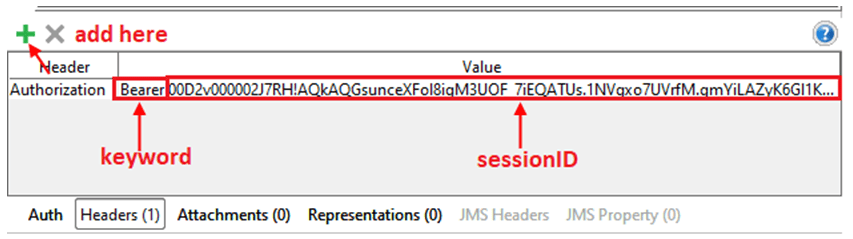
- Add header name eg. Authorization
- A bearer is a keyword after press space key
- Paste your sessionID
- Press enter key
Now go back to your salesforce org
- Create Integration & copy IntegrationID
- Create Interface & copy Interface Name

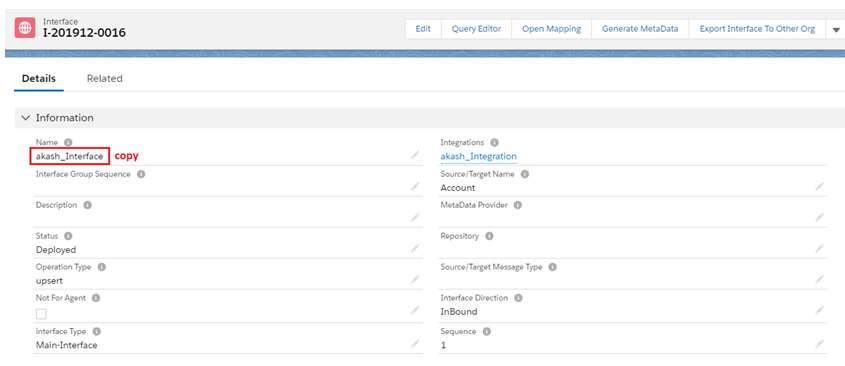
Click on Related List & create IStructure
- Name
- BillingCity
- BillingCountry

- Click on Open Mapping button
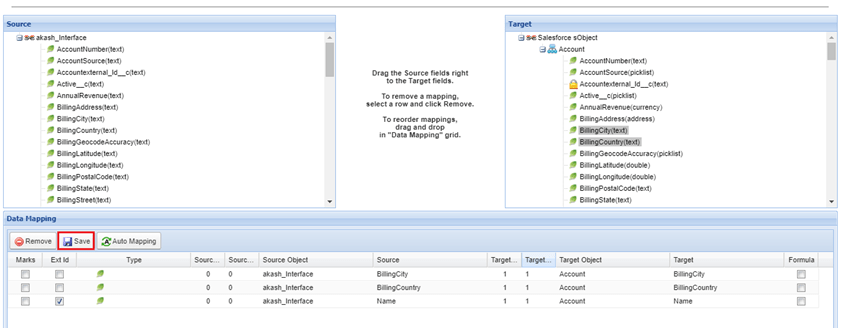
- Select Ext Id & Save
Go to SoapUI Paste this code under Media type section URL : https://skyvva-test-dev-ed.lightning.force.com/ RESOURCE: /services/apexrest/skyvvasolutions/integrateBatch [aux_code language="javascript" theme="tomorrow" title="" extra_classes=""]{ "INTEGRATIONID" : "a0W2v000019ePQOEA2", "INTERFACENAME" : "akash_Interface", "messages": [ { "BillingCountry": "Cam", "Name": "Test01", "BillingCity": "PP" }, { "BillingCountry": "Cam", "Name": "Test02", "BillingCity": "PP" }, { "BillingCountry": "Cam", "Name": "Test03", "BillingCity": "PP" } ] }[/aux_code]

- Paste the code and submit it.

Great you pass
- Number Of Records": "3"
- Basket Name": "IB-00000"
- Basket Id": "a0A2V0000uHgCiEAK"
Go to your salesforce org
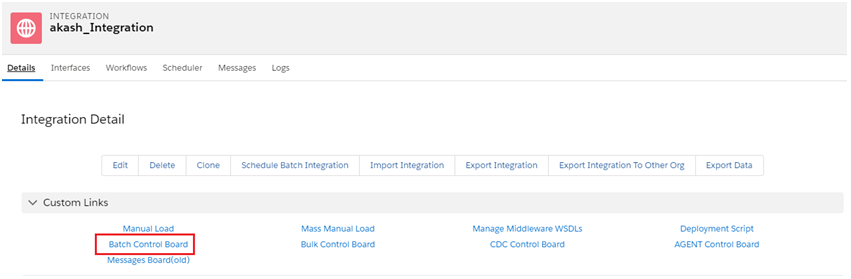
- Go to your Integration
- Click on Batch Control Board
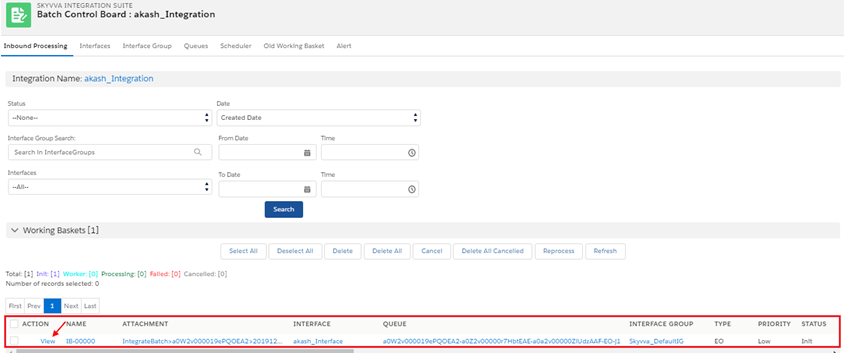
Here is all information about our Integration Inbound processing
- Click on view
- Successfully saved

Explaining a Simple REST Example Create New Message
Follow the same steps to create the REST project. Go back to your salesforce org
- Create an Integration & copy IntegrationID
- Create an Interface & copy Interface Name

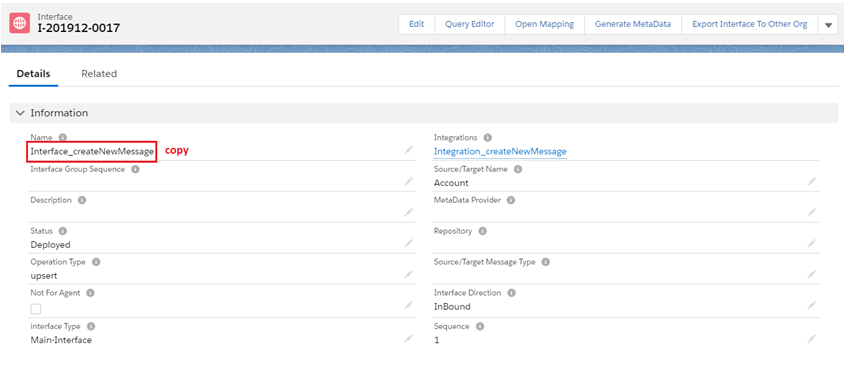
Click on Related List create IStructure
- Name
- BillingCity
- BillingCountry

- Click on Open Mapping Button
- Go to mapping section select ExtId & save

- Go to SoapUI
- Paste this code under Media type section
- URL : https://skyvva-test-dev-ed.lightning.force.com/
- RESOURCE: /services/apexrest/skyvvasolutions/createNewMessage
[aux_code language="javascript" theme="tomorrow" title="" extra_classes=""] { "integrationid":"a0W2v000019eQGkEAM", "INTERFACENAME":"Interface_createNewMessage" , "messages":[ { "imessage":{ "skyvvasolutions__status__c":"Pending", "skyvvasolutions__Comment__c":"Test Comment1123456" }, "idata":{ "BillingCity":"Billing City0", "Name":"Account01" } }, { "imessage":{ "skyvvasolutions__status__c":"New", "skyvvasolutions__Comment__c":"Test Comment1123456" }, "idata":{ "BillingCity":"Billing City0", "Name":"Account22" } }, { "imessage":{ "skyvvasolutions__status__c":"Failed", "skyvvasolutions__Comment__c":"Test Comment1123456" }, "idata":{ "BillingCity":"Billing City0", "Name":"Account12" } } ] } [/aux_code]
- Submit
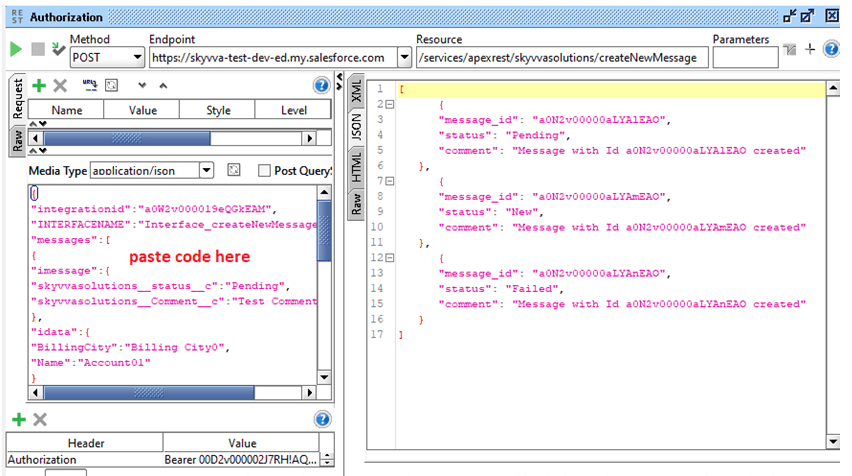
- Great you pass code
Go to your Salesforce org
- Click on Message Board
- Go to your Integration
- Select Interface
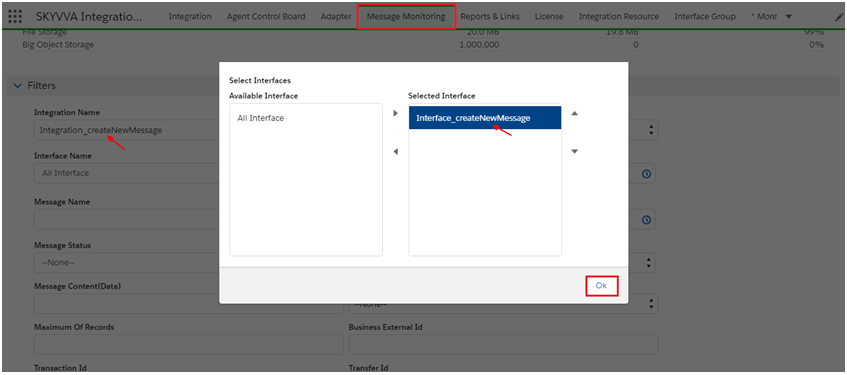
- OK
- Click on search button

This is the example of Failed message see red flag, If user having business requirement New, Pending, and Cancelled messages use method process message to reprocess. As now we explain it in next step
Explaining a Simple REST Example Process Message
We have to follow the same steps for creating REST Project 3
- Follow same steps
Go back to your salesforce org
- Copy Integration
- Copy Interface Name

Go to SoapUI
- Paste this code under Media type section
- URL : https://skyvva-test-dev-ed.lightning.force.com
- RESOURCE: /services/apexrest/skyvvasolutions/processMessage
[aux_code language="javascript" theme="tomorrow" title="" extra_classes=""]{ "INTEGRATIONNAME" : "Integration_createNewMessage", "INTERFACENAME" : "Interface_createNewMessage", "MODE":"SYNC", "STATUS":[ "New", "Pending", "Failed" ], "messages": [ "a0N2v00000aLYAlEAO", "a0N2v00000aLYAmEAO", "a0N2v00000aLYAnEAO" ] } [/aux_code] [su_box title="Key to remember" box_color="#2a8af0" title_color="#000000"]Click here to find messageID[/su_box]

- Click on Detail List
- See Integration and Interface name

Go to SoapUI
- Submit

- Great you pass code
Go to your salesforce org
- Go to your message board
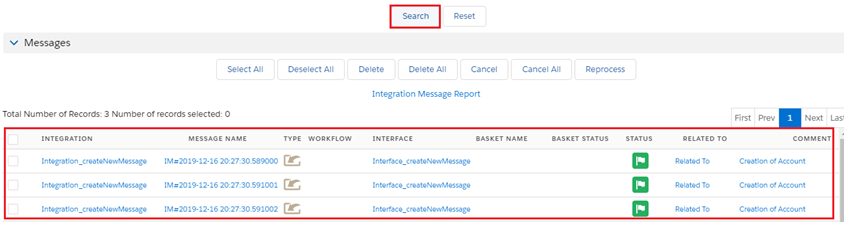
- Congratulation you done very easily
Explaining a Simple REST Example Integrate Synchronous
This feature is created to allow user call Skyvva Services by REST Api from their system.
- Create integration & copy Name

Create interface & copy Name

Click on Related list & create IStructure
- Name
- BillingCity
- BillingCountry

- Click on Open Mapping Button

Go to SoapUI
- Paste this code under Media type section
- URL : https://skyvva-test-dev-ed.lightning.force.com
- RESOURCE: /services/apexrest/skyvvasolutions/IntegrateSynchronous
[aux_code language="javascript" theme="tomorrow" title="" extra_classes=""] { "integrationid" : "Integrate_synchronous", "interfacename" : "Interface_synchronous", "batchmode" : "false", "messages": [ { "Name": "India", "BillingCity": "Mumbai", "BillingCountry": "India" } , { "Name": "USA", "BillingCity": "LA", "BillingCountry": "Virgina" } ] } [/aux_code]
- Submit
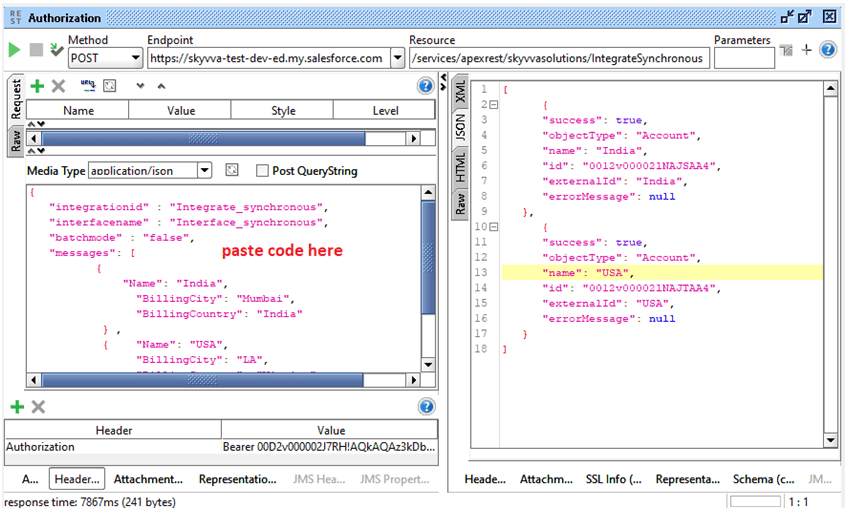
Great code pass successfully
- Go to your salesforce org
- Go to your Integration
- Click on Message Monitoring Tab

- Select your Integration
- Select your Interface
- OK
Click on Search button
