Execute Outbound Data via Developer Console with Queueable Apex Retry
Overview
Queueable Apex Retry improves the reliability of SKYVVA outbound processing when a Queueable Apex job fails because the processing package is too large.
For example, an outbound Queueable job can fail because of Salesforce governor limits such as:
- Apex heap size limit
- CPU time limit
- Query timeout
The retry remains on the Queueable Apex processing path.
Why Use Queueable Apex Retry?
Outbound processing can involve a large amount of data, especially when parent records contain many child records.
For example, when Transfer Package Size = 5, SKYVVA initially processes up to five Account records in one package.
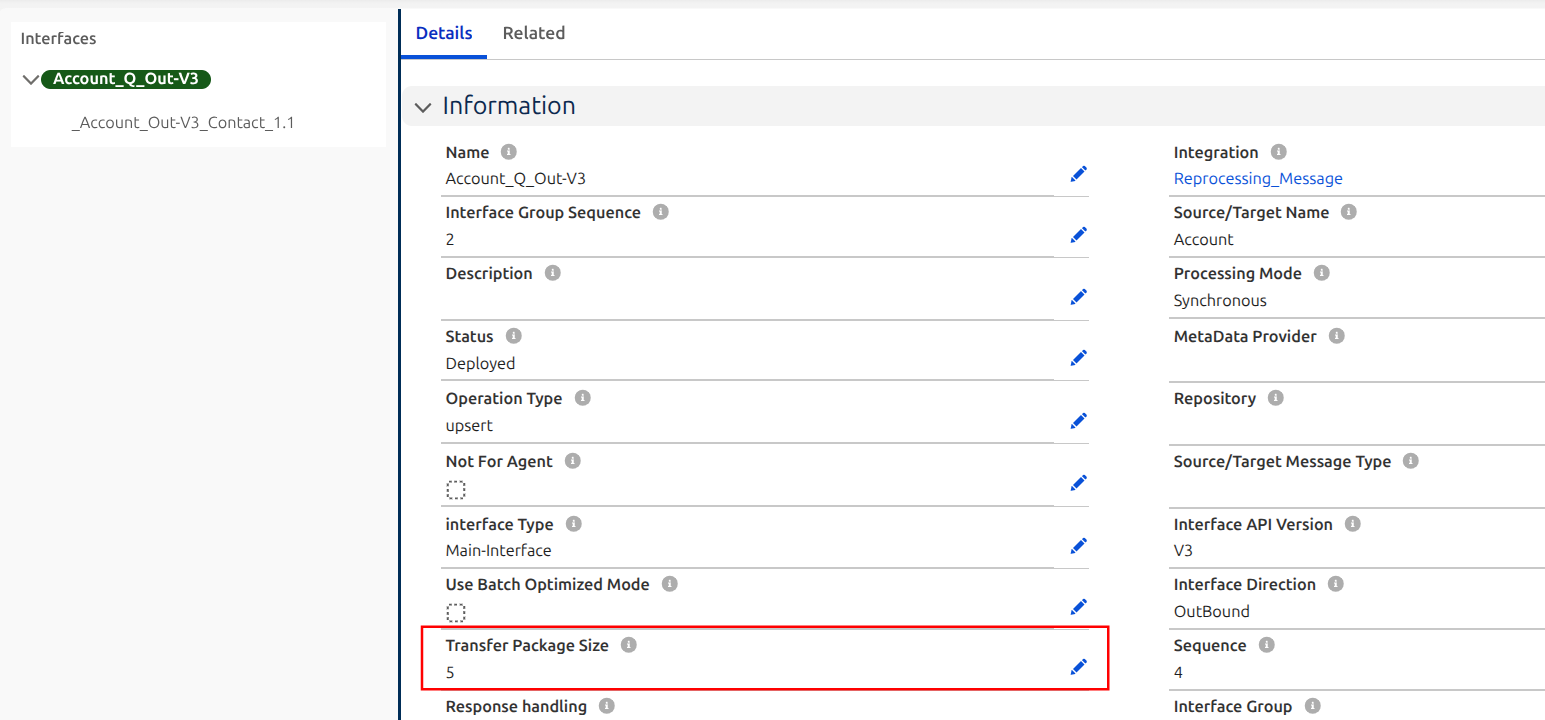
If those Account records contain many child Contact records, the resulting payload can become large enough to exceed a Salesforce governor limit such as the Apex heap size limit.
With Queueable Apex Retry, SKYVVA can:
- Detect the failed Queueable job.
- Split the failed package into smaller record groups.
- Retry the smaller record groups automatically.
- Continue using Queueable Apex during retry.
Scope
This document demonstrates Queueable Apex Retry when outbound records are executed only from the Salesforce Developer Console using invokeCalloutV3 with QUEUEABLE mode.
The following processing methods are not covered in this use case:
- Process button at Interface level
- Process button at Interface Group level
- Process button at Integration level
- Scheduler at Interface level
- Scheduler at Interface Group level
- Scheduler at Integration level
Example Scenario
The following configuration and sample data are used:
| Configuration | Value |
|---|---|
| Processing Mode | QUEUEABLE |
| Transfer Package Size | 5 |
| Total Account Records | 13 |
| Accounts with Child Records | 12 |
| Contacts per Account | 50 |
| Execution Method | Salesforce Developer Console |
| API Method | invokeCalloutV3 |
Of these, 12 Account records each contain 50 Contact records.
Because the Account records contain many child Contact records, processing several Accounts in the same Queueable transaction can create a large payload and cause the job to reach a Salesforce governor limit.
Step 1: Configure Transfer Package Size
Set:
Transfer Package Size = 5
The Transfer Package Size determines the initial number of Account records SKYVVA processes in each package before performing the outbound callout.
With 13 Account records and Transfer Package Size = 5, the initial processing is:
13 Account Records
        |
        +-- Package 1: 5 Accounts
        |       |
        |       +-- Queueable Callout
        |
        +-- Package 2: 5 Accounts
        |       |
        |       +-- Queueable Callout
        |
        +-- Package 3: 3 Accounts
                |
                +-- Queueable Callout
SKYVVA therefore initially divides the 13 Account records into three processing packages:
- Package 1 = 5 Account records
- Package 2 = 5 Account records
- Package 3 = 3 Account records
Transfer Package Size = 5 means that SKYVVA initially processes up to five Account records in each package.
Step 2: Execute Records from Developer Console
Open:
Salesforce Developer Console → Debug → Open Execute Anonymous Window
Execute the outbound records using invokeCalloutV3 with QUEUEABLE mode.
skyvvasolutions.CallOutControl c = new skyvvasolutions.CallOutControl();

c.returnxml = true;
c.returnListRecord = true;
c.iscreatemessage = true;

List<String> lId = new List<String>();

for (Account a : [SELECT Id FROM Account]) {
    lId.add(a.Id);
}

skyvvasolutions.IServices.invokeCalloutV3(
    'Reprocessing_Message',
    'Account_Q_Out-V3',
    lId,
    'QUEUEABLE',
    c
);
In this example:
Reprocessing_Messageis the Integration name.Account_Q_Out-V3is the outbound Interface name.lIdcontains the Account record IDs to process.QUEUEABLEexecutes the outbound processing using Queueable Apex.
Step 3: Initial Queueable Processing
After invokeCalloutV3 is executed, SKYVVA applies the configured Transfer Package Size = 5.
The initial processing flow is:
13 Account Records
        |
        v
Transfer Package Size = 5
        |
        v
Create Record Packages
        |
        v
Queueable Apex
        |
        v
Outbound Callout
For example, the first package contains five Account records.
Because the Account records can also contain child Contact records, the actual amount of data processed by the Queueable job can be much larger than five simple records.
For example:
5 Account Records
        |
        +-- Account 1 → 50 Contacts
        +-- Account 2 → 50 Contacts
        +-- Account 3 → 50 Contacts
        +-- Account 4 → 50 Contacts
        +-- Account 5 → 50 Contacts
        |
        v
Queueable Processing
This can create a large outbound payload.
Step 4: Queueable Job Reaches a Salesforce Limit
If the amount of data processed in the package is too large, the Queueable Apex transaction may exceed a Salesforce governor limit.
For example:
Apex heap size too large
The Queueable job then fails.
5 Account Records
       |
       v
Queueable Apex
       |
       v
Build Outbound Payload
       |
       v
Apex Heap Limit Reached
       |
       v
FAILED
At this point, the original processing package cannot be completed successfully with its current record size.
Step 5: Split the Failed Records and Retry
When a Queueable job fails because the processing package is too large, SKYVVA does not simply retry the same oversized record package.
Instead, SKYVVA splits the records from the failed package into smaller processing units.
The smaller record groups are then processed again using Queueable Apex.
Original Record Package
          |
          v
     Queueable Apex
          |
          v
 Governor Limit Reached
          |
          v
     Job Failed
          |
          v
 Split Failed Records
          |
          v
 Smaller Record Groups
          |
          v
    Queueable Retry
          |
          v
       Completed
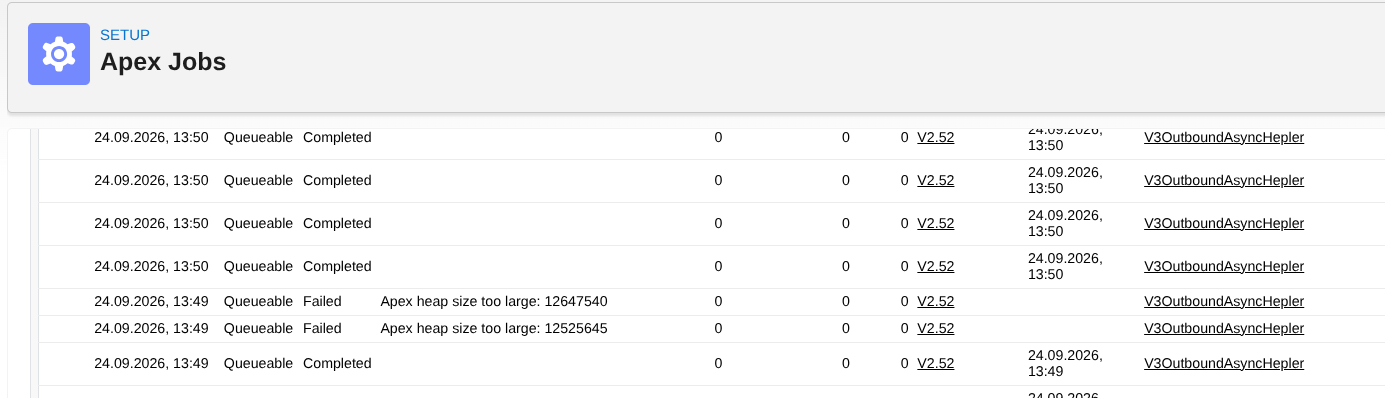 This reduces the amount of data processed in each Queueable transaction and gives the retry a better chance of completing within Salesforce governor limits.
Transfer Package Size vs. Retry Processing Size
It is important to distinguish between the configured Transfer Package Size and the number of records processed during retry.
Initial Processing
With:
Transfer Package Size = 5
SKYVVA initially attempts to process up to five Account records in one package.
Transfer Package Size = 5

5 Account Records
       |
       v
Queueable Apex
Retry Processing
If processing those five Account records causes the Queueable job to exceed a Salesforce limit, the failed records can be divided into smaller groups.
5 Account Records
       |
       v
Queueable Processing
       |
       v
     FAILED
       |
       v
Split Failed Records
       |
       v
Smaller Record Groups
       |
       v
Queueable Retry
The retry processing size can therefore be smaller than the configured Transfer Package Size.
Transfer Package Size controls the initial number of records processed in each package. If the package is too large, Queueable Apex Retry splits the failed records into smaller processing units and retries them automatically.
Step 6: Verify Queueable Retry in Apex Jobs
After executing the records, go to:
Salesforce Setup → Apex Jobs
In this example, some Queueable jobs can fail because the Apex heap size limit is exceeded.
For example:
Apex heap size too large: 12647540
Apex heap size too large: 12525645
After a failed job, SKYVVA creates additional Queueable processing for the smaller record groups.
The Apex Jobs page can therefore show:
- Queueable – Failed
- Queueable – Completed
Initial Record Package
        |
        v
Queueable Job
        |
        v
      Failed
        |
        v
Split Records
        |
        +----> Queueable Retry → Completed
        |
        +----> Queueable Retry → Completed
The completed Queueable jobs show that the smaller record groups were processed again after the original processing failed.
Queueable Retry Processing Behavior
1. Retry Uses Queueable Apex
If the original outbound processing uses Queueable Apex, the retry also uses Queueable Apex.
The processing mode does not change during retry.
2. Failed Records Are Split
If the original record package is too large, SKYVVA divides the failed records into smaller processing units before retrying.
3. Retry Uses Smaller Record Groups
The configured Transfer Package Size determines the initial package size.
When retry is required, the failed records can be processed in smaller groups than the original Transfer Package Size.
4. Processing Continues After Failure
Instead of stopping after an oversized record package fails, SKYVVA attempts to recover by processing the records in smaller units.
5. Queue Handling
If an EOIO failure puts the interface queue on Hold, the retry mechanism can reopen the queue so processing can continue.
However, if an administrator explicitly sets the queue to Stop by Admin, SKYVVA respects that setting.
6. All Record Packages Are Processed
SKYVVA processes all record packages provided to the Queueable job rather than processing only the first package.
This applies to the supported EO and EOIO processing behavior.
When Does Retry Stop?
SKYVVA continues splitting the failed record package into smaller units when splitting can help recover from the failure.
However, retry does not continue indefinitely.
If the failed processing unit has already been reduced to a single record and cannot be split further, SKYVVA stops retrying.
Failed Record Package
        |
        v
Split Records
        |
        v
Smaller Record Group
        |
        v
Still Failed
        |
        v
Split Again
        |
        v
Single Record
        |
        v
Still Failed
        |
        v
STOP RETRY
This prevents an endless retry loop when reducing the record package size can no longer resolve the failure.
Important Note About Duplicate Data
For the failure scenario covered by this feature, the Queueable failure occurs before the outbound callout is issued.
This means the affected records have not yet been delivered to the target system when retry begins.
SKYVVA can therefore retry the failed records without duplicating those records at the target system for this failure scenario.
Complete Processing Flow
The complete Queueable Apex Retry flow is:
Salesforce Developer Console
           |
           v
     invokeCalloutV3
           |
           v
       QUEUEABLE
           |
           v
 Transfer Package Size = 5
           |
           v
   Split Initial Records
           |
           v
 Create Record Packages
           |
           v
     Queueable Apex
           |
           v
   Outbound Processing
           |
           v
 Governor Limit Reached?
       /          \
      No          Yes
      |             |
      v             v
 Completed        Failed
                    |
                    v
              Split Records
                    |
                    v
           Smaller Record Groups
                    |
                    v
              Queueable Retry
                    |
                    v
                Completed
Summary
Queueable Apex Retry provides automatic recovery when SKYVVA outbound Queueable processing fails because too much data is being processed in a single transaction.
In this example:
- Records are executed from the Salesforce Developer Console.
invokeCalloutV3is used withQUEUEABLEmode.- Transfer Package Size = 5.
- 13 Account records are processed.
- 12 Account records each contain 50 Contact records.
- SKYVVA initially groups the Account records according to the configured Transfer Package Size.
- A large record package can exceed a Salesforce governor limit such as the Apex heap size limit.
- SKYVVA splits the failed records into smaller processing units.
- The smaller record groups are retried using Queueable Apex.
- Retry remains on the Queueable Apex processing path.
- Retry stops when a failed processing unit has been reduced to a single record and cannot be split further.
The Transfer Package Size controls the initial number of records processed in each package. If the package exceeds a Salesforce governor limit, Queueable Apex Retry splits the failed records into smaller processing units and retries them automatically while remaining in Queueable mode.
Scope Note
This use case demonstrates Queueable Apex Retry only when outbound records are executed from the Salesforce Developer Console using invokeCalloutV3 with QUEUEABLE mode.
Processing through the Interface, Interface Group, or Integration Process button or Scheduler is not covered in this document.