2. Change Pointer table
We can process or sent data for an outbound interface using CDC. To be concrete CDT will do the sent job. CDD will detect changes and create change pointer records and store to the change pointer table. This table is specially designed to hold the change pointer for CDT only.
What is Change Pointer Table?
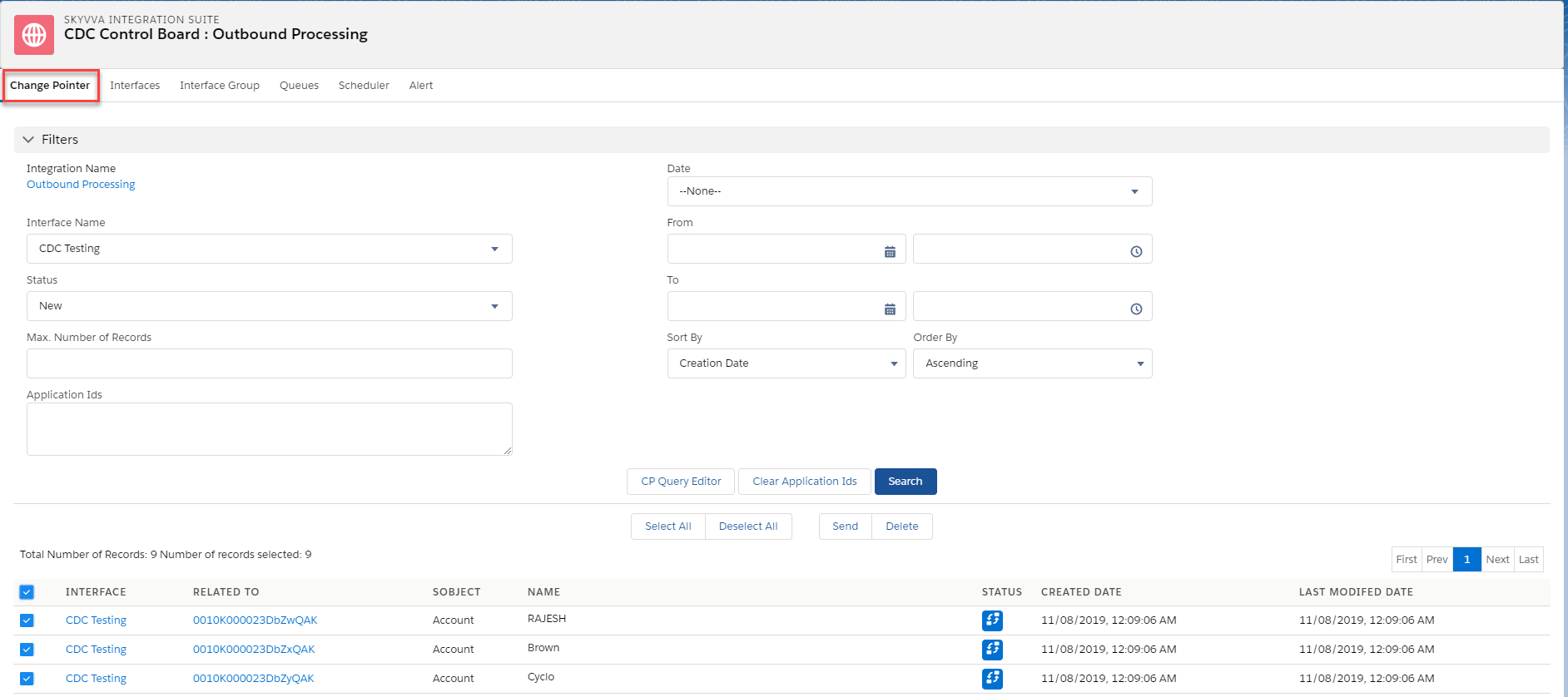
Change Pointer table is a table used to save the record change created by CDC processing, process Builder and CP Query editor. Besides saving all those CP records it displays the monitor screen so users can see a bit more detail data of CDC records. The CDD creates a record to this table and the CDT reads records from this table. After processing by CDT the CDT deleted the records from this table. Likewise, you can select all the Change Pointer records and send them manually.
Why use the Change Pointer table?
Use Change Pointer table to:
- Monitor CDC records (Change Pointer)
- See more detail data like sObject type and sObject Name
- Search Change Pointer records manually
- Create or delete Change Pointer manually
Filter
The filter section is added to make it easy for the user. You can filter for CP records base on Integration Name, Interface Name, Status, and Application Id, etc. This filter allows you to input many application-Ids and separate them by the comma.
Fields Description
Integration Name The name of the integration
Interface Name The name of the interface
Status The status of the change pointer
Max. Number of Records Use this filter to limit the result in the CDC monitoring to prevent the time out due to many change pointers.
Application Ids Show change pointer records Ids
Date You can specify Creation or Modified date
From The from date
To The to date
Sort By You can specify Creation date, Modified date or change pointer Name
Order By Use to filter the change pointer in order by Ascending or Descending.
Button


Buttons
Description
CP Query Editor Build a query using the query editor to create Change Pointer records.
Clear Application Ids Clear all the application Ids
Search All the results will be shown if you click this button.
Select All Select all result
Deselect All Unselect all the records from the result list
Send Send the CP out manually
Delete Use to delete the Change Pointer record manually.