How to configure Microsoft SharePoint adapter?
Learning Objectives :- This unit describes:-
- This unit describes the Microsoft SharePoint adapter
- Configuration of Microsoft SharePoint adapter
Introduction
The Microsoft SharePoint adapter within the SKYVVA integration application is designed to facilitate the seamless data exchange between SharePoint and other systems, including Salesforce. This integration ensures that users can leverage the full capabilities of SharePoint while maintaining data consistency and integrity across different platforms.
Key Features and Benefits
- Bidirectional Data Synchronization
- Ease of Configuration
- Support for Hierarchical Data Structures
- Robust Error Handling and Monitoring
- Enhanced Security
What is a Microsoft SharePoint adapter?
The Microsoft SharePoint adapter within the SKYVVA integration application represents a powerful tool for organizations looking to optimize their data management and collaboration efforts. By providing seamless integration between SharePoint and other enterprise systems, the adapter enhances data consistency, improves workflow efficiency, and ensures that users have access to the information they need when they need it. With features like bidirectional synchronization, hierarchical data support, robust error handling, and enhanced security, the Microsoft SharePoint adapter is a valuable asset for any organization seeking to leverage the full potential of its SharePoint environment.
Pre-required
Configuration Microsoft SharePoint adapter?
- Configuring the Microsoft SharePoint adapter within the SKYVVA integration application involves steps to establish a seamless connection between SharePoint and other systems like Salesforce. Below is a comprehensive guide to configuring the adapter.
- PrerequisitesBefore you begin, ensure you have the following:
Access to the SKYVVA integration application.
- Administrator access to both SharePoint and Salesforce (or other target systems).
- Necessary permissions to create and configure adapters within the SKYVVA platform.
- Accessing the SKYVVA Integration Application
- Login: Login to your Salesforce account where the SKYVVA integration application is installed.
- Navigate: Go to the SKYVVA integration application through the App Launcher.
- XML
- JSON
- CSV
- CSV Fixed Length
- Binary
How to read data from Microsoft OneDrive and Push to Salesforce (Inbound Adapter)
Expectation: We can read data from SharePoint and push it to Salesforce using our Microsoft SharePoint connector (Adapter). We have implemented with CSV, XML, JSON, and Binary format when you have been configured with an adapter already you can push it to salesforces.
- Executing callout records from Salesforce and sending them to Microsoft SharePoint is streamlined using the SKYVVA integration application. This process utilizes an adapter that supports various data formats, including CSV, CSV Fixed Length, XML, JSON, and Binary. By configuring the adapter within Salesforce, users can efficiently manage outbound interfaces to execute callouts.
- When an outbound interface is set up, the integration application facilitates seamless data transfer between Salesforce and SharePoint. The flexibility in data format support ensures that diverse data structures can be accurately conveyed, catering to different business needs. For instance, CSV is ideal for tabular data, while XML and JSON are preferred for hierarchical data structures. The Binary format can handle complex data types, adding to the versatility of the integration.
- The key advantage of using the SKYVVA integration application lies in its robust and user-friendly interface. It simplifies the process of setting up and managing callouts, allowing users to focus on their core business processes rather than the intricacies of data integration. The ability to execute callouts based on the outbound interface ensures that data is transferred efficiently and reliably, maintaining data integrity and enhancing operational efficiency.
Overall, SKYVVA's integration capabilities provide a comprehensive solution for organizations looking to streamline their data management processes between Salesforce and Microsoft SharePoint.
Required step:
- Create an Integration
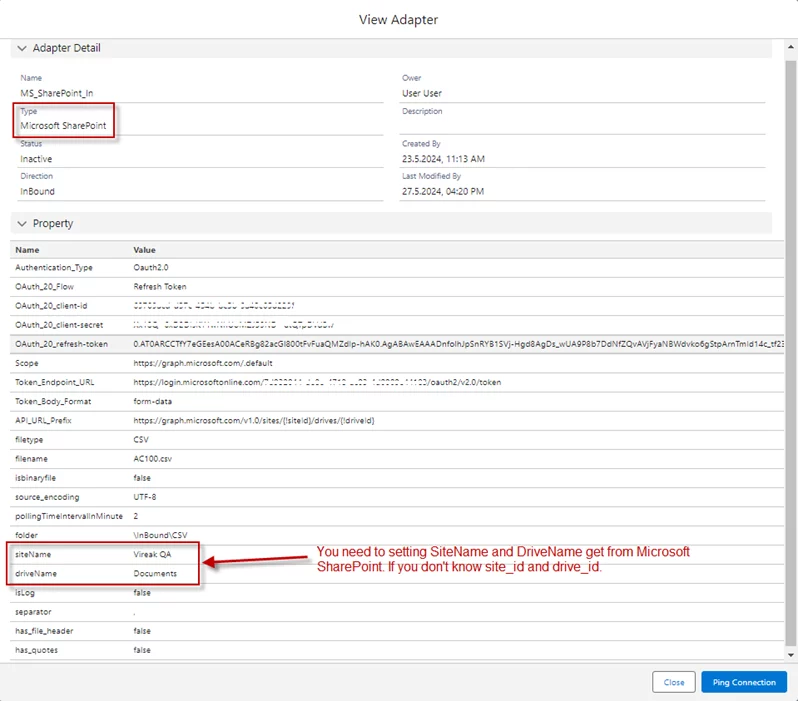
- Create an Inbound Adapter Microsoft SharePoint
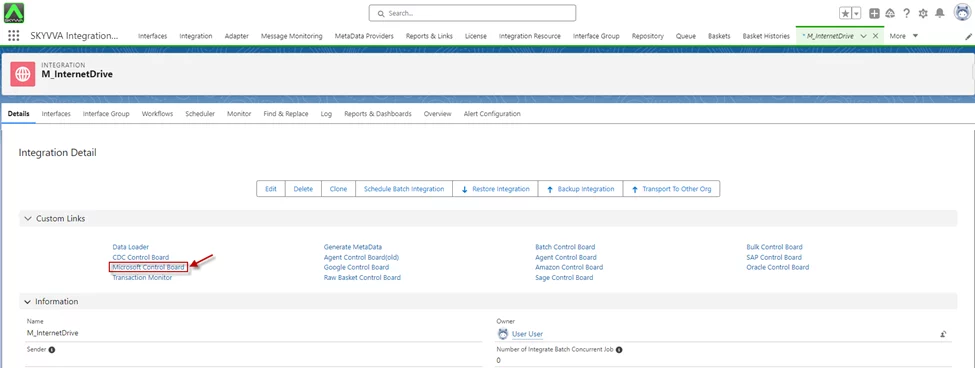
Go to Integration Detail -> click Microsoft Control Board
- On the Microsoft Control Boad screen -> Click Adapter tab -> Create Inbound Adapter
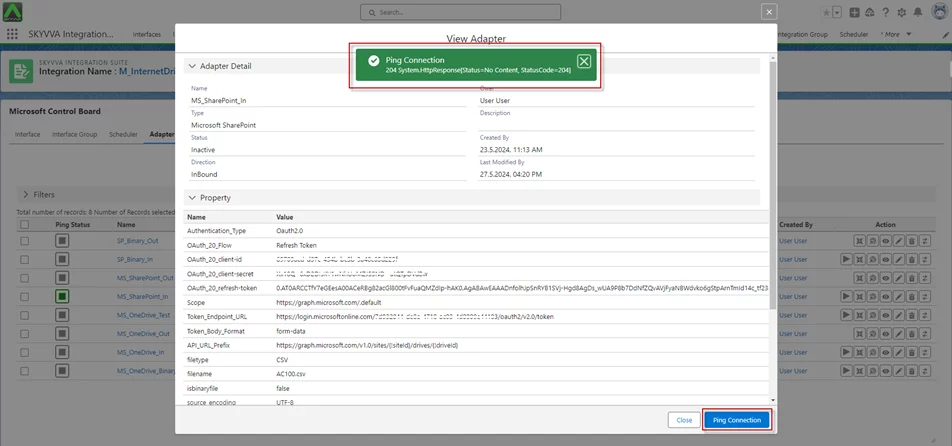
- Click Ping Connection
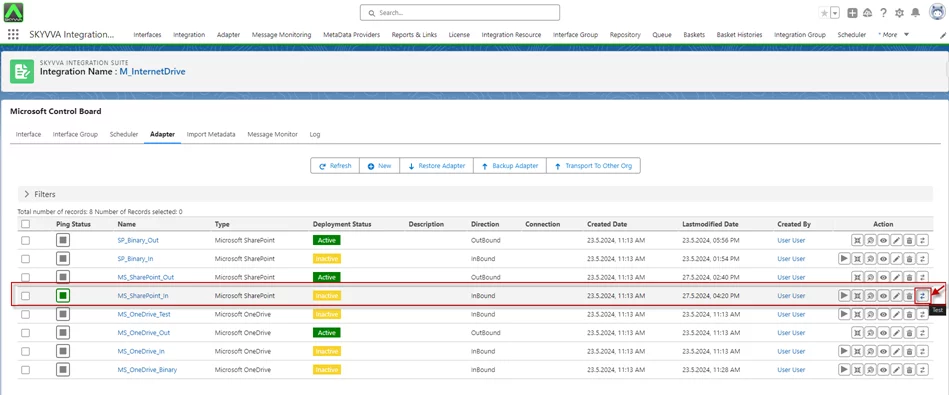
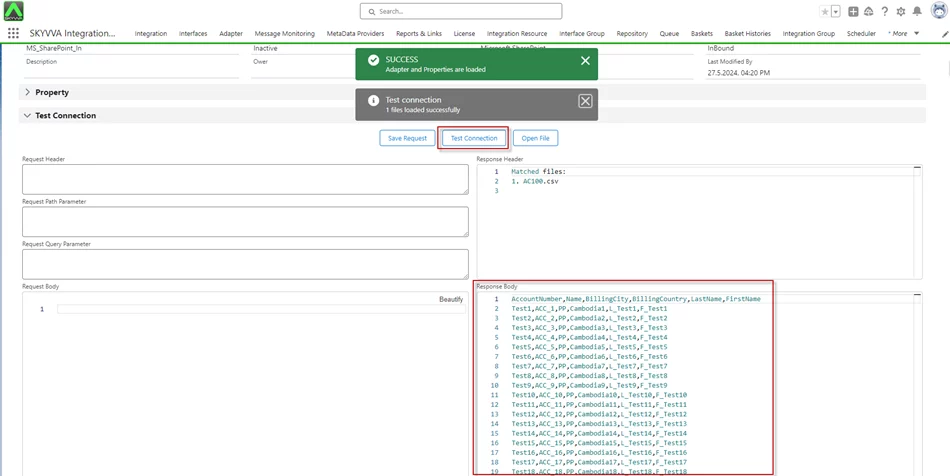
- Click on the Test Connection Action to check the adapter read the file from Microsoft SharePoint.
- After clicking on Test Connection, you get the Payload below
- Create an Inbound Interface
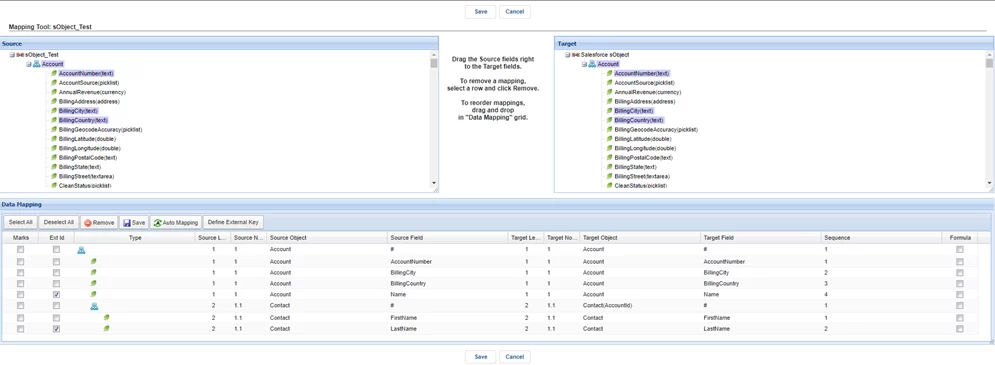
- Do Mapping
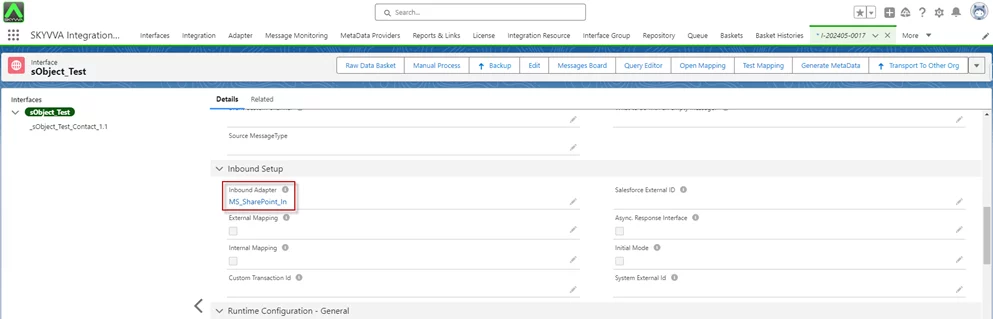
- After creating an Adapter and Interface already, go to the Interface Detail -> link the Adapter with the Interface.
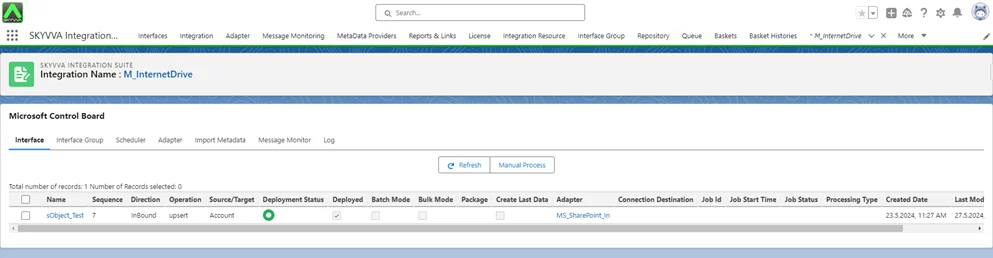
- On the Microsoft Control Boad screen -> Interface tab
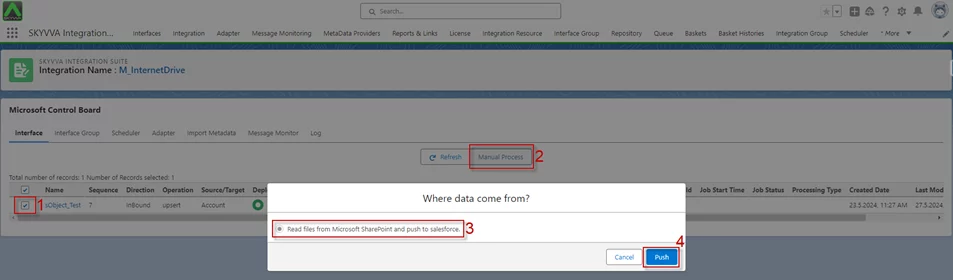
- The process involves reading files from Microsoft SharePoint and pushing them to Salesforce. We have three flows: Manual process, Scheduler, and Adapter Scheduler.
Use the Manual Process button
- Tick on the Interface you have a link on the adapter then click on the Manual Process button
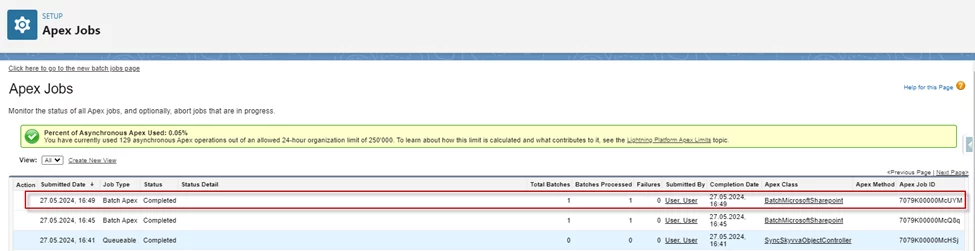
- Apex Job
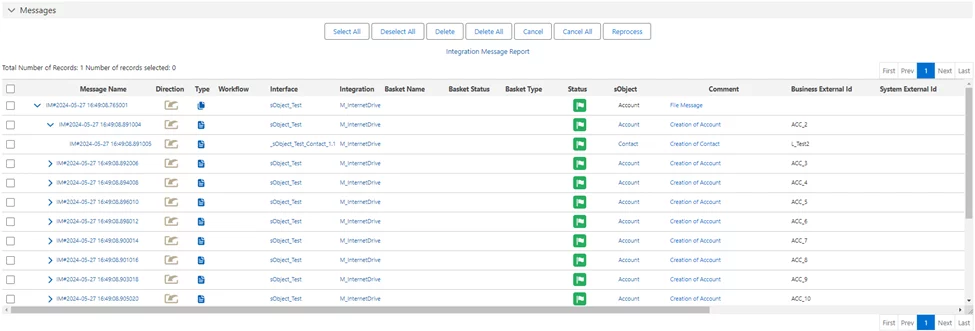
- After completing the Apex job, we will get the message monitoring.
- Use Scheduler setting
Click on the Scheduler tab on the Microsoft Control Board page
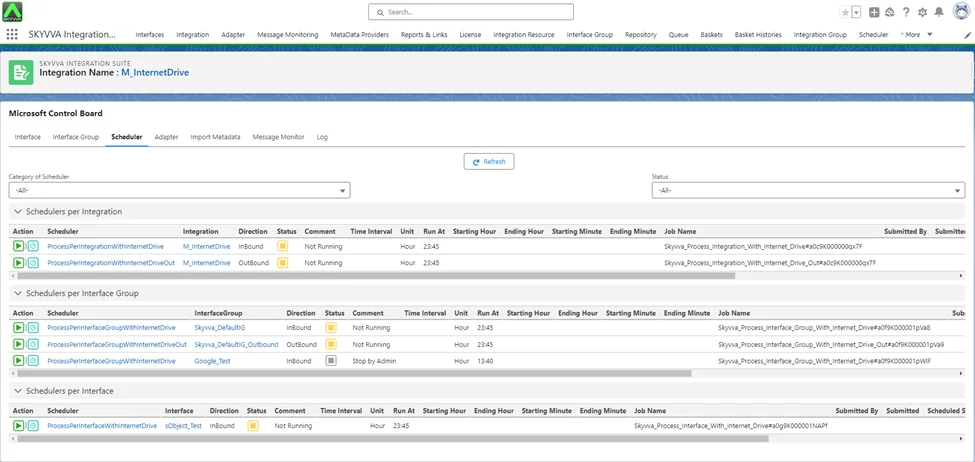
- The Scheduler tab has three sections:
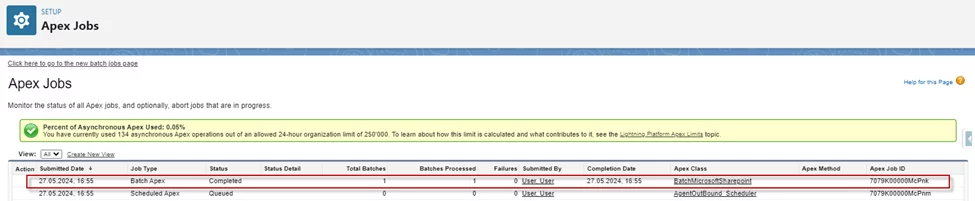
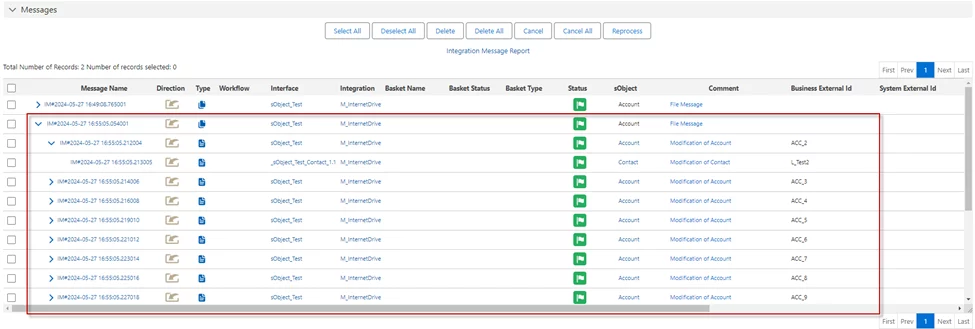
Run Scheduler Per Integration: It checks all interfaces have a link with the adapter on the Integration to processing.
Start scheduler on ProcessPerIntegrationWithInternetDrive

- Apex Job
- Message Monitoring
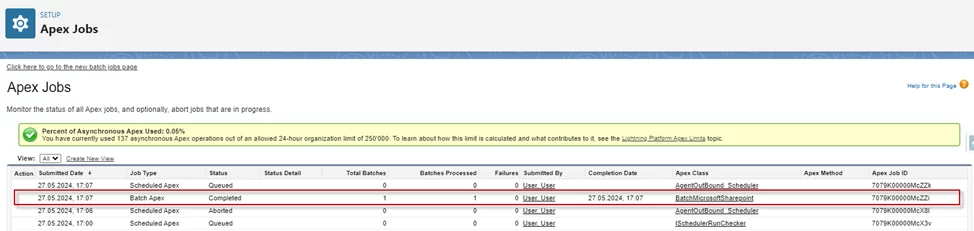
- Run Scheduler Per Interface Group: It checks all interfaces stay in the Interface Group for processing.
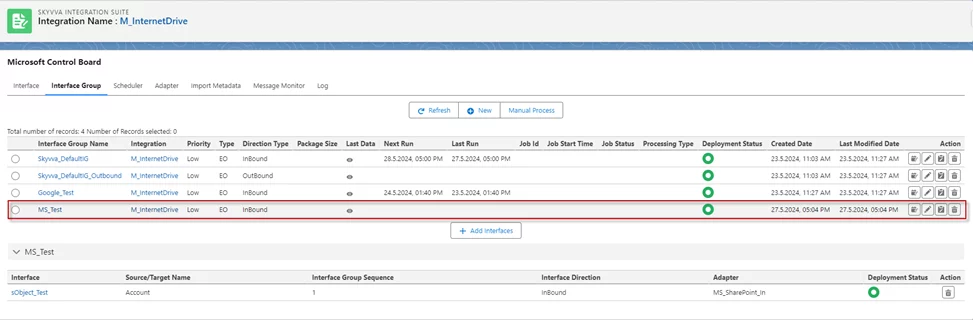
- Start scheduler on ProcessPerInterfaceGroupWithInternetDrive

- Apex Job
- Message Monitoring
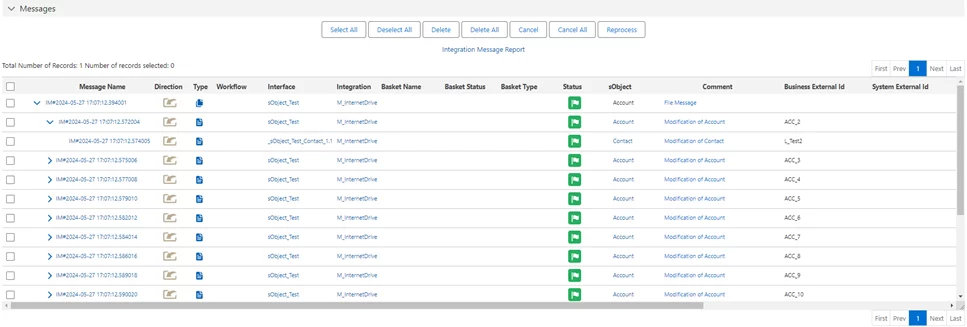
- Run Scheduler Per Interface: It takes an interface to execute processing.
Start scheduler on ProcessPerInterfaceWithInternetDrive

- Apex Job
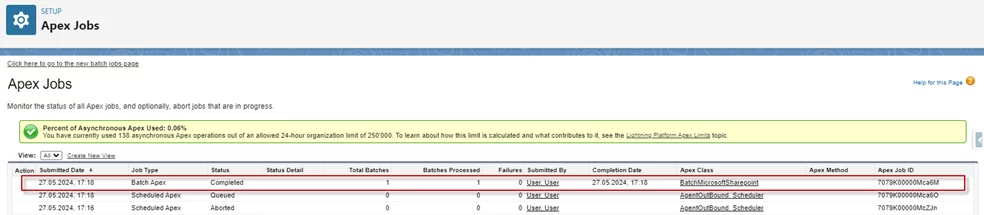
- Message Monitoring
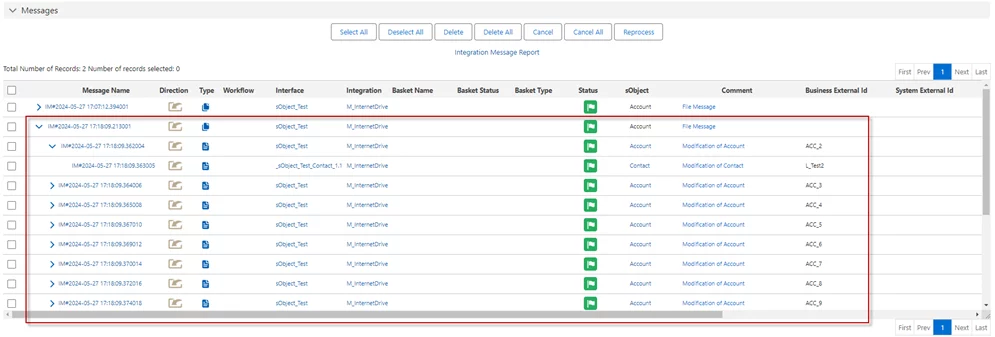
- Use Adapter Scheduler
Click on the Adapter tab on the Microsoft Control Board page
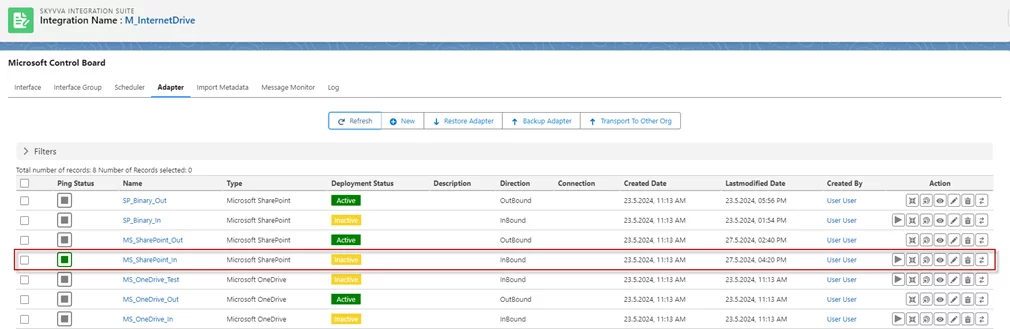
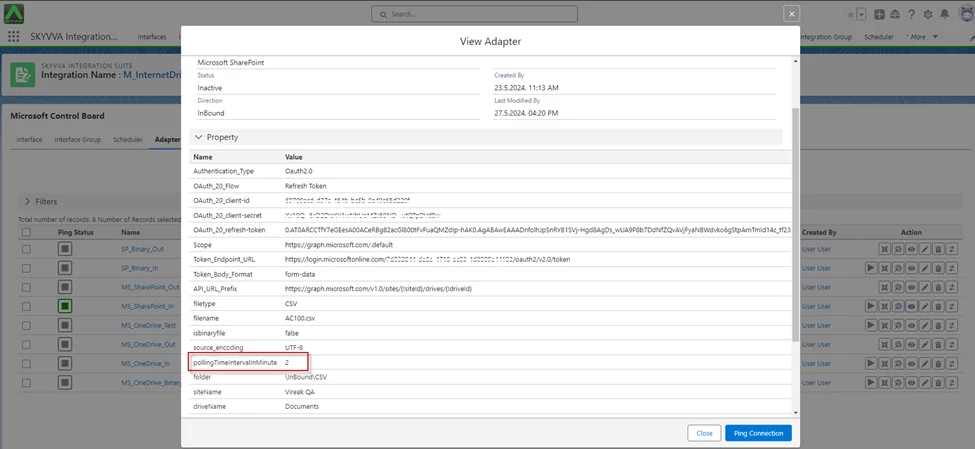
- Click on the View action to check pollingTimeIntervalInMinute:2, it means the adapter will poll to run that file again after 2min.
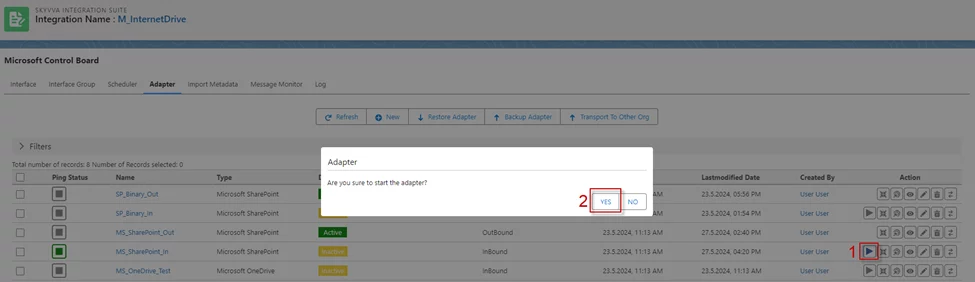
- Click on Start action on the adapter
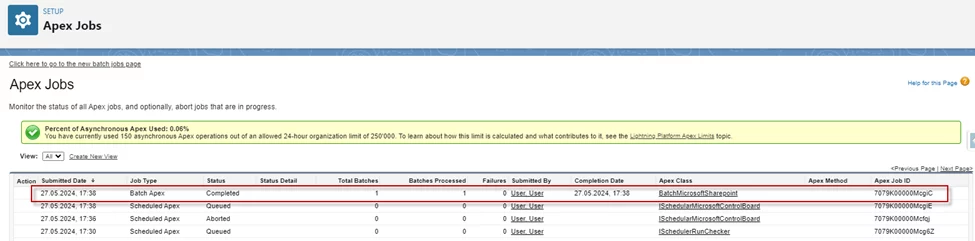
- Apex Job
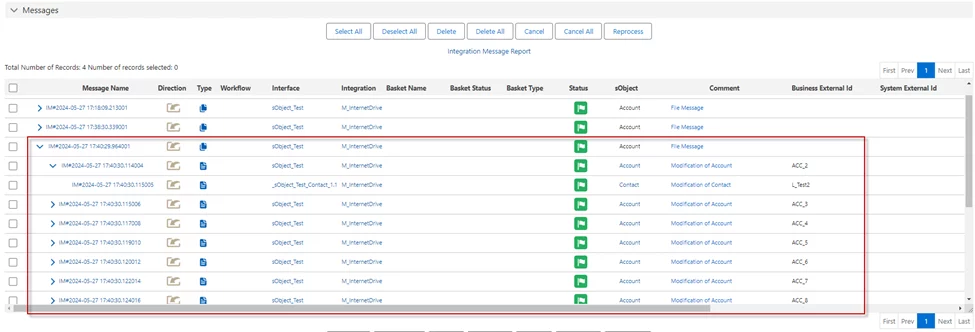
- Message Monitoring
[su_box title="Note" box_color="#ff0000" title_color="#000000"]
- The Microsoft SharePoint adapter supports CSV, XML, JSON, and Binary formats.
- When using CSV files, the adapter supports Asynchronous For instance, when processing a file containing 1,000 records, the default inbound processing is configured to handle 50 records per batch job. Consequently, a file with 1,000 records would execute 20 batches per Apex job.
- The Microsoft SharePoint adapter also supports Batch and Bulk
[/su_box]
How to execute callout records from Salesforce to Microsoft SharePoint (Outbound Adapter)
Expectation: We can execute callout records from Salesforce and send them to Microsoft SharePoint using an Adapter. We have implemented with CSV, CSV Fixed Length, XML, JSON, and Binary format when you have been configured with an adapter already you can execute callout best on the outbound interface.
- Executing callout records from Salesforce and sending them to Microsoft SharePoint using an adapter is a powerful capability of the SKYVVA integration application. This process supports various data formats including CSV, CSV Fixed Length, XML, JSON, and Binary, providing flexibility to meet different data handling requirements. Once the adapter is configured, users can efficiently perform callouts based on the outbound interface.
- To begin, the user needs to set up the adapter, ensuring it is correctly configured to handle the specific data formats and communication protocols required. With the adapter in place, the SKYVVA integration application facilitates seamless data transfer from Salesforce to SharePoint. This integration enables users to maintain data consistency and streamline workflows between the two platforms.
- Using the SKYVVA integration application, users can configure and execute callouts without needing extensive coding or manual intervention. The application handles the complexities of data format conversions and communication, allowing for a smooth and efficient integration process. This capability is particularly beneficial for organizations looking to automate data synchronization and improve their operational efficiency.
Overall, the SKYVVA integration application provides a robust solution for executing callout records from Salesforce to SharePoint, leveraging various data formats and simplifying the integration process through its user-friendly interface and powerful adapter configuration.
Required step:
- Create an Integration
- Create an Inbound Adapter Microsoft SharePoint
Go to Integration Detail -> click Microsoft Control Board
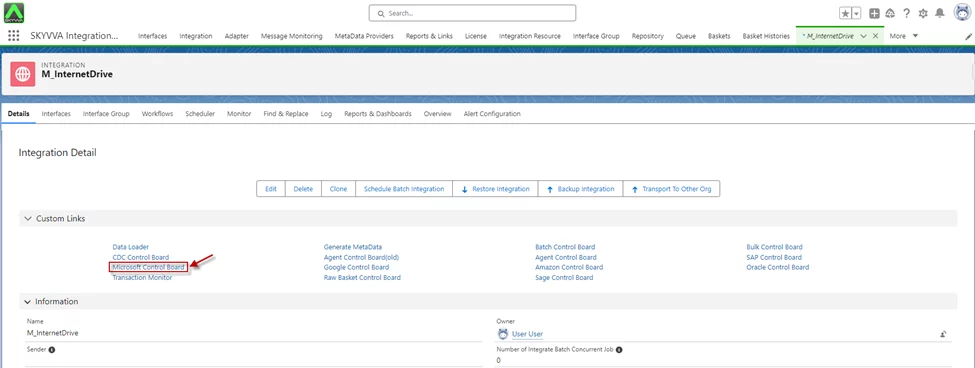
- On the Microsoft Control Boad screen -> Click Adapter tab -> Create Outbound Adapter
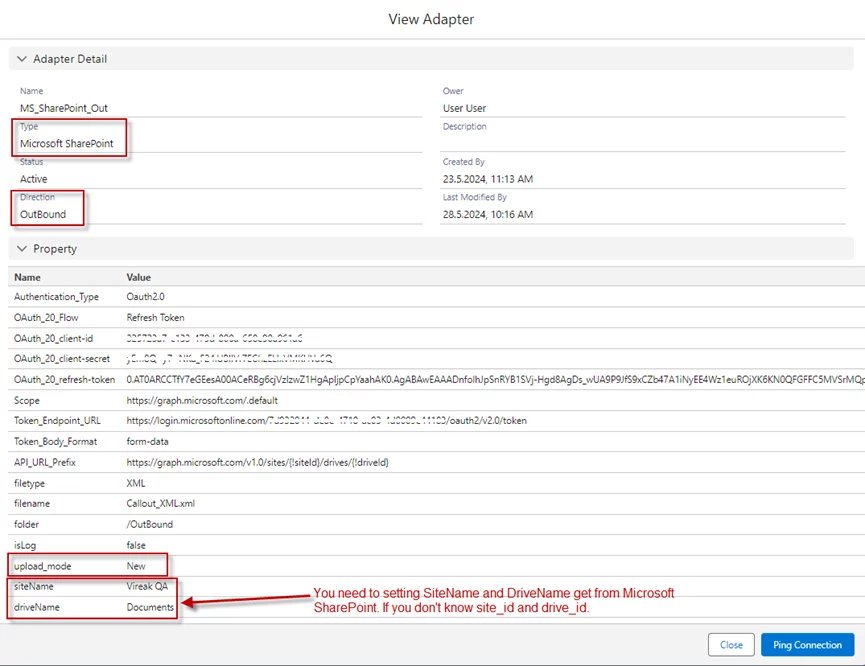
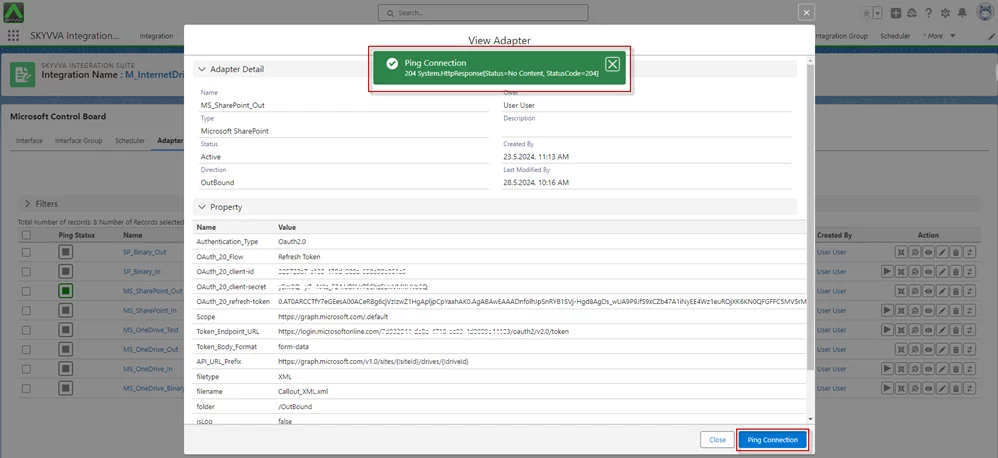
- Click Ping Connection
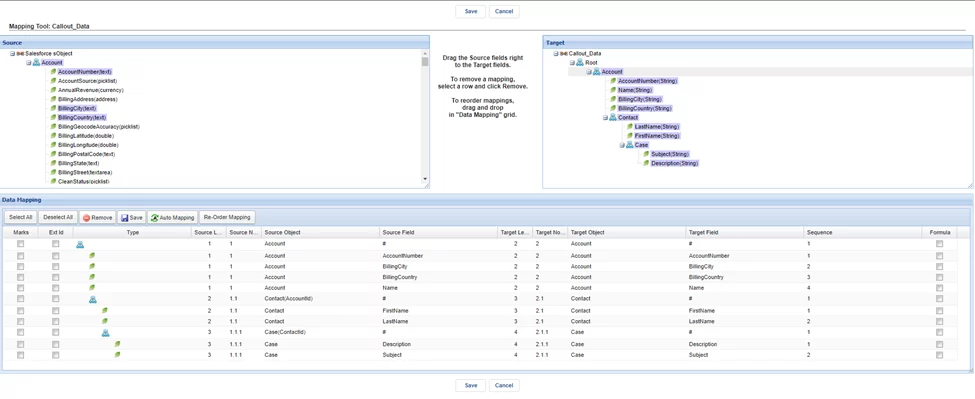
- Create an Outbound Interface ->set Interface API Version: V3 -> Do Mapping -> link Adapter with interface
- Go to Interface Detail -> Scroll down to SOQL Query for filter sObject -> Set the condition on the file Filter Query
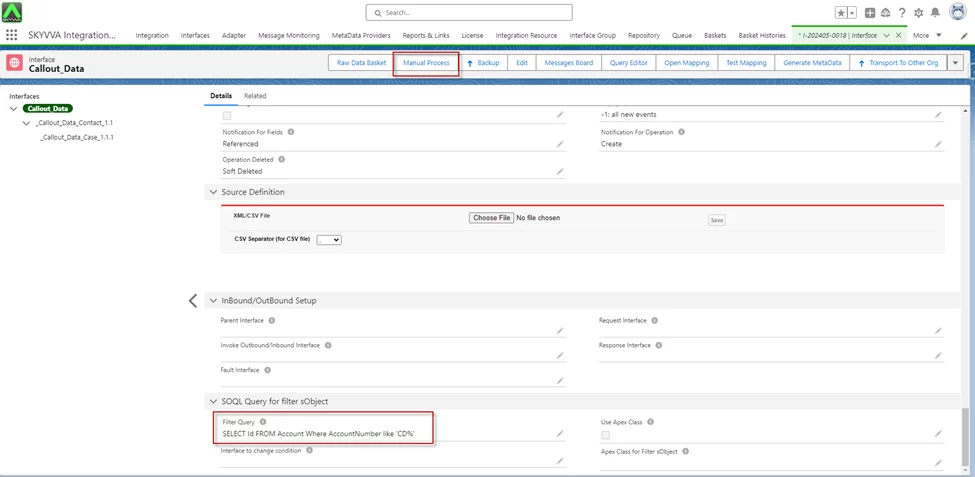
- Click on the Manual Process button to callout the records
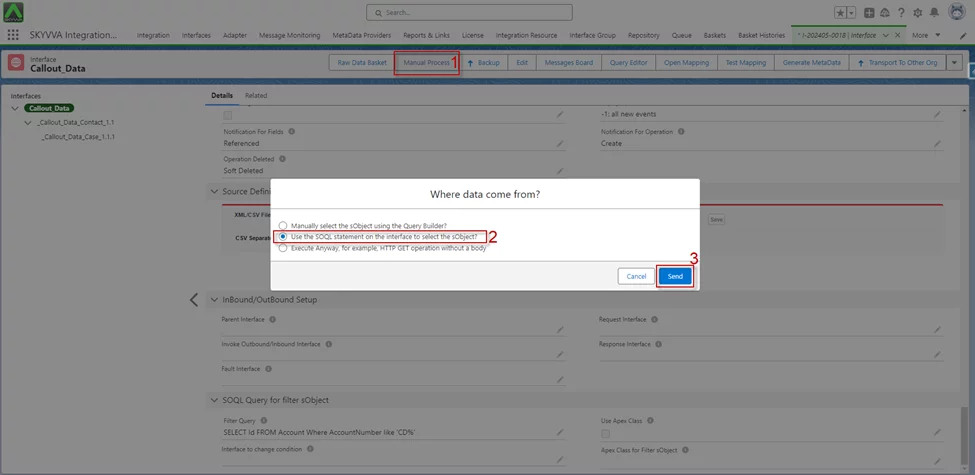
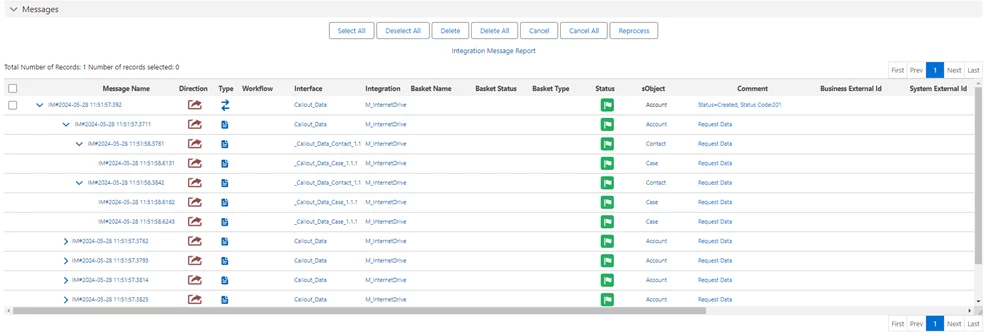
- After clicking Send, we got the Message Monitoring
- Here is the File Payload from Microsoft SharePoint.
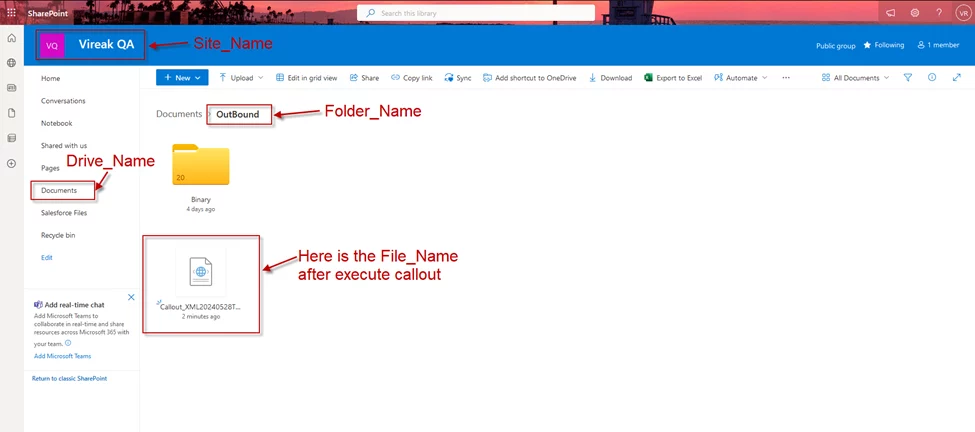
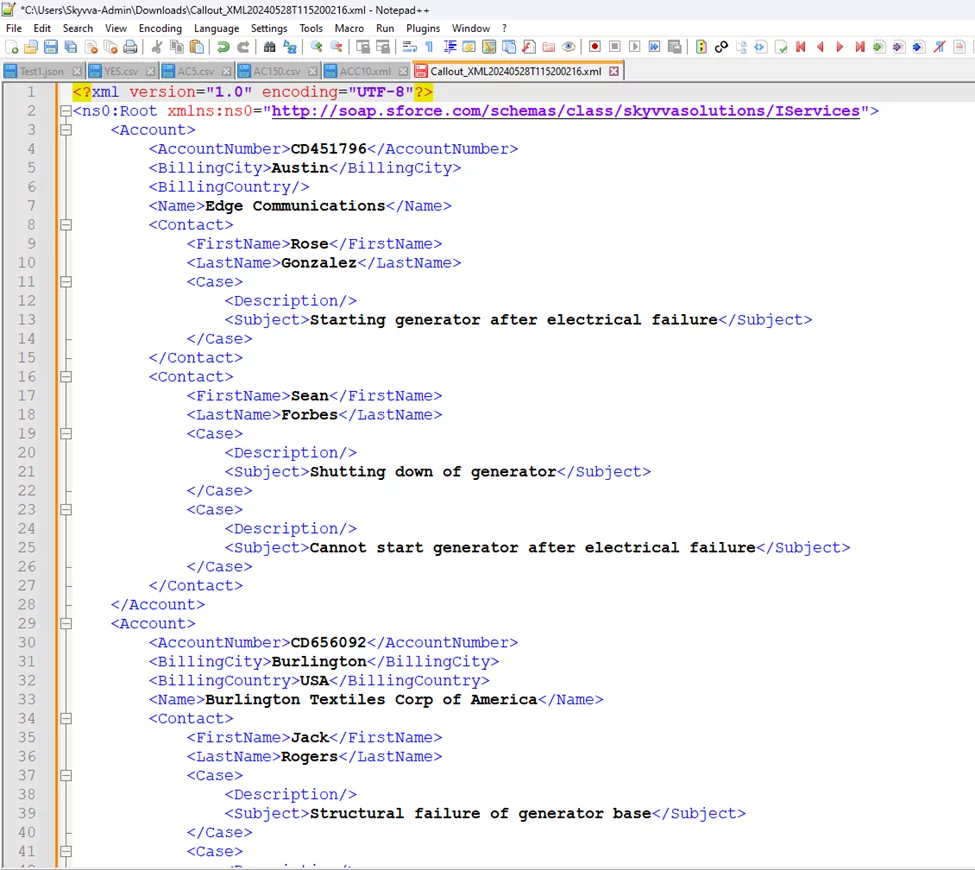
- Here is the Payload
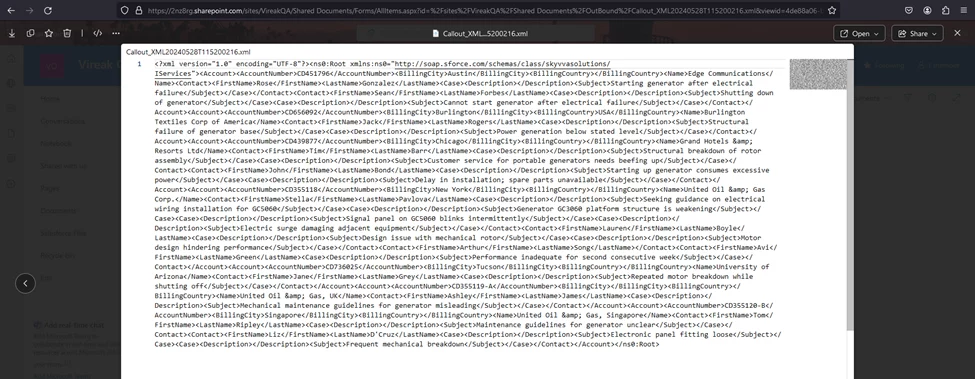
[su_box title="Result:" box_color="#2a8af0" title_color="#000000"]When clicking the Manual Process button to execute the callout, we receive the Message Success along with the payload, which is determined based on the conditions set in the Filter Query of the SOQL Query for filter sObject section. As a result, Export Data V3 hierarchical in XML File format is implemented for an internet adapter. [/su_box]
[su_box title="Note" box_color="#ff0000" title_color="#000000"]The Microsoft SharePoint Adapter is categorized under the Internet Adapter, which means it offers similar functionalities to other internet-based adapters such as Google Drive, Dropbox, OneDrive, Google Pub/Sub, and Amazon S3.[/su_box]
Summary
Now user understands how the Microsoft SharePoint adapter in SKYVVA supports inbound, outbound, and custom logic, enabling seamless data exchange and enhanced workflow automation between SharePoint and other systems, including Salesforce.