How to Configure the SOAP Protocol?
1. Overview
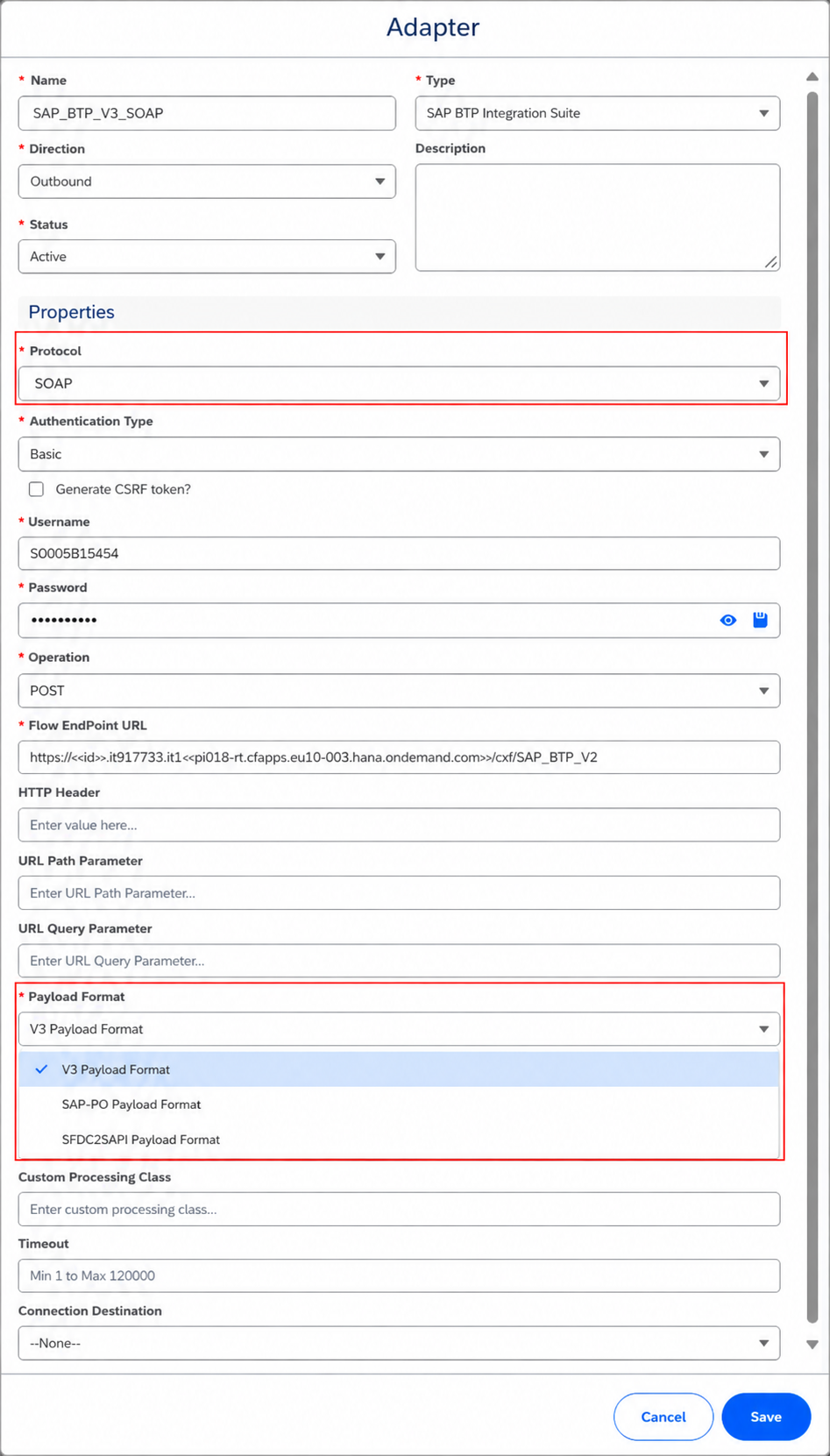
The SKYVVA SAP BTP Integration Suite Adapter supports the SOAP protocol for outbound communication from Salesforce to SAP BTP Integration Suite.
When SOAP is selected as the protocol, the following payload formats are available:
- V3 Payload Format
- SAP-PO Payload Format
- SFDC2SAPI Payload Format
All three payload formats support both Interface API V2 and Interface API V3.
2. Supported Payload Formats
The following table provides an overview of the supported payload formats and their behavior with each Interface API version.
| Payload Format | Interface API V2 | Interface API V3 | Payload Structure |
|---|---|---|---|
| V3 Payload Format | Supported | Supported | Same structure for API V2 and API V3 |
| SAP-PO Payload Format | Supported | Supported | Same structure for API V2 and API V3 |
| SFDC2SAPI Payload Format | Supported | Supported | API V2 uses a different structure; API V3 uses the standard structure |
Important: When using Interface API V3, all three payload formats use the standard payload structure. When using Interface API V2, the SFDC2SAPI Payload Format uses a different payload structure containing an ISTRUCTURE wrapper.
3. V3 Payload Format
The V3 Payload Format supports both Interface API V2 and Interface API V3.
The payload structure remains the same regardless of which Interface API version is selected.
3.1 Configure V3 Payload Format with Interface API V2
To use the V3 Payload Format with Interface API V2, configure the SKYVVA interface and adapter as follows:
- Open the required Integration in SKYVVA.
- Create a new interface
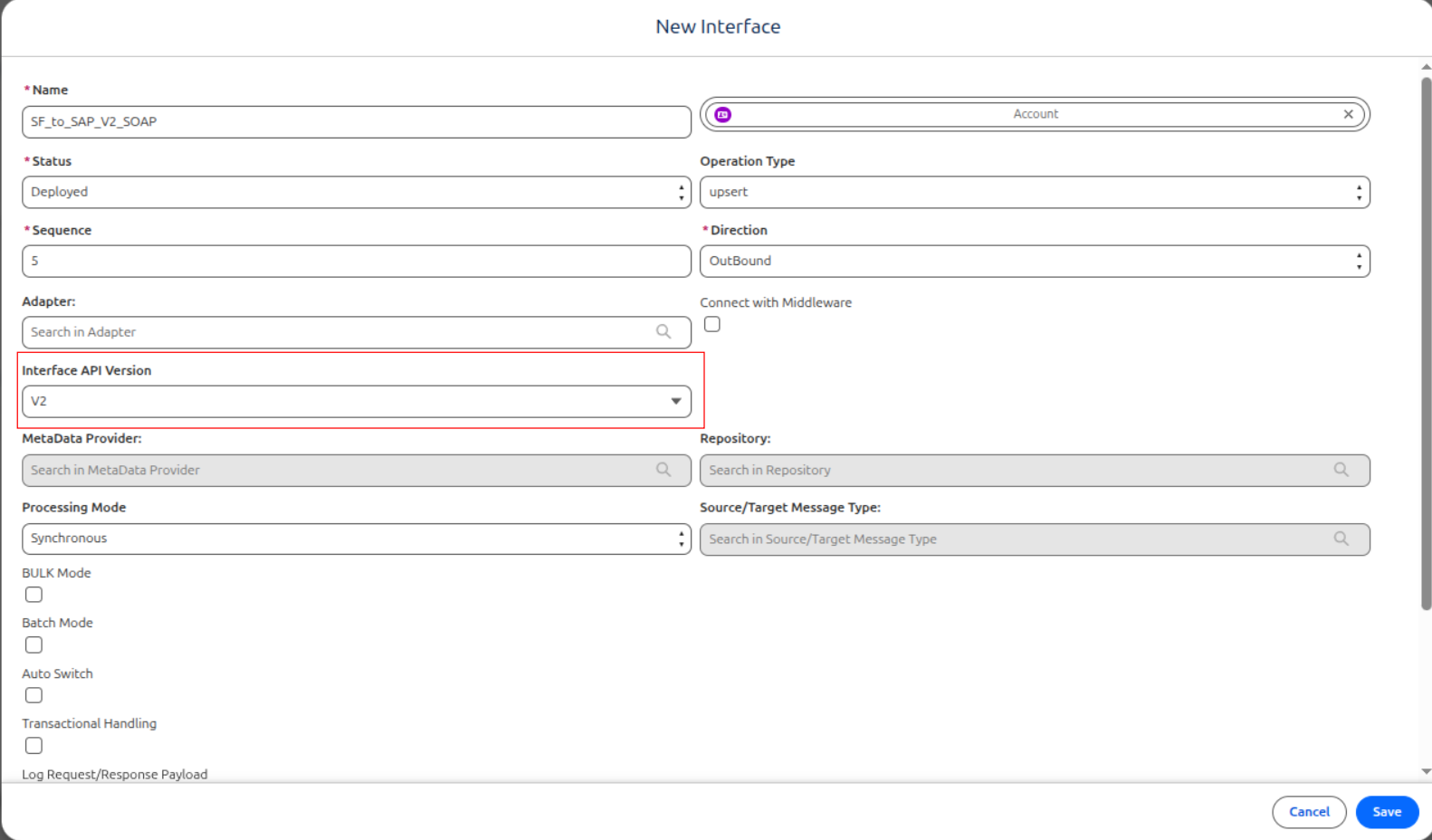
or open an existing interface.
- Set the Interface API Version to V2.
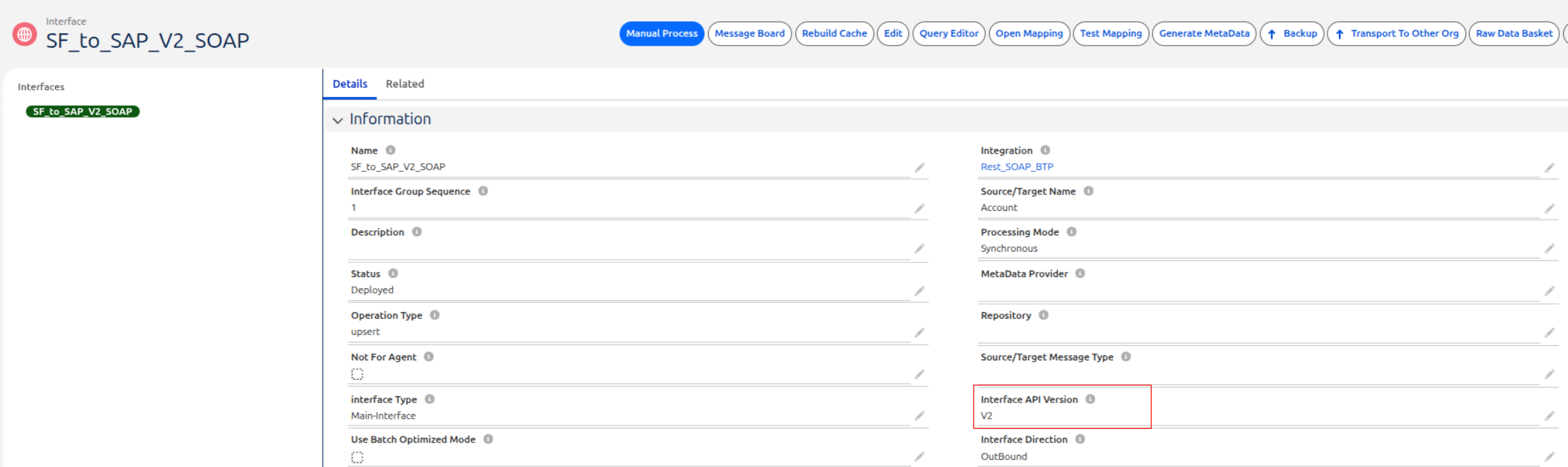
- Save the interface.
- Create and configure the required mapping.
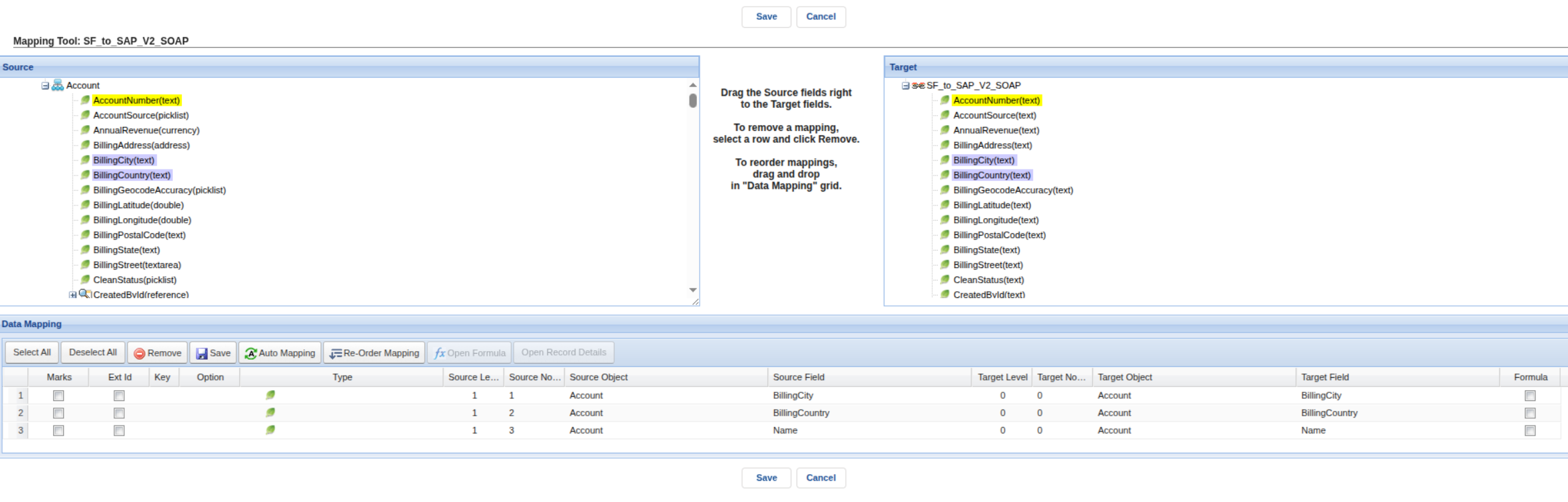
- Open the SAP BTP Integration Suite Adapter configuration.
- Configure:
- Protocol: SOAP
- Payload Format: V3 Payload Format
- Interface API Version: V2
- Save the configuration and execute the interface.
Configuration:
| Setting | Value |
|---|---|
| Protocol | SOAP |
| Payload Format | V3 Payload Format |
| Interface API Version | V2 |
Example SOAP XML Payload:
<?xml version="1.0" encoding="UTF-8"?>
<soapenv:Envelope xmlns:soapenv="http://schemas.xmlsoap.org/soap/envelope/">
  <soapenv:Header/>
  <soapenv:Body>
    <Account>
      <BillingCity>Phnom Penh</BillingCity>
      <BillingCountry>Cambodia</BillingCountry>
      <Name>Coca</Name>
    </Account>
  </soapenv:Body>
</soapenv:Envelope>
3.2 Configure V3 Payload Format with Interface API V3
To use the V3 Payload Format with Interface API V3, configure the SKYVVA interface and adapter as follows:
- Open the required Integration in SKYVVA.
- Create a new interface
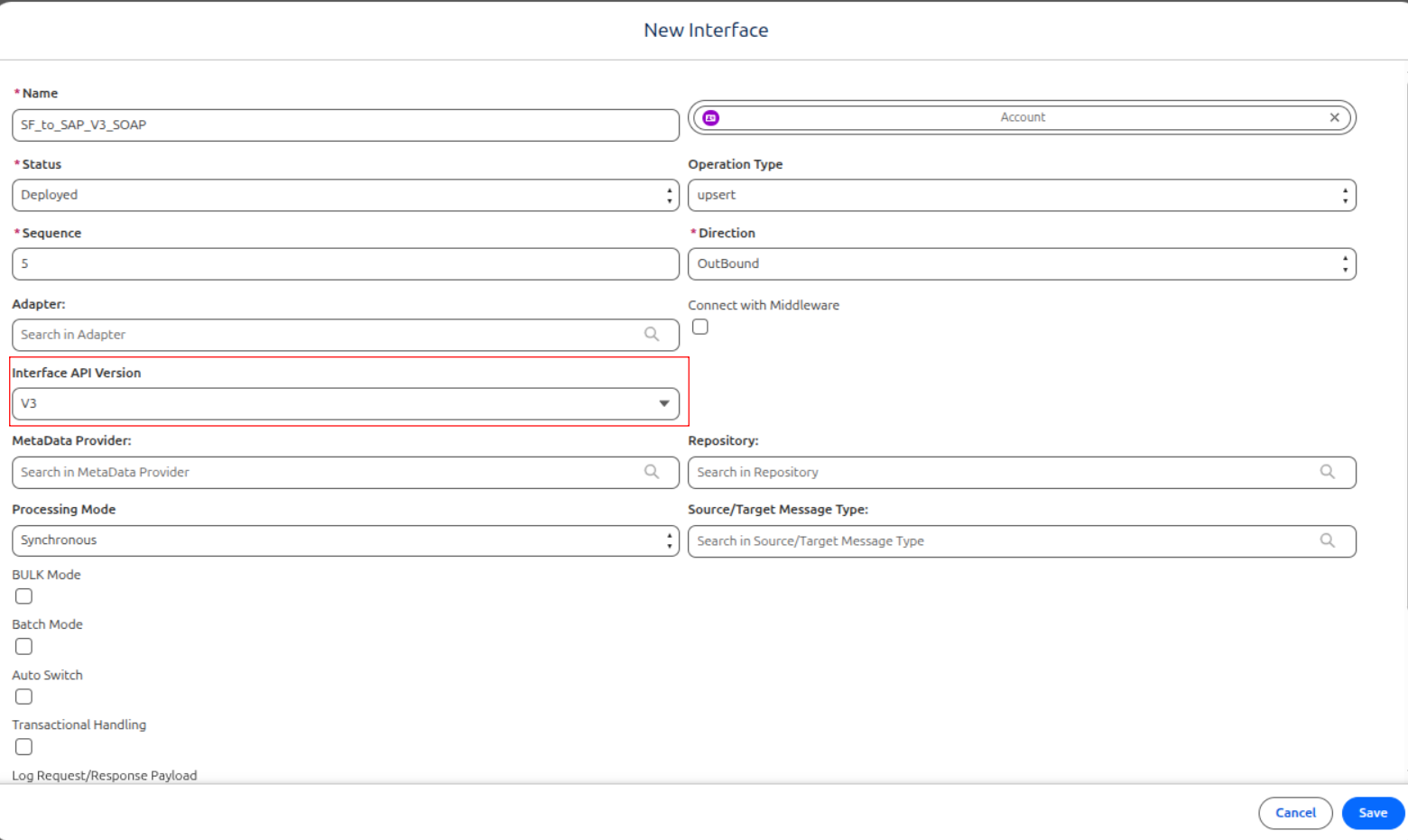
or open an existing interface.
- Set the Interface API Version to V3.
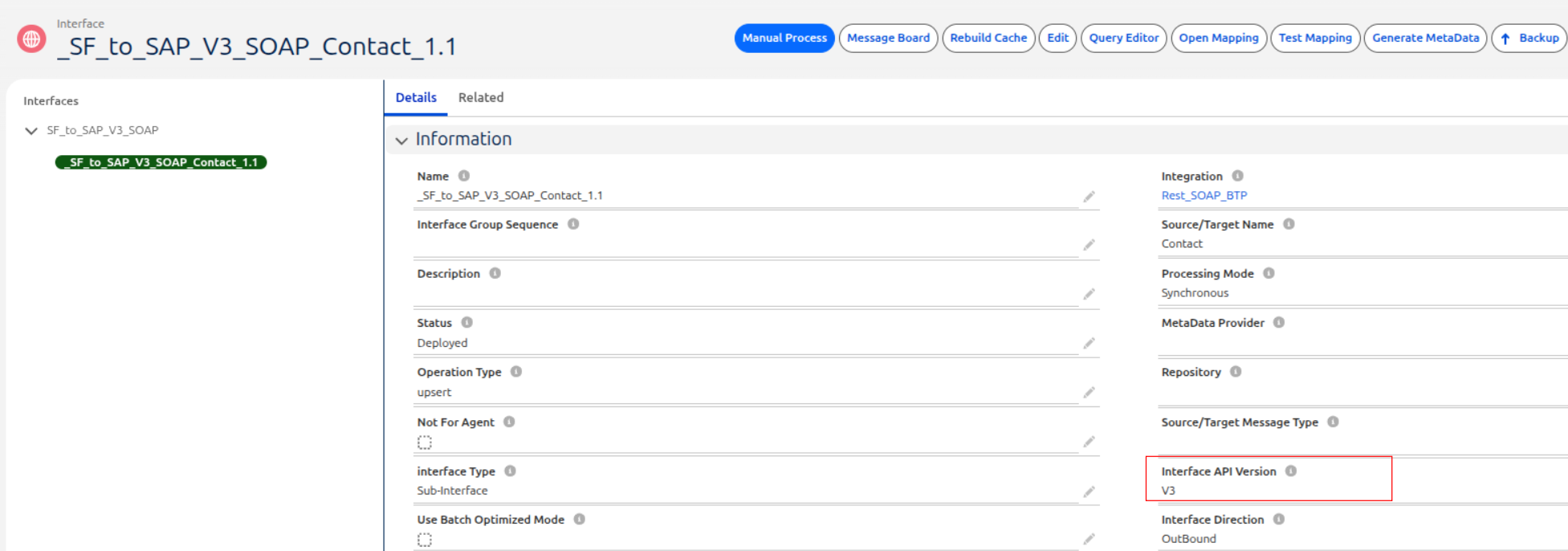
- Save the interface.
- Create and configure the required mapping.
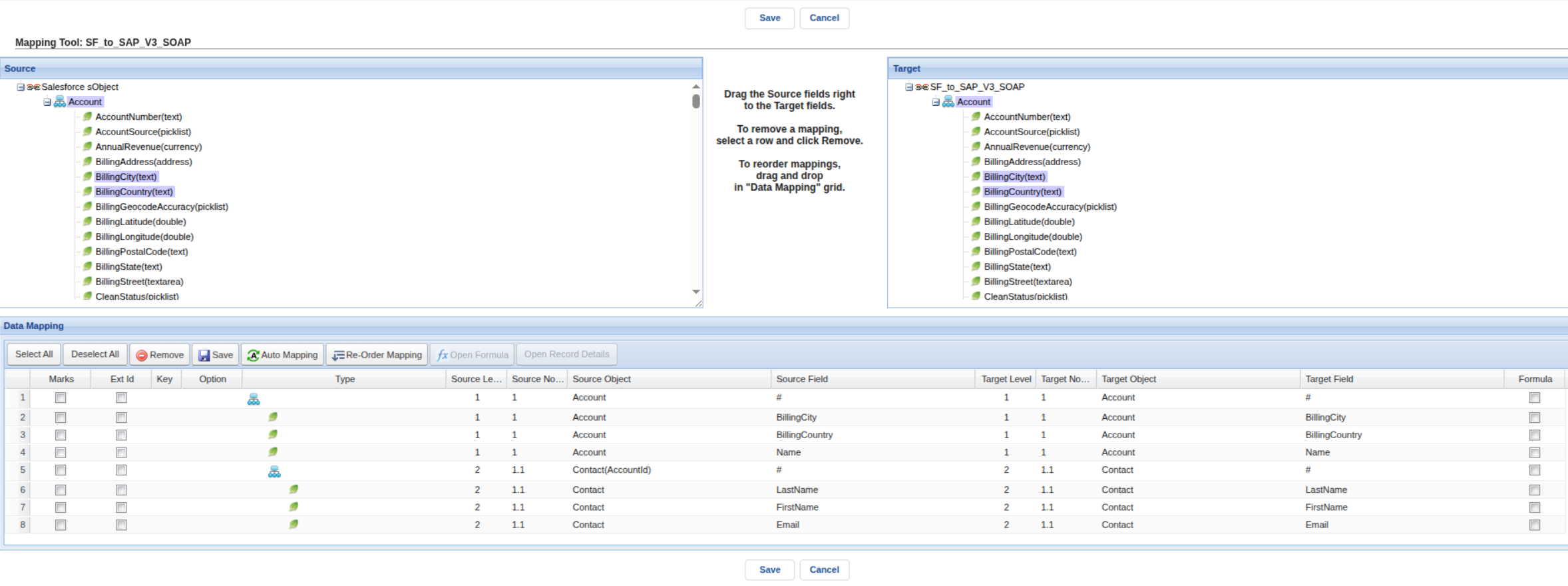
- Open the SAP BTP Integration Suite Adapter configuration.
- Configure:
- Protocol: SOAP
- Payload Format: V3 Payload Format
- Interface API Version: V3
- Save the configuration and execute the interface.
Configuration:
| Setting | Value |
|---|---|
| Protocol | SOAP |
| Payload Format | V3 Payload Format |
| Interface API Version | V3 |
Example SOAP XML Payload:
<?xml version="1.0" encoding="UTF-8"?>
<soapenv:Envelope xmlns:soapenv="http://schemas.xmlsoap.org/soap/envelope/">
  <soapenv:Header/>
  <soapenv:Body>
    <Account>
      <BillingCity>Phnom Penh</BillingCity>
      <BillingCountry>Cambodia</BillingCountry>
      <Name>Coca</Name>
      <Contact>
        <LastName>Maliza</LastName>
        <FirstName>Titi</FirstName>
        <Email>maliza@gmail.com</Email>
      </Contact>
    </Account>
  </soapenv:Body>
</soapenv:Envelope>
3.3 Interface API V2 and V3 Payload Comparison
When the V3 Payload Format is selected, Interface API V2 and Interface API V3 generate the same SOAP XML payload structure.
| Configuration | Interface API V2 | Interface API V3 |
|---|---|---|
| Protocol | SOAP | SOAP |
| Payload Format | V3 Payload Format | V3 Payload Format |
| Payload Type | SOAP XML | SOAP XML |
| SOAP Envelope | Supported | Supported |
| Payload Structure | Same | Same |
Therefore, switching between Interface API V2 and Interface API V3 does not change the SOAP XML payload structure when using the V3 Payload Format.
4. SAP-PO Payload Format
The SAP-PO Payload Format supports both Interface API V2 and Interface API V3.
As with the V3 Payload Format, the payload structure remains the same for both Interface API versions.
Example Payload
<?xml version="1.0" encoding="UTF-8"?>
<soapenv:Envelope
    xmlns:soapenv="http://schemas.xmlsoap.org/soap/envelope/">
    <soapenv:Header/>
    <soapenv:Body>
        <Account>
            <BillingCity>Phnom Penh</BillingCity>
            <BillingCountry>Cambodia</BillingCountry>
            <Name>Coca</Name>
        </Account>
    </soapenv:Body>
</soapenv:Envelope>
5. SFDC2SAPI Payload Format
The SFDC2SAPI Payload Format supports both Interface API V2 and Interface API V3. However, its payload structure depends on the selected Interface API version.
5.1 SFDC2SAPI with Interface API V3
When SFDC2SAPI Payload Format is used with Interface API V3, its payload structure is the same as the V3 Payload Format and SAP-PO Payload Format.
Example Payload
<?xml version="1.0" encoding="UTF-8"?>
<soapenv:Envelope xmlns:soapenv="http://schemas.xmlsoap.org/soap/envelope/">
  <soapenv:Header/>
  <soapenv:Body>
    <Account>
      <BillingCity>Phnom Penh</BillingCity>
      <BillingCountry>Cambodia</BillingCountry>
      <Name>Coca</Name>
      <Contact>
        <LastName>Maliza</LastName>
        <FirstName>Titi</FirstName>
        <Email>maliza@gmail.com</Email>
      </Contact>
    </Account>
  </soapenv:Body>
</soapenv:Envelope>
5.2 SFDC2SAPI with Interface API V2
When SFDC2SAPI Payload Format is used with Interface API V2, the SOAP message uses a different payload structure.
The SOAP body contains an additional ISTRUCTURE wrapper around the business object.
Example Payload
<?xml version="1.0" encoding="UTF-8"?>
<soapenv:Envelope
    xmlns:soapenv="http://schemas.xmlsoap.org/soap/envelope/"
    xmlns:xsi="http://www.w3.org/2001/XMLSchema-instance"
    xmlns:xsd="http://www.w3.org/2001/XMLSchema"
    xmlns:ns0="http://soap.sforce.com/schemas/class/skyvvasolutions/IServices">
    <soapenv:Header/>
    <soapenv:Body>
        <ns0:ISTRUCTURE_Account>
            <Account>
                <SKYVVA__MessageId>a0T9Q00000TkqVxUAJ</SKYVVA__MessageId>
                <BillingCity>Phnom Penh</BillingCity>
                <BillingCountry>Cambodia</BillingCountry>
                <Name>Coca</Name>
            </Account>
        </ns0:ISTRUCTURE_Account>
    </soapenv:Body>
</soapenv:Envelope>
The main structural difference is the additional ISTRUCTURE_Account wrapper:
<ns0:ISTRUCTURE_Account>
    <Account>
        ...
    </Account>
</ns0:ISTRUCTURE_Account>
Therefore, an SAP BTP Integration Suite iFlow that processes SFDC2SAPI Payload Format with Interface API V2 must take this additional structure into account when configuring message mapping or other message-processing steps.
6. Payload Structure Comparison
| Interface API | V3 Payload Format | SAP-PO Payload Format | SFDC2SAPI Payload Format |
|---|---|---|---|
| API V2 | Standard structure | Standard structure | Different structure with ISTRUCTURE wrapper |
| API V3 | Standard structure | Standard structure | Standard structure |
Standard Structure
The standard structure is used by:
- V3 Payload Format with API V2 and API V3
- SAP-PO Payload Format with API V2 and API V3
- SFDC2SAPI Payload Format with API V3
SOAP Envelope
└── SOAP Body
    └── Account
        ├── BillingCity
        ├── BillingCountry
        └── Name
SFDC2SAPI with Interface API V2
SOAP Envelope
└── SOAP Body
    └── ISTRUCTURE_Account
        └── Account
            ├── SKYVVA__MessageId
            ├── BillingCity
            ├── BillingCountry
            └── Name
7. Summary
The SOAP protocol of the SKYVVA SAP BTP Integration Suite Adapter supports the following payload formats:
- V3 Payload Format
- SAP-PO Payload Format
- SFDC2SAPI Payload Format
All three payload formats support both Interface API V2 and Interface API V3.
For Interface API V3, all three payload formats use the standard payload structure.
For Interface API V2, the V3 Payload Format and SAP-PO Payload Format use the standard payload structure, while the SFDC2SAPI Payload Format uses a different payload structure containing an ISTRUCTURE wrapper.
This distinction should be considered when configuring the message structure, message mapping, and processing logic in the SAP BTP Integration Suite iFlow.