How to create file name into transfer Id via DataLoader ?
Introduction
SKYVVA Integration App to import files in CSV, XML, or JSON formats, it is essential to automate assigning a unique identifier to each record. One effective approach is to populate the "Transfer Id" column with the file name. This method helps in tracking and managing the data more efficiently, ensuring that each entry is easily traceable to its source.
- To accomplish this, you first need to import the file into the Skyvva Integration App. During this process, configure the data mapping so that the file name is automatically assigned to the "Transfer Id" column. This step is crucial for maintaining data integrity, as it allows you to identify which file each record originated from, especially when dealing with multiple files.
- Implementing this strategy with CSV, XML, and JSON file types ensures a consistent and streamlined data import process. Skyvva's flexibility in handling different file formats makes it an ideal solution for integrating and managing data from various sources. By using the file name as the "Transfer ID," the user can enhance data tracking, reduce errors, and simplify troubleshooting, ultimately leading to more efficient data management and integration within your organization.
- Testing the message monitoring and filtering of the Transfer ID column using the SKYVVA integration app ensures accurate data handling and tracking. With Skyvva, the process becomes more streamlined, enabling the monitoring of all messages exchanged during data transfers. By focusing on the Transfer ID column, you can effectively track and filter specific data sets, making error detection and issue resolution more efficient. This feature helps maintain data integrity, as it provides clear visibility into message statuses. Utilizing Skyvva's robust integration capabilities ultimately enhances the accuracy and reliability of data management within your organization's ecosystem.
Expectation
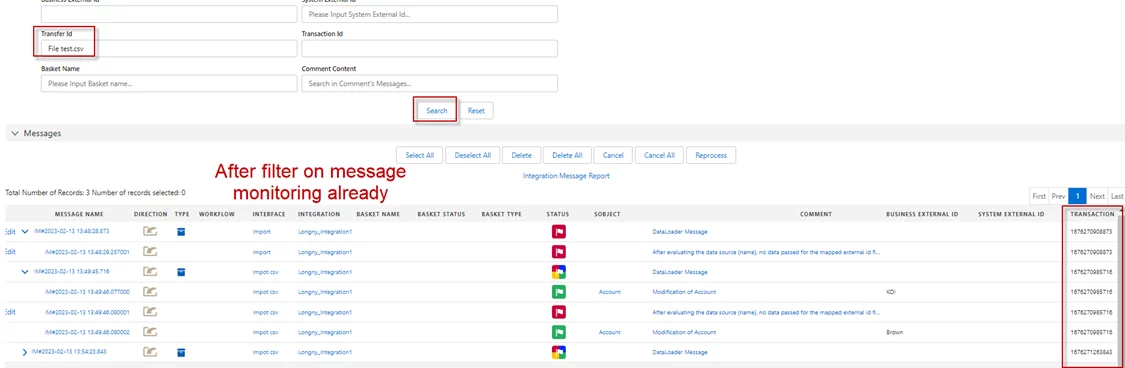
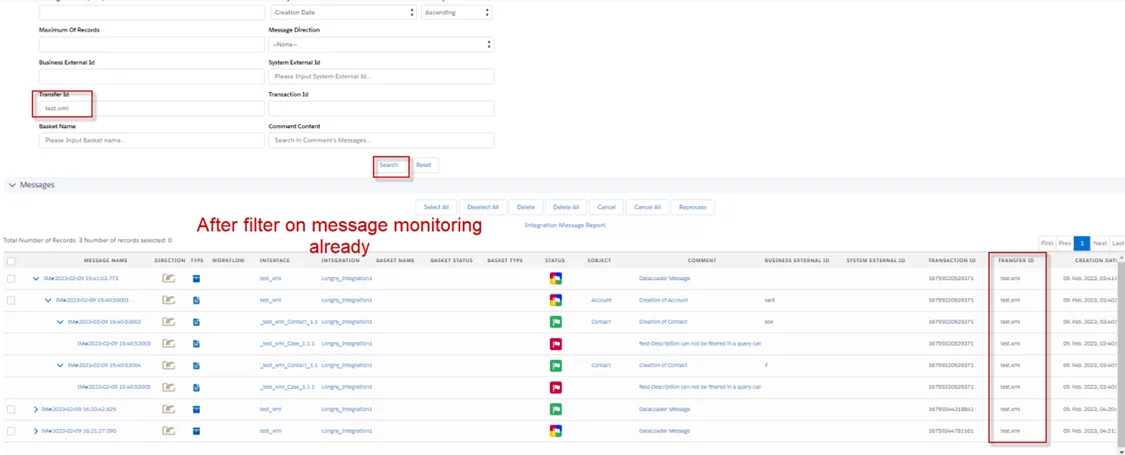
After applying a filter on message monitoring by selecting specific columns in the SKYVVA integration app, and clicking the "Search" button, the system is expected to display the relevant messages that match the filter criteria. The SKYVVA app's functionality enables users to monitor and track messages effectively, ensuring that the search operation filters through the data accurately. This feature streamlines the process of identifying particular messages, allowing for efficient tracking and analysis of message flows. The integration app is designed to improve data visibility and control within Salesforce, enhancing the overall message management experience for users.
Case 1:
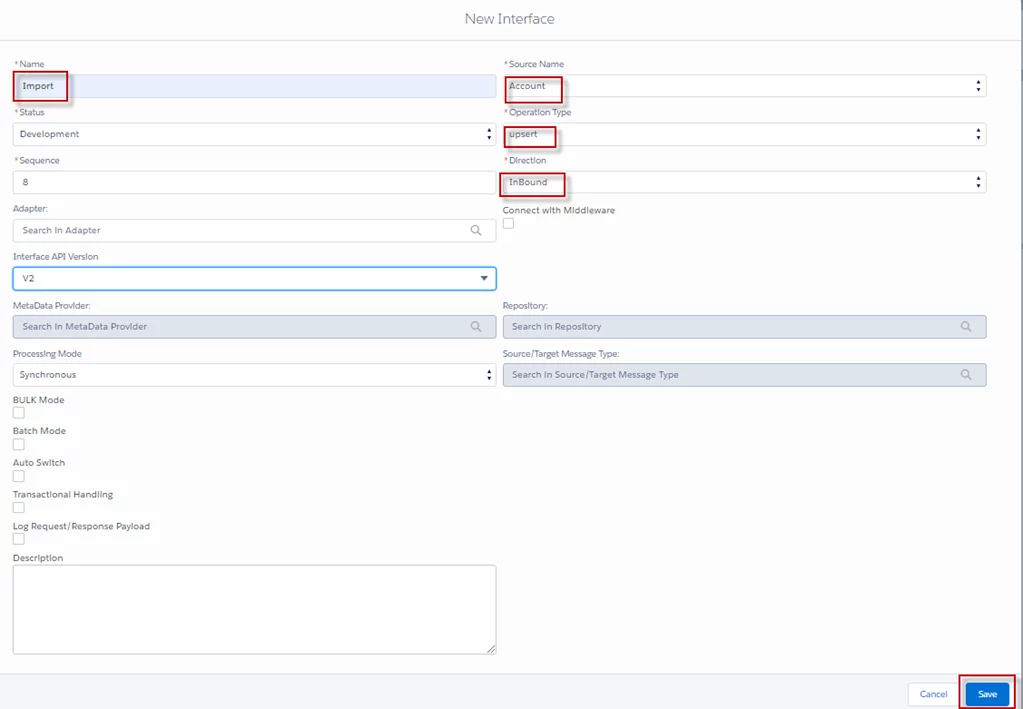
- Creating a new interface for importing CSV files with mapping using the SKYVVA integration app streamlines data integration processes.
- Skyvva's user-friendly platform allows users to define custom mappings, ensuring that CSV data fields align with your Salesforce objects and requirements. By leveraging our app capabilities, users can automate data transformation, validation, and error handling, reducing manual effort and increasing data accuracy.
- This interface supports complex data structures and provides a seamless way to integrate data from external systems into Salesforce. The result is a more efficient, reliable, and scalable solution for handling large volumes of data with minimal configuration.
Required step:
- Create a new interface for CSV with mapping
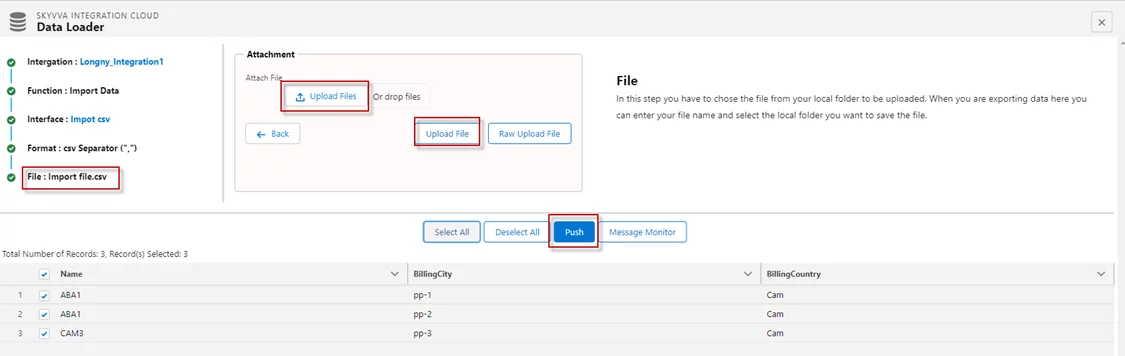
- Go to the Integration Details page and click Data Loader
- Import file CSV
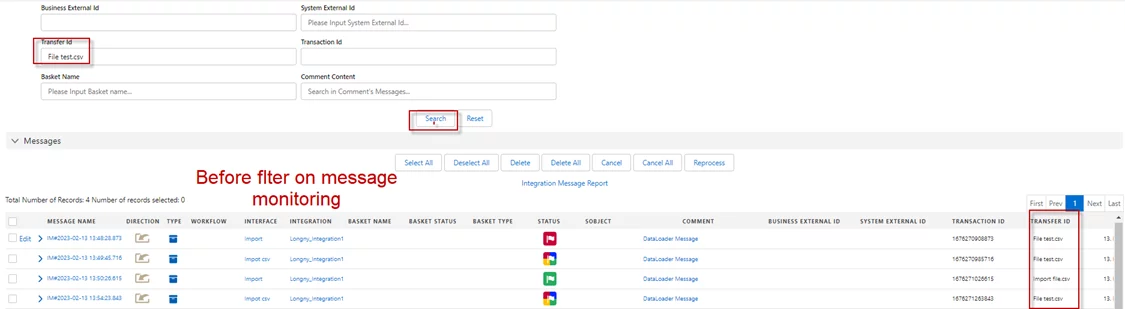
- Filters on message monitoring
- Before Filter on massage monitoring
- After Filter on message monitoring
Case 2:
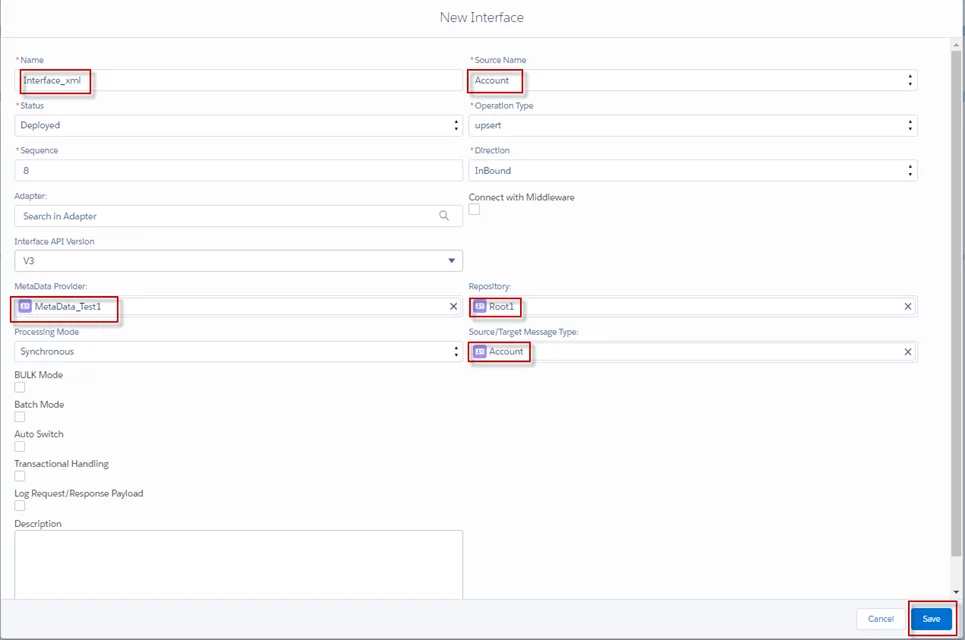
- Our Skyvva Integration App offers a powerful feature for creating a new interface to import XML data with mapping.
- This process involves defining data transformation rules, making it easier to map XML elements to your Salesforce fields seamlessly. The app provides a user-friendly interface where you can visually create and modify these mappings, ensuring data accuracy and consistency.
- By using Skyvva's drag-and-drop capabilities, user can quickly design their integration without extensive coding knowledge. This approach streamlines data imports, reduces manual errors, and accelerates your Salesforce integration process, making it ideal for businesses looking to optimize their data workflows.
Required step:
- Create a new interface for XML and mapping
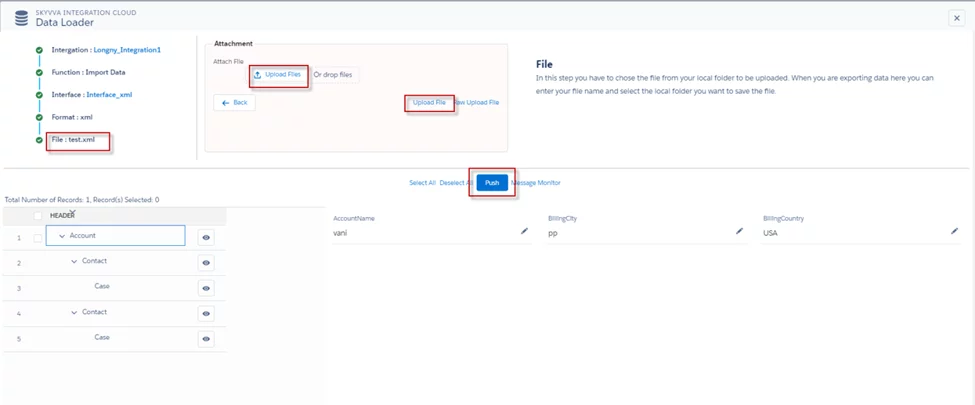
- Go to the integration details page and click Data Loader
- Import file XML
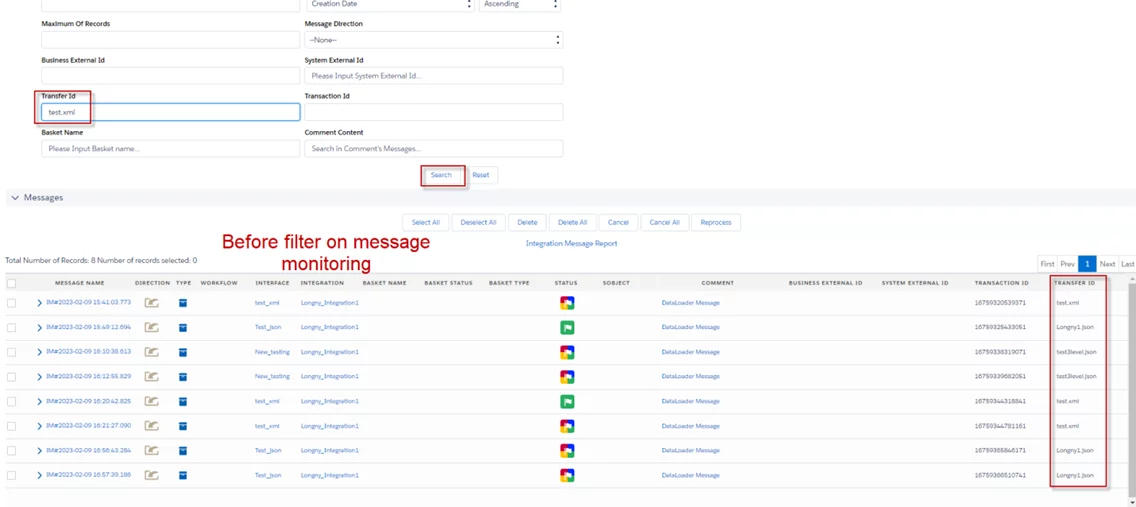
- Filter on message monitoring
- Before Filter on message monitoring
- After Filtering on message monitoring already
Case 3:
- To create a new interface for importing JSON with mapping using the Skyvva integration app, begin by defining the JSON structure to be imported. Utilize the app's built-in mapping tool to specify how each JSON field corresponds to your target system fields.
- This involves selecting source fields from the JSON data and aligning them with the appropriate fields in your database or application. Implement data transformation rules if necessary, such as formatting dates or converting values.
- Finally, test the interface with sample JSON files to ensure proper functionality and validate that the data is imported accurately, maintaining data integrity throughout the process.
Required step:
- Create a new interface for JSON with mapping
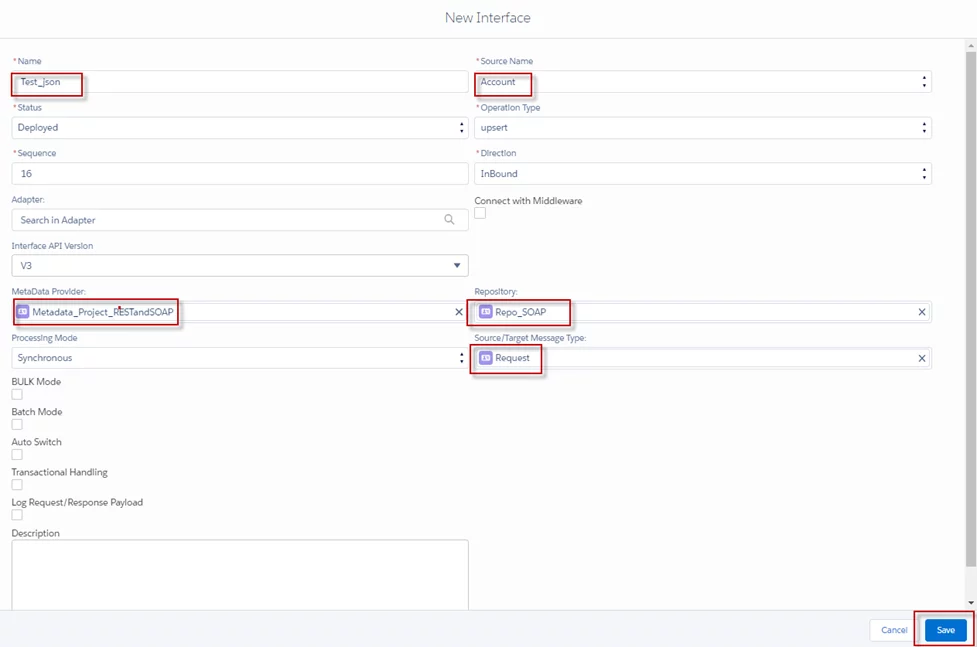
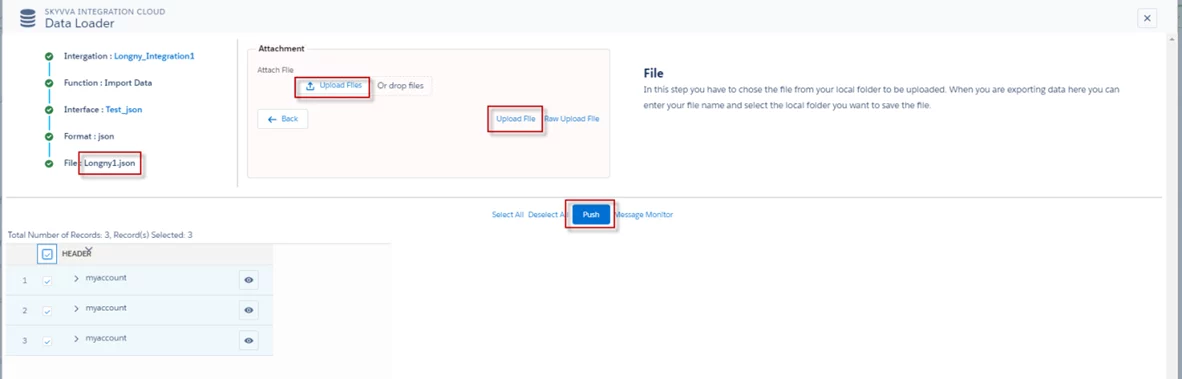
- Go to the Integration Details page and click Data Loader
- Import file JSON
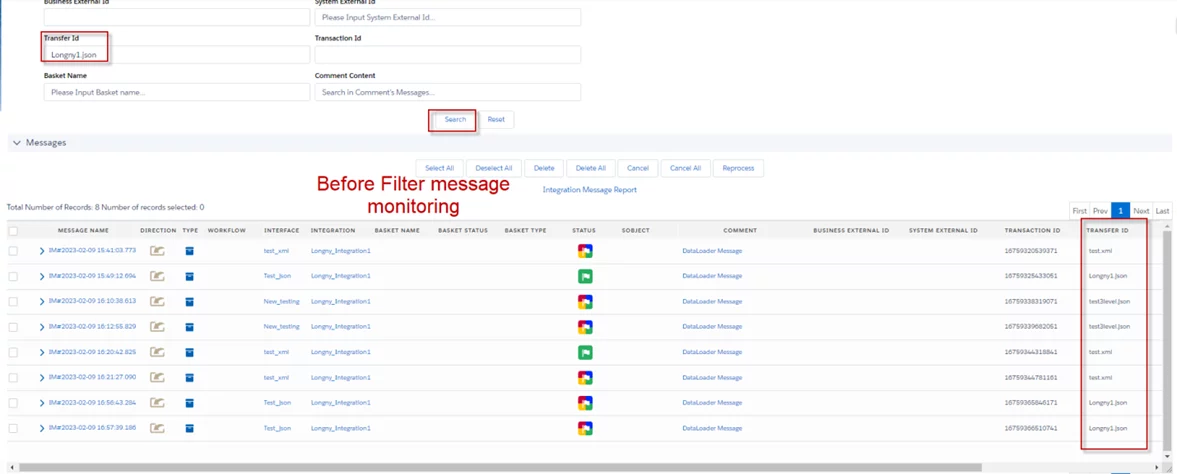
- Filter on message monitoring
- Before filter on message monitoring
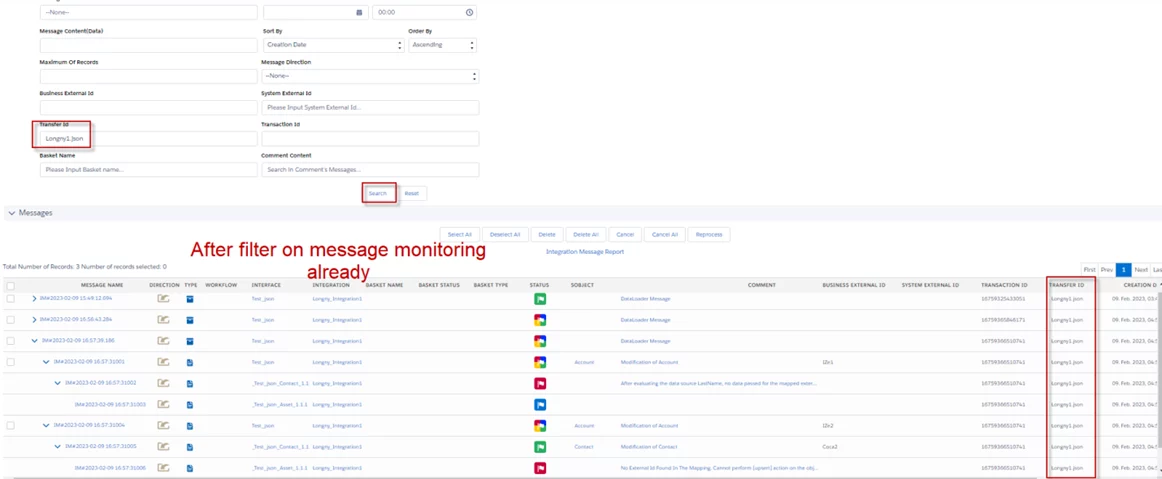
- After filter on message monitoring
Summary
Now user understands how the SKYVVA integration app allows users to convert file names into transfer IDs by importing data in CSV, XML, and JSON formats using DataLoader. This feature streamlines data migration processes, enhancing efficiency and accuracy in managing data transfers between systems, while ensuring compatibility with various file formats.