How to Import CSV Files Without Header Row Using the SFTP Protocol of the Agent File Adapter?
Introduction:
This tutorial explains how to import CSV without header files using the Agent File in the SFTP protocol of the inbound Adapter of our new agent application. The Agent File Adapter provides a streamlined process for seamlessly integrating CSV data into our platform. This functionality is available in the version of the V3 Interface API.
Pre-require:
- Agent File Type of Connection Destination. If you do not know how to create Agent File type of Connection Destination, please follow this document below:
OAuth2 Username-Password Authentication: #article/1-how-to-connect-a-new-agent-to-the-agent-control-board-using-oauth2-username-password-authentication
- OAuth2 Client-Credential Authentication: (link not available))
- Create an Inbound Agent File Adapter for CSV format without a header
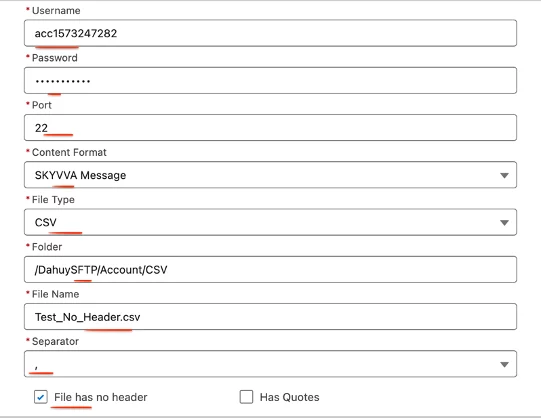
Fill in all required field
Enter Name: Any Name
- Select Type: Agent File
- Select Direction: Inbound
- Select Status: Active (in version 2.51.2 up) Inactive (2.51.1 down)
- Select Protocol: SFTP
- Select Authentication: Username_Password
- Enter Host: SFTP Host
- Enter Username: SFTP Username
- Enter Password: SFTP Password
- Enter Port: SFTP Server Port
- Select Content Format: SKYVVA Message
- Select File Type: CSV
- Enter Folder: (Your SFTP Folder Name) ex: /DahuySFTP/Account/CSV
- Enter File Name: (Your File Name)
- Select Separator: “,”
- Tick Box on File has no header
- Select Source encoding: UTF-8
- Select What to do with the file after Processing?: Delete File
- Select the Connection Destination: Choose the destination name that you created earlier.


- Create an Inbound Interface
Enter any Name
- Select Status: Deployed
- Select the Source Name that you want to import.
- Select Operation Type that you want to import
- Select Direction: Inbound
- Select Adapter: Choose the Adapter that you created earlier.
- Select Interface API Version: V3
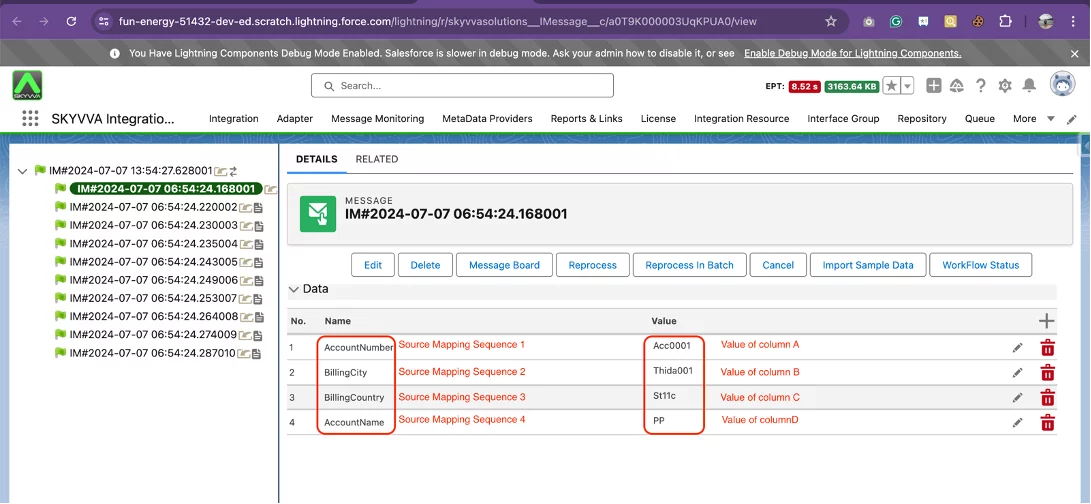
- Select Your MetaData Provider, Repository, and Source/Target Message Type. Note: You need to have the message type field entry to do the mapping. The first (A) column value will be stored at the top of the mapping order.

- Do Mapping:

- Here are the sample CSV records to import

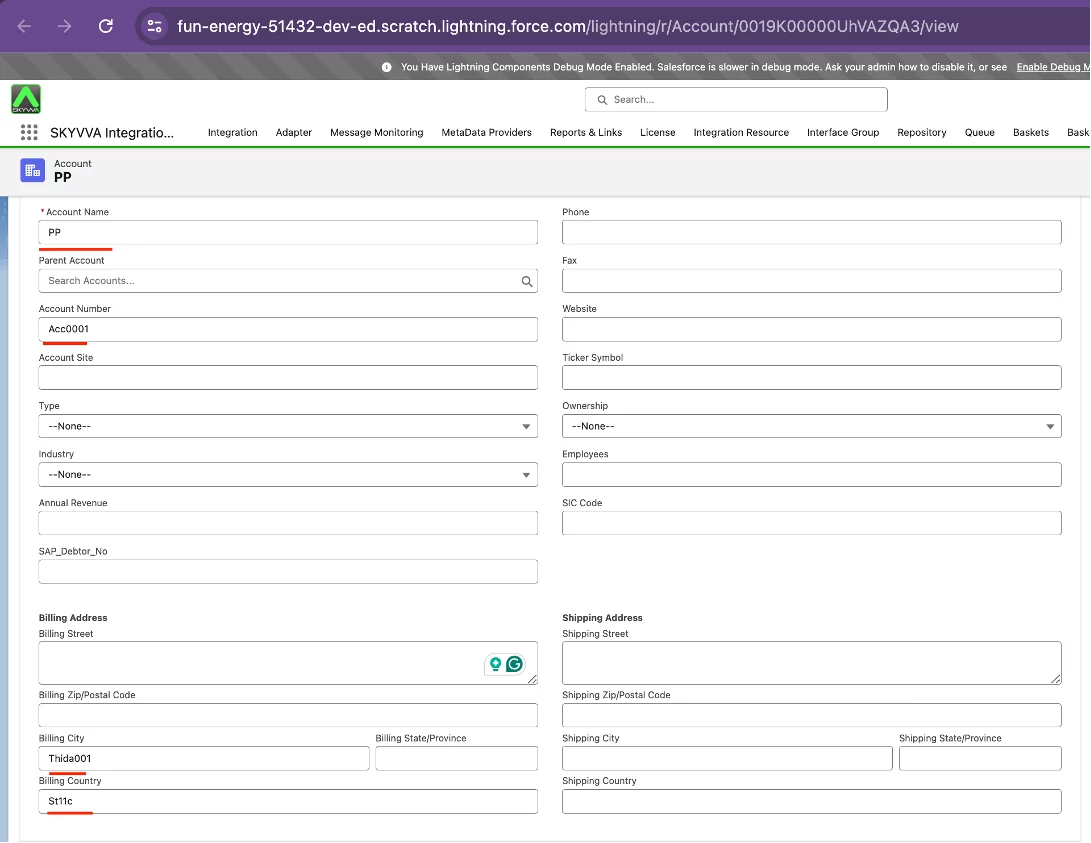
=> If the AccountNumber source field mapping is the first sequence, the value from Column A will be stored at the top of the mapping order. This will ensure that the Acc0001 source field value is passed to the AccountNumber target field for import into Salesforce.
- Check the cache to ensure all cache entries are synchronized before processing.
Navigate to the Cache tab and verify that the cache adapter, integration, interface group, interface, and mapping are all present in the cache table. You can use the filter to search the cache.

- Do Manual Process
Navigate to the Interface tab, select the desired interface, and click the Manual Process button.
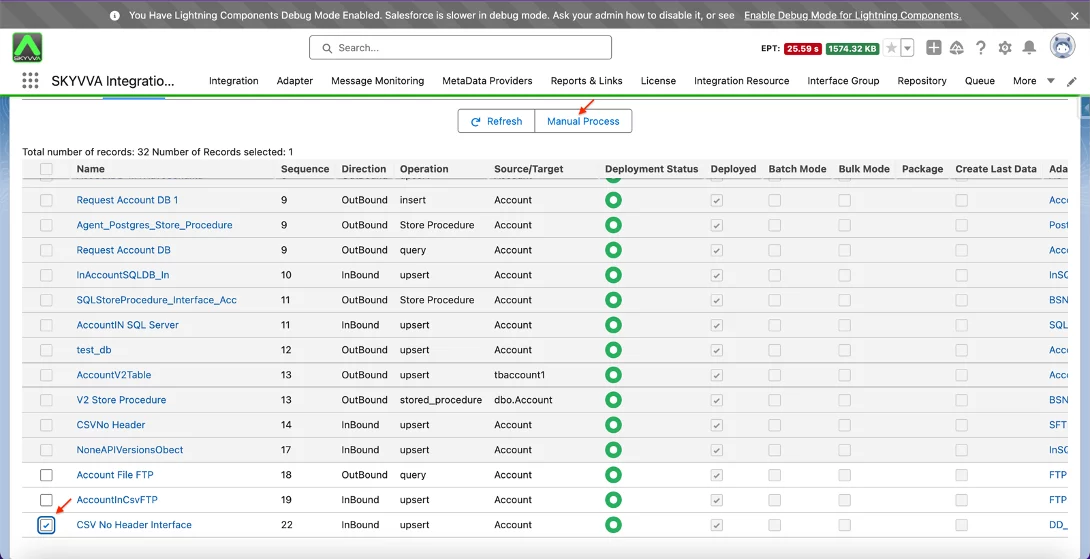
- Select the desired option and click the Push button.

- Manual processing was successful.

- The records were successfully created.

- Message Details
- Account Record Details
In summary, after you finish this section, you will learn how to import CSV files without headers using the Agent File Adapter's SFTP protocol of our New Agent. The Agent File Adapter streamlines the integration of CSV data, automating the process and ensuring consistent formatting. The SFTP protocol provides secure, reliable file transfers to meet data governance requirements. This functionality is available in Version 3 of the Interface API, demonstrating our commitment to advanced integration capabilities.