How to Import Internet Adapter using Asynchronous Mode?
Internet Adapter for the Inbound Interface using Asynchronous Mode.
The features of the SKYVVA integration application. However, users configure an internet adapter for an inbound interface using asynchronous mode in integration business scenarios.
SKYVVA integration application supports asynchronous mode and provides internet adapters, here's a general workflow on how to approach this:
- Access Skyvva Platform:
Log in to the Skyvva platform or application where users create integrations.
- Create Inbound Interface:
Navigate to the section where the user creates new integration interfaces.
- Choose to create an inbound interface.
- Select Internet Adapter:
Select an internet adapter for the inbound interface. This involves choosing a pre-built adapter option for the specific protocol integration.
- Configure Adapter Settings:
Configure the settings specific to the internet adapter the user selected.
- Ensure that the adapter selects the asynchronous mode for the integration.
- Define Asynchronous Mode:
Make sure to enable the setting for asynchronous mode,
- In asynchronous mode, requests and responses are handled independently, allowing for better scalability and responsiveness in integration as per business scenarios.
- Connection Details:
Make sure to provide the necessary connection details such as URLs, authentication credentials, and any other required parameters.
- Message Processing:
Set up how incoming messages will be processed. In an asynchronous mode, this involves defining already callback specified endpoints for receiving responses.
Business scenario related to Apex and the SKYVVA integration application. In the asynchronous mode, while dealing with a file containing 1,000 records, the default inbound processing is set to handle 50 records per batch job. Therefore, with a file of 1,000 records, it would execute 20 batches per Apex job.
Here's a breakdown of your description:
- File Size: 1,000 records
- Batch Size: 50 records per batch
- Number of Batches: 1,000 records / 50 records per batch = 20 batches
- Apex Job Execution: It executes 20 batches per Apex job.
This configuration is useful for handling large datasets asynchronously, breaking them down into manageable batches to avoid resource fundamentally improved performance during processing.
Required step:
- Create an Integration
- Create an Inbound Adapter e.g., Google Drive
- Create an Inbound Interface -> setting Processing Mode: Asynchronous -> Do Mapping -> link Adapter Google Drive with Interface
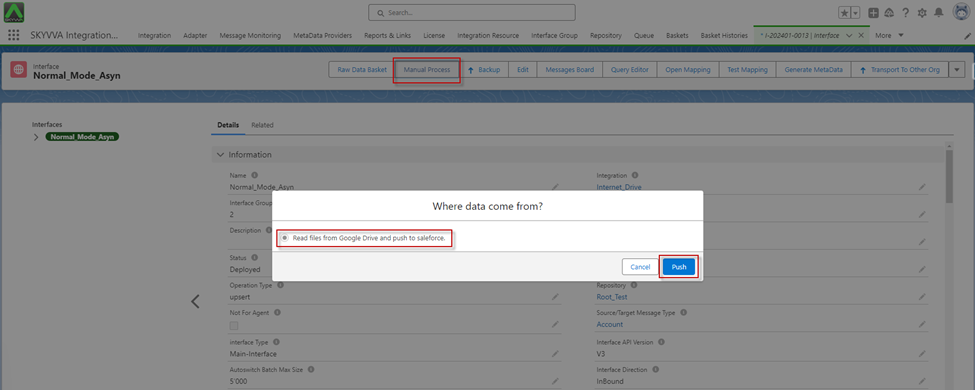
- Click on the Manual Process button for the Read file from Google Drive.
- Apex Job
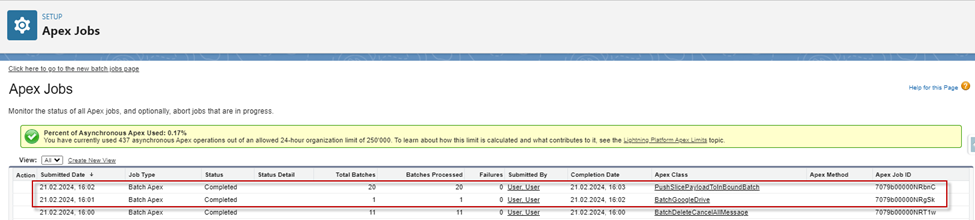
[su_box title="Note" box_color="#ff0000" title_color="#000000"] Default Inbound Processing processes 50 records per batch job.[/su_box]
- After apex job processing was completed, we got the Message Monitoring
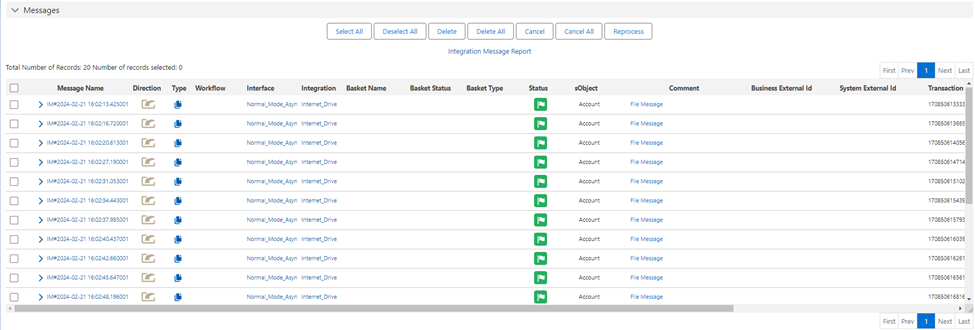
[su_box title="Result:" box_color="#2a8af0" title_color="#000000"]After processing, we get the 20 File Messages on Message Monitoring, for one File Message have 50 Business Messages.[/su_box]