How to Import Internet Adapter using Batch Mode ?
Internet Adapter for the Inbound Interface using Batch Mode.
The set of features that support the inbound processing of the Internet Drive adapter across the platforms. It supports popular services like Google Drive and Dropbox & handles different data formats such as XML, CSV, and JSON, which is a valuable feature for users as per business requirements.
The addition of Batch Processing mode is a notable enhancement, allowing users to manage data in larger quantities more efficiently. The capability to create a Batch Basket in the Batch Control Board using the SKYVVA integration application adds an extra layer of organization and control, streamlining the workflow for users who prefer or require batch processing.
This comprehensive support and advanced features make your Internet Drive adapter a versatile and powerful tool for users looking to integrate and process data from various sources. It is helpful for users dealing with large datasets or wanting to automate and streamline their data processing workflows.
Expectation, a setting called 'Batch' triggers the creation of a Batch Basket in a Batch Control Board through the SKYVVA integration application. This suggests a specific workflow, and integration process within a system.
Here's a breakdown of the scenario:
- Setting Configuration: There is a configuration setting, within the SKYVVA integration application, that can be set to 'Batch'.
- Integration Application (Skyvva): Skyvva is an integration application used in this context. SKYVVA is responsible for handling data integration/communication between different systems.
- Batch Basket Creation: When the setting is configured to 'Batch', the integration application (SKYVVA ) initiates the creation of a Batch Basket.
- Batch Control Board: The Batch Basket is created in the Batch Control Board. Batch Control Board where batch processing is managed.
[su_box title="Note" box_color="#ff0000" title_color="#000000"]
- In Synchronous mode, the interface pushes all records in the file to create a single basket in the batch control board.
- In Asynchronous mode, the interface can divide the records from the CSV file to create baskets based on the settings specified in the interface (specifically, the setting for Transfer Package Size on the Interface Detail page in the Information section).
- The Asynchronous mode can only divide records while using the CSV format; it cannot be applied to other formats.
[/su_box]
Required step:
- Create an Integration
- Create an Inbound Adapter e.g., Google Drive
- Create an Inbound Interface -> setting Processing Mode: Synchronous -> Do Mapping -> link Adapter Google Drive with Interface
- Go to Interface Detail -> scroll down to Batch Setting -> tick Batch Mode
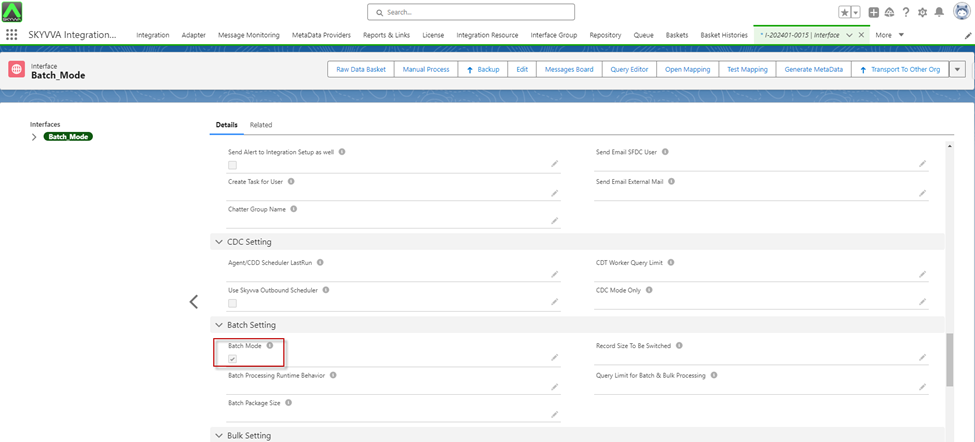
- Click on the Manual Process button for the Read file from Google Drive.

- Apex Job

- After apex job processing is completed, it will create a basket in the Batch Control Board.
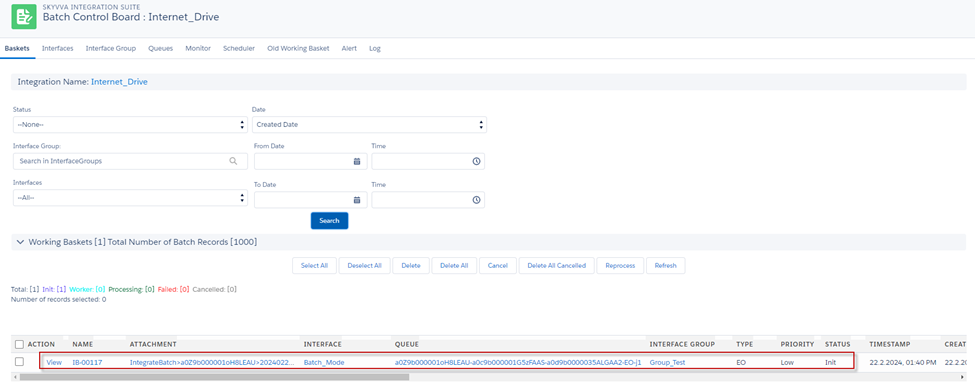
- Then we can process them as Batch Processing manually or schedule whatever user want

- Apex job process basket

- After Apex Job processing was completed, we got the Message Monitoring
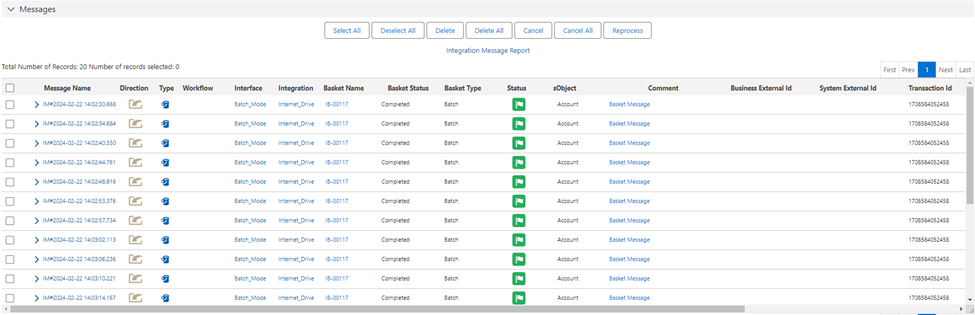
[su_box title="Result:" box_color="#2a8af0" title_color="#000000"]After the basket processing is completed, a success message is generated, indicating that the records have been successfully created in Salesforce[/su_box]