How to Pass parameter from InvokeCalloutV3() to use in the WHERE clause expression?
Introduction
We have such a feature that the user can pass and condition parameters to fill in their query in outbound runtime.
In this feature, we can see all the conditions as pretty much as an old feature that we have, the condition appends in runtime without a monitor or any note for the user. Moreover, this feature makes it easy for users to read the query with all their conditions.
This feature has a few key characteristics:
- Dynamic Conditions: The users can add conditions to their queries on the fly, without any predefined structure or fixed criteria. User can tailor their queries to specific needs and scenarios.
- No Monitoring or Notification: There are no notifications for the user when they add these conditions. They are free to modify their queries without restrictions or guidance.
- User-Friendly: The feature is designed to be user-friendly, making it easy for users to create and understand the queries they are constructing. This implies that the user interface and query-building process are intuitive and straightforward.
Overall, this feature provides flexibility and control to users, allowing them to adapt their queries in real-time without the need for constant monitoring instructions. It's designed to empower users to work with their data effectively and read and understand the queries with their unique conditions.
Runtime Query :
|DEBUG|>query_step: SELECT Id, BillingCity, Name, Description, BillingCountry FROM Account WHERE ((Id IN: ids)) AND (Name = 'Vireak' AND (BillingCity='Takeo' OR BillingCity='PhnomPenh'))
We see only in the debugging mode and that is not user-friendly. Here is another example.

Here is another case result:
|DEBUG|>query_step: SELECT Id, BillingCity, Name, Description, BillingCountry FROM Account WHERE (Name = 'Vireak' AND (BillingCity='Takeo' OR BillingCity='PhnomPenh')) AND (Id IN: ids)
This example shows that we can append our expression passing from the invokeCalloutV3() with the customer expression. However, we cannot mix the parameter from the invokeCalloutV3() with the customer expression. That is not possible with the current solution. When we change the idea to allow the user to use the parameter name in their expression then it is more flexible, and we can read and understand the WHERE clause.
Pass parameter from InvokeCalloutV3() to use in the WHERE clause expression
Creating an interface outbound for passing parameters from the InvokeCallOutV3() function to use in a WHERE clause expression. Here are some general steps you might follow to achieve this:
- Define the interface: Create an interface that specifies the parameters you want to pass from InvokeCallOutV3().
- Implement the interface: Implement the interface and define how the parameters should be passed.
- Call InvokeCallOutV3(): In the InvokeCallOutV3() function, invoke the interface, and pass the required parameters.
- Use parameters in the WHERE clause: In the code where the user executes the WHERE clause expression, retrieve the parameters passed from InvokeCallOutV3() and use them in the query.
Here are some key points to consider when implementing such a feature:
- Dynamic Query Building: This allows users to specify query conditions dynamically as part of their interaction with the SKYVVA application. This means the SKYVVA application provides an interface for users to input these conditions as per business requirements.
- User-Friendly Interface: Ensure that the interface for specifying conditions is user-friendly and intuitive. Users should easily understand how to add and modify conditions.
- Real-Time SKYVVA application: Make sure the conditions are applied in real-time, as users input them. This provides immediate feedback and results, which can be more user-friendly.
[su_box title="Expectation: " box_color="#2a8af0" title_color="#000000"]We will allow the user can pass and conditions parameter to fill in their query condition in outbound runtime. In this feature, we can add all the conditions as pretty much as an old feature that has the conditions appended in runtime without a monitor or any note for the user. Moreover, this feature is also easy for users when they read the query with all their conditions.[/su_box]
Required step:
- Create a new Interface Outbound as in the screenshot below then click the Save button

- Go to Interface -> click Open Mapping -> then mapping node and file -> Save
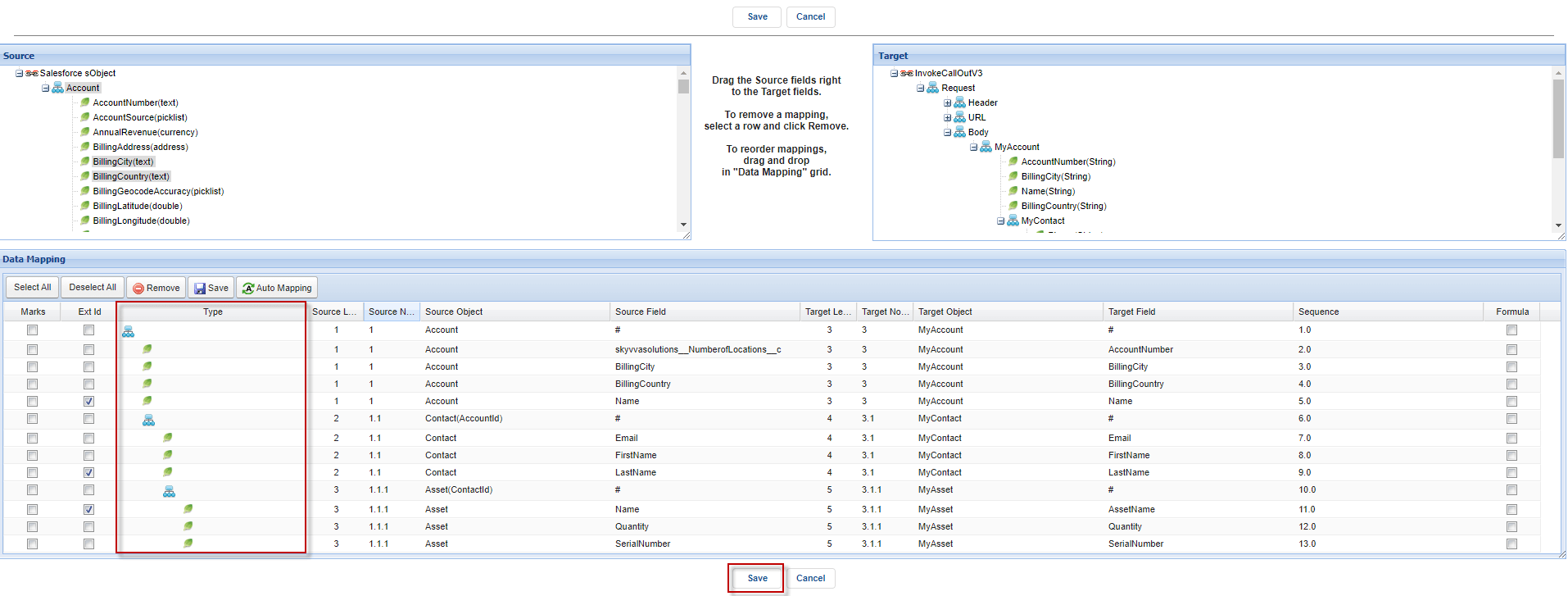
- After having the mapping, it will get SOQL Query.
- Go to interface -> then scroll down we can see SOQL Query to select the sObject data section

- The field default is text (String)
- Add the value that is the parameter as the expression “{!...}”
Example: MyField = {!MyFieldValue}
- MyField = ‘XXX’
We added {!AccountName} expression parameter on field Name on where clause

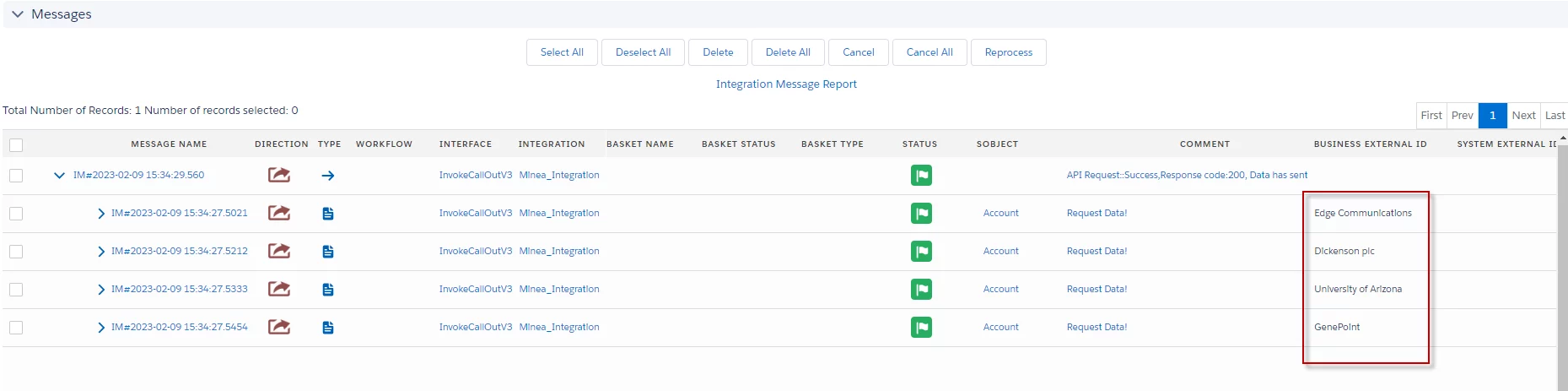
- Users can copy this code to pass developer consoles to be executed. It will send an Account that has the name 'University of Arizona'
[su_box title="Note" box_color="#2a8af0" title_color="#000000"] Please replace on integration with your integration name and interface to your interface name[/su_box]
Map<String,String> p = new Map<String,String>(); p.put('AccountName','University of Arizona'); skyvvasolutions.CallOutControl c = new skyvvasolutions.CallOutControl(); c.sqlWhereExpression = p; //parameter to replace query {!XXX} c.returnJSONComplete=true; //return json result in SYNC c.actionDoIntegrate=false; //skip execute response interface c.isCreateMessage=true; //create message for each execute String[] ids = new String[]{}; for(Account a: [select id from account]) ids.add(a.Id); String integration = 'Minea_Intergration'; String interfac = 'InvokeCallOutV3'; String mode = 'SYNC'; List<skyvvasolutions.CalloutResponse> resp = skyvvasolutions.Iservices.invokeCalloutV3(integration,interfac,ids,mode,c); System.debug('>>resp:'+resp?.toString());
Example:

[su_box title="Result: " box_color="#2a8af0" title_color="#000000"]After Executing the Apex Code, it will check all Accounts have Name = “University of Arizona” to send the record out.[/su_box]

- The field default is Real Value
- Add the value that is the parameter as the expression “{!@...}”
Example: MyfieldNumber = {!@mynumber}
- MyfieldNumber = XXX
We added {!@NumberofLocations} expression parameter on field NumberofLocations on where clause

Example:
- Users can copy this code to pass developer consoles to be executed. It will send Accounts that have NumberOfLocation = 955
Map<String,String> p = new Map<String,String>(); p.put('NumberOfLocations','955'); skyvvasolutions.CallOutControl c = new skyvvasolutions.CallOutControl(); c.sqlWhereExpression = p; //parameter to replace query {!XXX} c.returnJSONComplete=true; //return json result in SYNC c.actionDoIntegrate=false; //skip execute response interface c.isCreateMessage=true; //create message for each execute String[] ids = new String[]{}; for(Account a: [select id from account]) ids.add(a.Id); String integration = 'Minea_Integration'; String interfac = 'InvokeCallOutV3'; String mode = 'SYNC'; List<skyvvasolutions.CalloutResponse> resp = skyvvasolutions.Iservices.invokeCalloutV3(integration,interfac,ids,mode,c); System.debug('>>resp:'+resp?.toString());
[su_box title="Result: " box_color="#2a8af0" title_color="#000000"]After Executing the Apex Code, it will check all Accounts have NumberOfLocations = 955 to send the record out.[/su_box]

- Add the value that is the parameter as the expression “{!@...}”
Example: MyfieldNumber IN {!@mynumber} (we can CallOut by real value many records)
- MyfieldNumber IN (X1,X2,X3,..)
We added IN {!@NumberofLocations} expression parameter on field NumberofLocations on where clause

Example:
- Users can copy this code to pass developer consoles to be executed. It will send Accounts that have NumberOfLocation IN (1,2,3)
Map<String,String> p = new Map<String,String>(); p.put('NumberOfLocations','(1,2,3)'); skyvvasolutions.CallOutControl c = new skyvvasolutions.CallOutControl(); c.sqlWhereExpression = p; //parameter to replace query {!XXX} c.returnJSONComplete=true; //return json result in SYNC c.actionDoIntegrate=false; //skip execute response interface c.isCreateMessage=true; //create message for each execute String[] ids = new String[]{}; for(Account a: [select id from account]) ids.add(a.Id); String integration = 'Minea_Integration'; String interfac = 'InvokeCallOutV3'; String mode = 'SYNC'; List<skyvvasolutions.CalloutResponse> resp = skyvvasolutions.Iservices.invokeCalloutV3(integration,interfac,ids,mode,c); System.debug('>>resp:'+resp?.toString());
[su_box title="Result" box_color="#2a8af0" title_color="#000000"]After Executing the Apex Code, it will check all Accounts have NumberOfLocations IN (1,2,3) to send the record out.[/su_box]
- The field default is PickList
- Add the value that is the parameter as the expression “{!@...}”
Example: SLA IN {!@colectionAsString} (value passed as String of collection)
- SLA IN ('Silver', 'Platinum', 'Bronze'
We added IN {!@SLA } expression parameter on field SLA on where clause (SLA field type is PickList)

Example:
- Users can copy this code to pass developer consoles to be executed. It will send Accounts that have SLA IN ('Silver', 'Platinum', 'Bronze')
List<String> customSLA = new List{'Silver','Platinum','Bronze'}; Map<String,String> p = new Map<String,String>(); String typeSLA = '(\''+String.join(customSLA,'\',\'')+'\')'; p.put('SLA',typeSLA); skyvvasolutions.CallOutControl c = new skyvvasolutions.CallOutControl(); c.sqlWhereExpression = p; //parameter to replace query {!XXX} c.returnJSONComplete=true; //return json result in SYNC c.actionDoIntegrate=false; //skip execute response interface c.isCreateMessage=true; //create message for each execute String[] ids = new String[]{}; for(Account a: [select id from account]) ids.add(a.Id); String integration = 'Minea_Integration'; String interfac = 'InvokeCallOutV3'; String mode = 'SYNC'; List resp = skyvvasolutions.Iservices.invokeCalloutV3(integration,interfac,ids,mode,c); System.debug('>>resp:'+resp?.toString());
[su_box title="Result:" box_color="#2a8af0" title_color="#000000"]After Executing Apex Code, it will check all Accounts have SLA IN ('Silver', 'Platinum', 'Bronze') to send the record out.[/su_box]

[su_box title="Note" box_color="#dcdcdc" title_color="#000000"]
- In runtime, we have added our condition (internal) e.g for parent “Id IN: Ids”,
for the child “Account.Id IN: ids”
- If there are the conditions user-defined then we use all of them “AND”
g (User’s conditions….) AND (Our condition) SELECT Name, BillingCity FROM Account WHERE (Name = ‘MyAccount’) AND (Id IN: ids)
[/su_box]
[su_box title="Result: " box_color="#2a8af0" title_color="#000000"]It means all conditions defined must be matched with the passed records Id from invokeCalloutV3()[/su_box]
Summary
The feature in question allows users to pass parameters from the InvokeCalloutV3() function and use them in the WHERE clause expression of their queries. This feature enhances flexibility and control, enabling users to dynamically adjust their queries without requiring ongoing monitoring or specific instructions. Its primary purpose is to empower users to work efficiently with their data, enabling them to create and comprehend queries with unique conditions.