How to Reprocess Outbound Messages Using Queueable Apex Retry
Overview
This guide explains how to reprocess outbound messages using Queueable Apex Retry in SKYVVA with Interface API Version V3.
When outbound messages fail, users can manually reprocess the affected root/API messages. SKYVVA uses Queueable Apex to process the selected root message and its child messages.
For each selected root/API message, SKYVVA creates one initial Queueable Apex job, regardless of the number of child messages belonging to that root.
If Queueable Apex encounters a supported Salesforce governor-limit error, such as Apex heap size too large, SKYVVA automatically retries the affected messages using smaller processing chunks.
This guide explains how to configure the outbound interface, reprocess failed messages, understand automatic retry behavior, and verify the results in SKYVVA and Salesforce.
Outbound Message Reprocessing Flow
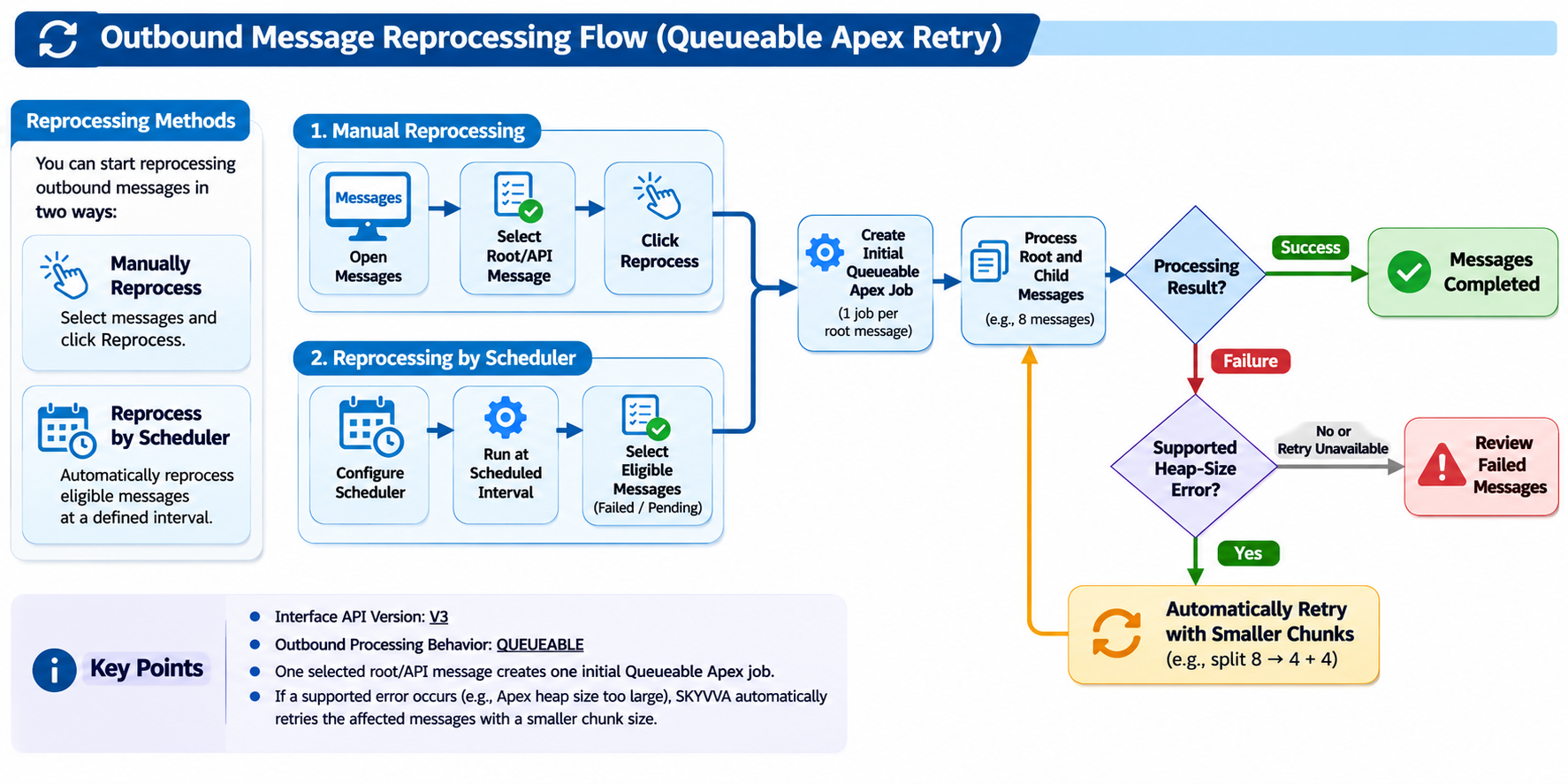
1. Why Use Queueable Apex Retry?
When reprocessing an outbound root message containing multiple child messages, Salesforce may encounter governor-limit errors if the processing transaction requires too much memory.
For example, a root message containing eight child messages may fail when Queueable Apex attempts to process all eight messages together.
Queueable Apex Retry helps recover from supported heap-size errors by automatically reducing the processing chunk size and retrying the affected messages.
Benefits:
- Reprocess failed outbound messages manually.
- Process multiple child messages belonging to one root/API message.
- Automatically retry supported heap-size errors with smaller processing chunks.
- Reduce manual intervention during message reprocessing.
- Improve processing reliability for outbound messages.
- Monitor Queueable Apex jobs and verify final message results.
2. Prerequisites
Before reprocessing outbound messages, ensure that:
- A SKYVVA Integration has been created.
- An outbound interface has been configured with Interface API Version V3.
- The outbound interface uses Outbound Processing Behavior = QUEUABLE.
- Outbound root/API messages and their child messages exist in SKYVVA.
- The messages requiring reprocessing have been identified.
- The user has permission to reprocess messages and view Salesforce Apex Jobs.
3. Configure the Outbound Interface
Before reprocessing outbound messages, verify that the interface uses Queueable Apex processing.
Step 1: Open the Outbound Interface
- Log in to Salesforce.
- Open the SKYVVA application.
- Navigate to the integration containing the outbound interface.
- Open the outbound interface configuration.
For example:
| Configuration | Value |
|---|---|
| Integration | Reprocessing_Message |
| Outbound Interface | Account_Out_V3 |
| Interface API Version | V3 |
Step 2: Configure Outbound Processing Behavior
- Open the outbound interface Details tab.
- Locate the Outbound Processing Behavior field.
- Set the value to
QUEUEABLE. - Save the interface configuration.
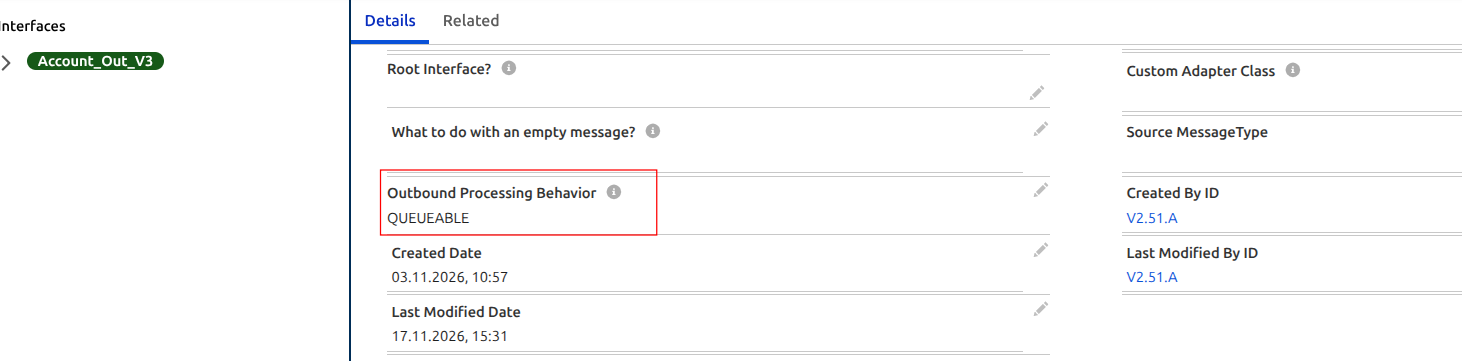
Important: The interface must use Interface API V3 with QUEUEABLE processing behavior for the reprocessing scenario described in this guide.
4. Manually Reprocess Outbound Messages
Manual reprocessing allows users to restart processing for failed outbound root/API messages.
Step 1: Open the Messages Section
- Open the SKYVVA message monitoring page.
- Navigate to the Messages section.
- Locate the integration and outbound interface.
- Find the failed root/API message that needs to be reprocessed.
For example:
- Integration:
Reprocessing_Message - Interface:
Account_Out_V3 - sObject: Account
- Message Status: Failed
Step 2: Select the Root/API Message
- Locate the failed root/API message.
- Expand the root message to review its child messages.
- Select the checkbox next to the root message.
In this example, one root/API message contains eight child messages.
Important: Select the root message to reprocess the message group. SKYVVA creates one initial Queueable Apex job for the selected root rather than creating one initial job for every child message.
Step 3: Click Reprocess
- After selecting the root message, click Reprocess.
- SKYVVA starts the outbound reprocessing operation.
- One initial Queueable Apex job is created for the selected root message.
- The Queueable Apex job processes the messages belonging to that root.
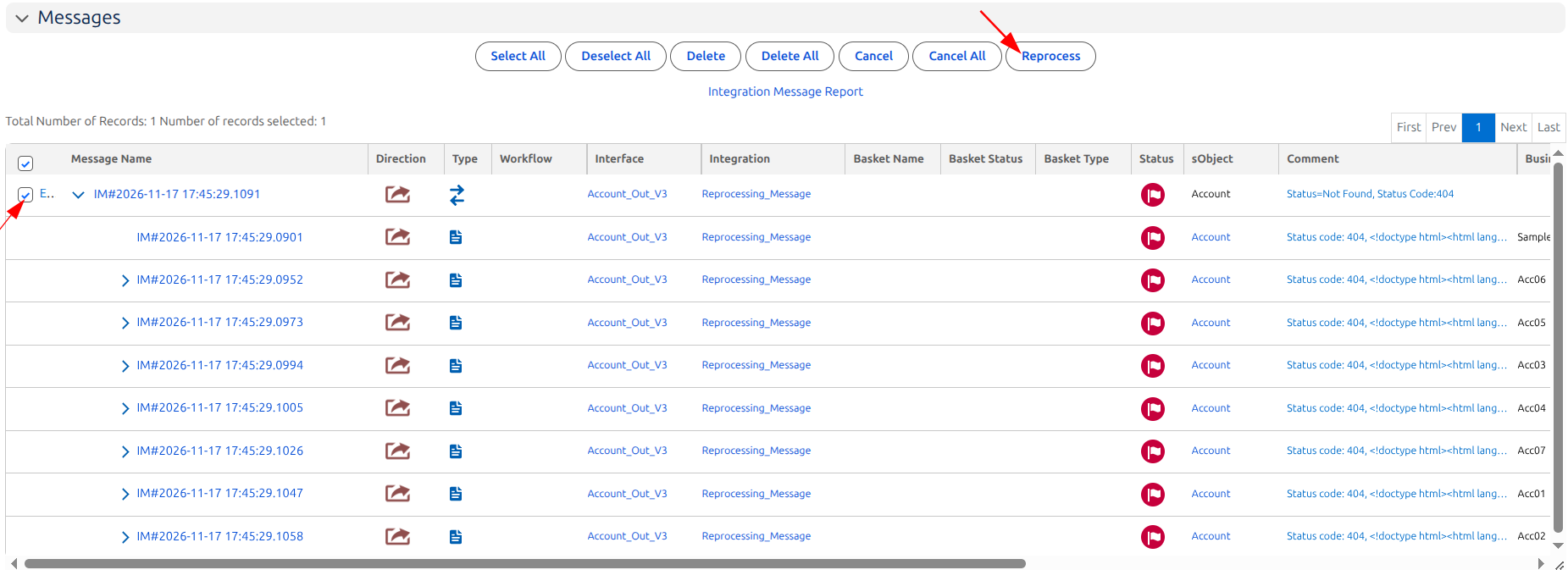
Expected result:
- One selected root/API message creates one initial Queueable Apex job.
- The Queueable Apex job processes the child messages belonging to the root.
- If a supported heap-size error occurs, automatic retry may create additional Queueable Apex jobs with smaller processing chunks.
5. How Queueable Apex Reprocessing Works
Queueable Apex reprocessing is based on the selected root/API message.
Example: One Root Message with Eight Child Messages
Assume a failed outbound root message contains eight child messages.
| Message | Description |
|---|---|
| Root/API Message | The parent message selected for reprocessing |
| Child Messages | Eight messages belonging to the root |
| Initial Queueable Apex Job | One job created for the selected root |
| Processing Scope | Eight child messages |
When the user clicks Reprocess:
- SKYVVA identifies the selected root/API message.
- SKYVVA creates one initial Queueable Apex job.
- The Queueable Apex job attempts to process the eight child messages.
- If processing succeeds, the messages are completed.
- If a supported Apex heap-size error occurs, SKYVVA automatically reduces the processing chunk size.
- The affected messages are retried in smaller chunks.
- Processing continues until the messages complete or retry is no longer possible.
Automatic Retry Processing Structure
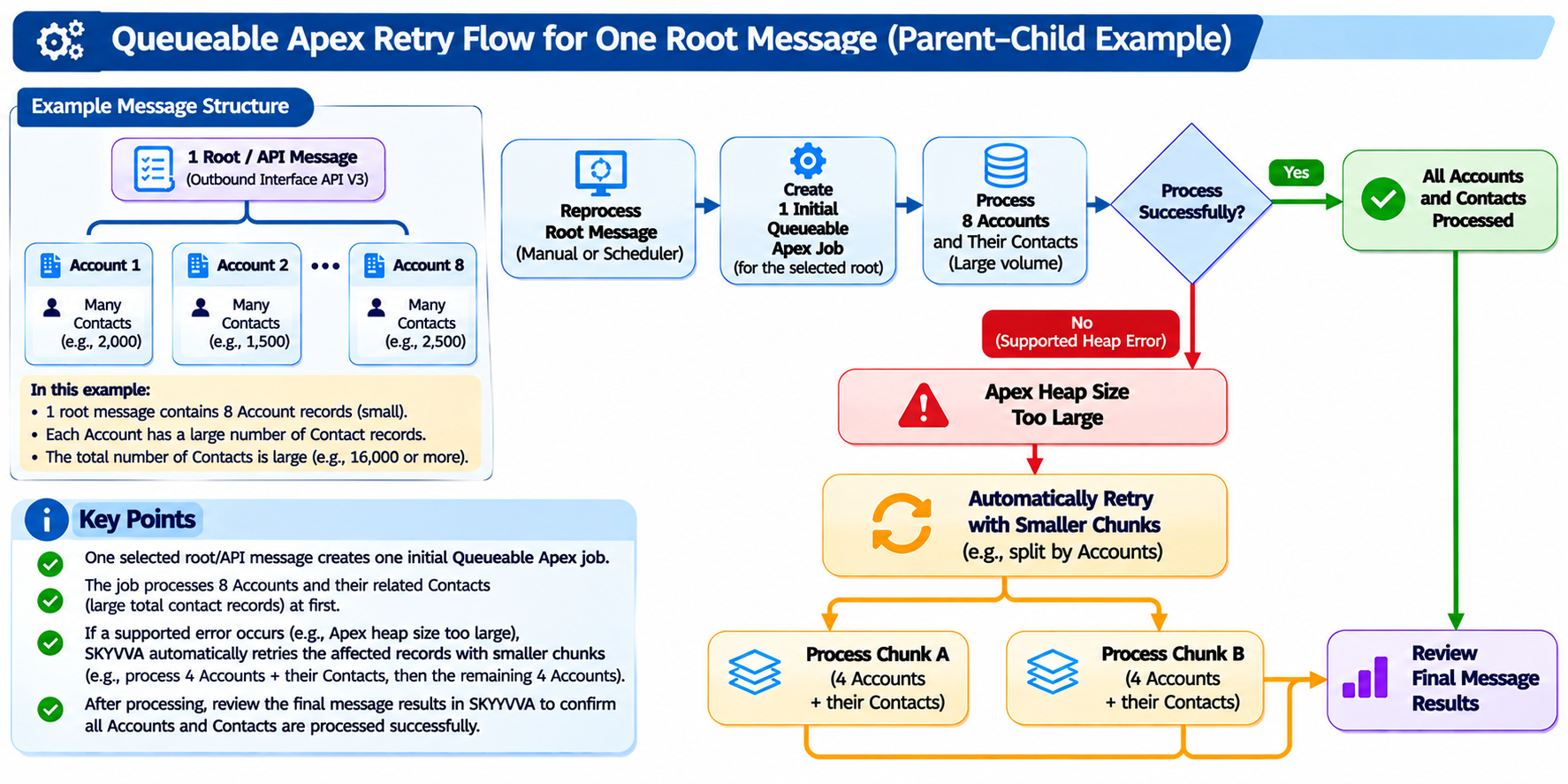
One root/API message containing eight child messages starts one initial Queueable Apex job. When a supported heap-size error occurs, SKYVVA automatically retries the affected messages using smaller chunks.
Example of Automatic Chunk Reduction
The following example illustrates how processing may be divided into smaller chunks.
| Processing Attempt | Chunk Size | Result |
|---|---|---|
| Initial processing | 8 messages | Apex heap-size error |
| Automatic retry | 4 + 4 messages | Retry using smaller chunks |
| Further retry, if needed | Smaller chunks | Continue processing |
| Final processing | Successfully processed messages | Completed |
Note: The chunk sizes shown above are examples. The actual chunk size reduction and number of retry attempts depend on the SKYVVA implementation.
Important: Users do not need to click Reprocess again when a supported automatic retry is triggered. SKYVVA handles the retry during Queueable Apex processing.
6. Verify Queueable Apex Jobs in Salesforce
After starting reprocessing, users can monitor the Queueable Apex jobs in Salesforce.
Step 1: Open Apex Jobs
- Open Salesforce Setup.
- Enter Apex Jobs in the Quick Find search box.
- Select Apex Jobs.
- Locate the Queueable Apex jobs created during reprocessing.
Step 2: Review Queueable Apex Jobs
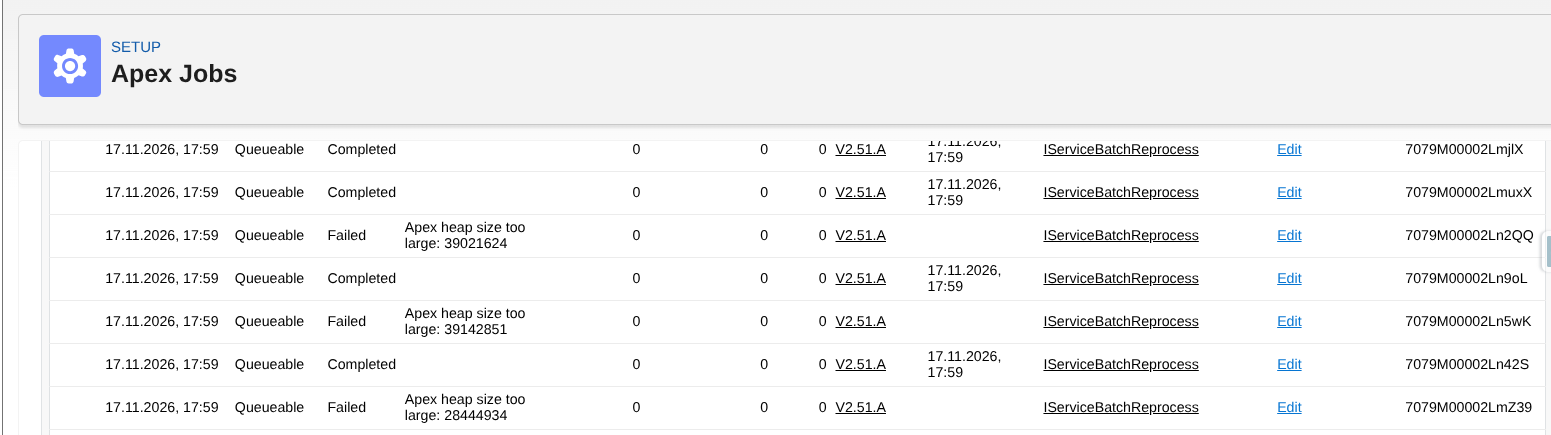
Check the following information:
| Field | Expected Information |
|---|---|
| Job Type | Queueable |
| Apex Class | IServiceBatchReprocess |
| Status | Completed or Failed |
| Extended Status | Error details, if available |
Step 3: Understand the Job Results
In the example, some Queueable Apex jobs show Failed with an error such as:
Apex heap size too large: 39021624
Other Queueable Apex jobs show Completed.
This is consistent with the automatic retry behavior:
- A Queueable Apex job encounters a supported heap-size error.
- SKYVVA initiates retry processing with smaller chunks.
- Subsequent processing attempts may complete successfully.
- The original failed Queueable Apex job remains visible in Salesforce Apex Jobs history.
Important: A Failed Apex Job does not necessarily mean that the entire root/API message remains failed. Always verify the final message status in SKYVVA.
7. Verify the Reprocessed Messages in SKYVVA
After reprocessing, return to SKYVVA to verify the final processing results.
Step 1: Open the Messages Section
- Open the SKYVVA message monitoring page.
- Locate the integration and outbound interface.
- Refresh the message list.
- Review the messages that were reprocessed.
Step 2: Check the Message Status
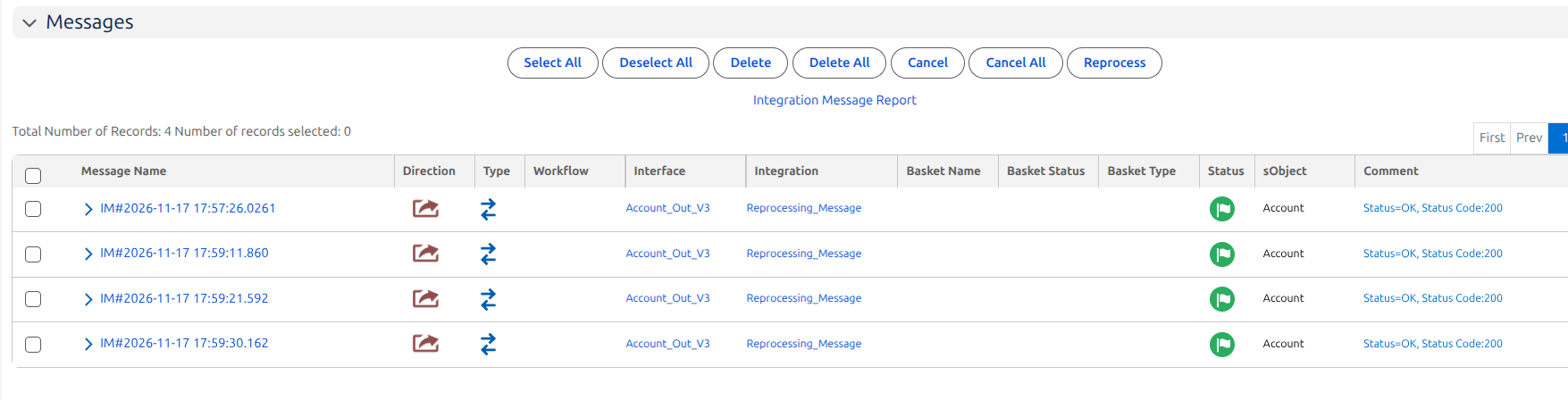
After successful reprocessing, the message status changes to Completed.
In the provided example, the Messages section shows successfully processed outbound messages with the comment:
Status=OK, Status Code:200
Step 3: Verify the Final Result
Confirm that:
- The selected root/API message was reprocessed.
- The child messages have the expected processing results.
- Successfully processed messages show Completed.
- No unexpected failed messages remain.
- The destination system received or processed the business data as expected.
Expected result: Even if an earlier Queueable Apex job encounters a supported heap-size error, the affected messages may complete successfully through automatic retry.
8. Troubleshooting
Case 1: Apex Heap Size Too Large
Problem: A Queueable Apex job fails with an Apex heap-size error.
Expected behavior: SKYVVA automatically retries the affected messages with a smaller chunk size when the error is supported by the retry mechanism.
Verification steps:
- Open Salesforce Apex Jobs.
- Locate the failed Queueable Apex job.
- Check whether additional Queueable Apex jobs were created.
- Return to SKYVVA Messages.
- Verify the final message statuses.
Case 2: Messages Remain Failed After Reprocessing
Problem: Some outbound messages remain Failed after reprocessing.
Possible causes:
- The error is not supported by automatic retry.
- The destination system returns an error.
- The business data is invalid.
- Automatic retry cannot recover from the processing failure.
Action:
- Open the failed message.
- Review the error details.
- Correct the underlying issue.
- Reprocess the root/API message again when appropriate.
Case 3: Queueable Apex Job Shows Failed, but Messages Are Completed
Problem: Salesforce Apex Jobs contains Failed jobs, while SKYVVA Messages shows Completed.
Explanation: An earlier Queueable Apex attempt may have failed due to a heap-size error, while subsequent automatic retry attempts completed successfully.
Action: Verify the final status of the root and child messages in SKYVVA. Do not rely only on the status of the original Apex job.
9. Summary
Queueable Apex Retry allows users to reprocess outbound messages using Interface API V3 with Outbound Processing Behavior = QUEUEABLE.
When a user selects one root/API message and clicks Reprocess, SKYVVA creates one initial Queueable Apex job to process the messages belonging to that root.
If a supported Apex heap-size error occurs, SKYVVA automatically retries the affected messages using smaller processing chunks.
Users can monitor Queueable Apex jobs in Salesforce Setup and verify the final message results in SKYVVA.
Key point: One root/API message creates one initial Queueable Apex job, regardless of the number of child messages. Automatic retry may create additional jobs to process smaller chunks when necessary.